Rails Background Jobs in Production: Solid Queue, Sidekiq and Where to Run Your Workers
Rails background jobs move anything slow out of the request cycle: emails, PDF exports, image processing, webhooks, third-party API syncs. In Rails 8 the default answer is Active Job on top of Solid Queue, which stores jobs in your existing database and needs no Redis. Sidekiq is still the right call for very high job volume or apps that already run it. Either way, production comes down to the same three choices: which backend, where the worker process runs, and how jobs behave when they fail and retry.
TL;DR:
- Use Active Job as the interface and pick a backend underneath: Solid Queue (Rails 8 default, database-backed) or Sidekiq (Redis-backed, highest throughput).
- Small apps can run Solid Queue inside Puma with
SOLID_QUEUE_IN_PUMA; anything with heavy jobs deserves a dedicated worker process with its own CPU, memory and failure domain.- Pass record IDs, not objects, and make every job idempotent: both Solid Queue and Sidekiq guarantee at least once, not exactly once.
- Size your database connection pool for web threads plus worker threads, or your jobs will starve your requests (and the other way round).
- Deploys and restarts send
SIGTERMto workers; keep jobs short or resumable so a shutdown never loses work.
Table of Contents
- Why Rails apps need background jobs
- Active Job: the interface every backend shares
- Solid Queue vs Sidekiq: choosing a backend
- Setting up Solid Queue in Rails 8
- Where the worker runs: embedded vs dedicated
- How Heroku, Render, Fly.io, Upsun and Enkihost run Rails workers
- Writing jobs that survive retries
- Connection pools, concurrency and memory
- Deploys, shutdowns and recurring jobs
- Monitoring background jobs
- Author Perspective: keep it boring until it hurts
- Running Rails background jobs on Enkihost
- FAQ
- Sources
Why Rails apps need background jobs
A web request should answer in well under a second. Heroku’s own guidance puts the ideal response time under 500 ms and suggests background jobs as soon as requests regularly take more than one second. Anything that waits on the network or chews CPU breaks that budget quickly.
Typical candidates:
- Sending transactional email (welcome, password reset, receipts).
- Generating PDFs, CSV exports and reports.
- Resizing images or processing uploads with Active Storage.
- Calling third-party APIs: payment providers, CRMs, webhooks to customers.
- Periodic housekeeping: cleaning expired sessions, syncing data, sending digests.
The pattern is always the same. The web process enqueues a small message describing the work and responds immediately. A separate worker process picks up the message, does the slow part, retries if it fails and stores the result.
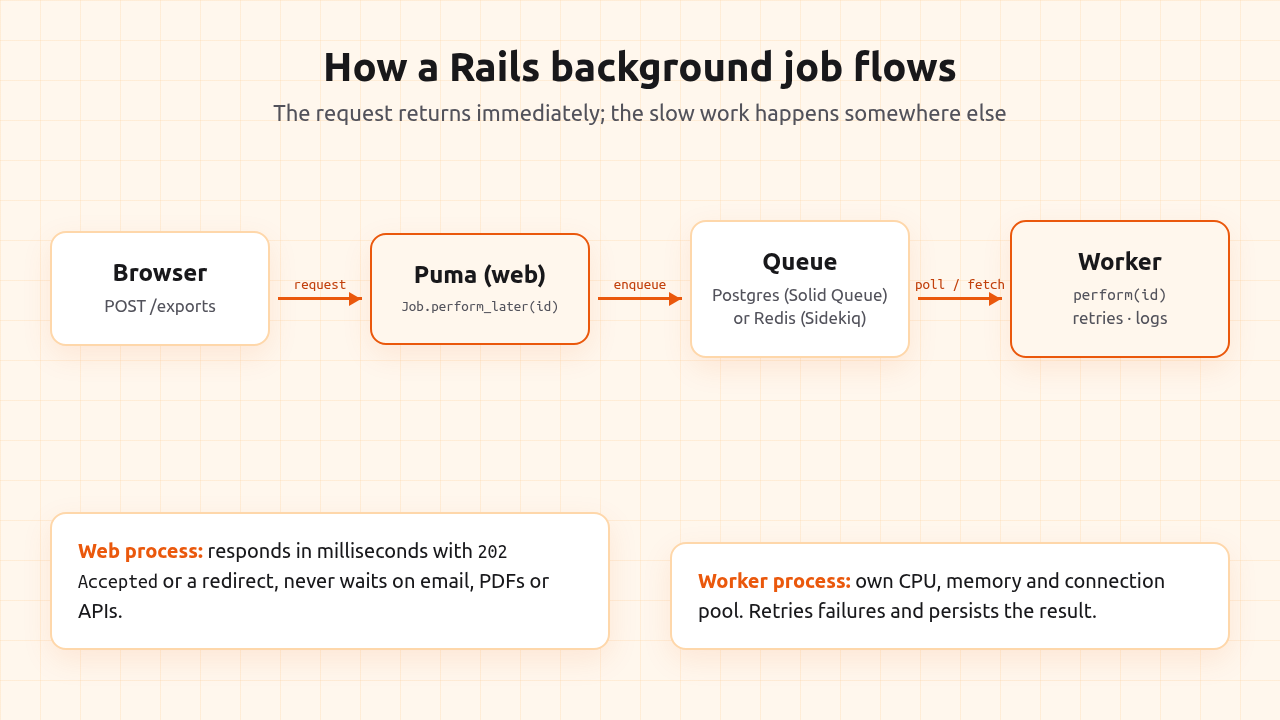
The win is not only speed for the user. A Puma thread blocked for eight seconds on a PDF is a thread that cannot serve anyone else, so moving that work out also raises how much traffic the same server can handle.
Active Job: the interface every backend shares
Active Job is Rails’ built-in abstraction for background work. You write the job once and choose the backend in configuration, which keeps your application code portable between Solid Queue, Sidekiq, GoodJob and others.
bin/rails generate job invoice_export
class InvoiceExportJob < ApplicationJob
  queue_as :default

  retry_on Net::ReadTimeout, wait: :polynomially_longer, attempts: 5
  discard_on ActiveJob::DeserializationError

  def perform(account_id)
    account = Account.find(account_id)
    InvoiceExporter.new(account).call
  end
end
Enqueue it from a controller or model:
InvoiceExportJob.perform_later(current_account.id)
A few things worth knowing from the start:
perform_laterenqueues;perform_nowruns inline (useful in tests and consoles, never for slow work in a request).perform_all_laterenqueues many jobs in one call, which is much cheaper than looping overperform_laterwhen you fan out thousands of jobs.retry_onanddiscard_ondeclare failure behaviour in the job itself, so it reads the same regardless of backend.set(wait: 10.minutes)orset(wait_until: ...)schedules a job for later.
Solid Queue vs Sidekiq: choosing a backend
This is the decision most articles on Rails background jobs revolve around, and for good reason: it determines what infrastructure you run.
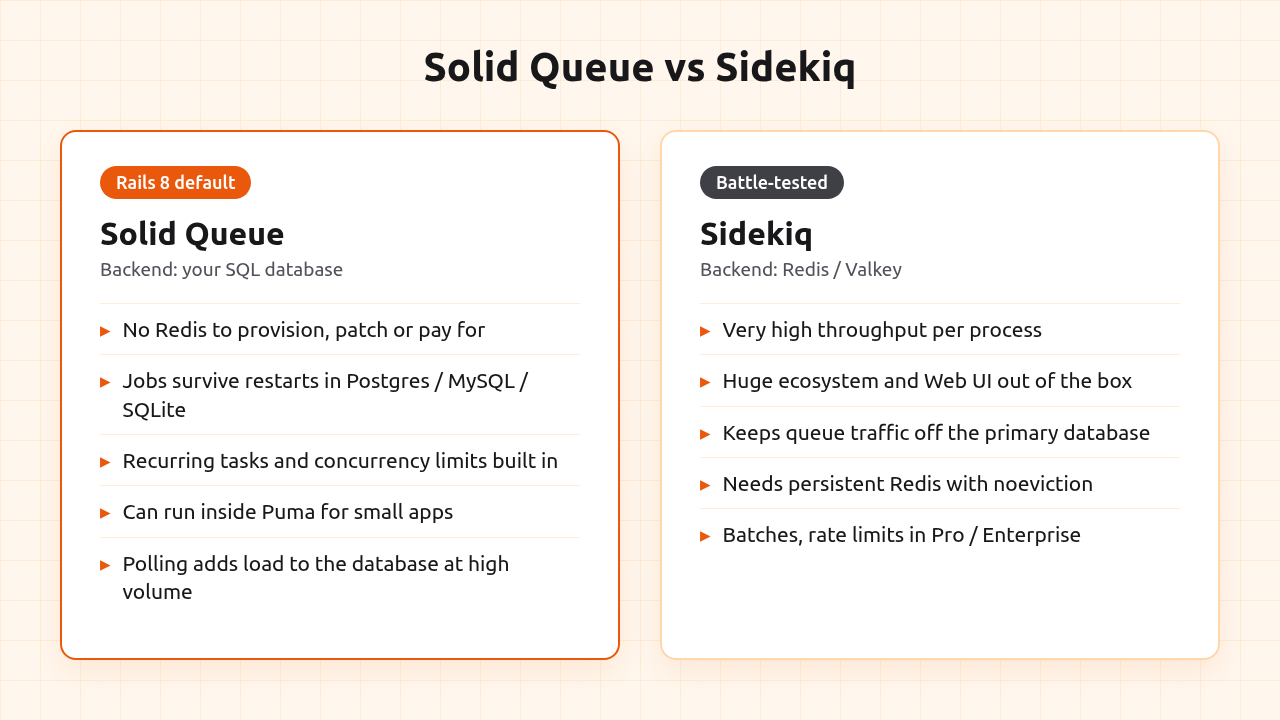
Solid Queue is the default in new Rails 8 apps. It stores jobs in a SQL database (PostgreSQL, MySQL or SQLite) and uses FOR UPDATE SKIP LOCKED so several workers can poll the same tables without blocking each other. It ships with recurring tasks, concurrency limits and pause/resume per queue, and failed jobs stay in the database until you retry or discard them.
Sidekiq stores jobs in Redis (or Valkey) and is the long-standing performance leader. One Sidekiq process runs many threads and processes a very high number of jobs per second. It has a mature Web UI and a large ecosystem; batches and rate limiting live in the paid Pro and Enterprise editions.
How to decide:
- New app, modest job volume, you’d rather not run Redis: Solid Queue. One less service to provision, patch, back up and pay for.
- Existing app already on Sidekiq: stay. Migrating a working queue rarely pays off.
- Very high volume, or you want queue traffic off the primary database: Sidekiq with a persistent Redis, or Solid Queue on a separate queue database.
Render’s production Rails guide lands on the same split: Solid Queue on Postgres for new apps with modest volume, Sidekiq on a dedicated key-value store once the database-backed default has been outgrown.
Pro Tip: If you choose Sidekiq, configure Redis with the noeviction memory policy and enable persistence. A Redis that evicts keys under memory pressure will silently delete queued jobs.
Setting up Solid Queue in Rails 8
New Rails 8 apps generate everything for you. The important pieces:
config/environments/production.rb sets the adapter and points Solid Queue at its own database:
config.active_job.queue_adapter = :solid_queue
config.solid_queue.connects_to = { database: { writing: :queue } }
config/database.yml declares a queue database next to the primary one, with migrations in db/queue_migrate. In PostgreSQL this can be a second database on the same server; keeping it separate means a flood of queue writes never fights your application tables for locks or vacuum time.
config/queue.yml defines dispatchers and workers:
default: &default
  dispatchers:
    - polling_interval: 1
      batch_size: 500
  workers:
    - queues: "*"
      threads: 3
      processes: <%= ENV.fetch("JOB_CONCURRENCY", 1) %>
      polling_interval: 0.1
Start processing with:
bin/jobs start
For an existing app moving to Solid Queue, add the gem and run bin/rails solid_queue:install, which generates the same configuration files and the queue schema.
To limit how many jobs of a kind run at once (one export per account, say), use concurrency controls:
class InvoiceExportJob < ApplicationJob
  limits_concurrency to: 1, key: ->(account_id) { "invoice_export_#{account_id}" }, duration: 10.minutes
end
Where the worker runs: embedded vs dedicated
Once the backend is chosen, the next question is where the worker process lives. This is where hosting choices start to matter.
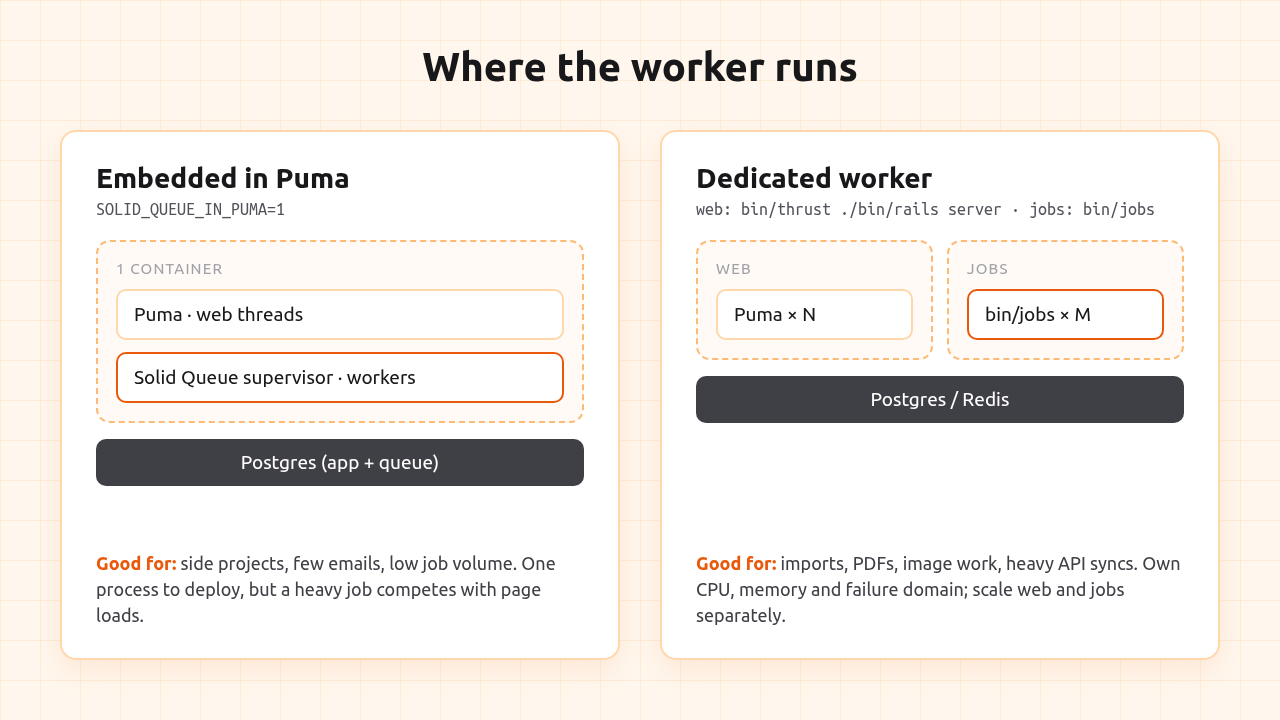
Embedded in Puma. Solid Queue ships a Puma plugin. With this line in config/puma.rb (already there in Rails 8):
plugin :solid_queue if ENV["SOLID_QUEUE_IN_PUMA"]
setting SOLID_QUEUE_IN_PUMA=1 makes Puma start the Solid Queue supervisor alongside the web server. One container, one deploy, no extra bill. It is a great fit for side projects and apps whose jobs are mostly emails and small API calls. The trade-off: jobs and web requests share the same CPU and memory, so a heavy job slows page loads and a busy site slows the queue.
Dedicated worker. Run bin/jobs (or bundle exec sidekiq) as its own process, container or machine. The queue gets its own CPU, memory and failure domain: a runaway import can be killed or scaled without touching the web tier, and you can scale web and workers independently. This is what you want as soon as jobs do real work, like image processing, large exports or long API syncs.
With Kamal, a dedicated worker is just another role in config/deploy.yml:
servers:
  web:
    - 192.168.0.1
  job:
    hosts:
      - 192.168.0.1
    cmd: bin/jobs
Both roles are built from the same image and roll out together on kamal deploy.
How Heroku, Render, Fly.io, Upsun and Enkihost run Rails workers
Heroku, Render, Fly.io and Upsun all use the same model for Rails background jobs: a second process type built from the same code, scaled independently from web. Enkihost is the exception, with one process per app. What changes is how workers are declared and what they cost.
- Heroku uses the
Procfile. You add aworker:line (for exampleworker: bundle exec sidekiqorworker: bin/jobs) and scale it withheroku ps:scale web=1 worker=1. Sidekiq needs a Heroku Key-Value Store add-on. Each worker is a separate dyno billed on its own. - Render models workers as a separate Background Worker service. Sidekiq setups add a Render Key Value instance; Solid Queue apps can reuse Render Postgres. The docs recommend a separate worker as soon as a job needs CPU or memory that a page load should not wait for.
- Fly.io uses process groups in
fly.toml, for exampleweb = "bin/rails fly:server"andworker = "bundle exec sidekiq", scaled withfly scale count web=2 worker=4. The worker group has no HTTP service attached, so autostop only applies to the web machines. - Upsun (formerly Platform.sh) declares workers under a
workerskey in the app configuration, each with its owncommands.start(for examplebundle exec sidekiqorbin/jobs) and its own container size. Workers inherit the app’s relationships, mounts and variables, so the database and Redis connections come for free, but deploy hooks and cron only run on the web container. - Enkihost runs one process per app, so there is no worker process type. Jobs run inside Puma with Solid Queue (
SOLID_QUEUE_IN_PUMA=true), or with Sidekiq’s embedded mode against the included Redis, and recurring jobs go inconfig/recurring.ymlbecause there’s no cron. The trade-off: heavy jobs share CPU and memory with web requests, and you can’t scale them separately.
The pattern is sound, but notice the cost structure: on every one of these platforms a dedicated worker is another container or machine with its own resources to pay for, and Sidekiq adds Redis on top. For a small app that sends a handful of emails, that’s often more infrastructure than the problem deserves, which is exactly why embedding Solid Queue in Puma is such a useful option in Rails 8. On Enkihost it isn’t an option but the model, which keeps the bill flat and makes Step 3’s sizing advice more important.
Writing jobs that survive retries
Backends retry failed jobs automatically. Sidekiq retries up to 25 times with exponential backoff spread over roughly three weeks, and Solid Queue keeps failed jobs until you act on them. Both promise at least once execution, not exactly once. Your jobs need to be written with that in mind.
- Pass IDs, not objects. Arguments are serialized. Pass
user.idand load the record insideperform. Active Job’s GlobalID helps here, but a record deleted between enqueue and run will raiseActiveJob::DeserializationError, which you should usuallydiscard_on. - Make jobs idempotent. Running the job twice must produce the same result as running it once. Check state before acting (
return if invoice.sent?), use unique constraints, and pass idempotency keys to payment and email APIs. - Enqueue after commit. If you enqueue inside a transaction, a fast worker can pick up the job before the record is committed and fail to find it. Enqueue from
after_commitcallbacks or after the transaction block. - Keep jobs small. Ten thousand short jobs retry, parallelize and shut down far better than one job that loops for an hour. Fan out with
perform_all_later. - Be explicit about failure. Use
retry_onfor transient errors (timeouts, rate limits) anddiscard_onfor permanent ones, rather than letting everything fall into the default retry path.
Pro Tip: Set timeouts on every outbound HTTP call inside a job. A job without a timeout that hangs on a dead API holds a worker thread, and a database connection, until the process is killed.
Connection pools, concurrency and memory
This is the part competitors’ quick-start guides tend to skip, and it is the most common cause of mysterious production errors like ActiveRecord::ConnectionTimeoutError.
Every thread that touches the database needs a connection. Puma web threads hold one each, and so does every worker thread. Fly.io’s Rails hosting guide puts it bluntly: a Sidekiq concurrency of 25 means 25 additional database connections on top of what the web server already uses.
Do the arithmetic before you scale:
- Web: Puma workers ×
RAILS_MAX_THREADSper web server. - Jobs: worker processes × threads per process (Sidekiq
concurrency, Solid Queuethreadsinqueue.yml), plus a little headroom for Solid Queue’s dispatcher and heartbeats. - Total: sum both across every server, and stay comfortably under your PostgreSQL
max_connections.
Make sure the pool value in database.yml matches the thread count of the process using it. Sidekiq’s default concurrency is 5; Solid Queue’s generated queue.yml uses 3 threads per worker. Raising threads beyond what your database and CPU can handle does not make jobs faster, it just moves the queue from Redis into connection waits.
Memory is the other ceiling. Workers that process images or large files grow over time; Ruby rarely gives memory back to the OS. Run workers with jemalloc (or MALLOC_ARENA_MAX=2) and set a memory limit for the worker container, so a leaking job gets restarted instead of dragging the whole server into swap.
Deploys, shutdowns and recurring jobs
Workers get restarted far more often than people expect: every deploy, every scaling event, and on Heroku, once a day as dynos cycle. The platform sends SIGTERM, waits a grace period, then kills the process.
- Sidekiq stops fetching new jobs on
SIGTERM, waits up to its timeout (25 seconds by default) and pushes unfinished jobs back to Redis. Your platform’s shutdown grace period must be longer than that timeout, or jobs get killed mid-run. Upsun, for example, sendsSIGKILL15 seconds afterSIGTERM, so Sidekiq there should run with a lower timeout such asbundle exec sidekiq -t 10. - Solid Queue’s supervisor sends
TERMto its workers and waitsshutdown_timeout(5 seconds by default) before forcing them to stop. Jobs that were still running are released back to the queue.
The practical rule: long jobs should be resumable. Process in batches, store progress, and let a restarted job continue where it left off.
Recurring jobs used to require cron, whenever or Heroku Scheduler. Solid Queue handles them in config/recurring.yml:
production:
  cleanup_expired_sessions:
    class: CleanupSessionsJob
    schedule: every day at 3am
  sync_exchange_rates:
    command: "ExchangeRate.refresh!"
    schedule: every hour
The dispatcher enqueues them on schedule, and only one instance fires each task even if you run several worker processes.
Monitoring background jobs
A stuck worker fails silently far more often than a web request does. Users report broken pages; nobody reports an email that was never sent.
Watch, at minimum:
- Queue depth per queue, and how long the oldest job has been waiting (queue latency).
- Failed jobs and retry counts, grouped by job class.
- Job duration at p95, so you spot a job that quietly went from two seconds to two minutes.
- Worker memory over time.
Sidekiq’s Web UI covers most of this out of the box. For Solid Queue, mount Mission Control - Jobs to inspect queues, retry or discard failed jobs and pause queues from the browser. We covered the wider monitoring setup, including job metrics, in our Rails monitoring guide.
Author Perspective: keep it boring until it hurts
Start with Solid Queue inside Puma. For most small Rails apps it is enough for far longer than you would expect, and it means one process, one database and nothing extra to monitor. Split the worker into its own process the day a job visibly slows your pages, not before. Reach for Sidekiq and Redis when the numbers tell you to, not because a tutorial assumed you would. The best queue is the one you never have to think about at 2 AM.
Running Rails background jobs on Enkihost
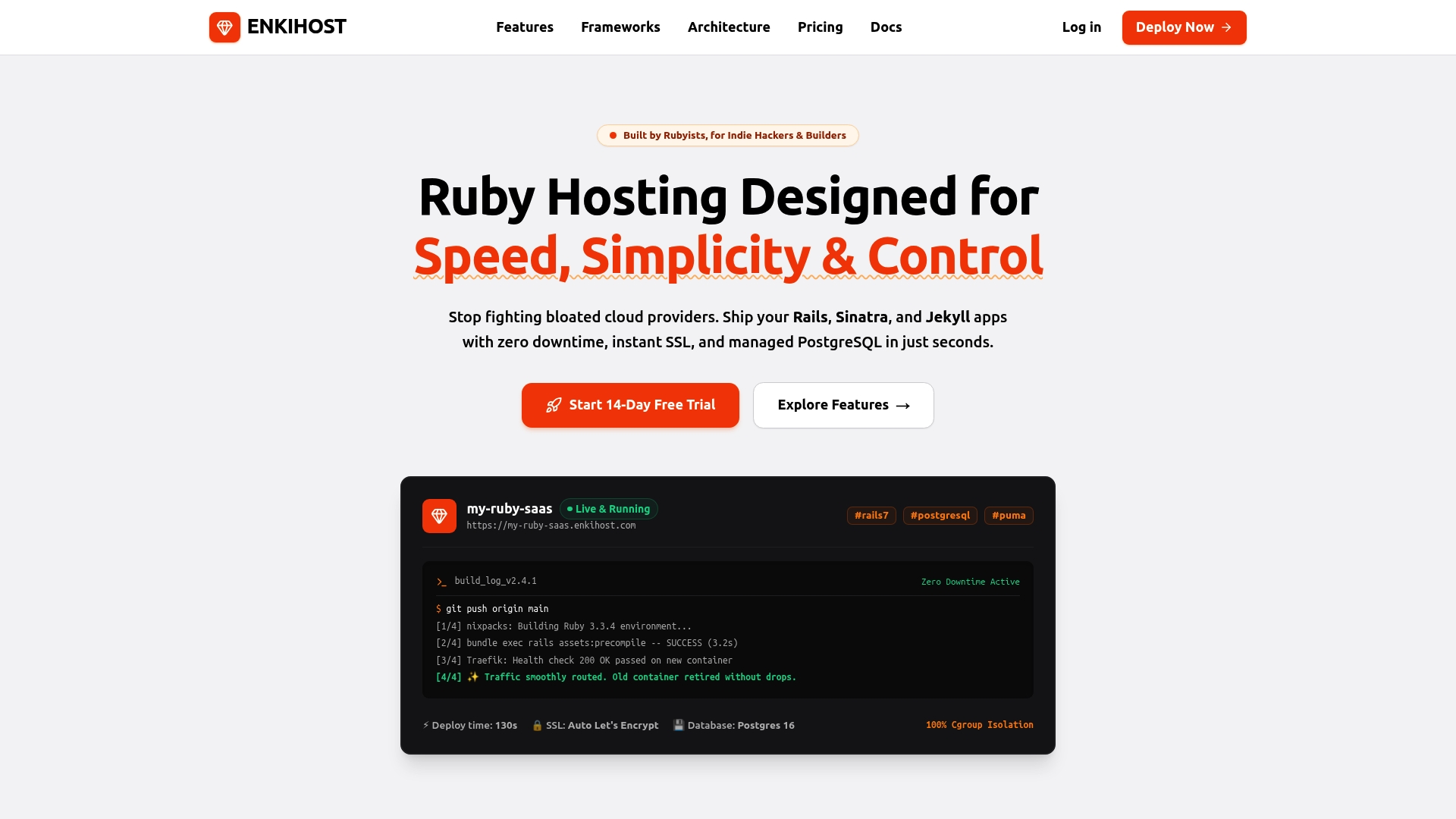
Every platform above can run Rails background jobs; the difference is how many billed pieces it takes. On Enkihost, a Rails 8 app with Solid Queue embedded in Puma runs as a single app with PostgreSQL: set SOLID_QUEUE_IN_PUMA=1 and your jobs run next to your web server with no extra worker service and no Redis bill.
- PostgreSQL and Redis add-ons that inject
DATABASE_URLandREDIS_URLautomatically, so both Solid Queue and Sidekiq work without manual wiring. - Zero-downtime deploys: the new container is health-checked before traffic switches, so a release never drops in-flight requests.
- Resource isolation per app, so another tenant’s traffic spike doesn’t slow down your queue.
Our Ignite and Blaze plans start at 5 EUR per month with PostgreSQL and Redis included, and Ignite has a 14-day free trial so you can test your job workload before committing.
FAQ
What are background jobs in Rails?
Background jobs are units of work that run outside the web request, in a separate worker process. Rails provides Active Job as a common interface, and a backend such as Solid Queue or Sidekiq stores the jobs and executes them. They are used for emails, exports, image processing and API calls that would otherwise slow down responses.
Is Solid Queue production ready?
Yes. Solid Queue is the default Active Job backend in Rails 8, it was built at 37signals to run their own production apps, and it supports PostgreSQL, MySQL and SQLite. For very high job volumes, run it on a separate queue database or consider Sidekiq.
Do I still need Redis for Rails background jobs?
Not with Rails 8 defaults. Solid Queue stores jobs in your SQL database, and Solid Cache and Solid Cable cover caching and Action Cable the same way. You only need Redis if you choose Sidekiq or another Redis-backed tool.
Should I run Sidekiq or Solid Queue inside my web process?
Solid Queue can run inside Puma with SOLID_QUEUE_IN_PUMA, which is ideal for small apps with light jobs. Sidekiq is normally run as its own process. Once jobs do CPU or memory-heavy work, give them a dedicated worker so they cannot slow down page loads.
How many threads should a Rails worker use?
Start with the defaults (5 for Sidekiq, 3 for Solid Queue) and make sure your database pool and max_connections can cover web threads plus worker threads. Increase only after measuring: I/O-heavy jobs benefit from more threads, CPU-heavy jobs benefit from more processes instead.
What does Enkihost cost to run a Rails app with background jobs?
A Rails app runs on Ignite at 5 EUR per month, with PostgreSQL and Redis included, or on Blaze at 16 EUR per month. With Solid Queue running inside Puma, background jobs don’t need an extra service, and Ignite includes a 14-day free trial.
Sources
- Active Job Basics — Ruby on Rails Guides
- rails/solid_queue — GitHub
- rails/mission_control-jobs — GitHub
- Sidekiq Best Practices — Sidekiq Wiki
- Worker Dynos, Background Jobs and Queueing — Heroku Dev Center
- Production-Grade Rails Hosting — Render
- Deploy Rails with Sidekiq — Render Docs
- Sidekiq Background Workers — Fly Docs
- Rails Hosting: What Your App Actually Needs — Fly.io
- Work with workers — Upsun Fixed (formerly Platform.sh) Docs