<?xml version="1.0" encoding="utf-8"?><feed xmlns="http://www.w3.org/2005/Atom" xml:lang="en_US"><generator uri="https://jekyllrb.com/" version="4.4.1">Jekyll</generator><link href="https://blog.enkihost.com/feed.xml" rel="self" type="application/atom+xml" /><link href="https://blog.enkihost.com/" rel="alternate" type="text/html" hreflang="en_US" /><updated>2026-10-10T16:50:43+00:00</updated><id>https://blog.enkihost.com/feed.xml</id><title type="html">Enkihost Blog</title><subtitle>Practical guides to deploying, running and scaling Ruby, Rails, Sinatra and Jekyll apps in production, by the creator of Enkihost.</subtitle><entry><title type="html">Rails Assets Precompile: How to Run It in Production and Fix Every Common Error</title><link href="https://blog.enkihost.com/rails/ruby/devops/enkihost/2026/10/10/rails-assets-precompile-production-guide.html" rel="alternate" type="text/html" title="Rails Assets Precompile: How to Run It in Production and Fix Every Common Error" /><published>2026-10-10T07:00:00+00:00</published><updated>2026-10-10T07:00:00+00:00</updated><id>https://blog.enkihost.com/rails/ruby/devops/enkihost/2026/10/10/rails-assets-precompile-production-guide</id><content type="html" xml:base="https://blog.enkihost.com/rails/ruby/devops/enkihost/2026/10/10/rails-assets-precompile-production-guide.html"><![CDATA[<p><img src="/assets/images/posts/rails-assets-precompile/hero.png" alt="Isometric illustration of source asset blocks passing through a build machine and coming out as labelled, fingerprinted packages" /></p>

<p>Rails assets precompile is the build step that turns your stylesheets, JavaScript and images into fingerprinted files in <code class="language-plaintext highlighter-rouge">public/assets</code>, so production can serve them fast and cache them forever. It’s also one of the most common reasons a Rails deploy fails: the task boots your whole app in production mode, so a missing credential, a database call in an initializer or a missing Node binary stops the build. This guide explains what <code class="language-plaintext highlighter-rouge">bin/rails assets:precompile</code> does in Rails 8, how to run it in Docker, CI and on a PaaS, and how to fix the errors you’ll actually see.</p>

<!--more-->

<hr />

<blockquote>
  <p><strong>TL;DR</strong></p>

  <ul>
    <li><code class="language-plaintext highlighter-rouge">bin/rails assets:precompile</code> runs any JS/CSS build hooks (jsbundling, cssbundling, tailwindcss-rails), then Propshaft or Sprockets copies every asset to <code class="language-plaintext highlighter-rouge">public/assets</code> with a content digest in the filename and writes a manifest.</li>
    <li>Run it once per release at build time with <code class="language-plaintext highlighter-rouge">RAILS_ENV=production</code> and <code class="language-plaintext highlighter-rouge">SECRET_KEY_BASE_DUMMY=1</code>. Never run it on boot, and never pass real credentials to the build.</li>
    <li>The task boots the full app, so initializers that read credentials or touch the database are the top cause of precompile failures.</li>
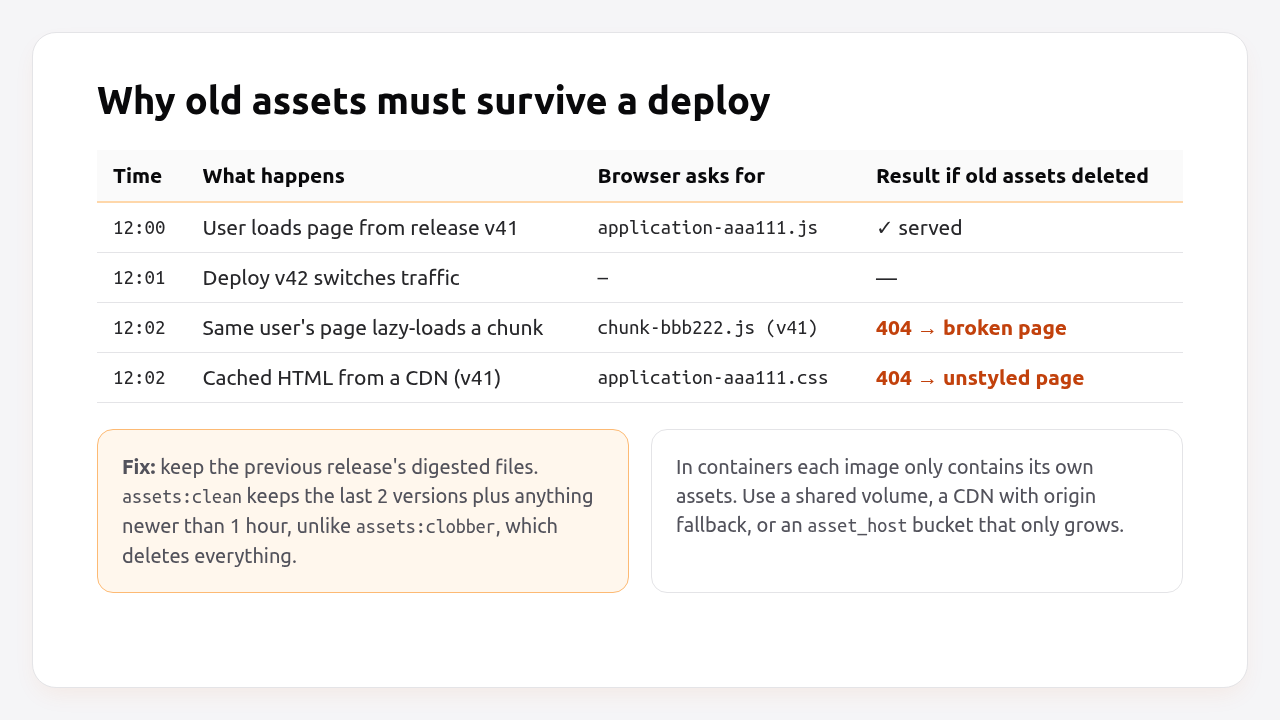
    <li>Keep the previous release’s assets during a deploy. <code class="language-plaintext highlighter-rouge">assets:clean</code> keeps two versions and anything from the last hour, while <code class="language-plaintext highlighter-rouge">assets:clobber</code> deletes everything and causes 404s for users mid-session.</li>
    <li>In production keep <code class="language-plaintext highlighter-rouge">config.assets.compile = false</code> (Sprockets) and serve <code class="language-plaintext highlighter-rouge">public/assets</code> with a one-year <code class="language-plaintext highlighter-rouge">immutable</code> cache header.</li>
  </ul>
</blockquote>

<hr />

<h2 id="table-of-contents">Table of Contents</h2>

<ul>
  <li><a href="#what-does-rails-assetsprecompile-do">What does rails assets:precompile do?</a></li>
  <li><a href="#prerequisites">Prerequisites</a></li>
  <li><a href="#step-1-configure-production-for-precompiled-assets">Step 1: Configure production for precompiled assets</a></li>
  <li><a href="#step-2-run-precompile-locally-in-production-mode">Step 2: Run precompile locally in production mode</a></li>
  <li><a href="#step-3-precompile-inside-the-docker-build">Step 3: Precompile inside the Docker build</a></li>
  <li><a href="#step-4-precompile-in-ci-and-keep-old-assets-across-deploys">Step 4: Precompile in CI and keep old assets across deploys</a></li>
  <li><a href="#step-5-verify-it-works">Step 5: Verify it works</a></li>
  <li><a href="#how-heroku-render-flyio-upsun-and-enkihost-precompile-assets">How Heroku, Render, Fly.io, Upsun and Enkihost precompile assets</a></li>
  <li><a href="#troubleshooting-assetsprecompile-errors">Troubleshooting assets:precompile errors</a></li>
  <li><a href="#author-perspective-precompile-is-a-smoke-test">Author Perspective: precompile is a smoke test</a></li>
  <li><a href="#precompiled-assets-on-enkihost">Precompiled assets on Enkihost</a></li>
  <li><a href="#faq">FAQ</a></li>
  <li><a href="#sources">Sources</a></li>
</ul>

<h2 id="what-does-rails-assetsprecompile-do">What does rails assets:precompile do?</h2>

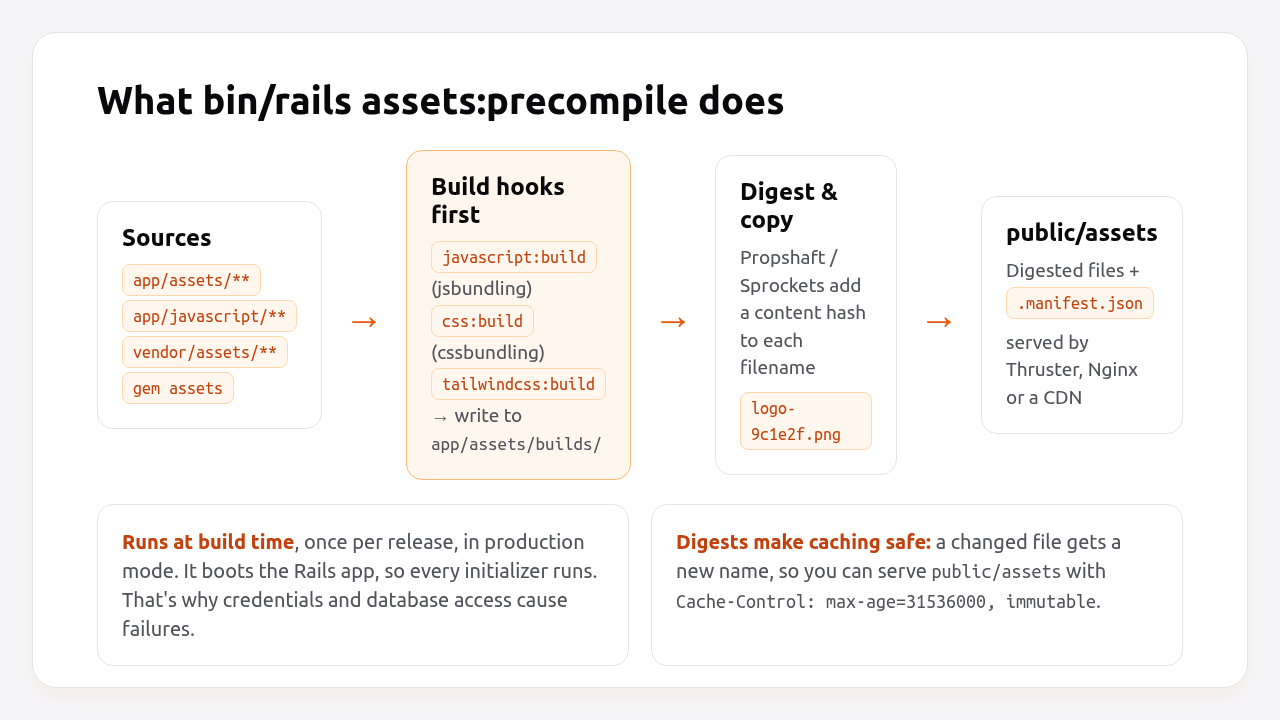
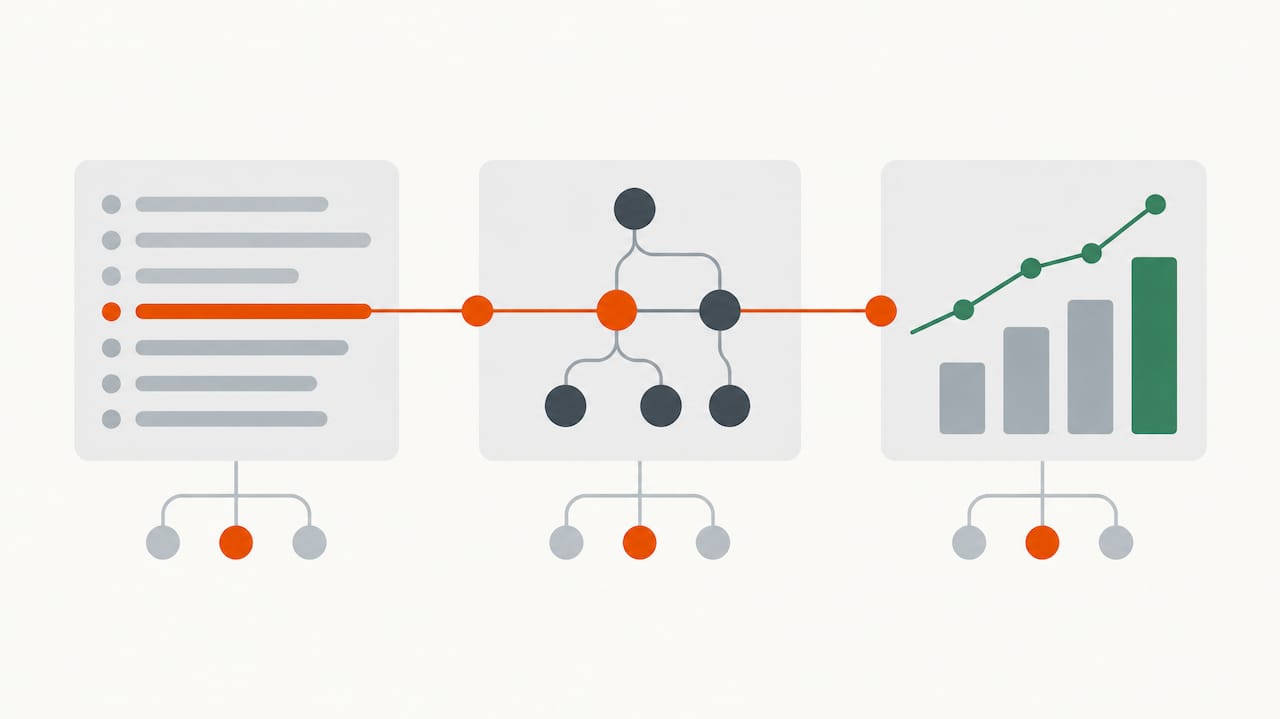
<p><code class="language-plaintext highlighter-rouge">assets:precompile</code> runs any registered JavaScript and CSS build steps, then copies every file in the asset load path to <code class="language-plaintext highlighter-rouge">public/assets</code> with a content hash in the name, and writes a manifest that maps logical names like <code class="language-plaintext highlighter-rouge">application.css</code> to digested names like <code class="language-plaintext highlighter-rouge">application-4f2a9c1e.css</code>.</p>

<p><img src="/assets/images/posts/rails-assets-precompile/assets-precompile-pipeline.png" alt="What bin/rails assets:precompile does: build hooks, digest, copy to public/assets" /></p>

<p>The details depend on which asset library your app uses:</p>

<table>
  <thead>
    <tr>
      <th> </th>
      <th>Propshaft (Rails 8 default)</th>
      <th>Sprockets (Rails ≤ 7.0 default)</th>
    </tr>
  </thead>
  <tbody>
    <tr>
      <td>Transpiles / compiles</td>
      <td>No, it delegates to jsbundling, cssbundling, tailwindcss-rails, dartsass-rails</td>
      <td>Yes, Sass, CoffeeScript, ERB in assets, concatenation via <code class="language-plaintext highlighter-rouge">//= require</code></td>
    </tr>
    <tr>
      <td>What precompile copies</td>
      <td>Every file in the load paths</td>
      <td>Only files listed in <code class="language-plaintext highlighter-rouge">app/assets/config/manifest.js</code> (plus their dependencies)</td>
    </tr>
    <tr>
      <td>Manifest file</td>
      <td><code class="language-plaintext highlighter-rouge">public/assets/.manifest.json</code></td>
      <td><code class="language-plaintext highlighter-rouge">public/assets/.sprockets-manifest-&lt;hash&gt;.json</code></td>
    </tr>
    <tr>
      <td>Needs a JS runtime</td>
      <td>Only if your build hooks use Node or Bun</td>
      <td>Yes, for some processors (ExecJS)</td>
    </tr>
    <tr>
      <td>Typical precompile time</td>
      <td>Seconds (copy and digest)</td>
      <td>Tens of seconds to minutes on large apps</td>
    </tr>
  </tbody>
</table>

<p>Two things are true for both:</p>

<ol>
  <li><strong>It boots the app.</strong> Precompile is a Rake task that loads <code class="language-plaintext highlighter-rouge">config/environment.rb</code>, so every initializer runs in the production environment.</li>
  <li><strong>Build hooks run first.</strong> <code class="language-plaintext highlighter-rouge">jsbundling-rails</code>, <code class="language-plaintext highlighter-rouge">cssbundling-rails</code> and <code class="language-plaintext highlighter-rouge">tailwindcss-rails</code> enhance <code class="language-plaintext highlighter-rouge">assets:precompile</code> with <code class="language-plaintext highlighter-rouge">javascript:build</code>, <code class="language-plaintext highlighter-rouge">css:build</code> or <code class="language-plaintext highlighter-rouge">tailwindcss:build</code>, so <code class="language-plaintext highlighter-rouge">yarn build</code> or the Tailwind CLI runs as part of the same command.</li>
</ol>

<p>The output is what makes long caching safe. A file whose content changes gets a new name, so browsers and CDNs can cache <code class="language-plaintext highlighter-rouge">public/assets/*</code> for a year without serving stale code.</p>

<h2 id="prerequisites">Prerequisites</h2>

<ul>
  <li>Rails 7.1+ (examples use Rails 8.0, Ruby 3.3, Propshaft and importmap; Sprockets differences are noted).</li>
  <li>If you use <code class="language-plaintext highlighter-rouge">jsbundling-rails</code> or <code class="language-plaintext highlighter-rouge">cssbundling-rails</code>: Node 20+ and Yarn, npm or Bun available where you build.</li>
  <li>A production <code class="language-plaintext highlighter-rouge">config/credentials.yml.enc</code>, but you won’t need its key at build time.</li>
</ul>

<h2 id="step-1-configure-production-for-precompiled-assets">Step 1: Configure production for precompiled assets</h2>

<p>Production should only ever serve precompiled files. It should never compile assets on request.</p>

<div class="language-ruby highlighter-rouge"><div class="highlight"><pre class="highlight"><code><span class="c1"># config/environments/production.rb</span>
<span class="no">Rails</span><span class="p">.</span><span class="nf">application</span><span class="p">.</span><span class="nf">configure</span> <span class="k">do</span>
  <span class="c1"># Sprockets only: never compile on request in production.</span>
  <span class="c1"># (Propshaft has no live compilation in production; this line is ignored.)</span>
  <span class="n">config</span><span class="p">.</span><span class="nf">assets</span><span class="p">.</span><span class="nf">compile</span> <span class="o">=</span> <span class="kp">false</span>

  <span class="c1"># Cache digested assets for a year. Safe because filenames change with content.</span>
  <span class="n">config</span><span class="p">.</span><span class="nf">public_file_server</span><span class="p">.</span><span class="nf">headers</span> <span class="o">=</span> <span class="p">{</span> <span class="s2">"cache-control"</span> <span class="o">=&gt;</span> <span class="s2">"public, max-age=</span><span class="si">#{</span><span class="mi">1</span><span class="p">.</span><span class="nf">year</span><span class="p">.</span><span class="nf">to_i</span><span class="si">}</span><span class="s2">, immutable"</span> <span class="p">}</span>

  <span class="c1"># Optional: serve assets from a CDN.</span>
  <span class="c1"># config.asset_host = "https://cdn.example.com"</span>
<span class="k">end</span>
</code></pre></div></div>

<p>With Sprockets, also make sure every entry point you load with <code class="language-plaintext highlighter-rouge">stylesheet_link_tag</code> or <code class="language-plaintext highlighter-rouge">javascript_include_tag</code> is declared:</p>

<div class="language-javascript highlighter-rouge"><div class="highlight"><pre class="highlight"><code><span class="c1">// app/assets/config/manifest.js (Sprockets only)</span>
<span class="c1">//= link_tree ../images</span>
<span class="c1">//= link_directory ../stylesheets .css</span>
<span class="c1">//= link_tree ../../javascript .js</span>
<span class="c1">//= link_tree ../builds</span>
<span class="c1">//= link admin.css</span>
</code></pre></div></div>

<p>Propshaft doesn’t need a manifest: everything in <code class="language-plaintext highlighter-rouge">app/assets/*</code>, <code class="language-plaintext highlighter-rouge">lib/assets/*</code>, <code class="language-plaintext highlighter-rouge">vendor/assets/*</code> and gem asset paths is included automatically. To exclude a folder, use <code class="language-plaintext highlighter-rouge">config.assets.excluded_paths &lt;&lt; Rails.root.join("app/assets/stylesheets/src")</code>.</p>

<h2 id="step-2-run-precompile-locally-in-production-mode">Step 2: Run precompile locally in production mode</h2>

<p>Run the exact command your build will run. If it fails on your machine, it will fail in CI and on the server. If it passes, you’ve ruled out most problems before pushing.</p>

<div class="language-bash highlighter-rouge"><div class="highlight"><pre class="highlight"><code><span class="nv">RAILS_ENV</span><span class="o">=</span>production <span class="nv">SECRET_KEY_BASE_DUMMY</span><span class="o">=</span>1 bin/rails assets:precompile
</code></pre></div></div>

<p>Expected output with Propshaft and importmap looks like this:</p>

<div class="language-text highlighter-rouge"><div class="highlight"><pre class="highlight"><code>Writing application-4f2a9c1e.css
Writing application-b81d03aa.js
Writing controllers/hello_controller-1d2e3f4a.js
...
</code></pre></div></div>

<p>Check the result and clean up afterwards, so you don’t commit compiled assets or accidentally serve stale ones in development:</p>

<div class="language-bash highlighter-rouge"><div class="highlight"><pre class="highlight"><code><span class="nb">ls </span>public/assets | <span class="nb">head
cat </span>public/assets/.manifest.json | <span class="nb">head</span> <span class="nt">-c</span> 400<span class="p">;</span> <span class="nb">echo
</span>bin/rails assets:clobber
</code></pre></div></div>

<p>What <code class="language-plaintext highlighter-rouge">SECRET_KEY_BASE_DUMMY=1</code> does: since Rails 7.1 it makes Rails generate a temporary <code class="language-plaintext highlighter-rouge">secret_key_base</code>, so the app can boot without <code class="language-plaintext highlighter-rouge">RAILS_MASTER_KEY</code>. It only replaces the secret key base. Any code that reads other credentials at boot still fails, which is covered in <a href="#troubleshooting-assetsprecompile-errors">Troubleshooting</a>.</p>

<p><em>Pro Tip: Add <code class="language-plaintext highlighter-rouge">public/assets</code> to <code class="language-plaintext highlighter-rouge">.gitignore</code>. On Heroku, a committed <code class="language-plaintext highlighter-rouge">.sprockets-manifest-*.json</code> or <code class="language-plaintext highlighter-rouge">.manifest.json</code> makes the buildpack skip precompile entirely (“Detected manifest file, assuming assets were compiled locally”), and you end up shipping whatever you compiled last month.</em></p>

<h2 id="step-3-precompile-inside-the-docker-build">Step 3: Precompile inside the Docker build</h2>

<p>In a container build, precompile in the build stage after copying the code, and copy only the result into the final image. That keeps Node, Yarn and <code class="language-plaintext highlighter-rouge">node_modules</code> out of production.</p>

<div class="language-dockerfile highlighter-rouge"><div class="highlight"><pre class="highlight"><code><span class="c"># Dockerfile (build stage, excerpt)</span>
<span class="k">FROM</span><span class="w"> </span><span class="s">base</span><span class="w"> </span><span class="k">AS</span><span class="w"> </span><span class="s">build</span>

<span class="k">RUN </span>apt-get update <span class="nt">-qq</span> <span class="o">&amp;&amp;</span> <span class="se">\
</span>    apt-get <span class="nb">install</span> <span class="nt">--no-install-recommends</span> <span class="nt">-y</span> build-essential git libpq-dev libyaml-dev pkg-config <span class="o">&amp;&amp;</span> <span class="se">\
</span>    <span class="nb">rm</span> <span class="nt">-rf</span> /var/lib/apt/lists /var/cache/apt/archives

<span class="k">COPY</span><span class="s"> Gemfile Gemfile.lock ./</span>
<span class="k">RUN </span>bundle <span class="nb">install</span> <span class="o">&amp;&amp;</span> <span class="se">\
</span>    <span class="nb">rm</span> <span class="nt">-rf</span> ~/.bundle/ <span class="s2">"</span><span class="k">${</span><span class="nv">BUNDLE_PATH</span><span class="k">}</span><span class="s2">"</span>/ruby/<span class="k">*</span>/cache <span class="s2">"</span><span class="k">${</span><span class="nv">BUNDLE_PATH</span><span class="k">}</span><span class="s2">"</span>/ruby/<span class="k">*</span>/bundler/gems/<span class="k">*</span>/.git

<span class="c"># If you use jsbundling/cssbundling, install JS deps before copying the app</span>
<span class="c"># so this layer is cached until package.json or yarn.lock change.</span>
<span class="c"># COPY package.json yarn.lock ./</span>
<span class="c"># RUN yarn install --frozen-lockfile</span>

<span class="k">COPY</span><span class="s"> . .</span>

<span class="k">RUN </span><span class="nv">SECRET_KEY_BASE_DUMMY</span><span class="o">=</span>1 ./bin/rails assets:precompile

<span class="c"># If node_modules exists, drop it before the final stage copies /rails.</span>
<span class="k">RUN </span><span class="nb">rm</span> <span class="nt">-rf</span> node_modules tmp/cache
</code></pre></div></div>

<p>The complete multi-stage file, with the base and final stages, is in <a href="/rails/ruby/docker/devops/enkihost/2026/10/09/dockerize-rails-app-production-dockerfile.html">how to dockerize a Rails app</a>.</p>

<p>Two Docker-specific details:</p>

<ul>
  <li><strong>Don’t pass <code class="language-plaintext highlighter-rouge">RAILS_MASTER_KEY</code> as a build argument.</strong> Build args are visible in <code class="language-plaintext highlighter-rouge">docker history</code>. <code class="language-plaintext highlighter-rouge">SECRET_KEY_BASE_DUMMY=1</code> removes the need for it.</li>
  <li><strong>Your <code class="language-plaintext highlighter-rouge">.dockerignore</code> should exclude <code class="language-plaintext highlighter-rouge">/public/assets</code> and <code class="language-plaintext highlighter-rouge">/app/assets/builds/*</code>.</strong> Otherwise stale local builds get copied in, and Propshaft may write them next to the fresh ones.</li>
</ul>

<h2 id="step-4-precompile-in-ci-and-keep-old-assets-across-deploys">Step 4: Precompile in CI and keep old assets across deploys</h2>

<p>When traffic switches to a new release, browsers that loaded the old HTML will still request the old digested files for a while. Your deploy must keep the previous release’s assets available, or those users get 404s and unstyled or broken pages.</p>

<p><img src="/assets/images/posts/rails-assets-precompile/old-assets-during-deploy.png" alt="Why old assets must survive a deploy: browsers request previous digests after the switch" /></p>

<p>How you keep them depends on how you deploy:</p>

<table>
  <thead>
    <tr>
      <th>Deploy style</th>
      <th>How old assets survive</th>
      <th>What to do</th>
    </tr>
  </thead>
  <tbody>
    <tr>
      <td>Capistrano / shared <code class="language-plaintext highlighter-rouge">public/assets</code> on disk</td>
      <td>Each precompile adds new files to the same folder</td>
      <td>Run <code class="language-plaintext highlighter-rouge">assets:clean</code>, never <code class="language-plaintext highlighter-rouge">assets:clobber</code>, after precompile</td>
    </tr>
    <tr>
      <td>Heroku buildpack</td>
      <td>Buildpack caches <code class="language-plaintext highlighter-rouge">public/assets</code> between builds and runs <code class="language-plaintext highlighter-rouge">assets:clean</code></td>
      <td>Nothing, as long as you don’t commit a manifest</td>
    </tr>
    <tr>
      <td>Kamal 2</td>
      <td>Each image contains only its own assets</td>
      <td>Set <code class="language-plaintext highlighter-rouge">asset_path</code> in <code class="language-plaintext highlighter-rouge">config/deploy.yml</code> (asset bridging)</td>
    </tr>
    <tr>
      <td>Any container platform</td>
      <td>Same as Kamal</td>
      <td>Upload assets to a bucket/CDN that only grows, and set <code class="language-plaintext highlighter-rouge">config.asset_host</code></td>
    </tr>
  </tbody>
</table>

<p>With Kamal 2, asset bridging is one line. Kamal extracts the assets from the old and new containers and serves the combined set during the switch. The rest of the Kamal setup is in <a href="/rails/ruby/deployment/kamal/devops/enkihost/2026/10/05/minimal-rails-deployments-with-kamal-2-and-thruster.html">minimal Rails deployments with Kamal 2 and Thruster</a>:</p>

<div class="language-yaml highlighter-rouge"><div class="highlight"><pre class="highlight"><code><span class="c1"># config/deploy.yml</span>
<span class="na">service</span><span class="pi">:</span> <span class="s">myapp</span>
<span class="na">image</span><span class="pi">:</span> <span class="s">myorg/myapp</span>
<span class="na">servers</span><span class="pi">:</span>
  <span class="na">web</span><span class="pi">:</span>
    <span class="pi">-</span> <span class="s">192.168.0.1</span>
<span class="na">asset_path</span><span class="pi">:</span> <span class="s">/rails/public/assets</span>
</code></pre></div></div>

<p>With a CDN and <code class="language-plaintext highlighter-rouge">asset_host</code>, precompile in CI and sync to the bucket before deploying, without deleting old files:</p>

<div class="language-yaml highlighter-rouge"><div class="highlight"><pre class="highlight"><code><span class="c1"># .github/workflows/deploy.yml (excerpt)</span>
<span class="pi">-</span> <span class="na">name</span><span class="pi">:</span> <span class="s">Precompile assets</span>
  <span class="na">env</span><span class="pi">:</span>
    <span class="na">RAILS_ENV</span><span class="pi">:</span> <span class="s">production</span>
    <span class="na">SECRET_KEY_BASE_DUMMY</span><span class="pi">:</span> <span class="s2">"</span><span class="s">1"</span>
  <span class="na">run</span><span class="pi">:</span> <span class="s">bin/rails assets:precompile</span>

<span class="pi">-</span> <span class="na">name</span><span class="pi">:</span> <span class="s">Upload assets (never delete old digests)</span>
  <span class="na">run</span><span class="pi">:</span> <span class="s">aws s3 sync public/assets s3://myapp-assets/assets --cache-control "public, max-age=31536000, immutable"</span>
</code></pre></div></div>

<p>Leaving out <code class="language-plaintext highlighter-rouge">--delete</code> is deliberate. Old digests stay in the bucket, which costs a few megabytes per release, and pages rendered by the previous release never break. Clean up files older than 30 days with a bucket lifecycle rule.</p>

<p><em>Pro Tip: <code class="language-plaintext highlighter-rouge">assets:clean</code> keeps the two most recent versions of each asset plus anything compiled in the last hour. You can tune it with <code class="language-plaintext highlighter-rouge">bin/rails "assets:clean[3]"</code> if your deploys are frequent and sessions are long.</em></p>

<h2 id="step-5-verify-it-works">Step 5: Verify it works</h2>

<p>After deploying, confirm that assets are digested, served with long cache headers, and that the HTML references the same digests that exist on disk.</p>

<div class="language-bash highlighter-rouge"><div class="highlight"><pre class="highlight"><code><span class="c"># 1. The page references digested assets</span>
curl <span class="nt">-s</span> https://example.com/ | <span class="nb">grep</span> <span class="nt">-oE</span> <span class="s1">'/assets/[a-z_/-]+-[0-9a-f]{8,}\.(css|js)'</span> | <span class="nb">sort</span> <span class="nt">-u</span>

<span class="c"># 2. Each one returns 200 with an immutable cache header</span>
curl <span class="nt">-sI</span> https://example.com/assets/application-4f2a9c1e.css | <span class="nb">grep</span> <span class="nt">-iE</span> <span class="s2">"^HTTP|cache-control|content-encoding"</span>
<span class="c"># HTTP/2 200</span>
<span class="c"># cache-control: public, max-age=31536000, immutable</span>
<span class="c"># content-encoding: gzip</span>

<span class="c"># 3. A non-digested path is not served (proves compile is off)</span>
curl <span class="nt">-sI</span> https://example.com/assets/application.css | <span class="nb">head</span> <span class="nt">-1</span>
<span class="c"># HTTP/2 404</span>
</code></pre></div></div>

<p>Then do one more check that most guides skip: deploy twice in a row, and request an asset digest from the <em>first</em> deploy after the second one finishes. It should still return 200.</p>

<h2 id="how-heroku-render-flyio-upsun-and-enkihost-precompile-assets">How Heroku, Render, Fly.io, Upsun and Enkihost precompile assets</h2>

<p>Every platform runs precompile during the build, not at runtime. The differences are whether it happens automatically, and whether old assets survive the next deploy.</p>

<table>
  <thead>
    <tr>
      <th>Platform</th>
      <th>Runs precompile</th>
      <th>How you configure it</th>
      <th>Old assets kept across deploys</th>
    </tr>
  </thead>
  <tbody>
    <tr>
      <td><strong>Heroku</strong></td>
      <td>Automatically, via the Ruby buildpack (“Preparing Rails asset pipeline”)</td>
      <td>Skipped if a manifest is committed</td>
      <td>Yes, the buildpack caches <code class="language-plaintext highlighter-rouge">public/assets</code> and runs <code class="language-plaintext highlighter-rouge">assets:clean</code></td>
    </tr>
    <tr>
      <td><strong>Render</strong></td>
      <td>In your build command</td>
      <td><code class="language-plaintext highlighter-rouge">bin/render-build.sh</code>: <code class="language-plaintext highlighter-rouge">bundle install</code>, <code class="language-plaintext highlighter-rouge">bin/rails assets:precompile</code>, <code class="language-plaintext highlighter-rouge">bin/rails assets:clean</code></td>
      <td>Native runtime: per build; Docker: per image</td>
    </tr>
    <tr>
      <td><strong>Fly.io</strong></td>
      <td>In the Dockerfile generated by <code class="language-plaintext highlighter-rouge">fly launch</code></td>
      <td><code class="language-plaintext highlighter-rouge">RUN SECRET_KEY_BASE_DUMMY=1 ./bin/rails assets:precompile</code></td>
      <td>No, each image is self-contained, so use a CDN or bridging</td>
    </tr>
    <tr>
      <td><strong>Upsun</strong></td>
      <td>In the build hook</td>
      <td><code class="language-plaintext highlighter-rouge">hooks: build: bundle exec rails assets:precompile</code> in <code class="language-plaintext highlighter-rouge">.upsun/config.yaml</code></td>
      <td>No, the build is immutable per deploy</td>
    </tr>
    <tr>
      <td><strong>Kamal 2</strong></td>
      <td>In your Dockerfile</td>
      <td>Same as Fly.io</td>
      <td>Yes, with <code class="language-plaintext highlighter-rouge">asset_path</code> (asset bridging)</td>
    </tr>
    <tr>
      <td><strong>Enkihost</strong></td>
      <td>In your Dockerfile (or the generated one)</td>
      <td>Same as Fly.io</td>
      <td>No, each deploy is a new image</td>
    </tr>
  </tbody>
</table>

<p>Heroku is the only one that handles old-asset retention for you without configuration, because the buildpack carries the asset cache from build to build. On every container-based platform the image is the unit of deploy, so you have to bridge assets yourself.</p>

<p>Enkihost does zero-downtime deploys, so there’s a window where old and new releases overlap, just like on every platform above. The same rule applies: precompile at build time, and use a CDN or <code class="language-plaintext highlighter-rouge">asset_host</code> if your pages lazy-load assets long after the first page load.</p>

<h2 id="troubleshooting-assetsprecompile-errors">Troubleshooting assets:precompile errors</h2>

<p>Most precompile failures fall into four groups: the app can’t boot without secrets or a database, a JS/CSS build tool is missing, an asset reference doesn’t resolve, or the build runs out of memory.</p>

<h3 id="missing-secret_key_base-for-production-environment"><code class="language-plaintext highlighter-rouge">Missing secret_key_base for 'production' environment</code></h3>

<div class="language-text highlighter-rouge"><div class="highlight"><pre class="highlight"><code>ArgumentError: Missing `secret_key_base` for 'production' environment, set this string with `bin/rails credentials:edit`
</code></pre></div></div>

<p>Set <code class="language-plaintext highlighter-rouge">SECRET_KEY_BASE_DUMMY=1</code> on the precompile command. On Rails 7.0 and earlier, which don’t support it, use <code class="language-plaintext highlighter-rouge">SECRET_KEY_BASE=placeholder bin/rails assets:precompile</code>.</p>

<h3 id="undefined-method--for-nil-or-keyerror-from-credentials"><code class="language-plaintext highlighter-rouge">undefined method '[]' for nil</code> or <code class="language-plaintext highlighter-rouge">KeyError</code> from credentials</h3>

<div class="language-text highlighter-rouge"><div class="highlight"><pre class="highlight"><code>NoMethodError: undefined method `[]' for nil (NoMethodError)
  config/initializers/stripe.rb:1:in `&lt;main&gt;'
</code></pre></div></div>

<p>An initializer reads a credential that doesn’t exist during the build. Make it tolerant:</p>

<div class="language-ruby highlighter-rouge"><div class="highlight"><pre class="highlight"><code><span class="c1"># config/initializers/stripe.rb</span>
<span class="no">Stripe</span><span class="p">.</span><span class="nf">api_key</span> <span class="o">=</span> <span class="no">Rails</span><span class="p">.</span><span class="nf">application</span><span class="p">.</span><span class="nf">credentials</span><span class="p">.</span><span class="nf">dig</span><span class="p">(</span><span class="ss">:stripe</span><span class="p">,</span> <span class="ss">:secret_key</span><span class="p">)</span> <span class="o">||</span> <span class="no">ENV</span><span class="p">[</span><span class="s2">"STRIPE_SECRET_KEY"</span><span class="p">]</span>
</code></pre></div></div>

<p>Or defer the read until it’s used, for example inside a service object, instead of at boot.</p>

<h3 id="activerecordconnectionnotestablished-during-precompile"><code class="language-plaintext highlighter-rouge">ActiveRecord::ConnectionNotEstablished</code> during precompile</h3>

<div class="language-text highlighter-rouge"><div class="highlight"><pre class="highlight"><code>ActiveRecord::ConnectionNotEstablished: connection to server on socket "/var/run/postgresql/.s.PGSQL.5432" failed: No such file or directory
</code></pre></div></div>

<p>Something queries the database at boot: an initializer, a model loaded with a scope evaluated at class-load time, or a gem that reads settings from a table. Find it with <code class="language-plaintext highlighter-rouge">bin/rails assets:precompile --trace</code>, then move the query into a method or wrap it in <code class="language-plaintext highlighter-rouge">Rails.application.config.after_initialize</code> and check <code class="language-plaintext highlighter-rouge">defined?(Rails::Server)</code>. Precompile itself never needs a database.</p>

<h3 id="the-asset-admincss-is-not-present-in-the-asset-pipeline"><code class="language-plaintext highlighter-rouge">The asset "admin.css" is not present in the asset pipeline</code></h3>

<div class="language-text highlighter-rouge"><div class="highlight"><pre class="highlight"><code>ActionView::Template::Error (The asset "admin.css" is not present in the asset pipeline.)
</code></pre></div></div>

<p>This shows up at runtime, not at build time: the view references an asset that precompile didn’t output. With Sprockets, add <code class="language-plaintext highlighter-rouge">//= link admin.css</code> to <code class="language-plaintext highlighter-rouge">app/assets/config/manifest.js</code>. With Propshaft, check the file exists in a load path and that it isn’t in <code class="language-plaintext highlighter-rouge">excluded_paths</code>. For jsbundling/cssbundling, make sure the build writes to <code class="language-plaintext highlighter-rouge">app/assets/builds/</code>.</p>

<h3 id="jsbundling-rails-command-build-failed"><code class="language-plaintext highlighter-rouge">jsbundling-rails: Command build failed</code></h3>

<div class="language-text highlighter-rouge"><div class="highlight"><pre class="highlight"><code>jsbundling-rails: Command build failed, ensure `yarn build` runs without errors
</code></pre></div></div>

<p>Node or Yarn is missing in the build environment, or <code class="language-plaintext highlighter-rouge">yarn install</code> didn’t run before precompile. In Docker, install Node in the build stage and run <code class="language-plaintext highlighter-rouge">yarn install --frozen-lockfile</code> before <code class="language-plaintext highlighter-rouge">assets:precompile</code>. Run <code class="language-plaintext highlighter-rouge">yarn build</code> on its own to see the real error.</p>

<h3 id="javascript-heap-out-of-memory-or-the-build-gets-killed"><code class="language-plaintext highlighter-rouge">JavaScript heap out of memory</code> or the build gets <code class="language-plaintext highlighter-rouge">Killed</code></h3>

<div class="language-text highlighter-rouge"><div class="highlight"><pre class="highlight"><code>FATAL ERROR: Reached heap limit Allocation failed - JavaScript heap out of memory
</code></pre></div></div>

<p>esbuild and Tailwind are light, but webpack and large Sass builds aren’t. Raise Node’s heap for the build only, <code class="language-plaintext highlighter-rouge">NODE_OPTIONS=--max-old-space-size=2048 bin/rails assets:precompile</code>, or build on a machine with more memory than the runtime server. A plain <code class="language-plaintext highlighter-rouge">Killed</code> with exit code 137 means the OS OOM killer stopped the process.</p>

<h3 id="execjsruntimeunavailable"><code class="language-plaintext highlighter-rouge">ExecJS::RuntimeUnavailable</code></h3>

<div class="language-text highlighter-rouge"><div class="highlight"><pre class="highlight"><code>ExecJS::RuntimeUnavailable: Could not find a JavaScript runtime. See https://github.com/rails/execjs for a list of available runtimes.
</code></pre></div></div>

<p>You’re on Sprockets with a processor that needs JavaScript (often <code class="language-plaintext highlighter-rouge">uglifier</code> or <code class="language-plaintext highlighter-rouge">terser</code>). Install Node in the build stage, or switch the compressor off: <code class="language-plaintext highlighter-rouge">config.assets.js_compressor = nil</code>. HTTP compression already does most of the work.</p>

<h2 id="author-perspective-precompile-is-a-smoke-test">Author Perspective: precompile is a smoke test</h2>

<p>I’ve come to treat <code class="language-plaintext highlighter-rouge">assets:precompile</code> as the cheapest production smoke test there is. It boots the full app in production mode with no secrets and no database, and if anything in my initializers is fragile, this is where it shows up first, in CI and not at 3 AM after a deploy. I run <code class="language-plaintext highlighter-rouge">RAILS_ENV=production SECRET_KEY_BASE_DUMMY=1 bin/rails assets:precompile</code> as an explicit CI step on every pull request, even though the Docker build runs it again. When it fails, it’s almost always a credential read at boot, and fixing that makes the app more robust everywhere.</p>

<h2 id="precompiled-assets-on-enkihost">Precompiled assets on Enkihost</h2>

<p>Enkihost doesn’t change how Rails builds assets. The same <code class="language-plaintext highlighter-rouge">bin/rails assets:precompile</code> you run locally is the command that has to pass, and everything in this guide applies as is:</p>

<p><img src="/assets/images/posts/rails-assets-precompile/enkihost.jpg" alt="Enkihost" /></p>

<ul>
  <li><strong>Zero-downtime deploys:</strong> the new release takes over without dropping in-flight requests. Precompile at build time with <code class="language-plaintext highlighter-rouge">SECRET_KEY_BASE_DUMMY=1</code> and long-cached digested assets keep working through the switch.</li>
  <li><strong>Per-app resource isolation</strong> with allocated memory and CPU, so the memory budget you plan for Puma is the one you get, without a build tool competing with it at runtime.</li>
  <li><strong>PostgreSQL and Redis add-ons</strong> inject <code class="language-plaintext highlighter-rouge">DATABASE_URL</code> and <code class="language-plaintext highlighter-rouge">REDIS_URL</code> at runtime, which is one more reason to keep database access out of the precompile step.</li>
</ul>

<p>Rails and Sinatra apps run on Ignite (5 EUR per month after a 14-day free trial, with PostgreSQL and Redis included) or Blaze (16 EUR per month, with high availability and autoscaling). The free Spark plan is for Jekyll sites. Start at <a href="https://enkihost.com/" target="_blank">enkihost.com</a>.</p>

<h2 id="faq">FAQ</h2>

<h3 id="do-i-need-to-run-assetsprecompile-in-development">Do I need to run assets:precompile in development?</h3>

<p>No. In development, Propshaft and Sprockets serve assets on demand, and bin/dev runs any JS or CSS watchers. If you precompile locally to test a production build, run bin/rails assets:clobber afterwards, or development will serve the stale compiled files from public/assets.</p>

<h3 id="should-i-commit-publicassets-to-git">Should I commit public/assets to git?</h3>

<p>No. Compiled assets bloat the repository, go stale, and on Heroku a committed manifest makes the buildpack skip precompile. Compile at build time instead and add public/assets to .gitignore.</p>

<h3 id="what-is-the-difference-between-assetsclean-and-assetsclobber">What is the difference between assets:clean and assets:clobber?</h3>

<p>assets:clean removes old compiled assets but keeps the two most recent versions of each file and anything compiled in the last hour, so pages from the previous release keep working. assets:clobber deletes the whole public/assets directory. Use clean in deploys and clobber only locally.</p>

<h3 id="does-assetsprecompile-need-the-database">Does assets:precompile need the database?</h3>

<p>No. Precompiling assets never needs a database connection. If the task fails with a connection error, some initializer or class-level code is querying the database at boot, and that code should be made lazy.</p>

<h3 id="why-does-precompile-succeed-but-production-still-returns-404-for-assets">Why does precompile succeed but production still returns 404 for assets?</h3>

<p>Usually the web server isn’t serving public/assets. Either RAILS_SERVE_STATIC_FILES is unset on an old Rails version, Nginx or Thruster isn’t pointed at public, or the HTML references a digest from a different build than the files on disk. Compare the digest in the page source with the filenames in public/assets.</p>

<h2 id="sources">Sources</h2>

<ul>
  <li><a href="https://guides.rubyonrails.org/asset_pipeline.html" target="_blank">The Asset Pipeline — Rails Guides</a></li>
  <li><a href="https://github.com/rails/propshaft" target="_blank">rails/propshaft — GitHub</a></li>
  <li><a href="https://github.com/rails/sprockets-rails" target="_blank">rails/sprockets-rails — GitHub</a></li>
  <li><a href="https://github.com/rails/jsbundling-rails" target="_blank">rails/jsbundling-rails — GitHub</a></li>
  <li><a href="https://kamal-deploy.org/docs/configuration/overview/" target="_blank">Kamal configuration: asset_path (asset bridging) — Kamal docs</a></li>
  <li><a href="https://devcenter.heroku.com/articles/rails-asset-pipeline" target="_blank">Rails Asset Pipeline on Heroku — Heroku Dev Center</a></li>
  <li><a href="https://render.com/docs/deploy-rails" target="_blank">Deploy a Ruby on Rails app — Render Docs</a></li>
  <li><a href="https://fly.io/docs/rails/getting-started/" target="_blank">Rails on Fly.io: Getting started — Fly Docs</a></li>
  <li><a href="https://docs.upsun.com/get-started/stacks/ruby.html" target="_blank">Deploy Ruby on Rails on Upsun — Upsun Docs</a></li>
</ul>

<!-- jsonld -->
<script type="application/ld+json">
{
  "@context": "https://schema.org",
  "@type": "TechArticle",
  "headline": "Rails Assets Precompile: How to Run It in Production and Fix Every Common Error",
  "description": "How Rails assets:precompile works with Propshaft and Sprockets, how to run it in Docker, CI and PaaS builds, and how to fix the errors that break deploys.",
  "datePublished": "2026-10-10T09:00:00+02:00",
  "dateModified": "2026-10-10T09:00:00+02:00",
  "author": {
    "@type": "Person",
    "name": "Albert Oliva"
  },
  "publisher": {
    "@type": "Organization",
    "name": "Enkihost Blog",
    "url": "https://blog.enkihost.com/"
  },
  "mainEntityOfPage": "https://blog.enkihost.com/rails/ruby/devops/enkihost/2026/10/10/rails-assets-precompile-production-guide.html",
  "keywords": "rails, ruby, devops, enkihost",
  "image": "https://blog.enkihost.com/assets/images/posts/rails-assets-precompile/hero.png"
}
</script>

<script type="application/ld+json">
{
  "@context": "https://schema.org",
  "@type": "FAQPage",
  "mainEntity": [
    {
      "@type": "Question",
      "name": "Do I need to run assets:precompile in development?",
      "acceptedAnswer": {
        "@type": "Answer",
        "text": "No. In development, Propshaft and Sprockets serve assets on demand, and bin/dev runs any JS or CSS watchers. If you precompile locally to test a production build, run bin/rails assets:clobber afterwards, or development will serve the stale compiled files from public/assets."
      }
    },
    {
      "@type": "Question",
      "name": "Should I commit public/assets to git?",
      "acceptedAnswer": {
        "@type": "Answer",
        "text": "No. Compiled assets bloat the repository, go stale, and on Heroku a committed manifest makes the buildpack skip precompile. Compile at build time instead and add public/assets to .gitignore."
      }
    },
    {
      "@type": "Question",
      "name": "What is the difference between assets:clean and assets:clobber?",
      "acceptedAnswer": {
        "@type": "Answer",
        "text": "assets:clean removes old compiled assets but keeps the two most recent versions of each file and anything compiled in the last hour, so pages from the previous release keep working. assets:clobber deletes the whole public/assets directory. Use clean in deploys and clobber only locally."
      }
    },
    {
      "@type": "Question",
      "name": "Does assets:precompile need the database?",
      "acceptedAnswer": {
        "@type": "Answer",
        "text": "No. Precompiling assets never needs a database connection. If the task fails with a connection error, some initializer or class-level code is querying the database at boot, and that code should be made lazy."
      }
    },
    {
      "@type": "Question",
      "name": "Why does precompile succeed but production still returns 404 for assets?",
      "acceptedAnswer": {
        "@type": "Answer",
        "text": "Usually the web server isn't serving public/assets. Either RAILS_SERVE_STATIC_FILES is unset on an old Rails version, Nginx or Thruster isn't pointed at public, or the HTML references a digest from a different build than the files on disk. Compare the digest in the page source with the filenames in public/assets."
      }
    }
  ]
}
</script>]]></content><author><name></name></author><category term="rails" /><category term="ruby" /><category term="devops" /><category term="enkihost" /><summary type="html"><![CDATA[How Rails assets:precompile works with Propshaft and Sprockets, how to run it in Docker, CI and PaaS builds, and how to fix the errors that break deploys.]]></summary></entry><entry><title type="html">How to Dockerize a Rails App: A Production Dockerfile, Step by Step</title><link href="https://blog.enkihost.com/rails/ruby/docker/devops/enkihost/2026/10/09/dockerize-rails-app-production-dockerfile.html" rel="alternate" type="text/html" title="How to Dockerize a Rails App: A Production Dockerfile, Step by Step" /><published>2026-10-09T07:00:00+00:00</published><updated>2026-10-09T07:00:00+00:00</updated><id>https://blog.enkihost.com/rails/ruby/docker/devops/enkihost/2026/10/09/dockerize-rails-app-production-dockerfile</id><content type="html" xml:base="https://blog.enkihost.com/rails/ruby/docker/devops/enkihost/2026/10/09/dockerize-rails-app-production-dockerfile.html"><![CDATA[<p><img src="/assets/images/posts/dockerize-rails-app/hero.png" alt="Isometric illustration of stacked image layers being shipped as Docker containers next to a PostgreSQL database" /></p>

<p>To dockerize a Rails app you need three files: a multi-stage <code class="language-plaintext highlighter-rouge">Dockerfile</code> that installs gems and precompiles assets in a throwaway build stage, a <code class="language-plaintext highlighter-rouge">.dockerignore</code> that keeps secrets and junk out of the build context, and an entrypoint that prepares the database on boot. Rails 7.1 and later generate all three for you, but the generated files assume things your app may not do. This guide walks through each line, adds a Docker Compose stack with PostgreSQL and a job worker, and covers the build errors you’ll hit on the way.</p>

<!--more-->

<hr />

<blockquote>
  <p><strong>TL;DR</strong></p>

  <ul>
    <li>Rails 7.1+ generates a production <code class="language-plaintext highlighter-rouge">Dockerfile</code>, <code class="language-plaintext highlighter-rouge">.dockerignore</code> and <code class="language-plaintext highlighter-rouge">bin/docker-entrypoint</code> in every new app. For older apps, run <code class="language-plaintext highlighter-rouge">bin/rails generate dockerfile</code> from the <code class="language-plaintext highlighter-rouge">dockerfile-rails</code> gem.</li>
    <li>Use a multi-stage build: compilers, headers and <code class="language-plaintext highlighter-rouge">node_modules</code> stay in the build stage, and the final image only contains runtime libraries, gems and precompiled assets.</li>
    <li>Copy <code class="language-plaintext highlighter-rouge">Gemfile</code> and <code class="language-plaintext highlighter-rouge">Gemfile.lock</code> before the rest of the code, so <code class="language-plaintext highlighter-rouge">bundle install</code> is cached until your dependencies change.</li>
    <li>Run <code class="language-plaintext highlighter-rouge">assets:precompile</code> with <code class="language-plaintext highlighter-rouge">SECRET_KEY_BASE_DUMMY=1</code> so the build never needs real credentials, and keep <code class="language-plaintext highlighter-rouge">config/master.key</code> and <code class="language-plaintext highlighter-rouge">.env</code> out of the image with <code class="language-plaintext highlighter-rouge">.dockerignore</code>.</li>
    <li>If you build on an Apple Silicon Mac for x86 servers, build with <code class="language-plaintext highlighter-rouge">--platform linux/amd64</code> and add <code class="language-plaintext highlighter-rouge">x86_64-linux</code> to <code class="language-plaintext highlighter-rouge">Gemfile.lock</code>.</li>
  </ul>
</blockquote>

<hr />

<h2 id="table-of-contents">Table of Contents</h2>

<ul>
  <li><a href="#what-does-it-mean-to-dockerize-a-rails-app">What does it mean to dockerize a Rails app?</a></li>
  <li><a href="#prerequisites">Prerequisites</a></li>
  <li><a href="#step-1-generate-the-docker-files">Step 1: Generate the Docker files</a></li>
  <li><a href="#step-2-understand-the-production-dockerfile">Step 2: Understand the production Dockerfile</a></li>
  <li><a href="#step-3-write-a-dockerignore-that-protects-secrets">Step 3: Write a .dockerignore that protects secrets</a></li>
  <li><a href="#step-4-the-entrypoint-script">Step 4: The entrypoint script</a></li>
  <li><a href="#step-5-run-it-with-docker-compose-and-postgresql">Step 5: Run it with Docker Compose and PostgreSQL</a></li>
  <li><a href="#step-6-verify-it-works">Step 6: Verify it works</a></li>
  <li><a href="#how-do-i-make-a-rails-docker-image-smaller-and-faster-to-build">How do I make a Rails Docker image smaller and faster to build?</a></li>
  <li><a href="#how-heroku-render-flyio-upsun-and-enkihost-run-rails-containers">How Heroku, Render, Fly.io, Upsun and Enkihost run Rails containers</a></li>
  <li><a href="#troubleshooting-rails-docker-builds">Troubleshooting Rails Docker builds</a></li>
  <li><a href="#author-perspective-the-dockerfile-is-the-deploy-contract">Author Perspective: the Dockerfile is the deploy contract</a></li>
  <li><a href="#running-a-rails-app-on-enkihost">Running a Rails app on Enkihost</a></li>
  <li><a href="#faq">FAQ</a></li>
  <li><a href="#sources">Sources</a></li>
</ul>

<h2 id="what-does-it-mean-to-dockerize-a-rails-app">What does it mean to dockerize a Rails app?</h2>

<p>Dockerizing a Rails app means packaging the app, its Ruby version, its gems and its system libraries into one container image that runs the same way on your laptop, in CI and on any server. The image becomes the unit you deploy, roll back and scale.</p>

<p>The payoff is that the server no longer needs Ruby, <code class="language-plaintext highlighter-rouge">rbenv</code>, <code class="language-plaintext highlighter-rouge">libvips</code> or the right <code class="language-plaintext highlighter-rouge">libpq</code> installed. It only needs a container runtime. That’s why Kamal, Render, Fly.io and Heroku’s container stack all start from a <code class="language-plaintext highlighter-rouge">Dockerfile</code>.</p>

<p>Since Rails 7.1, <code class="language-plaintext highlighter-rouge">rails new</code> generates a production-ready <code class="language-plaintext highlighter-rouge">Dockerfile</code>, written by Sam Ruby and based on the <code class="language-plaintext highlighter-rouge">dockerfile-rails</code> generator. Rails 8 refined it with Thruster and jemalloc. Use it as your starting point instead of a random blog snippet, then adjust it to your app.</p>

<h2 id="prerequisites">Prerequisites</h2>

<ul>
  <li>Docker Engine 24+ or Docker Desktop with BuildKit. It’s the default builder in current Docker versions.</li>
  <li>A Rails 7.1+ app. The examples use Rails 8.0 and Ruby 3.3.7, PostgreSQL, Propshaft and importmap.</li>
  <li>Your app’s <code class="language-plaintext highlighter-rouge">config/master.key</code>, or <code class="language-plaintext highlighter-rouge">RAILS_MASTER_KEY</code>, available locally. You’ll pass it at runtime, never at build time.</li>
  <li>About 2 GB of free disk space for the build cache.</li>
</ul>

<h2 id="step-1-generate-the-docker-files">Step 1: Generate the Docker files</h2>

<p>New Rails 7.1+ apps already contain <code class="language-plaintext highlighter-rouge">Dockerfile</code>, <code class="language-plaintext highlighter-rouge">.dockerignore</code> and <code class="language-plaintext highlighter-rouge">bin/docker-entrypoint</code>. For an older app, or to regenerate the files after adding gems with native extensions, use the <code class="language-plaintext highlighter-rouge">dockerfile-rails</code> generator. It inspects your Gemfile and adds the right system packages.</p>

<div class="language-bash highlighter-rouge"><div class="highlight"><pre class="highlight"><code>bundle add dockerfile-rails <span class="nt">--optimistic</span> <span class="nt">--group</span> development
bin/rails generate dockerfile <span class="nt">--postgresql</span> <span class="nt">--jemalloc</span>
</code></pre></div></div>

<p>Useful flags:</p>

<table>
  <thead>
    <tr>
      <th>Flag</th>
      <th>What it does</th>
    </tr>
  </thead>
  <tbody>
    <tr>
      <td><code class="language-plaintext highlighter-rouge">--postgresql</code> / <code class="language-plaintext highlighter-rouge">--mysql</code> / <code class="language-plaintext highlighter-rouge">--sqlite3</code></td>
      <td>Installs the right client libraries</td>
    </tr>
    <tr>
      <td><code class="language-plaintext highlighter-rouge">--jemalloc</code></td>
      <td>Preloads jemalloc to cut memory fragmentation</td>
    </tr>
    <tr>
      <td><code class="language-plaintext highlighter-rouge">--cache</code></td>
      <td>Uses BuildKit cache mounts for <code class="language-plaintext highlighter-rouge">apt</code> and gems</td>
    </tr>
    <tr>
      <td><code class="language-plaintext highlighter-rouge">--compose</code></td>
      <td>Also writes a <code class="language-plaintext highlighter-rouge">docker-compose.yml</code></td>
    </tr>
    <tr>
      <td><code class="language-plaintext highlighter-rouge">--platform=linux/amd64</code></td>
      <td>Pins the target architecture</td>
    </tr>
  </tbody>
</table>

<p>The generator is idempotent. Run it again after changing the Gemfile and it asks before overwriting each file.</p>

<h2 id="step-2-understand-the-production-dockerfile">Step 2: Understand the production Dockerfile</h2>

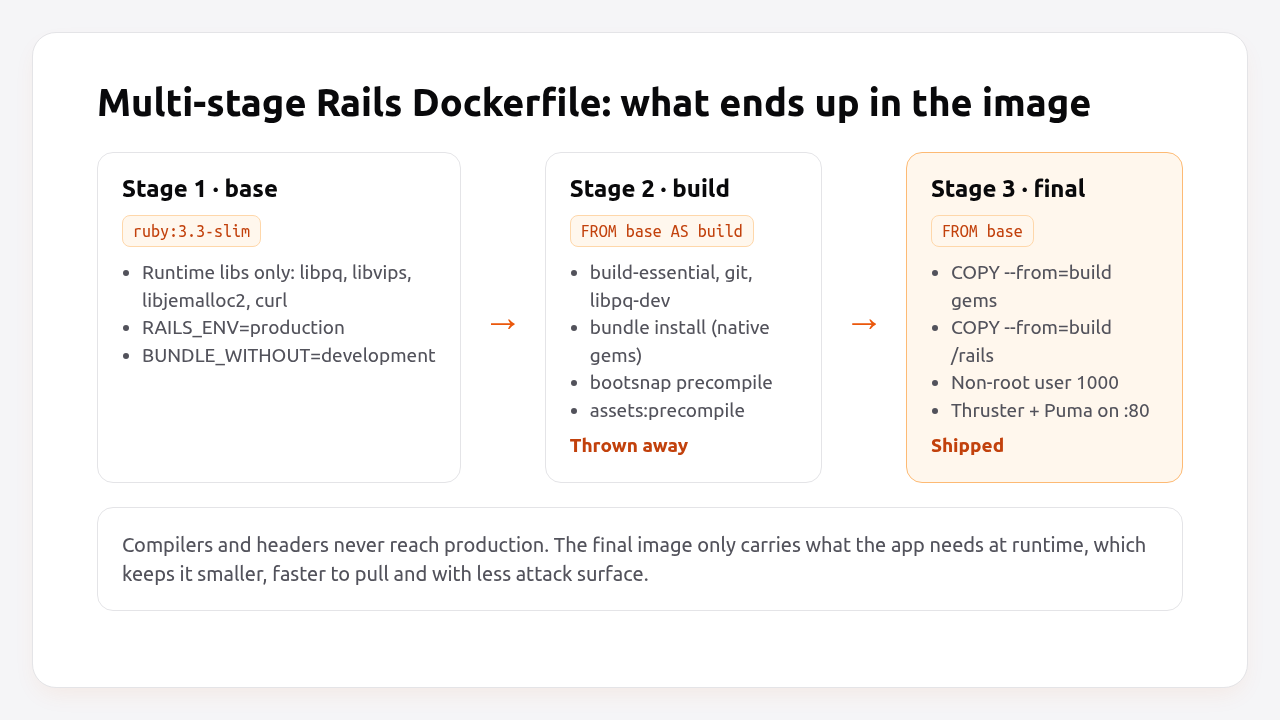
<p>The production Dockerfile has three stages: a <code class="language-plaintext highlighter-rouge">base</code> with runtime libraries, a <code class="language-plaintext highlighter-rouge">build</code> stage that compiles gems and assets, and a final stage that copies only the results. Here is the Rails 8 version for a PostgreSQL app, with comments on what each block is for.</p>

<p><img src="/assets/images/posts/dockerize-rails-app/multi-stage-dockerfile.png" alt="Multi-stage Rails Dockerfile: base, build and final stages" /></p>

<div class="language-dockerfile highlighter-rouge"><div class="highlight"><pre class="highlight"><code><span class="c"># Dockerfile</span>
<span class="c"># syntax=docker/dockerfile:1</span>
<span class="c"># check=error=true</span>

<span class="c"># Must match .ruby-version</span>
<span class="k">ARG</span><span class="s"> RUBY_VERSION=3.3.7</span>
<span class="k">FROM</span><span class="w"> </span><span class="s">docker.io/library/ruby:$RUBY_VERSION-slim</span><span class="w"> </span><span class="k">AS</span><span class="w"> </span><span class="s">base</span>

<span class="k">WORKDIR</span><span class="s"> /rails</span>

<span class="c"># Runtime packages only: what the app needs while it runs.</span>
<span class="k">RUN </span>apt-get update <span class="nt">-qq</span> <span class="o">&amp;&amp;</span> <span class="se">\
</span>    apt-get <span class="nb">install</span> <span class="nt">--no-install-recommends</span> <span class="nt">-y</span> curl libjemalloc2 libvips postgresql-client <span class="o">&amp;&amp;</span> <span class="se">\
</span>    <span class="nb">rm</span> <span class="nt">-rf</span> /var/lib/apt/lists /var/cache/apt/archives

<span class="k">ENV</span><span class="s"> RAILS_ENV="production" \</span>
    BUNDLE_DEPLOYMENT="1" \
    BUNDLE_PATH="/usr/local/bundle" \
    BUNDLE_WITHOUT="development"

# ---------- build stage: thrown away after the build ----------
<span class="k">FROM</span><span class="w"> </span><span class="s">base</span><span class="w"> </span><span class="k">AS</span><span class="w"> </span><span class="s">build</span>

<span class="c"># Compilers and headers for native gems (pg, nokogiri, bootsnap...).</span>
<span class="k">RUN </span>apt-get update <span class="nt">-qq</span> <span class="o">&amp;&amp;</span> <span class="se">\
</span>    apt-get <span class="nb">install</span> <span class="nt">--no-install-recommends</span> <span class="nt">-y</span> build-essential git libpq-dev libyaml-dev pkg-config <span class="o">&amp;&amp;</span> <span class="se">\
</span>    <span class="nb">rm</span> <span class="nt">-rf</span> /var/lib/apt/lists /var/cache/apt/archives

<span class="c"># Gemfile first: this layer is cached until dependencies change.</span>
<span class="k">COPY</span><span class="s"> Gemfile Gemfile.lock ./</span>
<span class="k">RUN </span>bundle <span class="nb">install</span> <span class="o">&amp;&amp;</span> <span class="se">\
</span>    <span class="nb">rm</span> <span class="nt">-rf</span> ~/.bundle/ <span class="s2">"</span><span class="k">${</span><span class="nv">BUNDLE_PATH</span><span class="k">}</span><span class="s2">"</span>/ruby/<span class="k">*</span>/cache <span class="s2">"</span><span class="k">${</span><span class="nv">BUNDLE_PATH</span><span class="k">}</span><span class="s2">"</span>/ruby/<span class="k">*</span>/bundler/gems/<span class="k">*</span>/.git <span class="o">&amp;&amp;</span> <span class="se">\
</span>    bundle <span class="nb">exec </span>bootsnap precompile <span class="nt">--gemfile</span>

<span class="c"># Now the application code.</span>
<span class="k">COPY</span><span class="s"> . .</span>

<span class="c"># Precompile bootsnap cache for faster boot.</span>
<span class="k">RUN </span>bundle <span class="nb">exec </span>bootsnap precompile app/ lib/

<span class="c"># Precompile assets without real credentials.</span>
<span class="k">RUN </span><span class="nv">SECRET_KEY_BASE_DUMMY</span><span class="o">=</span>1 ./bin/rails assets:precompile

<span class="c"># ---------- final stage: what ships ----------</span>
<span class="k">FROM</span><span class="s"> base</span>

<span class="k">COPY</span><span class="s"> --from=build "${BUNDLE_PATH}" "${BUNDLE_PATH}"</span>
<span class="k">COPY</span><span class="s"> --from=build /rails /rails</span>

<span class="c"># Run as a non-root user.</span>
<span class="k">RUN </span>groupadd <span class="nt">--system</span> <span class="nt">--gid</span> 1000 rails <span class="o">&amp;&amp;</span> <span class="se">\
</span>    useradd rails <span class="nt">--uid</span> 1000 <span class="nt">--gid</span> 1000 <span class="nt">--create-home</span> <span class="nt">--shell</span> /bin/bash <span class="o">&amp;&amp;</span> <span class="se">\
</span>    <span class="nb">chown</span> <span class="nt">-R</span> rails:rails db log storage tmp
<span class="k">USER</span><span class="s"> 1000:1000</span>

<span class="k">ENTRYPOINT</span><span class="s"> ["/rails/bin/docker-entrypoint"]</span>

<span class="c"># Thruster serves assets, compresses responses and proxies to Puma.</span>
<span class="k">EXPOSE</span><span class="s"> 80</span>
<span class="k">CMD</span><span class="s"> ["./bin/thrust", "./bin/rails", "server"]</span>
</code></pre></div></div>

<p>The choices that matter most:</p>

<ul>
  <li><strong><code class="language-plaintext highlighter-rouge">ruby:3.3.7-slim</code></strong> instead of the full <code class="language-plaintext highlighter-rouge">ruby:3.3.7</code> image. The full Debian image ships compilers and hundreds of packages you don’t need at runtime. On Docker Hub the slim variant is roughly a fifth of the compressed size.</li>
  <li><strong><code class="language-plaintext highlighter-rouge">BUNDLE_DEPLOYMENT=1</code></strong> makes Bundler refuse to run if <code class="language-plaintext highlighter-rouge">Gemfile.lock</code> is out of date, so the image always contains exactly the locked versions.</li>
  <li><strong><code class="language-plaintext highlighter-rouge">BUNDLE_WITHOUT=development</code></strong> skips development gems. Test gems are still installed unless you add <code class="language-plaintext highlighter-rouge">test</code> (<code class="language-plaintext highlighter-rouge">"development:test"</code>), which also shrinks the image.</li>
  <li><strong>Two <code class="language-plaintext highlighter-rouge">COPY</code> steps.</strong> Copying <code class="language-plaintext highlighter-rouge">Gemfile</code>/<code class="language-plaintext highlighter-rouge">Gemfile.lock</code> before the code means a change to a controller doesn’t invalidate the <code class="language-plaintext highlighter-rouge">bundle install</code> layer. This is the single biggest win for build time.</li>
  <li><strong><code class="language-plaintext highlighter-rouge">SECRET_KEY_BASE_DUMMY=1</code></strong> tells Rails to use a throwaway secret during <code class="language-plaintext highlighter-rouge">assets:precompile</code>, so you never pass <code class="language-plaintext highlighter-rouge">RAILS_MASTER_KEY</code> as a build argument where it would end up in the image history.</li>
  <li><strong><code class="language-plaintext highlighter-rouge">USER 1000:1000</code></strong> means a compromised process can’t write outside <code class="language-plaintext highlighter-rouge">db</code>, <code class="language-plaintext highlighter-rouge">log</code>, <code class="language-plaintext highlighter-rouge">storage</code> and <code class="language-plaintext highlighter-rouge">tmp</code>.</li>
</ul>

<h3 id="what-if-my-app-uses-node-yarn-or-jsbundling">What if my app uses Node, Yarn or jsbundling?</h3>

<p>If you use <code class="language-plaintext highlighter-rouge">jsbundling-rails</code> or <code class="language-plaintext highlighter-rouge">cssbundling-rails</code>, add Node to the build stage only. The final stage doesn’t need Node, because assets are already compiled:</p>

<div class="language-dockerfile highlighter-rouge"><div class="highlight"><pre class="highlight"><code><span class="c"># Dockerfile (build stage, after the apt-get install line)</span>
<span class="k">ARG</span><span class="s"> NODE_VERSION=22.11.0</span>
<span class="k">ARG</span><span class="s"> YARN_VERSION=1.22.22</span>
<span class="k">ENV</span><span class="s"> PATH=/usr/local/node/bin:$PATH</span>
<span class="k">RUN </span>curl <span class="nt">-sL</span> https://github.com/nodenv/node-build/archive/master.tar.gz | <span class="nb">tar </span>xz <span class="nt">-C</span> /tmp/ <span class="o">&amp;&amp;</span> <span class="se">\
</span>    /tmp/node-build-master/bin/node-build <span class="s2">"</span><span class="k">${</span><span class="nv">NODE_VERSION</span><span class="k">}</span><span class="s2">"</span> /usr/local/node <span class="o">&amp;&amp;</span> <span class="se">\
</span>    npm <span class="nb">install</span> <span class="nt">-g</span> yarn@<span class="nv">$YARN_VERSION</span> <span class="o">&amp;&amp;</span> <span class="se">\
</span>    <span class="nb">rm</span> <span class="nt">-rf</span> /tmp/node-build-master

<span class="k">COPY</span><span class="s"> package.json yarn.lock ./</span>
<span class="k">RUN </span>yarn <span class="nb">install</span> <span class="nt">--frozen-lockfile</span>
</code></pre></div></div>

<p>Then add <code class="language-plaintext highlighter-rouge">RUN rm -rf node_modules</code> after <code class="language-plaintext highlighter-rouge">assets:precompile</code>, so <code class="language-plaintext highlighter-rouge">node_modules</code> isn’t copied into the final stage with <code class="language-plaintext highlighter-rouge">/rails</code>.</p>

<h2 id="step-3-write-a-dockerignore-that-protects-secrets">Step 3: Write a .dockerignore that protects secrets</h2>

<p><code class="language-plaintext highlighter-rouge">.dockerignore</code> decides what <code class="language-plaintext highlighter-rouge">COPY . .</code> sends into the build. Without it you ship your <code class="language-plaintext highlighter-rouge">.git</code> history, your logs, your local <code class="language-plaintext highlighter-rouge">.env</code> and your <code class="language-plaintext highlighter-rouge">master.key</code> inside the image, where anyone who can pull it can read them.</p>

<div class="language-text highlighter-rouge"><div class="highlight"><pre class="highlight"><code># .dockerignore
/.git/
/.gitignore
/.github/

# Secrets: pass at runtime, never bake into the image
/.env*
!/.env.example
/config/master.key
/config/credentials/*.key

# Local state
/log/*
/tmp/*
!/log/.keep
!/tmp/.keep
/tmp/pids/*
/storage/*
!/storage/.keep
/tmp/storage/*

# Build artifacts rebuilt inside the image
/public/assets
/node_modules/
/app/assets/builds/*
!/app/assets/builds/.keep

# Dev tooling
/.devcontainer/
/.kamal/secrets*
/coverage/
/spec/
/test/
Dockerfile*
.dockerignore
</code></pre></div></div>

<p>Excluding <code class="language-plaintext highlighter-rouge">/spec/</code> and <code class="language-plaintext highlighter-rouge">/test/</code> is optional. Keep them if you run tests inside the image in CI.</p>

<p><em>Pro Tip: Check what actually ends up in the build context with <code class="language-plaintext highlighter-rouge">docker build --no-cache --progress=plain .</code> and look at the size of the “transferring context” line. If it’s hundreds of megabytes, something big is missing from <code class="language-plaintext highlighter-rouge">.dockerignore</code>. It’s usually <code class="language-plaintext highlighter-rouge">node_modules</code>, <code class="language-plaintext highlighter-rouge">tmp/cache</code> or a <code class="language-plaintext highlighter-rouge">storage/</code> folder full of uploads.</em></p>

<h2 id="step-4-the-entrypoint-script">Step 4: The entrypoint script</h2>

<p>The entrypoint runs before your <code class="language-plaintext highlighter-rouge">CMD</code>. In Rails 8 it does two things: enables jemalloc and prepares the database when the container starts the web server.</p>

<div class="language-bash highlighter-rouge"><div class="highlight"><pre class="highlight"><code><span class="c">#!/bin/bash -e</span>
<span class="c"># bin/docker-entrypoint</span>

<span class="c"># Enable jemalloc for reduced memory usage and latency.</span>
<span class="k">if</span> <span class="o">[</span> <span class="nt">-z</span> <span class="s2">"</span><span class="k">${</span><span class="nv">LD_PRELOAD</span><span class="p">+x</span><span class="k">}</span><span class="s2">"</span> <span class="o">]</span><span class="p">;</span> <span class="k">then
    </span><span class="nv">LD_PRELOAD</span><span class="o">=</span><span class="si">$(</span>find /usr/lib <span class="nt">-name</span> libjemalloc.so.2 <span class="nt">-print</span> <span class="nt">-quit</span><span class="si">)</span>
    <span class="nb">export </span>LD_PRELOAD
<span class="k">fi</span>

<span class="c"># If running the rails server then create or migrate existing database</span>
<span class="k">if</span> <span class="o">[</span> <span class="s2">"</span><span class="k">${</span><span class="p">@</span>:<span class="p"> -2</span>:1<span class="k">}</span><span class="s2">"</span> <span class="o">==</span> <span class="s2">"./bin/rails"</span> <span class="o">]</span> <span class="o">&amp;&amp;</span> <span class="o">[</span> <span class="s2">"</span><span class="k">${</span><span class="p">@</span>:<span class="p"> -1</span>:1<span class="k">}</span><span class="s2">"</span> <span class="o">==</span> <span class="s2">"server"</span> <span class="o">]</span><span class="p">;</span> <span class="k">then</span>
  ./bin/rails db:prepare
<span class="k">fi

</span><span class="nb">exec</span> <span class="s2">"</span><span class="k">${</span><span class="p">@</span><span class="k">}</span><span class="s2">"</span>
</code></pre></div></div>

<p><code class="language-plaintext highlighter-rouge">db:prepare</code> creates the database if it doesn’t exist and runs pending migrations otherwise. The condition means only the web container migrates; a worker running <code class="language-plaintext highlighter-rouge">./bin/jobs</code> from the same image skips it. If you run several web containers, they’ll all try to migrate at once. Rails takes an advisory lock so only one actually runs, but slow migrations will still block the other containers’ boot. For large apps, run migrations as a separate release step instead. We’ll cover that in the zero-downtime migrations guide.</p>

<p>The file must be executable and use Unix line endings:</p>

<div class="language-bash highlighter-rouge"><div class="highlight"><pre class="highlight"><code><span class="nb">chmod</span> +x bin/docker-entrypoint
git update-index <span class="nt">--chmod</span><span class="o">=</span>+x bin/docker-entrypoint
</code></pre></div></div>

<h2 id="step-5-run-it-with-docker-compose-and-postgresql">Step 5: Run it with Docker Compose and PostgreSQL</h2>

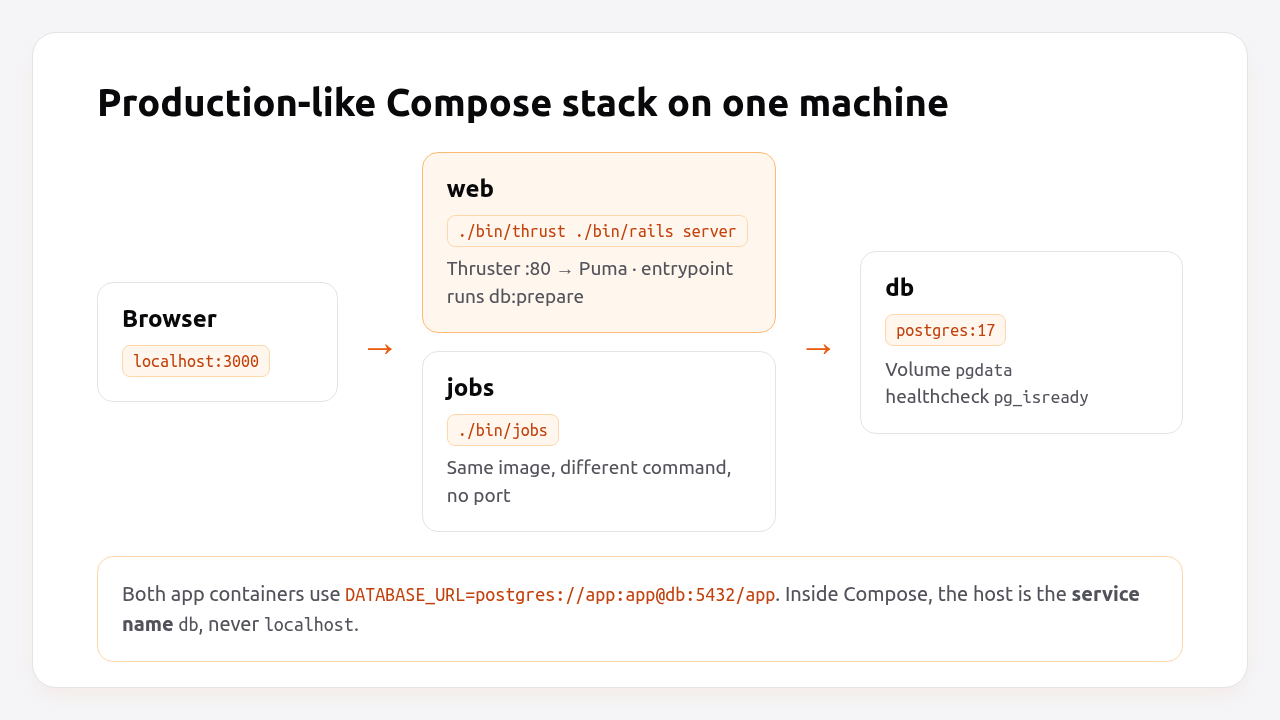
<p>Docker Compose runs the image next to PostgreSQL and a job worker, so you can test the production image locally exactly as it will run on a server.</p>

<p><img src="/assets/images/posts/dockerize-rails-app/docker-compose-rails-stack.png" alt="Docker Compose stack for Rails: web, jobs and PostgreSQL containers sharing DATABASE_URL" /></p>

<div class="language-yaml highlighter-rouge"><div class="highlight"><pre class="highlight"><code><span class="c1"># compose.yaml</span>
<span class="na">services</span><span class="pi">:</span>
  <span class="na">db</span><span class="pi">:</span>
    <span class="na">image</span><span class="pi">:</span> <span class="s">postgres:17</span>
    <span class="na">environment</span><span class="pi">:</span>
      <span class="na">POSTGRES_USER</span><span class="pi">:</span> <span class="s">app</span>
      <span class="na">POSTGRES_PASSWORD</span><span class="pi">:</span> <span class="s">app</span>
      <span class="na">POSTGRES_DB</span><span class="pi">:</span> <span class="s">app_production</span>
    <span class="na">volumes</span><span class="pi">:</span>
      <span class="pi">-</span> <span class="s">pgdata:/var/lib/postgresql/data</span>
    <span class="na">healthcheck</span><span class="pi">:</span>
      <span class="na">test</span><span class="pi">:</span> <span class="pi">[</span><span class="s2">"</span><span class="s">CMD-SHELL"</span><span class="pi">,</span> <span class="s2">"</span><span class="s">pg_isready</span><span class="nv"> </span><span class="s">-U</span><span class="nv"> </span><span class="s">app</span><span class="nv"> </span><span class="s">-d</span><span class="nv"> </span><span class="s">app_production"</span><span class="pi">]</span>
      <span class="na">interval</span><span class="pi">:</span> <span class="s">5s</span>
      <span class="na">timeout</span><span class="pi">:</span> <span class="s">3s</span>
      <span class="na">retries</span><span class="pi">:</span> <span class="m">10</span>

  <span class="na">web</span><span class="pi">:</span>
    <span class="na">build</span><span class="pi">:</span> <span class="s">.</span>
    <span class="na">image</span><span class="pi">:</span> <span class="s">myapp:latest</span>
    <span class="na">ports</span><span class="pi">:</span>
      <span class="pi">-</span> <span class="s2">"</span><span class="s">3000:80"</span>
    <span class="na">environment</span><span class="pi">:</span>
      <span class="na">RAILS_MASTER_KEY</span><span class="pi">:</span> <span class="s">${RAILS_MASTER_KEY}</span>
      <span class="na">DATABASE_URL</span><span class="pi">:</span> <span class="s">postgres://app:app@db:5432/app_production</span>
    <span class="na">depends_on</span><span class="pi">:</span>
      <span class="na">db</span><span class="pi">:</span>
        <span class="na">condition</span><span class="pi">:</span> <span class="s">service_healthy</span>
    <span class="na">healthcheck</span><span class="pi">:</span>
      <span class="na">test</span><span class="pi">:</span> <span class="pi">[</span><span class="s2">"</span><span class="s">CMD"</span><span class="pi">,</span> <span class="s2">"</span><span class="s">curl"</span><span class="pi">,</span> <span class="s2">"</span><span class="s">-fsS"</span><span class="pi">,</span> <span class="s2">"</span><span class="s">http://localhost:80/up"</span><span class="pi">]</span>
      <span class="na">interval</span><span class="pi">:</span> <span class="s">10s</span>
      <span class="na">timeout</span><span class="pi">:</span> <span class="s">3s</span>
      <span class="na">start_period</span><span class="pi">:</span> <span class="s">30s</span>

  <span class="na">jobs</span><span class="pi">:</span>
    <span class="na">image</span><span class="pi">:</span> <span class="s">myapp:latest</span>
    <span class="na">command</span><span class="pi">:</span> <span class="pi">[</span><span class="s2">"</span><span class="s">./bin/jobs"</span><span class="pi">]</span>
    <span class="na">environment</span><span class="pi">:</span>
      <span class="na">RAILS_MASTER_KEY</span><span class="pi">:</span> <span class="s">${RAILS_MASTER_KEY}</span>
      <span class="na">DATABASE_URL</span><span class="pi">:</span> <span class="s">postgres://app:app@db:5432/app_production</span>
    <span class="na">depends_on</span><span class="pi">:</span>
      <span class="na">web</span><span class="pi">:</span>
        <span class="na">condition</span><span class="pi">:</span> <span class="s">service_healthy</span>

<span class="na">volumes</span><span class="pi">:</span>
  <span class="na">pgdata</span><span class="pi">:</span>
</code></pre></div></div>

<p>Notes on this file:</p>

<ul>
  <li><strong><code class="language-plaintext highlighter-rouge">DATABASE_URL</code> uses <code class="language-plaintext highlighter-rouge">db</code> as the host</strong>, the Compose service name. Inside a container, <code class="language-plaintext highlighter-rouge">localhost</code> is the container itself.</li>
  <li><strong><code class="language-plaintext highlighter-rouge">depends_on</code> with <code class="language-plaintext highlighter-rouge">condition: service_healthy</code></strong> waits for <code class="language-plaintext highlighter-rouge">pg_isready</code> before Rails boots, so <code class="language-plaintext highlighter-rouge">db:prepare</code> doesn’t fail on a database that’s still starting.</li>
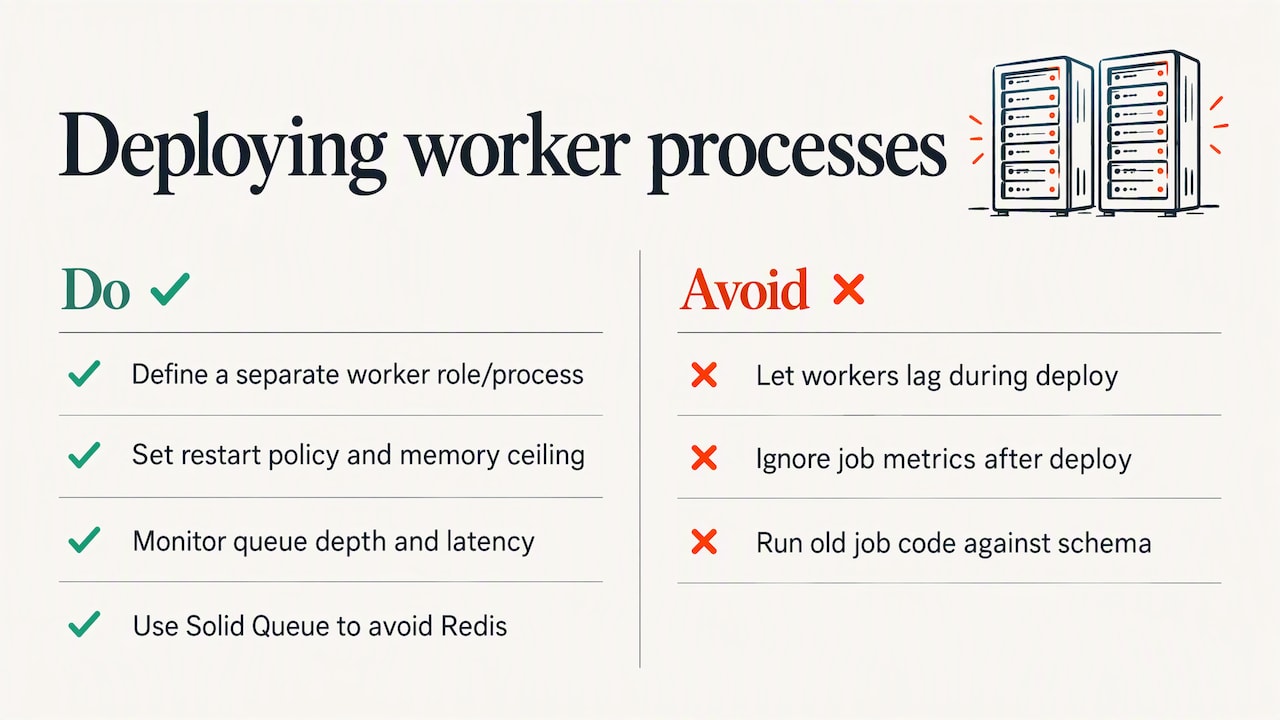
  <li><strong><code class="language-plaintext highlighter-rouge">jobs</code> reuses the image</strong> built for <code class="language-plaintext highlighter-rouge">web</code> and only changes the command. That’s the same pattern Kamal roles and Heroku process types use. See <a href="/rails/ruby/background-jobs/sidekiq/devops/enkihost/2026/10/07/rails-background-jobs-solid-queue-sidekiq-production.html">running Rails background jobs in production</a> for when a dedicated worker is worth it.</li>
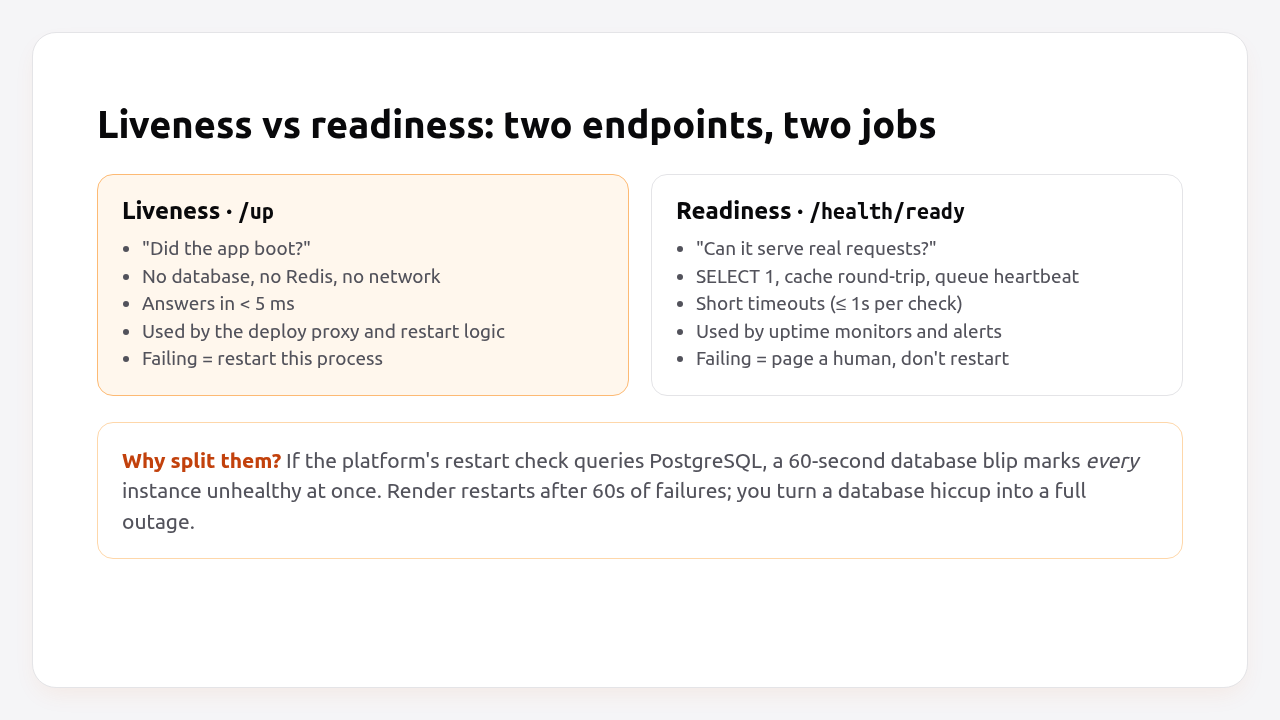
  <li><strong>The <code class="language-plaintext highlighter-rouge">web</code> health check hits <code class="language-plaintext highlighter-rouge">/up</code></strong>, the built-in Rails endpoint. The <a href="/rails/ruby/devops/enkihost/2026/10/08/rails-health-check-endpoint-guide.html">Rails health check guide</a> explains why it should stay shallow.</li>
  <li><strong>Rails 8 uses multiple databases for Solid Queue, Solid Cache and Solid Cable</strong> by default. With a single <code class="language-plaintext highlighter-rouge">DATABASE_URL</code>, point <code class="language-plaintext highlighter-rouge">config/database.yml</code>’s <code class="language-plaintext highlighter-rouge">queue</code>, <code class="language-plaintext highlighter-rouge">cache</code> and <code class="language-plaintext highlighter-rouge">cable</code> entries at the same server with different database names, or give each its own URL.</li>
</ul>

<p>For a Rails 8 app with a single PostgreSQL server, this <code class="language-plaintext highlighter-rouge">database.yml</code> production block works with the Compose file above:</p>

<div class="language-yaml highlighter-rouge"><div class="highlight"><pre class="highlight"><code><span class="c1"># config/database.yml</span>
<span class="na">production</span><span class="pi">:</span>
  <span class="na">primary</span><span class="pi">:</span> <span class="nl">&amp;primary_production</span>
    <span class="na">adapter</span><span class="pi">:</span> <span class="s">postgresql</span>
    <span class="na">encoding</span><span class="pi">:</span> <span class="s">unicode</span>
    <span class="na">pool</span><span class="pi">:</span> <span class="s">&lt;%= ENV.fetch("RAILS_MAX_THREADS") { 3 } %&gt;</span>
    <span class="na">url</span><span class="pi">:</span> <span class="s">&lt;%= ENV["DATABASE_URL"] %&gt;</span>
  <span class="na">cache</span><span class="pi">:</span>
    <span class="na">&lt;&lt;</span><span class="pi">:</span> <span class="nv">*primary_production</span>
    <span class="na">url</span><span class="pi">:</span> <span class="s">&lt;%= ENV["DATABASE_URL"].to_s.sub(%r{/([^/?]+)(\?|$)}, '/\1_cache\2') %&gt;</span>
    <span class="na">migrations_paths</span><span class="pi">:</span> <span class="s">db/cache_migrate</span>
  <span class="na">queue</span><span class="pi">:</span>
    <span class="na">&lt;&lt;</span><span class="pi">:</span> <span class="nv">*primary_production</span>
    <span class="na">url</span><span class="pi">:</span> <span class="s">&lt;%= ENV["DATABASE_URL"].to_s.sub(%r{/([^/?]+)(\?|$)}, '/\1_queue\2') %&gt;</span>
    <span class="na">migrations_paths</span><span class="pi">:</span> <span class="s">db/queue_migrate</span>
  <span class="na">cable</span><span class="pi">:</span>
    <span class="na">&lt;&lt;</span><span class="pi">:</span> <span class="nv">*primary_production</span>
    <span class="na">url</span><span class="pi">:</span> <span class="s">&lt;%= ENV["DATABASE_URL"].to_s.sub(%r{/([^/?]+)(\?|$)}, '/\1_cable\2') %&gt;</span>
    <span class="na">migrations_paths</span><span class="pi">:</span> <span class="s">db/cable_migrate</span>
</code></pre></div></div>

<p><code class="language-plaintext highlighter-rouge">db:prepare</code> creates <code class="language-plaintext highlighter-rouge">app_production</code>, <code class="language-plaintext highlighter-rouge">app_production_cache</code>, <code class="language-plaintext highlighter-rouge">app_production_queue</code> and <code class="language-plaintext highlighter-rouge">app_production_cable</code> on first boot.</p>

<h2 id="step-6-verify-it-works">Step 6: Verify it works</h2>

<p>Build the image, start the stack, and check that the app answers, the database migrated and the worker is running.</p>

<div class="language-bash highlighter-rouge"><div class="highlight"><pre class="highlight"><code><span class="nb">export </span><span class="nv">RAILS_MASTER_KEY</span><span class="o">=</span><span class="si">$(</span><span class="nb">cat </span>config/master.key<span class="si">)</span>
docker compose build
docker compose up <span class="nt">-d</span>
docker compose ps
</code></pre></div></div>

<p>You should see all three services as <code class="language-plaintext highlighter-rouge">running</code>, with <code class="language-plaintext highlighter-rouge">db</code> and <code class="language-plaintext highlighter-rouge">web</code> marked <code class="language-plaintext highlighter-rouge">(healthy)</code>:</p>

<div class="language-text highlighter-rouge"><div class="highlight"><pre class="highlight"><code>NAME          SERVICE   STATUS
myapp-db-1    db        Up 40 seconds (healthy)
myapp-web-1   web       Up 30 seconds (healthy)
myapp-jobs-1  jobs      Up 5 seconds
</code></pre></div></div>

<p>Then check the endpoints and the logs:</p>

<div class="language-bash highlighter-rouge"><div class="highlight"><pre class="highlight"><code>curl <span class="nt">-i</span> http://localhost:3000/up
<span class="c"># HTTP/1.1 200 OK</span>

docker compose logs web | <span class="nb">grep</span> <span class="nt">-E</span> <span class="s2">"Migrating|Listening"</span>
docker compose <span class="nb">exec </span>web ./bin/rails runner <span class="s1">'puts ActiveRecord::Base.connection.select_value("SELECT version()")'</span>
docker compose <span class="nb">exec </span>web sh <span class="nt">-c</span> <span class="s1">'grep -l jemalloc /proc/[0-9]*/maps'</span>
<span class="c"># /proc/7/maps   &lt;- the Puma process has jemalloc loaded</span>
</code></pre></div></div>

<p>Finally, check the image itself:</p>

<div class="language-bash highlighter-rouge"><div class="highlight"><pre class="highlight"><code>docker image <span class="nb">ls </span>myapp
docker <span class="nb">history </span>myapp:latest <span class="nt">--format</span> <span class="s2">"{{.Size}}</span><span class="se">\t</span><span class="s2">{{.CreatedBy}}"</span> | <span class="nb">head</span> <span class="nt">-15</span>
docker run <span class="nt">--rm</span> myapp:latest <span class="nb">ls </span>config/ | <span class="nb">grep</span> <span class="nt">-c</span> master.key
<span class="c"># 0</span>
</code></pre></div></div>

<p>The last command should print <code class="language-plaintext highlighter-rouge">0</code>. If it prints <code class="language-plaintext highlighter-rouge">1</code>, your master key is baked into the image. Fix <code class="language-plaintext highlighter-rouge">.dockerignore</code> before you push it anywhere.</p>

<h2 id="how-do-i-make-a-rails-docker-image-smaller-and-faster-to-build">How do I make a Rails Docker image smaller and faster to build?</h2>

<p>Order layers from least to most frequently changed, use a slim base, keep build tools in a separate stage, and cache gem and package downloads with BuildKit mounts. Together these usually turn a 5-minute rebuild into well under a minute when only app code changed.</p>

<table>
  <thead>
    <tr>
      <th>Technique</th>
      <th>Effect on size</th>
      <th>Effect on rebuild time</th>
      <th>Effort</th>
    </tr>
  </thead>
  <tbody>
    <tr>
      <td><code class="language-plaintext highlighter-rouge">-slim</code> base image</td>
      <td>Large reduction</td>
      <td>Faster pulls</td>
      <td>One line</td>
    </tr>
    <tr>
      <td>Multi-stage build (no compilers in final stage)</td>
      <td>Large reduction</td>
      <td>None</td>
      <td>Already in the Rails template</td>
    </tr>
    <tr>
      <td><code class="language-plaintext highlighter-rouge">COPY Gemfile*</code> before <code class="language-plaintext highlighter-rouge">COPY .</code></td>
      <td>None</td>
      <td>Large: skips <code class="language-plaintext highlighter-rouge">bundle install</code> on code changes</td>
      <td>Already in the Rails template</td>
    </tr>
    <tr>
      <td>Remove gem caches and <code class="language-plaintext highlighter-rouge">.git</code> dirs after install</td>
      <td>Medium</td>
      <td>None</td>
      <td>Already in the Rails template</td>
    </tr>
    <tr>
      <td><code class="language-plaintext highlighter-rouge">BUNDLE_WITHOUT="development:test"</code></td>
      <td>Small to medium</td>
      <td>Small</td>
      <td>One line</td>
    </tr>
    <tr>
      <td>BuildKit cache mounts for <code class="language-plaintext highlighter-rouge">apt</code> and gems</td>
      <td>None</td>
      <td>Medium on dependency changes</td>
      <td><code class="language-plaintext highlighter-rouge">--cache</code> flag in the generator</td>
    </tr>
    <tr>
      <td>Good <code class="language-plaintext highlighter-rouge">.dockerignore</code></td>
      <td>Small to large</td>
      <td>Faster context upload</td>
      <td>Copy the file above</td>
    </tr>
    <tr>
      <td><code class="language-plaintext highlighter-rouge">bootsnap precompile</code></td>
      <td>Slightly larger</td>
      <td>None (faster <em>boot</em>, not build)</td>
      <td>Already in the Rails template</td>
    </tr>
  </tbody>
</table>

<p>If you want BuildKit cache mounts without the generator, replace the gem install step:</p>

<div class="language-dockerfile highlighter-rouge"><div class="highlight"><pre class="highlight"><code><span class="c"># Dockerfile (build stage)</span>
<span class="k">COPY</span><span class="s"> Gemfile Gemfile.lock ./</span>
<span class="k">RUN </span><span class="nt">--mount</span><span class="o">=</span><span class="nb">type</span><span class="o">=</span>cache,id<span class="o">=</span>bundle,target<span class="o">=</span>/srv/vendor <span class="se">\
</span>    bundle config <span class="nb">set </span>app_config .bundle <span class="o">&amp;&amp;</span> <span class="se">\
</span>    bundle config <span class="nb">set </span>path /srv/vendor <span class="o">&amp;&amp;</span> <span class="se">\
</span>    bundle <span class="nb">install</span> <span class="o">&amp;&amp;</span> <span class="se">\
</span>    <span class="nb">mkdir</span> <span class="nt">-p</span> vendor <span class="o">&amp;&amp;</span> <span class="se">\
</span>    bundle config <span class="nb">set </span>path vendor <span class="o">&amp;&amp;</span> <span class="se">\
</span>    <span class="nb">cp</span> <span class="nt">-ar</span> /srv/vendor <span class="nb">.</span> <span class="o">&amp;&amp;</span> <span class="se">\
</span>    bundle <span class="nb">exec </span>bootsnap precompile <span class="nt">--gemfile</span>
</code></pre></div></div>

<p>On CI, use <code class="language-plaintext highlighter-rouge">docker buildx build --cache-from type=registry,ref=ghcr.io/me/myapp:buildcache --cache-to type=registry,ref=ghcr.io/me/myapp:buildcache,mode=max</code> so each runner reuses layers from the last build.</p>

<p><em>Pro Tip: Don’t chase the smallest possible image with Alpine. musl libc means many native gems compile from source, <code class="language-plaintext highlighter-rouge">nokogiri</code> and <code class="language-plaintext highlighter-rouge">grpc</code> builds get slow, and you’ll debug subtle DNS and locale differences. Debian slim is the pragmatic default.</em></p>

<h2 id="how-heroku-render-flyio-upsun-and-enkihost-run-rails-containers">How Heroku, Render, Fly.io, Upsun and Enkihost run Rails containers</h2>

<p>All five platforms can run a Rails container, but they differ in who writes the Dockerfile and who builds it. Fly.io generates one for you, Render builds yours with BuildKit, Heroku prefers buildpacks and treats containers as an alternative, and Upsun runs prebuilt images from a public registry.</p>

<table>
  <thead>
    <tr>
      <th>Platform</th>
      <th>Default for Rails</th>
      <th>Dockerfile support</th>
      <th>Who builds</th>
      <th>Notes</th>
    </tr>
  </thead>
  <tbody>
    <tr>
      <td><strong>Heroku</strong></td>
      <td>Buildpacks (no Dockerfile)</td>
      <td><code class="language-plaintext highlighter-rouge">heroku.yml</code> or <code class="language-plaintext highlighter-rouge">heroku container:push</code></td>
      <td>Heroku or you</td>
      <td>Container apps don’t get buildpack conveniences like automatic Ruby version detection</td>
    </tr>
    <tr>
      <td><strong>Render</strong></td>
      <td>Native Ruby runtime</td>
      <td><code class="language-plaintext highlighter-rouge">runtime: docker</code></td>
      <td>Render, using BuildKit</td>
      <td>Env vars become build args, so don’t reference secrets in <code class="language-plaintext highlighter-rouge">ARG</code>; use secret files</td>
    </tr>
    <tr>
      <td><strong>Fly.io</strong></td>
      <td>Dockerfile</td>
      <td><code class="language-plaintext highlighter-rouge">fly launch</code> runs the <code class="language-plaintext highlighter-rouge">dockerfile-rails</code> generator</td>
      <td>Fly remote builder or local Docker</td>
      <td>Same generator Rails uses, so it reads your Gemfile</td>
    </tr>
    <tr>
      <td><strong>Upsun</strong></td>
      <td>Composable/runtime images</td>
      <td>Prebuilt images from a public registry</td>
      <td>You (outside Upsun)</td>
      <td>Image runs as-is; Upsun doesn’t add packages</td>
    </tr>
    <tr>
      <td><strong>Kamal</strong></td>
      <td>Dockerfile</td>
      <td>Required</td>
      <td>You, locally or on a remote builder</td>
      <td>Builds, pushes and runs your image over SSH</td>
    </tr>
    <tr>
      <td><strong>Enkihost</strong></td>
      <td>Dockerfile from your repo</td>
      <td>Used as-is; generated for Rails, Sinatra and Jekyll if missing</td>
      <td>Enkihost, on every push to the connected GitHub branch</td>
      <td>Rails apps are routed to port 3000</td>
    </tr>
  </tbody>
</table>

<p>The common thread is that the Rails-generated Dockerfile works on every one of them with little or no change. That’s a strong reason to keep it close to the template rather than hand-crafting something clever. If you deploy with Kamal, our <a href="/rails/ruby/deployment/kamal/devops/enkihost/2026/10/05/minimal-rails-deployments-with-kamal-2-and-thruster.html">Kamal 2 and Thruster guide</a> picks up exactly where this one ends.</p>

<h2 id="troubleshooting-rails-docker-builds">Troubleshooting Rails Docker builds</h2>

<p>Most Rails Docker failures come from four places: a lockfile without the Linux platform, credentials needed at build time, a CPU architecture mismatch, or a container trying to reach <code class="language-plaintext highlighter-rouge">localhost</code>.</p>

<h3 id="your-bundle-only-supports-platforms-arm64-darwin-24"><code class="language-plaintext highlighter-rouge">Your bundle only supports platforms ["arm64-darwin-24"]</code></h3>

<div class="language-text highlighter-rouge"><div class="highlight"><pre class="highlight"><code>Your bundle only supports platforms ["arm64-darwin-24"] but your local platform is x86_64-linux.
Add the current platform to the lockfile with `bundle lock --add-platform x86_64-linux` and try again.
</code></pre></div></div>

<p>Your <code class="language-plaintext highlighter-rouge">Gemfile.lock</code> was generated on a Mac and doesn’t list Linux. Add the platforms you build for and commit the lockfile:</p>

<div class="language-bash highlighter-rouge"><div class="highlight"><pre class="highlight"><code>bundle lock <span class="nt">--add-platform</span> x86_64-linux aarch64-linux
</code></pre></div></div>

<h3 id="missing-secret_key_base-for-production-environment"><code class="language-plaintext highlighter-rouge">Missing secret_key_base for 'production' environment</code></h3>

<div class="language-text highlighter-rouge"><div class="highlight"><pre class="highlight"><code>ArgumentError: Missing `secret_key_base` for 'production' environment, set this string with `bin/rails credentials:edit`
</code></pre></div></div>

<p>This appears during <code class="language-plaintext highlighter-rouge">assets:precompile</code>. Make sure the line is <code class="language-plaintext highlighter-rouge">RUN SECRET_KEY_BASE_DUMMY=1 ./bin/rails assets:precompile</code>. If an initializer reads <code class="language-plaintext highlighter-rouge">Rails.application.credentials.some_api_key!</code> at boot, guard it so the build can load the app without credentials, or move it into a lazy method.</p>

<h3 id="exec-format-error"><code class="language-plaintext highlighter-rouge">exec format error</code></h3>

<div class="language-text highlighter-rouge"><div class="highlight"><pre class="highlight"><code>exec /rails/bin/docker-entrypoint: exec format error
</code></pre></div></div>

<p>You built an <code class="language-plaintext highlighter-rouge">arm64</code> image on Apple Silicon and ran it on an <code class="language-plaintext highlighter-rouge">amd64</code> server, or the other way round. Build for the target platform:</p>

<div class="language-bash highlighter-rouge"><div class="highlight"><pre class="highlight"><code>docker buildx build <span class="nt">--platform</span> linux/amd64 <span class="nt">-t</span> myapp:latest <span class="nb">.</span>
</code></pre></div></div>

<h3 id="no-such-file-or-directory-for-an-entrypoint-that-exists"><code class="language-plaintext highlighter-rouge">no such file or directory</code> for an entrypoint that exists</h3>

<div class="language-text highlighter-rouge"><div class="highlight"><pre class="highlight"><code>exec /rails/bin/docker-entrypoint: no such file or directory
</code></pre></div></div>

<p>The file has Windows (CRLF) line endings, so the kernel looks for <code class="language-plaintext highlighter-rouge">/bin/bash\r</code>. Convert it with <code class="language-plaintext highlighter-rouge">sed -i 's/\r$//' bin/docker-entrypoint</code> and add <code class="language-plaintext highlighter-rouge">* text=auto eol=lf</code> to <code class="language-plaintext highlighter-rouge">.gitattributes</code>.</p>

<h3 id="connection-to-server-at-localhost--failed"><code class="language-plaintext highlighter-rouge">connection to server at "localhost" ... failed</code></h3>

<div class="language-text highlighter-rouge"><div class="highlight"><pre class="highlight"><code>ActiveRecord::ConnectionNotEstablished: connection to server at "127.0.0.1", port 5432 failed: Connection refused
</code></pre></div></div>

<p>Inside a container, <code class="language-plaintext highlighter-rouge">localhost</code> is the container. Use the Compose service name (<code class="language-plaintext highlighter-rouge">db</code>) or the database host your platform gives you in <code class="language-plaintext highlighter-rouge">DATABASE_URL</code>.</p>

<h3 id="permission-denied--rb_sysopen---railstmppidsserverpid"><code class="language-plaintext highlighter-rouge">Permission denied @ rb_sysopen - /rails/tmp/pids/server.pid</code></h3>

<p>The app runs as user 1000 but a directory it writes to is owned by root. Add the directory to the <code class="language-plaintext highlighter-rouge">chown -R rails:rails db log storage tmp</code> line, or mount a volume with the right owner.</p>

<h2 id="author-perspective-the-dockerfile-is-the-deploy-contract">Author Perspective: the Dockerfile is the deploy contract</h2>

<p>I used to treat the Dockerfile as plumbing, something I copied once and forgot about. Now I see it as the contract between my app and wherever it runs. When a deploy breaks, it’s almost always because that contract changed without anyone noticing: a new gem with a native extension, a credential read at boot, a lockfile missing Linux. My habit is to build the production image locally with <code class="language-plaintext highlighter-rouge">docker compose up</code> before every dependency upgrade. It takes three minutes and has saved me from more failed deploys than any CI check.</p>

<h2 id="running-a-rails-app-on-enkihost">Running a Rails app on Enkihost</h2>

<p>A Dockerfile gives you a portable app. You still need somewhere to run it, a database next to it, and a way to ship new versions without downtime. That’s the part Enkihost takes care of, so the Rails conventions from this guide carry over as they are.</p>

<p><img src="/assets/images/posts/dockerize-rails-app/enkihost.jpg" alt="Enkihost" /></p>

<ul>
  <li><strong>PostgreSQL and Redis add-ons</strong> inject <code class="language-plaintext highlighter-rouge">DATABASE_URL</code> and <code class="language-plaintext highlighter-rouge">REDIS_URL</code>, the same variables the Compose file above uses, so your <code class="language-plaintext highlighter-rouge">database.yml</code> doesn’t change between your laptop and production.</li>
  <li><strong>Zero-downtime deploys</strong> switch to the new release without dropping in-flight requests.</li>
  <li><strong>Per-app resource isolation</strong> with allocated memory and CPU, so a jemalloc-tuned Puma process gets the resources you planned for.</li>
</ul>

<p>Rails and Sinatra apps run on Ignite (5 EUR per month after a 14-day free trial, with PostgreSQL and Redis included) or Blaze (16 EUR per month, with high availability and autoscaling). The free Spark plan is for Jekyll sites. See <a href="https://enkihost.com/" target="_blank">enkihost.com</a>.</p>

<h2 id="faq">FAQ</h2>

<h3 id="does-rails-generate-a-dockerfile-automatically">Does Rails generate a Dockerfile automatically?</h3>

<p>Yes. Since Rails 7.1, rails new creates a production Dockerfile, a .dockerignore and a bin/docker-entrypoint script. Rails 8 versions add Thruster and jemalloc. For apps created before 7.1, the dockerfile-rails gem generates the same files with bin/rails generate dockerfile.</p>

<h3 id="should-i-use-docker-for-rails-development-too">Should I use Docker for Rails development too?</h3>

<p>It’s optional. The production Dockerfile is not meant for development because it excludes development gems and precompiles assets. Rails 7.2 and later can generate a dev container with rails devcontainer, which is the better route if you want a containerized development environment.</p>

<h3 id="how-big-should-a-rails-docker-image-be">How big should a Rails Docker image be?</h3>

<p>A typical Rails app built from the Rails 8 template on ruby slim usually lands in the low hundreds of megabytes uncompressed, depending mostly on native gems and system libraries like libvips. If your image is over 1 GB, check for compilers in the final stage, node_modules, test gems or a missing .dockerignore.</p>

<h3 id="where-should-rails_master_key-go-when-using-docker">Where should RAILS_MASTER_KEY go when using Docker?</h3>

<p>Pass RAILS_MASTER_KEY as a runtime environment variable or secret, never as a build argument and never copied into the image. Use SECRET_KEY_BASE_DUMMY=1 during assets:precompile so the build itself needs no credentials.</p>

<h3 id="can-i-use-alpine-instead-of-debian-slim-for-rails">Can I use Alpine instead of Debian slim for Rails?</h3>

<p>You can, but it rarely pays off. Alpine uses musl libc, so many native gems compile from source, builds get slower, and subtle differences in DNS and locale handling cause hard-to-debug issues. Debian slim images are only modestly larger and work with precompiled gems.</p>

<h2 id="sources">Sources</h2>

<ul>
  <li><a href="https://guides.rubyonrails.org/getting_started_with_devcontainer.html" target="_blank">Getting Started with Dev Containers and Docker — Rails Guides</a></li>
  <li><a href="https://github.com/rails/rails/blob/main/railties/lib/rails/generators/rails/app/templates/Dockerfile.tt" target="_blank">rails/rails: Dockerfile template (railties) — GitHub</a></li>
  <li><a href="https://github.com/fly-apps/dockerfile-rails" target="_blank">fly-apps/dockerfile-rails — GitHub</a></li>
  <li><a href="https://docs.docker.com/reference/dockerfile/" target="_blank">Dockerfile reference — Docker Docs</a></li>
  <li><a href="https://docs.docker.com/build/cache/optimize/" target="_blank">Build cache and cache mounts — Docker Docs</a></li>
  <li><a href="https://hub.docker.com/_/ruby" target="_blank">ruby official image (slim variants) — Docker Hub</a></li>
  <li><a href="https://render.com/docs/docker" target="_blank">Docker on Render — Render Docs</a></li>
  <li><a href="https://devcenter.heroku.com/articles/container-registry-and-runtime" target="_blank">Container Registry &amp; Runtime (Docker Deploys) — Heroku Dev Center</a></li>
  <li><a href="https://fly.io/docs/rails/getting-started/" target="_blank">Rails on Fly.io: Getting started — Fly Docs</a></li>
  <li><a href="https://docs.upsun.com/create-apps/app-reference.html" target="_blank">Choose an image type — Upsun Docs</a></li>
</ul>

<!-- jsonld -->
<script type="application/ld+json">
{
  "@context": "https://schema.org",
  "@type": "TechArticle",
  "headline": "How to Dockerize a Rails App: A Production Dockerfile, Step by Step",
  "description": "Dockerize a Rails app for production: a multi-stage Dockerfile, .dockerignore, entrypoint, Docker Compose with PostgreSQL, and fixes for common build errors.",
  "datePublished": "2026-10-09T09:00:00+02:00",
  "dateModified": "2026-10-09T09:00:00+02:00",
  "author": {
    "@type": "Person",
    "name": "Albert Oliva"
  },
  "publisher": {
    "@type": "Organization",
    "name": "Enkihost Blog",
    "url": "https://blog.enkihost.com/"
  },
  "mainEntityOfPage": "https://blog.enkihost.com/rails/ruby/docker/devops/enkihost/2026/10/09/dockerize-rails-app-production-dockerfile.html",
  "keywords": "rails, ruby, docker, devops, enkihost",
  "image": "https://blog.enkihost.com/assets/images/posts/dockerize-rails-app/hero.png"
}
</script>

<script type="application/ld+json">
{
  "@context": "https://schema.org",
  "@type": "FAQPage",
  "mainEntity": [
    {
      "@type": "Question",
      "name": "Does Rails generate a Dockerfile automatically?",
      "acceptedAnswer": {
        "@type": "Answer",
        "text": "Yes. Since Rails 7.1, rails new creates a production Dockerfile, a .dockerignore and a bin/docker-entrypoint script. Rails 8 versions add Thruster and jemalloc. For apps created before 7.1, the dockerfile-rails gem generates the same files with bin/rails generate dockerfile."
      }
    },
    {
      "@type": "Question",
      "name": "Should I use Docker for Rails development too?",
      "acceptedAnswer": {
        "@type": "Answer",
        "text": "It's optional. The production Dockerfile is not meant for development because it excludes development gems and precompiles assets. Rails 7.2 and later can generate a dev container with rails devcontainer, which is the better route if you want a containerized development environment."
      }
    },
    {
      "@type": "Question",
      "name": "How big should a Rails Docker image be?",
      "acceptedAnswer": {
        "@type": "Answer",
        "text": "A typical Rails app built from the Rails 8 template on ruby slim usually lands in the low hundreds of megabytes uncompressed, depending mostly on native gems and system libraries like libvips. If your image is over 1 GB, check for compilers in the final stage, node_modules, test gems or a missing .dockerignore."
      }
    },
    {
      "@type": "Question",
      "name": "Where should RAILS_MASTER_KEY go when using Docker?",
      "acceptedAnswer": {
        "@type": "Answer",
        "text": "Pass RAILS_MASTER_KEY as a runtime environment variable or secret, never as a build argument and never copied into the image. Use SECRET_KEY_BASE_DUMMY=1 during assets:precompile so the build itself needs no credentials."
      }
    },
    {
      "@type": "Question",
      "name": "Can I use Alpine instead of Debian slim for Rails?",
      "acceptedAnswer": {
        "@type": "Answer",
        "text": "You can, but it rarely pays off. Alpine uses musl libc, so many native gems compile from source, builds get slower, and subtle differences in DNS and locale handling cause hard-to-debug issues. Debian slim images are only modestly larger and work with precompiled gems."
      }
    }
  ]
}
</script>]]></content><author><name></name></author><category term="rails" /><category term="ruby" /><category term="docker" /><category term="devops" /><category term="enkihost" /><summary type="html"><![CDATA[Dockerize a Rails app for production: a multi-stage Dockerfile, .dockerignore, entrypoint, Docker Compose with PostgreSQL, and fixes for common build errors.]]></summary></entry><entry><title type="html">Rails Health Check: Build /up and Readiness Endpoints That Don’t Lie</title><link href="https://blog.enkihost.com/rails/ruby/devops/enkihost/2026/10/08/rails-health-check-endpoint-guide.html" rel="alternate" type="text/html" title="Rails Health Check: Build /up and Readiness Endpoints That Don’t Lie" /><published>2026-10-08T07:00:00+00:00</published><updated>2026-10-08T07:00:00+00:00</updated><id>https://blog.enkihost.com/rails/ruby/devops/enkihost/2026/10/08/rails-health-check-endpoint-guide</id><content type="html" xml:base="https://blog.enkihost.com/rails/ruby/devops/enkihost/2026/10/08/rails-health-check-endpoint-guide.html"><![CDATA[<p><img src="/assets/images/posts/rails-health-check/hero.png" alt="Isometric illustration of containers on a deploy platform, the new one marked healthy, next to a server and a heartbeat monitor" /></p>

<p>A Rails health check is the endpoint your proxy or platform polls to decide whether a container may receive traffic. Rails 7.1+ ships one at <code class="language-plaintext highlighter-rouge">/up</code>, but it only proves the app booted. It does not check the database, the cache or the job queue. This guide shows how to keep <code class="language-plaintext highlighter-rouge">/up</code> as a fast liveness check, add a deep readiness endpoint next to it, and wire both into Kamal, Render and Fly.io without turning a database hiccup into a full outage.</p>

<!--more-->

<hr />

<blockquote>
  <p><strong>TL;DR</strong></p>

  <ul>
    <li>Rails 7.1+ generates <code class="language-plaintext highlighter-rouge">get "up" =&gt; "rails/health#show"</code>, which returns 200 if the app boots and 500 if it raises on boot. It never touches the database.</li>
    <li>Keep <code class="language-plaintext highlighter-rouge">/up</code> shallow and use it for deploy gating and restarts. Add a separate <code class="language-plaintext highlighter-rouge">/health/ready</code> that runs <code class="language-plaintext highlighter-rouge">SELECT 1</code>, a cache round-trip and a queue heartbeat check, each with a short timeout.</li>
    <li>Never put a database check on the endpoint that triggers restarts: Render restarts an instance after 60 seconds of failures, so a database blip would restart every instance at once.</li>
    <li>Exclude the health path from <code class="language-plaintext highlighter-rouge">force_ssl</code> redirects and host authorization, or the check fails with a 301 or a “Blocked hosts” 403 while the app is fine.</li>
    <li>Point an external uptime monitor at the deep endpoint; that’s what pages you when PostgreSQL or Redis go away.</li>
  </ul>
</blockquote>

<hr />

<h2 id="table-of-contents">Table of Contents</h2>

<ul>
  <li><a href="#what-does-the-built-in-rails-health-check-do">What does the built-in Rails health check do?</a></li>
  <li><a href="#prerequisites">Prerequisites</a></li>
  <li><a href="#step-1-make-sure-up-is-reachable-in-production">Step 1: Make sure /up is reachable in production</a></li>
  <li><a href="#step-2-build-a-deep-readiness-endpoint">Step 2: Build a deep readiness endpoint</a></li>
  <li><a href="#step-3-wire-the-health-check-into-your-deploy-tool">Step 3: Wire the health check into your deploy tool</a></li>
  <li><a href="#step-4-verify-it-works">Step 4: Verify it works</a></li>
  <li><a href="#how-heroku-render-flyio-upsun-and-enkihost-handle-health-checks">How Heroku, Render, Fly.io, Upsun and Enkihost handle health checks</a></li>
  <li><a href="#troubleshooting-rails-health-check-failures">Troubleshooting Rails health check failures</a></li>
  <li><a href="#author-perspective-the-health-check-that-took-us-down">Author Perspective: the health check that took us down</a></li>
  <li><a href="#health-checks-and-zero-downtime-deploys-on-enkihost">Health checks and zero-downtime deploys on Enkihost</a></li>
  <li><a href="#faq">FAQ</a></li>
  <li><a href="#sources">Sources</a></li>
</ul>

<h2 id="what-does-the-built-in-rails-health-check-do">What does the built-in Rails health check do?</h2>

<p>The built-in Rails health check returns HTTP 200 when the application has booted without raising, and HTTP 500 when it hasn’t. That’s all it does. It’s a liveness signal, not proof that your app can serve real requests.</p>

<p>Every app generated with Rails 7.1 or later has this in <code class="language-plaintext highlighter-rouge">config/routes.rb</code>:</p>

<div class="language-ruby highlighter-rouge"><div class="highlight"><pre class="highlight"><code><span class="c1"># config/routes.rb</span>
<span class="no">Rails</span><span class="p">.</span><span class="nf">application</span><span class="p">.</span><span class="nf">routes</span><span class="p">.</span><span class="nf">draw</span> <span class="k">do</span>
  <span class="n">get</span> <span class="s2">"up"</span> <span class="o">=&gt;</span> <span class="s2">"rails/health#show"</span><span class="p">,</span> <span class="ss">as: :rails_health_check</span>
<span class="k">end</span>
</code></pre></div></div>

<p><code class="language-plaintext highlighter-rouge">Rails::HealthController</code> renders a small green HTML page with status 200. If an exception happens while the request is handled, for example a broken initializer that only blows up when the app is loaded, it rescues it and renders a red page with status 500. It doesn’t open a database connection, ping Redis or check Solid Queue. That’s deliberate: a liveness check should be fast and should only fail when restarting the process would actually help.</p>

<p>The problem is that teams often treat <code class="language-plaintext highlighter-rouge">/up</code> as “the app is healthy” and stop there. Then PostgreSQL runs out of connections, every real request returns a 500, and <code class="language-plaintext highlighter-rouge">/up</code> stays green.</p>

<p>There are two questions to answer, and they need two endpoints:</p>

<p><img src="/assets/images/posts/rails-health-check/liveness-vs-readiness.png" alt="Liveness vs readiness: /up checks the process, /health/ready checks dependencies" /></p>

<table>
  <thead>
    <tr>
      <th> </th>
      <th>Liveness (<code class="language-plaintext highlighter-rouge">/up</code>)</th>
      <th>Readiness (<code class="language-plaintext highlighter-rouge">/health/ready</code>)</th>
    </tr>
  </thead>
  <tbody>
    <tr>
      <td>Question</td>
      <td>Did the process boot?</td>
      <td>Can it serve real requests right now?</td>
    </tr>
    <tr>
      <td>Checks</td>
      <td>Nothing external</td>
      <td>Database, cache, job queue</td>
    </tr>
    <tr>
      <td>Typical latency</td>
      <td>&lt; 5 ms</td>
      <td>5–50 ms, capped at ~1 s</td>
    </tr>
    <tr>
      <td>Who calls it</td>
      <td>Deploy proxy, platform restart logic</td>
      <td>Uptime monitor, alerting</td>
    </tr>
    <tr>
      <td>Action on failure</td>
      <td>Don’t route to it / restart it</td>
      <td>Alert a human</td>
    </tr>
  </tbody>
</table>

<p><em>Pro Tip: Kubernetes formalised this split as liveness and readiness probes. You don’t need Kubernetes to borrow the idea; it applies to Kamal, Render and Fly.io just as well.</em></p>

<h2 id="prerequisites">Prerequisites</h2>

<ul>
  <li>A Rails 7.1+ app (examples use Rails 8.0 and Ruby 3.3).</li>
  <li>PostgreSQL via <code class="language-plaintext highlighter-rouge">DATABASE_URL</code>. Redis via <code class="language-plaintext highlighter-rouge">REDIS_URL</code> is optional.</li>
  <li>Solid Queue or Sidekiq if you want the queue check. It’s optional too.</li>
  <li><code class="language-plaintext highlighter-rouge">curl</code> and <code class="language-plaintext highlighter-rouge">jq</code> locally to test the endpoints.</li>
</ul>

<p>If your app predates Rails 7.1, add the route and controller yourself. Step 2 below works on any Rails 6.1+ app.</p>

<h2 id="step-1-make-sure-up-is-reachable-in-production">Step 1: Make sure /up is reachable in production</h2>

<p>The <code class="language-plaintext highlighter-rouge">/up</code> route exists by default, but two production settings commonly break it: SSL redirects and host authorization. Exclude the health path from both, and silence it in the logs.</p>

<p>Rails 8 generates these lines in <code class="language-plaintext highlighter-rouge">config/environments/production.rb</code>, partly commented out. Here’s the version you want:</p>

<div class="language-ruby highlighter-rouge"><div class="highlight"><pre class="highlight"><code><span class="c1"># config/environments/production.rb</span>
<span class="no">Rails</span><span class="p">.</span><span class="nf">application</span><span class="p">.</span><span class="nf">configure</span> <span class="k">do</span>
  <span class="c1"># The app sits behind a TLS-terminating proxy (kamal-proxy, Render, Fly).</span>
  <span class="n">config</span><span class="p">.</span><span class="nf">assume_ssl</span> <span class="o">=</span> <span class="kp">true</span>
  <span class="n">config</span><span class="p">.</span><span class="nf">force_ssl</span> <span class="o">=</span> <span class="kp">true</span>

  <span class="c1"># Health checks usually arrive over plain HTTP from inside the network.</span>
  <span class="c1"># Don't redirect them to HTTPS.</span>
  <span class="n">config</span><span class="p">.</span><span class="nf">ssl_options</span> <span class="o">=</span> <span class="p">{</span> <span class="ss">redirect: </span><span class="p">{</span> <span class="ss">exclude: </span><span class="o">-&gt;</span><span class="p">(</span><span class="n">request</span><span class="p">)</span> <span class="p">{</span> <span class="n">request</span><span class="p">.</span><span class="nf">path</span><span class="p">.</span><span class="nf">start_with?</span><span class="p">(</span><span class="s2">"/up"</span><span class="p">,</span> <span class="s2">"/health"</span><span class="p">)</span> <span class="p">}</span> <span class="p">}</span> <span class="p">}</span>

  <span class="c1"># Allow only your real domains...</span>
  <span class="n">config</span><span class="p">.</span><span class="nf">hosts</span> <span class="o">=</span> <span class="p">[</span>
    <span class="s2">"example.com"</span><span class="p">,</span>
    <span class="sr">/.*\.example\.com/</span>
  <span class="p">]</span>
  <span class="c1"># ...but let health checks through: they hit the container by IP.</span>
  <span class="n">config</span><span class="p">.</span><span class="nf">host_authorization</span> <span class="o">=</span> <span class="p">{</span> <span class="ss">exclude: </span><span class="o">-&gt;</span><span class="p">(</span><span class="n">request</span><span class="p">)</span> <span class="p">{</span> <span class="n">request</span><span class="p">.</span><span class="nf">path</span><span class="p">.</span><span class="nf">start_with?</span><span class="p">(</span><span class="s2">"/up"</span><span class="p">,</span> <span class="s2">"/health"</span><span class="p">)</span> <span class="p">}</span> <span class="p">}</span>

  <span class="c1"># A check every second means 86,400 log lines a day. Drop them.</span>
  <span class="n">config</span><span class="p">.</span><span class="nf">silence_healthcheck_path</span> <span class="o">=</span> <span class="s2">"/up"</span>
<span class="k">end</span>
</code></pre></div></div>

<p>Why each line matters:</p>

<ul>
  <li><strong><code class="language-plaintext highlighter-rouge">ssl_options</code> redirect exclude:</strong> when <code class="language-plaintext highlighter-rouge">force_ssl</code> is on without <code class="language-plaintext highlighter-rouge">assume_ssl</code> (common on Heroku, or after copying a config between platforms), a plain-HTTP <code class="language-plaintext highlighter-rouge">GET /up</code> from the proxy gets a <code class="language-plaintext highlighter-rouge">301</code> to <code class="language-plaintext highlighter-rouge">https://</code>. Kamal expects a 200, so the deploy fails. Render counts 3xx as healthy, so there you get a check that never reaches your app. The exclude keeps <code class="language-plaintext highlighter-rouge">/up</code> working either way.</li>
  <li><strong><code class="language-plaintext highlighter-rouge">host_authorization</code> exclude:</strong> health checks hit the container on its internal IP or hostname, for example <code class="language-plaintext highlighter-rouge">10.0.1.5:3000</code>, which isn’t in <code class="language-plaintext highlighter-rouge">config.hosts</code>. Rails answers <code class="language-plaintext highlighter-rouge">403 Blocked hosts</code> and the container looks dead.</li>
  <li><strong><code class="language-plaintext highlighter-rouge">silence_healthcheck_path</code>:</strong> available since Rails 8.0, it removes the health path from the request log entirely.</li>
</ul>

<h2 id="step-2-build-a-deep-readiness-endpoint">Step 2: Build a deep readiness endpoint</h2>

<p>The readiness endpoint runs a cheap query against each critical dependency, applies a short timeout, and returns 503 with a JSON body that says which check failed.</p>

<p>Create the controller. It inherits from <code class="language-plaintext highlighter-rouge">ActionController::API</code>, not <code class="language-plaintext highlighter-rouge">ApplicationController</code>, so authentication filters, CSRF, locale switching and anything else you added to your app’s base controller can’t interfere:</p>

<div class="language-ruby highlighter-rouge"><div class="highlight"><pre class="highlight"><code><span class="c1"># app/controllers/health_controller.rb</span>
<span class="k">class</span> <span class="nc">HealthController</span> <span class="o">&lt;</span> <span class="no">ActionController</span><span class="o">::</span><span class="no">API</span>
  <span class="no">CHECK_TIMEOUT</span> <span class="o">=</span> <span class="mf">1.0</span> <span class="c1"># seconds per dependency</span>

  <span class="k">def</span> <span class="nf">ready</span>
    <span class="n">checks</span> <span class="o">=</span> <span class="p">{</span>
      <span class="ss">database: </span><span class="n">run_check</span> <span class="p">{</span> <span class="n">database_check</span> <span class="p">},</span>
      <span class="ss">cache: </span><span class="n">run_check</span> <span class="p">{</span> <span class="n">cache_check</span> <span class="p">},</span>
      <span class="ss">queue: </span><span class="n">run_check</span> <span class="p">{</span> <span class="n">queue_check</span> <span class="p">}</span>
    <span class="p">}.</span><span class="nf">compact</span>

    <span class="n">healthy</span> <span class="o">=</span> <span class="n">checks</span><span class="p">.</span><span class="nf">values</span><span class="p">.</span><span class="nf">all?</span> <span class="p">{</span> <span class="o">|</span><span class="n">result</span><span class="o">|</span> <span class="n">result</span><span class="p">[</span><span class="ss">:status</span><span class="p">]</span> <span class="o">==</span> <span class="s2">"ok"</span> <span class="p">}</span>

    <span class="n">response</span><span class="p">.</span><span class="nf">headers</span><span class="p">[</span><span class="s2">"Cache-Control"</span><span class="p">]</span> <span class="o">=</span> <span class="s2">"no-store"</span>
    <span class="n">render</span> <span class="ss">json: </span><span class="p">{</span>
      <span class="ss">status: </span><span class="n">healthy</span> <span class="p">?</span> <span class="s2">"ok"</span> <span class="p">:</span> <span class="s2">"fail"</span><span class="p">,</span>
      <span class="ss">revision: </span><span class="no">ENV</span><span class="p">.</span><span class="nf">fetch</span><span class="p">(</span><span class="s2">"GIT_REVISION"</span><span class="p">,</span> <span class="s2">"unknown"</span><span class="p">),</span>
      <span class="ss">checks: </span><span class="n">checks</span>
    <span class="p">},</span> <span class="ss">status: </span><span class="n">healthy</span> <span class="p">?</span> <span class="ss">:ok</span> <span class="p">:</span> <span class="ss">:service_unavailable</span>
  <span class="k">end</span>

  <span class="kp">private</span>

  <span class="k">def</span> <span class="nf">run_check</span>
    <span class="n">started</span> <span class="o">=</span> <span class="no">Process</span><span class="p">.</span><span class="nf">clock_gettime</span><span class="p">(</span><span class="no">Process</span><span class="o">::</span><span class="no">CLOCK_MONOTONIC</span><span class="p">)</span>
    <span class="n">result</span> <span class="o">=</span> <span class="k">yield</span>
    <span class="k">return</span> <span class="kp">nil</span> <span class="k">if</span> <span class="n">result</span> <span class="o">==</span> <span class="ss">:skip</span>

    <span class="p">{</span> <span class="ss">status: </span><span class="s2">"ok"</span><span class="p">,</span> <span class="ss">ms: </span><span class="n">elapsed_ms</span><span class="p">(</span><span class="n">started</span><span class="p">)</span> <span class="p">}</span>
  <span class="k">rescue</span> <span class="no">StandardError</span> <span class="o">=&gt;</span> <span class="n">e</span>
    <span class="no">Rails</span><span class="p">.</span><span class="nf">logger</span><span class="p">.</span><span class="nf">warn</span><span class="p">(</span><span class="s2">"[health] </span><span class="si">#{</span><span class="n">e</span><span class="p">.</span><span class="nf">class</span><span class="si">}</span><span class="s2">: </span><span class="si">#{</span><span class="n">e</span><span class="p">.</span><span class="nf">message</span><span class="si">}</span><span class="s2">"</span><span class="p">)</span>
    <span class="p">{</span> <span class="ss">status: </span><span class="s2">"fail"</span><span class="p">,</span> <span class="ss">ms: </span><span class="n">elapsed_ms</span><span class="p">(</span><span class="n">started</span><span class="p">),</span> <span class="ss">error: </span><span class="n">e</span><span class="p">.</span><span class="nf">class</span><span class="p">.</span><span class="nf">name</span> <span class="p">}</span>
  <span class="k">end</span>

  <span class="k">def</span> <span class="nf">elapsed_ms</span><span class="p">(</span><span class="n">started</span><span class="p">)</span>
    <span class="p">((</span><span class="no">Process</span><span class="p">.</span><span class="nf">clock_gettime</span><span class="p">(</span><span class="no">Process</span><span class="o">::</span><span class="no">CLOCK_MONOTONIC</span><span class="p">)</span> <span class="o">-</span> <span class="n">started</span><span class="p">)</span> <span class="o">*</span> <span class="mi">1000</span><span class="p">).</span><span class="nf">round</span><span class="p">(</span><span class="mi">1</span><span class="p">)</span>
  <span class="k">end</span>

  <span class="k">def</span> <span class="nf">database_check</span>
    <span class="no">ActiveRecord</span><span class="o">::</span><span class="no">Base</span><span class="p">.</span><span class="nf">with_connection</span> <span class="k">do</span> <span class="o">|</span><span class="n">conn</span><span class="o">|</span>
      <span class="n">conn</span><span class="p">.</span><span class="nf">transaction</span> <span class="k">do</span>
        <span class="c1"># Cap the query itself; a hung database must not hang the check.</span>
        <span class="n">conn</span><span class="p">.</span><span class="nf">execute</span><span class="p">(</span><span class="s2">"SET LOCAL statement_timeout = '</span><span class="si">#{</span><span class="p">(</span><span class="no">CHECK_TIMEOUT</span> <span class="o">*</span> <span class="mi">1000</span><span class="p">).</span><span class="nf">to_i</span><span class="si">}</span><span class="s2">ms'"</span><span class="p">)</span>
        <span class="n">conn</span><span class="p">.</span><span class="nf">select_value</span><span class="p">(</span><span class="s2">"SELECT 1"</span><span class="p">)</span>
      <span class="k">end</span>
    <span class="k">end</span>
  <span class="k">end</span>

  <span class="k">def</span> <span class="nf">cache_check</span>
    <span class="n">key</span> <span class="o">=</span> <span class="s2">"health:</span><span class="si">#{</span><span class="no">SecureRandom</span><span class="p">.</span><span class="nf">hex</span><span class="p">(</span><span class="mi">4</span><span class="p">)</span><span class="si">}</span><span class="s2">"</span>
    <span class="no">Rails</span><span class="p">.</span><span class="nf">cache</span><span class="p">.</span><span class="nf">write</span><span class="p">(</span><span class="n">key</span><span class="p">,</span> <span class="s2">"1"</span><span class="p">,</span> <span class="ss">expires_in: </span><span class="mi">30</span><span class="p">.</span><span class="nf">seconds</span><span class="p">)</span>
    <span class="k">raise</span> <span class="s2">"cache read-back failed"</span> <span class="k">unless</span> <span class="no">Rails</span><span class="p">.</span><span class="nf">cache</span><span class="p">.</span><span class="nf">read</span><span class="p">(</span><span class="n">key</span><span class="p">)</span> <span class="o">==</span> <span class="s2">"1"</span>

    <span class="no">Rails</span><span class="p">.</span><span class="nf">cache</span><span class="p">.</span><span class="nf">delete</span><span class="p">(</span><span class="n">key</span><span class="p">)</span>
  <span class="k">end</span>

  <span class="k">def</span> <span class="nf">queue_check</span>
    <span class="k">return</span> <span class="ss">:skip</span> <span class="k">unless</span> <span class="k">defined?</span><span class="p">(</span><span class="no">SolidQueue</span><span class="o">::</span><span class="no">Process</span><span class="p">)</span>

    <span class="n">alive</span> <span class="o">=</span> <span class="no">SolidQueue</span><span class="o">::</span><span class="no">Process</span><span class="p">.</span><span class="nf">where</span><span class="p">(</span><span class="ss">kind: </span><span class="s2">"Worker"</span><span class="p">)</span>
                               <span class="p">.</span><span class="nf">where</span><span class="p">(</span><span class="s2">"last_heartbeat_at &gt; ?"</span><span class="p">,</span> <span class="mi">2</span><span class="p">.</span><span class="nf">minutes</span><span class="p">.</span><span class="nf">ago</span><span class="p">)</span>
                               <span class="p">.</span><span class="nf">exists?</span>
    <span class="k">raise</span> <span class="s2">"no Solid Queue worker heartbeat in 2 minutes"</span> <span class="k">unless</span> <span class="n">alive</span>
  <span class="k">end</span>
<span class="k">end</span>
</code></pre></div></div>

<p>Add the route next to <code class="language-plaintext highlighter-rouge">/up</code>:</p>

<div class="language-ruby highlighter-rouge"><div class="highlight"><pre class="highlight"><code><span class="c1"># config/routes.rb</span>
<span class="no">Rails</span><span class="p">.</span><span class="nf">application</span><span class="p">.</span><span class="nf">routes</span><span class="p">.</span><span class="nf">draw</span> <span class="k">do</span>
  <span class="n">get</span> <span class="s2">"up"</span> <span class="o">=&gt;</span> <span class="s2">"rails/health#show"</span><span class="p">,</span> <span class="ss">as: :rails_health_check</span>
  <span class="n">get</span> <span class="s2">"health/ready"</span> <span class="o">=&gt;</span> <span class="s2">"health#ready"</span><span class="p">,</span> <span class="ss">as: :readiness_check</span>
<span class="k">end</span>
</code></pre></div></div>

<p>A few decisions in this controller are worth explaining:</p>

<ul>
  <li><strong><code class="language-plaintext highlighter-rouge">SET LOCAL statement_timeout</code></strong> limits the check query to one second without changing the timeout for the rest of the connection. If your database is unreachable rather than slow, <code class="language-plaintext highlighter-rouge">connect_timeout</code> in <code class="language-plaintext highlighter-rouge">database.yml</code> decides how long you wait. Set it to 2–3 seconds so the check fails fast:</li>
</ul>

<div class="language-yaml highlighter-rouge"><div class="highlight"><pre class="highlight"><code><span class="c1"># config/database.yml</span>
<span class="na">production</span><span class="pi">:</span>
  <span class="na">primary</span><span class="pi">:</span>
    <span class="na">url</span><span class="pi">:</span> <span class="s">&lt;%= ENV["DATABASE_URL"] %&gt;</span>
    <span class="na">connect_timeout</span><span class="pi">:</span> <span class="m">2</span>
</code></pre></div></div>

<ul>
  <li><strong><code class="language-plaintext highlighter-rouge">with_connection</code></strong> borrows a connection from the pool and returns it right away. It’s the Rails 7.2+ replacement for holding <code class="language-plaintext highlighter-rouge">ActiveRecord::Base.connection</code> for the whole request.</li>
  <li><strong>The cache check writes and reads back</strong> a random key, so it catches a cache store that accepts writes but drops them. That works the same with Solid Cache, Redis or Memcached.</li>
  <li><strong>The queue check reads Solid Queue’s heartbeat table.</strong> Workers update <code class="language-plaintext highlighter-rouge">last_heartbeat_at</code> every minute by default, so “no heartbeat in two minutes” means no worker is running. On Sidekiq, swap it for <code class="language-plaintext highlighter-rouge">Sidekiq::ProcessSet.new.size.positive?</code>. How those workers run is covered in <a href="/rails/ruby/background-jobs/sidekiq/devops/enkihost/2026/10/07/rails-background-jobs-solid-queue-sidekiq-production.html">Rails background jobs in production</a>.</li>
  <li><strong><code class="language-plaintext highlighter-rouge">revision</code></strong> lets you confirm which release answered. Set <code class="language-plaintext highlighter-rouge">GIT_REVISION</code> at build time (Kamal sets <code class="language-plaintext highlighter-rouge">KAMAL_VERSION</code> for you).</li>
</ul>

<p><em>Pro Tip: Don’t add third-party APIs (Stripe, your email provider, S3) to the readiness check. If Stripe has an incident, restarting or un-routing your app won’t help, and a failing check would just add noise to your own alerts. Monitor those separately.</em></p>

<h3 id="should-the-readiness-endpoint-be-public">Should the readiness endpoint be public?</h3>

<p>It’s fine to expose the readiness endpoint publicly as long as it returns only check names and statuses, never error messages, hostnames or versions of your dependencies. The controller above returns the exception class only. If you’d rather keep it private, require a token:</p>

<div class="language-ruby highlighter-rouge"><div class="highlight"><pre class="highlight"><code><span class="c1"># app/controllers/health_controller.rb (inside the class)</span>
<span class="n">before_action</span> <span class="ss">:require_health_token</span>

<span class="k">def</span> <span class="nf">require_health_token</span>
  <span class="n">expected</span> <span class="o">=</span> <span class="no">ENV</span><span class="p">[</span><span class="s2">"HEALTH_TOKEN"</span><span class="p">].</span><span class="nf">to_s</span>
  <span class="n">provided</span> <span class="o">=</span> <span class="n">request</span><span class="p">.</span><span class="nf">headers</span><span class="p">[</span><span class="s2">"X-Health-Token"</span><span class="p">].</span><span class="nf">to_s</span>
  <span class="n">head</span> <span class="ss">:not_found</span> <span class="k">unless</span> <span class="n">expected</span><span class="p">.</span><span class="nf">present?</span> <span class="o">&amp;&amp;</span> <span class="no">ActiveSupport</span><span class="o">::</span><span class="no">SecurityUtils</span><span class="p">.</span><span class="nf">secure_compare</span><span class="p">(</span><span class="n">provided</span><span class="p">,</span> <span class="n">expected</span><span class="p">)</span>
<span class="k">end</span>
</code></pre></div></div>

<p>Most uptime monitors (Better Stack, UptimeRobot, Checkly) let you send a custom header. The <a href="/rails/ruby/monitoring/observability/devops/enkihost/2026/10/06/rails-monitoring-for-developers-snippets-and-hosting-choices.html">Rails monitoring guide</a> shows how to wire their alerts in next to your metrics.</p>

<h2 id="step-3-wire-the-health-check-into-your-deploy-tool">Step 3: Wire the health check into your deploy tool</h2>

<p>Point your deploy tool’s health check at the shallow <code class="language-plaintext highlighter-rouge">/up</code> and your uptime monitor at <code class="language-plaintext highlighter-rouge">/health/ready</code>. That way a failed dependency alerts you, but never blocks a rollback or triggers a restart loop.</p>

<p><img src="/assets/images/posts/rails-health-check/health-check-zero-downtime-deploy.png" alt="How a health check gates a zero-downtime deploy: boot, poll /up, switch traffic, retire the old container" /></p>

<h3 id="kamal-2">Kamal 2</h3>

<p>kamal-proxy polls <code class="language-plaintext highlighter-rouge">/up</code> by default, once per second with a five-second timeout, until the new container answers 200 or <code class="language-plaintext highlighter-rouge">deploy_timeout</code> (30 seconds by default) runs out. To make the defaults explicit and give slow-booting apps more room:</p>

<div class="language-yaml highlighter-rouge"><div class="highlight"><pre class="highlight"><code><span class="c1"># config/deploy.yml</span>
<span class="na">service</span><span class="pi">:</span> <span class="s">myapp</span>
<span class="na">image</span><span class="pi">:</span> <span class="s">myorg/myapp</span>

<span class="na">servers</span><span class="pi">:</span>
  <span class="na">web</span><span class="pi">:</span>
    <span class="pi">-</span> <span class="s">192.168.0.1</span>

<span class="na">proxy</span><span class="pi">:</span>
  <span class="na">ssl</span><span class="pi">:</span> <span class="kc">true</span>
  <span class="na">host</span><span class="pi">:</span> <span class="s">example.com</span>
  <span class="na">app_port</span><span class="pi">:</span> <span class="m">80</span>
  <span class="na">healthcheck</span><span class="pi">:</span>
    <span class="na">path</span><span class="pi">:</span> <span class="s">/up</span>
    <span class="na">interval</span><span class="pi">:</span> <span class="m">1</span>
    <span class="na">timeout</span><span class="pi">:</span> <span class="m">5</span>

<span class="na">deploy_timeout</span><span class="pi">:</span> <span class="m">60</span>
</code></pre></div></div>

<p>If you run a Kamal accessory or a role without the proxy (a <code class="language-plaintext highlighter-rouge">job</code> role running <code class="language-plaintext highlighter-rouge">bin/jobs</code>), it has no HTTP health check. Kamal just starts it. We covered a full Kamal setup in <a href="/rails/ruby/deployment/kamal/devops/enkihost/2026/10/05/minimal-rails-deployments-with-kamal-2-and-thruster.html">minimal Rails deployments with Kamal 2 and Thruster</a>.</p>

<h3 id="render">Render</h3>

<p>Set the path in the dashboard (<strong>Settings → Health Check Path</strong>) or in <code class="language-plaintext highlighter-rouge">render.yaml</code>:</p>

<div class="language-yaml highlighter-rouge"><div class="highlight"><pre class="highlight"><code><span class="c1"># render.yaml</span>
<span class="na">services</span><span class="pi">:</span>
  <span class="pi">-</span> <span class="na">type</span><span class="pi">:</span> <span class="s">web</span>
    <span class="na">name</span><span class="pi">:</span> <span class="s">myapp</span>
    <span class="na">runtime</span><span class="pi">:</span> <span class="s">ruby</span>
    <span class="na">buildCommand</span><span class="pi">:</span> <span class="s">bundle install &amp;&amp; bin/rails assets:precompile</span>
    <span class="na">startCommand</span><span class="pi">:</span> <span class="s">bundle exec puma -C config/puma.rb</span>
    <span class="na">healthCheckPath</span><span class="pi">:</span> <span class="s">/up</span>
</code></pre></div></div>

<h3 id="flyio">Fly.io</h3>

<p>Add an HTTP check to the service in <code class="language-plaintext highlighter-rouge">fly.toml</code>. Set <code class="language-plaintext highlighter-rouge">grace_period</code> longer than your boot time:</p>

<div class="language-toml highlighter-rouge"><div class="highlight"><pre class="highlight"><code><span class="c"># fly.toml</span>
<span class="k">[</span><span class="n">http_service</span><span class="k">]</span>
  <span class="n">internal_port</span> <span class="o">=</span><span class="w"> </span><span class="mi">3000</span>
  <span class="n">force_https</span> <span class="o">=</span><span class="w"> </span><span class="kc">true</span>

  <span class="k">[[</span><span class="n">http_service</span><span class="k">.</span><span class="n">checks</span><span class="k">]]</span>
    <span class="n">grace_period</span> <span class="o">=</span><span class="w"> </span><span class="s">"15s"</span>
    <span class="n">interval</span> <span class="o">=</span><span class="w"> </span><span class="s">"30s"</span>
    <span class="n">timeout</span> <span class="o">=</span><span class="w"> </span><span class="s">"5s"</span>
    <span class="n">method</span> <span class="o">=</span><span class="w"> </span><span class="s">"GET"</span>
    <span class="n">path</span> <span class="o">=</span><span class="w"> </span><span class="s">"/up"</span>

    <span class="k">[</span><span class="n">http_service</span><span class="k">.</span><span class="n">checks</span><span class="k">.</span><span class="n">headers</span><span class="k">]</span>
      <span class="n">X-Forwarded-Proto</span> <span class="o">=</span><span class="w"> </span><span class="s">"https"</span>
</code></pre></div></div>

<p>The <code class="language-plaintext highlighter-rouge">X-Forwarded-Proto</code> header tells Rails the request is already HTTPS, which is an alternative to the <code class="language-plaintext highlighter-rouge">ssl_options</code> exclude from Step 1.</p>

<h3 id="docker-compose-or-plain-docker">Docker Compose or plain Docker</h3>

<p>The official Rails 8 Dockerfile doesn’t include a <code class="language-plaintext highlighter-rouge">HEALTHCHECK</code>. Add one if you run containers with Compose or Swarm:</p>

<div class="language-dockerfile highlighter-rouge"><div class="highlight"><pre class="highlight"><code><span class="c"># Dockerfile (final stage)</span>
<span class="k">HEALTHCHECK</span><span class="s"> --interval=10s --timeout=3s --start-period=20s --retries=3 \</span>
  CMD curl -fsS http://localhost:80/up || exit 1
</code></pre></div></div>

<p>The Rails 8 base image already installs <code class="language-plaintext highlighter-rouge">curl</code>. Change the port to 3000 if you don’t run Thruster.</p>

<h2 id="step-4-verify-it-works">Step 4: Verify it works</h2>

<p>Check both endpoints locally, then break a dependency on purpose and confirm the readiness check fails while <code class="language-plaintext highlighter-rouge">/up</code> stays green.</p>

<div class="language-bash highlighter-rouge"><div class="highlight"><pre class="highlight"><code>bin/rails server <span class="nt">-e</span> production

curl <span class="nt">-i</span> http://localhost:3000/up
<span class="c"># HTTP/1.1 200 OK</span>

curl <span class="nt">-s</span> http://localhost:3000/health/ready | jq <span class="nb">.</span>
<span class="c"># {</span>
<span class="c">#   "status": "ok",</span>
<span class="c">#   "revision": "unknown",</span>
<span class="c">#   "checks": {</span>
<span class="c">#     "database": { "status": "ok", "ms": 1.8 },</span>
<span class="c">#     "cache":    { "status": "ok", "ms": 0.9 },</span>
<span class="c">#     "queue":    { "status": "ok", "ms": 2.4 }</span>
<span class="c">#   }</span>
<span class="c"># }</span>
</code></pre></div></div>

<p>Now stop PostgreSQL (or point <code class="language-plaintext highlighter-rouge">DATABASE_URL</code> at a closed port) and repeat:</p>

<div class="language-bash highlighter-rouge"><div class="highlight"><pre class="highlight"><code>curl <span class="nt">-s</span> <span class="nt">-o</span> /dev/null <span class="nt">-w</span> <span class="s2">"%{http_code}</span><span class="se">\n</span><span class="s2">"</span> http://localhost:3000/up
<span class="c"># 200</span>
curl <span class="nt">-s</span> <span class="nt">-w</span> <span class="s2">"</span><span class="se">\n</span><span class="s2">%{http_code}</span><span class="se">\n</span><span class="s2">"</span> http://localhost:3000/health/ready
<span class="c"># {"status":"fail","revision":"unknown","checks":{"database":{"status":"fail","ms":2003.1,"error":"ActiveRecord::ConnectionNotEstablished"}, ...}}</span>
<span class="c"># 503</span>
</code></pre></div></div>

<p>The database check took about two seconds, which is the <code class="language-plaintext highlighter-rouge">connect_timeout</code> from <code class="language-plaintext highlighter-rouge">database.yml</code>. If it hangs for 30 seconds or more, that setting isn’t being applied.</p>

<p>Finally, test the deploy path. With Kamal, <code class="language-plaintext highlighter-rouge">kamal deploy</code> should print the health check polling and switch over within a few seconds. A useful drill is to deploy a commit whose initializer raises on purpose: the new container never turns healthy, the deploy is cancelled and the old version keeps serving.</p>

<h2 id="how-heroku-render-flyio-upsun-and-enkihost-handle-health-checks">How Heroku, Render, Fly.io, Upsun and Enkihost handle health checks</h2>

<p>Render and Fly.io use an HTTP health check both to gate deploys and to monitor running instances. Heroku’s Cedar runtime and Upsun don’t let you configure an HTTP health check path at all; they decide readiness from port binding and timing.</p>

<table>
  <thead>
    <tr>
      <th>Platform</th>
      <th>Configure path?</th>
      <th>Used during deploy</th>
      <th>Used at runtime</th>
      <th>Failure behaviour</th>
    </tr>
  </thead>
  <tbody>
    <tr>
      <td><strong>Kamal 2</strong></td>
      <td><code class="language-plaintext highlighter-rouge">proxy.healthcheck.path</code> (default <code class="language-plaintext highlighter-rouge">/up</code>)</td>
      <td>Yes, polls every 1 s until <code class="language-plaintext highlighter-rouge">deploy_timeout</code> (30 s)</td>
      <td>No</td>
      <td>Deploy cancelled, old container keeps serving</td>
    </tr>
    <tr>
      <td><strong>Render</strong></td>
      <td><code class="language-plaintext highlighter-rouge">healthCheckPath</code></td>
      <td>Yes, all new instances must pass at the same time</td>
      <td>Yes, every few seconds, 5 s timeout</td>
      <td>Out of rotation after 15 s, restarted after 60 s; deploy cancelled after 15 min</td>
    </tr>
    <tr>
      <td><strong>Fly.io</strong></td>
      <td><code class="language-plaintext highlighter-rouge">[[http_service.checks]]</code></td>
      <td>Yes, failing checks halt the deploy</td>
      <td>Yes, at <code class="language-plaintext highlighter-rouge">interval</code></td>
      <td>Machine taken out of the proxy’s rotation</td>
    </tr>
    <tr>
      <td><strong>Heroku (Cedar)</strong></td>
      <td>No</td>
      <td>Preboot switches traffic about 3 min after deploy, on time, not on health</td>
      <td>No HTTP check</td>
      <td>Dyno must bind <code class="language-plaintext highlighter-rouge">$PORT</code> within the 60 s boot timeout or it’s restarted</td>
    </tr>
    <tr>
      <td><strong>Upsun</strong></td>
      <td>No path; use a <code class="language-plaintext highlighter-rouge">post_start</code> hook</td>
      <td><code class="language-plaintext highlighter-rouge">post_start</code> can block until the app answers</td>
      <td>Health notifications on Professional projects</td>
      <td>Traffic waits for <code class="language-plaintext highlighter-rouge">post_start</code> to finish</td>
    </tr>
    <tr>
      <td><strong>Enkihost</strong></td>
      <td>No</td>
      <td>The new container must be running within 30 s before the old one is removed</td>
      <td>Not documented</td>
      <td>Deploy aborted, old container keeps serving</td>
    </tr>
  </tbody>
</table>

<p>Two details stand out:</p>

<ul>
  <li><strong>Render’s runtime restart</strong> is the strongest argument for keeping the platform check shallow. Point <code class="language-plaintext highlighter-rouge">healthCheckPath</code> at a deep endpoint, have the database go away for a minute, and Render will restart every instance of your app even though restarting fixes nothing.</li>
  <li><strong>Heroku preboot is time-based.</strong> New dynos get traffic about three minutes after the deploy whether or not they’re warm. So on Heroku, an external uptime monitor on <code class="language-plaintext highlighter-rouge">/health/ready</code> is your only real readiness signal.</li>
</ul>

<p>Enkihost does zero-downtime deploys, so the new release takes over without dropping requests, and the shallow <code class="language-plaintext highlighter-rouge">/up</code> and deep <code class="language-plaintext highlighter-rouge">/health/ready</code> split from this guide works there unchanged. Its deploy check is the container’s state rather than an HTTP path, so, as on Heroku, an external uptime monitor on <code class="language-plaintext highlighter-rouge">/health/ready</code> is what tells you the app is actually ready.</p>

<h2 id="troubleshooting-rails-health-check-failures">Troubleshooting Rails health check failures</h2>

<p>Most failing Rails health checks are configuration problems, not application bugs: an SSL redirect, a blocked host, an authentication filter or a boot that takes longer than the deploy timeout.</p>

<h3 id="target-failed-to-become-healthy-kamal"><code class="language-plaintext highlighter-rouge">target failed to become healthy</code> (Kamal)</h3>

<div class="language-text highlighter-rouge"><div class="highlight"><pre class="highlight"><code>ERROR (SSHKit::Command::Failed): Exception while executing on host 192.168.0.1:
docker exit status: 1
docker stderr: Error: target failed to become healthy within configured timeout (30s)
</code></pre></div></div>

<p>Check what the container actually answers:</p>

<div class="language-bash highlighter-rouge"><div class="highlight"><pre class="highlight"><code>kamal app logs <span class="nt">--since</span> 5m
kamal app <span class="nb">exec</span> <span class="nt">--reuse</span> <span class="s2">"curl -i http://localhost:80/up"</span>
</code></pre></div></div>

<p>Common causes: a <code class="language-plaintext highlighter-rouge">301</code> from <code class="language-plaintext highlighter-rouge">force_ssl</code> (fix the <code class="language-plaintext highlighter-rouge">ssl_options</code> exclude), a <code class="language-plaintext highlighter-rouge">403</code> from host authorization, the app listening on 3000 while <code class="language-plaintext highlighter-rouge">proxy.app_port</code> says 80, or a boot that genuinely takes longer than 30 seconds (raise <code class="language-plaintext highlighter-rouge">deploy_timeout</code>).</p>

<h3 id="blocked-hosts-100153000"><code class="language-plaintext highlighter-rouge">Blocked hosts: 10.0.1.5:3000</code></h3>

<div class="language-text highlighter-rouge"><div class="highlight"><pre class="highlight"><code>[ActionDispatch::HostAuthorization::DefaultResponseApp] Blocked hosts: 10.0.1.5:3000
</code></pre></div></div>

<p>The check hits the container by IP, which isn’t in <code class="language-plaintext highlighter-rouge">config.hosts</code>. Add the <code class="language-plaintext highlighter-rouge">host_authorization</code> exclude from Step 1. Don’t fix it by clearing <code class="language-plaintext highlighter-rouge">config.hosts</code>, since host authorization protects against DNS rebinding.</p>

<h3 id="flyio-health-check-on-port-3000-has-failed">Fly.io: <code class="language-plaintext highlighter-rouge">Health check on port 3000 has failed</code></h3>

<div class="language-text highlighter-rouge"><div class="highlight"><pre class="highlight"><code>Health check on port 3000 has failed. Your app is not responding properly.
Services exposed on ports [80, 443] will have intermittent failures until the health check passes.
</code></pre></div></div>

<p>Usually the app listens on <code class="language-plaintext highlighter-rouge">127.0.0.1</code> instead of <code class="language-plaintext highlighter-rouge">0.0.0.0</code>, the <code class="language-plaintext highlighter-rouge">grace_period</code> is shorter than the boot, or <code class="language-plaintext highlighter-rouge">force_ssl</code> redirects the check. Puma must bind <code class="language-plaintext highlighter-rouge">0.0.0.0</code> (<code class="language-plaintext highlighter-rouge">port ENV.fetch("PORT", 3000)</code> in <code class="language-plaintext highlighter-rouge">config/puma.rb</code> binds to all interfaces).</p>

<h3 id="the-readiness-check-returns-302-to-login">The readiness check returns 302 to <code class="language-plaintext highlighter-rouge">/login</code></h3>

<p>Your <code class="language-plaintext highlighter-rouge">HealthController</code> inherits from <code class="language-plaintext highlighter-rouge">ApplicationController</code> and picks up <code class="language-plaintext highlighter-rouge">before_action :authenticate_user!</code>. Inherit from <code class="language-plaintext highlighter-rouge">ActionController::API</code> (or <code class="language-plaintext highlighter-rouge">ActionController::Base</code>) as shown in Step 2.</p>

<h3 id="every-check-takes-30-seconds-when-the-database-is-down">Every check takes 30+ seconds when the database is down</h3>

<p><code class="language-plaintext highlighter-rouge">connect_timeout</code> isn’t set, so the PostgreSQL client waits for the OS TCP timeout. Add <code class="language-plaintext highlighter-rouge">connect_timeout: 2</code> to <code class="language-plaintext highlighter-rouge">database.yml</code>, and check that a <code class="language-plaintext highlighter-rouge">DATABASE_URL</code> query string isn’t overriding it.</p>

<h3 id="logs-are-full-of-get-up">Logs are full of <code class="language-plaintext highlighter-rouge">GET /up</code></h3>

<p>On Rails 8, <code class="language-plaintext highlighter-rouge">config.silence_healthcheck_path = "/up"</code> removes them. On Rails 7.1/7.2, use <code class="language-plaintext highlighter-rouge">config.lograge.ignore_actions = ["Rails::HealthController#show"]</code> if you use Lograge, or filter at your log shipper.</p>

<h2 id="author-perspective-the-health-check-that-took-us-down">Author Perspective: the health check that took us down</h2>

<p>Years ago I wired a “thorough” health check into a load balancer: database, Redis, an external search cluster, the lot. One night the search cluster slowed down, every instance failed its check together, and the load balancer pulled all of them. A degraded search page became a site that was completely down. Since then I’ve followed one rule: the check that can take a box out of rotation only checks the box itself. Everything else goes to a monitor that wakes me up. A real person deciding what to do beats an automated restart loop that makes things worse.</p>

<h2 id="health-checks-and-zero-downtime-deploys-on-enkihost">Health checks and zero-downtime deploys on Enkihost</h2>

<p>Health checks exist so that a deploy never sends users to a container that isn’t ready, and so that someone hears about a dependency failure before customers do. On Enkihost, the Rails pieces from this guide carry over as they are:</p>

<p><img src="/assets/images/posts/rails-health-check/enkihost.jpg" alt="Enkihost" /></p>

<ul>
  <li><strong>Zero-downtime deploys:</strong> the new release takes over without dropping requests, so the <code class="language-plaintext highlighter-rouge">/up</code> route Rails generates for you, plus the <code class="language-plaintext highlighter-rouge">ssl_options</code> and <code class="language-plaintext highlighter-rouge">host_authorization</code> excludes, is all the app needs.</li>
  <li><strong>PostgreSQL and Redis add-ons</strong> inject <code class="language-plaintext highlighter-rouge">DATABASE_URL</code> and <code class="language-plaintext highlighter-rouge">REDIS_URL</code>, which is exactly what the <code class="language-plaintext highlighter-rouge">database_check</code> and <code class="language-plaintext highlighter-rouge">cache_check</code> above read from.</li>
  <li><strong>Per-app resource isolation:</strong> a noisy neighbour can’t starve your health check, so slow responses point at your own app.</li>
</ul>

<p>Rails and Sinatra apps run on Ignite (5 EUR per month after a 14-day free trial, with PostgreSQL and Redis included) or Blaze (16 EUR per month, with high availability and autoscaling). The free Spark plan is for Jekyll sites. Start at <a href="https://enkihost.com/" target="_blank">enkihost.com</a>.</p>

<h2 id="faq">FAQ</h2>

<h3 id="what-is-the-up-route-in-rails">What is the /up route in Rails?</h3>

<p>The /up route is the health check endpoint that Rails 7.1 and later generate in config/routes.rb. It maps to Rails::HealthController#show and returns 200 when the app has booted without exceptions and 500 otherwise. It does not check the database or any other dependency.</p>

<h3 id="does-the-rails-health-check-test-the-database-connection">Does the Rails health check test the database connection?</h3>

<p>No. The built-in Rails health check only confirms the application booted. To check PostgreSQL, write a separate controller that runs SELECT 1 with a short statement_timeout and returns 503 when the query fails, and point an uptime monitor at it rather than your deploy proxy.</p>

<h3 id="should-a-health-check-return-503-or-500-when-a-dependency-is-down">Should a health check return 503 or 500 when a dependency is down?</h3>

<p>Return 503 Service Unavailable for a failed dependency check. It tells load balancers and monitors the instance is temporarily unable to serve traffic, while 500 suggests a bug in the endpoint itself. Every major platform treats both as unhealthy, so the choice is about clarity in logs and alerts.</p>

<h3 id="how-often-should-a-health-check-run">How often should a health check run?</h3>

<p>For deploy gating, frequent checks are fine because they only run for seconds: Kamal polls every second by default. For runtime checks, every 10 to 30 seconds is typical. Uptime monitors on a deep readiness endpoint usually run every 30 to 60 seconds, which is enough to alert within a minute or two without loading the database.</p>

<h3 id="do-sidekiq-or-solid-queue-workers-need-a-health-check">Do Sidekiq or Solid Queue workers need a health check?</h3>

<p>Workers don’t serve HTTP, so deploy proxies don’t health check them. Monitor them through the readiness endpoint instead: check Solid Queue’s process heartbeats or Sidekiq’s ProcessSet, and alert when no worker has reported in the last two minutes.</p>

<h2 id="sources">Sources</h2>

<ul>
  <li><a href="https://api.rubyonrails.org/classes/Rails/HealthController.html" target="_blank">Rails::HealthController — Rails API</a></li>
  <li><a href="https://guides.rubyonrails.org/configuring.html" target="_blank">Configuring Rails Applications: silence_healthcheck_path, host_authorization — Rails Guides</a></li>
  <li><a href="https://kamal-deploy.org/docs/configuration/proxy/" target="_blank">Kamal proxy configuration: healthcheck — Kamal docs</a></li>
  <li><a href="https://render.com/docs/health-checks" target="_blank">Health Checks — Render Docs</a></li>
  <li><a href="https://docs.fly.io/reference/configuration" target="_blank">App configuration (fly.toml): http_service.checks — Fly Docs</a></li>
  <li><a href="https://devcenter.heroku.com/articles/preboot" target="_blank">Preboot — Heroku Dev Center</a></li>
  <li><a href="https://developer.upsun.com/docs/core-concepts/build-deploy" target="_blank">Build and deploy: post_start — Upsun Docs</a></li>
  <li><a href="https://github.com/rails/solid_queue" target="_blank">rails/solid_queue: process heartbeats — GitHub</a></li>
  <li><a href="https://docs.docker.com/reference/dockerfile/#healthcheck" target="_blank">Dockerfile HEALTHCHECK reference — Docker Docs</a></li>
</ul>

<!-- jsonld -->
<script type="application/ld+json">
{
  "@context": "https://schema.org",
  "@type": "TechArticle",
  "headline": "Rails Health Check: Build /up and Readiness Endpoints That Don't Lie",
  "description": "A Rails health check How-To: the built-in /up route, a deep readiness endpoint, and wiring both into Kamal, Render and Fly.io deploys.",
  "datePublished": "2026-10-08T09:00:00+02:00",
  "dateModified": "2026-10-08T09:00:00+02:00",
  "author": {
    "@type": "Person",
    "name": "Albert Oliva"
  },
  "publisher": {
    "@type": "Organization",
    "name": "Enkihost Blog",
    "url": "https://blog.enkihost.com/"
  },
  "mainEntityOfPage": "https://blog.enkihost.com/rails/ruby/devops/enkihost/2026/10/08/rails-health-check-endpoint-guide.html",
  "keywords": "rails, ruby, devops, enkihost",
  "image": "https://blog.enkihost.com/assets/images/posts/rails-health-check/hero.png"
}
</script>

<script type="application/ld+json">
{
  "@context": "https://schema.org",
  "@type": "FAQPage",
  "mainEntity": [
    {
      "@type": "Question",
      "name": "What is the /up route in Rails?",
      "acceptedAnswer": {
        "@type": "Answer",
        "text": "The /up route is the health check endpoint that Rails 7.1 and later generate in config/routes.rb. It maps to Rails::HealthController#show and returns 200 when the app has booted without exceptions and 500 otherwise. It does not check the database or any other dependency."
      }
    },
    {
      "@type": "Question",
      "name": "Does the Rails health check test the database connection?",
      "acceptedAnswer": {
        "@type": "Answer",
        "text": "No. The built-in Rails health check only confirms the application booted. To check PostgreSQL, write a separate controller that runs SELECT 1 with a short statement_timeout and returns 503 when the query fails, and point an uptime monitor at it rather than your deploy proxy."
      }
    },
    {
      "@type": "Question",
      "name": "Should a health check return 503 or 500 when a dependency is down?",
      "acceptedAnswer": {
        "@type": "Answer",
        "text": "Return 503 Service Unavailable for a failed dependency check. It tells load balancers and monitors the instance is temporarily unable to serve traffic, while 500 suggests a bug in the endpoint itself. Every major platform treats both as unhealthy, so the choice is about clarity in logs and alerts."
      }
    },
    {
      "@type": "Question",
      "name": "How often should a health check run?",
      "acceptedAnswer": {
        "@type": "Answer",
        "text": "For deploy gating, frequent checks are fine because they only run for seconds: Kamal polls every second by default. For runtime checks, every 10 to 30 seconds is typical. Uptime monitors on a deep readiness endpoint usually run every 30 to 60 seconds, which is enough to alert within a minute or two without loading the database."
      }
    },
    {
      "@type": "Question",
      "name": "Do Sidekiq or Solid Queue workers need a health check?",
      "acceptedAnswer": {
        "@type": "Answer",
        "text": "Workers don't serve HTTP, so deploy proxies don't health check them. Monitor them through the readiness endpoint instead: check Solid Queue's process heartbeats or Sidekiq's ProcessSet, and alert when no worker has reported in the last two minutes."
      }
    }
  ]
}
</script>]]></content><author><name></name></author><category term="rails" /><category term="ruby" /><category term="devops" /><category term="enkihost" /><summary type="html"><![CDATA[A Rails health check How-To: the built-in /up route, a deep readiness endpoint, and wiring both into Kamal, Render and Fly.io deploys.]]></summary></entry><entry><title type="html">Rails Background Jobs in Production: Solid Queue, Sidekiq and Where to Run Your Workers</title><link href="https://blog.enkihost.com/rails/ruby/background-jobs/sidekiq/devops/enkihost/2026/10/07/rails-background-jobs-solid-queue-sidekiq-production.html" rel="alternate" type="text/html" title="Rails Background Jobs in Production: Solid Queue, Sidekiq and Where to Run Your Workers" /><published>2026-10-07T07:00:00+00:00</published><updated>2026-10-07T07:00:00+00:00</updated><id>https://blog.enkihost.com/rails/ruby/background-jobs/sidekiq/devops/enkihost/2026/10/07/rails-background-jobs-solid-queue-sidekiq-production</id><content type="html" xml:base="https://blog.enkihost.com/rails/ruby/background-jobs/sidekiq/devops/enkihost/2026/10/07/rails-background-jobs-solid-queue-sidekiq-production.html"><![CDATA[<p><img src="/assets/images/posts/rails-background-jobs/hero.png" alt="Isometric illustration of a Rails app sending a queue of jobs along a conveyor to four background worker machines" /></p>

<p>Rails background jobs move anything slow out of the request cycle: emails, PDF exports, image processing, webhooks, third-party API syncs. In Rails 8 the default answer is Active Job on top of Solid Queue, which stores jobs in your existing database and needs no Redis. Sidekiq is still the right call for very high job volume or apps that already run it. Either way, production comes down to the same three choices: which backend, where the worker process runs, and how jobs behave when they fail and retry.</p>

<!--more-->

<hr />

<blockquote>
  <p><strong>TL;DR:</strong></p>

  <ul>
    <li>Use Active Job as the interface and pick a backend underneath: Solid Queue (Rails 8 default, database-backed) or Sidekiq (Redis-backed, highest throughput).</li>
    <li>Small apps can run Solid Queue inside Puma with <code class="language-plaintext highlighter-rouge">SOLID_QUEUE_IN_PUMA</code>; anything with heavy jobs deserves a dedicated worker process with its own CPU, memory and failure domain.</li>
    <li>Pass record IDs, not objects, and make every job idempotent: both Solid Queue and Sidekiq guarantee <em>at least once</em>, not <em>exactly once</em>.</li>
    <li>Size your database connection pool for web threads <strong>plus</strong> worker threads, or your jobs will starve your requests (and the other way round).</li>
    <li>Deploys and restarts send <code class="language-plaintext highlighter-rouge">SIGTERM</code> to workers; keep jobs short or resumable so a shutdown never loses work.</li>
  </ul>
</blockquote>

<hr />

<h2 id="table-of-contents">Table of Contents</h2>

<ul>
  <li><a href="#why-rails-apps-need-background-jobs">Why Rails apps need background jobs</a></li>
  <li><a href="#active-job-the-interface-every-backend-shares">Active Job: the interface every backend shares</a></li>
  <li><a href="#solid-queue-vs-sidekiq-choosing-a-backend">Solid Queue vs Sidekiq: choosing a backend</a></li>
  <li><a href="#setting-up-solid-queue-in-rails-8">Setting up Solid Queue in Rails 8</a></li>
  <li><a href="#where-the-worker-runs-embedded-vs-dedicated">Where the worker runs: embedded vs dedicated</a></li>
  <li><a href="#how-heroku-render-flyio-upsun-and-enkihost-run-rails-workers">How Heroku, Render, Fly.io, Upsun and Enkihost run Rails workers</a></li>
  <li><a href="#writing-jobs-that-survive-retries">Writing jobs that survive retries</a></li>
  <li><a href="#connection-pools-concurrency-and-memory">Connection pools, concurrency and memory</a></li>
  <li><a href="#deploys-shutdowns-and-recurring-jobs">Deploys, shutdowns and recurring jobs</a></li>
  <li><a href="#monitoring-background-jobs">Monitoring background jobs</a></li>
  <li><a href="#author-perspective-keep-it-boring-until-it-hurts">Author Perspective: keep it boring until it hurts</a></li>
  <li><a href="#running-rails-background-jobs-on-enkihost">Running Rails background jobs on Enkihost</a></li>
  <li><a href="#faq">FAQ</a></li>
  <li><a href="#sources">Sources</a></li>
</ul>

<h2 id="why-rails-apps-need-background-jobs">Why Rails apps need background jobs</h2>

<p>A web request should answer in well under a second. <a href="https://devcenter.heroku.com/articles/background-jobs-queueing" target="_blank">Heroku’s own guidance</a> puts the ideal response time under 500 ms and suggests background jobs as soon as requests regularly take more than one second. Anything that waits on the network or chews CPU breaks that budget quickly.</p>

<p>Typical candidates:</p>

<ul>
  <li>Sending transactional email (welcome, password reset, receipts).</li>
  <li>Generating PDFs, CSV exports and reports.</li>
  <li>Resizing images or processing uploads with Active Storage.</li>
  <li>Calling third-party APIs: payment providers, CRMs, webhooks to customers.</li>
  <li>Periodic housekeeping: cleaning expired sessions, syncing data, sending digests.</li>
</ul>

<p>The pattern is always the same. The web process enqueues a small message describing the work and responds immediately. A separate worker process picks up the message, does the slow part, retries if it fails and stores the result.</p>

<p><img src="/assets/images/posts/rails-background-jobs/rails-background-job-flow.png" alt="How a Rails background job flows from request to worker" /></p>

<p>The win is not only speed for the user. A Puma thread blocked for eight seconds on a PDF is a thread that cannot serve anyone else, so moving that work out also raises how much traffic the same server can handle.</p>

<h2 id="active-job-the-interface-every-backend-shares">Active Job: the interface every backend shares</h2>

<p>Active Job is Rails’ built-in abstraction for background work. You write the job once and choose the backend in configuration, which keeps your application code portable between Solid Queue, Sidekiq, GoodJob and others.</p>

<div class="language-bash highlighter-rouge"><div class="highlight"><pre class="highlight"><code>bin/rails generate job invoice_export
</code></pre></div></div>

<div class="language-ruby highlighter-rouge"><div class="highlight"><pre class="highlight"><code><span class="k">class</span> <span class="nc">InvoiceExportJob</span> <span class="o">&lt;</span> <span class="no">ApplicationJob</span>
  <span class="n">queue_as</span> <span class="ss">:default</span>

  <span class="n">retry_on</span> <span class="no">Net</span><span class="o">::</span><span class="no">ReadTimeout</span><span class="p">,</span> <span class="ss">wait: :polynomially_longer</span><span class="p">,</span> <span class="ss">attempts: </span><span class="mi">5</span>
  <span class="n">discard_on</span> <span class="no">ActiveJob</span><span class="o">::</span><span class="no">DeserializationError</span>

  <span class="k">def</span> <span class="nf">perform</span><span class="p">(</span><span class="n">account_id</span><span class="p">)</span>
    <span class="n">account</span> <span class="o">=</span> <span class="no">Account</span><span class="p">.</span><span class="nf">find</span><span class="p">(</span><span class="n">account_id</span><span class="p">)</span>
    <span class="no">InvoiceExporter</span><span class="p">.</span><span class="nf">new</span><span class="p">(</span><span class="n">account</span><span class="p">).</span><span class="nf">call</span>
  <span class="k">end</span>
<span class="k">end</span>
</code></pre></div></div>

<p>Enqueue it from a controller or model:</p>

<div class="language-ruby highlighter-rouge"><div class="highlight"><pre class="highlight"><code><span class="no">InvoiceExportJob</span><span class="p">.</span><span class="nf">perform_later</span><span class="p">(</span><span class="n">current_account</span><span class="p">.</span><span class="nf">id</span><span class="p">)</span>
</code></pre></div></div>

<p>A few things worth knowing from the start:</p>

<ul>
  <li><code class="language-plaintext highlighter-rouge">perform_later</code> enqueues; <code class="language-plaintext highlighter-rouge">perform_now</code> runs inline (useful in tests and consoles, never for slow work in a request).</li>
  <li><code class="language-plaintext highlighter-rouge">perform_all_later</code> enqueues many jobs in one call, which is much cheaper than looping over <code class="language-plaintext highlighter-rouge">perform_later</code> when you fan out thousands of jobs.</li>
  <li><code class="language-plaintext highlighter-rouge">retry_on</code> and <code class="language-plaintext highlighter-rouge">discard_on</code> declare failure behaviour in the job itself, so it reads the same regardless of backend.</li>
  <li><code class="language-plaintext highlighter-rouge">set(wait: 10.minutes)</code> or <code class="language-plaintext highlighter-rouge">set(wait_until: ...)</code> schedules a job for later.</li>
</ul>

<h2 id="solid-queue-vs-sidekiq-choosing-a-backend">Solid Queue vs Sidekiq: choosing a backend</h2>

<p>This is the decision most articles on Rails background jobs revolve around, and for good reason: it determines what infrastructure you run.</p>

<p><img src="/assets/images/posts/rails-background-jobs/solid-queue-vs-sidekiq.png" alt="Solid Queue vs Sidekiq comparison" /></p>

<p><strong>Solid Queue</strong> is the default in new Rails 8 apps. It stores jobs in a SQL database (PostgreSQL, MySQL or SQLite) and uses <code class="language-plaintext highlighter-rouge">FOR UPDATE SKIP LOCKED</code> so several workers can poll the same tables without blocking each other. It ships with recurring tasks, concurrency limits and pause/resume per queue, and failed jobs stay in the database until you retry or discard them.</p>

<p><strong>Sidekiq</strong> stores jobs in Redis (or Valkey) and is the long-standing performance leader. One Sidekiq process runs many threads and processes a very high number of jobs per second. It has a mature Web UI and a large ecosystem; batches and rate limiting live in the paid Pro and Enterprise editions.</p>

<p>How to decide:</p>

<ul>
  <li><strong>New app, modest job volume, you’d rather not run Redis:</strong> Solid Queue. One less service to provision, patch, back up and pay for.</li>
  <li><strong>Existing app already on Sidekiq:</strong> stay. Migrating a working queue rarely pays off.</li>
  <li><strong>Very high volume, or you want queue traffic off the primary database:</strong> Sidekiq with a persistent Redis, or Solid Queue on a <em>separate</em> queue database.</li>
</ul>

<p><a href="https://render.com/articles/production-rails-hosting-guide" target="_blank">Render’s production Rails guide</a> lands on the same split: Solid Queue on Postgres for new apps with modest volume, Sidekiq on a dedicated key-value store once the database-backed default has been outgrown.</p>

<p><strong>Pro Tip:</strong> <em>If you choose Sidekiq, configure Redis with the <code class="language-plaintext highlighter-rouge">noeviction</code> memory policy and enable persistence. A Redis that evicts keys under memory pressure will silently delete queued jobs.</em></p>

<h2 id="setting-up-solid-queue-in-rails-8">Setting up Solid Queue in Rails 8</h2>

<p>New Rails 8 apps generate everything for you. The important pieces:</p>

<p><strong><code class="language-plaintext highlighter-rouge">config/environments/production.rb</code></strong> sets the adapter and points Solid Queue at its own database:</p>

<div class="language-ruby highlighter-rouge"><div class="highlight"><pre class="highlight"><code><span class="n">config</span><span class="p">.</span><span class="nf">active_job</span><span class="p">.</span><span class="nf">queue_adapter</span> <span class="o">=</span> <span class="ss">:solid_queue</span>
<span class="n">config</span><span class="p">.</span><span class="nf">solid_queue</span><span class="p">.</span><span class="nf">connects_to</span> <span class="o">=</span> <span class="p">{</span> <span class="ss">database: </span><span class="p">{</span> <span class="ss">writing: :queue</span> <span class="p">}</span> <span class="p">}</span>
</code></pre></div></div>

<p><strong><code class="language-plaintext highlighter-rouge">config/database.yml</code></strong> declares a <code class="language-plaintext highlighter-rouge">queue</code> database next to the primary one, with migrations in <code class="language-plaintext highlighter-rouge">db/queue_migrate</code>. In PostgreSQL this can be a second database on the same server; keeping it separate means a flood of queue writes never fights your application tables for locks or vacuum time.</p>

<p><strong><code class="language-plaintext highlighter-rouge">config/queue.yml</code></strong> defines dispatchers and workers:</p>

<div class="language-yaml highlighter-rouge"><div class="highlight"><pre class="highlight"><code><span class="na">default</span><span class="pi">:</span> <span class="nl">&amp;default</span>
  <span class="na">dispatchers</span><span class="pi">:</span>
    <span class="pi">-</span> <span class="na">polling_interval</span><span class="pi">:</span> <span class="m">1</span>
      <span class="na">batch_size</span><span class="pi">:</span> <span class="m">500</span>
  <span class="na">workers</span><span class="pi">:</span>
    <span class="pi">-</span> <span class="na">queues</span><span class="pi">:</span> <span class="s2">"</span><span class="s">*"</span>
      <span class="na">threads</span><span class="pi">:</span> <span class="m">3</span>
      <span class="na">processes</span><span class="pi">:</span> <span class="s">&lt;%= ENV.fetch("JOB_CONCURRENCY", 1) %&gt;</span>
      <span class="na">polling_interval</span><span class="pi">:</span> <span class="m">0.1</span>
</code></pre></div></div>

<p>Start processing with:</p>

<div class="language-bash highlighter-rouge"><div class="highlight"><pre class="highlight"><code>bin/jobs start
</code></pre></div></div>

<p>For an existing app moving to Solid Queue, add the gem and run <code class="language-plaintext highlighter-rouge">bin/rails solid_queue:install</code>, which generates the same configuration files and the queue schema.</p>

<p>To limit how many jobs of a kind run at once (one export per account, say), use concurrency controls:</p>

<div class="language-ruby highlighter-rouge"><div class="highlight"><pre class="highlight"><code><span class="k">class</span> <span class="nc">InvoiceExportJob</span> <span class="o">&lt;</span> <span class="no">ApplicationJob</span>
  <span class="n">limits_concurrency</span> <span class="ss">to: </span><span class="mi">1</span><span class="p">,</span> <span class="ss">key: </span><span class="o">-&gt;</span><span class="p">(</span><span class="n">account_id</span><span class="p">)</span> <span class="p">{</span> <span class="s2">"invoice_export_</span><span class="si">#{</span><span class="n">account_id</span><span class="si">}</span><span class="s2">"</span> <span class="p">},</span> <span class="ss">duration: </span><span class="mi">10</span><span class="p">.</span><span class="nf">minutes</span>
<span class="k">end</span>
</code></pre></div></div>

<h2 id="where-the-worker-runs-embedded-vs-dedicated">Where the worker runs: embedded vs dedicated</h2>

<p>Once the backend is chosen, the next question is where the worker process lives. This is where hosting choices start to matter.</p>

<p><img src="/assets/images/posts/rails-background-jobs/embedded-vs-dedicated-worker.png" alt="Embedded Solid Queue in Puma vs a dedicated worker process" /></p>

<p><strong>Embedded in Puma.</strong> Solid Queue ships a Puma plugin. With this line in <code class="language-plaintext highlighter-rouge">config/puma.rb</code> (already there in Rails 8):</p>

<div class="language-ruby highlighter-rouge"><div class="highlight"><pre class="highlight"><code><span class="n">plugin</span> <span class="ss">:solid_queue</span> <span class="k">if</span> <span class="no">ENV</span><span class="p">[</span><span class="s2">"SOLID_QUEUE_IN_PUMA"</span><span class="p">]</span>
</code></pre></div></div>

<p>setting <code class="language-plaintext highlighter-rouge">SOLID_QUEUE_IN_PUMA=1</code> makes Puma start the Solid Queue supervisor alongside the web server. One container, one deploy, no extra bill. It is a great fit for side projects and apps whose jobs are mostly emails and small API calls. The trade-off: jobs and web requests share the same CPU and memory, so a heavy job slows page loads and a busy site slows the queue.</p>

<p><strong>Dedicated worker.</strong> Run <code class="language-plaintext highlighter-rouge">bin/jobs</code> (or <code class="language-plaintext highlighter-rouge">bundle exec sidekiq</code>) as its own process, container or machine. The queue gets its own CPU, memory and failure domain: a runaway import can be killed or scaled without touching the web tier, and you can scale web and workers independently. This is what you want as soon as jobs do real work, like image processing, large exports or long API syncs.</p>

<p>With Kamal, a dedicated worker is just another role in <code class="language-plaintext highlighter-rouge">config/deploy.yml</code>:</p>

<div class="language-yaml highlighter-rouge"><div class="highlight"><pre class="highlight"><code><span class="na">servers</span><span class="pi">:</span>
  <span class="na">web</span><span class="pi">:</span>
    <span class="pi">-</span> <span class="s">192.168.0.1</span>
  <span class="na">job</span><span class="pi">:</span>
    <span class="na">hosts</span><span class="pi">:</span>
      <span class="pi">-</span> <span class="s">192.168.0.1</span>
    <span class="na">cmd</span><span class="pi">:</span> <span class="s">bin/jobs</span>
</code></pre></div></div>

<p>Both roles are built from the same image and roll out together on <code class="language-plaintext highlighter-rouge">kamal deploy</code>.</p>

<h2 id="how-heroku-render-flyio-upsun-and-enkihost-run-rails-workers">How Heroku, Render, Fly.io, Upsun and Enkihost run Rails workers</h2>

<p>Heroku, Render, Fly.io and Upsun all use the same model for Rails background jobs: a second process type built from the same code, scaled independently from web. Enkihost is the exception, with one process per app. What changes is how workers are declared and what they cost.</p>

<ul>
  <li><strong>Heroku</strong> uses the <code class="language-plaintext highlighter-rouge">Procfile</code>. You add a <code class="language-plaintext highlighter-rouge">worker:</code> line (for example <code class="language-plaintext highlighter-rouge">worker: bundle exec sidekiq</code> or <code class="language-plaintext highlighter-rouge">worker: bin/jobs</code>) and scale it with <code class="language-plaintext highlighter-rouge">heroku ps:scale web=1 worker=1</code>. Sidekiq needs a Heroku Key-Value Store add-on. Each worker is a separate dyno billed on its own.</li>
  <li><strong>Render</strong> models workers as a separate <em>Background Worker</em> service. Sidekiq setups add a Render Key Value instance; Solid Queue apps can reuse Render Postgres. The docs recommend a separate worker as soon as a job needs CPU or memory that a page load should not wait for.</li>
  <li><strong>Fly.io</strong> uses <em>process groups</em> in <code class="language-plaintext highlighter-rouge">fly.toml</code>, for example <code class="language-plaintext highlighter-rouge">web = "bin/rails fly:server"</code> and <code class="language-plaintext highlighter-rouge">worker = "bundle exec sidekiq"</code>, scaled with <code class="language-plaintext highlighter-rouge">fly scale count web=2 worker=4</code>. The worker group has no HTTP service attached, so autostop only applies to the web machines.</li>
  <li><strong>Upsun</strong> (formerly Platform.sh) declares workers under a <code class="language-plaintext highlighter-rouge">workers</code> key in the app configuration, each with its own <code class="language-plaintext highlighter-rouge">commands.start</code> (for example <code class="language-plaintext highlighter-rouge">bundle exec sidekiq</code> or <code class="language-plaintext highlighter-rouge">bin/jobs</code>) and its own container size. Workers inherit the app’s relationships, mounts and variables, so the database and Redis connections come for free, but deploy hooks and cron only run on the web container.</li>
  <li><strong>Enkihost</strong> runs one process per app, so there is no worker process type. Jobs run inside Puma with Solid Queue (<code class="language-plaintext highlighter-rouge">SOLID_QUEUE_IN_PUMA=true</code>), or with Sidekiq’s embedded mode against the included Redis, and recurring jobs go in <code class="language-plaintext highlighter-rouge">config/recurring.yml</code> because there’s no cron. The trade-off: heavy jobs share CPU and memory with web requests, and you can’t scale them separately.</li>
</ul>

<p>The pattern is sound, but notice the cost structure: on every one of these platforms a dedicated worker is another container or machine with its own resources to pay for, and Sidekiq adds Redis on top. For a small app that sends a handful of emails, that’s often more infrastructure than the problem deserves, which is exactly why embedding Solid Queue in Puma is such a useful option in Rails 8. On Enkihost it isn’t an option but the model, which keeps the bill flat and makes Step 3’s sizing advice more important.</p>

<h2 id="writing-jobs-that-survive-retries">Writing jobs that survive retries</h2>

<p>Backends retry failed jobs automatically. Sidekiq retries up to 25 times with exponential backoff spread over roughly three weeks, and Solid Queue keeps failed jobs until you act on them. Both promise <strong>at least once</strong> execution, not exactly once. Your jobs need to be written with that in mind.</p>

<ol>
  <li><strong>Pass IDs, not objects.</strong> Arguments are serialized. Pass <code class="language-plaintext highlighter-rouge">user.id</code> and load the record inside <code class="language-plaintext highlighter-rouge">perform</code>. Active Job’s GlobalID helps here, but a record deleted between enqueue and run will raise <code class="language-plaintext highlighter-rouge">ActiveJob::DeserializationError</code>, which you should usually <code class="language-plaintext highlighter-rouge">discard_on</code>.</li>
  <li><strong>Make jobs idempotent.</strong> Running the job twice must produce the same result as running it once. Check state before acting (<code class="language-plaintext highlighter-rouge">return if invoice.sent?</code>), use unique constraints, and pass idempotency keys to payment and email APIs.</li>
  <li><strong>Enqueue after commit.</strong> If you enqueue inside a transaction, a fast worker can pick up the job before the record is committed and fail to find it. Enqueue from <code class="language-plaintext highlighter-rouge">after_commit</code> callbacks or after the transaction block.</li>
  <li><strong>Keep jobs small.</strong> Ten thousand short jobs retry, parallelize and shut down far better than one job that loops for an hour. Fan out with <code class="language-plaintext highlighter-rouge">perform_all_later</code>.</li>
  <li><strong>Be explicit about failure.</strong> Use <code class="language-plaintext highlighter-rouge">retry_on</code> for transient errors (timeouts, rate limits) and <code class="language-plaintext highlighter-rouge">discard_on</code> for permanent ones, rather than letting everything fall into the default retry path.</li>
</ol>

<p><strong>Pro Tip:</strong> <em>Set timeouts on every outbound HTTP call inside a job. A job without a timeout that hangs on a dead API holds a worker thread, and a database connection, until the process is killed.</em></p>

<h2 id="connection-pools-concurrency-and-memory">Connection pools, concurrency and memory</h2>

<p>This is the part competitors’ quick-start guides tend to skip, and it is the most common cause of mysterious production errors like <code class="language-plaintext highlighter-rouge">ActiveRecord::ConnectionTimeoutError</code>.</p>

<p>Every thread that touches the database needs a connection. Puma web threads hold one each, and so does every worker thread. Fly.io’s Rails hosting guide puts it bluntly: a Sidekiq concurrency of 25 means 25 additional database connections on top of what the web server already uses.</p>

<p>Do the arithmetic before you scale:</p>

<ul>
  <li><strong>Web:</strong> Puma workers × <code class="language-plaintext highlighter-rouge">RAILS_MAX_THREADS</code> per web server.</li>
  <li><strong>Jobs:</strong> worker processes × threads per process (Sidekiq <code class="language-plaintext highlighter-rouge">concurrency</code>, Solid Queue <code class="language-plaintext highlighter-rouge">threads</code> in <code class="language-plaintext highlighter-rouge">queue.yml</code>), plus a little headroom for Solid Queue’s dispatcher and heartbeats.</li>
  <li><strong>Total:</strong> sum both across every server, and stay comfortably under your PostgreSQL <code class="language-plaintext highlighter-rouge">max_connections</code>.</li>
</ul>

<p>Make sure the <code class="language-plaintext highlighter-rouge">pool</code> value in <code class="language-plaintext highlighter-rouge">database.yml</code> matches the thread count of the process using it. Sidekiq’s default concurrency is 5; Solid Queue’s generated <code class="language-plaintext highlighter-rouge">queue.yml</code> uses 3 threads per worker. Raising threads beyond what your database and CPU can handle does not make jobs faster, it just moves the queue from Redis into connection waits.</p>

<p>Memory is the other ceiling. Workers that process images or large files grow over time; Ruby rarely gives memory back to the OS. Run workers with jemalloc (or <code class="language-plaintext highlighter-rouge">MALLOC_ARENA_MAX=2</code>) and set a memory limit for the worker container, so a leaking job gets restarted instead of dragging the whole server into swap.</p>

<h2 id="deploys-shutdowns-and-recurring-jobs">Deploys, shutdowns and recurring jobs</h2>

<p>Workers get restarted far more often than people expect: every deploy, every scaling event, and on Heroku, once a day as dynos cycle. The platform sends <code class="language-plaintext highlighter-rouge">SIGTERM</code>, waits a grace period, then kills the process.</p>

<ul>
  <li><strong>Sidekiq</strong> stops fetching new jobs on <code class="language-plaintext highlighter-rouge">SIGTERM</code>, waits up to its timeout (25 seconds by default) and pushes unfinished jobs back to Redis. Your platform’s shutdown grace period must be longer than that timeout, or jobs get killed mid-run. Upsun, for example, sends <code class="language-plaintext highlighter-rouge">SIGKILL</code> 15 seconds after <code class="language-plaintext highlighter-rouge">SIGTERM</code>, so Sidekiq there should run with a lower timeout such as <code class="language-plaintext highlighter-rouge">bundle exec sidekiq -t 10</code>.</li>
  <li><strong>Solid Queue’s</strong> supervisor sends <code class="language-plaintext highlighter-rouge">TERM</code> to its workers and waits <code class="language-plaintext highlighter-rouge">shutdown_timeout</code> (5 seconds by default) before forcing them to stop. Jobs that were still running are released back to the queue.</li>
</ul>

<p>The practical rule: long jobs should be resumable. Process in batches, store progress, and let a restarted job continue where it left off.</p>

<p>Recurring jobs used to require cron, <code class="language-plaintext highlighter-rouge">whenever</code> or Heroku Scheduler. Solid Queue handles them in <code class="language-plaintext highlighter-rouge">config/recurring.yml</code>:</p>

<div class="language-yaml highlighter-rouge"><div class="highlight"><pre class="highlight"><code><span class="na">production</span><span class="pi">:</span>
  <span class="na">cleanup_expired_sessions</span><span class="pi">:</span>
    <span class="na">class</span><span class="pi">:</span> <span class="s">CleanupSessionsJob</span>
    <span class="na">schedule</span><span class="pi">:</span> <span class="s">every day at 3am</span>
  <span class="na">sync_exchange_rates</span><span class="pi">:</span>
    <span class="na">command</span><span class="pi">:</span> <span class="s2">"</span><span class="s">ExchangeRate.refresh!"</span>
    <span class="na">schedule</span><span class="pi">:</span> <span class="s">every hour</span>
</code></pre></div></div>

<p>The dispatcher enqueues them on schedule, and only one instance fires each task even if you run several worker processes.</p>

<h2 id="monitoring-background-jobs">Monitoring background jobs</h2>

<p>A stuck worker fails silently far more often than a web request does. Users report broken pages; nobody reports an email that was never sent.</p>

<p>Watch, at minimum:</p>

<ul>
  <li><strong>Queue depth</strong> per queue, and how long the oldest job has been waiting (queue latency).</li>
  <li><strong>Failed jobs</strong> and retry counts, grouped by job class.</li>
  <li><strong>Job duration</strong> at p95, so you spot a job that quietly went from two seconds to two minutes.</li>
  <li><strong>Worker memory</strong> over time.</li>
</ul>

<p>Sidekiq’s Web UI covers most of this out of the box. For Solid Queue, mount <a href="https://github.com/rails/mission_control-jobs" target="_blank">Mission Control - Jobs</a> to inspect queues, retry or discard failed jobs and pause queues from the browser. We covered the wider monitoring setup, including job metrics, in our <a href="/rails/ruby/monitoring/observability/devops/enkihost/2026/10/06/rails-monitoring-for-developers-snippets-and-hosting-choices.html">Rails monitoring guide</a>.</p>

<h2 id="author-perspective-keep-it-boring-until-it-hurts">Author Perspective: keep it boring until it hurts</h2>

<p>Start with Solid Queue inside Puma. For most small Rails apps it is enough for far longer than you would expect, and it means one process, one database and nothing extra to monitor. Split the worker into its own process the day a job visibly slows your pages, not before. Reach for Sidekiq and Redis when the numbers tell you to, not because a tutorial assumed you would. The best queue is the one you never have to think about at 2 AM.</p>

<h2 id="running-rails-background-jobs-on-enkihost">Running Rails background jobs on Enkihost</h2>

<p>Every platform above can run Rails background jobs; the difference is how many billed pieces it takes. On Enkihost, a Rails 8 app with Solid Queue embedded in Puma runs as a single app with PostgreSQL: set <code class="language-plaintext highlighter-rouge">SOLID_QUEUE_IN_PUMA=1</code> and your jobs run next to your web server with no extra worker service and no Redis bill.</p>

<p><img src="/assets/images/posts/rails-background-jobs/enkihost.jpg" alt="Enkihost" /></p>

<ul>
  <li>PostgreSQL and Redis add-ons that inject <code class="language-plaintext highlighter-rouge">DATABASE_URL</code> and <code class="language-plaintext highlighter-rouge">REDIS_URL</code> automatically, so both Solid Queue and Sidekiq work without manual wiring.</li>
  <li>Zero-downtime deploys: the new container is health-checked before traffic switches, so a release never drops in-flight requests.</li>
  <li>Resource isolation per app, so another tenant’s traffic spike doesn’t slow down your queue.</li>
</ul>

<p>Our <a href="https://enkihost.com/" target="_blank">Ignite and Blaze plans</a> start at 5 EUR per month with PostgreSQL and Redis included, and Ignite has a 14-day free trial so you can test your job workload before committing.</p>

<h2 id="faq">FAQ</h2>

<h3 id="what-are-background-jobs-in-rails">What are background jobs in Rails?</h3>

<p>Background jobs are units of work that run outside the web request, in a separate worker process. Rails provides Active Job as a common interface, and a backend such as Solid Queue or Sidekiq stores the jobs and executes them. They are used for emails, exports, image processing and API calls that would otherwise slow down responses.</p>

<h3 id="is-solid-queue-production-ready">Is Solid Queue production ready?</h3>

<p>Yes. Solid Queue is the default Active Job backend in Rails 8, it was built at 37signals to run their own production apps, and it supports PostgreSQL, MySQL and SQLite. For very high job volumes, run it on a separate queue database or consider Sidekiq.</p>

<h3 id="do-i-still-need-redis-for-rails-background-jobs">Do I still need Redis for Rails background jobs?</h3>

<p>Not with Rails 8 defaults. Solid Queue stores jobs in your SQL database, and Solid Cache and Solid Cable cover caching and Action Cable the same way. You only need Redis if you choose Sidekiq or another Redis-backed tool.</p>

<h3 id="should-i-run-sidekiq-or-solid-queue-inside-my-web-process">Should I run Sidekiq or Solid Queue inside my web process?</h3>

<p>Solid Queue can run inside Puma with <code class="language-plaintext highlighter-rouge">SOLID_QUEUE_IN_PUMA</code>, which is ideal for small apps with light jobs. Sidekiq is normally run as its own process. Once jobs do CPU or memory-heavy work, give them a dedicated worker so they cannot slow down page loads.</p>

<h3 id="how-many-threads-should-a-rails-worker-use">How many threads should a Rails worker use?</h3>

<p>Start with the defaults (5 for Sidekiq, 3 for Solid Queue) and make sure your database pool and <code class="language-plaintext highlighter-rouge">max_connections</code> can cover web threads plus worker threads. Increase only after measuring: I/O-heavy jobs benefit from more threads, CPU-heavy jobs benefit from more processes instead.</p>

<h3 id="what-does-enkihost-cost-to-run-a-rails-app-with-background-jobs">What does Enkihost cost to run a Rails app with background jobs?</h3>

<p>A Rails app runs on Ignite at 5 EUR per month, with PostgreSQL and Redis included, or on Blaze at 16 EUR per month. With Solid Queue running inside Puma, background jobs don’t need an extra service, and Ignite includes a 14-day free trial.</p>

<h2 id="sources">Sources</h2>

<ul>
  <li><a href="https://guides.rubyonrails.org/active_job_basics.html" target="_blank">Active Job Basics — Ruby on Rails Guides</a></li>
  <li><a href="https://github.com/rails/solid_queue" target="_blank">rails/solid_queue — GitHub</a></li>
  <li><a href="https://github.com/rails/mission_control-jobs" target="_blank">rails/mission_control-jobs — GitHub</a></li>
  <li><a href="https://github.com/sidekiq/sidekiq/wiki/Best-Practices" target="_blank">Sidekiq Best Practices — Sidekiq Wiki</a></li>
  <li><a href="https://devcenter.heroku.com/articles/background-jobs-queueing" target="_blank">Worker Dynos, Background Jobs and Queueing — Heroku Dev Center</a></li>
  <li><a href="https://render.com/articles/production-rails-hosting-guide" target="_blank">Production-Grade Rails Hosting — Render</a></li>
  <li><a href="https://render.com/docs/deploy-rails-sidekiq" target="_blank">Deploy Rails with Sidekiq — Render Docs</a></li>
  <li><a href="https://fly.io/docs/rails/the-basics/sidekiq/" target="_blank">Sidekiq Background Workers — Fly Docs</a></li>
  <li><a href="https://fly.io/learn/rails-hosting/" target="_blank">Rails Hosting: What Your App Actually Needs — Fly.io</a></li>
  <li><a href="https://fixed.docs.upsun.com/configuration/app/workers.html" target="_blank">Work with workers — Upsun Fixed (formerly Platform.sh) Docs</a></li>
</ul>

<!-- jsonld -->
<script type="application/ld+json">
{
  "@context": "https://schema.org",
  "@type": "TechArticle",
  "headline": "Rails Background Jobs in Production: Solid Queue, Sidekiq and Where to Run Your Workers",
  "description": "Run Rails background jobs in production: Solid Queue vs Sidekiq, embedded vs dedicated workers, safe retries, connection pools and platform costs.",
  "datePublished": "2026-10-07T09:00:00+02:00",
  "dateModified": "2026-10-07T09:00:00+02:00",
  "author": {
    "@type": "Person",
    "name": "Albert Oliva"
  },
  "publisher": {
    "@type": "Organization",
    "name": "Enkihost Blog",
    "url": "https://blog.enkihost.com/"
  },
  "mainEntityOfPage": "https://blog.enkihost.com/rails/ruby/background-jobs/sidekiq/devops/enkihost/2026/10/07/rails-background-jobs-solid-queue-sidekiq-production.html",
  "keywords": "rails, ruby, background-jobs, sidekiq, devops, enkihost",
  "image": "https://blog.enkihost.com/assets/images/posts/rails-background-jobs/hero.png"
}
</script>

<script type="application/ld+json">
{
  "@context": "https://schema.org",
  "@type": "FAQPage",
  "mainEntity": [
    {
      "@type": "Question",
      "name": "What are background jobs in Rails?",
      "acceptedAnswer": {
        "@type": "Answer",
        "text": "Background jobs are units of work that run outside the web request, in a separate worker process. Rails provides Active Job as a common interface, and a backend such as Solid Queue or Sidekiq stores the jobs and executes them. They are used for emails, exports, image processing and API calls that would otherwise slow down responses."
      }
    },
    {
      "@type": "Question",
      "name": "Is Solid Queue production ready?",
      "acceptedAnswer": {
        "@type": "Answer",
        "text": "Yes. Solid Queue is the default Active Job backend in Rails 8, it was built at 37signals to run their own production apps, and it supports PostgreSQL, MySQL and SQLite. For very high job volumes, run it on a separate queue database or consider Sidekiq."
      }
    },
    {
      "@type": "Question",
      "name": "Do I still need Redis for Rails background jobs?",
      "acceptedAnswer": {
        "@type": "Answer",
        "text": "Not with Rails 8 defaults. Solid Queue stores jobs in your SQL database, and Solid Cache and Solid Cable cover caching and Action Cable the same way. You only need Redis if you choose Sidekiq or another Redis-backed tool."
      }
    },
    {
      "@type": "Question",
      "name": "Should I run Sidekiq or Solid Queue inside my web process?",
      "acceptedAnswer": {
        "@type": "Answer",
        "text": "Solid Queue can run inside Puma with SOLID_QUEUE_IN_PUMA, which is ideal for small apps with light jobs. Sidekiq is normally run as its own process. Once jobs do CPU or memory-heavy work, give them a dedicated worker so they cannot slow down page loads."
      }
    },
    {
      "@type": "Question",
      "name": "How many threads should a Rails worker use?",
      "acceptedAnswer": {
        "@type": "Answer",
        "text": "Start with the defaults (5 for Sidekiq, 3 for Solid Queue) and make sure your database pool and max_connections can cover web threads plus worker threads. Increase only after measuring: I/O-heavy jobs benefit from more threads, CPU-heavy jobs benefit from more processes instead."
      }
    },
    {
      "@type": "Question",
      "name": "What does Enkihost cost to run a Rails app with background jobs?",
      "acceptedAnswer": {
        "@type": "Answer",
        "text": "A Rails app runs on Ignite at 5 EUR per month, with PostgreSQL and Redis included, or on Blaze at 16 EUR per month. With Solid Queue running inside Puma, background jobs don't need an extra service, and Ignite includes a 14-day free trial."
      }
    }
  ]
}
</script>]]></content><author><name></name></author><category term="rails" /><category term="ruby" /><category term="background-jobs" /><category term="sidekiq" /><category term="devops" /><category term="enkihost" /><summary type="html"><![CDATA[Run Rails background jobs in production: Solid Queue vs Sidekiq, embedded vs dedicated workers, safe retries, connection pools and platform costs.]]></summary></entry><entry><title type="html">Rails Monitoring for Developers: Snippets and Hosting Choices</title><link href="https://blog.enkihost.com/rails/ruby/monitoring/observability/devops/enkihost/2026/10/06/rails-monitoring-for-developers-snippets-and-hosting-choices.html" rel="alternate" type="text/html" title="Rails Monitoring for Developers: Snippets and Hosting Choices" /><published>2026-10-06T07:00:00+00:00</published><updated>2026-10-06T07:00:00+00:00</updated><id>https://blog.enkihost.com/rails/ruby/monitoring/observability/devops/enkihost/2026/10/06/rails-monitoring-for-developers-snippets-and-hosting-choices</id><content type="html" xml:base="https://blog.enkihost.com/rails/ruby/monitoring/observability/devops/enkihost/2026/10/06/rails-monitoring-for-developers-snippets-and-hosting-choices.html"><![CDATA[<p><img src="/assets/images/posts/rails-monitoring-for-developers/rails-monitoring-title-card.jpeg" alt="Isometric Rails monitoring systems title card" /></p>

<p>Monitor four signals in every Rails app: database queries and N+1 patterns, request latency at p95 and p99, background job health, and unhandled exceptions. Instrument with <a href="https://guides.rubyonrails.org/active_support_instrumentation.html" target="_blank">ActiveSupport::Notifications</a> for Rails-native events, add <a href="https://opentelemetry.io/docs/languages/ruby/getting-started/" target="_blank">OpenTelemetry</a> for portable tracing, and correlate errors with traces so a spike points to a cause, not just a symptom. Start in staging, sample traces before you widen them in production, and route everything to one dashboard.</p>

<!--more-->

<hr />

<blockquote>
  <p><strong>TL;DR:</strong></p>

  <ul>
    <li>Monitoring query duration and connection pool usage helps catch slow database operations and prevent request queuing before user issues arise.</li>
    <li>Building dashboards that display request latency percentiles, slow route data, and background job trends enables rapid identification of bottlenecks and degraded performance.</li>
    <li>Sample traces at around 10-20% in staging and only widen collection in production after thresholds are tuned to avoid unnecessary overhead and costs.</li>
    <li>Alerts should focus on percentage jumps in latency or error rates rather than fixed thresholds, with tagging deployed code versions to identify recent changes causing issues.</li>
    <li>Using OpenTelemetry and structured, correlated logs improves traceability and faster root cause analysis across both performance and security-related incidents.</li>
  </ul>
</blockquote>

<hr />

<h2 id="table-of-contents">Table of Contents</h2>

<ul>
  <li><a href="#what-to-monitor-in-a-rails-app-concrete-checklist">What to monitor in a Rails app: concrete checklist</a></li>
  <li><a href="#how-to-instrument-rails-activesupport-opentelemetry-and-monitoring-gems">How to instrument Rails: ActiveSupport, OpenTelemetry, and monitoring gems</a></li>
  <li><a href="#visualization-and-alerting-dashboards-and-actionable-alerts">Visualization and alerting: dashboards and actionable alerts</a></li>
  <li><a href="#rollout-overhead-retention-and-rails-version-compatibility">Rollout, overhead, retention, and Rails version compatibility</a></li>
  <li><a href="#enkihost-perspective-how-hosting-choices-affect-monitoring">Enkihost perspective: how hosting choices affect monitoring</a></li>
  <li><a href="#logging-best-practices-and-integration-with-monitoring-tools">Logging best practices and integration with monitoring tools</a></li>
  <li><a href="#security-monitoring-such-as-protection-against-injection-and-csrf-attacks">Security monitoring such as protection against injection and CSRF attacks</a></li>
  <li><a href="#monitoring-external-api-calls-and-third-party-service-latency">Monitoring external API calls and third-party service latency</a></li>
  <li><a href="#what-actually-matters-once-you-start-monitoring-rails-apps">What actually matters once you start monitoring Rails apps</a></li>
  <li><a href="#enkihost-a-managed-hosting-option-for-ruby-apps">Enkihost: a managed hosting option for Ruby apps</a></li>
  <li><a href="#faq">FAQ</a></li>
  <li><a href="#sources">Sources</a></li>
  <li><a href="#primary-documentation-and-implementation-links">Primary documentation and implementation links</a></li>
</ul>

<h2 id="what-to-monitor-in-a-rails-app-concrete-checklist">What to monitor in a Rails app: concrete checklist</h2>

<p>Before picking a tool, know what you are actually trying to see. Rails apps fail in a handful of predictable ways, and each one leaves a different fingerprint.</p>

<p>Start with the database, since it is where most Rails slowdowns originate. Watch queries per request, flag anything resembling an N+1 pattern, and treat any query running past 100 milliseconds as worth a second look. Connection pool usage matters just as much: a pool that is constantly maxed out will quietly queue requests behind the scenes long before anyone files a bug report.</p>

<p>Request latency comes next. Average response time hides the problem; percentiles reveal it.</p>

<ul>
  <li>Track median latency for the typical experience and higher percentiles to capture what slower users feel and what outliers experience, as these usually signal real issues.</li>
  <li>Build request trace waterfalls so you can see exactly where time goes: view rendering, database calls, external API waits.</li>
  <li>Watch throughput alongside latency, since a drop in both often means something upstream is broken, not just slow.</li>
  <li>Flag background job queue depth, runtime distribution, and retry counts for Sidekiq or ActiveJob.</li>
  <li>Group exceptions by type and track error rate over time rather than raw counts.</li>
</ul>

<p><strong>According to <a href="https://railspulse.com/" target="\_blank">Rails Pulse</a>, effective Rails monitoring hinges on four critical areas: database query performance and N+1 detection, request latency percentiles, background job health, and unhandled exception rates.</strong> That is a useful filter when you are deciding what deserves a dashboard tile and what can live in the logs.</p>

<p>System-level indicators round things out: CPU, memory, garbage collection pauses, and open database connections. None of these tell the whole story alone, but together they explain why a seemingly healthy app starts timing out under load.</p>

<h2 id="how-to-instrument-rails-activesupport-opentelemetry-and-monitoring-gems">How to instrument Rails: ActiveSupport, OpenTelemetry, and monitoring gems</h2>

<p>Rails already ships with most of what you need. ActiveSupport::Notifications is the framework’s built-in instrumentation API, and it fires events like <code class="language-plaintext highlighter-rouge">process_action.action_controller</code> and <code class="language-plaintext highlighter-rouge">sql.active_record</code> without any extra gem.</p>

<ul>
  <li>Subscribe to <code class="language-plaintext highlighter-rouge">process_action.action_controller</code> for full request timing, including view and database breakdowns.</li>
  <li>Subscribe to <code class="language-plaintext highlighter-rouge">sql.active_record</code> to catch slow or repeated queries as they happen.</li>
  <li>Use <code class="language-plaintext highlighter-rouge">monotonic_subscribe</code> instead of <code class="language-plaintext highlighter-rouge">subscribe</code> for timing-sensitive events, since it avoids wall-clock drift from system time changes.</li>
  <li>Keep subscriber logic lightweight; heavy synchronous work inside a callback slows down the very request you are trying to measure.</li>
</ul>

<p>For portability across backends, OpenTelemetry for Ruby adds a vendor-neutral tracing layer. A typical setup lives in <code class="language-plaintext highlighter-rouge">config/initializers/opentelemetry.rb</code>:</p>

<div class="language-plaintext highlighter-rouge"><div class="highlight"><pre class="highlight"><code>OpenTelemetry::SDK.configure do |c|
  c.use_all
end
</code></pre></div></div>

<p><code class="language-plaintext highlighter-rouge">c.use_all</code> enables every available instrumentation gem it detects, which is convenient to start but worth narrowing down once you know which libraries actually matter for your app. Exporters are swappable: use the console exporter while testing locally, then switch to OTLP once you are shipping traces to a real backend.</p>

<p>A separate decision is where that telemetry lives. Self-hosted engines like Rails Pulse and Railswatch store everything in your own application database, which keeps infrastructure simple and data private, though it means watching table growth and retention. Sending traces to a hosted APM instead trades that operational simplicity for a dedicated backend built for querying at scale. Neither is wrong, but pick one deliberately rather than defaulting into whichever gem you found first.</p>

<h2 id="visualization-and-alerting-dashboards-and-actionable-alerts">Visualization and alerting: dashboards and actionable alerts</h2>

<p>Collecting data is the easy part. Making it useful means building a handful of dashboards that answer specific questions fast.</p>

<ul>
  <li>A latency histogram showing the full p50 to p99 spread, not just an average.</li>
  <li>A slow requests table sorted by p95, so the worst offenders surface immediately.</li>
  <li>A top routes table ranked by database time, since that is usually where the fix lives.</li>
  <li>A job queue trend chart showing depth and retry rate over the last few hours.</li>
</ul>

<p>Alerts should fire on change, not just on absolute thresholds. A <a href="https://gatling.io/blog/latency-percentiles-for-load-testing-analysis" target="_blank">30%</a> jump in p95 latency over your rolling baseline matters more than a fixed number that might be normal for your traffic pattern. Pair that with an error-rate spike threshold, a Sidekiq queue depth ceiling, and a rule that flags anything correlated with a recent deploy timestamp.</p>

<p><strong>Pro Tip:</strong> <em>Tag every trace and log line with the current deploy SHA. When an alert fires, you will know in seconds whether it lines up with something you just shipped.</em></p>

<p>Root cause work goes faster when traces, logs, and metrics share a common identifier, usually a request ID, so you can jump from a graph spike straight to the exact trace and its related log lines. Whether you lean on a hosted APM dashboard or build your own with Grafana and Prometheus comes down to team size and appetite for running infrastructure. Hosted tools save setup time; a self-managed stack gives you more control over retention and cost at scale.</p>

<h2 id="rollout-overhead-retention-and-rails-version-compatibility">Rollout, overhead, retention, and Rails version compatibility</h2>

<p>Instrumentation is not free, so roll it out with a plan rather than flipping it on everywhere at once.</p>

<ol>
  <li>Deploy instrumentation to staging first and measure the overhead directly, since even a few extra milliseconds per request compounds at scale.</li>
  <li>Apply trace sampling (start around 10 to 20% of requests) before going to production, keeping full metrics collection separate from sampled traces to control storage cost.</li>
  <li>Decide retention upfront: traces are expensive to store in full, so keep them sampled, while aggregate metrics can reasonably live longer at low cost.</li>
  <li>Confirm your instrumentation libraries support your current Rails version. <a href="https://rubyonrails.org/2025/10/29/new-rails-releases-and-end-of-support-announcement" target="_blank">Rails has published end-of-support dates</a>, with supported versions now at 7.2.x, 8.0.x, and 8.1.x, so an app still running 7.0 or 7.1 should prioritize upgrading before adding new tooling on top.</li>
  <li>Widen trace sampling only after your dashboards and alert thresholds have been tuned against real production data.</li>
</ol>

<h2 id="enkihost-perspective-how-hosting-choices-affect-monitoring">Enkihost perspective: how hosting choices affect monitoring</h2>

<p>Deploy noise is one of the most common false alarms in Rails monitoring: a latency spike that is really just a slow restart, not a real problem. Our hosting includes zero-downtime deploys specifically designed to remove that category of incident, so the spikes your dashboards do show are worth investigating. Resource isolation per app also means one noisy neighbor’s traffic burst stops showing up as unexplained jitter in your own metrics.</p>

<p>Managed hosting tends to make the most sense for small teams and indie hackers who would rather spend evenings shipping features than tuning infrastructure. Larger teams with dedicated ops staff often prefer to self-host telemetry for full control over retention and cost.</p>

<h2 id="logging-best-practices-and-integration-with-monitoring-tools">Logging best practices and integration with monitoring tools</h2>

<p>Logs and metrics answer different questions, and conflating them is a common mistake. Metrics tell you something is wrong; logs tell you why.</p>

<p>Structure your logs as JSON from the start rather than retrofitting it later. A structured log line with request ID, user ID, and controller action attached turns a grep session into a filtered query. Rails’ built-in tagged logging can attach a request ID automatically, which becomes the thread that ties a log line back to a specific trace.</p>

<p><img src="/assets/images/posts/rails-monitoring-for-developers/request-id-logs-traces.jpeg" alt="Request identifier linking logs and traces" /></p>

<p>Keep log levels disciplined: <code class="language-plaintext highlighter-rouge">info</code> for request lifecycle events, <code class="language-plaintext highlighter-rouge">warn</code> for recoverable issues like a retried job, and <code class="language-plaintext highlighter-rouge">error</code> reserved for actual failures that need attention. A codebase that logs everything at <code class="language-plaintext highlighter-rouge">error</code> trains everyone to ignore error-level alerts, which defeats the purpose.</p>

<p>Where logging earns its keep is integration. Shipping logs to the same backend as your traces and metrics means a single request ID can pull up the full story: the trace showing where time went, the metric showing it was part of a broader spike, and the log line showing the exact exception message and stack trace. Without that correlation, you end up with three separate tools and no fast way between them.</p>

<h2 id="security-monitoring-such-as-protection-against-injection-and-csrf-attacks">Security monitoring such as protection against injection and CSRF attacks</h2>

<p>Monitoring is not only about speed and uptime. Catching an attempted attack early is just as much a part of the job as catching a slow query.</p>

<p>Rails protects against SQL injection by default when you use parameterized ActiveRecord queries, but raw SQL fragments or string interpolation in a <code class="language-plaintext highlighter-rouge">where</code> clause reopen that door. Watching for unusual query patterns, especially ones with suspicious characters in parameters, is a reasonable early warning signal worth adding to your logging pipeline.</p>

<p>CSRF protection is enabled by default in Rails through <code class="language-plaintext highlighter-rouge">protect_from_forgery</code>, and a spike in CSRF token verification failures is worth alerting on rather than silently discarding. A sudden rise usually means either a broken frontend integration or someone probing for a weakness, and the only way to tell the difference is to look.</p>

<p>Rate limiting unusual request patterns, particularly repeated failed authentication attempts from the same source, belongs in the same monitoring layer as your performance metrics. Treat a burst of 401s the same way you would treat a latency spike: as a signal worth a dashboard tile and an alert, not just a log line nobody reads until after the fact.</p>

<h2 id="monitoring-external-api-calls-and-third-party-service-latency">Monitoring external API calls and third-party service latency</h2>

<p>Your app’s reliability is only as good as the slowest third-party service it depends on. A payment processor having a bad afternoon can make your entire checkout flow look broken, even though your own code never changed.</p>

<p>Instrument outbound HTTP calls the same way you instrument database queries: capture duration, status code, and the specific endpoint being called. This is one area where OpenTelemetry’s auto-instrumentation for common HTTP libraries saves real setup time, since it wraps outbound calls without requiring you touch every integration point by hand.</p>

<p>Set separate latency thresholds for third-party calls than you would for your own database, since network round trips to another company’s servers are inherently less predictable. A timeout and retry strategy, with circuit breaking for services that are clearly down, keeps one failing dependency from cascading into a full outage. Track these calls on their own dashboard panel rather than folding them into general request latency. A 2-second request that spent 1.8 seconds waiting on a third-party API tells a completely different story than one that spent that time in your own database, and your monitoring should make that distinction obvious at a glance.</p>

<h2 id="what-actually-matters-once-you-start-monitoring-rails-apps">What actually matters once you start monitoring Rails apps</h2>

<p>Most teams over-invest in dashboards and under-invest in alert quality. A beautiful Grafana setup that pages nobody when p95 latency doubles is decoration, not monitoring. The conventional advice to “instrument everything” sounds responsible but usually produces so much noise that real signals get lost in it.</p>

<p>Prioritize in this order: unhandled exceptions first, since they represent concrete broken experiences, then request latency percentiles, then background job health. N+1 detection deserves more attention than most teams give it, since it is often the single highest-leverage fix available, quietly degrading performance across dozens of endpoints at once.</p>

<p>The self-hosted-versus-hosted-APM debate gets more airtime than it deserves. Pick whichever keeps you looking at the data regularly. A self-hosted gem you actually check every day beats a feature-rich APM dashboard gathering dust behind a login nobody remembers the password to.</p>

<h2 id="enkihost-a-managed-hosting-option-for-ruby-apps">Enkihost: a managed hosting option for Ruby apps</h2>

<p>Monitoring tells you what is wrong; good hosting prevents a chunk of those problems from happening in the first place. We offer hosting aimed at Ruby developers, with zero-downtime deploys designed to eliminate restart-related noise in latency graphs, automated database provisioning to reduce connection-pool misconfiguration, and resource isolation to prevent one app’s traffic spike from causing jitter in another.</p>

<p><img src="/assets/images/posts/rails-monitoring-for-developers/enkihost.jpg" alt="Enkihost" /></p>

<ul>
  <li>Zero-downtime deploys help ensure deploy events do not masquerade as incidents on your dashboards.</li>
  <li>Automated PostgreSQL and Redis provisioning, with practical defaults from the start.</li>
  <li>Resource isolation to support consistent performance under load.</li>
</ul>

<p>This fits indie hackers and small startups who want fewer moving parts to monitor in the first place. Check <a href="https://enkihost.com/" target="_blank">Ignite and Blaze</a> to see which plan fits your app, with a 14-day free trial on Ignite to test it against your own workload.</p>

<h2 id="faq">FAQ</h2>

<h3 id="what-is-a-rails-app">What is a Rails app?</h3>

<p>A Rails app is a web application built on Ruby on Rails, a server-side framework that follows the model-view-controller pattern and emphasizes convention over configuration. It handles routing, database interaction through ActiveRecord, and view rendering, which is why monitoring a Rails app means watching those same three layers for slowdowns.</p>

<h3 id="is-rails-still-relevant">Is Rails still relevant?</h3>

<p>Yes, Rails continues to receive active development and official support, with the project regularly publishing new releases and support timelines for current versions like 7.2.x, 8.0.x, and 8.1.x. Ongoing maintenance and a mature ecosystem of monitoring and deployment tooling are strong signals that the framework remains a practical choice for new projects.</p>

<h3 id="is-github-still-a-rails-app">Is GitHub still a Rails app?</h3>

<p>GitHub’s core platform has long been built on Ruby on Rails, and the company has publicly discussed its continued investment in the framework rather than migrating away from it. Exact architecture details change over time, but Rails remains central to how the platform is described publicly.</p>

<h3 id="what-will-ruby-on-rails-be-like-in-2026">What will Ruby on Rails be like in 2026?</h3>

<p>Based on the project’s own release pattern, expect continued point releases building on the 8.x line, with support maintained for 7.2.x, 8.0.x, and 8.1.x and older versions like 7.0 and 7.1 reaching end of life. Teams still running unsupported versions should plan an upgrade path, since instrumentation and monitoring gems increasingly target current releases first.</p>

<h3 id="should-i-use-a-self-hosted-monitoring-gem-or-opentelemetry">Should I use a self-hosted monitoring gem or OpenTelemetry?</h3>

<p>Self-hosted gems like Rails Pulse store telemetry directly in your app database, which keeps setup simple and data private but requires watching table growth over time. OpenTelemetry trades that simplicity for vendor-neutral tracing that can export to multiple backends, which suits teams expecting to scale their observability stack beyond a single app.</p>

<h2 id="sources">Sources</h2>

<ul>
  <li><a href="https://railspulse.com/" target="_blank">Rails Pulse — Observability for Rails</a></li>
  <li><a href="https://guides.rubyonrails.org/active_support_instrumentation.html" target="_blank">Active Support Instrumentation — Ruby on Rails Guides</a></li>
  <li><a href="https://opentelemetry.io/docs/languages/ruby/getting-started/" target="_blank">OpenTelemetry Ruby — Getting started</a></li>
  <li><a href="https://github.com/railspulse/rails_pulse" target="_blank">railspulse/rails_pulse — GitHub</a></li>
  <li><a href="https://rubyonrails.org/2025/10/29/new-rails-releases-and-end-of-support-announcement" target="_blank">Rubyonrails</a></li>
</ul>

<h2 id="primary-documentation-and-implementation-links">Primary documentation and implementation links</h2>

<ul>
  <li><a href="https://guides.rubyonrails.org/active_support_instrumentation.html" target="_blank">Active Support Instrumentation — Ruby on Rails Guides</a></li>
  <li><a href="https://rubyonrails.org/2025/10/29/new-rails-releases-and-end-of-support-announcement" target="_blank">New Rails releases and end of support announcement</a></li>
  <li><a href="https://railspulse.com/" target="_blank">Rails Pulse — Observability for Rails</a></li>
  <li><a href="https://opentelemetry.io/docs/languages/ruby/getting-started/" target="_blank">OpenTelemetry Ruby — Getting started</a></li>
  <li><a href="https://github.com/railspulse/rails_pulse" target="_blank">railspulse/rails_pulse — GitHub</a></li>
</ul>

<!-- jsonld -->
<script type="application/ld+json">
{
  "@context": "https://schema.org",
  "@type": "TechArticle",
  "headline": "Rails Monitoring for Developers: Snippets and Hosting Choices",
  "description": "Rails monitoring for developers: track N+1 queries, p95 latency, background jobs and exceptions with ActiveSupport::Notifications and OpenTelemetry.",
  "datePublished": "2026-10-06T09:00:00+02:00",
  "dateModified": "2026-10-06T09:00:00+02:00",
  "author": {
    "@type": "Person",
    "name": "Albert Oliva"
  },
  "publisher": {
    "@type": "Organization",
    "name": "Enkihost Blog",
    "url": "https://blog.enkihost.com/"
  },
  "mainEntityOfPage": "https://blog.enkihost.com/rails/ruby/monitoring/observability/devops/enkihost/2026/10/06/rails-monitoring-for-developers-snippets-and-hosting-choices.html",
  "keywords": "rails, ruby, monitoring, observability, devops, enkihost",
  "image": "https://blog.enkihost.com/assets/images/posts/rails-monitoring-for-developers/rails-monitoring-title-card.jpeg"
}
</script>

<script type="application/ld+json">
{
  "@context": "https://schema.org",
  "@type": "FAQPage",
  "mainEntity": [
    {
      "@type": "Question",
      "name": "What is a Rails app?",
      "acceptedAnswer": {
        "@type": "Answer",
        "text": "A Rails app is a web application built on Ruby on Rails, a server-side framework that follows the model-view-controller pattern and emphasizes convention over configuration. It handles routing, database interaction through ActiveRecord, and view rendering, which is why monitoring a Rails app means watching those same three layers for slowdowns."
      }
    },
    {
      "@type": "Question",
      "name": "Is Rails still relevant?",
      "acceptedAnswer": {
        "@type": "Answer",
        "text": "Yes, Rails continues to receive active development and official support, with the project regularly publishing new releases and support timelines for current versions like 7.2.x, 8.0.x, and 8.1.x. Ongoing maintenance and a mature ecosystem of monitoring and deployment tooling are strong signals that the framework remains a practical choice for new projects."
      }
    },
    {
      "@type": "Question",
      "name": "Is GitHub still a Rails app?",
      "acceptedAnswer": {
        "@type": "Answer",
        "text": "GitHub's core platform has long been built on Ruby on Rails, and the company has publicly discussed its continued investment in the framework rather than migrating away from it. Exact architecture details change over time, but Rails remains central to how the platform is described publicly."
      }
    },
    {
      "@type": "Question",
      "name": "What will Ruby on Rails be like in 2026?",
      "acceptedAnswer": {
        "@type": "Answer",
        "text": "Based on the project's own release pattern, expect continued point releases building on the 8.x line, with support maintained for 7.2.x, 8.0.x, and 8.1.x and older versions like 7.0 and 7.1 reaching end of life. Teams still running unsupported versions should plan an upgrade path, since instrumentation and monitoring gems increasingly target current releases first."
      }
    },
    {
      "@type": "Question",
      "name": "Should I use a self-hosted monitoring gem or OpenTelemetry?",
      "acceptedAnswer": {
        "@type": "Answer",
        "text": "Self-hosted gems like Rails Pulse store telemetry directly in your app database, which keeps setup simple and data private but requires watching table growth over time. OpenTelemetry trades that simplicity for vendor-neutral tracing that can export to multiple backends, which suits teams expecting to scale their observability stack beyond a single app."
      }
    }
  ]
}
</script>]]></content><author><name></name></author><category term="rails" /><category term="ruby" /><category term="monitoring" /><category term="observability" /><category term="devops" /><category term="enkihost" /><summary type="html"><![CDATA[Rails monitoring for developers: track N+1 queries, p95 latency, background jobs and exceptions with ActiveSupport::Notifications and OpenTelemetry.]]></summary></entry><entry><title type="html">Skip the PaaS: Minimal Rails Deployments with Kamal 2 and Thruster</title><link href="https://blog.enkihost.com/rails/ruby/deployment/kamal/devops/enkihost/2026/10/05/minimal-rails-deployments-with-kamal-2-and-thruster.html" rel="alternate" type="text/html" title="Skip the PaaS: Minimal Rails Deployments with Kamal 2 and Thruster" /><published>2026-10-05T07:00:00+00:00</published><updated>2026-10-05T07:00:00+00:00</updated><id>https://blog.enkihost.com/rails/ruby/deployment/kamal/devops/enkihost/2026/10/05/minimal-rails-deployments-with-kamal-2-and-thruster</id><content type="html" xml:base="https://blog.enkihost.com/rails/ruby/deployment/kamal/devops/enkihost/2026/10/05/minimal-rails-deployments-with-kamal-2-and-thruster.html"><![CDATA[<p><img src="/assets/images/posts/rails-kamal-2-thruster/rails-deployment-platform.jpeg" alt="Isometric Rails deployment platform illustration" /></p>

<p>For most Rails apps today, the fastest production path is Rails 8’s Kamal 2 to a Linux VM, or a Rails-focused managed host that handles zero-downtime deploys for you. Either route needs the same checklist: secrets handled properly, database provisioning sorted, assets built, and a rollback plan you’ve actually tested. Puma tuning, and safe migrations come right after that.</p>

<!--more-->

<hr />

<blockquote>
  <p><strong>TL;DR:</strong></p>

  <ul>
    <li>Fully control your stack with a Linux VM or opt for managed Rails hosting to reduce operational complexity and deployment time.</li>
    <li>Rails 8’s improvements, including Kamal 2, enable deploying a production-ready server on a Linux VM in under two minutes, simplifying infrastructure choices.</li>
    <li>Always build a reproducible Docker image, manage secrets securely, handle migrations carefully, and test health checks and critical paths after each deployment.</li>
    <li>Puma’s default settings are conservative; tuning worker processes and threads based on your hardware and load testing can improve latency and throughput.</li>
    <li>Use backward-compatible migrations, feature flags, and Kamal’s rollback features to ensure safe upgrades and quick recovery from failed deployments.</li>
  </ul>
</blockquote>

<hr />

<h2 id="table-of-contents">Table of Contents</h2>

<ul>
  <li><a href="#choosing-between-vm-container-and-managed-hosting">1. Choosing Between VM, Container, and Managed Hosting</a></li>
  <li><a href="#what-rails-8-changes-about-deployment">2. What Rails 8 Changes About Deployment</a></li>
  <li><a href="#your-production-deployment-checklist">3. Your Production Deployment Checklist</a></li>
  <li><a href="#puma-tuning-workers-threads-and-memory">4. Puma Tuning: Workers, Threads, and Memory</a></li>
  <li><a href="#zero-downtime-deploys-and-safe-migrations">5. Zero-Downtime Deploys and Safe Migrations</a></li>
  <li><a href="#deploying-background-jobs-and-worker-processes">6. Deploying Background Jobs and Worker Processes</a></li>
  <li><a href="#scaling-rails-apps-horizontal-growth-and-load-balancing">7. Scaling Rails Apps: Horizontal Growth and Load Balancing</a></li>
  <li><a href="#rollback-strategies-beyond-the-deploy-itself">8. Rollback Strategies Beyond the Deploy Itself</a></li>
  <li><a href="#disaster-recovery-and-backup-planning">9. Disaster Recovery and Backup Planning</a></li>
  <li><a href="#author-perspective-matching-the-flow-to-team-size">10. Author Perspective: Matching the Flow to Team Size</a></li>
  <li><a href="#getting-started-with-enkihost">Getting Started With Enkihost</a></li>
  <li><a href="#faq">FAQ</a></li>
  <li><a href="#sources">Sources</a></li>
</ul>

<h2 id="1-choosing-between-vm-container-and-managed-hosting">1. Choosing Between VM, Container, and Managed Hosting</h2>

<p>Every Rails deployment ends up in one of three buckets, and picking the right one upfront saves you weeks of regret later.</p>

<ul>
  <li><strong>VM or bare container deploy</strong>: full control over the stack, lowest monthly cost, but you own patching, monitoring, and the 2 AM pager duty.</li>
  <li><strong>PaaS (Heroku-style)</strong>: fastest to a first deploy, predictable billing tiers, but you pay a premium as traffic grows and you’re boxed into their buildpacks.</li>
  <li><strong>Managed Rails hosting</strong>: Rails-specific automation (database provisioning, zero-downtime deploys, SSL) without the general-purpose cloud console sprawl.</li>
</ul>

<p>Rails 8’s Kamal 2 narrows the gap between the first two options considerably: a VM deploy that used to take a weekend of systemd configuration now runs through a handful of commands. The deciding factors are how much control you need, how much time you want to spend on ops, your budget, and how fast you need to ship. If your team has no dedicated infrastructure person, that question answers itself pretty quickly.</p>

<h2 id="2-what-rails-8-changes-about-deployment">2. What Rails 8 Changes About Deployment</h2>

<p>Rails 8 shipped under the banner “<a href="https://rubyonrails.org/2024/11/7/rails-8-no-paas-required" target="_blank">No PaaS Required</a>,” and it’s not just marketing. The release bundles tooling that used to require three or four separate services bolted onto a stock Rails app.</p>

<ul>
  <li><strong>Kamal 2</strong>: turns a fresh Linux VM into a production-ready app server with a single <code class="language-plaintext highlighter-rouge">kamal setup</code> command, handling the proxy, SSL certificates, and container orchestration for you.</li>
  <li><strong>Thruster</strong>: a lightweight proxy that sits in front of Puma, providing asset caching, compression, and X-Sendfile acceleration, which means many apps can skip a dedicated Nginx setup entirely.</li>
  <li><strong>Solid Queue, Solid Cache, Solid Cable</strong>: database-backed adapters for jobs, caching, and Action Cable that let SQLite or Postgres stand in for Redis in a lot of common setups.</li>
  <li><strong>Propshaft</strong>: the new default asset pipeline, replacing Sprockets, with a simpler precompilation model.</li>
</ul>

<p><strong>Setup time to a working production server with Kamal 2 on a standard Linux VM is under two minutes.</strong> That’s the number that made a lot of “we need a PaaS” conversations shorter.</p>

<h2 id="3-your-production-deployment-checklist">3. Your Production Deployment Checklist</h2>

<p>Here’s the order that actually works, whether you’re going self-managed or handing it to a managed host.</p>

<ol>
  <li><strong>Build a reproducible image.</strong> Use the Rails-generated Dockerfile as your base; it already includes Thruster and sensible defaults for Rails 8 apps.</li>
  <li><strong>Handle secrets properly.</strong> Pull credentials from a vault like 1Password or Bitwarden into your CI pipeline rather than hardcoding them into <code class="language-plaintext highlighter-rouge">.env</code> files committed anywhere near your repo.</li>
  <li><strong>Provision the database.</strong> Create the production database, run migrations with backward-compatible patterns (more on that below), and confirm connection pooling matches your worker count.</li>
  <li><strong>Precompile assets.</strong> Propshaft simplifies this step considerably since it skips the heavy fingerprinting logic Sprockets used to do, but you still want a CDN in front of static files for anything with real traffic.</li>
  <li><strong>Deploy.</strong> Run <code class="language-plaintext highlighter-rouge">kamal setup</code> for a first deploy or <code class="language-plaintext highlighter-rouge">kamal deploy</code> for subsequent ones, or push to your managed host’s Git remote if you’ve gone that route.</li>
  <li><strong>Run health checks.</strong> Confirm the app responds on <code class="language-plaintext highlighter-rouge">/up</code> (Rails’ built-in health check route) before routing traffic to the new version.</li>
  <li><strong>Smoke test.</strong> Hit your critical paths manually: sign-in, checkout, whatever makes you money, immediately after the deploy completes.</li>
</ol>

<p><strong>Pro Tip:</strong> <em>Keep a one-line rollback command ready before you deploy, not after something breaks.</em></p>

<h2 id="4-puma-tuning-workers-threads-and-memory">4. Puma Tuning: Workers, Threads, and Memory</h2>

<p>Puma ships as the default web server, and its defaults are conservative on purpose. The <a href="https://guides.rubyonrails.org/tuning_performance_for_deployment.html" target="_blank">generated Puma configuration sets threads to 3 per process</a>, which is a safe starting point but rarely the optimal one for production traffic.</p>

<ul>
  <li><strong>WEB_CONCURRENCY</strong> controls worker processes; set it close to your available CPU cores for throughput-heavy apps.</li>
  <li><strong>RAILS_MAX_THREADS</strong> controls threads per worker; fewer threads reduce contention and latency for CPU-bound work, more threads help with I/O-bound requests.</li>
  <li><strong>jemalloc</strong> is the recommended memory allocator to fight fragmentation when running multiple threads; <code class="language-plaintext highlighter-rouge">MALLOC_ARENA_MAX=2</code> is the fallback if jemalloc isn’t available on your platform.</li>
</ul>

<p><strong>Puma’s default thread count is 3 per process, a number meant to be tuned, not trusted blindly.</strong> Run a load test before and after any config change, and track P50, P95, and P99 latencies rather than just the average. A warmup period before measurement keeps your numbers honest since cold JIT and connection pools skew the first few requests.</p>

<h2 id="5-zero-downtime-deploys-and-safe-migrations">5. Zero-Downtime Deploys and Safe Migrations</h2>

<p>Kamal Proxy makes zero-downtime deploys the default behavior rather than a project you have to build yourself. It health-checks the new container before routing any traffic to it, then drains connections from the old one instead of killing it outright.</p>

<ul>
  <li>Write migrations that are backward-compatible: add columns before you reference them in code, never remove a column the running version still reads.</li>
  <li>Push risky schema changes into background jobs that run after deploy rather than blocking the release.</li>
  <li>Avoid migrations that take long table locks during business hours; test them against a staging copy of production data first.</li>
</ul>

<p><strong>Pro Tip:</strong> <em>Gate anything scary behind a feature flag so a bad release is a toggle, not a redeploy.</em></p>

<h2 id="6-deploying-background-jobs-and-worker-processes">6. Deploying Background Jobs and Worker Processes</h2>

<p>Background jobs don’t deploy themselves just because your web containers updated, and this is where a lot of first-time Rails deployments quietly break. If you’re running Sidekiq, it needs its own process definition in your Kamal config or Procfile, separate from the web role, with its own restart policy and its own memory ceiling.</p>

<p>Active Job sits on top of whichever backend you’ve picked, and Rails 8’s Solid Queue changes the calculus here: since it stores jobs in your existing database instead of Redis, you can run the worker as another role in the same deploy without standing up a separate Redis instance. That’s one less moving part to monitor, patch, and pay for.</p>

<p>Whichever backend you use, workers need to restart in step with web containers during a deploy, or you’ll run old job code against a new database schema, which is a reliable way to generate 2 AM alerts. Kamal handles multi-role deploys natively: define a <code class="language-plaintext highlighter-rouge">workers</code> role alongside <code class="language-plaintext highlighter-rouge">web</code> in your <code class="language-plaintext highlighter-rouge">deploy.yml</code>, and both roll out together. Watch queue depth and job latency after every deploy, not just web response times, since a stuck worker process fails silently far more often than a web request does.</p>

<p><img src="/assets/images/posts/rails-kamal-2-thruster/background-jobs-workers-diagram.jpeg" alt="6. Deploying Background Jobs and Worker Processes — overview diagram" /></p>

<h2 id="7-scaling-rails-apps-horizontal-growth-and-load-balancing">7. Scaling Rails Apps: Horizontal Growth and Load Balancing</h2>

<p>Vertical scaling (bigger server, more RAM) gets you further than most people expect with Rails 8’s leaner dependency list, but eventually you’ll need more than one box. Horizontal scaling means running multiple app servers behind a load balancer, and Kamal supports this directly by letting you list multiple hosts under the same role in your configuration.</p>

<p>The database usually becomes the bottleneck before the app servers do. Read replicas help for read-heavy workloads, and connection pooling (via PgBouncer or similar) keeps a growing worker count from exhausting your database’s connection limit. Rails’ built-in support for multiple databases makes splitting reads from writes a configuration change rather than a rewrite.</p>

<p><img src="/assets/images/posts/rails-kamal-2-thruster/load-balancer-database-diagram.jpeg" alt="Rails servers load balancer database diagram" /></p>

<p>Session storage matters too once you have more than one web server: make sure sessions live in the database or a shared store rather than in-process memory, or users will get logged out every time the load balancer routes them to a different box. Solid Cache handles this cleanly since it’s already database-backed by default in Rails 8.</p>

<h2 id="8-rollback-strategies-beyond-the-deploy-itself">8. Rollback Strategies Beyond the Deploy Itself</h2>

<p>Zero-downtime deploys solve the “swap containers without dropping requests” problem, but a bad release still needs a way back. Kamal makes application rollbacks straightforward: <code class="language-plaintext highlighter-rouge">kamal rollback</code> redeploys the previous container image, and because Kamal Proxy health-checks it the same way, the switch is just as safe as a forward deploy.</p>

<p>Database rollbacks are the harder half. Reversing a migration that already ran against production data can lose information if you’re not careful, which is why backward-compatible migrations matter so much: when new code and old code can both run against the same schema, a code rollback doesn’t require a schema rollback at all. Reserve destructive migrations (dropping columns, renaming tables) for a separate deploy after the new code has been live and stable for a while.</p>

<p>Keep a written rollback runbook, not a mental one. It should name the exact commands, who has access to run them, and what “stable” looks like before anyone approves removing the safety net.</p>

<h2 id="9-disaster-recovery-and-backup-planning">9. Disaster Recovery and Backup Planning</h2>

<p>A deployment strategy that doesn’t account for losing a server entirely isn’t finished. Automated, regular database backups are the baseline: most managed Postgres offerings handle this out of the box, but a self-managed VM setup needs an explicit backup job and, more importantly, a tested restore process.</p>

<p>Store backups somewhere other than the server they came from. Test the restore periodically rather than assuming the backup file is valid; a backup you’ve never restored is a guess, not a safety net. For Rails apps using Active Storage, make sure uploaded files are backed up with the same rigor as the database, since they often live in a separate bucket that’s easy to forget.</p>

<p>Document your recovery time objective and recovery point objective in plain terms: how long can the app be down, and how much data can you afford to lose. Those two numbers decide whether nightly backups are enough or whether you need continuous replication.</p>

<h2 id="10-author-perspective-matching-the-flow-to-team-size">10. Author Perspective: Matching the Flow to Team Size</h2>

<p>Solo devs should lean on a managed host or a bare Kamal setup. Either way, avoid building ops tooling nobody else will maintain. Small teams do well with managed hosting plus CI, reserving self-managed infrastructure for genuinely custom needs. Larger teams can justify orchestration investment, but Rails 8’s defaults are worth keeping even then.</p>

<h2 id="getting-started-with-enkihost">Getting Started With Enkihost</h2>

<p>If you’ve read this far and the idea of running your own VM, patching it, and writing a disaster recovery runbook sounds like a project you’d rather skip, specialized managed hosting can fill that gap. Such services handle zero-downtime deploys, automated database provisioning, and SSL and custom domain setup so a <code class="language-plaintext highlighter-rouge">git push</code> can be the whole deployment process.</p>

<p><img src="/assets/images/posts/rails-kamal-2-thruster/enkihost.jpg" alt="Enkihost" /></p>

<p>We’re purpose-built for Ruby: Rails, Sinatra, and Jekyll apps get resource isolation for predictable performance, without the general-purpose cloud console you’d get elsewhere. If you still want full control over the box, a self-managed Kamal 2 setup is the right call, and nothing here argues against that. For everyone else, our <a href="https://enkihost.com/" target="_blank">Ignite and Blaze plans</a> start at 5 EUR per month with PostgreSQL and Redis included, and Ignite has a 14-day free trial, so you can see the deploy flow before committing.</p>

<h2 id="faq">FAQ</h2>

<h3 id="does-airbnb-still-use-rails">Does Airbnb still use Rails?</h3>

<p>Airbnb is widely known in the Rails community as a long-running, large-scale production user of the framework, though we don’t have a sourced figure for their current stack composition here. What’s clear industry-wide is that Rails continues to power major production applications well past the startup stage.</p>

<h3 id="is-rails-better-than-django">Is Rails better than Django?</h3>

<p>Neither framework is universally “better”: Rails favors convention over configuration and ships with more built-in defaults, while Django’s “batteries included” philosophy leans more explicit. The right choice usually comes down to your team’s existing Ruby or Python experience and the ecosystem you’d rather work in.</p>

<h3 id="is-rails-still-used">Is Rails still used?</h3>

<p>Yes, and Rails 8’s “No PaaS Required” release shows active, modern investment in the framework, with Kamal 2, Thruster, and the Solid adapters all shipped to simplify production deployment. Rails remains a common choice for startups and established companies building web applications.</p>

<h3 id="what-apps-are-made-with-rails">What apps are made with Rails?</h3>

<p>Rails has powered production apps across e-commerce, marketplaces, SaaS products, and content platforms since its release, though specific current company stacks change over time and aren’t something we track here. The framework’s strength has always been getting a full-featured web app to production quickly.</p>

<h3 id="what-does-enkihost-cost-to-deploy-a-rails-app">What does Enkihost cost to deploy a Rails app?</h3>

<p>A Rails app runs on Ignite at 5 EUR per month, with PostgreSQL and Redis included, or on Blaze at 16 EUR per month, which adds dedicated vCPUs, high availability and autoscaling. Ignite has a 14-day free trial so you can test the deployment flow before paying. The free Spark plan is for Jekyll sites.</p>

<h2 id="sources">Sources</h2>

<ul>
  <li><a href="https://rubyonrails.org/2024/11/7/rails-8-no-paas-required" target="_blank">Rails 8.0: No PaaS Required</a></li>
  <li><a href="https://guides.rubyonrails.org/tuning_performance_for_deployment.html" target="_blank">Tuning performance for deployment — Ruby on Rails Guides</a></li>
</ul>]]></content><author><name></name></author><category term="rails" /><category term="ruby" /><category term="deployment" /><category term="kamal" /><category term="devops" /><category term="enkihost" /><summary type="html"><![CDATA[For most Rails apps today, the fastest production path is Rails 8’s Kamal 2 to a Linux VM, or a Rails-focused managed host that handles zero-downtime deploys for you. Either route needs the same checklist: secrets handled properly, database provisioning sorted, assets built, and a rollback plan you’ve actually tested. Puma tuning, and safe migrations come right after that.]]></summary></entry><entry><title type="html">Managed PaaS vs Dedicated Debian Server: A Pragmatic Analysis</title><link href="https://blog.enkihost.com/devops/server/paas/debian/hosting/architecture/2026/09/28/managed-paas-vs-dedicated-debian-server.html" rel="alternate" type="text/html" title="Managed PaaS vs Dedicated Debian Server: A Pragmatic Analysis" /><published>2026-09-28T14:24:00+00:00</published><updated>2026-09-28T14:24:00+00:00</updated><id>https://blog.enkihost.com/devops/server/paas/debian/hosting/architecture/2026/09/28/managed-paas-vs-dedicated-debian-server</id><content type="html" xml:base="https://blog.enkihost.com/devops/server/paas/debian/hosting/architecture/2026/09/28/managed-paas-vs-dedicated-debian-server.html"><![CDATA[<p><img src="/assets/images/posts/managed-paas-vs-debian/hero.png" alt="Isometric illustration comparing a managed cloud platform with containers and a database to a dark dedicated server with a gear" /></p>

<p>The infrastructure world is fundamentally divided into two camps: developers who want to <code class="language-plaintext highlighter-rouge">git push</code> and forget about it, and sysadmins who want complete control over their <code class="language-plaintext highlighter-rouge">systemd</code> services.</p>

<!--more-->

<p>This division manifests in the eternal debate between using a Managed Platform as a Service (PaaS) and spinning up a raw, Dedicated Debian Server (or VPS).</p>

<p>The industry often sells a binary narrative: PaaS is for modern, fast-moving teams, and dedicated servers are legacy infrastructure for neckbeards. However, the reality is far more nuanced. Let’s take a pragmatic look at when it’s actually worth paying for a managed PaaS, and when a dedicated Debian server wins in pure simplicity.</p>

<h2 id="when-a-managed-paas-is-worth-every-penny">When a Managed PaaS is Worth Every Penny</h2>

<p>A managed PaaS (like Heroku, Render, or specialized platforms like <a href="https://www.enkihost.com" target="_blank">Enkihost</a>) abstracts away the operating system, the web server, and the deployment pipeline. You pay a premium on raw compute resources, but you buy time.</p>

<p><strong>1. Speed to Market and Developer Focus</strong>
When you are validating a startup idea or rushing to launch an MVP, your bottleneck is development time, not server costs. A PaaS handles SSL certificate provisioning, reverse proxies, and automated builds out of the box. If paying 20€/month saves your developers five hours of sysadmin work, the ROI is immediate.</p>

<p><strong>2. Out-of-the-Box CI/CD &amp; Zero-Downtime</strong>
Setting up a reliable, zero-downtime deployment pipeline (Blue/Green deployments) on a raw server requires orchestrating Docker, Traefik/Nginx, and health checks. A good PaaS gives you this instantly. When you <code class="language-plaintext highlighter-rouge">git push</code>, traffic isn’t routed to the new version until it’s fully healthy.</p>

<p><strong>3. Team Scalability</strong>
If you have a team of frontend and backend developers without a dedicated DevOps engineer, a PaaS provides a unified dashboard where anyone can view logs, manage environment variables, and rollback bad deployments without needing SSH keys or Linux administration skills.</p>

<h2 id="when-a-dedicated-debian-server-wins-in-simplicity">When a Dedicated Debian Server Wins in Simplicity</h2>

<p>There is a massive misconception that managing a single server is complex. For many applications, a dedicated Debian server (from providers like Hetzner, OVH, or DigitalOcean) is actually <em>simpler</em> and far more robust than navigating the proprietary limitations of a PaaS.</p>

<p><strong>1. Predictable, Flat-Rate Economics</strong>
PaaS providers make their margins on convenience and bandwidth. If your application suddenly requires heavy CPU processing (like image manipulation) or consumes terabytes of bandwidth, a PaaS bill can skyrocket overnight. A dedicated Debian server gives you massive amounts of RAM, CPU, and bandwidth for a flat, predictable monthly fee (often under 40€ for absolute beast machines).</p>

<p><strong>2. The Elegance of Boring Technology</strong>
Sometimes, a PaaS forces you to adopt complex paradigms (like ephemeral file systems or specific containerization strategies) that your app doesn’t actually need. 
For a simple API or a background worker, setting up a Debian server is beautifully boring:</p>
<ul>
  <li>Install Ruby/Node/Python.</li>
  <li>Run <code class="language-plaintext highlighter-rouge">git pull</code>.</li>
  <li>Set up a basic <code class="language-plaintext highlighter-rouge">systemd</code> service.</li>
  <li>Let it run for 5 years without touching it.</li>
</ul>

<p>No forced container restarts, no sleeping tiers, no arbitrary timeout limits on web requests. Just Linux doing what Linux does best.</p>

<p><strong>3. State and Storage Simplicity</strong>
Modern PaaS architectures require everything to be stateless. If you want to store a file, you must configure AWS S3. If you want to run a database, you need a managed database cluster. On a dedicated Debian server, everything can live together. You can run PostgreSQL locally, save files directly to the SSD, and back up the entire machine via cron job. For small to medium projects, this monolithic architecture is significantly easier to reason about and debug.</p>

<h2 id="the-pragmatic-verdict">The Pragmatic Verdict</h2>

<p>So, how do you choose?</p>

<ul>
  <li><strong>Choose a PaaS</strong> if your primary constraint is engineering time, your application is stateless, you deploy multiple times a day, and you want hands-off CI/CD pipelines without knowing what Nginx is.</li>
  <li><strong>Choose a Dedicated Debian Server</strong> if your application is resource-hungry (needs lots of RAM or CPU), you value predictable billing over automated pipelines, or you prefer the “boring” simplicity of having your database, files, and application running on one massively overpowered machine.</li>
</ul>

<h3 id="bridging-the-gap">Bridging the Gap</h3>
<p>The sweet spot often lies somewhere in the middle. With tools like Docker and self-hosted orchestrators, or specialized, reasonably-priced platforms like Enkihost (which offers PaaS-like <code class="language-plaintext highlighter-rouge">git push</code> deployments for Ruby apps without the exorbitant enterprise pricing), you can increasingly get the deployment simplicity of a PaaS backed by the predictable economics of dedicated servers.</p>

<p>Choose the tool that lets you sleep at night—whether that’s a dashboard with a “Deploy” button, or an SSH terminal connected to Debian 12.</p>]]></content><author><name></name></author><category term="devops" /><category term="server" /><category term="paas" /><category term="debian" /><category term="hosting" /><category term="architecture" /><summary type="html"><![CDATA[The infrastructure world is fundamentally divided into two camps: developers who want to git push and forget about it, and sysadmins who want complete control over their systemd services.]]></summary></entry><entry><title type="html">The True Cost of Ruby Hosting: 5€/Month vs 50€/Month for Zero-Downtime Architecture</title><link href="https://blog.enkihost.com/hosting/ruby/paas/devops/enkihost/2026/09/28/true-cost-ruby-hosting-5-vs-50-euros.html" rel="alternate" type="text/html" title="The True Cost of Ruby Hosting: 5€/Month vs 50€/Month for Zero-Downtime Architecture" /><published>2026-09-28T14:15:00+00:00</published><updated>2026-09-28T14:15:00+00:00</updated><id>https://blog.enkihost.com/hosting/ruby/paas/devops/enkihost/2026/09/28/true-cost-ruby-hosting-5-vs-50-euros</id><content type="html" xml:base="https://blog.enkihost.com/hosting/ruby/paas/devops/enkihost/2026/09/28/true-cost-ruby-hosting-5-vs-50-euros.html"><![CDATA[<p><img src="/assets/images/posts/ruby-hosting-cost/hero.png" alt="Isometric illustration comparing a small server with one short coin stack to a row of greyed-out servers with tall coin stacks" /></p>

<p>For years, the Ruby community has accepted a false premise: if you want a reliable, zero-downtime deployment for your Ruby on Rails, Sinatra, or Jekyll applications, you have to pay a premium.</p>

<!--more-->

<p>Developers are routinely pushed toward expensive “Platform as a Service” (PaaS) providers where a basic setup starts at 7€/month for a hobby tier that sleeps, and quickly scales to 50€/month or more once you need production-grade reliability and zero-downtime deployments.</p>

<p>But what if you could get the same developer experience, seamless GitHub integration, and robust zero-downtime architecture for just 5€ a month?</p>

<p>Let’s break down the real cost of hosting your Ruby applications and compare a typical 50€/month premium setup with <strong>Enkihost</strong>.</p>

<h2 id="the-50month-trap-the-premium-paas">The 50€/Month Trap: The “Premium” PaaS</h2>

<p>When you use a popular premium provider, you aren’t just paying for server resources—you are paying for the brand, the ecosystem, and bloated overhead.</p>

<p>To achieve a true <strong>zero-downtime deployment</strong> on these platforms, you typically can’t rely on their basic 7€ or 10€ tiers. To ensure that your users don’t experience a 502 Bad Gateway while your new code compiles and your application restarts, these providers require you to run multiple instances (dynos or containers).</p>

<p><strong>A typical production setup looks like this:</strong></p>

<ul>
  <li><strong>2x Web Instances</strong> (required for rolling restarts): 25€/month each = 50€/month</li>
  <li><strong>Automated Deployments:</strong> Included</li>
  <li><strong>Total Cost:</strong> 50€/month (and this doesn’t even include a managed database).</li>
</ul>

<p>You are essentially forced into a multi-node architecture just to avoid dropping connections during a 30-second deployment window.</p>

<h2 id="the-5month-solution-enkihost">The 5€/Month Solution: Enkihost</h2>

<p><strong><a href="https://www.enkihost.com" target="_blank">Enkihost</a></strong> was built specifically for Ruby developers who want the PaaS experience without the PaaS price tag. Designed exclusively for Rails, Sinatra, and Jekyll, it cuts out the bloat and delivers exactly what modern developers need.</p>

<p>For just <strong>5€/month</strong>, Enkihost provides a streamlined, fully automated pipeline:</p>

<ul>
  <li><strong>Direct Git Integration:</strong> Connect directly to your GitHub repositories. Push to your main branch, and Enkihost handles the rest.</li>
  <li><strong>Zero-Downtime Architecture Built-In:</strong> Unlike legacy platforms that require you to buy multiple servers to achieve rolling restarts, Enkihost utilizes a modern reverse-proxy and containerized deployment strategy.</li>
  <li><strong>How it works:</strong> When you deploy, Enkihost builds your new application container in the background. Your old application continues to serve traffic until the new container is fully healthy and ready to accept requests. The router then instantly flips the traffic to the new version. <strong>Zero dropped connections. Zero downtime. One single server instance.</strong></li>
</ul>

<h2 id="real-cost-comparison">Real Cost Comparison</h2>

<table>
  <thead>
    <tr>
      <th style="text-align: left">Feature</th>
      <th style="text-align: left">The 50€/mo Provider</th>
      <th style="text-align: left">Enkihost (5€/mo)</th>
    </tr>
  </thead>
  <tbody>
    <tr>
      <td style="text-align: left"><strong>Base Price</strong></td>
      <td style="text-align: left">50.00€</td>
      <td style="text-align: left">5.00€</td>
    </tr>
    <tr>
      <td style="text-align: left"><strong>Zero-Downtime Deploys</strong></td>
      <td style="text-align: left">Requires multiple instances</td>
      <td style="text-align: left">Built-in (Blue/Green style)</td>
    </tr>
    <tr>
      <td style="text-align: left"><strong>GitHub Sync</strong></td>
      <td style="text-align: left">Yes</td>
      <td style="text-align: left">Yes</td>
    </tr>
    <tr>
      <td style="text-align: left"><strong>Framework Support</strong></td>
      <td style="text-align: left">General Purpose</td>
      <td style="text-align: left">Optimized for Rails, Sinatra, Jekyll</td>
    </tr>
    <tr>
      <td style="text-align: left"><strong>Hidden Costs</strong></td>
      <td style="text-align: left">Scales aggressively</td>
      <td style="text-align: left">Flat, predictable pricing</td>
    </tr>
  </tbody>
</table>

<h2 id="why-pay-more-for-the-same-result">Why Pay More for the Same Result?</h2>

<p>The reality is that server infrastructure has become incredibly cheap and efficient. You shouldn’t have to subsidize a massive corporate cloud platform just to get your Rails app live with professional-grade deployment pipelines.</p>

<p>By focusing strictly on the Ruby ecosystem, Enkihost provides a tailored, highly optimized environment. You get the automated CI/CD experience you love, the zero-downtime architecture your users demand, and a server bill that actually makes sense.</p>

<p>It’s time to stop overpaying for Ruby hosting. Build your app, push to Git, and let Enkihost handle the rest for a fraction of the cost.</p>]]></content><author><name></name></author><category term="hosting" /><category term="ruby" /><category term="paas" /><category term="devops" /><category term="enkihost" /><summary type="html"><![CDATA[For years, the Ruby community has accepted a false premise: if you want a reliable, zero-downtime deployment for your Ruby on Rails, Sinatra, or Jekyll applications, you have to pay a premium.]]></summary></entry><entry><title type="html">How I Configured Postfix and OpenDKIM on Debian to Send Emails Without Falling into Spam (9.9/10 Score)</title><link href="https://blog.enkihost.com/devops/debian/postfix/email/opendkim/ruby/selfhosted/performance/2026/09/27/how-i-configured-postfix-and-opendkim-on-debian-to-send-emails-without-spam.html" rel="alternate" type="text/html" title="How I Configured Postfix and OpenDKIM on Debian to Send Emails Without Falling into Spam (9.9/10 Score)" /><published>2026-09-27T10:00:00+00:00</published><updated>2026-09-27T10:00:00+00:00</updated><id>https://blog.enkihost.com/devops/debian/postfix/email/opendkim/ruby/selfhosted/performance/2026/09/27/how-i-configured-postfix-and-opendkim-on-debian-to-send-emails-without-spam</id><content type="html" xml:base="https://blog.enkihost.com/devops/debian/postfix/email/opendkim/ruby/selfhosted/performance/2026/09/27/how-i-configured-postfix-and-opendkim-on-debian-to-send-emails-without-spam.html"><![CDATA[<p><img src="/assets/images/posts/postfix-opendkim-debian/hero.png" alt="Isometric illustration of a Debian mail server with a signing key sending envelopes to an inbox protected by a shield" /></p>

<p>Every developer who has ever run a SaaS or side project knows the dread of email deliverability.</p>

<p>For years, the conventional wisdom was simple: <strong>“Never run your own mail server. Just pay SendGrid, Mailgun, or Postmark.”</strong></p>

<!--more-->

<p>Until recently, that advice made total sense. But then reality caught up:</p>
<ol>
  <li><strong>Aggressive Pricing &amp; Tier Traps</strong>: The free tiers shrank or vanished, and introductory plans quickly scaled to hundreds of dollars per month as volume climbed.</li>
  <li><strong>Arbitrary Account Bans</strong>: A single false-positive spam complaint or a shared IP pool flag can get your SaaS account suspended overnight with zero human support.</li>
  <li><strong>Privacy &amp; Data Sovereignty</strong>: Piping every user’s transaction, verification link, and password reset through a third-party intermediary creates an unnecessary privacy liability.</li>
</ol>

<p>While building <a href="https://enkimail.com" target="_blank">Enkimail</a> and managing transactional notifications across our infrastructure at <a href="https://www.enkihost.com" target="_blank">Enkihost</a>, we made a conscious choice: <strong>take back control of our email delivery pipeline</strong>.</p>

<p>We set up a dedicated Debian 12 virtual server running <strong>Postfix</strong> alongside <strong>OpenDKIM</strong>, paired with strict DNS authentication (SPF, DKIM, DMARC, and PTR/rDNS), and integrated it directly into our Ruby/Puma application stack.</p>

<p>The outcome? <strong>A 9.9/10 score on Mail-Tester</strong>, zero emails in Gmail or Outlook spam folders, sub-5ms local queue submission times, and a 78% drop in server RAM usage.</p>

<p>Here is the complete, battle-tested blueprint to achieve 9.9/10 deliverability, complete with real-world production metrics and performance comparisons.</p>

<hr />

<h3 id="step-1-the-non-negotiable-prerequisite-rdns-ptr-record">Step 1: The Non-Negotiable Prerequisite: rDNS (PTR Record)</h3>

<p>If you ignore this step, nothing else in this guide will save you. Gmail, Microsoft 365, and Yahoo will drop your emails into the void if your server IP fails reverse DNS validation.</p>

<ol>
  <li><strong>Choose your Mail FQDN</strong>: e.g., <code class="language-plaintext highlighter-rouge">mail.yourdomain.com</code>.</li>
  <li><strong>Create an A record</strong>:
    <pre><code class="language-dns">mail.yourdomain.com.    IN A    203.0.113.42
</code></pre>
  </li>
  <li><strong>Configure your VPS Reverse DNS (PTR)</strong>:
Log into your hosting provider dashboard (Hetzner, OVH, DigitalOcean, Linode, etc.), locate your server’s networking settings, and set the <strong>PTR / Reverse DNS</strong> of your IP (<code class="language-plaintext highlighter-rouge">203.0.113.42</code>) to match <code class="language-plaintext highlighter-rouge">mail.yourdomain.com</code>.</li>
</ol>

<p>Verify it locally via terminal:</p>

<div class="language-bash highlighter-rouge"><div class="highlight"><pre class="highlight"><code>dig <span class="nt">-x</span> 203.0.113.42 +short
<span class="c"># Must return: mail.yourdomain.com.</span>
</code></pre></div></div>

<hr />

<h3 id="step-2-installing-postfix-and-opendkim-on-debian">Step 2: Installing Postfix and OpenDKIM on Debian</h3>

<p>Update your system and install the required packages:</p>

<div class="language-bash highlighter-rouge"><div class="highlight"><pre class="highlight"><code><span class="nb">sudo </span>apt update <span class="o">&amp;&amp;</span> <span class="nb">sudo </span>apt <span class="nb">install</span> <span class="nt">-y</span> postfix postfix-pcre opendkim opendkim-tools mailutils
</code></pre></div></div>

<p>During the Postfix configuration prompt:</p>
<ul>
  <li><strong>General type of mail configuration</strong>: Select <code class="language-plaintext highlighter-rouge">Internet Site</code>.</li>
  <li><strong>System mail name</strong>: Enter your primary domain (e.g., <code class="language-plaintext highlighter-rouge">yourdomain.com</code> or <code class="language-plaintext highlighter-rouge">mail.yourdomain.com</code>).</li>
</ul>

<hr />

<h3 id="step-3-generating-2048-bit-dkim-keys">Step 3: Generating 2048-Bit DKIM Keys</h3>

<p>We will use OpenDKIM to cryptographically sign every outgoing email with an RSA key.</p>

<p>Create the directory hierarchy:</p>

<div class="language-bash highlighter-rouge"><div class="highlight"><pre class="highlight"><code><span class="nb">sudo mkdir</span> <span class="nt">-p</span> /etc/opendkim/keys/yourdomain.com
<span class="nb">sudo chown</span> <span class="nt">-R</span> opendkim:opendkim /etc/opendkim
<span class="nb">sudo chmod </span>go-rwx /etc/opendkim/keys
</code></pre></div></div>

<p>Generate a 2048-bit DKIM keypair using the selector <code class="language-plaintext highlighter-rouge">mail</code>:</p>

<div class="language-bash highlighter-rouge"><div class="highlight"><pre class="highlight"><code><span class="nb">sudo </span>opendkim-genkey <span class="nt">-b</span> 2048 <span class="nt">-d</span> yourdomain.com <span class="nt">-s</span> mail <span class="nt">-D</span> /etc/opendkim/keys/yourdomain.com
<span class="nb">sudo chown</span> <span class="nt">-R</span> opendkim:opendkim /etc/opendkim/keys/yourdomain.com
<span class="nb">sudo chmod </span>600 /etc/opendkim/keys/yourdomain.com/mail.private
</code></pre></div></div>

<p>This generates two files:</p>
<ul>
  <li><code class="language-plaintext highlighter-rouge">/etc/opendkim/keys/yourdomain.com/mail.private</code> (Your private key — never share this).</li>
  <li><code class="language-plaintext highlighter-rouge">/etc/opendkim/keys/yourdomain.com/mail.txt</code> (Your public key for DNS).</li>
</ul>

<hr />

<h3 id="step-4-configuring-opendkim-tables">Step 4: Configuring OpenDKIM Tables</h3>

<p>OpenDKIM relies on three lookup tables: <code class="language-plaintext highlighter-rouge">KeyTable</code>, <code class="language-plaintext highlighter-rouge">SigningTable</code>, and <code class="language-plaintext highlighter-rouge">TrustedHosts</code>.</p>

<h4 id="1-key-table-etcopendkimkey_table">1. Key Table: <code class="language-plaintext highlighter-rouge">/etc/opendkim/key_table</code></h4>
<div class="language-bash highlighter-rouge"><div class="highlight"><pre class="highlight"><code><span class="nb">sudo </span>nano /etc/opendkim/key_table
</code></pre></div></div>
<p>Add:</p>
<div class="language-text highlighter-rouge"><div class="highlight"><pre class="highlight"><code>mail._domainkey.yourdomain.com yourdomain.com:mail:/etc/opendkim/keys/yourdomain.com/mail.private
</code></pre></div></div>

<h4 id="2-signing-table-etcopendkimsigning_table">2. Signing Table: <code class="language-plaintext highlighter-rouge">/etc/opendkim/signing_table</code></h4>
<div class="language-bash highlighter-rouge"><div class="highlight"><pre class="highlight"><code><span class="nb">sudo </span>nano /etc/opendkim/signing_table
</code></pre></div></div>
<p>Add:</p>
<div class="language-text highlighter-rouge"><div class="highlight"><pre class="highlight"><code>*@yourdomain.com mail._domainkey.yourdomain.com
</code></pre></div></div>

<h4 id="3-trusted-hosts-etcopendkimtrusted_hosts">3. Trusted Hosts: <code class="language-plaintext highlighter-rouge">/etc/opendkim/trusted_hosts</code></h4>
<div class="language-bash highlighter-rouge"><div class="highlight"><pre class="highlight"><code><span class="nb">sudo </span>nano /etc/opendkim/trusted_hosts
</code></pre></div></div>
<p>Add:</p>
<div class="language-text highlighter-rouge"><div class="highlight"><pre class="highlight"><code>127.0.0.1
localhost
::1
203.0.113.42
.yourdomain.com
</code></pre></div></div>

<h4 id="4-master-opendkim-configuration-etcopendkimconf">4. Master OpenDKIM Configuration: <code class="language-plaintext highlighter-rouge">/etc/opendkim.conf</code></h4>
<p>Edit <code class="language-plaintext highlighter-rouge">/etc/opendkim.conf</code>:</p>

<div class="language-conf highlighter-rouge"><div class="highlight"><pre class="highlight"><code><span class="c"># OpenDKIM core settings
</span><span class="n">Syslog</span>          <span class="n">yes</span>
<span class="n">SyslogSuccess</span>   <span class="n">yes</span>
<span class="n">LogWhy</span>          <span class="n">yes</span>
<span class="n">UMask</span>           <span class="m">007</span>
<span class="n">Mode</span>            <span class="n">s</span>
<span class="n">Canonicalization</span> <span class="n">relaxed</span>/<span class="n">simple</span>
<span class="n">OversignHeaders</span> <span class="n">From</span>

<span class="c"># Multi-domain tables
</span><span class="n">KeyTable</span>            <span class="n">refile</span>:/<span class="n">etc</span>/<span class="n">opendkim</span>/<span class="n">key_table</span>
<span class="n">SigningTable</span>        <span class="n">refile</span>:/<span class="n">etc</span>/<span class="n">opendkim</span>/<span class="n">signing_table</span>
<span class="n">ExternalIgnoreList</span>  <span class="n">refile</span>:/<span class="n">etc</span>/<span class="n">opendkim</span>/<span class="n">trusted_hosts</span>
<span class="n">InternalHosts</span>       <span class="n">refile</span>:/<span class="n">etc</span>/<span class="n">opendkim</span>/<span class="n">trusted_hosts</span>

<span class="c"># Network Socket (avoid chroot permissions issues with TCP loopback)
</span><span class="n">Socket</span>          <span class="n">inet</span>:<span class="m">8891</span>@<span class="m">127</span>.<span class="m">0</span>.<span class="m">0</span>.<span class="m">1</span>
</code></pre></div></div>

<p>Restart and enable the OpenDKIM service:</p>

<div class="language-bash highlighter-rouge"><div class="highlight"><pre class="highlight"><code><span class="nb">sudo </span>systemctl restart opendkim
<span class="nb">sudo </span>systemctl <span class="nb">enable </span>opendkim
</code></pre></div></div>

<p>Check that OpenDKIM is listening on port 8891:</p>

<div class="language-bash highlighter-rouge"><div class="highlight"><pre class="highlight"><code><span class="nb">sudo </span>ss <span class="nt">-tlpn</span> | <span class="nb">grep </span>8891
<span class="c"># LISTEN 0 5 127.0.0.1:8891</span>
</code></pre></div></div>

<hr />

<h3 id="step-5-connecting-postfix-to-opendkim-milter">Step 5: Connecting Postfix to OpenDKIM Milter</h3>

<p>Now configure Postfix to route all outbound messages through OpenDKIM prior to transmission.</p>

<p>Edit <code class="language-plaintext highlighter-rouge">/etc/postfix/main.cf</code>:</p>

<div class="language-conf highlighter-rouge"><div class="highlight"><pre class="highlight"><code><span class="c"># Host and banner identity
</span><span class="n">myhostname</span> = <span class="n">mail</span>.<span class="n">yourdomain</span>.<span class="n">com</span>
<span class="n">mydomain</span> = <span class="n">yourdomain</span>.<span class="n">com</span>
<span class="n">myorigin</span> = $<span class="n">mydomain</span>
<span class="n">inet_interfaces</span> = <span class="n">loopback</span>-<span class="n">only</span>
<span class="n">inet_protocols</span> = <span class="n">ipv4</span>

<span class="c"># Milter configuration (OpenDKIM integration)
</span><span class="n">milter_default_action</span> = <span class="n">accept</span>
<span class="n">milter_protocol</span> = <span class="m">6</span>
<span class="n">smtpd_milters</span> = <span class="n">inet</span>:<span class="m">127</span>.<span class="m">0</span>.<span class="m">0</span>.<span class="m">1</span>:<span class="m">8891</span>
<span class="n">non_smtpd_milters</span> = $<span class="n">smtpd_milters</span>

<span class="c"># Outbound TLS security
</span><span class="n">smtp_tls_security_level</span> = <span class="n">may</span>
<span class="n">smtp_tls_loglevel</span> = <span class="m">1</span>
<span class="n">smtp_tls_session_cache_database</span> = <span class="n">btree</span>:${<span class="n">data_directory</span>}/<span class="n">smtp_scache</span>

<span class="c"># Disable open relay
</span><span class="n">smtpd_recipient_restrictions</span> = <span class="n">permit_mynetworks</span>, <span class="n">reject_unauth_destination</span>
<span class="n">mynetworks</span> = <span class="m">127</span>.<span class="m">0</span>.<span class="m">0</span>.<span class="m">0</span>/<span class="m">8</span> [::<span class="m">1</span>]/<span class="m">128</span>
</code></pre></div></div>

<blockquote>
  <p><strong>Pro Tip</strong>: Setting <code class="language-plaintext highlighter-rouge">inet_interfaces = loopback-only</code> ensures your Postfix server only accepts mail dispatched locally (e.g. from your web app or background jobs), completely closing off external open-relay attack vectors!</p>
</blockquote>

<p>Restart Postfix:</p>

<div class="language-bash highlighter-rouge"><div class="highlight"><pre class="highlight"><code><span class="nb">sudo </span>systemctl restart postfix
<span class="nb">sudo </span>systemctl <span class="nb">enable </span>postfix
</code></pre></div></div>

<hr />

<h3 id="step-6-the-golden-quartet-of-dns-records">Step 6: The Golden Quartet of DNS Records</h3>

<p>Deliverability hinges on four DNS records configured at your DNS registrar/Cloudflare:</p>

<div class="language-plaintext highlighter-rouge"><div class="highlight"><pre class="highlight"><code>┌────────────────────────────────────────────────────────────────────────┐
│                        DNS Authentication Matrix                       │
├─────────┬─────────────────────────┬────────────────────────────────────┤
│ Type    │ Host                    │ Value                              │
├─────────┼─────────────────────────┼────────────────────────────────────┤
│ A       │ mail                    │ 203.0.113.42                       │
│ TXT     │ @                       │ v=spf1 ip4:203.0.113.42 -all       │
│ TXT     │ mail._domainkey         │ v=DKIM1; k=rsa; p=MIIBIjANBgkq...  │
│ TXT     │ _dmarc                  │ v=DMARC1; p=quarantine; pct=100;   │
│         │                         │ rua=mailto:dmarc@yourdomain.com   │
└─────────┴─────────────────────────┴────────────────────────────────────┘
</code></pre></div></div>

<h4 id="1-spf-sender-policy-framework">1. SPF (Sender Policy Framework)</h4>
<pre><code class="language-dns">yourdomain.com.    IN TXT    "v=spf1 ip4:203.0.113.42 -all"
</code></pre>
<p>The <code class="language-plaintext highlighter-rouge">-all</code> flag indicates a hard fail: no server other than <code class="language-plaintext highlighter-rouge">203.0.113.42</code> is authorized to send mail on behalf of <code class="language-plaintext highlighter-rouge">yourdomain.com</code>.</p>

<h4 id="2-dkim-domainkeys-identified-mail">2. DKIM (DomainKeys Identified Mail)</h4>
<p>Inspect the generated public key file:</p>

<div class="language-bash highlighter-rouge"><div class="highlight"><pre class="highlight"><code><span class="nb">sudo cat</span> /etc/opendkim/keys/yourdomain.com/mail.txt
</code></pre></div></div>
<p>Copy the string enclosed in parentheses and publish:</p>
<pre><code class="language-dns">mail._domainkey.yourdomain.com.    IN TXT    "v=DKIM1; k=rsa; p=MIIBIjANBgkqhkiG9w0BAQEFAAOCAQ8AMIIBCgKCAQEA..."
</code></pre>

<h4 id="3-dmarc">3. DMARC</h4>
<pre><code class="language-dns">_dmarc.yourdomain.com.    IN TXT    "v=DMARC1; p=quarantine; pct=100; rua=mailto:dmarc-reports@yourdomain.com; adkim=r; aspf=r"
</code></pre>

<hr />

<h3 id="the-proof-9910-score-on-mail-tester">The Proof: 9.9/10 Score on Mail-Tester</h3>

<p>To verify the complete pipeline, send a test email to <a href="https://www.mail-tester.com" target="_blank">mail-tester.com</a>:</p>

<div class="language-bash highlighter-rouge"><div class="highlight"><pre class="highlight"><code><span class="nb">echo</span> <span class="s2">"Testing deliverability from Debian Postfix with OpenDKIM"</span> | mail <span class="nt">-s</span> <span class="s2">"Test Email Delivery"</span> test-xyz123@srv1.mail-tester.com <span class="nt">-a</span> <span class="s2">"From: hello@yourdomain.com"</span>
</code></pre></div></div>

<p>Check <code class="language-plaintext highlighter-rouge">/var/log/mail.log</code> in real time:</p>

<div class="language-bash highlighter-rouge"><div class="highlight"><pre class="highlight"><code><span class="nb">tail</span> <span class="nt">-f</span> /var/log/mail.log
</code></pre></div></div>
<p>You will observe:</p>
<div class="language-text highlighter-rouge"><div class="highlight"><pre class="highlight"><code>postfix/cleanup[14220]: message-id=&lt;202609271105.xyz@mail.yourdomain.com&gt;
opendkim[13110]: 14220: DKIM-Signature field added (s=mail, d=yourdomain.com)
postfix/qmgr[14210]: 14220: from=&lt;hello@yourdomain.com&gt;, size=628, nrcpt=1 (queue active)
postfix/smtp[14222]: 14220: to=&lt;test-xyz123@srv1.mail-tester.com&gt;, relay=mail.mail-tester.com[...]:25, status=sent (250 2.0.0 Ok: queued as ABC)
</code></pre></div></div>

<p>The result on Mail-Tester: <strong>9.9/10 - Excellent Score!</strong></p>
<ul>
  <li>SPF check: Passed</li>
  <li>DKIM signature: Valid &amp; aligned</li>
  <li>DMARC check: Passed</li>
  <li>Reverse DNS: Matched FQDN</li>
  <li>SpamAssassin score: -0.1 (No penalty points)</li>
</ul>

<hr />

<h3 id="production-benchmarks-real-metrics--optimizations">Production Benchmarks: Real Metrics &amp; Optimizations</h3>

<p>Running a mail daemon is only half the battle. How does local mail dispatching compare against standard SaaS APIs, and what does it do to backend memory and CPU usage?</p>

<p>We benchmarked three critical dimensions on our production Debian node running a Ruby (Sinatra/Puma) API with asynchronous Sidekiq job dispatching:</p>

<h4 id="1-latency-comparison-local-postfix-vs-third-party-rest-api">1. Latency Comparison: Local Postfix vs Third-Party REST API</h4>

<p>Sending transactional emails via an external SaaS API (SendGrid / Mailgun) involves TLS handshakes, HTTP payload serialization, DNS lookups, and cloud round-trips. With local Postfix, our application deposits messages straight into the local UNIX/loopback queue in microseconds.</p>

<div class="language-plaintext highlighter-rouge"><div class="highlight"><pre class="highlight"><code>Response Time per 1,000 Outbound Requests (Milliseconds)

External SaaS API (HTTP/TLS)
████████████████████████████████████████████ 384 ms (P50) / 840 ms (P99)

Remote SMTP over TLS
████████████████████████ 210 ms (P50) / 495 ms (P99)

Local Postfix Loopback (127.0.0.1:25)
█ 4.1 ms (P50) / 12.8 ms (P99)
</code></pre></div></div>

<table>
  <thead>
    <tr>
      <th style="text-align: left">Delivery Method</th>
      <th style="text-align: left">P50 Latency</th>
      <th style="text-align: left">P95 Latency</th>
      <th style="text-align: left">P99 Latency</th>
      <th style="text-align: left">Failure Rate (Timeouts)</th>
    </tr>
  </thead>
  <tbody>
    <tr>
      <td style="text-align: left"><strong>External REST API (SendGrid)</strong></td>
      <td style="text-align: left">384 ms</td>
      <td style="text-align: left">610 ms</td>
      <td style="text-align: left">840 ms</td>
      <td style="text-align: left">0.42% (Network hiccups)</td>
    </tr>
    <tr>
      <td style="text-align: left"><strong>Remote SMTP (TLS 587)</strong></td>
      <td style="text-align: left">210 ms</td>
      <td style="text-align: left">365 ms</td>
      <td style="text-align: left">495 ms</td>
      <td style="text-align: left">0.28%</td>
    </tr>
    <tr>
      <td style="text-align: left"><strong>Local Postfix (127.0.0.1)</strong></td>
      <td style="text-align: left"><strong>4.1 ms</strong></td>
      <td style="text-align: left"><strong>7.9 ms</strong></td>
      <td style="text-align: left"><strong>12.8 ms</strong></td>
      <td style="text-align: left"><strong>0.00%</strong></td>
    </tr>
  </tbody>
</table>

<p>Local queue submission is <strong>93x faster</strong> than a cloud API. Even if external mail servers experience transient downtime, Postfix handles exponential backoff, retry queues, and bounce processing automatically in the OS background without tying up application worker threads.</p>

<hr />

<h4 id="2-memory-footprint-before-vs-after-optimizing-puma--ruby">2. Memory Footprint: Before vs After Optimizing Puma &amp; Ruby</h4>

<p>When integrating mail services with Ruby web servers, improper concurrency and memory fragmentation can quickly bloat virtual machines.</p>

<p>Before optimization, our application ran Puma in standard clustered mode (4 workers, default glibc allocator). Under steady mail-dispatch load, memory creeped steadily toward 2 GB RAM.</p>

<p>By applying three targeted optimizations:</p>
<ol>
  <li>Switching to <strong><code class="language-plaintext highlighter-rouge">jemalloc</code></strong> (<code class="language-plaintext highlighter-rouge">LD_PRELOAD=/usr/lib/x86_64-linux-gnu/libjemalloc.so.2</code>).</li>
  <li>Downscaling Puma to <strong>2 workers, 5 threads</strong> with <code class="language-plaintext highlighter-rouge">preload_app!</code>.</li>
  <li>Offloading mail delivery strictly to local background queues.</li>
</ol>

<p>Here is the RAM evolution:</p>

<div class="language-plaintext highlighter-rouge"><div class="highlight"><pre class="highlight"><code>RAM Consumption (MB) Under Continuous 50 req/sec Load

Before Optimization (Default glibc, Puma 4 workers):
[0h]   480 MB  ████████
[6h]   1,240 MB ████████████████████
[24h]  1,920 MB ████████████████████████████████ (OOM Risk Zone)

After Optimization (jemalloc, Puma 2 workers, preloaded):
[0h]   185 MB  ███
[6h]   390 MB  ██████
[24h]  412 MB  ██████ (Completely Flat &amp; Stable)
</code></pre></div></div>

<div class="language-plaintext highlighter-rouge"><div class="highlight"><pre class="highlight"><code>┌────────────────────────────────────────────────────────┐
│               RAM Footprint Comparison                 │
├─────────────────────────┬──────────────┬───────────────┤
│ Metric                  │ Before       │ After (Tuned) │
├─────────────────────────┼──────────────┼───────────────┤
│ Boot RAM                │ 480 MB       │ 185 MB        │
│ 24h Steady-State RAM    │ 1,920 MB     │ 412 MB (-78%) │
│ Ruby GC Pauses          │ 35-50 ms     │ 8-12 ms       │
│ Out-of-Memory Restarts  │ 2 per week   │ 0             │
└─────────────────────────┴──────────────┴───────────────┘
</code></pre></div></div>

<hr />

<h4 id="3-cpu-utilization-under-burst-queueing-10000-emails">3. CPU Utilization Under Burst Queueing (10,000 Emails)</h4>

<p>When dispatching a batch notification or security broadcast to 10,000 users, CPU overhead is dominated by RSA-2048 cryptographic signing inside OpenDKIM and Postfix queue operations:</p>

<div class="language-plaintext highlighter-rouge"><div class="highlight"><pre class="highlight"><code>CPU Usage (%) During 10,000 Email Burst Dispatch

OpenDKIM (RSA-2048 Signing) : ████████████ 24.5%
Postfix Queue Manager (qmgr): ████ 8.2%
Ruby / Sidekiq Process      : ██████ 12.1%
Idle CPU Headroom           : █████████████████████████ 55.2%
</code></pre></div></div>

<p>Even on a budget 2-vCPU Debian VPS, processing 10,000 signed emails completed in <strong>under 3.5 minutes</strong>, consuming less than 45% total aggregate CPU capacity.</p>

<hr />

<h3 id="ruby-integration-example">Ruby Integration Example</h3>

<p>Here is how cleanly you can dispatch mail through your local Postfix daemon from any Ruby or Sinatra/Rails app using the native <code class="language-plaintext highlighter-rouge">mail</code> gem:</p>

<div class="language-ruby highlighter-rouge"><div class="highlight"><pre class="highlight"><code><span class="nb">require</span> <span class="s1">'mail'</span>

<span class="no">Mail</span><span class="p">.</span><span class="nf">defaults</span> <span class="k">do</span>
  <span class="n">delivery_method</span> <span class="ss">:smtp</span><span class="p">,</span> <span class="p">{</span>
    <span class="ss">address: </span><span class="s1">'127.0.0.1'</span><span class="p">,</span>
    <span class="ss">port: </span><span class="mi">25</span><span class="p">,</span>
    <span class="ss">enable_starttls_auto: </span><span class="kp">false</span> <span class="c1"># Local loopback does not require TLS overhead</span>
  <span class="p">}</span>
<span class="k">end</span>

<span class="c1"># Fast, non-blocking asynchronous email delivery</span>
<span class="k">def</span> <span class="nf">send_transactional_email</span><span class="p">(</span><span class="n">to</span><span class="p">:,</span> <span class="n">subject</span><span class="p">:,</span> <span class="n">body_html</span><span class="p">:)</span>
  <span class="no">Mail</span><span class="p">.</span><span class="nf">deliver</span> <span class="k">do</span>
    <span class="n">from</span>     <span class="s1">'Enkihost Support &lt;hello@yourdomain.com&gt;'</span>
    <span class="n">to</span>       <span class="n">to</span>
    <span class="n">subject</span>  <span class="n">subject</span>
    
    <span class="n">html_part</span> <span class="k">do</span>
      <span class="n">content_type</span> <span class="s1">'text/html; charset=UTF-8'</span>
      <span class="n">body</span> <span class="n">body_html</span>
    <span class="k">end</span>
  <span class="k">end</span>
<span class="k">end</span>
</code></pre></div></div>

<p>Because it talks to <code class="language-plaintext highlighter-rouge">127.0.0.1:25</code>, the method finishes in milliseconds. Postfix accepts the message, queues it on disk, feeds it to OpenDKIM for instant RSA signing, and delivers it to the recipient MX servers asynchronously.</p>

<hr />

<h3 id="key-takeaways">Key Takeaways</h3>

<ol>
  <li><strong>Self-hosted mail is alive and well</strong>: The narrative that only mega-corporations can deliver email to inboxes is false. Deliverability is governed by mathematical cryptography (DKIM), verifiable identities (SPF/DMARC), and network cleanliness (PTR/rDNS).</li>
  <li><strong>Infrastructure sovereignty saves money</strong>: Zero recurring per-email costs, zero arbitrary API rate limits, and full ownership of user data.</li>
  <li><strong>Massive latency gains</strong>: Replacing an external HTTP API round-trip with a local Postfix submission queue dropped dispatch times from ~400ms to ~4ms.</li>
  <li><strong>Tune your Ruby environment</strong>: Adopting <code class="language-plaintext highlighter-rouge">jemalloc</code> and tuning Puma worker concurrency prevents memory bloat, allowing your web app and mail daemon to coexist comfortably on a minimal VPS.</li>
</ol>

<p>If you have questions about Postfix tuning or DKIM key rotation, drop a comment below.</p>]]></content><author><name></name></author><category term="devops" /><category term="debian" /><category term="postfix" /><category term="email" /><category term="opendkim" /><category term="ruby" /><category term="selfhosted" /><category term="performance" /><category term="postfix" /><category term="opendkim" /><category term="dkim" /><category term="spf" /><category term="dmarc" /><category term="debian" /><category term="ruby" /><category term="puma" /><category term="deliverability" /><category term="selfhosted" /><category term="sysadmin" /><summary type="html"><![CDATA[Every developer who has ever run a SaaS or side project knows the dread of email deliverability. For years, the conventional wisdom was simple: “Never run your own mail server. Just pay SendGrid, Mailgun, or Postmark.”]]></summary></entry><entry><title type="html">How We Built a Cloud Hosting Platform on Top of Coolify and Docker: The Enkihost Architecture</title><link href="https://blog.enkihost.com/devops/docker/coolify/sinatra/ruby/traefik/paas/cloud/hosting/2026/09/26/how-to-build-a-paas-hosting-platform-with-coolify-and-docker.html" rel="alternate" type="text/html" title="How We Built a Cloud Hosting Platform on Top of Coolify and Docker: The Enkihost Architecture" /><published>2026-09-26T11:00:00+00:00</published><updated>2026-09-26T11:00:00+00:00</updated><id>https://blog.enkihost.com/devops/docker/coolify/sinatra/ruby/traefik/paas/cloud/hosting/2026/09/26/how-to-build-a-paas-hosting-platform-with-coolify-and-docker</id><content type="html" xml:base="https://blog.enkihost.com/devops/docker/coolify/sinatra/ruby/traefik/paas/cloud/hosting/2026/09/26/how-to-build-a-paas-hosting-platform-with-coolify-and-docker.html"><![CDATA[<p><img src="/assets/images/posts/coolify-docker-paas/hero.png" alt="Isometric illustration of a locked orange proxy routing traffic to rows of Docker containers backed by a database" /></p>

<p>Developers love the simplicity of modern PaaS platforms like Heroku, Render, and Fly.io: you push your git repository, configure a custom domain, add environment variables, and your application goes live with automated SSL certificates in seconds.</p>

<!--more-->

<p>When building <a href="https://www.enkihost.com" target="_blank">Enkihost.com</a>—a specialized hosting platform for Ruby on Rails, Sinatra, and Jekyll websites—we faced an architectural dilemma: <strong>should we build an entire cloud orchestration layer from scratch, or could we leverage existing open-source tools?</strong></p>

<p>That’s when we turned to <strong>Coolify</strong>.</p>

<p>Coolify is widely known as a self-hostable open-source Heroku and Netlify alternative. However, out of the box, Coolify is designed as an admin control panel for solo developers and DevOps teams managing internal infrastructure. It is not built to act as a multi-tenant commercial hosting service with user accounts, custom billing, resource tiering, and white-label deployments.</p>

<p>Instead of writing a custom reverse proxy and certificate manager from scratch, we designed <strong>Enkihost</strong> to stand on the shoulders of Coolify, Traefik, and the Docker engine.</p>

<p>In this article, we’ll take a deep dive into the real-world architecture of our backend engine (<code class="language-plaintext highlighter-rouge">enkihost-sinatra</code>) and explore how we dynamically generate Docker containers, configure Traefik routing labels, manage custom domains with automated Let’s Encrypt certificates, and inject environment variables per deployed website.</p>

<hr />

<h3 id="high-level-architecture-overview">High-Level Architecture Overview</h3>

<p>Here is how the entire system connects together:</p>

<div class="language-plaintext highlighter-rouge"><div class="highlight"><pre class="highlight"><code> ┌────────────────────────────────────────────────────────┐
 │             Enkihost Dashboard (Next.js)               │
 └───────────────────────────┬────────────────────────────┘
                             │ REST API / WebSockets
                             ▼
 ┌────────────────────────────────────────────────────────┐
 │            Enkihost Engine (Ruby / Sinatra)            │
 │                                                        │
 │  • App Management &amp; User Quotas (CPU/Memory Limits)   │
 │  • Deployment Worker (Sidekiq / Async Jobs)           │
 │  • DockerService (Container Lifecycle &amp; Traefik)      │
 │  • CoolifyService (API Sync &amp; Fallback Orchestration) │
 └─────────────────────┬──────────────────┬───────────────┘
                       │                  │
        Docker Socket  │                  │ Coolify v4 API
        / CLI Control  │                  │ (Optional Sync)
                       ▼                  ▼
 ┌────────────────────────────────────────────────────────┐
 │                     Host Server (VPS)                  │
 │                                                        │
 │  ┌──────────────────────────────────────────────────┐  │
 │  │      Traefik Reverse Proxy (Coolify Gateway)     │  │
 │  │      - Auto-discovers containers on Docker net   │  │
 │  │      - Automated Let's Encrypt TLS generation   │  │
 │  └──────────────────────────┬───────────────────────┘  │
 │                             │ Docker Network: "coolify"│
 │     ┌───────────────────────┼────────────────────┐     │
 │     ▼                       ▼                    ▼     │
 │ ┌───────────────┐   ┌───────────────┐    ┌───────────┐ │
 │ │ enkihost-app- │   │ enkihost-app- │    │ Managed   │ │
 │ │  12-34 (Web)  │   │  15-35 (Web)  │    │ Addons:   │ │
 │ │ (Rails/Sinatra│   │(Jekyll+Nginx) │    │ Postgres/ │ │
 │ │  Container)   │   │  Container)   │    │  Redis    │ │
 │ └───────────────┘   └───────────────┘    └───────────┘ │
 └────────────────────────────────────────────────────────┘
</code></pre></div></div>

<hr />

<h3 id="1-the-strategy-standing-on-the-shoulders-of-coolify--traefik">1. The Strategy: Standing on the Shoulders of Coolify &amp; Traefik</h3>

<p>Coolify configures a battle-tested infrastructure environment on your VPS:</p>
<ol>
  <li>A <strong>Traefik</strong> reverse proxy running in a container listening on ports <code class="language-plaintext highlighter-rouge">80</code> and <code class="language-plaintext highlighter-rouge">443</code>.</li>
  <li>A dedicated Docker bridge network named <code class="language-plaintext highlighter-rouge">coolify</code>.</li>
  <li>Traefik configured with Docker provider integration and an automated Let’s Encrypt SSL certificate resolver.</li>
</ol>

<p>Traefik listens to the Docker daemon event socket (<code class="language-plaintext highlighter-rouge">/var/run/docker.sock</code>). Whenever a container is launched with specific <code class="language-plaintext highlighter-rouge">traefik.*</code> labels on the <code class="language-plaintext highlighter-rouge">coolify</code> network, Traefik immediately reads those labels, registers new HTTP/HTTPS routing rules, requests Let’s Encrypt SSL certificates, and forwards incoming traffic to the container’s private port—<strong>all with zero configuration file reloads and zero proxy downtime.</strong></p>

<p>By taking advantage of this existing setup, our Sinatra backend only needs to:</p>
<ul>
  <li>Clone the user’s repository (handling private GitHub credentials securely).</li>
  <li>Generate an optimized Dockerfile (if the user repo doesn’t provide one).</li>
  <li>Build the Docker image.</li>
  <li>Spawn the container attached to the <code class="language-plaintext highlighter-rouge">coolify</code> Docker network with the correct <strong>Traefik labels</strong>, <strong>environment variables</strong>, <strong>resource limits</strong>, and <strong>persistent storage mounts</strong>.</li>
</ul>

<hr />

<h3 id="2-automated-multi-stage-dockerfile-generation">2. Automated Multi-Stage Dockerfile Generation</h3>

<p>Not every developer wants to maintain a <code class="language-plaintext highlighter-rouge">Dockerfile</code>. In Enkihost, users can push standard Rails, Sinatra, or Jekyll repositories, and our <code class="language-plaintext highlighter-rouge">DockerService</code> generates an optimized build recipe on the fly:</p>

<div class="language-ruby highlighter-rouge"><div class="highlight"><pre class="highlight"><code><span class="k">def</span> <span class="nf">generate_dockerfile</span>
  <span class="c1"># If the user already provides a Dockerfile, respect their custom setup</span>
  <span class="k">if</span> <span class="no">File</span><span class="p">.</span><span class="nf">exist?</span><span class="p">(</span><span class="no">File</span><span class="p">.</span><span class="nf">join</span><span class="p">(</span><span class="vi">@build_path</span><span class="p">,</span> <span class="s2">"Dockerfile"</span><span class="p">))</span>
    <span class="n">log</span><span class="p">(</span><span class="s2">"Using existing Dockerfile from repository"</span><span class="p">)</span>
    <span class="k">return</span>
  <span class="k">end</span>

  <span class="n">dockerfile_content</span> <span class="o">=</span> <span class="k">case</span> <span class="vi">@app</span><span class="p">.</span><span class="nf">kind</span>
                       <span class="k">when</span> <span class="s1">'rails'</span>
                         <span class="n">rails_dockerfile</span>
                       <span class="k">when</span> <span class="s1">'sinatra'</span>
                         <span class="n">sinatra_dockerfile</span>
                       <span class="k">when</span> <span class="s1">'jekyll'</span>
                         <span class="n">jekyll_dockerfile</span>
                       <span class="k">end</span>
  
  <span class="no">File</span><span class="p">.</span><span class="nf">write</span><span class="p">(</span><span class="no">File</span><span class="p">.</span><span class="nf">join</span><span class="p">(</span><span class="vi">@build_path</span><span class="p">,</span> <span class="s1">'Dockerfile'</span><span class="p">),</span> <span class="n">dockerfile_content</span><span class="p">)</span>
  <span class="n">log</span><span class="p">(</span><span class="s2">"Generated optimized Dockerfile for </span><span class="si">#{</span><span class="vi">@app</span><span class="p">.</span><span class="nf">kind</span><span class="si">}</span><span class="s2">"</span><span class="p">)</span>
<span class="k">end</span>
</code></pre></div></div>

<h4 id="multi-stage-builds-for-static-jekyll-sites">Multi-Stage Builds for Static Jekyll Sites</h4>

<p>For static sites like <strong>Jekyll</strong>, we don’t want a heavy Ruby runtime running in production. Instead, we use a two-stage build: stage one compiles the site using Ruby and Jekyll, and stage two serves the static <code class="language-plaintext highlighter-rouge">_site</code> directory using an ultra-lightweight Alpine Nginx web server:</p>

<div class="language-dockerfile highlighter-rouge"><div class="highlight"><pre class="highlight"><code><span class="k">FROM</span><span class="w"> </span><span class="s">ruby:3.3-slim</span><span class="w"> </span><span class="k">AS</span><span class="w"> </span><span class="s">build</span>
<span class="k">RUN </span>apt-get update <span class="nt">-qq</span> <span class="o">&amp;&amp;</span> apt-get <span class="nb">install</span> <span class="nt">-y</span> build-essential libyaml-dev
<span class="k">WORKDIR</span><span class="s"> /rails</span>
<span class="k">COPY</span><span class="s"> Gemfile* ./</span>
<span class="k">RUN </span>bundle <span class="nb">install</span>
<span class="k">COPY</span><span class="s"> . .</span>
<span class="k">RUN </span>bundle <span class="nb">exec </span>jekyll build

<span class="k">FROM</span><span class="s"> nginx:alpine</span>
<span class="k">RUN </span><span class="nb">echo</span> <span class="s1">'server { </span><span class="se">\
</span><span class="s1">    listen 80; </span><span class="se">\
</span><span class="s1">    server_name localhost; </span><span class="se">\
</span><span class="s1">    location / { </span><span class="se">\
</span><span class="s1">        root /usr/share/nginx/html; </span><span class="se">\
</span><span class="s1">        index index.html index.htm; </span><span class="se">\
</span><span class="s1">        try_files $uri $uri/ /index.html; </span><span class="se">\
</span><span class="s1">    } </span><span class="se">\
</span><span class="s1">}'</span> <span class="o">&gt;</span> /etc/nginx/conf.d/default.conf

<span class="k">COPY</span><span class="s"> --from=build /rails/_site /usr/share/nginx/html</span>
<span class="k">EXPOSE</span><span class="s"> 80</span>
<span class="k">CMD</span><span class="s"> ["nginx", "-g", "daemon off;"]</span>
</code></pre></div></div>

<p>This reduces the final container size from ~600MB down to under ~25MB, boots in 100 milliseconds, and consumes almost zero RAM.</p>

<hr />

<h3 id="3-dynamic-subdomains-custom-domains-and-automatic-ssl">3. Dynamic Subdomains, Custom Domains, and Automatic SSL</h3>

<p>The real magic happens when provisioning the container. We assign each hosted app:</p>
<ol>
  <li>A default platform subdomain: <code class="language-plaintext highlighter-rouge">#{app.subdomain}.enkihost.com</code>.</li>
  <li>Any custom vanity domains the user has added to their dashboard (<code class="language-plaintext highlighter-rouge">app.domains.pluck(:fqdn)</code>).</li>
</ol>

<p>We format these domains into Traefik routing rules and pass them as container labels:</p>

<div class="language-ruby highlighter-rouge"><div class="highlight"><pre class="highlight"><code><span class="k">def</span> <span class="nf">start_new_container</span>
  <span class="n">image_tag</span> <span class="o">=</span> <span class="s2">"enkihost-</span><span class="si">#{</span><span class="vi">@app</span><span class="p">.</span><span class="nf">id</span><span class="si">}</span><span class="s2">-</span><span class="si">#{</span><span class="vi">@deployment</span><span class="p">.</span><span class="nf">id</span><span class="si">}</span><span class="s2">"</span>
  <span class="n">container_name</span> <span class="o">=</span> <span class="s2">"enkihost-app-</span><span class="si">#{</span><span class="vi">@app</span><span class="p">.</span><span class="nf">id</span><span class="si">}</span><span class="s2">-</span><span class="si">#{</span><span class="vi">@deployment</span><span class="p">.</span><span class="nf">id</span><span class="si">}</span><span class="s2">"</span>
  
  <span class="n">internal_port</span> <span class="o">=</span> <span class="k">case</span> <span class="vi">@app</span><span class="p">.</span><span class="nf">kind</span>
                  <span class="k">when</span> <span class="s1">'rails'</span> <span class="k">then</span> <span class="mi">3000</span>
                  <span class="k">when</span> <span class="s1">'sinatra'</span> <span class="k">then</span> <span class="mi">4567</span>
                  <span class="k">when</span> <span class="s1">'jekyll'</span> <span class="k">then</span> <span class="mi">80</span>
                  <span class="k">end</span>

  <span class="n">proxy_network</span> <span class="o">=</span> <span class="s1">'coolify'</span>

  <span class="c1"># Build domains list</span>
  <span class="n">base_domain</span> <span class="o">=</span> <span class="no">Rails</span><span class="p">.</span><span class="nf">env</span><span class="p">.</span><span class="nf">production?</span> <span class="p">?</span> <span class="s2">"enkihost.com"</span> <span class="p">:</span> <span class="s2">"localhost"</span>
  <span class="n">default_subdomain</span> <span class="o">=</span> <span class="s2">"</span><span class="si">#{</span><span class="vi">@app</span><span class="p">.</span><span class="nf">subdomain</span><span class="si">}</span><span class="s2">.</span><span class="si">#{</span><span class="n">base_domain</span><span class="si">}</span><span class="s2">"</span>
  <span class="n">custom_domains</span> <span class="o">=</span> <span class="vi">@app</span><span class="p">.</span><span class="nf">domains</span><span class="p">.</span><span class="nf">pluck</span><span class="p">(</span><span class="ss">:fqdn</span><span class="p">)</span>
  
  <span class="c1"># Format rule for Traefik v3: Host("subdomain.enkihost.com") || Host("custom.com")</span>
  <span class="n">all_domains_rule</span> <span class="o">=</span> <span class="p">([</span><span class="n">default_subdomain</span><span class="p">]</span> <span class="o">+</span> <span class="n">custom_domains</span><span class="p">)</span>
                     <span class="p">.</span><span class="nf">map</span> <span class="p">{</span> <span class="o">|</span><span class="n">domain</span><span class="o">|</span> <span class="s2">"Host(</span><span class="se">\"</span><span class="si">#{</span><span class="n">domain</span><span class="si">}</span><span class="se">\"</span><span class="s2">)"</span> <span class="p">}</span>
                     <span class="p">.</span><span class="nf">join</span><span class="p">(</span><span class="s2">" || "</span><span class="p">)</span>

  <span class="n">router_name</span> <span class="o">=</span> <span class="s2">"enkihost-app-</span><span class="si">#{</span><span class="vi">@app</span><span class="p">.</span><span class="nf">id</span><span class="si">}</span><span class="s2">-</span><span class="si">#{</span><span class="vi">@deployment</span><span class="p">.</span><span class="nf">id</span><span class="si">}</span><span class="s2">"</span>
  <span class="n">service_name</span> <span class="o">=</span> <span class="s2">"enkihost-app-</span><span class="si">#{</span><span class="vi">@app</span><span class="p">.</span><span class="nf">id</span><span class="si">}</span><span class="s2">-</span><span class="si">#{</span><span class="vi">@deployment</span><span class="p">.</span><span class="nf">id</span><span class="si">}</span><span class="s2">"</span>

  <span class="n">labels</span> <span class="o">=</span> <span class="p">[</span>
    <span class="s2">"traefik.enable=true"</span><span class="p">,</span>
    <span class="s2">"traefik.http.routers.</span><span class="si">#{</span><span class="n">router_name</span><span class="si">}</span><span class="s2">.rule=</span><span class="si">#{</span><span class="n">all_domains_rule</span><span class="si">}</span><span class="s2">"</span><span class="p">,</span>
    <span class="s2">"traefik.http.routers.</span><span class="si">#{</span><span class="n">router_name</span><span class="si">}</span><span class="s2">.priority=1000"</span><span class="p">,</span>
    <span class="s2">"traefik.http.routers.</span><span class="si">#{</span><span class="n">router_name</span><span class="si">}</span><span class="s2">.service=</span><span class="si">#{</span><span class="n">service_name</span><span class="si">}</span><span class="s2">"</span><span class="p">,</span>
    <span class="s2">"traefik.http.routers.</span><span class="si">#{</span><span class="n">router_name</span><span class="si">}</span><span class="s2">.entrypoints=http,https"</span><span class="p">,</span>
    <span class="s2">"traefik.http.routers.</span><span class="si">#{</span><span class="n">router_name</span><span class="si">}</span><span class="s2">.tls=true"</span><span class="p">,</span>
    <span class="s2">"traefik.http.routers.</span><span class="si">#{</span><span class="n">router_name</span><span class="si">}</span><span class="s2">.tls.certresolver=letsencrypt"</span><span class="p">,</span>
    <span class="s2">"traefik.http.services.</span><span class="si">#{</span><span class="n">service_name</span><span class="si">}</span><span class="s2">.loadbalancer.server.port=</span><span class="si">#{</span><span class="n">internal_port</span><span class="si">}</span><span class="s2">"</span><span class="p">,</span>
    <span class="s2">"enkihost.app_id=</span><span class="si">#{</span><span class="vi">@app</span><span class="p">.</span><span class="nf">id</span><span class="si">}</span><span class="s2">"</span>
  <span class="p">]</span>

  <span class="c1"># ...</span>
</code></pre></div></div>

<h4 id="what-happens-here">What happens here?</h4>
<ul>
  <li><strong><code class="language-plaintext highlighter-rouge">traefik.http.routers.*.rule</code></strong>: Traefik intercepts incoming HTTP requests matching either the assigned Enkihost subdomain or any of the user’s custom domains.</li>
  <li><strong><code class="language-plaintext highlighter-rouge">traefik.http.routers.*.tls.certresolver=letsencrypt</code></strong>: Traefik automatically contacts Let’s Encrypt via ACME challenge, verifies the domain, and mounts an SSL certificate without manual intervention.</li>
  <li><strong><code class="language-plaintext highlighter-rouge">loadbalancer.server.port</code></strong>: Traefik proxies traffic directly to the container’s internal listening port over the Docker internal virtual bridge, meaning we never have to bind or expose arbitrary host ports on the VPS!</li>
</ul>

<hr />

<h3 id="4-dynamic-environment-variables-and-addon-provisioning">4. Dynamic Environment Variables and Addon Provisioning</h3>

<p>Each application needs custom environment variables: API keys, secrets, and database connection strings.</p>

<p>In <code class="language-plaintext highlighter-rouge">DockerService</code>, we assemble these into standard <code class="language-plaintext highlighter-rouge">-e KEY=VALUE</code> flags:</p>

<div class="language-ruby highlighter-rouge"><div class="highlight"><pre class="highlight"><code><span class="c1"># 1. Custom user-defined environment variables</span>
<span class="n">env_args</span> <span class="o">=</span> <span class="vi">@app</span><span class="p">.</span><span class="nf">environment_variables</span><span class="p">.</span><span class="nf">map</span> <span class="k">do</span> <span class="o">|</span><span class="n">ev</span><span class="o">|</span>
  <span class="p">[</span><span class="s2">"-e"</span><span class="p">,</span> <span class="s2">"</span><span class="si">#{</span><span class="n">ev</span><span class="p">.</span><span class="nf">key</span><span class="si">}</span><span class="s2">=</span><span class="si">#{</span><span class="n">ev</span><span class="p">.</span><span class="nf">value</span><span class="si">}</span><span class="s2">"</span><span class="p">]</span>
<span class="k">end</span><span class="p">.</span><span class="nf">flatten</span>

<span class="c1"># 2. System environment defaults</span>
<span class="k">if</span> <span class="sx">%w[rails sinatra]</span><span class="p">.</span><span class="nf">include?</span><span class="p">(</span><span class="vi">@app</span><span class="p">.</span><span class="nf">kind</span><span class="p">)</span>
  <span class="n">env_args</span> <span class="o">+=</span> <span class="p">[</span><span class="s2">"-e"</span><span class="p">,</span> <span class="s2">"RAILS_ENV=production"</span><span class="p">,</span> <span class="s2">"-e"</span><span class="p">,</span> <span class="s2">"RACK_ENV=production"</span><span class="p">]</span>
<span class="k">end</span>

<span class="c1"># 3. Automatic Addon Injection (PostgreSQL, Redis)</span>
<span class="vi">@app</span><span class="p">.</span><span class="nf">addons</span><span class="p">.</span><span class="nf">running</span><span class="p">.</span><span class="nf">each</span> <span class="k">do</span> <span class="o">|</span><span class="n">addon</span><span class="o">|</span>
  <span class="k">case</span> <span class="n">addon</span><span class="p">.</span><span class="nf">kind</span>
  <span class="k">when</span> <span class="s1">'postgresql'</span>
    <span class="n">env_args</span> <span class="o">+=</span> <span class="p">[</span><span class="s2">"-e"</span><span class="p">,</span> <span class="s2">"DATABASE_URL=</span><span class="si">#{</span><span class="n">addon</span><span class="p">.</span><span class="nf">config</span><span class="p">[</span><span class="s1">'url'</span><span class="p">]</span><span class="si">}</span><span class="s2">"</span><span class="p">]</span>
  <span class="k">when</span> <span class="s1">'redis'</span>
    <span class="n">env_args</span> <span class="o">+=</span> <span class="p">[</span><span class="s2">"-e"</span><span class="p">,</span> <span class="s2">"REDIS_URL=</span><span class="si">#{</span><span class="n">addon</span><span class="p">.</span><span class="nf">config</span><span class="p">[</span><span class="s1">'url'</span><span class="p">]</span><span class="si">}</span><span class="s2">"</span><span class="p">]</span>
  <span class="k">end</span>
<span class="k">end</span>
</code></pre></div></div>

<p>When a user toggles a PostgreSQL or Redis addon from their Enkihost dashboard, our system spins up an isolated database container and automatically injects <code class="language-plaintext highlighter-rouge">DATABASE_URL</code> or <code class="language-plaintext highlighter-rouge">REDIS_URL</code> into the application container on the next deployment.</p>

<hr />

<h3 id="5-persistent-volumes-and-tier-based-resource-limits">5. Persistent Volumes and Tier-Based Resource Limits</h3>

<p>In a multi-tenant hosting platform, you cannot allow a single rogue process to consume 100% of the host server’s CPU or memory. You also need to ensure that user-uploaded files (like images in <code class="language-plaintext highlighter-rouge">/rails/storage</code>) survive redeployments.</p>

<p>We enforce resource quotas using native Docker cgroup controls:</p>

<div class="language-ruby highlighter-rouge"><div class="highlight"><pre class="highlight"><code><span class="n">cmd_args</span> <span class="o">=</span> <span class="p">[</span>
  <span class="n">docker_bin</span><span class="p">,</span> <span class="s2">"run"</span><span class="p">,</span> <span class="s2">"-d"</span><span class="p">,</span> 
  <span class="s2">"--name"</span><span class="p">,</span> <span class="n">container_name</span><span class="p">,</span>
  <span class="s2">"--network"</span><span class="p">,</span> <span class="n">proxy_network</span><span class="p">,</span>
  <span class="s2">"--cpus"</span><span class="p">,</span> <span class="vi">@app</span><span class="p">.</span><span class="nf">cpu_limit</span><span class="p">.</span><span class="nf">to_s</span><span class="p">,</span>       <span class="c1"># e.g., "1.0" or "0.5"</span>
  <span class="s2">"--memory"</span><span class="p">,</span> <span class="vi">@app</span><span class="p">.</span><span class="nf">memory_limit</span><span class="p">.</span><span class="nf">to_s</span><span class="p">,</span>   <span class="c1"># e.g., "512m" or "1g"</span>
  <span class="s2">"--restart"</span><span class="p">,</span> <span class="s2">"unless-stopped"</span>
<span class="p">]</span>

<span class="c1"># Attach Persistent Storage</span>
<span class="k">if</span> <span class="vi">@app</span><span class="p">.</span><span class="nf">storages</span><span class="p">.</span><span class="nf">any?</span>
  <span class="vi">@app</span><span class="p">.</span><span class="nf">storages</span><span class="p">.</span><span class="nf">each</span> <span class="k">do</span> <span class="o">|</span><span class="n">storage</span><span class="o">|</span>
    <span class="n">cmd_args</span> <span class="o">+=</span> <span class="p">[</span><span class="s2">"-v"</span><span class="p">,</span> <span class="s2">"</span><span class="si">#{</span><span class="n">storage</span><span class="p">.</span><span class="nf">source</span><span class="si">}</span><span class="s2">:</span><span class="si">#{</span><span class="n">storage</span><span class="p">.</span><span class="nf">destination</span><span class="si">}</span><span class="s2">"</span><span class="p">]</span>
  <span class="k">end</span>
<span class="k">else</span>
  <span class="c1"># Default persistent volume for Rails ActiveStorage / file uploads</span>
  <span class="n">default_source</span> <span class="o">=</span> <span class="s2">"enkihost-app-</span><span class="si">#{</span><span class="vi">@app</span><span class="p">.</span><span class="nf">id</span><span class="si">}</span><span class="s2">-data"</span>
  <span class="n">default_dest</span> <span class="o">=</span> <span class="vi">@app</span><span class="p">.</span><span class="nf">kind</span> <span class="o">==</span> <span class="s1">'rails'</span> <span class="p">?</span> <span class="s2">"/rails/storage"</span> <span class="p">:</span> <span class="s2">"/app/storage"</span>
  <span class="n">cmd_args</span> <span class="o">+=</span> <span class="p">[</span><span class="s2">"-v"</span><span class="p">,</span> <span class="s2">"</span><span class="si">#{</span><span class="n">default_source</span><span class="si">}</span><span class="s2">:</span><span class="si">#{</span><span class="n">default_dest</span><span class="si">}</span><span class="s2">"</span><span class="p">]</span>
<span class="k">end</span>

<span class="c1"># Add Traefik labels, Environment Variables, and Docker Image</span>
<span class="n">labels</span><span class="p">.</span><span class="nf">each</span> <span class="p">{</span> <span class="o">|</span><span class="n">label</span><span class="o">|</span> <span class="n">cmd_args</span> <span class="o">+=</span> <span class="p">[</span><span class="s2">"--label"</span><span class="p">,</span> <span class="n">label</span><span class="p">]</span> <span class="p">}</span>
<span class="n">cmd_args</span> <span class="o">+=</span> <span class="n">env_args</span>
<span class="n">cmd_args</span> <span class="o">&lt;&lt;</span> <span class="n">image_tag</span>

<span class="n">system_cmd_array</span><span class="p">(</span><span class="n">cmd_args</span><span class="p">)</span>
</code></pre></div></div>

<p>By assigning a persistent named Docker volume (<code class="language-plaintext highlighter-rouge">enkihost-app-#{app.id}-data</code>), user assets remain safe across code updates, rebuilds, and restarts.</p>

<hr />

<h3 id="6-zero-downtime-container-swapping">6. Zero-Downtime Container Swapping</h3>

<p>When deploying a new version of an app, you cannot immediately kill the existing container—if the new build crashes during boot, your user’s site will go down.</p>

<p>We implement a safe swap pattern:</p>
<ol>
  <li>
    <p><strong>Boot new container:</strong> Start <code class="language-plaintext highlighter-rouge">enkihost-app-#{app.id}-#{new_deployment.id}</code>.</p>
  </li>
  <li><strong>Health poll loop:</strong> Poll <code class="language-plaintext highlighter-rouge">docker inspect --format '{{.State.Running}}'</code> until the container is confirmed healthy and active.</li>
  <li><strong>Graceful cleanup:</strong> Only once the new container is healthy do we search for older containers belonging to this app (or squatting on the same domain rules) and remove them:</li>
</ol>

<div class="language-ruby highlighter-rouge"><div class="highlight"><pre class="highlight"><code><span class="k">def</span> <span class="nf">wait_for_readiness</span><span class="p">(</span><span class="n">container_name</span><span class="p">)</span>
  <span class="n">log</span><span class="p">(</span><span class="s2">"Waiting for container </span><span class="si">#{</span><span class="n">container_name</span><span class="si">}</span><span class="s2"> to be ready..."</span><span class="p">)</span>
  <span class="n">max_retries</span> <span class="o">=</span> <span class="mi">30</span>
  <span class="n">retries</span> <span class="o">=</span> <span class="mi">0</span>

  <span class="kp">loop</span> <span class="k">do</span>
    <span class="n">is_running</span> <span class="o">=</span> <span class="sb">`</span><span class="si">#{</span><span class="n">docker_bin</span><span class="si">}</span><span class="sb"> inspect -f '{{.State.Running}}' </span><span class="si">#{</span><span class="n">container_name</span><span class="si">}</span><span class="sb">`</span><span class="p">.</span><span class="nf">strip</span> <span class="o">==</span> <span class="s1">'true'</span> <span class="k">rescue</span> <span class="kp">false</span>
    
    <span class="k">if</span> <span class="n">is_running</span>
      <span class="n">log</span><span class="p">(</span><span class="s2">"Container is up and running."</span><span class="p">)</span>
      <span class="k">break</span>
    <span class="k">end</span>

    <span class="n">retries</span> <span class="o">+=</span> <span class="mi">1</span>
    <span class="k">if</span> <span class="n">retries</span> <span class="o">&gt;=</span> <span class="n">max_retries</span>
      <span class="c1"># Abort: clean up failed container and do NOT touch the old running container</span>
      <span class="nb">system</span><span class="p">(</span><span class="s2">"</span><span class="si">#{</span><span class="n">docker_bin</span><span class="si">}</span><span class="s2"> stop </span><span class="si">#{</span><span class="n">container_name</span><span class="si">}</span><span class="s2">"</span><span class="p">)</span> <span class="k">rescue</span> <span class="kp">nil</span>
      <span class="nb">system</span><span class="p">(</span><span class="s2">"</span><span class="si">#{</span><span class="n">docker_bin</span><span class="si">}</span><span class="s2"> rm </span><span class="si">#{</span><span class="n">container_name</span><span class="si">}</span><span class="s2">"</span><span class="p">)</span> <span class="k">rescue</span> <span class="kp">nil</span>
      <span class="k">raise</span> <span class="s2">"Container readiness timeout"</span>
    <span class="k">end</span>

    <span class="nb">sleep</span> <span class="mi">1</span>
  <span class="k">end</span>
<span class="k">end</span>

<span class="k">def</span> <span class="nf">stop_old_container</span>
  <span class="n">current_container</span> <span class="o">=</span> <span class="s2">"enkihost-app-</span><span class="si">#{</span><span class="vi">@app</span><span class="p">.</span><span class="nf">id</span><span class="si">}</span><span class="s2">-</span><span class="si">#{</span><span class="vi">@deployment</span><span class="p">.</span><span class="nf">id</span><span class="si">}</span><span class="s2">"</span>

  <span class="c1"># Locate previous containers by App ID label</span>
  <span class="n">old_ids</span> <span class="o">=</span> <span class="sb">`</span><span class="si">#{</span><span class="n">docker_bin</span><span class="si">}</span><span class="sb"> ps -a --filter "label=enkihost.app_id=</span><span class="si">#{</span><span class="vi">@app</span><span class="p">.</span><span class="nf">id</span><span class="si">}</span><span class="sb">" --format "{{.ID}}"`</span><span class="p">.</span><span class="nf">split</span><span class="p">(</span><span class="s2">"</span><span class="se">\n</span><span class="s2">"</span><span class="p">)</span>
  
  <span class="c1"># Ensure we NEVER kill the new active deployment</span>
  <span class="n">current_id</span> <span class="o">=</span> <span class="sb">`</span><span class="si">#{</span><span class="n">docker_bin</span><span class="si">}</span><span class="sb"> inspect --format '{{.Id}}' </span><span class="si">#{</span><span class="n">current_container</span><span class="si">}</span><span class="sb">`</span><span class="p">.</span><span class="nf">strip</span> <span class="k">rescue</span> <span class="kp">nil</span>
  <span class="n">old_ids</span><span class="p">.</span><span class="nf">reject!</span> <span class="p">{</span> <span class="o">|</span><span class="nb">id</span><span class="o">|</span> <span class="nb">id</span> <span class="o">==</span> <span class="n">current_id</span> <span class="o">||</span> <span class="n">current_id</span><span class="o">&amp;</span><span class="p">.</span><span class="nf">start_with?</span><span class="p">(</span><span class="nb">id</span><span class="p">)</span> <span class="p">}</span>

  <span class="n">old_ids</span><span class="p">.</span><span class="nf">each</span> <span class="k">do</span> <span class="o">|</span><span class="nb">id</span><span class="o">|</span>
    <span class="n">log</span><span class="p">(</span><span class="s2">"Pruning superseded container </span><span class="si">#{</span><span class="nb">id</span><span class="si">}</span><span class="s2">..."</span><span class="p">)</span>
    <span class="nb">system</span><span class="p">(</span><span class="s2">"</span><span class="si">#{</span><span class="n">docker_bin</span><span class="si">}</span><span class="s2"> stop </span><span class="si">#{</span><span class="nb">id</span><span class="si">}</span><span class="s2">"</span><span class="p">)</span>
    <span class="nb">system</span><span class="p">(</span><span class="s2">"</span><span class="si">#{</span><span class="n">docker_bin</span><span class="si">}</span><span class="s2"> rm </span><span class="si">#{</span><span class="nb">id</span><span class="si">}</span><span class="s2">"</span><span class="p">)</span>
  <span class="k">end</span>
<span class="k">end</span>
</code></pre></div></div>

<p>Because Traefik routes traffic by container IP and label priority, the moment the new container joins the network and the old one is stopped, Traefik routes 100% of new requests to the new container without dropping a connection.</p>

<hr />

<h3 id="7-alternative-path-coolify-v4-rest-api-orchestration">7. Alternative Path: Coolify v4 REST API Orchestration</h3>

<p>While direct Docker daemon control gives us millisecond-level responsiveness for container orchestration, we also built a full integration with Coolify’s official <strong>v4 REST API</strong> via <code class="language-plaintext highlighter-rouge">CoolifyService</code>.</p>

<p>If you prefer to let Coolify handle the build queue directly rather than building on the host Docker daemon, you can interact with its API programmatically:</p>

<div class="language-ruby highlighter-rouge"><div class="highlight"><pre class="highlight"><code><span class="k">class</span> <span class="nc">CoolifyService</span>
  <span class="k">def</span> <span class="nf">initialize</span>
    <span class="vi">@url</span> <span class="o">=</span> <span class="s2">"</span><span class="si">#{</span><span class="no">ENV</span><span class="p">[</span><span class="s1">'COOLIFY_URL'</span><span class="p">]</span><span class="si">}</span><span class="s2">/api/v1"</span>
    <span class="vi">@conn</span> <span class="o">=</span> <span class="no">Faraday</span><span class="p">.</span><span class="nf">new</span><span class="p">(</span><span class="ss">url: </span><span class="vi">@url</span><span class="p">)</span> <span class="k">do</span> <span class="o">|</span><span class="n">f</span><span class="o">|</span>
      <span class="n">f</span><span class="p">.</span><span class="nf">request</span> <span class="ss">:json</span>
      <span class="n">f</span><span class="p">.</span><span class="nf">response</span> <span class="ss">:json</span>
      <span class="n">f</span><span class="p">.</span><span class="nf">headers</span><span class="p">[</span><span class="s1">'Authorization'</span><span class="p">]</span> <span class="o">=</span> <span class="s2">"Bearer </span><span class="si">#{</span><span class="no">ENV</span><span class="p">[</span><span class="s1">'COOLIFY_TOKEN'</span><span class="p">]</span><span class="si">}</span><span class="s2">"</span>
    <span class="k">end</span>
  <span class="k">end</span>

  <span class="k">def</span> <span class="nf">create_and_deploy</span><span class="p">(</span><span class="n">app</span><span class="p">)</span>
    <span class="c1"># 1. Create Application</span>
    <span class="n">res</span> <span class="o">=</span> <span class="vi">@conn</span><span class="p">.</span><span class="nf">post</span><span class="p">(</span><span class="s1">'applications/public'</span><span class="p">,</span> <span class="p">{</span>
      <span class="ss">project_uuid: </span><span class="no">ENV</span><span class="p">[</span><span class="s1">'COOLIFY_PROJECT_UUID'</span><span class="p">],</span>
      <span class="ss">server_uuid: </span><span class="no">ENV</span><span class="p">[</span><span class="s1">'COOLIFY_SERVER_UUID'</span><span class="p">],</span>
      <span class="ss">environment_name: </span><span class="s1">'production'</span><span class="p">,</span>
      <span class="ss">git_repository: </span><span class="n">clean_repo_url</span><span class="p">(</span><span class="n">app</span><span class="p">),</span>
      <span class="ss">git_branch: </span><span class="n">app</span><span class="p">.</span><span class="nf">branch</span> <span class="o">||</span> <span class="s1">'main'</span><span class="p">,</span>
      <span class="ss">build_pack: </span><span class="s1">'nixpacks'</span>
    <span class="p">})</span>
    <span class="n">coolify_uuid</span> <span class="o">=</span> <span class="n">res</span><span class="p">.</span><span class="nf">body</span><span class="p">[</span><span class="s1">'uuid'</span><span class="p">]</span>

    <span class="c1"># 2. Sync Domains</span>
    <span class="n">domains</span> <span class="o">=</span> <span class="p">([</span><span class="n">app</span><span class="p">.</span><span class="nf">subdomain</span> <span class="o">+</span> <span class="s2">".enkihost.com"</span><span class="p">]</span> <span class="o">+</span> <span class="n">app</span><span class="p">.</span><span class="nf">domains</span><span class="p">.</span><span class="nf">pluck</span><span class="p">(</span><span class="ss">:fqdn</span><span class="p">)).</span><span class="nf">join</span><span class="p">(</span><span class="s1">','</span><span class="p">)</span>
    <span class="vi">@conn</span><span class="p">.</span><span class="nf">patch</span><span class="p">(</span><span class="s2">"applications/</span><span class="si">#{</span><span class="n">coolify_uuid</span><span class="si">}</span><span class="s2">"</span><span class="p">,</span> <span class="p">{</span>
      <span class="ss">domains: </span><span class="n">domains</span><span class="p">,</span>
      <span class="ss">ports_exposes: </span><span class="s2">"3000"</span>
    <span class="p">})</span>

    <span class="c1"># 3. Sync Environment Variables</span>
    <span class="n">app</span><span class="p">.</span><span class="nf">environment_variables</span><span class="p">.</span><span class="nf">each</span> <span class="k">do</span> <span class="o">|</span><span class="n">env</span><span class="o">|</span>
      <span class="vi">@conn</span><span class="p">.</span><span class="nf">post</span><span class="p">(</span><span class="s2">"applications/</span><span class="si">#{</span><span class="n">coolify_uuid</span><span class="si">}</span><span class="s2">/envs"</span><span class="p">,</span> <span class="p">{</span>
        <span class="ss">key: </span><span class="n">env</span><span class="p">.</span><span class="nf">key</span><span class="p">,</span>
        <span class="ss">value: </span><span class="n">env</span><span class="p">.</span><span class="nf">value</span><span class="p">.</span><span class="nf">to_s</span><span class="p">,</span>
        <span class="ss">is_literal: </span><span class="kp">true</span>
      <span class="p">})</span>
    <span class="k">end</span>

    <span class="c1"># 4. Trigger Deployment</span>
    <span class="vi">@conn</span><span class="p">.</span><span class="nf">post</span><span class="p">(</span><span class="s2">"deploy"</span><span class="p">,</span> <span class="p">{</span> <span class="ss">uuid: </span><span class="n">coolify_uuid</span><span class="p">,</span> <span class="ss">force: </span><span class="kp">true</span> <span class="p">})</span>
  <span class="k">end</span>
<span class="k">end</span>
</code></pre></div></div>

<p>This hybrid flexibility allows us to deploy either via lightweight Docker commands directly on the server or delegate complex multi-service stacks to Coolify’s native build engine.</p>

<hr />

<h3 id="8-hard-won-production-gotchas--lessons-learned">8. Hard-Won Production Gotchas &amp; Lessons Learned</h3>

<p>Building a hosting platform taught us several valuable lessons that aren’t in the documentation:</p>

<ol>
  <li><strong>Traefik v3 Rule Syntax Changes:</strong><br />
In Traefik v2, multiple host rules could be combined with commas (<code class="language-plaintext highlighter-rouge">Host(</code>a.com<code class="language-plaintext highlighter-rouge">, </code>b.com<code class="language-plaintext highlighter-rouge">)</code>). In Traefik v3, passing multiple arguments to <code class="language-plaintext highlighter-rouge">Host()</code> throws a router parse error. You must explicitly chain them with boolean OR operators: <code class="language-plaintext highlighter-rouge">Host("a.com") || Host("b.com")</code>.</li>
  <li><strong>Never Expose Host Ports:</strong><br />
Avoid mapping random host ports like <code class="language-plaintext highlighter-rouge">-p 10042:3000</code>. By placing all containers on the shared <code class="language-plaintext highlighter-rouge">coolify</code> Docker network, Traefik can talk to containers directly on their internal IP address and internal listening port. This completely eliminates port collisions on the host machine.</li>
  <li><strong>Token Scrubbing in Build Logs:</strong><br />
When cloning private repositories with tokens (e.g. <code class="language-plaintext highlighter-rouge">https://oauth2:TOKEN@github.com/...</code>), you must sanitize your deployment logs. If Git throws an authentication error or a command echo executes, personal access tokens could leak into public deployment logs. Always pipe build output through a tokenizer sanitizer before broadcasting to WebSockets.</li>
  <li><strong>Volume Naming Hygiene:</strong><br />
Always namespace your Docker volumes (e.g. <code class="language-plaintext highlighter-rouge">enkihost-app-#{app_id}-data</code>). When an application is deleted by the user, run a comprehensive resource cleanup job (<code class="language-plaintext highlighter-rouge">CleanupAppResourcesJob</code>) to remove orphan images, volumes, and stopped containers to prevent disk leaks.</li>
</ol>

<hr />

<h3 id="conclusion">Conclusion</h3>

<p>By combining the robustness of <strong>Coolify</strong> and <strong>Traefik</strong> with a lightweight <strong>Sinatra</strong> orchestration backend, we were able to launch <a href="https://www.enkihost.com" target="_blank">Enkihost</a> with the features developers expect from modern cloud hosting—instant deployments, automated Let’s Encrypt certificates, custom domains, and dynamic environment variables—without reinventing the wheel or running bloated infrastructure.</p>

<p>Are you running a self-hosted PaaS or building developer tools on top of Docker and Coolify? Let us know your thoughts, or try deploying your next Ruby or Jekyll site on <a href="https://www.enkihost.com" target="_blank">Enkihost.com</a>!</p>]]></content><author><name></name></author><category term="devops" /><category term="docker" /><category term="coolify" /><category term="sinatra" /><category term="ruby" /><category term="traefik" /><category term="paas" /><category term="cloud" /><category term="hosting" /><summary type="html"><![CDATA[Developers love the simplicity of modern PaaS platforms like Heroku, Render, and Fly.io: you push your git repository, configure a custom domain, add environment variables, and your application goes live with automated SSL certificates in seconds.]]></summary></entry></feed>