How to Dockerize a Rails App: A Production Dockerfile, Step by Step

To dockerize a Rails app you need three files: a multi-stage Dockerfile that installs gems and precompiles assets in a throwaway build stage, a .dockerignore that keeps secrets and junk out of the build context, and an entrypoint that prepares the database on boot. Rails 7.1 and later generate all three for you, but the generated files assume things your app may not do. This guide walks through each line, adds a Docker Compose stack with PostgreSQL and a job worker, and covers the build errors you’ll hit on the way.
TL;DR
- Rails 7.1+ generates a production
Dockerfile,.dockerignoreandbin/docker-entrypointin every new app. For older apps, runbin/rails generate dockerfilefrom thedockerfile-railsgem.- Use a multi-stage build: compilers, headers and
node_modulesstay in the build stage, and the final image only contains runtime libraries, gems and precompiled assets.- Copy
GemfileandGemfile.lockbefore the rest of the code, sobundle installis cached until your dependencies change.- Run
assets:precompilewithSECRET_KEY_BASE_DUMMY=1so the build never needs real credentials, and keepconfig/master.keyand.envout of the image with.dockerignore.- If you build on an Apple Silicon Mac for x86 servers, build with
--platform linux/amd64and addx86_64-linuxtoGemfile.lock.
Table of Contents
- What does it mean to dockerize a Rails app?
- Prerequisites
- Step 1: Generate the Docker files
- Step 2: Understand the production Dockerfile
- Step 3: Write a .dockerignore that protects secrets
- Step 4: The entrypoint script
- Step 5: Run it with Docker Compose and PostgreSQL
- Step 6: Verify it works
- How do I make a Rails Docker image smaller and faster to build?
- How Heroku, Render, Fly.io, Upsun and Enkihost run Rails containers
- Troubleshooting Rails Docker builds
- Author Perspective: the Dockerfile is the deploy contract
- Running a Rails app on Enkihost
- FAQ
- Sources
What does it mean to dockerize a Rails app?
Dockerizing a Rails app means packaging the app, its Ruby version, its gems and its system libraries into one container image that runs the same way on your laptop, in CI and on any server. The image becomes the unit you deploy, roll back and scale.
The payoff is that the server no longer needs Ruby, rbenv, libvips or the right libpq installed. It only needs a container runtime. That’s why Kamal, Render, Fly.io and Heroku’s container stack all start from a Dockerfile.
Since Rails 7.1, rails new generates a production-ready Dockerfile, written by Sam Ruby and based on the dockerfile-rails generator. Rails 8 refined it with Thruster and jemalloc. Use it as your starting point instead of a random blog snippet, then adjust it to your app.
Prerequisites
- Docker Engine 24+ or Docker Desktop with BuildKit. It’s the default builder in current Docker versions.
- A Rails 7.1+ app. The examples use Rails 8.0 and Ruby 3.3.7, PostgreSQL, Propshaft and importmap.
- Your app’s
config/master.key, orRAILS_MASTER_KEY, available locally. You’ll pass it at runtime, never at build time. - About 2 GB of free disk space for the build cache.
Step 1: Generate the Docker files
New Rails 7.1+ apps already contain Dockerfile, .dockerignore and bin/docker-entrypoint. For an older app, or to regenerate the files after adding gems with native extensions, use the dockerfile-rails generator. It inspects your Gemfile and adds the right system packages.
bundle add dockerfile-rails --optimistic --group development
bin/rails generate dockerfile --postgresql --jemalloc
Useful flags:
| Flag | What it does |
|---|---|
--postgresql / --mysql / --sqlite3 |
Installs the right client libraries |
--jemalloc |
Preloads jemalloc to cut memory fragmentation |
--cache |
Uses BuildKit cache mounts for apt and gems |
--compose |
Also writes a docker-compose.yml |
--platform=linux/amd64 |
Pins the target architecture |
The generator is idempotent. Run it again after changing the Gemfile and it asks before overwriting each file.
Step 2: Understand the production Dockerfile
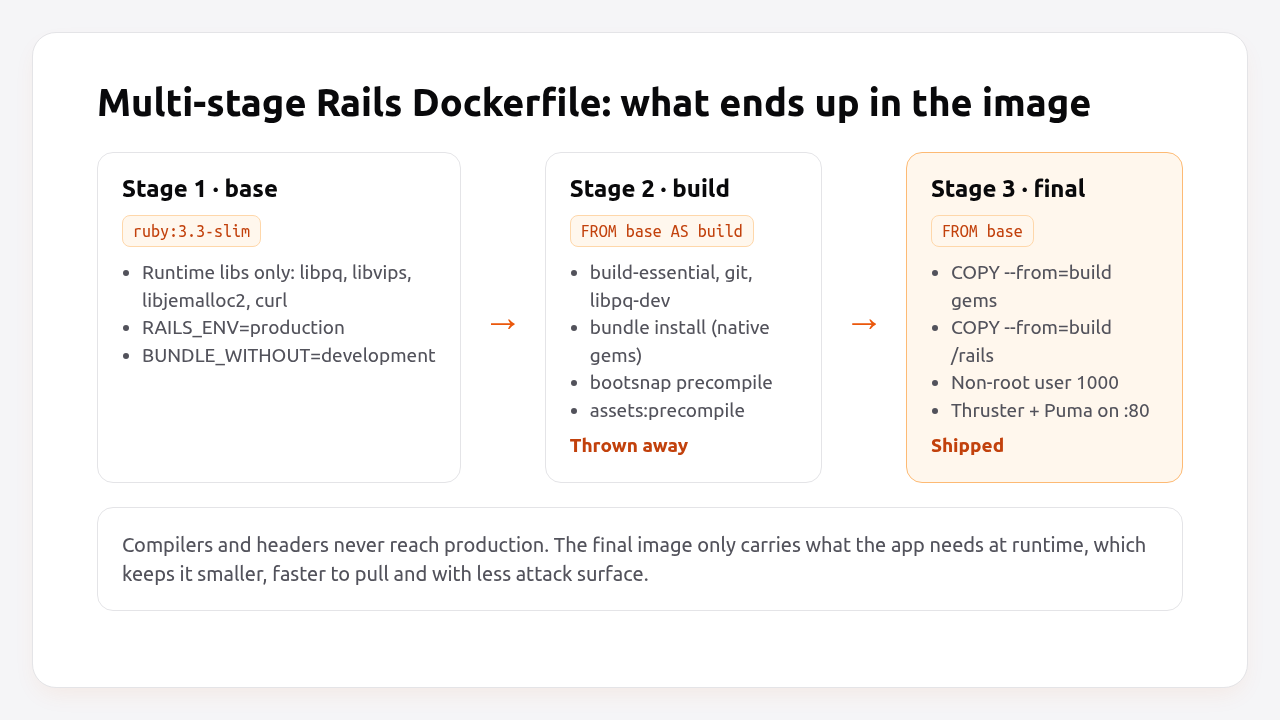
The production Dockerfile has three stages: a base with runtime libraries, a build stage that compiles gems and assets, and a final stage that copies only the results. Here is the Rails 8 version for a PostgreSQL app, with comments on what each block is for.
# Dockerfile
# syntax=docker/dockerfile:1
# check=error=true

# Must match .ruby-version
ARG RUBY_VERSION=3.3.7
FROM docker.io/library/ruby:$RUBY_VERSION-slim AS base

WORKDIR /rails

# Runtime packages only: what the app needs while it runs.
RUN apt-get update -qq && \
    apt-get install --no-install-recommends -y curl libjemalloc2 libvips postgresql-client && \
    rm -rf /var/lib/apt/lists /var/cache/apt/archives

ENV RAILS_ENV="production" \
    BUNDLE_DEPLOYMENT="1" \
    BUNDLE_PATH="/usr/local/bundle" \
    BUNDLE_WITHOUT="development"

# ---------- build stage: thrown away after the build ----------
FROM base AS build

# Compilers and headers for native gems (pg, nokogiri, bootsnap...).
RUN apt-get update -qq && \
    apt-get install --no-install-recommends -y build-essential git libpq-dev libyaml-dev pkg-config && \
    rm -rf /var/lib/apt/lists /var/cache/apt/archives

# Gemfile first: this layer is cached until dependencies change.
COPY Gemfile Gemfile.lock ./
RUN bundle install && \
    rm -rf ~/.bundle/ "${BUNDLE_PATH}"/ruby/*/cache "${BUNDLE_PATH}"/ruby/*/bundler/gems/*/.git && \
    bundle exec bootsnap precompile --gemfile

# Now the application code.
COPY . .

# Precompile bootsnap cache for faster boot.
RUN bundle exec bootsnap precompile app/ lib/

# Precompile assets without real credentials.
RUN SECRET_KEY_BASE_DUMMY=1 ./bin/rails assets:precompile

# ---------- final stage: what ships ----------
FROM base

COPY --from=build "${BUNDLE_PATH}" "${BUNDLE_PATH}"
COPY --from=build /rails /rails

# Run as a non-root user.
RUN groupadd --system --gid 1000 rails && \
    useradd rails --uid 1000 --gid 1000 --create-home --shell /bin/bash && \
    chown -R rails:rails db log storage tmp
USER 1000:1000

ENTRYPOINT ["/rails/bin/docker-entrypoint"]

# Thruster serves assets, compresses responses and proxies to Puma.
EXPOSE 80
CMD ["./bin/thrust", "./bin/rails", "server"]
The choices that matter most:
ruby:3.3.7-sliminstead of the fullruby:3.3.7image. The full Debian image ships compilers and hundreds of packages you don’t need at runtime. On Docker Hub the slim variant is roughly a fifth of the compressed size.BUNDLE_DEPLOYMENT=1makes Bundler refuse to run ifGemfile.lockis out of date, so the image always contains exactly the locked versions.BUNDLE_WITHOUT=developmentskips development gems. Test gems are still installed unless you addtest("development:test"), which also shrinks the image.- Two
COPYsteps. CopyingGemfile/Gemfile.lockbefore the code means a change to a controller doesn’t invalidate thebundle installlayer. This is the single biggest win for build time. SECRET_KEY_BASE_DUMMY=1tells Rails to use a throwaway secret duringassets:precompile, so you never passRAILS_MASTER_KEYas a build argument where it would end up in the image history.USER 1000:1000means a compromised process can’t write outsidedb,log,storageandtmp.
What if my app uses Node, Yarn or jsbundling?
If you use jsbundling-rails or cssbundling-rails, add Node to the build stage only. The final stage doesn’t need Node, because assets are already compiled:
# Dockerfile (build stage, after the apt-get install line)
ARG NODE_VERSION=22.11.0
ARG YARN_VERSION=1.22.22
ENV PATH=/usr/local/node/bin:$PATH
RUN curl -sL https://github.com/nodenv/node-build/archive/master.tar.gz | tar xz -C /tmp/ && \
    /tmp/node-build-master/bin/node-build "${NODE_VERSION}" /usr/local/node && \
    npm install -g yarn@$YARN_VERSION && \
    rm -rf /tmp/node-build-master

COPY package.json yarn.lock ./
RUN yarn install --frozen-lockfile
Then add RUN rm -rf node_modules after assets:precompile, so node_modules isn’t copied into the final stage with /rails.
Step 3: Write a .dockerignore that protects secrets
.dockerignore decides what COPY . . sends into the build. Without it you ship your .git history, your logs, your local .env and your master.key inside the image, where anyone who can pull it can read them.
# .dockerignore
/.git/
/.gitignore
/.github/

# Secrets: pass at runtime, never bake into the image
/.env*
!/.env.example
/config/master.key
/config/credentials/*.key

# Local state
/log/*
/tmp/*
!/log/.keep
!/tmp/.keep
/tmp/pids/*
/storage/*
!/storage/.keep
/tmp/storage/*

# Build artifacts rebuilt inside the image
/public/assets
/node_modules/
/app/assets/builds/*
!/app/assets/builds/.keep

# Dev tooling
/.devcontainer/
/.kamal/secrets*
/coverage/
/spec/
/test/
Dockerfile*
.dockerignore
Excluding /spec/ and /test/ is optional. Keep them if you run tests inside the image in CI.
Pro Tip: Check what actually ends up in the build context with docker build --no-cache --progress=plain . and look at the size of the “transferring context” line. If it’s hundreds of megabytes, something big is missing from .dockerignore. It’s usually node_modules, tmp/cache or a storage/ folder full of uploads.
Step 4: The entrypoint script
The entrypoint runs before your CMD. In Rails 8 it does two things: enables jemalloc and prepares the database when the container starts the web server.
#!/bin/bash -e
# bin/docker-entrypoint

# Enable jemalloc for reduced memory usage and latency.
if [ -z "${LD_PRELOAD+x}" ]; then
    LD_PRELOAD=$(find /usr/lib -name libjemalloc.so.2 -print -quit)
    export LD_PRELOAD
fi

# If running the rails server then create or migrate existing database
if [ "${@: -2:1}" == "./bin/rails" ] && [ "${@: -1:1}" == "server" ]; then
  ./bin/rails db:prepare
fi

exec "${@}"
db:prepare creates the database if it doesn’t exist and runs pending migrations otherwise. The condition means only the web container migrates; a worker running ./bin/jobs from the same image skips it. If you run several web containers, they’ll all try to migrate at once. Rails takes an advisory lock so only one actually runs, but slow migrations will still block the other containers’ boot. For large apps, run migrations as a separate release step instead. We’ll cover that in the zero-downtime migrations guide.
The file must be executable and use Unix line endings:
chmod +x bin/docker-entrypoint
git update-index --chmod=+x bin/docker-entrypoint
Step 5: Run it with Docker Compose and PostgreSQL
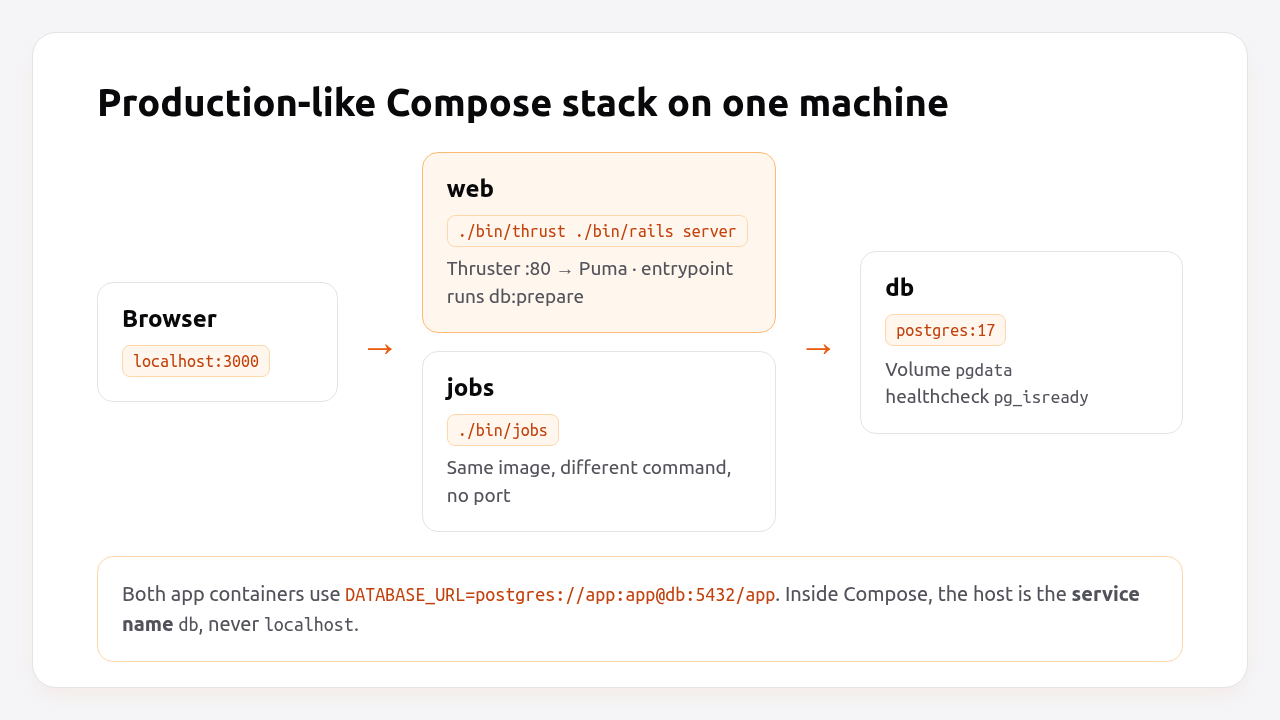
Docker Compose runs the image next to PostgreSQL and a job worker, so you can test the production image locally exactly as it will run on a server.
# compose.yaml
services:
  db:
    image: postgres:17
    environment:
      POSTGRES_USER: app
      POSTGRES_PASSWORD: app
      POSTGRES_DB: app_production
    volumes:
      - pgdata:/var/lib/postgresql/data
    healthcheck:
      test: ["CMD-SHELL", "pg_isready -U app -d app_production"]
      interval: 5s
      timeout: 3s
      retries: 10

  web:
    build: .
    image: myapp:latest
    ports:
      - "3000:80"
    environment:
      RAILS_MASTER_KEY: ${RAILS_MASTER_KEY}
      DATABASE_URL: postgres://app:app@db:5432/app_production
    depends_on:
      db:
        condition: service_healthy
    healthcheck:
      test: ["CMD", "curl", "-fsS", "http://localhost:80/up"]
      interval: 10s
      timeout: 3s
      start_period: 30s

  jobs:
    image: myapp:latest
    command: ["./bin/jobs"]
    environment:
      RAILS_MASTER_KEY: ${RAILS_MASTER_KEY}
      DATABASE_URL: postgres://app:app@db:5432/app_production
    depends_on:
      web:
        condition: service_healthy

volumes:
  pgdata:
Notes on this file:
DATABASE_URLusesdbas the host, the Compose service name. Inside a container,localhostis the container itself.depends_onwithcondition: service_healthywaits forpg_isreadybefore Rails boots, sodb:preparedoesn’t fail on a database that’s still starting.jobsreuses the image built forweband only changes the command. That’s the same pattern Kamal roles and Heroku process types use. See running Rails background jobs in production for when a dedicated worker is worth it.- The
webhealth check hits/up, the built-in Rails endpoint. The Rails health check guide explains why it should stay shallow. - Rails 8 uses multiple databases for Solid Queue, Solid Cache and Solid Cable by default. With a single
DATABASE_URL, pointconfig/database.yml’squeue,cacheandcableentries at the same server with different database names, or give each its own URL.
For a Rails 8 app with a single PostgreSQL server, this database.yml production block works with the Compose file above:
# config/database.yml
production:
  primary: &primary_production
    adapter: postgresql
    encoding: unicode
    pool: <%= ENV.fetch("RAILS_MAX_THREADS") { 3 } %>
    url: <%= ENV["DATABASE_URL"] %>
  cache:
    <<: *primary_production
    url: <%= ENV["DATABASE_URL"].to_s.sub(%r{/([^/?]+)(\?|$)}, '/\1_cache\2') %>
    migrations_paths: db/cache_migrate
  queue:
    <<: *primary_production
    url: <%= ENV["DATABASE_URL"].to_s.sub(%r{/([^/?]+)(\?|$)}, '/\1_queue\2') %>
    migrations_paths: db/queue_migrate
  cable:
    <<: *primary_production
    url: <%= ENV["DATABASE_URL"].to_s.sub(%r{/([^/?]+)(\?|$)}, '/\1_cable\2') %>
    migrations_paths: db/cable_migrate
db:prepare creates app_production, app_production_cache, app_production_queue and app_production_cable on first boot.
Step 6: Verify it works
Build the image, start the stack, and check that the app answers, the database migrated and the worker is running.
export RAILS_MASTER_KEY=$(cat config/master.key)
docker compose build
docker compose up -d
docker compose ps
You should see all three services as running, with db and web marked (healthy):
NAME          SERVICE   STATUS
myapp-db-1    db        Up 40 seconds (healthy)
myapp-web-1   web       Up 30 seconds (healthy)
myapp-jobs-1  jobs      Up 5 seconds
Then check the endpoints and the logs:
curl -i http://localhost:3000/up
# HTTP/1.1 200 OK

docker compose logs web | grep -E "Migrating|Listening"
docker compose exec web ./bin/rails runner 'puts ActiveRecord::Base.connection.select_value("SELECT version()")'
docker compose exec web sh -c 'grep -l jemalloc /proc/[0-9]*/maps'
# /proc/7/maps   <- the Puma process has jemalloc loaded
Finally, check the image itself:
docker image ls myapp
docker history myapp:latest --format "{{.Size}}\t{{.CreatedBy}}" | head -15
docker run --rm myapp:latest ls config/ | grep -c master.key
# 0
The last command should print 0. If it prints 1, your master key is baked into the image. Fix .dockerignore before you push it anywhere.
How do I make a Rails Docker image smaller and faster to build?
Order layers from least to most frequently changed, use a slim base, keep build tools in a separate stage, and cache gem and package downloads with BuildKit mounts. Together these usually turn a 5-minute rebuild into well under a minute when only app code changed.
| Technique | Effect on size | Effect on rebuild time | Effort |
|---|---|---|---|
-slim base image |
Large reduction | Faster pulls | One line |
| Multi-stage build (no compilers in final stage) | Large reduction | None | Already in the Rails template |
COPY Gemfile* before COPY . |
None | Large: skips bundle install on code changes |
Already in the Rails template |
Remove gem caches and .git dirs after install |
Medium | None | Already in the Rails template |
BUNDLE_WITHOUT="development:test" |
Small to medium | Small | One line |
BuildKit cache mounts for apt and gems |
None | Medium on dependency changes | --cache flag in the generator |
Good .dockerignore |
Small to large | Faster context upload | Copy the file above |
bootsnap precompile |
Slightly larger | None (faster boot, not build) | Already in the Rails template |
If you want BuildKit cache mounts without the generator, replace the gem install step:
# Dockerfile (build stage)
COPY Gemfile Gemfile.lock ./
RUN --mount=type=cache,id=bundle,target=/srv/vendor \
    bundle config set app_config .bundle && \
    bundle config set path /srv/vendor && \
    bundle install && \
    mkdir -p vendor && \
    bundle config set path vendor && \
    cp -ar /srv/vendor . && \
    bundle exec bootsnap precompile --gemfile
On CI, use docker buildx build --cache-from type=registry,ref=ghcr.io/me/myapp:buildcache --cache-to type=registry,ref=ghcr.io/me/myapp:buildcache,mode=max so each runner reuses layers from the last build.
Pro Tip: Don’t chase the smallest possible image with Alpine. musl libc means many native gems compile from source, nokogiri and grpc builds get slow, and you’ll debug subtle DNS and locale differences. Debian slim is the pragmatic default.
How Heroku, Render, Fly.io, Upsun and Enkihost run Rails containers
All five platforms can run a Rails container, but they differ in who writes the Dockerfile and who builds it. Fly.io generates one for you, Render builds yours with BuildKit, Heroku prefers buildpacks and treats containers as an alternative, and Upsun runs prebuilt images from a public registry.
| Platform | Default for Rails | Dockerfile support | Who builds | Notes |
|---|---|---|---|---|
| Heroku | Buildpacks (no Dockerfile) | heroku.yml or heroku container:push |
Heroku or you | Container apps don’t get buildpack conveniences like automatic Ruby version detection |
| Render | Native Ruby runtime | runtime: docker |
Render, using BuildKit | Env vars become build args, so don’t reference secrets in ARG; use secret files |
| Fly.io | Dockerfile | fly launch runs the dockerfile-rails generator |
Fly remote builder or local Docker | Same generator Rails uses, so it reads your Gemfile |
| Upsun | Composable/runtime images | Prebuilt images from a public registry | You (outside Upsun) | Image runs as-is; Upsun doesn’t add packages |
| Kamal | Dockerfile | Required | You, locally or on a remote builder | Builds, pushes and runs your image over SSH |
| Enkihost | Dockerfile from your repo | Used as-is; generated for Rails, Sinatra and Jekyll if missing | Enkihost, on every push to the connected GitHub branch | Rails apps are routed to port 3000 |
The common thread is that the Rails-generated Dockerfile works on every one of them with little or no change. That’s a strong reason to keep it close to the template rather than hand-crafting something clever. If you deploy with Kamal, our Kamal 2 and Thruster guide picks up exactly where this one ends.
Troubleshooting Rails Docker builds
Most Rails Docker failures come from four places: a lockfile without the Linux platform, credentials needed at build time, a CPU architecture mismatch, or a container trying to reach localhost.
Your bundle only supports platforms ["arm64-darwin-24"]
Your bundle only supports platforms ["arm64-darwin-24"] but your local platform is x86_64-linux.
Add the current platform to the lockfile with `bundle lock --add-platform x86_64-linux` and try again.
Your Gemfile.lock was generated on a Mac and doesn’t list Linux. Add the platforms you build for and commit the lockfile:
bundle lock --add-platform x86_64-linux aarch64-linux
Missing secret_key_base for 'production' environment
ArgumentError: Missing `secret_key_base` for 'production' environment, set this string with `bin/rails credentials:edit`
This appears during assets:precompile. Make sure the line is RUN SECRET_KEY_BASE_DUMMY=1 ./bin/rails assets:precompile. If an initializer reads Rails.application.credentials.some_api_key! at boot, guard it so the build can load the app without credentials, or move it into a lazy method.
exec format error
exec /rails/bin/docker-entrypoint: exec format error
You built an arm64 image on Apple Silicon and ran it on an amd64 server, or the other way round. Build for the target platform:
docker buildx build --platform linux/amd64 -t myapp:latest .
no such file or directory for an entrypoint that exists
exec /rails/bin/docker-entrypoint: no such file or directory
The file has Windows (CRLF) line endings, so the kernel looks for /bin/bash\r. Convert it with sed -i 's/\r$//' bin/docker-entrypoint and add * text=auto eol=lf to .gitattributes.
connection to server at "localhost" ... failed
ActiveRecord::ConnectionNotEstablished: connection to server at "127.0.0.1", port 5432 failed: Connection refused
Inside a container, localhost is the container. Use the Compose service name (db) or the database host your platform gives you in DATABASE_URL.
Permission denied @ rb_sysopen - /rails/tmp/pids/server.pid
The app runs as user 1000 but a directory it writes to is owned by root. Add the directory to the chown -R rails:rails db log storage tmp line, or mount a volume with the right owner.
Author Perspective: the Dockerfile is the deploy contract
I used to treat the Dockerfile as plumbing, something I copied once and forgot about. Now I see it as the contract between my app and wherever it runs. When a deploy breaks, it’s almost always because that contract changed without anyone noticing: a new gem with a native extension, a credential read at boot, a lockfile missing Linux. My habit is to build the production image locally with docker compose up before every dependency upgrade. It takes three minutes and has saved me from more failed deploys than any CI check.
Running a Rails app on Enkihost
A Dockerfile gives you a portable app. You still need somewhere to run it, a database next to it, and a way to ship new versions without downtime. That’s the part Enkihost takes care of, so the Rails conventions from this guide carry over as they are.
- PostgreSQL and Redis add-ons inject
DATABASE_URLandREDIS_URL, the same variables the Compose file above uses, so yourdatabase.ymldoesn’t change between your laptop and production. - Zero-downtime deploys switch to the new release without dropping in-flight requests.
- Per-app resource isolation with allocated memory and CPU, so a jemalloc-tuned Puma process gets the resources you planned for.
Rails and Sinatra apps run on Ignite (5 EUR per month after a 14-day free trial, with PostgreSQL and Redis included) or Blaze (16 EUR per month, with high availability and autoscaling). The free Spark plan is for Jekyll sites. See enkihost.com.
FAQ
Does Rails generate a Dockerfile automatically?
Yes. Since Rails 7.1, rails new creates a production Dockerfile, a .dockerignore and a bin/docker-entrypoint script. Rails 8 versions add Thruster and jemalloc. For apps created before 7.1, the dockerfile-rails gem generates the same files with bin/rails generate dockerfile.
Should I use Docker for Rails development too?
It’s optional. The production Dockerfile is not meant for development because it excludes development gems and precompiles assets. Rails 7.2 and later can generate a dev container with rails devcontainer, which is the better route if you want a containerized development environment.
How big should a Rails Docker image be?
A typical Rails app built from the Rails 8 template on ruby slim usually lands in the low hundreds of megabytes uncompressed, depending mostly on native gems and system libraries like libvips. If your image is over 1 GB, check for compilers in the final stage, node_modules, test gems or a missing .dockerignore.
Where should RAILS_MASTER_KEY go when using Docker?
Pass RAILS_MASTER_KEY as a runtime environment variable or secret, never as a build argument and never copied into the image. Use SECRET_KEY_BASE_DUMMY=1 during assets:precompile so the build itself needs no credentials.
Can I use Alpine instead of Debian slim for Rails?
You can, but it rarely pays off. Alpine uses musl libc, so many native gems compile from source, builds get slower, and subtle differences in DNS and locale handling cause hard-to-debug issues. Debian slim images are only modestly larger and work with precompiled gems.
Sources
- Getting Started with Dev Containers and Docker — Rails Guides
- rails/rails: Dockerfile template (railties) — GitHub
- fly-apps/dockerfile-rails — GitHub
- Dockerfile reference — Docker Docs
- Build cache and cache mounts — Docker Docs
- ruby official image (slim variants) — Docker Hub
- Docker on Render — Render Docs
- Container Registry & Runtime (Docker Deploys) — Heroku Dev Center
- Rails on Fly.io: Getting started — Fly Docs
- Choose an image type — Upsun Docs