Rails Health Check: Build /up and Readiness Endpoints That Don't Lie

A Rails health check is the endpoint your proxy or platform polls to decide whether a container may receive traffic. Rails 7.1+ ships one at /up, but it only proves the app booted. It does not check the database, the cache or the job queue. This guide shows how to keep /up as a fast liveness check, add a deep readiness endpoint next to it, and wire both into Kamal, Render and Fly.io without turning a database hiccup into a full outage.
TL;DR
- Rails 7.1+ generates
get "up" => "rails/health#show", which returns 200 if the app boots and 500 if it raises on boot. It never touches the database.- Keep
/upshallow and use it for deploy gating and restarts. Add a separate/health/readythat runsSELECT 1, a cache round-trip and a queue heartbeat check, each with a short timeout.- Never put a database check on the endpoint that triggers restarts: Render restarts an instance after 60 seconds of failures, so a database blip would restart every instance at once.
- Exclude the health path from
force_sslredirects and host authorization, or the check fails with a 301 or a “Blocked hosts” 403 while the app is fine.- Point an external uptime monitor at the deep endpoint; that’s what pages you when PostgreSQL or Redis go away.
Table of Contents
- What does the built-in Rails health check do?
- Prerequisites
- Step 1: Make sure /up is reachable in production
- Step 2: Build a deep readiness endpoint
- Step 3: Wire the health check into your deploy tool
- Step 4: Verify it works
- How Heroku, Render, Fly.io, Upsun and Enkihost handle health checks
- Troubleshooting Rails health check failures
- Author Perspective: the health check that took us down
- Health checks and zero-downtime deploys on Enkihost
- FAQ
- Sources
What does the built-in Rails health check do?
The built-in Rails health check returns HTTP 200 when the application has booted without raising, and HTTP 500 when it hasn’t. That’s all it does. It’s a liveness signal, not proof that your app can serve real requests.
Every app generated with Rails 7.1 or later has this in config/routes.rb:
# config/routes.rb
Rails.application.routes.draw do
  get "up" => "rails/health#show", as: :rails_health_check
end
Rails::HealthController renders a small green HTML page with status 200. If an exception happens while the request is handled, for example a broken initializer that only blows up when the app is loaded, it rescues it and renders a red page with status 500. It doesn’t open a database connection, ping Redis or check Solid Queue. That’s deliberate: a liveness check should be fast and should only fail when restarting the process would actually help.
The problem is that teams often treat /up as “the app is healthy” and stop there. Then PostgreSQL runs out of connections, every real request returns a 500, and /up stays green.
There are two questions to answer, and they need two endpoints:
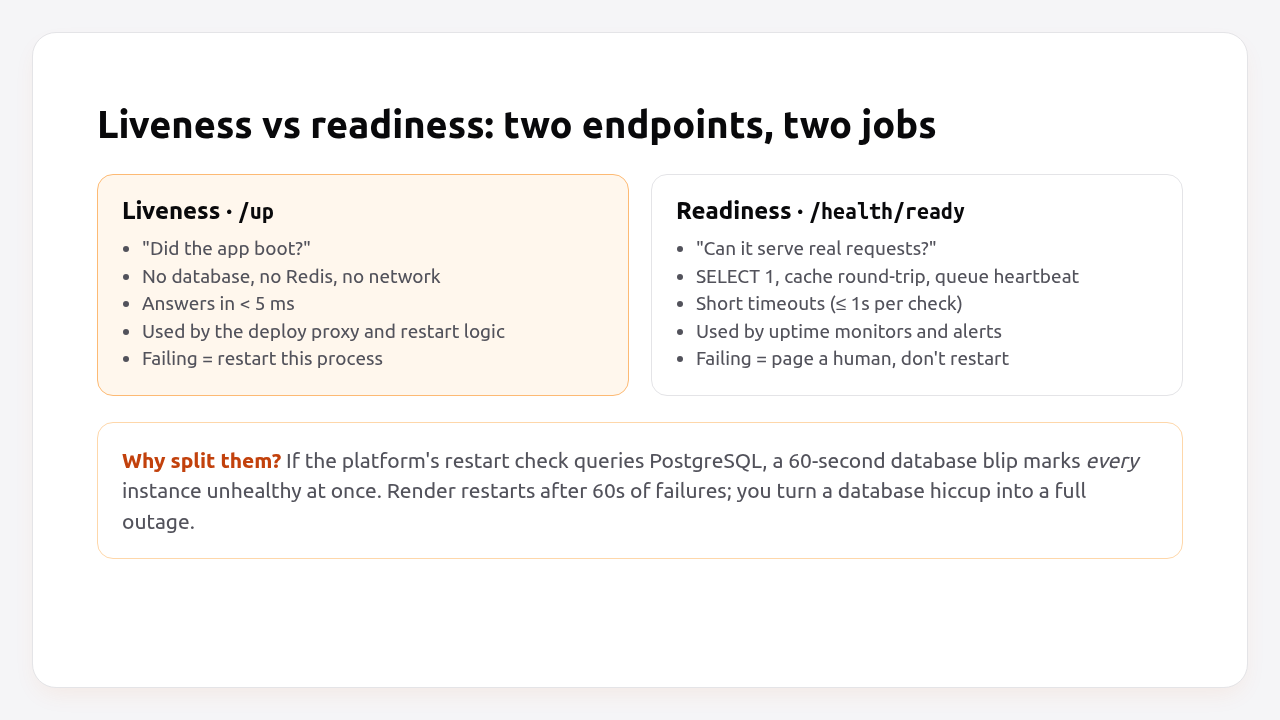
Liveness (/up) |
Readiness (/health/ready) |
|
|---|---|---|
| Question | Did the process boot? | Can it serve real requests right now? |
| Checks | Nothing external | Database, cache, job queue |
| Typical latency | < 5 ms | 5–50 ms, capped at ~1 s |
| Who calls it | Deploy proxy, platform restart logic | Uptime monitor, alerting |
| Action on failure | Don’t route to it / restart it | Alert a human |
Pro Tip: Kubernetes formalised this split as liveness and readiness probes. You don’t need Kubernetes to borrow the idea; it applies to Kamal, Render and Fly.io just as well.
Prerequisites
- A Rails 7.1+ app (examples use Rails 8.0 and Ruby 3.3).
- PostgreSQL via
DATABASE_URL. Redis viaREDIS_URLis optional. - Solid Queue or Sidekiq if you want the queue check. It’s optional too.
curlandjqlocally to test the endpoints.
If your app predates Rails 7.1, add the route and controller yourself. Step 2 below works on any Rails 6.1+ app.
Step 1: Make sure /up is reachable in production
The /up route exists by default, but two production settings commonly break it: SSL redirects and host authorization. Exclude the health path from both, and silence it in the logs.
Rails 8 generates these lines in config/environments/production.rb, partly commented out. Here’s the version you want:
# config/environments/production.rb
Rails.application.configure do
  # The app sits behind a TLS-terminating proxy (kamal-proxy, Render, Fly).
  config.assume_ssl = true
  config.force_ssl = true

  # Health checks usually arrive over plain HTTP from inside the network.
  # Don't redirect them to HTTPS.
  config.ssl_options = { redirect: { exclude: ->(request) { request.path.start_with?("/up", "/health") } } }

  # Allow only your real domains...
  config.hosts = [
    "example.com",
    /.*\.example\.com/
  ]
  # ...but let health checks through: they hit the container by IP.
  config.host_authorization = { exclude: ->(request) { request.path.start_with?("/up", "/health") } }

  # A check every second means 86,400 log lines a day. Drop them.
  config.silence_healthcheck_path = "/up"
end
Why each line matters:
ssl_optionsredirect exclude: whenforce_sslis on withoutassume_ssl(common on Heroku, or after copying a config between platforms), a plain-HTTPGET /upfrom the proxy gets a301tohttps://. Kamal expects a 200, so the deploy fails. Render counts 3xx as healthy, so there you get a check that never reaches your app. The exclude keeps/upworking either way.host_authorizationexclude: health checks hit the container on its internal IP or hostname, for example10.0.1.5:3000, which isn’t inconfig.hosts. Rails answers403 Blocked hostsand the container looks dead.silence_healthcheck_path: available since Rails 8.0, it removes the health path from the request log entirely.
Step 2: Build a deep readiness endpoint
The readiness endpoint runs a cheap query against each critical dependency, applies a short timeout, and returns 503 with a JSON body that says which check failed.
Create the controller. It inherits from ActionController::API, not ApplicationController, so authentication filters, CSRF, locale switching and anything else you added to your app’s base controller can’t interfere:
# app/controllers/health_controller.rb
class HealthController < ActionController::API
  CHECK_TIMEOUT = 1.0 # seconds per dependency

  def ready
    checks = {
      database: run_check { database_check },
      cache: run_check { cache_check },
      queue: run_check { queue_check }
    }.compact

    healthy = checks.values.all? { |result| result[:status] == "ok" }

    response.headers["Cache-Control"] = "no-store"
    render json: {
      status: healthy ? "ok" : "fail",
      revision: ENV.fetch("GIT_REVISION", "unknown"),
      checks: checks
    }, status: healthy ? :ok : :service_unavailable
  end

  private

  def run_check
    started = Process.clock_gettime(Process::CLOCK_MONOTONIC)
    result = yield
    return nil if result == :skip

    { status: "ok", ms: elapsed_ms(started) }
  rescue StandardError => e
    Rails.logger.warn("[health] #{e.class}: #{e.message}")
    { status: "fail", ms: elapsed_ms(started), error: e.class.name }
  end

  def elapsed_ms(started)
    ((Process.clock_gettime(Process::CLOCK_MONOTONIC) - started) * 1000).round(1)
  end

  def database_check
    ActiveRecord::Base.with_connection do |conn|
      conn.transaction do
        # Cap the query itself; a hung database must not hang the check.
        conn.execute("SET LOCAL statement_timeout = '#{(CHECK_TIMEOUT * 1000).to_i}ms'")
        conn.select_value("SELECT 1")
      end
    end
  end

  def cache_check
    key = "health:#{SecureRandom.hex(4)}"
    Rails.cache.write(key, "1", expires_in: 30.seconds)
    raise "cache read-back failed" unless Rails.cache.read(key) == "1"

    Rails.cache.delete(key)
  end

  def queue_check
    return :skip unless defined?(SolidQueue::Process)

    alive = SolidQueue::Process.where(kind: "Worker")
                               .where("last_heartbeat_at > ?", 2.minutes.ago)
                               .exists?
    raise "no Solid Queue worker heartbeat in 2 minutes" unless alive
  end
end
Add the route next to /up:
# config/routes.rb
Rails.application.routes.draw do
  get "up" => "rails/health#show", as: :rails_health_check
  get "health/ready" => "health#ready", as: :readiness_check
end
A few decisions in this controller are worth explaining:
SET LOCAL statement_timeoutlimits the check query to one second without changing the timeout for the rest of the connection. If your database is unreachable rather than slow,connect_timeoutindatabase.ymldecides how long you wait. Set it to 2–3 seconds so the check fails fast:
# config/database.yml
production:
  primary:
    url: <%= ENV["DATABASE_URL"] %>
    connect_timeout: 2
with_connectionborrows a connection from the pool and returns it right away. It’s the Rails 7.2+ replacement for holdingActiveRecord::Base.connectionfor the whole request.- The cache check writes and reads back a random key, so it catches a cache store that accepts writes but drops them. That works the same with Solid Cache, Redis or Memcached.
- The queue check reads Solid Queue’s heartbeat table. Workers update
last_heartbeat_atevery minute by default, so “no heartbeat in two minutes” means no worker is running. On Sidekiq, swap it forSidekiq::ProcessSet.new.size.positive?. How those workers run is covered in Rails background jobs in production. revisionlets you confirm which release answered. SetGIT_REVISIONat build time (Kamal setsKAMAL_VERSIONfor you).
Pro Tip: Don’t add third-party APIs (Stripe, your email provider, S3) to the readiness check. If Stripe has an incident, restarting or un-routing your app won’t help, and a failing check would just add noise to your own alerts. Monitor those separately.
Should the readiness endpoint be public?
It’s fine to expose the readiness endpoint publicly as long as it returns only check names and statuses, never error messages, hostnames or versions of your dependencies. The controller above returns the exception class only. If you’d rather keep it private, require a token:
# app/controllers/health_controller.rb (inside the class)
before_action :require_health_token

def require_health_token
  expected = ENV["HEALTH_TOKEN"].to_s
  provided = request.headers["X-Health-Token"].to_s
  head :not_found unless expected.present? && ActiveSupport::SecurityUtils.secure_compare(provided, expected)
end
Most uptime monitors (Better Stack, UptimeRobot, Checkly) let you send a custom header. The Rails monitoring guide shows how to wire their alerts in next to your metrics.
Step 3: Wire the health check into your deploy tool
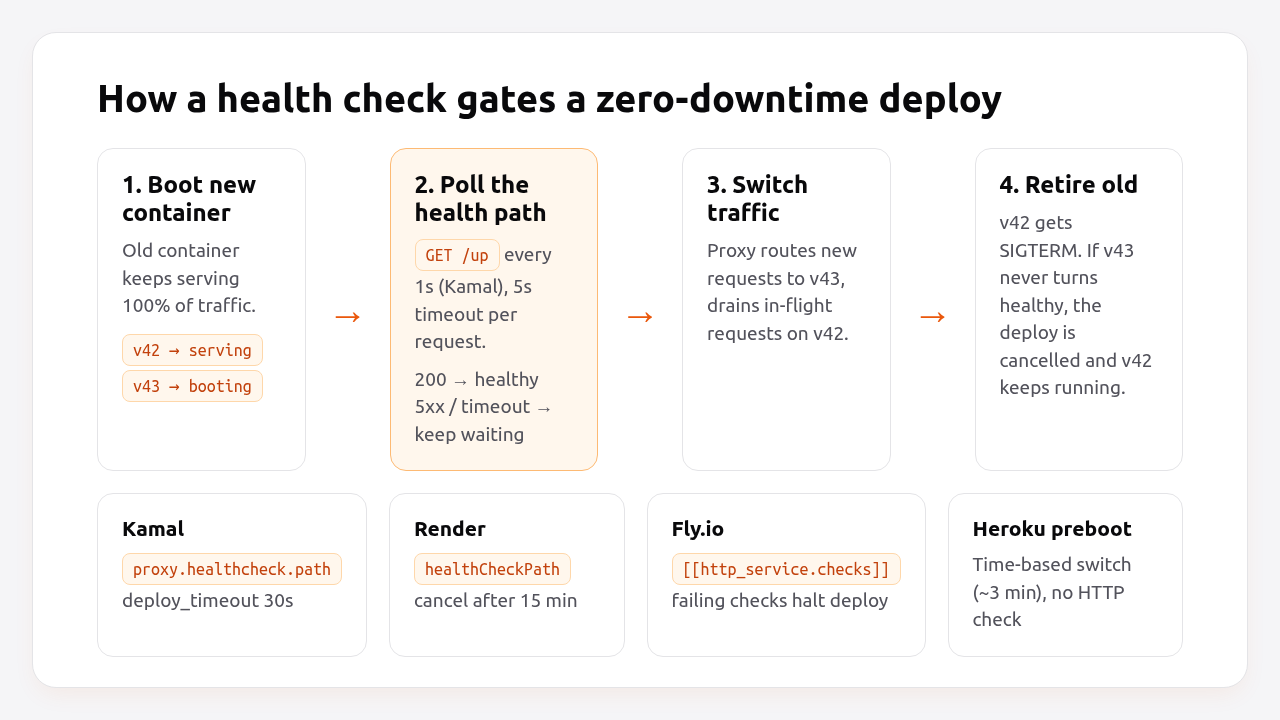
Point your deploy tool’s health check at the shallow /up and your uptime monitor at /health/ready. That way a failed dependency alerts you, but never blocks a rollback or triggers a restart loop.
Kamal 2
kamal-proxy polls /up by default, once per second with a five-second timeout, until the new container answers 200 or deploy_timeout (30 seconds by default) runs out. To make the defaults explicit and give slow-booting apps more room:
# config/deploy.yml
service: myapp
image: myorg/myapp

servers:
  web:
    - 192.168.0.1

proxy:
  ssl: true
  host: example.com
  app_port: 80
  healthcheck:
    path: /up
    interval: 1
    timeout: 5

deploy_timeout: 60
If you run a Kamal accessory or a role without the proxy (a job role running bin/jobs), it has no HTTP health check. Kamal just starts it. We covered a full Kamal setup in minimal Rails deployments with Kamal 2 and Thruster.
Render
Set the path in the dashboard (Settings → Health Check Path) or in render.yaml:
# render.yaml
services:
  - type: web
    name: myapp
    runtime: ruby
    buildCommand: bundle install && bin/rails assets:precompile
    startCommand: bundle exec puma -C config/puma.rb
    healthCheckPath: /up
Fly.io
Add an HTTP check to the service in fly.toml. Set grace_period longer than your boot time:
# fly.toml
[http_service]
  internal_port = 3000
  force_https = true

  [[http_service.checks]]
    grace_period = "15s"
    interval = "30s"
    timeout = "5s"
    method = "GET"
    path = "/up"

    [http_service.checks.headers]
      X-Forwarded-Proto = "https"
The X-Forwarded-Proto header tells Rails the request is already HTTPS, which is an alternative to the ssl_options exclude from Step 1.
Docker Compose or plain Docker
The official Rails 8 Dockerfile doesn’t include a HEALTHCHECK. Add one if you run containers with Compose or Swarm:
# Dockerfile (final stage)
HEALTHCHECK --interval=10s --timeout=3s --start-period=20s --retries=3 \
  CMD curl -fsS http://localhost:80/up || exit 1
The Rails 8 base image already installs curl. Change the port to 3000 if you don’t run Thruster.
Step 4: Verify it works
Check both endpoints locally, then break a dependency on purpose and confirm the readiness check fails while /up stays green.
bin/rails server -e production

curl -i http://localhost:3000/up
# HTTP/1.1 200 OK

curl -s http://localhost:3000/health/ready | jq .
# {
#   "status": "ok",
#   "revision": "unknown",
#   "checks": {
#     "database": { "status": "ok", "ms": 1.8 },
#     "cache":    { "status": "ok", "ms": 0.9 },
#     "queue":    { "status": "ok", "ms": 2.4 }
#   }
# }
Now stop PostgreSQL (or point DATABASE_URL at a closed port) and repeat:
curl -s -o /dev/null -w "%{http_code}\n" http://localhost:3000/up
# 200
curl -s -w "\n%{http_code}\n" http://localhost:3000/health/ready
# {"status":"fail","revision":"unknown","checks":{"database":{"status":"fail","ms":2003.1,"error":"ActiveRecord::ConnectionNotEstablished"}, ...}}
# 503
The database check took about two seconds, which is the connect_timeout from database.yml. If it hangs for 30 seconds or more, that setting isn’t being applied.
Finally, test the deploy path. With Kamal, kamal deploy should print the health check polling and switch over within a few seconds. A useful drill is to deploy a commit whose initializer raises on purpose: the new container never turns healthy, the deploy is cancelled and the old version keeps serving.
How Heroku, Render, Fly.io, Upsun and Enkihost handle health checks
Render and Fly.io use an HTTP health check both to gate deploys and to monitor running instances. Heroku’s Cedar runtime and Upsun don’t let you configure an HTTP health check path at all; they decide readiness from port binding and timing.
| Platform | Configure path? | Used during deploy | Used at runtime | Failure behaviour |
|---|---|---|---|---|
| Kamal 2 | proxy.healthcheck.path (default /up) |
Yes, polls every 1 s until deploy_timeout (30 s) |
No | Deploy cancelled, old container keeps serving |
| Render | healthCheckPath |
Yes, all new instances must pass at the same time | Yes, every few seconds, 5 s timeout | Out of rotation after 15 s, restarted after 60 s; deploy cancelled after 15 min |
| Fly.io | [[http_service.checks]] |
Yes, failing checks halt the deploy | Yes, at interval |
Machine taken out of the proxy’s rotation |
| Heroku (Cedar) | No | Preboot switches traffic about 3 min after deploy, on time, not on health | No HTTP check | Dyno must bind $PORT within the 60 s boot timeout or it’s restarted |
| Upsun | No path; use a post_start hook |
post_start can block until the app answers |
Health notifications on Professional projects | Traffic waits for post_start to finish |
| Enkihost | No | The new container must be running within 30 s before the old one is removed | Not documented | Deploy aborted, old container keeps serving |
Two details stand out:
- Render’s runtime restart is the strongest argument for keeping the platform check shallow. Point
healthCheckPathat a deep endpoint, have the database go away for a minute, and Render will restart every instance of your app even though restarting fixes nothing. - Heroku preboot is time-based. New dynos get traffic about three minutes after the deploy whether or not they’re warm. So on Heroku, an external uptime monitor on
/health/readyis your only real readiness signal.
Enkihost does zero-downtime deploys, so the new release takes over without dropping requests, and the shallow /up and deep /health/ready split from this guide works there unchanged. Its deploy check is the container’s state rather than an HTTP path, so, as on Heroku, an external uptime monitor on /health/ready is what tells you the app is actually ready.
Troubleshooting Rails health check failures
Most failing Rails health checks are configuration problems, not application bugs: an SSL redirect, a blocked host, an authentication filter or a boot that takes longer than the deploy timeout.
target failed to become healthy (Kamal)
ERROR (SSHKit::Command::Failed): Exception while executing on host 192.168.0.1:
docker exit status: 1
docker stderr: Error: target failed to become healthy within configured timeout (30s)
Check what the container actually answers:
kamal app logs --since 5m
kamal app exec --reuse "curl -i http://localhost:80/up"
Common causes: a 301 from force_ssl (fix the ssl_options exclude), a 403 from host authorization, the app listening on 3000 while proxy.app_port says 80, or a boot that genuinely takes longer than 30 seconds (raise deploy_timeout).
Blocked hosts: 10.0.1.5:3000
[ActionDispatch::HostAuthorization::DefaultResponseApp] Blocked hosts: 10.0.1.5:3000
The check hits the container by IP, which isn’t in config.hosts. Add the host_authorization exclude from Step 1. Don’t fix it by clearing config.hosts, since host authorization protects against DNS rebinding.
Fly.io: Health check on port 3000 has failed
Health check on port 3000 has failed. Your app is not responding properly.
Services exposed on ports [80, 443] will have intermittent failures until the health check passes.
Usually the app listens on 127.0.0.1 instead of 0.0.0.0, the grace_period is shorter than the boot, or force_ssl redirects the check. Puma must bind 0.0.0.0 (port ENV.fetch("PORT", 3000) in config/puma.rb binds to all interfaces).
The readiness check returns 302 to /login
Your HealthController inherits from ApplicationController and picks up before_action :authenticate_user!. Inherit from ActionController::API (or ActionController::Base) as shown in Step 2.
Every check takes 30+ seconds when the database is down
connect_timeout isn’t set, so the PostgreSQL client waits for the OS TCP timeout. Add connect_timeout: 2 to database.yml, and check that a DATABASE_URL query string isn’t overriding it.
Logs are full of GET /up
On Rails 8, config.silence_healthcheck_path = "/up" removes them. On Rails 7.1/7.2, use config.lograge.ignore_actions = ["Rails::HealthController#show"] if you use Lograge, or filter at your log shipper.
Author Perspective: the health check that took us down
Years ago I wired a “thorough” health check into a load balancer: database, Redis, an external search cluster, the lot. One night the search cluster slowed down, every instance failed its check together, and the load balancer pulled all of them. A degraded search page became a site that was completely down. Since then I’ve followed one rule: the check that can take a box out of rotation only checks the box itself. Everything else goes to a monitor that wakes me up. A real person deciding what to do beats an automated restart loop that makes things worse.
Health checks and zero-downtime deploys on Enkihost
Health checks exist so that a deploy never sends users to a container that isn’t ready, and so that someone hears about a dependency failure before customers do. On Enkihost, the Rails pieces from this guide carry over as they are:
- Zero-downtime deploys: the new release takes over without dropping requests, so the
/uproute Rails generates for you, plus thessl_optionsandhost_authorizationexcludes, is all the app needs. - PostgreSQL and Redis add-ons inject
DATABASE_URLandREDIS_URL, which is exactly what thedatabase_checkandcache_checkabove read from. - Per-app resource isolation: a noisy neighbour can’t starve your health check, so slow responses point at your own app.
Rails and Sinatra apps run on Ignite (5 EUR per month after a 14-day free trial, with PostgreSQL and Redis included) or Blaze (16 EUR per month, with high availability and autoscaling). The free Spark plan is for Jekyll sites. Start at enkihost.com.
FAQ
What is the /up route in Rails?
The /up route is the health check endpoint that Rails 7.1 and later generate in config/routes.rb. It maps to Rails::HealthController#show and returns 200 when the app has booted without exceptions and 500 otherwise. It does not check the database or any other dependency.
Does the Rails health check test the database connection?
No. The built-in Rails health check only confirms the application booted. To check PostgreSQL, write a separate controller that runs SELECT 1 with a short statement_timeout and returns 503 when the query fails, and point an uptime monitor at it rather than your deploy proxy.
Should a health check return 503 or 500 when a dependency is down?
Return 503 Service Unavailable for a failed dependency check. It tells load balancers and monitors the instance is temporarily unable to serve traffic, while 500 suggests a bug in the endpoint itself. Every major platform treats both as unhealthy, so the choice is about clarity in logs and alerts.
How often should a health check run?
For deploy gating, frequent checks are fine because they only run for seconds: Kamal polls every second by default. For runtime checks, every 10 to 30 seconds is typical. Uptime monitors on a deep readiness endpoint usually run every 30 to 60 seconds, which is enough to alert within a minute or two without loading the database.
Do Sidekiq or Solid Queue workers need a health check?
Workers don’t serve HTTP, so deploy proxies don’t health check them. Monitor them through the readiness endpoint instead: check Solid Queue’s process heartbeats or Sidekiq’s ProcessSet, and alert when no worker has reported in the last two minutes.
Sources
- Rails::HealthController — Rails API
- Configuring Rails Applications: silence_healthcheck_path, host_authorization — Rails Guides
- Kamal proxy configuration: healthcheck — Kamal docs
- Health Checks — Render Docs
- App configuration (fly.toml): http_service.checks — Fly Docs
- Preboot — Heroku Dev Center
- Build and deploy: post_start — Upsun Docs
- rails/solid_queue: process heartbeats — GitHub
- Dockerfile HEALTHCHECK reference — Docker Docs