Rails Assets Precompile: How to Run It in Production and Fix Every Common Error

Rails assets precompile is the build step that turns your stylesheets, JavaScript and images into fingerprinted files in public/assets, so production can serve them fast and cache them forever. It’s also one of the most common reasons a Rails deploy fails: the task boots your whole app in production mode, so a missing credential, a database call in an initializer or a missing Node binary stops the build. This guide explains what bin/rails assets:precompile does in Rails 8, how to run it in Docker, CI and on a PaaS, and how to fix the errors you’ll actually see.
TL;DR
bin/rails assets:precompileruns any JS/CSS build hooks (jsbundling, cssbundling, tailwindcss-rails), then Propshaft or Sprockets copies every asset topublic/assetswith a content digest in the filename and writes a manifest.- Run it once per release at build time with
RAILS_ENV=productionandSECRET_KEY_BASE_DUMMY=1. Never run it on boot, and never pass real credentials to the build.- The task boots the full app, so initializers that read credentials or touch the database are the top cause of precompile failures.
- Keep the previous release’s assets during a deploy.
assets:cleankeeps two versions and anything from the last hour, whileassets:clobberdeletes everything and causes 404s for users mid-session.- In production keep
config.assets.compile = false(Sprockets) and servepublic/assetswith a one-yearimmutablecache header.
Table of Contents
- What does rails assets:precompile do?
- Prerequisites
- Step 1: Configure production for precompiled assets
- Step 2: Run precompile locally in production mode
- Step 3: Precompile inside the Docker build
- Step 4: Precompile in CI and keep old assets across deploys
- Step 5: Verify it works
- How Heroku, Render, Fly.io, Upsun and Enkihost precompile assets
- Troubleshooting assets:precompile errors
- Author Perspective: precompile is a smoke test
- Precompiled assets on Enkihost
- FAQ
- Sources
What does rails assets:precompile do?
assets:precompile runs any registered JavaScript and CSS build steps, then copies every file in the asset load path to public/assets with a content hash in the name, and writes a manifest that maps logical names like application.css to digested names like application-4f2a9c1e.css.
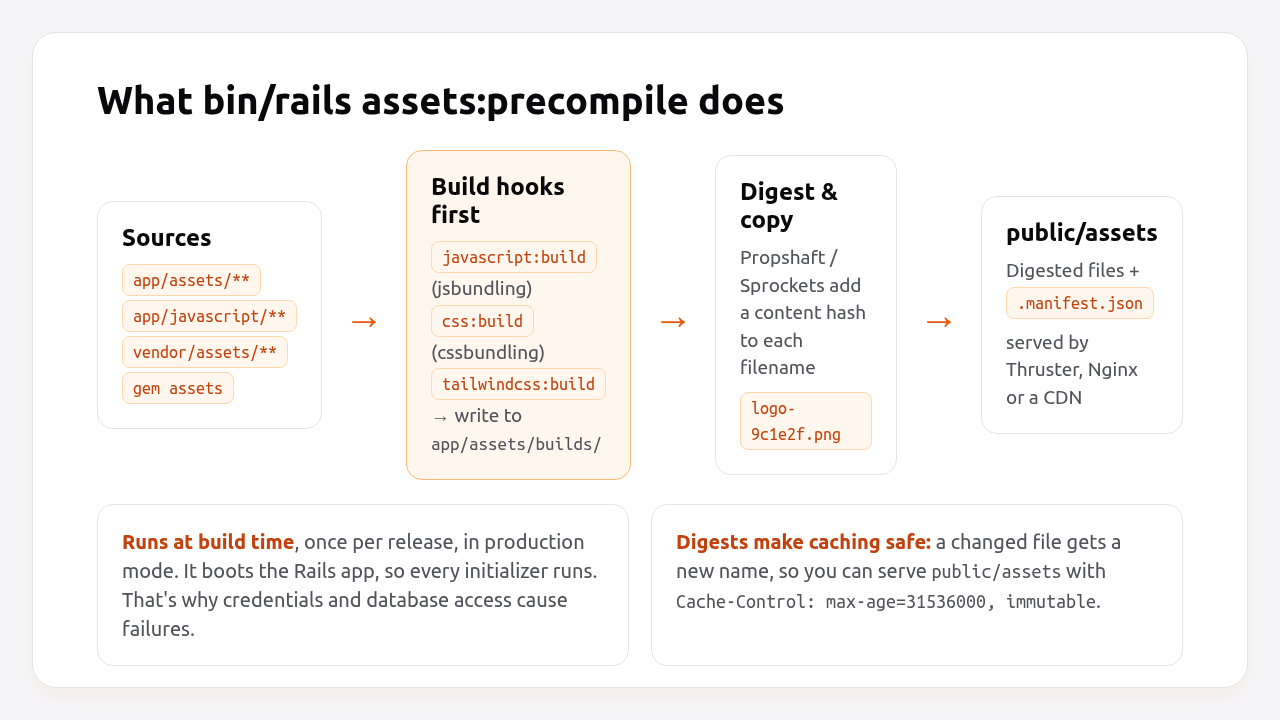
The details depend on which asset library your app uses:
| Propshaft (Rails 8 default) | Sprockets (Rails ≤ 7.0 default) | |
|---|---|---|
| Transpiles / compiles | No, it delegates to jsbundling, cssbundling, tailwindcss-rails, dartsass-rails | Yes, Sass, CoffeeScript, ERB in assets, concatenation via //= require |
| What precompile copies | Every file in the load paths | Only files listed in app/assets/config/manifest.js (plus their dependencies) |
| Manifest file | public/assets/.manifest.json |
public/assets/.sprockets-manifest-<hash>.json |
| Needs a JS runtime | Only if your build hooks use Node or Bun | Yes, for some processors (ExecJS) |
| Typical precompile time | Seconds (copy and digest) | Tens of seconds to minutes on large apps |
Two things are true for both:
- It boots the app. Precompile is a Rake task that loads
config/environment.rb, so every initializer runs in the production environment. - Build hooks run first.
jsbundling-rails,cssbundling-railsandtailwindcss-railsenhanceassets:precompilewithjavascript:build,css:buildortailwindcss:build, soyarn buildor the Tailwind CLI runs as part of the same command.
The output is what makes long caching safe. A file whose content changes gets a new name, so browsers and CDNs can cache public/assets/* for a year without serving stale code.
Prerequisites
- Rails 7.1+ (examples use Rails 8.0, Ruby 3.3, Propshaft and importmap; Sprockets differences are noted).
- If you use
jsbundling-railsorcssbundling-rails: Node 20+ and Yarn, npm or Bun available where you build. - A production
config/credentials.yml.enc, but you won’t need its key at build time.
Step 1: Configure production for precompiled assets
Production should only ever serve precompiled files. It should never compile assets on request.
# config/environments/production.rb
Rails.application.configure do
  # Sprockets only: never compile on request in production.
  # (Propshaft has no live compilation in production; this line is ignored.)
  config.assets.compile = false

  # Cache digested assets for a year. Safe because filenames change with content.
  config.public_file_server.headers = { "cache-control" => "public, max-age=#{1.year.to_i}, immutable" }

  # Optional: serve assets from a CDN.
  # config.asset_host = "https://cdn.example.com"
end
With Sprockets, also make sure every entry point you load with stylesheet_link_tag or javascript_include_tag is declared:
// app/assets/config/manifest.js (Sprockets only)
//= link_tree ../images
//= link_directory ../stylesheets .css
//= link_tree ../../javascript .js
//= link_tree ../builds
//= link admin.css
Propshaft doesn’t need a manifest: everything in app/assets/*, lib/assets/*, vendor/assets/* and gem asset paths is included automatically. To exclude a folder, use config.assets.excluded_paths << Rails.root.join("app/assets/stylesheets/src").
Step 2: Run precompile locally in production mode
Run the exact command your build will run. If it fails on your machine, it will fail in CI and on the server. If it passes, you’ve ruled out most problems before pushing.
RAILS_ENV=production SECRET_KEY_BASE_DUMMY=1 bin/rails assets:precompile
Expected output with Propshaft and importmap looks like this:
Writing application-4f2a9c1e.css
Writing application-b81d03aa.js
Writing controllers/hello_controller-1d2e3f4a.js
...
Check the result and clean up afterwards, so you don’t commit compiled assets or accidentally serve stale ones in development:
ls public/assets | head
cat public/assets/.manifest.json | head -c 400; echo
bin/rails assets:clobber
What SECRET_KEY_BASE_DUMMY=1 does: since Rails 7.1 it makes Rails generate a temporary secret_key_base, so the app can boot without RAILS_MASTER_KEY. It only replaces the secret key base. Any code that reads other credentials at boot still fails, which is covered in Troubleshooting.
Pro Tip: Add public/assets to .gitignore. On Heroku, a committed .sprockets-manifest-*.json or .manifest.json makes the buildpack skip precompile entirely (“Detected manifest file, assuming assets were compiled locally”), and you end up shipping whatever you compiled last month.
Step 3: Precompile inside the Docker build
In a container build, precompile in the build stage after copying the code, and copy only the result into the final image. That keeps Node, Yarn and node_modules out of production.
# Dockerfile (build stage, excerpt)
FROM base AS build

RUN apt-get update -qq && \
    apt-get install --no-install-recommends -y build-essential git libpq-dev libyaml-dev pkg-config && \
    rm -rf /var/lib/apt/lists /var/cache/apt/archives

COPY Gemfile Gemfile.lock ./
RUN bundle install && \
    rm -rf ~/.bundle/ "${BUNDLE_PATH}"/ruby/*/cache "${BUNDLE_PATH}"/ruby/*/bundler/gems/*/.git

# If you use jsbundling/cssbundling, install JS deps before copying the app
# so this layer is cached until package.json or yarn.lock change.
# COPY package.json yarn.lock ./
# RUN yarn install --frozen-lockfile

COPY . .

RUN SECRET_KEY_BASE_DUMMY=1 ./bin/rails assets:precompile

# If node_modules exists, drop it before the final stage copies /rails.
RUN rm -rf node_modules tmp/cache
The complete multi-stage file, with the base and final stages, is in how to dockerize a Rails app.
Two Docker-specific details:
- Don’t pass
RAILS_MASTER_KEYas a build argument. Build args are visible indocker history.SECRET_KEY_BASE_DUMMY=1removes the need for it. - Your
.dockerignoreshould exclude/public/assetsand/app/assets/builds/*. Otherwise stale local builds get copied in, and Propshaft may write them next to the fresh ones.
Step 4: Precompile in CI and keep old assets across deploys
When traffic switches to a new release, browsers that loaded the old HTML will still request the old digested files for a while. Your deploy must keep the previous release’s assets available, or those users get 404s and unstyled or broken pages.
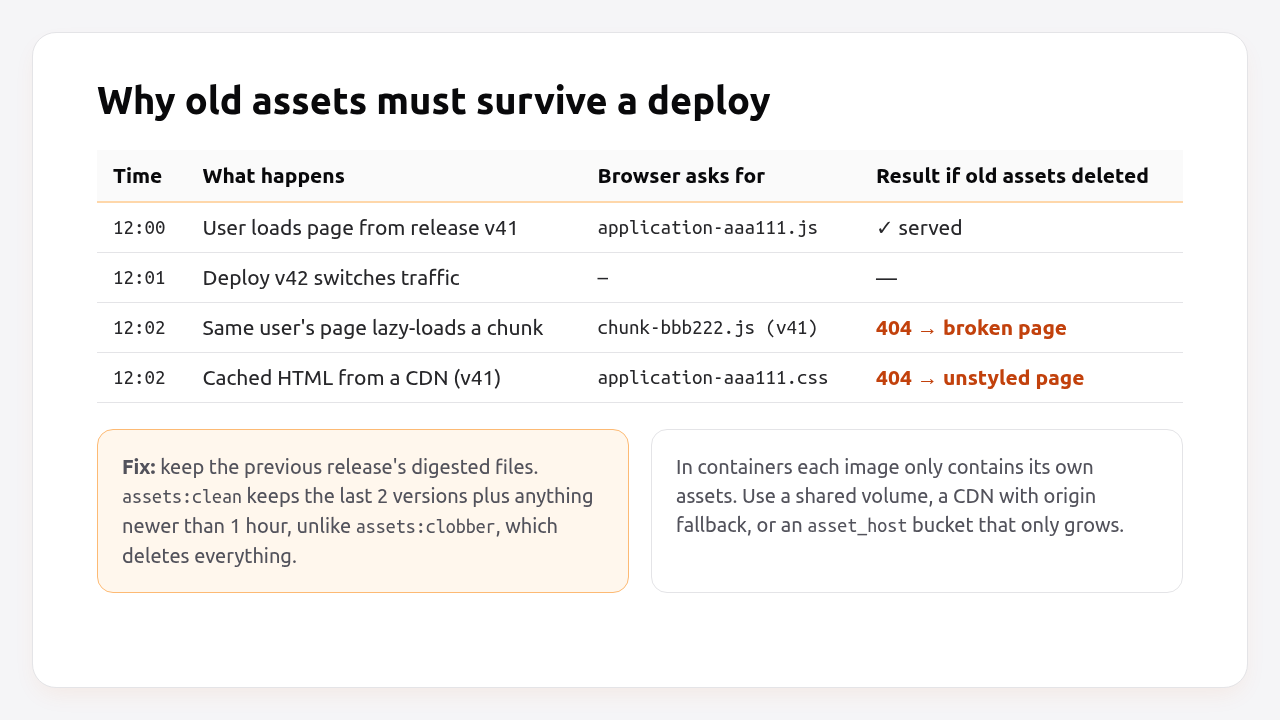
How you keep them depends on how you deploy:
| Deploy style | How old assets survive | What to do |
|---|---|---|
Capistrano / shared public/assets on disk |
Each precompile adds new files to the same folder | Run assets:clean, never assets:clobber, after precompile |
| Heroku buildpack | Buildpack caches public/assets between builds and runs assets:clean |
Nothing, as long as you don’t commit a manifest |
| Kamal 2 | Each image contains only its own assets | Set asset_path in config/deploy.yml (asset bridging) |
| Any container platform | Same as Kamal | Upload assets to a bucket/CDN that only grows, and set config.asset_host |
With Kamal 2, asset bridging is one line. Kamal extracts the assets from the old and new containers and serves the combined set during the switch. The rest of the Kamal setup is in minimal Rails deployments with Kamal 2 and Thruster:
# config/deploy.yml
service: myapp
image: myorg/myapp
servers:
  web:
    - 192.168.0.1
asset_path: /rails/public/assets
With a CDN and asset_host, precompile in CI and sync to the bucket before deploying, without deleting old files:
# .github/workflows/deploy.yml (excerpt)
- name: Precompile assets
  env:
    RAILS_ENV: production
    SECRET_KEY_BASE_DUMMY: "1"
  run: bin/rails assets:precompile

- name: Upload assets (never delete old digests)
  run: aws s3 sync public/assets s3://myapp-assets/assets --cache-control "public, max-age=31536000, immutable"
Leaving out --delete is deliberate. Old digests stay in the bucket, which costs a few megabytes per release, and pages rendered by the previous release never break. Clean up files older than 30 days with a bucket lifecycle rule.
Pro Tip: assets:clean keeps the two most recent versions of each asset plus anything compiled in the last hour. You can tune it with bin/rails "assets:clean[3]" if your deploys are frequent and sessions are long.
Step 5: Verify it works
After deploying, confirm that assets are digested, served with long cache headers, and that the HTML references the same digests that exist on disk.
# 1. The page references digested assets
curl -s https://example.com/ | grep -oE '/assets/[a-z_/-]+-[0-9a-f]{8,}\.(css|js)' | sort -u

# 2. Each one returns 200 with an immutable cache header
curl -sI https://example.com/assets/application-4f2a9c1e.css | grep -iE "^HTTP|cache-control|content-encoding"
# HTTP/2 200
# cache-control: public, max-age=31536000, immutable
# content-encoding: gzip

# 3. A non-digested path is not served (proves compile is off)
curl -sI https://example.com/assets/application.css | head -1
# HTTP/2 404
Then do one more check that most guides skip: deploy twice in a row, and request an asset digest from the first deploy after the second one finishes. It should still return 200.
How Heroku, Render, Fly.io, Upsun and Enkihost precompile assets
Every platform runs precompile during the build, not at runtime. The differences are whether it happens automatically, and whether old assets survive the next deploy.
| Platform | Runs precompile | How you configure it | Old assets kept across deploys |
|---|---|---|---|
| Heroku | Automatically, via the Ruby buildpack (“Preparing Rails asset pipeline”) | Skipped if a manifest is committed | Yes, the buildpack caches public/assets and runs assets:clean |
| Render | In your build command | bin/render-build.sh: bundle install, bin/rails assets:precompile, bin/rails assets:clean |
Native runtime: per build; Docker: per image |
| Fly.io | In the Dockerfile generated by fly launch |
RUN SECRET_KEY_BASE_DUMMY=1 ./bin/rails assets:precompile |
No, each image is self-contained, so use a CDN or bridging |
| Upsun | In the build hook | hooks: build: bundle exec rails assets:precompile in .upsun/config.yaml |
No, the build is immutable per deploy |
| Kamal 2 | In your Dockerfile | Same as Fly.io | Yes, with asset_path (asset bridging) |
| Enkihost | In your Dockerfile (or the generated one) | Same as Fly.io | No, each deploy is a new image |
Heroku is the only one that handles old-asset retention for you without configuration, because the buildpack carries the asset cache from build to build. On every container-based platform the image is the unit of deploy, so you have to bridge assets yourself.
Enkihost does zero-downtime deploys, so there’s a window where old and new releases overlap, just like on every platform above. The same rule applies: precompile at build time, and use a CDN or asset_host if your pages lazy-load assets long after the first page load.
Troubleshooting assets:precompile errors
Most precompile failures fall into four groups: the app can’t boot without secrets or a database, a JS/CSS build tool is missing, an asset reference doesn’t resolve, or the build runs out of memory.
Missing secret_key_base for 'production' environment
ArgumentError: Missing `secret_key_base` for 'production' environment, set this string with `bin/rails credentials:edit`
Set SECRET_KEY_BASE_DUMMY=1 on the precompile command. On Rails 7.0 and earlier, which don’t support it, use SECRET_KEY_BASE=placeholder bin/rails assets:precompile.
undefined method '[]' for nil or KeyError from credentials
NoMethodError: undefined method `[]' for nil (NoMethodError)
  config/initializers/stripe.rb:1:in `<main>'
An initializer reads a credential that doesn’t exist during the build. Make it tolerant:
# config/initializers/stripe.rb
Stripe.api_key = Rails.application.credentials.dig(:stripe, :secret_key) || ENV["STRIPE_SECRET_KEY"]
Or defer the read until it’s used, for example inside a service object, instead of at boot.
ActiveRecord::ConnectionNotEstablished during precompile
ActiveRecord::ConnectionNotEstablished: connection to server on socket "/var/run/postgresql/.s.PGSQL.5432" failed: No such file or directory
Something queries the database at boot: an initializer, a model loaded with a scope evaluated at class-load time, or a gem that reads settings from a table. Find it with bin/rails assets:precompile --trace, then move the query into a method or wrap it in Rails.application.config.after_initialize and check defined?(Rails::Server). Precompile itself never needs a database.
The asset "admin.css" is not present in the asset pipeline
ActionView::Template::Error (The asset "admin.css" is not present in the asset pipeline.)
This shows up at runtime, not at build time: the view references an asset that precompile didn’t output. With Sprockets, add //= link admin.css to app/assets/config/manifest.js. With Propshaft, check the file exists in a load path and that it isn’t in excluded_paths. For jsbundling/cssbundling, make sure the build writes to app/assets/builds/.
jsbundling-rails: Command build failed
jsbundling-rails: Command build failed, ensure `yarn build` runs without errors
Node or Yarn is missing in the build environment, or yarn install didn’t run before precompile. In Docker, install Node in the build stage and run yarn install --frozen-lockfile before assets:precompile. Run yarn build on its own to see the real error.
JavaScript heap out of memory or the build gets Killed
FATAL ERROR: Reached heap limit Allocation failed - JavaScript heap out of memory
esbuild and Tailwind are light, but webpack and large Sass builds aren’t. Raise Node’s heap for the build only, NODE_OPTIONS=--max-old-space-size=2048 bin/rails assets:precompile, or build on a machine with more memory than the runtime server. A plain Killed with exit code 137 means the OS OOM killer stopped the process.
ExecJS::RuntimeUnavailable
ExecJS::RuntimeUnavailable: Could not find a JavaScript runtime. See https://github.com/rails/execjs for a list of available runtimes.
You’re on Sprockets with a processor that needs JavaScript (often uglifier or terser). Install Node in the build stage, or switch the compressor off: config.assets.js_compressor = nil. HTTP compression already does most of the work.
Author Perspective: precompile is a smoke test
I’ve come to treat assets:precompile as the cheapest production smoke test there is. It boots the full app in production mode with no secrets and no database, and if anything in my initializers is fragile, this is where it shows up first, in CI and not at 3 AM after a deploy. I run RAILS_ENV=production SECRET_KEY_BASE_DUMMY=1 bin/rails assets:precompile as an explicit CI step on every pull request, even though the Docker build runs it again. When it fails, it’s almost always a credential read at boot, and fixing that makes the app more robust everywhere.
Precompiled assets on Enkihost
Enkihost doesn’t change how Rails builds assets. The same bin/rails assets:precompile you run locally is the command that has to pass, and everything in this guide applies as is:
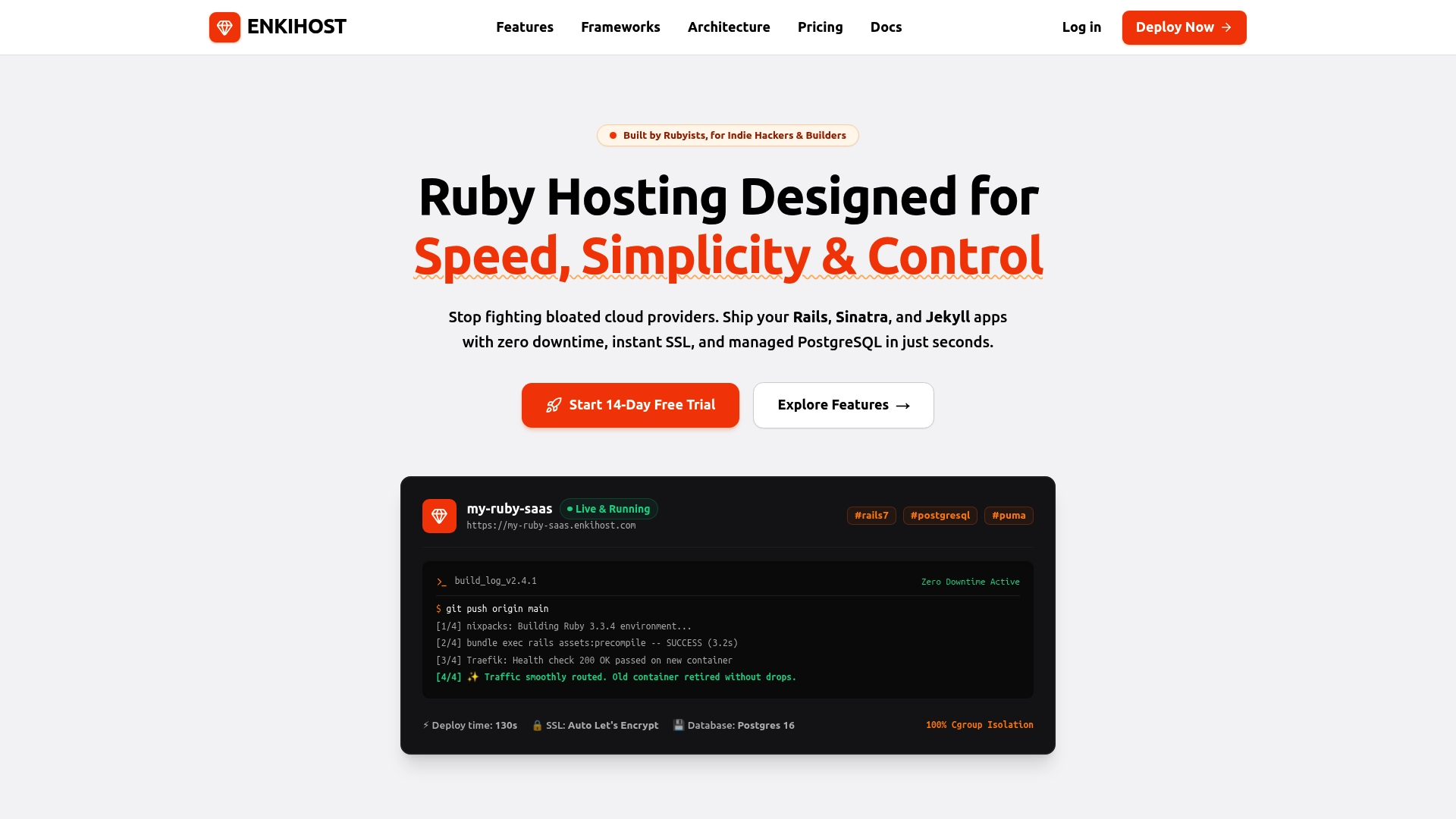
- Zero-downtime deploys: the new release takes over without dropping in-flight requests. Precompile at build time with
SECRET_KEY_BASE_DUMMY=1and long-cached digested assets keep working through the switch. - Per-app resource isolation with allocated memory and CPU, so the memory budget you plan for Puma is the one you get, without a build tool competing with it at runtime.
- PostgreSQL and Redis add-ons inject
DATABASE_URLandREDIS_URLat runtime, which is one more reason to keep database access out of the precompile step.
Rails and Sinatra apps run on Ignite (5 EUR per month after a 14-day free trial, with PostgreSQL and Redis included) or Blaze (16 EUR per month, with high availability and autoscaling). The free Spark plan is for Jekyll sites. Start at enkihost.com.
FAQ
Do I need to run assets:precompile in development?
No. In development, Propshaft and Sprockets serve assets on demand, and bin/dev runs any JS or CSS watchers. If you precompile locally to test a production build, run bin/rails assets:clobber afterwards, or development will serve the stale compiled files from public/assets.
Should I commit public/assets to git?
No. Compiled assets bloat the repository, go stale, and on Heroku a committed manifest makes the buildpack skip precompile. Compile at build time instead and add public/assets to .gitignore.
What is the difference between assets:clean and assets:clobber?
assets:clean removes old compiled assets but keeps the two most recent versions of each file and anything compiled in the last hour, so pages from the previous release keep working. assets:clobber deletes the whole public/assets directory. Use clean in deploys and clobber only locally.
Does assets:precompile need the database?
No. Precompiling assets never needs a database connection. If the task fails with a connection error, some initializer or class-level code is querying the database at boot, and that code should be made lazy.
Why does precompile succeed but production still returns 404 for assets?
Usually the web server isn’t serving public/assets. Either RAILS_SERVE_STATIC_FILES is unset on an old Rails version, Nginx or Thruster isn’t pointed at public, or the HTML references a digest from a different build than the files on disk. Compare the digest in the page source with the filenames in public/assets.
Sources
- The Asset Pipeline — Rails Guides
- rails/propshaft — GitHub
- rails/sprockets-rails — GitHub
- rails/jsbundling-rails — GitHub
- Kamal configuration: asset_path (asset bridging) — Kamal docs
- Rails Asset Pipeline on Heroku — Heroku Dev Center
- Deploy a Ruby on Rails app — Render Docs
- Rails on Fly.io: Getting started — Fly Docs
- Deploy Ruby on Rails on Upsun — Upsun Docs