Rails Staging Environment: How to Set It Up So It Actually Matches Production

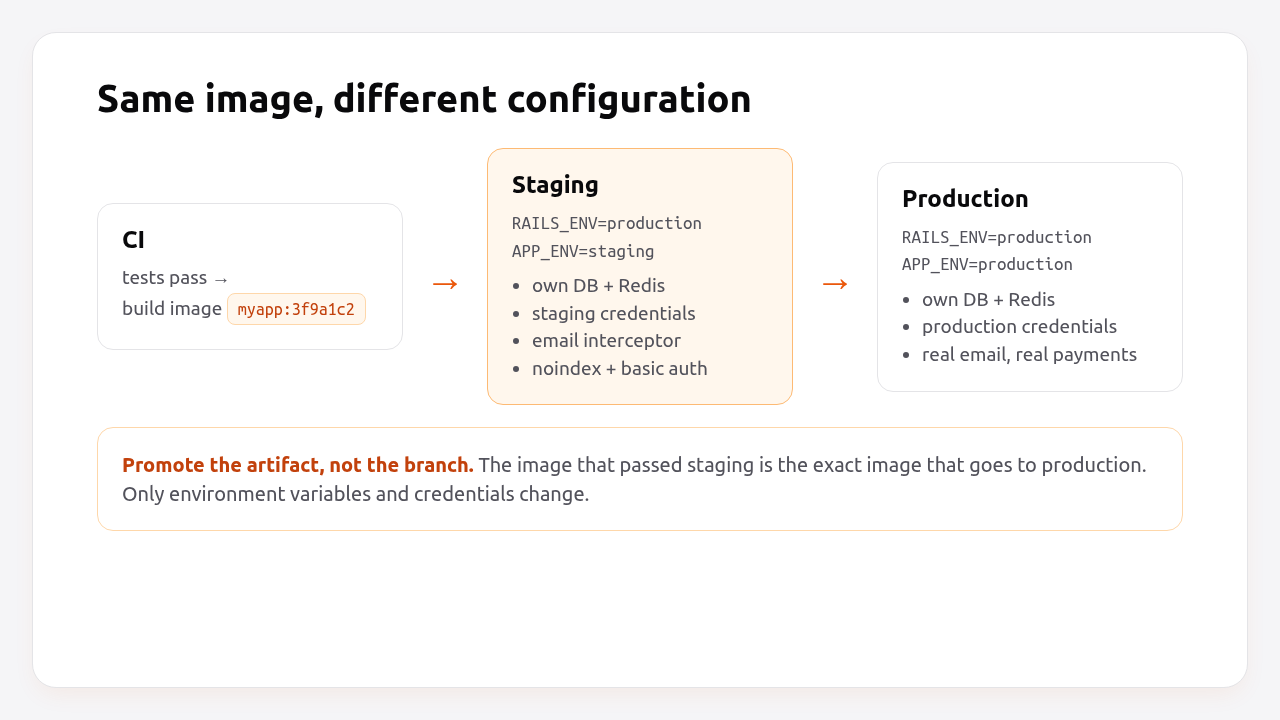
A Rails staging environment is a copy of production where you test a release with production settings, production-like data and real integrations in sandbox mode before customers see it. The most reliable way to build one is to run staging with RAILS_ENV=production and change only environment variables and credentials. Then the code paths, eager loading, asset compilation and caching you test are the ones you’ll ship. This How-To shows that setup step by step: separate credentials, email and search-engine safety, safe data, Kamal destinations, and how Heroku, Render, Fly.io and Upsun handle staging and preview environments.
TL;DR
- Run staging with
RAILS_ENV=productionand an extraAPP_ENV=stagingvariable for the few things that must differ. Heroku recommends the same thing.- Give staging its own database, Redis, storage bucket and credentials file (
config/credentials/staging.yml.enc), loaded by pointingconfig.credentials.content_pathat it.- Make staging safe by default: a mail interceptor so real customers never get test emails, HTTP basic auth,
X-Robots-Tag: noindex, and sandbox keys for payments.- Deploy the same image to staging and production. With Kamal 2, that’s a destination:
config/deploy.staging.ymlpluskamal deploy -d staging.- Never copy raw production data to staging. Use seeds or a scrubbed dump with personal data replaced.
Table of Contents
- What is a Rails staging environment for?
- Should staging use RAILS_ENV=staging or RAILS_ENV=production?
- Prerequisites
- Step 1: Add an APP_ENV switch
- Step 2: Give staging its own credentials
- Step 3: Make staging safe for email, search engines and payments
- Step 4: Deploy staging with Kamal destinations
- Step 5: Load safe data into staging
- Step 6: Verify it works
- How Heroku, Render, Fly.io, Upsun and Enkihost handle staging
- Troubleshooting Rails staging environments
- Author Perspective: staging is for the release, not for the feature
- Staging environments on Enkihost
- FAQ
- Sources
What is a Rails staging environment for?
Staging is where you test the release, not the feature. It catches what development and CI can’t: production configuration, eager loading, asset precompilation, migrations against realistic data, background jobs, and integrations with external services.
The things staging catches that tests usually miss:
- A credential or environment variable that only exists in production.
- A migration that’s fast on an empty test database and locks a table with a million rows.
- An asset that compiles locally but not with
RAILS_ENV=production. - A webhook, OAuth callback or CORS setting tied to a hostname.
- A job that works with the
:testadapter and fails on Solid Queue or Sidekiq.
For that to work, staging has to be as close to production as possible. Every difference is a bug that staging can’t catch.
Should staging use RAILS_ENV=staging or RAILS_ENV=production?
Use RAILS_ENV=production for staging, and express the differences through environment variables. A custom staging Rails environment is a second set of configuration that drifts from production over time, which defeats the purpose of staging.
RAILS_ENV=production + APP_ENV=staging |
RAILS_ENV=staging |
|
|---|---|---|
| Config files to maintain | One (production.rb) |
Two (production.rb + staging.rb) |
| Risk of config drift | Low | High; every production change must be mirrored |
database.yml, cable.yml, queue.yml entries |
Shared production entries |
Need staging entries in each file |
| Per-environment credentials | Via content_path (Step 2) |
Built in: --environment staging |
Gems in group :production |
Loaded | Not loaded unless you add :staging |
| Platform recommendation | Heroku recommends it | — |
If you already have a staging.rb, make it inherit from production so it can only differ where you say so:
# config/environments/staging.rb
require_relative "production"

Rails.application.configure do
  # Only overrides go here.
  config.log_level = :debug
end
The rest of this guide uses the RAILS_ENV=production + APP_ENV approach.
Prerequisites
- A Rails 7.1+ app (examples use Rails 8.0 and Ruby 3.3) that already deploys to production.
- A separate server, app or service for staging, with its own PostgreSQL database and Redis if you use it.
- A staging hostname, e.g.
staging.example.com. - Kamal 2 for the deploy examples. Platform equivalents are listed later.
Step 1: Add an APP_ENV switch
Add one small helper that tells the app which deployment it’s running in, independently of Rails.env:
# config/initializers/app_env.rb
module AppEnv
  def self.name = ENV.fetch("APP_ENV", Rails.env)
  def self.staging? = name == "staging"
  def self.production? = name == "production"
end
Use it sparingly, only for things that must differ: credentials, email delivery, access control, banners. If you find yourself writing if AppEnv.staging? in business logic, stop. That’s the drift you’re trying to avoid.
Show a visible banner so nobody confuses the two environments:
<%# app/views/layouts/application.html.erb (inside <body>) %>
<% if AppEnv.staging? %>
  <div style="background:#ea580c;color:#fff;text-align:center;padding:4px;font:600 13px sans-serif">
    STAGING · <%= ENV.fetch("KAMAL_VERSION", "dev")[0, 7] %>
  </div>
<% end %>
Step 2: Give staging its own credentials
Staging must never hold production secrets. Create a separate encrypted credentials file and point Rails at it when APP_ENV=staging.
bin/rails credentials:edit --environment staging
# Adding config/credentials/staging.key to store the encryption key
# Saving config/credentials/staging.yml.enc
Because staging runs with RAILS_ENV=production, Rails would load the production credentials by default. Tell it which file to use:
# config/application.rb
require_relative "boot"
require "rails/all"

Bundler.require(*Rails.groups)

module Myapp
  class Application < Rails::Application
    config.load_defaults 8.0

    app_env = ENV["APP_ENV"]
    if app_env.present? && app_env != Rails.env
      config.credentials.content_path = Rails.root.join("config/credentials/#{app_env}.yml.enc")
      config.credentials.key_path = Rails.root.join("config/credentials/#{app_env}.key")
    end
  end
end
On the staging server, set RAILS_MASTER_KEY to the contents of config/credentials/staging.key. The environment variable takes precedence over key_path. Keep the .key files out of git:
# .gitignore
/config/master.key
/config/credentials/*.key
Put sandbox keys in the staging file: Stripe test-mode keys, your email provider’s sandbox or test server, test OAuth apps registered with the staging callback URL.
Pro Tip: Give staging its own S3 bucket (or a prefix with its own IAM user). A staging Active Storage purge job running against the production bucket is a very bad afternoon.
Step 3: Make staging safe for email, search engines and payments
Staging should be safe by default: it must not email real customers, show up in Google, or move real money, even when someone loads a copy of real data into it.
Email. Register an interceptor that redirects every message to an internal address unless the recipient is on your own domain:
# config/initializers/staging_mail_interceptor.rb
if AppEnv.staging?
  class StagingMailInterceptor
    ALLOWED = /@example\.com\z/i

    def self.delivering_email(message)
      original = Array(message.to).join(", ")
      allowed = Array(message.to).select { |address| address.match?(ALLOWED) }

      message.to = allowed.presence || [ENV.fetch("STAGING_MAIL_TO", "dev-team@example.com")]
      message.cc = nil
      message.bcc = nil
      message.subject = "[STAGING → #{original}] #{message.subject}"
    end
  end

  ActionMailer::Base.register_interceptor(StagingMailInterceptor)
end
Access and indexing. Put staging behind HTTP basic auth and tell crawlers to stay away:
# app/controllers/application_controller.rb
class ApplicationController < ActionController::Base
  if AppEnv.staging?
    http_basic_authenticate_with name: ENV.fetch("STAGING_USER"), password: ENV.fetch("STAGING_PASSWORD")
    after_action { response.headers["X-Robots-Tag"] = "noindex, nofollow" }
  end
end
public/robots.txt is shared by both environments, so rely on the header rather than the file.
The /up health check is served by Rails::HealthController, which doesn’t inherit from ApplicationController, so basic auth doesn’t break deploys. That’s covered in the Rails health check guide.
Payments and third parties. Use test-mode keys from the staging credentials, and register staging webhook endpoints separately in each provider’s dashboard. A production webhook pointed at staging, or the other way round, is one of the most common staging bugs.
Step 4: Deploy staging with Kamal destinations
Deploy the exact image you’ll ship to production. With Kamal 2, staging is a destination: a small file that overrides config/deploy.yml.
# config/deploy.yml (shared base)
service: myapp
image: myorg/myapp

servers:
  web:
    - 10.0.0.11
  job:
    hosts:
      - 10.0.0.11
    cmd: bin/jobs

proxy:
  ssl: true
  host: example.com

registry:
  username: myorg
  password:
    - KAMAL_REGISTRY_PASSWORD

env:
  clear:
    APP_ENV: production
  secret:
    - RAILS_MASTER_KEY
    - DATABASE_URL
# config/deploy.staging.yml (only what differs)
servers:
  web:
    - 10.0.0.31
  job:
    hosts:
      - 10.0.0.31
    cmd: bin/jobs

proxy:
  ssl: true
  host: staging.example.com

env:
  clear:
    APP_ENV: staging
    STAGING_MAIL_TO: dev-team@example.com
  secret:
    - RAILS_MASTER_KEY
    - DATABASE_URL
    - STAGING_USER
    - STAGING_PASSWORD
Secrets per destination live in .kamal/secrets.staging:
# .kamal/secrets.staging
KAMAL_REGISTRY_PASSWORD=$KAMAL_REGISTRY_PASSWORD
RAILS_MASTER_KEY=$(cat config/credentials/staging.key)
DATABASE_URL=$STAGING_DATABASE_URL
STAGING_USER=$STAGING_USER
STAGING_PASSWORD=$STAGING_PASSWORD
Deploy to staging, test, then deploy the same commit to production:
kamal deploy -d staging
# ...test on https://staging.example.com...
kamal deploy --skip-push      # same image tag, already in the registry
Both deploys use the image tagged with the current git commit, so production runs exactly what you tested. The full Kamal setup is in minimal Rails deployments with Kamal 2 and Thruster.
Step 5: Load safe data into staging
Staging needs realistic data volume and shape, but not real personal data. Use seeds for most apps, and a scrubbed production dump only when you need production-scale data to test migrations or performance.
For seeds, make them idempotent so they can be rerun:
# db/seeds.rb
return if Rails.env.production? && !AppEnv.staging?

admin = User.find_or_create_by!(email: "admin@example.com") do |u|
  u.name = "Staging Admin"
  u.password = ENV.fetch("STAGING_ADMIN_PASSWORD")
end

50.times do |i|
  Product.find_or_create_by!(sku: "SEED-#{i}") do |p|
    p.name = "Sample product #{i}"
    p.price_cents = 1_000 + (i * 137)
  end
end
If you do copy production, scrub it before it leaves the production network, or on a throwaway machine, never on staging itself:
pg_dump --format=custom --no-owner "$PRODUCTION_DATABASE_URL" -f prod.dump
createdb scrub_tmp && pg_restore --no-owner -d scrub_tmp prod.dump
STAGING_HASH=$(bin/rails runner 'puts BCrypt::Password.create(ENV.fetch("STAGING_ADMIN_PASSWORD"))')
psql scrub_tmp -v staging_hash="$STAGING_HASH" -f scrub.sql
pg_dump --format=custom --no-owner scrub_tmp -f staging.dump
pg_restore --clean --if-exists --no-owner -d "$STAGING_DATABASE_URL" staging.dump
dropdb scrub_tmp && rm prod.dump
-- scrub.sql
UPDATE users
SET email = 'user' || id || '@example.com',
    name = 'User ' || id,
    phone = NULL,
    encrypted_password = :'staging_hash'; -- everyone gets the staging password
UPDATE addresses SET line1 = 'Street ' || id, postcode = '00000';
TRUNCATE sessions, api_tokens, webhook_deliveries;
UPDATE accounts SET stripe_customer_id = NULL;
Under GDPR and similar laws, a staging copy of production personal data is still personal data. It needs the same protection as production, or it shouldn’t exist.
Step 6: Verify it works
Check that staging is running production mode, using its own credentials and database, and that the safety nets are active.
# Production mode, staging deployment
kamal app exec -d staging --reuse 'bin/rails runner "puts [Rails.env, AppEnv.name].inspect"'
# ["production", "staging"]

# Staging credentials, not production ones
kamal app exec -d staging --reuse 'bin/rails runner "puts Rails.application.credentials.dig(:stripe, :secret_key).to_s[0, 8]"'
# sk_test_

# Auth and indexing
curl -sI https://staging.example.com/ | grep -iE "^HTTP|x-robots"
# HTTP/2 401
curl -sI -u "$STAGING_USER:$STAGING_PASSWORD" https://staging.example.com/ | grep -iE "^HTTP|x-robots"
# HTTP/2 200
# x-robots-tag: noindex, nofollow

# Health check still open for the proxy
curl -s -o /dev/null -w "%{http_code}\n" https://staging.example.com/up
# 200
Finally, trigger an email to an outside address (a password reset for a seeded user with @gmail.com, for example) and confirm it arrives at STAGING_MAIL_TO with the [STAGING → …] subject.
How Heroku, Render, Fly.io, Upsun and Enkihost handle staging
Every platform supports a staging environment as a second copy of the app. They differ in whether code is promoted as a built artifact, and whether per-pull-request preview environments are built in.
| Platform | Staging model | Promotion | Preview environments | Data in previews |
|---|---|---|---|---|
| Heroku | Separate app in a Pipeline | Promotes the built slug from staging to production | Review Apps per pull request | Empty; seed via app.json scripts |
| Render | Separate services, or an environment in a project | Redeploys from git (no artifact promotion) | Preview Environments (previews.generation in render.yaml), auto-expire with expireAfterDays |
Empty; seed with initialDeployHook |
| Fly.io | Separate app (fly deploy -a myapp-staging -c fly.staging.toml) |
Deploy the same image with --image |
Not built in (GitHub Actions recipes) | Empty |
| Upsun | Every git branch is an environment | Merge to the parent branch | Built in for every branch | Cloned from the parent environment |
| Kamal 2 | Destination (-d staging) |
Same image tag per commit | Not built in | Whatever you load |
| Enkihost | Separate app (Ignite runs two, Blaze five) | Redeploy from a git branch | Not built in | Empty |
Two details are worth knowing:
- Heroku’s slug promotion is the closest thing to “the image you tested is the image you ship” on a buildpack platform. Render rebuilds from git for each environment, so a dependency resolved differently between builds can still surprise you.
- Upsun clones data into branch environments from their parent. It’s a great way to test migrations against real volume, and it also means production personal data ends up in every preview unless you sanitize it in a deploy hook.
Enkihost runs each app with its own resources and zero-downtime deploys. A staging environment there is a second app: Ignite runs two apps and Blaze five. Blaze includes five databases, so staging gets its own DATABASE_URL; Ignite includes one PostgreSQL, so check how a second app gets its own database before you rely on it. The APP_ENV approach in this guide works unchanged on both.
Troubleshooting Rails staging environments
Most staging problems come from a custom staging Rails environment missing a configuration entry, or from staging sharing something with production that it shouldn’t.
'staging' database is not configured
ActiveRecord::AdapterNotSpecified: The `staging` database is not configured for the `staging` environment.
  Available database configurations are: development, test, production
You’re running RAILS_ENV=staging without a staging entry in database.yml. Either add one (and the same for cable.yml, queue.yml, cache.yml and storage.yml), or switch to RAILS_ENV=production with APP_ENV=staging.
Missing encryption key to decrypt file
ActiveSupport::EncryptedFile::MissingKeyError: Missing encryption key to decrypt file with.
Ask your team for your master key and write it to /rails/config/credentials/staging.key or put it in the ENV['RAILS_MASTER_KEY'].
RAILS_MASTER_KEY isn’t set on the staging server, or it’s set to the production key. Set it to the contents of config/credentials/staging.key.
Missing secret_key_base for 'staging' environment
ArgumentError: Missing `secret_key_base` for 'staging' environment, set this string with `bin/rails credentials:edit --environment staging`
The staging credentials file doesn’t contain secret_key_base. Add one with bin/rails secret and bin/rails credentials:edit --environment staging.
A gem works in production but not in staging
With RAILS_ENV=staging, gems inside group :production do ... end in the Gemfile aren’t required. Use group :production, :staging do, or drop the custom environment.
Customers received an email from staging
The interceptor wasn’t registered (check AppEnv.staging? returns true), or the job ran on a worker without APP_ENV=staging. Every process type needs the same environment variables. In Kamal, env at the top level applies to all roles.
Staging appears in Google search results
The site was public before the header was added, or the X-Robots-Tag header is only on HTML responses while assets and redirects are indexed. Keep basic auth on, then use Google Search Console’s removal tool for the staging hostname.
Author Perspective: staging is for the release, not for the feature
The staging environments that worked best in my projects were boring: production mode, a smaller server, sandbox keys, seeded data, and one rule, which is that the release that goes to production is the one that sat on staging first. The ones that failed tried to be a shared playground where three people tested half-finished branches at once, so nobody knew which version was deployed. If you need to test features in isolation, use preview environments. Keep staging for the question “is this exact release safe to ship?”. It’s also where I run every non-trivial migration first, against a realistic amount of scrubbed data. That habit has saved me more than once.
Staging environments on Enkihost
A staging environment is useful only if it’s cheap enough to keep running and close enough to production to trust. On Enkihost:
- A second app with its own PostgreSQL and Redis add-ons, which inject their own
DATABASE_URLandREDIS_URL, so staging data never touches production. - Per-app resource isolation, so a heavy migration test on staging can’t slow down production.
- Zero-downtime deploys on both, so you test the same deploy behaviour your users will experience.
- Room for staging in the plan: Ignite (9 EUR per month, 14-day free trial) runs two Rails apps and Blaze (29 EUR) runs five, so production and staging can share one plan.
See enkihost.com.
FAQ
Do I need a separate database for staging?
Yes. Staging should always have its own PostgreSQL database and its own Redis. Sharing the production database means a staging migration or test job can change or lock production data, which defeats the purpose of having a separate environment.
Should staging run the same server size as production?
It doesn’t need to be the same size, but it should run the same software: same image, same Ruby, same PostgreSQL major version, same process types. A smaller instance is fine for functional testing. For load or migration testing, use production-sized data, temporarily if necessary.
What is the difference between staging and preview environments?
Staging is one long-lived environment that mirrors production and tests the next release. Preview environments are short-lived copies created per pull request to test a single change in isolation, and they are deleted when the pull request closes. Many teams use both.
Can I use Rails credentials for staging with RAILS_ENV=production?
Yes. Create the file with bin/rails credentials:edit –environment staging, then point config.credentials.content_path and key_path at it in config/application.rb when APP_ENV is staging. Set RAILS_MASTER_KEY on the staging server to the staging key.
How do I stop staging from sending real emails?
Register an Action Mailer interceptor that only runs on staging and rewrites every recipient outside your own domain to an internal address. Clear cc and bcc, and tag the subject so test emails are easy to recognise. Make sure every process, including job workers, runs with the staging environment variables.
Sources
- Configuring Rails Applications: custom environments and credentials — Rails Guides
- Securing Rails Applications: custom credentials — Rails Guides
- Action Mailer Basics: intercepting emails — Rails Guides
- Kamal configuration: destinations — Kamal docs
- Managing Multiple Environments for an App — Heroku Dev Center
- Pipelines — Heroku Dev Center
- Preview Environments — Render Docs
- Fly.io: deploying multiple environments — Fly Docs
- Upsun: environments and data inheritance — Upsun Docs