Rails Connection Pool: How to Size It for Puma, Solid Queue and PgBouncer
The Rails connection pool is the set of database connections each Ruby process keeps open and lends to its threads. Size it too small and requests fail with ActiveRecord::ConnectionTimeoutError. Size it too large, or forget how many processes you run, and PostgreSQL refuses new clients with too many clients already. This guide gives you the formula for both sides, shows how Rails 8’s separate queue, cache and cable databases multiply your connection count, walks through the database.yml settings including the new Rails 8.1 options, and explains when PgBouncer is the right fix.
TL;DR
- Set
pool(max_connectionsin Rails 8.1) to at least the number of threads in the process that use the database. For Puma, that’sRAILS_MAX_THREADS. For Solid Queue, it’s the worker’sthreadsplus 2.- The pool is per process and per database. A Rails 8 web process that talks to primary, queue and cache databases can hold three pools.
- Total connections = Σ (processes × pool) across every server, worker, console and cron job. Keep that under PostgreSQL’s
max_connectionswith headroom.ConnectionTimeoutErrormeans the pool is too small for the threads in that process.FATAL: sorry, too many clients alreadymeans the total across processes is too large for the server.- Add PgBouncer in transaction mode when the total outgrows the database, and connect migrations directly to PostgreSQL.
Table of Contents
- What is the Rails connection pool?
- How big should the Rails connection pool be?
- Prerequisites
- Step 1: Measure your current connections
- Step 2: Configure the pool in database.yml
- Step 3: Align Puma, Solid Queue and the pool
- Step 4: Add PgBouncer when you run out of connections
- Step 5: Verify it works
- How Heroku, Render, Fly.io, Upsun and Enkihost handle connection limits
- Troubleshooting connection pool errors
- Author Perspective: count, don’t guess
- Database connections on Enkihost
- FAQ
- Sources
What is the Rails connection pool?
The Rails connection pool is a per-process, thread-safe cache of open database connections. When a thread needs to run a query, it checks out a connection, uses it, and returns it. If every connection is busy, the thread waits up to checkout_timeout (5 seconds by default) and then raises an error.
Opening a PostgreSQL connection is expensive. It forks a backend process on the server and costs a few milliseconds plus a few megabytes of server memory, so Rails keeps connections open and reuses them. A few facts that drive all the sizing decisions:
- One pool per process per database. A Puma worker is a separate process with its own pools. Threads inside it share them.
- Pools open lazily. A pool of 10 in a process that only ever runs 3 threads will typically hold 3 connections. The pool size is a ceiling, not a reservation.
- Since Rails 7.2, Active Record can release a connection between queries instead of holding it for the whole request. That reduces how many are busy at once in practice, but you still size the pool for the worst case: every thread inside a transaction at the same moment.
How big should the Rails connection pool be?
The pool for each process should equal the number of threads in that process that can use the database at the same time. The total across all processes must stay below what PostgreSQL allows. Those are two separate limits, and each one causes its own error.
| Limit | Rule | Error when broken |
|---|---|---|
| Per process | pool ≥ threads using the database |
ActiveRecord::ConnectionTimeoutError: could not obtain a connection from the pool |
| Per database server | Σ (processes × pool × databases on that server) < max_connections − reserved |
PG::ConnectionBad: FATAL: sorry, too many clients already |
The second number is where teams get surprised. Here is a worked example for a modest Rails 8 app with Solid Queue and Solid Cache on the same PostgreSQL server:
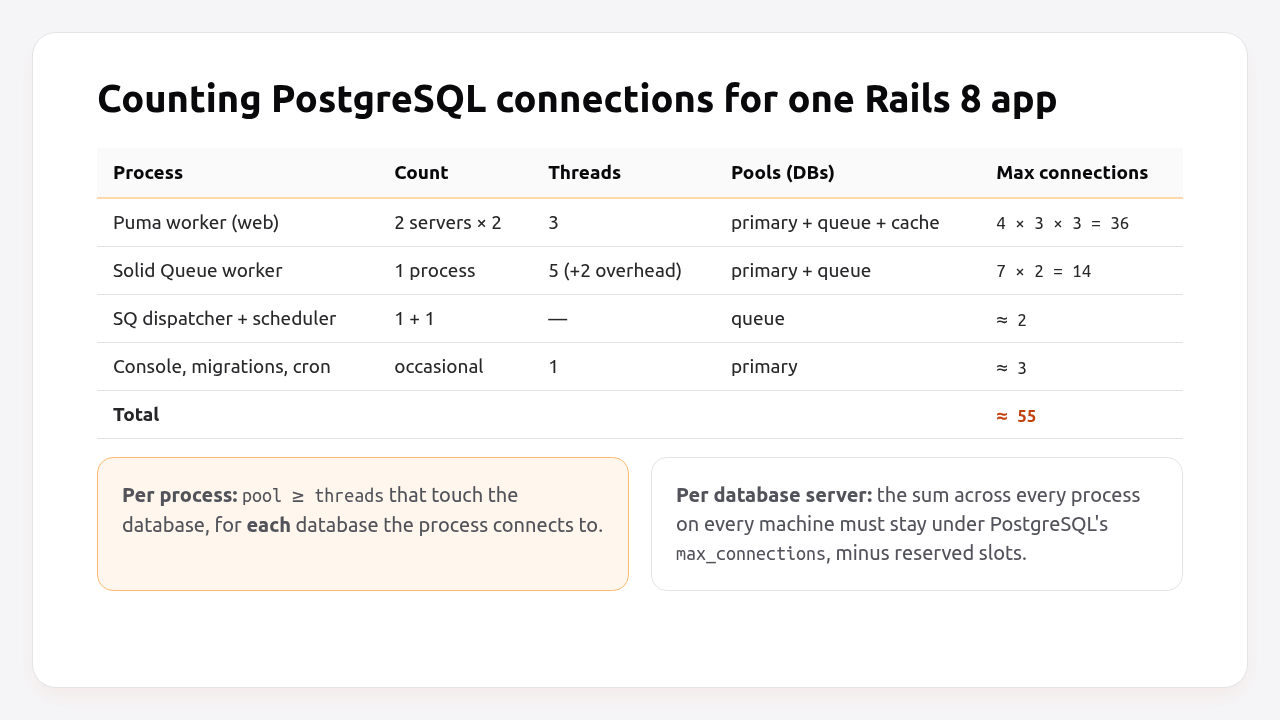
Web processes connect to the queue database every time they enqueue a job and to the cache database on every Rails.cache call, so each Puma worker can open three pools, not one. Two servers with two Puma workers and three threads each can open 36 connections on their own, before a single background job runs.
Pro Tip: PostgreSQL’s default max_connections is 100, and a few slots are reserved for superusers (superuser_reserved_connections, 3 by default). Managed plans often set lower limits on small instances. Run SHOW max_connections; on yours. Don’t assume.
Prerequisites
- Rails 7.1+ (examples use Rails 8.0/8.1, Ruby 3.3, Puma 6 and Solid Queue 1.x).
- PostgreSQL 14+ and
psqlaccess to run the queries below. - Your current
config/puma.rb,config/queue.ymlandconfig/database.yml.
Step 1: Measure your current connections
Before you change anything, count what’s actually connected and who it belongs to. Give each process type a distinct application_name so the numbers mean something:
# config/database.yml (excerpt)
production:
  primary:
    url: <%= ENV["DATABASE_URL"] %>
    variables:
      application_name: <%= "#{ENV.fetch('APP_ROLE', 'web')}-#{Socket.gethostname}" %>
Set APP_ROLE=jobs on your worker processes. Then, in psql:
-- How close are we to the limit?
SELECT count(*) AS used,
       current_setting('max_connections')::int AS max
FROM pg_stat_activity;

-- Who holds the connections, and are they doing anything?
SELECT application_name, state, count(*)
FROM pg_stat_activity
WHERE datname = current_database()
GROUP BY application_name, state
ORDER BY count(*) DESC;
A healthy app shows mostly idle connections and a few active ones. Many idle in transaction rows point to a code bug (an open transaction around a slow HTTP call, for example), not a sizing problem.
Step 2: Configure the pool in database.yml
Tie the pool to the thread count with an environment variable, so the two can never drift apart. Here’s a production database.yml for a Rails 8 app with separate queue and cache databases:
# config/database.yml
default: &default
  adapter: postgresql
  encoding: unicode
  # Rails 8.1 name: max_connections. `pool` still works as an alias.
  pool: <%= ENV.fetch("DB_POOL") { ENV.fetch("RAILS_MAX_THREADS", 3) } %>
  checkout_timeout: 5      # seconds a thread waits for a free connection
  idle_timeout: 300        # close connections idle for 5 minutes
  reaping_frequency: 60    # how often the reaper checks for dead/idle connections
  connect_timeout: 2       # libpq: fail fast if the server is unreachable

production:
  primary:
    <<: *default
    url: <%= ENV["DATABASE_URL"] %>
  queue:
    <<: *default
    url: <%= ENV["QUEUE_DATABASE_URL"] %>
    migrations_paths: db/queue_migrate
  cache:
    <<: *default
    url: <%= ENV["CACHE_DATABASE_URL"] %>
    migrations_paths: db/cache_migrate
What each setting does:
| Setting | Default | What to set | Why |
|---|---|---|---|
pool / max_connections |
5 | Threads in the process | Ceiling per process per database |
checkout_timeout |
5 s | 2–5 s | Fail fast instead of piling up waiting threads |
idle_timeout |
300 s | 300 s | Gives connections back to PostgreSQL after a burst |
reaping_frequency |
60 s | 60 s | Reclaims connections from dead threads |
min_connections (8.1) |
0 | 0–1 | Keep a warm connection to skip connect latency after idle |
keepalive (8.1) |
600 s | 60–300 s behind NAT/proxies | Stops middleboxes from silently dropping idle connections |
max_age (8.1) |
∞ | 3600 s with PgBouncer/failover | Rotates connections so they follow DNS failover |
The Rails 8.1 options are opt-in. Without them, behaviour matches Rails 8.0.
Pro Tip: Use a separate DB_POOL variable when a process needs more connections than it has Puma threads. For example, a process that runs load_async queries also uses the async executor’s threads, which need their own connections.
Step 3: Align Puma, Solid Queue and the pool
Each process type has its own thread count, so each one needs its own pool value. The usual mistake is a single RAILS_MAX_THREADS shared by web and workers while the worker runs with more threads.
Puma. Threads come from RAILS_MAX_THREADS (3 by default since Rails 7.2), and workers from WEB_CONCURRENCY:
# config/puma.rb
threads_count = ENV.fetch("RAILS_MAX_THREADS", 3)
threads threads_count, threads_count

workers ENV.fetch("WEB_CONCURRENCY", 2)
preload_app!

port ENV.fetch("PORT", 3000)
plugin :tmp_restart
plugin :solid_queue if ENV["SOLID_QUEUE_IN_PUMA"]
With preload_app!, Puma loads the app in the master process before forking. Rails disconnects the pools before the fork and each worker opens its own lazily, so there’s no need for the on_worker_boot { ActiveRecord::Base.establish_connection } block older guides recommend.
Solid Queue. Each worker process runs threads job threads, plus internal threads for polling and heartbeats. Give the worker process a pool of threads + 2:
# config/queue.yml
production:
  dispatchers:
    - polling_interval: 1
      batch_size: 500
  workers:
    - queues: "*"
      threads: 5
      processes: 1
      polling_interval: 0.1
# Worker process environment
APP_ROLE=jobs DB_POOL=7 bin/jobs
If you run Solid Queue inside Puma (SOLID_QUEUE_IN_PUMA=1), its threads live in the Puma master process alongside its own pools. Count them as an extra process. The background jobs guide covers when embedding is a good idea.
Sidekiq. Its concurrency (5 by default) is the thread count, so the Sidekiq process needs DB_POOL of at least that value.
Then do the arithmetic for every process on every server, per database server, the way the worked example above does. If it’s above 70–80% of max_connections, plan for PgBouncer or fewer processes before the next traffic spike does the planning for you.
Step 4: Add PgBouncer when you run out of connections
PgBouncer sits between Rails and PostgreSQL. In transaction mode it gives a real server connection to a client only for the length of one transaction, so hundreds of mostly-idle Rails connections share a few dozen PostgreSQL backends.
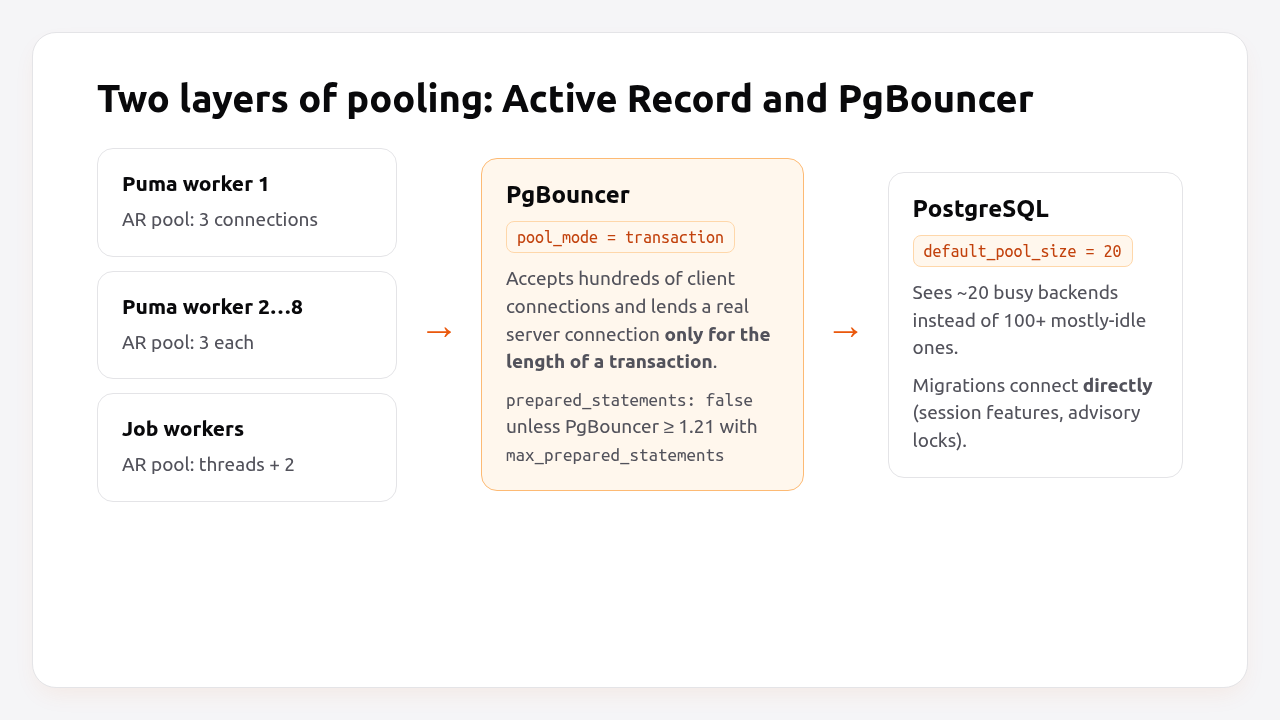
You need PgBouncer when the sum of all pools exceeds what your database can handle, typically once you run many web servers or many worker processes. You don’t need it to fix ConnectionTimeoutError. That error is a per-process pool size problem.
A minimal pgbouncer.ini:
; /etc/pgbouncer/pgbouncer.ini
[databases]
app_production = host=10.0.0.5 port=5432 dbname=app_production

[pgbouncer]
listen_addr = 0.0.0.0
listen_port = 6432
auth_type = scram-sha-256
auth_file = /etc/pgbouncer/userlist.txt
pool_mode = transaction
default_pool_size = 20
max_client_conn = 500
; PgBouncer 1.21+: track protocol-level prepared statements in transaction mode
max_prepared_statements = 200
Rails changes in transaction mode. Session-level features don’t survive between transactions, so disable the ones Rails uses by default unless your PgBouncer supports them:
# config/database.yml (production, behind PgBouncer)
production:
  primary:
    <<: *default
    url: <%= ENV["DATABASE_URL"] %>            # points at PgBouncer :6432
    prepared_statements: false                 # safe default; can be true with PgBouncer 1.21+ and max_prepared_statements
    advisory_locks: false                      # migrations use session advisory locks
Keep a second URL that points straight at PostgreSQL on port 5432, and run migrations through it, not through PgBouncer:
DATABASE_URL="$DATABASE_DIRECT_URL" bin/rails db:migrate
Transaction mode also breaks SET statements outside a transaction, LISTEN/NOTIFY (Action Cable’s PostgreSQL adapter) and session advisory locks used by some gems. Solid Cable, the Rails 8 default, polls a table and works fine behind PgBouncer.
Step 5: Verify it works
Check the pool from inside a running process, then check the total from PostgreSQL, ideally under load.
bin/rails runner 'pp ActiveRecord::Base.connection_pool.stat'
# {size: 3, connections: 1, busy: 0, dead: 0, idle: 1, waiting: 0, checkout_timeout: 5.0}
waiting greater than 0 under normal traffic means threads are queueing for connections and the pool is too small. To see every pool in a multi-database app:
# bin/rails runner
ActiveRecord::Base.connection_handler.connection_pool_list.each do |pool|
  puts "#{pool.db_config.name}: #{pool.stat.slice(:size, :connections, :busy, :waiting)}"
end
Then load-test a page that hits the database with as many concurrent requests as you have total web threads:
# 2 workers × 3 threads = 6 concurrent requests per server
hey -z 30s -c 6 https://staging.example.com/products
Run the pg_stat_activity query from Step 1 during the test. The connection count should rise to roughly your calculated total and no further, and there should be no ConnectionTimeoutError in the logs. The Rails monitoring guide shows how to export these numbers to a dashboard, so you see the trend before you hit the limit.
How Heroku, Render, Fly.io, Upsun and Enkihost handle connection limits
All five platforms give you a PostgreSQL connection limit that depends on your database plan, and most now offer PgBouncer. What differs is whether pooling is built in, and which mode it runs in by default.
| Platform | Connection limit | Built-in pooling | Default pool mode | Rails gotcha |
|---|---|---|---|---|
| Heroku Postgres | By plan; Essential tier is 20 | PgBouncer buildpack (on the dyno) or server-side pooling on larger plans | Transaction | Disable prepared statements; on Essential, 20 connections go fast |
| Render Postgres | By compute plan | Integrated PgBouncer on paid plans, port 6432 | Transaction | max_db_connections = max_connections − 10, so 10 stay reserved for direct access |
| Fly.io Managed Postgres | By cluster size | PgBouncer on every cluster | Session (transaction optional) | In transaction mode, set prepared_statements: false and advisory_locks: false |
| Upsun | Follows the PostgreSQL service’s resources | Not part of the standard service docs; check current docs or run your own | — | Check SHOW max_connections after resizing the service |
| Kamal / your own server | Whatever you set in postgresql.conf |
Run PgBouncer as an accessory | You choose | Raise max_connections only with matching memory |
| Enkihost | Not documented; check SHOW max_connections |
Not documented | — | Ignite includes one database, so Solid Queue, Solid Cache and Solid Cable share it with the primary |
Heroku’s documentation makes the cost of getting this wrong very concrete: on an Essential-tier database with 20 connections, three app processes per dyno means you can’t run more than six dynos. The same arithmetic applies everywhere. Only the limit changes.
Enkihost’s included PostgreSQL injects DATABASE_URL, so the database.yml above works without changes. The same formula applies there: pool per process equals threads, and keep the total under the database’s limit.
Troubleshooting connection pool errors
Connection pool errors come in two kinds: the pool inside a process is too small, or the total across processes is too big for the database. The error message tells you which.
ActiveRecord::ConnectionTimeoutError
ActiveRecord::ConnectionTimeoutError: could not obtain a connection from the pool within 5.000 seconds (waited 5.000 seconds); all pooled connections were in use
More threads in this process want a connection than the pool allows. Common causes:
poolsmaller than Puma threads or Sidekiq/Solid Queue concurrency. Checkconnection_pool.stat[:size]against the thread count.- Threads created manually (
Thread.new,concurrent-rubyfutures,load_async) that use Active Record without returning connections. Wrap that work inActiveRecord::Base.connection_pool.with_connection { ... }. - Long transactions holding connections while waiting on an HTTP API. Move the external call outside the transaction.
FATAL: sorry, too many clients already
PG::ConnectionBad: connection to server at "10.0.0.5", port 5432 failed: FATAL: sorry, too many clients already
The sum across all processes exceeds max_connections. Do the arithmetic from Step 3, reduce pool sizes that are larger than thread counts, reduce the number of processes, or add PgBouncer.
remaining connection slots are reserved
FATAL: remaining connection slots are reserved for non-replication superuser connections
The same problem as above. You’ve reached max_connections minus the reserved superuser slots. On managed databases you usually can’t use those slots either.
PG::InvalidSqlStatementName behind PgBouncer
PG::InvalidSqlStatementName: ERROR: prepared statement "a12" does not exist
You’re in transaction mode with prepared statements enabled. Set prepared_statements: false, or upgrade to PgBouncer 1.21+ and set max_prepared_statements.
PG::ConnectionBad: PQconsumeInput() server closed the connection unexpectedly
An idle connection was closed by a firewall, NAT gateway or proxy timeout. Rails reconnects automatically on the next checkout in most cases, but you’ll see errors on the first query. Lower idle_timeout below the middlebox’s timeout, or use the Rails 8.1 keepalive option.
Author Perspective: count, don’t guess
Every connection pool incident I’ve been part of was solved with a spreadsheet, not a config tweak. Someone had raised pool to 25 “to be safe”, someone else added a worker server, and PostgreSQL ran out of slots on a Monday morning. Now, before I scale anything, I write down every process, its threads and which databases it talks to, and add them up. It takes ten minutes. The Rails 8 move to separate queue and cache databases makes this more important, not less, because a web process quietly opens pools you never configured by hand. Count first, then decide if you need PgBouncer.
Database connections on Enkihost
Connection sizing is about matching your threads to your database. On Enkihost, the pieces in this guide fit together without extra wiring:
- PostgreSQL add-on injects
DATABASE_URL, sopool: <%= ENV["RAILS_MAX_THREADS"] %>and the rest of thedatabase.ymlabove apply directly. - Per-app resource isolation with allocated memory and CPU means you size threads and workers for your own budget, and the connection count follows from that.
- Redis add-on injects
REDIS_URLif you’d rather keep Sidekiq or the cache off PostgreSQL, which removes those pools from the total. - Zero-downtime deploys: during the switch, old and new processes briefly overlap, so leave headroom in your total for both releases running at once.
Rails and Sinatra apps run on Ignite (5 EUR per month after a 14-day free trial, with PostgreSQL and Redis included) or Blaze (16 EUR per month, with high availability and autoscaling). The free Spark plan is for Jekyll sites. See enkihost.com.
FAQ
What is the default Rails connection pool size?
The Active Record default is 5 connections per process per database. New Rails apps set pool from RAILS_MAX_THREADS in database.yml, which defaults to 3 since Rails 7.2, matching Puma’s default thread count.
Should the connection pool be larger than the number of Puma threads?
Only slightly, if at all. A pool equal to the thread count is enough for normal request handling. Add a little headroom only if the process starts its own threads that use Active Record, such as load_async queries or a Solid Queue supervisor embedded in Puma.
How many connections does a Rails app use in total?
Multiply processes by pool size for every process type, on every server, for every database on the same PostgreSQL server, then add consoles, migrations and cron jobs. A Rails 8 web process using separate queue and cache databases can hold up to three pools, so the total is often two to three times higher than people expect.
Do I need PgBouncer for a small Rails app?
Usually not. A single server with a few Puma workers and one job process stays well under PostgreSQL’s default limit of 100 connections. PgBouncer becomes useful when you run many servers or workers, or when a managed plan caps connections low, such as 20 on small plans.
Why do I get ConnectionTimeoutError when PostgreSQL has plenty of free connections?
Because the limit that was hit is the pool inside one Ruby process, not the database server. Too many threads in that process want a connection at once. Raise the pool for that process type to match its threads, or find code that holds connections for too long.
Sources
- ActiveRecord::ConnectionAdapters::ConnectionPool — Rails API
- Configuring a Database — Rails Guides
- This Week in Rails: new database connection pool options (Rails 8.1)
- rails/solid_queue: threads and database connections — GitHub
- PgBouncer configuration — pgbouncer.org
- Connections and Authentication: max_connections — PostgreSQL Docs
- Concurrency and Database Connections in Ruby with ActiveRecord — Heroku Dev Center
- Connection Pooling with PgBouncer — Render Docs
- Managed Postgres: connect your client — Fly Docs