How to Force HTTPS in Rails: force_ssl, assume_ssl, HSTS and Proxy Redirect Loops

To force HTTPS in Rails, set config.force_ssl = true in config/environments/production.rb. Rails then redirects plain HTTP to HTTPS, sends a Strict-Transport-Security (HSTS) header, and marks cookies as Secure. Behind a TLS-terminating proxy, which is how almost every Rails app runs today, you also have to decide who does the redirect: Rails, using the proxy’s X-Forwarded-Proto header, or the proxy itself, with config.assume_ssl = true telling Rails every request is already HTTPS. Get that wrong and you’ll see redirect loops, failing health checks or CSRF errors. This guide shows the right configuration per platform, a safe HSTS rollout, and how to fix each failure.
TL;DR
config.force_ssl = truegives you three things: HTTP→HTTPS redirects, an HSTS header (2 years, including subdomains, by default) andSecurecookies.- If the proxy redirects HTTP to HTTPS itself (kamal-proxy with
ssl: true, Render, Fly.io withforce_https, Upsun), also setconfig.assume_ssl = true. That’s the Rails 8 default.- If the proxy doesn’t redirect (Heroku’s router), keep
assume_ssloff and letforce_sslredirect based onX-Forwarded-Proto.- Roll out HSTS gradually: start with a short
max-age, then go to 1–2 years, and only addpreloadwhen every subdomain serves HTTPS.- Exclude
/upfrom the redirect, and avoid Cloudflare’s “Flexible” SSL mode, which causes infinite redirect loops.
Table of Contents
- What does force_ssl do in Rails?
- force_ssl vs assume_ssl: which one do you need?
- Prerequisites
- Step 1: Configure HTTPS in production.rb
- Step 2: Roll out HSTS safely
- Step 3: Fix mixed content and secure cookies
- Step 4: Configure the proxy or platform
- Step 5: Verify it works
- How Heroku, Render, Fly.io, Upsun and Enkihost handle HTTPS
- Troubleshooting HTTPS in Rails
- Author Perspective: let one layer own the redirect
- HTTPS on Enkihost
- FAQ
- Sources
What does force_ssl do in Rails?
config.force_ssl = true inserts the ActionDispatch::SSL middleware, which does three things for every request.
- Redirects HTTP to HTTPS.
GETandHEADrequests get a301 Moved Permanently. Other methods get a307 Temporary Redirect, so the browser repeats thePOSTover HTTPS instead of turning it into aGET. - Sends HSTS.
Strict-Transport-Security: max-age=63072000; includeSubDomainstells browsers to use HTTPS for this host, and all its subdomains, for the next two years without even trying HTTP. - Marks cookies
Secure, so session and other cookies are never sent over plain HTTP.
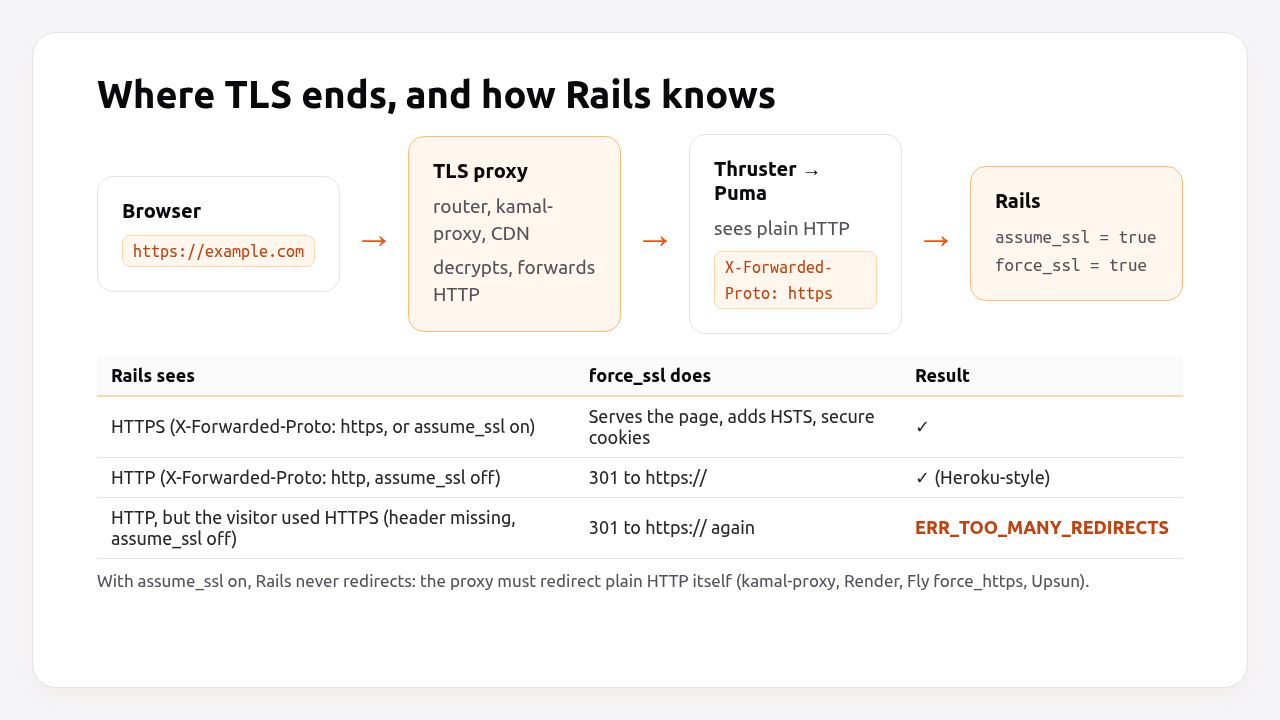
The redirect only happens when Rails believes the request came in over plain HTTP. Behind a proxy, that belief depends on headers and on assume_ssl, which is where most HTTPS problems come from.
force_ssl vs assume_ssl: which one do you need?
Use force_ssl in every production app. Add assume_ssl only when the proxy in front of Rails already redirects plain HTTP to HTTPS, because with assume_ssl on, Rails treats every request as HTTPS and never redirects.
| Setting | What it does | Use when |
|---|---|---|
force_ssl = true |
Redirects HTTP→HTTPS, sends HSTS, marks cookies Secure |
Always in production |
assume_ssl = true (Rails 7.1+) |
Treats every request as HTTPS, regardless of headers | The proxy terminates TLS and redirects HTTP itself, or doesn’t send X-Forwarded-Proto |
Neither header nor assume_ssl |
Rails sees http:// for every request |
Never: causes redirect loops with force_ssl |
Without either, a TLS-terminating proxy forwards the decrypted request as plain HTTP. Rails sees http://, force_ssl redirects to https://, the browser follows the redirect to the same proxy, and the loop starts again. X-Forwarded-Proto: https from the proxy, or assume_ssl, breaks the loop.
Prerequisites
- Rails 7.1+ for
assume_ssl(examples use Rails 8.0 and Ruby 3.3). - A domain with a TLS certificate. Every platform below issues one automatically with Let’s Encrypt or its own CA.
- Access to
config/environments/production.rband your proxy or platform settings.
Step 1: Configure HTTPS in production.rb
Pick the block that matches who redirects plain HTTP.
The proxy redirects HTTP itself (Kamal 2, Render, Fly.io with force_https, Upsun). This is the Rails 8 default:
# config/environments/production.rb
Rails.application.configure do
  # TLS ends at the proxy, which also redirects http:// -> https://.
  config.assume_ssl = true

  # HSTS + Secure cookies (no redirect needed, every request is HTTPS to Rails).
  config.force_ssl = true
  config.ssl_options = {
    hsts: { expires: 1.year, subdomains: true, preload: false }
  }
end
The proxy doesn’t redirect (Heroku’s router, or a load balancer that forwards port 80 to the app):
# config/environments/production.rb
Rails.application.configure do
  # Rails decides from X-Forwarded-Proto, which the proxy must set.
  config.assume_ssl = false
  config.force_ssl = true
  config.ssl_options = {
    hsts: { expires: 1.year, subdomains: true, preload: false },
    # Health checks often arrive as plain HTTP from inside the network.
    redirect: { exclude: ->(request) { request.path == "/up" } }
  }
end
ssl_options reference:
| Option | Default | Notes |
|---|---|---|
hsts: { expires: } |
2 years | Start lower during rollout (Step 2) |
hsts: { subdomains: } |
true |
Every subdomain must serve HTTPS |
hsts: { preload: } |
false |
Only with expires ≥ 1 year and subdomains: true |
hsts: false |
— | Disables the header entirely |
redirect: { exclude: ->(req) { … } } |
none | Skip redirect for health checks, ACME challenges |
redirect: { status: } |
301 / 307 | Rarely needs changing |
secure_cookies: |
true |
Keep it |
Health check behaviour across platforms is covered in the Rails health check guide.
Step 2: Roll out HSTS safely
HSTS is cached by browsers for max-age seconds, and you can’t take it back early. If a subdomain doesn’t support HTTPS yet, includeSubDomains with a two-year max-age breaks it for every visitor for two years. Increase it in stages:
| Stage | ssl_options[:hsts] |
Duration before next stage |
|---|---|---|
| 1. Test | { expires: 5.minutes, subdomains: false } |
A day |
| 2. Short | { expires: 1.week, subdomains: true } |
A week, after checking every subdomain |
| 3. Long | { expires: 1.year, subdomains: true } |
A month |
| 4. Preload (optional) | { expires: 2.years, subdomains: true, preload: true } |
Submit at hstspreload.org |
Before stage 2, list every subdomain that has DNS records (staging, mail, docs, old marketing sites) and confirm each one serves HTTPS with a valid certificate.
Preloading puts your domain in the HSTS list compiled into browsers, so even the very first visit uses HTTPS. It’s effectively permanent. Removal takes months to reach users, so only preload a domain you’re sure will stay HTTPS-only on every subdomain.
Pro Tip: HSTS on example.com with includeSubDomains doesn’t protect example.com if users type www.example.com first and www is served by a different system. Make sure the apex domain itself sends the header, since that’s what the preload list checks.
Step 3: Fix mixed content and secure cookies
Once pages load over HTTPS, browsers block or warn about resources loaded over HTTP. Fix the sources, and add a CSP directive that upgrades stragglers.
# config/environments/production.rb
config.asset_host = "https://cdn.example.com"   # never "http://" or protocol-relative
config.action_mailer.default_url_options = { host: "example.com", protocol: "https" }
# config/initializers/content_security_policy.rb
Rails.application.configure do
  config.content_security_policy do |policy|
    policy.upgrade_insecure_requests true
    # ...the rest of your policy
  end
end
upgrade_insecure_requests makes the browser fetch http:// subresources over https:// automatically. It’s a safety net for old content in your database, such as user-generated HTML with image URLs. It’s not a substitute for fixing your own templates.
force_ssl already marks cookies Secure. For the session cookie, also keep SameSite=Lax (the Rails default) and HttpOnly:
# config/initializers/session_store.rb
Rails.application.config.session_store :cookie_store,
  key: "_myapp_session", secure: Rails.env.production?, same_site: :lax, httponly: true
Action Cable connects over wss:// automatically when the page is served over HTTPS. If you set config.action_cable.url, use wss://.
Step 4: Configure the proxy or platform
The proxy must terminate TLS with a valid certificate and either redirect HTTP itself or tell Rails the original scheme.
Kamal 2. ssl: true makes kamal-proxy obtain a Let’s Encrypt certificate and redirect HTTP to HTTPS:
# config/deploy.yml
proxy:
  ssl: true
  host: example.com
  # ssl_redirect: true   # default when ssl is on
For multiple domains, use hosts: [example.com, www.example.com]. Port 80 must be reachable from the internet so Let’s Encrypt’s HTTP-01 challenge succeeds. The full setup is in minimal Rails deployments with Kamal 2 and Thruster.
Fly.io. Let the proxy redirect, and add a certificate for your custom domain:
# fly.toml
[http_service]
  internal_port = 3000
  force_https = true
fly certs add example.com
fly certs show example.com
Render. Add the custom domain in the dashboard. Render issues the certificate and redirects HTTP to HTTPS for you.
Upsun. Declare HTTPS routes. HTTP is redirected to HTTPS by default:
# .upsun/config.yaml (routes excerpt)
routes:
  "https://{default}/":
    type: upstream
    upstream: "myapp:http"
  "https://www.{default}/":
    type: redirect
    to: "https://{default}/"
Heroku. Enable Automated Certificate Management. The router doesn’t redirect HTTP, so Rails does it with force_ssl (the second production.rb block above):
heroku certs:auto:enable -a myapp
heroku domains:add example.com -a myapp
Behind Cloudflare. Use SSL/TLS mode Full (strict), so Cloudflare connects to your origin over HTTPS and validates its certificate. Flexible mode connects to the origin over plain HTTP, which combined with force_ssl creates an endless redirect loop.
Step 5: Verify it works
Check the redirect, the HSTS header, cookies and the certificate from outside, then the health check from inside.
# 1. HTTP redirects to HTTPS, keeping the path
curl -sI http://example.com/pricing | grep -iE "^HTTP|^location"
# HTTP/1.1 301 Moved Permanently
# location: https://example.com/pricing

# 2. HSTS header present with the expected max-age
curl -sI https://example.com/ | grep -i strict-transport-security
# strict-transport-security: max-age=31536000; includeSubDomains

# 3. Cookies are Secure
curl -sI https://example.com/session/new | grep -i set-cookie
# set-cookie: _myapp_session=...; path=/; secure; httponly; samesite=lax

# 4. Certificate is valid and not about to expire
echo | openssl s_client -connect example.com:443 -servername example.com 2>/dev/null | openssl x509 -noout -subject -dates

# 5. Health check still returns 200 (no redirect)
curl -s -o /dev/null -w "%{http_code}\n" https://example.com/up
For a full report of protocol versions, ciphers and HSTS, run the domain through SSL Labs’ server test. Aim for an A or A+.
How Heroku, Render, Fly.io, Upsun and Enkihost handle HTTPS
All five platforms issue and renew TLS certificates automatically. The key difference for Rails is whether the platform redirects HTTP to HTTPS itself, which decides whether you need assume_ssl.
| Platform | Certificates | Redirects HTTP→HTTPS | Sets X-Forwarded-Proto |
Rails config |
|---|---|---|---|---|
| Heroku | Automated Certificate Management (Let’s Encrypt) | No, the app must | Yes | force_ssl = true, assume_ssl = false |
| Render | Automatic for custom domains | Yes | Yes | assume_ssl = true, force_ssl = true |
| Fly.io | fly certs add (Let’s Encrypt) |
With force_https = true |
Yes | assume_ssl = true, force_ssl = true |
| Upsun | Automatic Let’s Encrypt, renewed before expiry | Yes, by default for https:// routes |
Yes | assume_ssl = true, force_ssl = true |
| Kamal 2 | kamal-proxy with Let’s Encrypt (ssl: true) |
Yes (ssl_redirect) |
Yes | assume_ssl = true, force_ssl = true (Rails 8 default) |
| Enkihost | Automatic Let’s Encrypt at the proxy | Not documented | Yes (Traefik) | force_ssl = true; check the redirect with Step 5 before setting assume_ssl |
Heroku is the outlier. Its router doesn’t redirect, so an app with assume_ssl = true on Heroku serves pages over plain HTTP to anyone who types http://, with no redirect at all. That’s an easy mistake when a Rails 8 app generated for Kamal is deployed to Heroku unchanged.
Enkihost serves Rails apps behind its own proxy with zero-downtime deploys. The Rails-side checks in this guide (force_ssl, HSTS, secure cookies, and the curl tests in Step 5) apply there too, so verify the redirect with Step 5 to choose the right assume_ssl setting.
Troubleshooting HTTPS in Rails
ERR_TOO_MANY_REDIRECTS
The browser follows https:// → (proxy forwards as HTTP) → Rails redirects to https:// → … forever. Rails never learns the request was HTTPS. Fix it with one of:
config.assume_ssl = true, if the proxy itself redirects HTTP.- Make the proxy send
X-Forwarded-Proto: https(Nginx:proxy_set_header X-Forwarded-Proto $scheme;). - Behind Cloudflare, switch from Flexible to Full (strict).
Health checks fail with 301
The platform’s health check hits the container over plain HTTP, and force_ssl redirects it. Add redirect: { exclude: ->(r) { r.path == "/up" } } to ssl_options, or set assume_ssl if the proxy handles redirects.
HTTP Origin header didn't match request.base_url
ActionController::InvalidAuthenticityToken (HTTP Origin header (https://example.com) didn't match request.base_url (http://example.com))
Rails thinks the request is HTTP, so the CSRF origin check fails on every form submission. That’s the same root cause as the redirect loop: set assume_ssl or fix X-Forwarded-Proto.
A subdomain stopped working after enabling HSTS
includeSubDomains forced browsers to use HTTPS on a subdomain that doesn’t support it. Give that subdomain a certificate. You can’t shorten the HSTS period for visitors who already received the header. Reducing max-age only affects new visits. This is why the staged rollout in Step 2 matters.
Let’s Encrypt certificate isn’t issued (Kamal)
kamal-proxy needs port 80 reachable for the HTTP-01 challenge, and DNS must point to the server before you deploy. Check kamal proxy logs for ACME errors, confirm ufw allows 80/tcp, and make sure no CDN in front intercepts /.well-known/acme-challenge/.
Mixed content warnings
Mixed Content: The page at 'https://example.com/' was loaded over HTTPS, but requested an insecure image 'http://cdn.example.com/logo.png'.
A template, asset_host or database content uses http://. Fix the URL, set asset_host to https://, and add upgrade_insecure_requests to your CSP as a safety net.
Author Perspective: let one layer own the redirect
Almost every HTTPS bug I’ve debugged in Rails apps came from two layers both trying to be in charge of the redirect, or neither. The fix is to decide explicitly: either the proxy redirects and Rails assumes SSL, or Rails redirects based on X-Forwarded-Proto and the proxy just forwards. Write that decision in a comment next to assume_ssl in production.rb, because the next platform migration will otherwise break it. I’m also more careful with HSTS than I used to be. A five-minute max-age for the first day costs nothing, and a typo in a two-year includeSubDomains header can’t be undone.
HTTPS on Enkihost
HTTPS done right is mostly configuration, and it should stay the same between platforms. On Enkihost:
- Zero-downtime deploys, so enabling
force_sslor moving through the HSTS stages in Step 2 is a normal deploy, without dropped requests. - Per-app resource isolation, so TLS handshakes and redirects for other apps don’t share your app’s allocated CPU and memory.
- PostgreSQL and Redis add-ons that inject
DATABASE_URLandREDIS_URL, so encrypted connection settings likesslmodestay in one environment variable. - Plans for Rails and Sinatra: Ignite at 9 EUR per month after a 14-day free trial, with PostgreSQL and Redis included, or Blaze at 29 EUR with high availability and autoscaling. The free Spark plan is for Jekyll sites.
See enkihost.com.
FAQ
What is the difference between force_ssl and assume_ssl in Rails?
force_ssl redirects HTTP requests to HTTPS, adds the HSTS header and marks cookies as secure. assume_ssl, added in Rails 7.1, makes Rails treat every request as HTTPS regardless of headers. Use assume_ssl only when the proxy in front of Rails terminates TLS and already redirects plain HTTP.
Does force_ssl work behind a load balancer?
Yes, as long as Rails can tell the original request was HTTPS. The load balancer must send X-Forwarded-Proto: https, or you set config.assume_ssl to true if the load balancer redirects HTTP itself. Without either, force_ssl causes an infinite redirect loop.
What HSTS max-age should I use?
Start with a few minutes to test, then a week, then one year once every subdomain serves HTTPS. Rails defaults to two years with includeSubDomains. Use a year or more if you plan to submit your domain to the HSTS preload list, which requires includeSubDomains and the preload flag.
Do I need force_ssl if my platform already redirects to HTTPS?
Yes. Even when the proxy handles redirects, force_ssl is what adds the HSTS header and marks cookies as secure, which protect users from downgrade attacks and cookie leaks. Combine it with assume_ssl so Rails doesn’t try to redirect requests that are already HTTPS.
How do I test HTTPS locally in Rails?
You usually don’t need to, because force_ssl is only enabled in production. To test HTTPS-specific behaviour, generate a local certificate with mkcert and start Puma with an ssl bind, or use a tunnelling tool that provides an HTTPS URL. Keep development on plain HTTP otherwise.
Sources
- ActionDispatch::SSL — Rails API
- Configuring Rails Applications: force_ssl, assume_ssl, ssl_options — Rails Guides
- Securing Rails Applications — Rails Guides
- Strict-Transport-Security — MDN
- HSTS Preload List submission requirements — hstspreload.org
- Kamal proxy configuration: ssl — Kamal docs
- Can Heroku force an application to use SSL/TLS? — Heroku Help
- Automated Certificate Management — Heroku Dev Center
- Custom domains and TLS — Render Docs
- Custom domains and certificates — Fly Docs
- HTTPS routes — Upsun Docs
- Cloudflare SSL/TLS encryption modes — Cloudflare Docs