Rails Log Management in Production: Structured Logs, Request IDs and Retention
Rails log management in production comes down to four things: write one structured line per request to STDOUT, tag every line with a request ID, keep secrets and personal data out, and ship the logs somewhere that keeps them for longer than your platform’s buffer. Rails’ default multi-line logs are fine on a laptop and painful in production, where five concurrent requests interleave and a week of history means 1,500 lines on Heroku. This How-To sets up JSON request logs with Lograge (or Rails 8.1’s Rails.event), consistent tags across web and jobs, log levels and filtering, Docker log rotation, and log shipping on Heroku, Render, Fly.io and Kamal.
TL;DR
- Log to STDOUT in production (the Rails 7.1+ default) and let the platform collect it. Never write to
log/production.loginside a container.- Replace Rails’ multi-line request logs with one JSON line per request using Lograge, and add
request_idanduser_idto every line.- Rails 8.1 adds
Rails.eventfor structured application events. Use it for business events likeorder.paidalongside your request logs.- Keep
filter_parametersup to date and never log full request bodies. Logs are a common place for passwords, tokens and personal data to leak.- Platform log history is short (Heroku: 1,500 lines; Render: 7–30 days depending on the workspace plan), so add a drain or log stream to a log platform from day one, and cap Docker’s
json-filelogs on your own servers.
Table of Contents
- Where do Rails logs go in production?
- Prerequisites
- Step 1: Check the production logger configuration
- Step 2: One JSON line per request with Lograge
- Step 3: Structured application events with Rails.event
- Step 4: Keep secrets and personal data out of logs
- Step 5: Ship logs and set retention
- Step 6: Verify it works
- How Heroku, Render, Fly.io, Upsun and Enkihost handle logs
- Troubleshooting Rails logging
- Author Perspective: logs are for the incident you haven’t had yet
- Rails logs on Enkihost
- FAQ
- Sources
Where do Rails logs go in production?
Since Rails 7.1, new apps log to STDOUT in production. The platform or container runtime collects that stream, keeps a short buffer, and forwards it to a drain if you configure one. Your app should never manage log files itself.
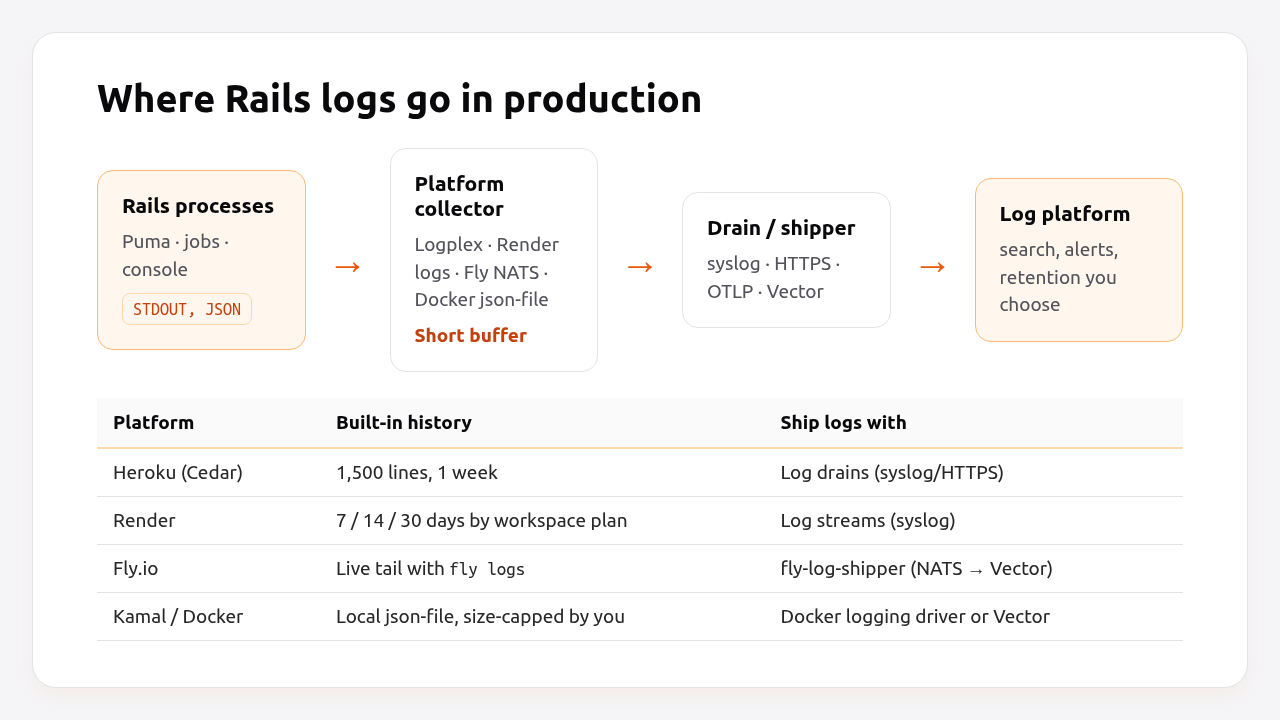
That’s the twelve-factor model, and every platform in this guide expects it:
- Rails writes events to STDOUT, one line per event, ideally JSON.
- The platform collector (Heroku’s Logplex, Render’s log service, Fly.io’s NATS log stream, Docker’s logging driver) captures the stream and keeps a short history.
- A drain or shipper forwards logs to a platform where you can search, alert and keep them for as long as you need.
The weak spot is the middle: built-in history is short and easy to lose. Heroku keeps 1,500 lines. On a busy app that’s a couple of minutes.
Prerequisites
- Rails 7.1+ (examples use Rails 8.0 and 8.1, Ruby 3.3).
- The
logragegem for JSON request logs. - An account with a log platform that accepts syslog or HTTPS (Better Stack, Papertrail, Grafana Loki, Datadog, Axiom, or self-hosted Loki/OpenSearch).
bundle add lograge
Step 1: Check the production logger configuration
Rails 8 generates a production logger that writes tagged lines to STDOUT. Make sure your production.rb still looks like this, especially if the app was upgraded from an older version:
# config/environments/production.rb
Rails.application.configure do
  # Log to STDOUT with the request ID as a tag on every line.
  config.log_tags = [:request_id]
  config.logger = ActiveSupport::TaggedLogging.logger(STDOUT)

  # "info" in production. Use "debug" only temporarily, it logs every SQL query.
  config.log_level = ENV.fetch("RAILS_LOG_LEVEL", "info")

  # Health checks every second would flood the logs.
  config.silence_healthcheck_path = "/up"

  # Don't log deprecation warnings in production.
  config.active_support.report_deprecations = false
end
silence_healthcheck_path keeps the once-per-second /up checks described in the Rails health check guide out of your logs.
Upgraded apps often still have the Rails 6 pattern that writes to a file unless RAILS_LOG_TO_STDOUT is set. Remove it. In a container, a file inside the image is lost on every deploy and fills the container’s disk in the meantime.
Log levels in practice:
| Level | Use in production | What you get |
|---|---|---|
debug |
Only while debugging, for minutes | Every SQL query, cache read and template render |
info |
Default | One request summary per request, job start/finish, your own info lines |
warn |
Quieter apps with good error tracking | Only problems and deprecations |
error |
Rarely | You’ll miss context during incidents |
Pro Tip: Change the level without a redeploy by reading RAILS_LOG_LEVEL, as above. Then switching to debug for ten minutes during an incident is a config change, not a code change.
Step 2: One JSON line per request with Lograge
Rails’ default request logging writes four or more lines per request (“Started”, “Processing”, “Rendered”, “Completed”). With concurrent requests they interleave, and log platforms can’t parse them. Lograge collapses them into one line, and the JSON formatter makes every field searchable.
# config/initializers/lograge.rb
Rails.application.configure do
  next unless Rails.env.production?

  config.lograge.enabled = true
  config.lograge.formatter = Lograge::Formatters::Json.new

  # Don't log health checks or asset requests.
  config.lograge.ignore_actions = ["Rails::HealthController#show"]

  # Fields from the controller (runs inside the request).
  config.lograge.custom_payload do |controller|
    {
      request_id: controller.request.request_id,
      user_id: controller.respond_to?(:current_user, true) ? controller.send(:current_user)&.id : nil,
      ip: controller.request.remote_ip
    }
  end

  # Fields from the instrumentation event.
  config.lograge.custom_options = lambda do |event|
    {
      time: event.time.utc.iso8601(3),
      params: event.payload[:params]&.except("controller", "action", "format", "authenticity_token"),
      exception: event.payload[:exception]&.first,
      exception_message: event.payload[:exception]&.last
    }.compact
  end
end
A request now produces one line:
{"method":"GET","path":"/orders","format":"html","controller":"OrdersController","action":"index","status":200,"allocations":21483,"duration":48.21,"view":31.02,"db":11.34,"request_id":"9f2c1e7a-4b1d-4c55-9f6e-2a0b8c1d3e4f","user_id":42,"ip":"203.0.113.7","time":"2026-10-18T09:12:44.512Z","params":{"page":"2"}}
The params in the event are already filtered by filter_parameters (Step 4), so passwords appear as [FILTERED].
Background jobs. Active Job logs Performing/Performed lines with the job class and ID, tagged by the same logger. (Where those workers run is covered in Rails background jobs in production.) To connect a job back to the request that enqueued it, pass the request ID along:
# app/jobs/application_job.rb
class ApplicationJob < ActiveJob::Base
  attr_accessor :request_id

  # Capture the request ID when the job is enqueued...
  before_enqueue { self.request_id ||= Current.request_id }

  # ...store it in the job payload...
  def serialize
    super.merge("request_id" => request_id)
  end

  def deserialize(job_data)
    super
    self.request_id = job_data["request_id"]
  end

  # ...and tag every log line the job writes.
  around_perform do |job, block|
    Rails.logger.tagged("job:#{job.class.name}", "req:#{job.request_id || 'none'}") { block.call }
  end
end
# app/models/current.rb
class Current < ActiveSupport::CurrentAttributes
  attribute :request_id
end
# app/controllers/application_controller.rb
class ApplicationController < ActionController::Base
  before_action { Current.request_id = request.request_id }
end
If that feels like too much plumbing, OpenTelemetry tracing propagates the same context automatically. The Rails monitoring guide shows how to correlate request IDs, logs and traces.
Step 3: Structured application events with Rails.event
Rails 8.1 adds Rails.event, a structured event reporter for application events. Use it for things you want to count and search later, like signups, payments and failed webhooks, instead of free-text Rails.logger.info lines.
# app/controllers/checkouts_controller.rb (Rails 8.1+)
def create
  order = Checkout.new(current_user, cart).call
  Rails.event.notify("order.paid", order_id: order.id, amount_cents: order.total_cents, currency: order.currency)
  redirect_to order
end
Add shared context once per request, so every event carries it:
# app/controllers/application_controller.rb (Rails 8.1+)
class ApplicationController < ActionController::Base
  before_action do
    Rails.event.set_context(request_id: request.request_id, user_id: current_user&.id)
  end
end
Events go to subscribers you register. A minimal one that writes JSON lines to the same log stream:
# config/initializers/event_log_subscriber.rb (Rails 8.1+)
class JsonEventLogSubscriber
  def emit(event)
    Rails.logger.info(event.slice(:name, :payload, :context, :tags, :timestamp).merge(type: "event").to_json)
  end
end

Rails.event.subscribe(JsonEventLogSubscriber.new) if Rails.env.production?
The benefit over ad-hoc log lines is consistency: a fixed name, a payload hash and shared context. Your log platform can then answer “how many order.paid events per hour” without regular expressions.
Step 4: Keep secrets and personal data out of logs
Logs are copied to more places and kept by more vendors than your database, so treat them as a place where secrets leak. Rails filters parameters by name. Make sure the list covers your app.
# config/initializers/filter_parameter_logging.rb
Rails.application.config.filter_parameters += [
  :passw, :email, :secret, :token, :_key, :crypt, :salt, :certificate, :otp, :ssn, :cvv, :cvc,
  # app-specific additions:
  :iban, :phone, :address, :api_key, :authorization
]
The matching is partial and case-insensitive, so :token also filters access_token, reset_password_token and api_token. Then check the places where filtering doesn’t apply:
- Your own log lines.
Rails.logger.info("Charging #{user.email} with #{card.inspect}")isn’t filtered. Log IDs, not objects. - Exception messages. Some gems include request bodies or headers in exception messages. Check what your error tracker and
exception_messagefield actually capture. - Headers. Lograge doesn’t log headers by default. Don’t add
request.headersto the payload. - SQL at debug level. Bound values are shown in debug logs. Another reason to keep production at
info.
In the EU, IP addresses and user IDs that can be linked to a person are personal data under GDPR. Decide on a retention period (30 days is common for application logs), configure it in your log platform, and document it.
Step 5: Ship logs and set retention
Ship logs out of the platform buffer to a service that keeps them for your retention period. Every platform supports this with a single setting or command.
Heroku (Cedar):
heroku drains:add "syslog+tls://logs.example-provider.com:6514" -a myapp
heroku drains -a myapp
Render: add a log stream under Workspace Settings → Log Streams with your provider’s syslog endpoint and token. It applies to every service in the workspace.
Fly.io: run the log shipper as its own app. It reads your organisation’s log stream over NATS and forwards it with Vector:
fly launch --image ghcr.io/superfly/fly-log-shipper:latest --name myorg-log-shipper --no-deploy
fly secrets set ORG=personal ACCESS_TOKEN="$(fly tokens create readonly personal)" \
  BETTER_STACK_SOURCE_TOKEN=xxxxx -a myorg-log-shipper
fly deploy -a myorg-log-shipper
The shipper’s README lists the environment variables for each supported provider.
Kamal / Docker: Docker’s default json-file driver doesn’t rotate logs, so a chatty app eventually fills the disk. Cap it in config/deploy.yml, and ship with a logging driver or a Vector accessory:
# config/deploy.yml
logging:
  driver: json-file
  options:
    max-size: 100m
    max-file: "5"
# config/deploy.yml (accessory that ships container logs with Vector)
accessories:
  vector:
    image: timberio/vector:latest-debian   # pin a specific version in real deployments
    host: 10.0.0.11
    volumes:
      - /var/run/docker.sock:/var/run/docker.sock:ro
    files:
      - config/vector.yaml:/etc/vector/vector.yaml
# config/vector.yaml
sources:
  docker:
    type: docker_logs
    include_labels:
      - "service=myapp"
transforms:
  parse:
    type: remap
    inputs: [docker]
    source: |
      parsed, err = parse_json(.message)
      if err == null { . = merge!(., parsed) }
sinks:
  logs:
    type: http
    inputs: [parse]
    uri: https://in.logs.example-provider.com
    encoding:
      codec: json
    auth:
      strategy: bearer
      token: "${LOG_TOKEN}"
Kamal labels app containers with service=<service name>, which is what the include_labels filter uses.
Step 6: Verify it works
Confirm that requests produce one JSON line with a request ID, that secrets are filtered, and that lines reach your log platform.
# Locally, in production mode
RAILS_ENV=production SECRET_KEY_BASE_DUMMY=1 bin/rails server &
curl -s -o /dev/null -H "X-Request-Id: test-123" "http://localhost:3000/orders?page=2"
The server output should contain a single line with "request_id":"test-123" and "path":"/orders". Then check the filter:
curl -s -o /dev/null -X POST -d "user[email]=a@example.com&user[password]=hunter2" http://localhost:3000/session
# log line contains "params":{"user":{"email":"[FILTERED]","password":"[FILTERED]"}}
Make sure the JSON parses:
kamal app logs --since 5m | grep '"request_id"' | sed 's/^[^{]*//' | head -5 | jq -c '{path, status, duration, request_id}'
Finally, search your log platform for the same request_id. If it shows up within a minute, shipping works. Then trigger a background job from that request and confirm the job’s lines carry the same req: tag.
How Heroku, Render, Fly.io, Upsun and Enkihost handle logs
Heroku, Render, Fly.io and Upsun collect STDOUT and offer a way to forward logs. Enkihost doesn’t document log retention or forwarding. The big differences are how much history you get without a drain, and which forwarding protocols they support.
| Platform | Built-in history | Forwarding | Limits worth knowing |
|---|---|---|---|
| Heroku (Cedar) | 1,500 lines, up to 1 week | Log drains (syslog, HTTPS) | Lines over 10,000 bytes are split; L10 errors when a drain can’t keep up |
| Heroku (Fir) | Real-time tail only | Telemetry drains (OpenTelemetry/OTLP) | No history without a drain |
| Render | 7 days (Hobby), 14 days (Pro), 30 days (Scale/Enterprise) | Log streams (syslog) | 6,000 log lines per minute per instance; excess lines dropped |
| Fly.io | Live tail via fly logs and the dashboard |
fly-log-shipper (NATS → Vector) | Shipper is an app you run and pay for |
| Upsun | Log files on the container, rotated and size-capped | Log forwarding (syslog, HTTP, several vendors) | Read with upsun log app |
| Kamal / Docker | Whatever json-file keeps on disk |
Docker logging drivers, Vector | No rotation unless you set max-size |
| Enkihost | Not documented | Not documented | Log to STDOUT and ship from the app if you need retention |
Render’s 6,000-lines-per-minute cap is a good reason to use Lograge even if you never look at the logs. Four lines per request means you hit the cap at 25 requests per second per instance, and the excess is dropped. With one line per request, you can serve four times more traffic before losing any log lines.
Enkihost runs each app with per-app resource isolation, and because the app logs to STDOUT, the Rails configuration in this guide doesn’t change. Shipping to a log platform follows the same pattern as above.
Troubleshooting Rails logging
No logs at all in production
The app is still writing to log/production.log. Look for ActiveSupport::Logger.new("log/production.log") or a RAILS_LOG_TO_STDOUT condition in production.rb, and replace it with the Step 1 configuration.
Errno::ENOSPC: No space left on device
Errno::ENOSPC: No space left on device @ io_write - /rails/log/production.log
A log file or Docker’s unrotated json-file logs filled the disk. Switch to STDOUT, set max-size/max-file for Docker, and clean up with docker system prune or by truncating the file the container log points to (docker inspect --format '{{.LogPath}}' <container>).
Error L10 (output buffer overflow) on Heroku
heroku[logplex]: Error L10 (output buffer overflow): 512 messages dropped since 2026-10-18T09:00:01+00:00.
Your app produces logs faster than a drain accepts them. Reduce volume (Lograge, info level, silence noisy endpoints), or switch to a drain endpoint that can handle the rate.
Log lines are cut or split
Heroku splits lines longer than 10,000 bytes, and other collectors have similar limits. That usually means you’re logging whole params hashes or large objects. Trim the payload in custom_options, and never log request bodies.
Puma or Solid Queue output isn’t JSON
Lograge only formats Rails request logs. Puma’s boot messages and some gem output go through their own loggers. That’s usually fine, since they’re rare lines. For Solid Queue, set config.solid_queue.logger = Rails.logger so its lines get the same tags.
Author Perspective: logs are for the incident you haven’t had yet
Logging is the thing I most often find under-configured when I join a project, and you only notice it at the worst moment: something broke two hours ago, and Heroku’s buffer has already rotated past it. The fix takes an afternoon. Lograge with JSON, a request ID on every line, a drain to anything searchable, and a 30-day retention policy. I also keep one rule about my own log lines: log identifiers and decisions, never objects. charge.failed order_id=812 reason=card_declined is useful at 3 AM. #<Order id: 812, …> with an email address inside is a liability.
Rails logs on Enkihost
Good logging only depends on the platform for two things: collecting STDOUT reliably, and not mixing your app’s resources with anyone else’s. On Enkihost:
- STDOUT logging works as Rails generates it, so the
production.rb, Lograge andRails.eventsetup above applies unchanged. - Per-app resource isolation: a burst of logs or a debug-level session in one app doesn’t affect another app’s performance.
- Zero-downtime deploys: request IDs and the release version in each line make it easy to see where one release stops logging and the next starts.
- PostgreSQL and Redis add-ons inject
DATABASE_URLandREDIS_URL, so connection details never need to appear in logs or code.
Rails and Sinatra apps run on Ignite (9 EUR per month after a 14-day free trial, with PostgreSQL and Redis included) or Blaze (29 EUR per month, with high availability and autoscaling). The free Spark plan is for Jekyll sites. See enkihost.com.
FAQ
Where are Rails logs stored in production?
In Rails 7.1 and later, production logs go to STDOUT by default and are collected by the platform or container runtime rather than stored by Rails. To keep them, forward them to a log platform with a drain, a log stream or a shipper such as Vector. Older apps may still write to log/production.log.
Should I use Lograge in Rails 8?
Yes, for most production apps. Rails 8 still writes several lines per request by default, which interleave under concurrency and are hard to search. Lograge reduces each request to one line, and its JSON formatter makes every field searchable. Rails 8.1’s Rails.event complements it for application events.
How long should I keep Rails application logs?
Thirty days is a common default for application logs, long enough to investigate incidents and short enough to limit the personal data you hold. Keep audit or security logs longer if regulations require it, and keep them separately from application logs.
How do I stop passwords from appearing in Rails logs?
Add the parameter names to config.filter_parameters, which filters matching keys in request params everywhere Rails logs them. The match is partial, so token also covers access_token. Parameter filtering does not cover your own log messages, exception messages or headers, so log IDs rather than objects.
What is the difference between logs, metrics and traces?
Logs are individual events with details, metrics are numbers aggregated over time, such as requests per second or p95 latency, and traces follow one request across services and steps. Logs answer what happened to a specific request; metrics and traces show trends and where time is spent. A production Rails app benefits from all three, connected by a request ID.
Sources
- Debugging Rails Applications: the logger — Rails Guides
- Configuring Rails Applications: log_tags, log_level, filter_parameters — Rails Guides
- Rails 8.1: structured event reporting — Ruby on Rails blog
- roidrage/lograge — GitHub
- Logging — Heroku Dev Center
- Error codes: L10 — Heroku Dev Center
- Logging — Render Docs
- superfly/fly-log-shipper — GitHub
- Access and forward logs — Upsun Docs
- JSON File logging driver — Docker Docs
- Kamal configuration: logging and accessories — Kamal docs