Rails Redis Caching: Production Setup for redis_cache_store, Fragments and Low-Level Caching

Rails Redis caching means using :redis_cache_store as Rails.cache, so fragment caches, Rails.cache.fetch results and optionally sessions are kept in Redis and shared by every web and worker process. Pointing REDIS_URL at an instance is a one-line change. The production details are where it goes wrong: the eviction policy, timeouts that keep a Redis outage from becoming a site outage, connection pooling, and TLS on managed providers. This How-To covers that setup step by step, with the cache patterns you’ll actually use and fixes for the errors you’ll see.
TL;DR
- Configure
config.cache_store = :redis_cache_storewith explicitconnect_timeout,read_timeoutandwrite_timeout(0.2–1 s), anerror_handler, anamespaceand a defaultexpires_in.- Set the cache Redis to
maxmemory-policy allkeys-lfu. Heroku Key-Value Store defaults tonoeviction, and Upstash on Fly.io rejects writes when full unless eviction is enabled.- Use a separate Redis (or at least a separate database and policy) for Sidekiq: queues need
noeviction, caches need eviction.- Use
Rails.cache.fetchwith versioned keys for expensive queries and API calls, and Russian doll fragment caching withtouch: truefor views.- Rails 8 defaults to Solid Cache in PostgreSQL. Choose Redis when you need sub-millisecond reads, already run Redis, or have a high write rate.
Table of Contents
- When should a Rails app use Redis for caching?
- Prerequisites
- Step 1: Provision Redis with the right eviction policy
- Step 2: Configure redis_cache_store for production
- Step 3: Cache expensive work with Rails.cache.fetch
- Step 4: Add fragment and Russian doll caching
- Step 5: Verify it works
- How Heroku, Render, Fly.io, Upsun and Enkihost provide Redis
- Troubleshooting Rails Redis caching
- Author Perspective: the cache is a performance feature, not a dependency
- Redis caching on Enkihost
- FAQ
- Sources
When should a Rails app use Redis for caching?
Use Redis for caching when you need the fastest possible reads, already run Redis for Sidekiq or Action Cable, or write to the cache very often. For many new Rails 8 apps, the default Solid Cache in PostgreSQL is enough and saves you a service.
Redis (:redis_cache_store) |
Solid Cache (Rails 8 default) | Memcached (:mem_cache_store) |
|
|---|---|---|---|
| Storage | RAM | Database (disk + DB cache) | RAM |
| Typical read latency | Sub-millisecond on the same network | ~1 ms or more, depending on DB | Sub-millisecond |
| Cache size for the money | Limited by RAM, expensive | Large, cheap (disk) | Limited by RAM |
| Extra service to run | Yes | No | Yes |
| Eviction | maxmemory-policy |
Age/size-based expiry jobs | LRU |
| Also used for | Sidekiq, Action Cable, rate limiting | — | — |
There’s a full comparison of strategies (page, action, fragment, low-level and HTTP caching) in a later post. This one is about getting Redis right once you’ve chosen it.
Prerequisites
- Rails 7.1+ (examples use Rails 8.0 and Ruby 3.3).
- The
redisgem (5.x) in your Gemfile. Rails’ Redis cache store uses it. - A Redis or Valkey 7+ instance and its URL in
REDIS_CACHE_URL(orREDIS_URL). redis-clilocally for verification.
bundle add redis
Step 1: Provision Redis with the right eviction policy
A cache Redis must evict old keys when it’s full. Set maxmemory to a value below the instance’s RAM and the policy to allkeys-lfu, which evicts the least frequently used keys first.
On a server you run yourself:
# /etc/redis/redis.conf (cache instance)
maxmemory 512mb
maxmemory-policy allkeys-lfu

# A cache doesn't need persistence; restarting empty is fine.
save ""
appendonly no
Or at runtime:
redis-cli CONFIG SET maxmemory 512mb
redis-cli CONFIG SET maxmemory-policy allkeys-lfu
redis-cli CONFIG GET maxmemory-policy
Keep the job queue separate. Sidekiq needs noeviction, so a full Redis rejects new jobs loudly instead of silently deleting queued ones. A cache needs the opposite. If you’d rather avoid Redis for jobs entirely, see how Solid Queue compares in Rails background jobs in production.
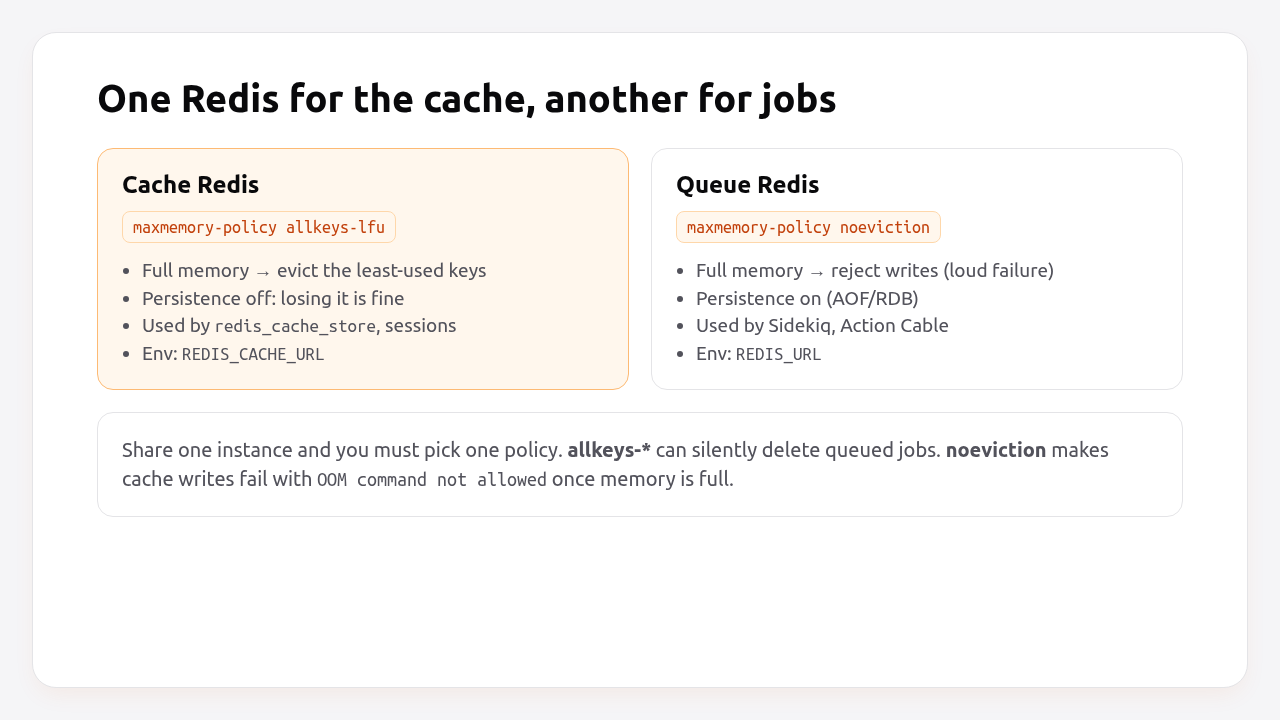
If you can only afford one instance, use volatile-lfu: it evicts only keys that have a TTL. Give every cache entry an expires_in (Step 2 sets a default), and never set TTLs on Sidekiq’s keys. It’s a compromise. A cache that forgets TTLs can still fill memory, so two instances are better.
Step 2: Configure redis_cache_store for production
Configure short timeouts, an error handler and a connection pool, so the cache speeds you up when Redis is healthy and quietly steps aside when it isn’t.
# config/environments/production.rb
Rails.application.configure do
  config.cache_store = :redis_cache_store, {
    url: ENV.fetch("REDIS_CACHE_URL") { ENV.fetch("REDIS_URL") },

    # Keep keys from different apps or environments apart on a shared Redis.
    namespace: "myapp:cache",

    # Default TTL for every entry that doesn't set its own.
    expires_in: 1.day,

    # A slow or unreachable Redis should cost milliseconds, not seconds.
    connect_timeout: 0.5,
    read_timeout: 0.2,
    write_timeout: 0.2,
    reconnect_attempts: 1,

    # One pool per process, sized to its threads.
    pool: { size: ENV.fetch("RAILS_MAX_THREADS", 3).to_i, timeout: 1 },

    # Values over 1 KB are compressed by default; this makes it explicit.
    compress: true,
    compress_threshold: 1.kilobyte,

    # Report failures without raising: a cache error behaves like a miss.
    error_handler: ->(method:, returning:, exception:) {
      Rails.logger.warn("[cache] #{method} failed: #{exception.class}: #{exception.message}")
      Sentry.capture_exception(exception, level: :warning) if defined?(Sentry)
    }
  }
end
Why these values:
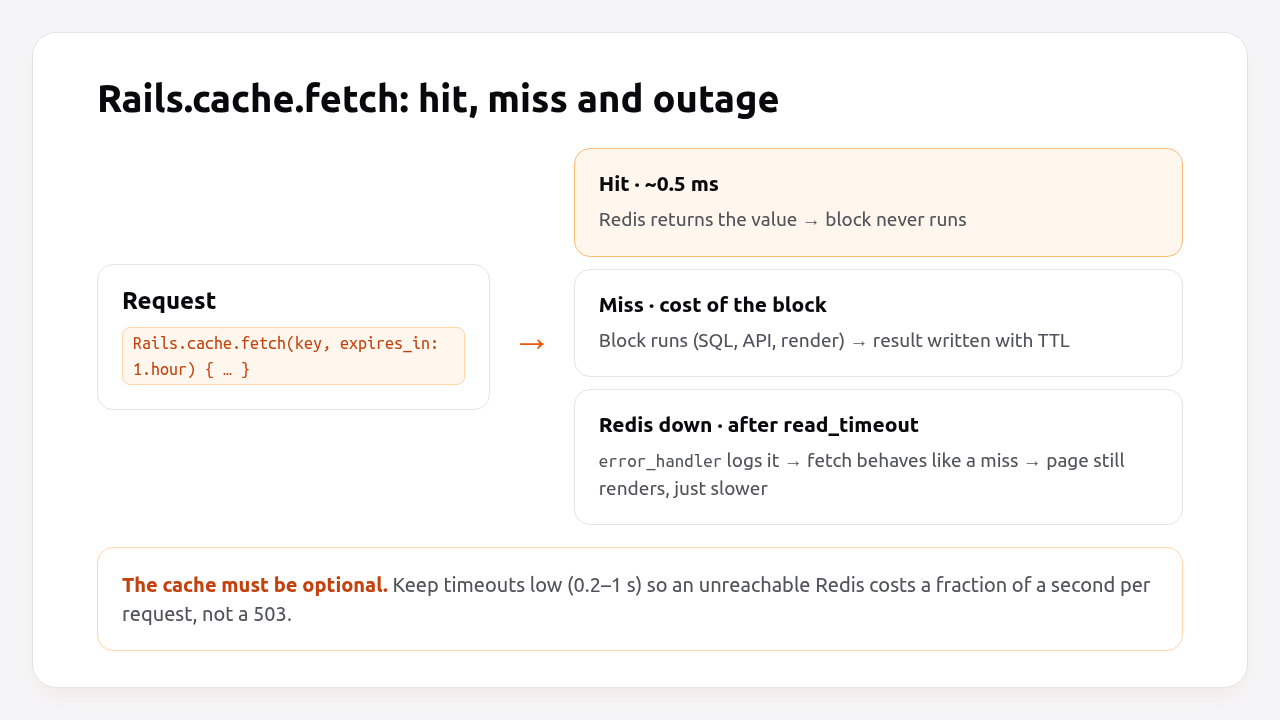
- Timeouts. Rails defaults to 1 second for connect, read and write. On a page with 30 cache reads, a Redis that stops answering costs 30 seconds. At 0.2 s it costs 6 seconds in the worst case, and in practice the connection fails fast and later reads skip it immediately. Go lower if Redis is on the same private network.
error_handler. Without it, cache errors are swallowed silently. You want them in your logs and error tracker, so “the site got slow” has an explanation.pool. Each Puma thread can check out its own Redis connection. Size it like the database pool: one per thread.namespace. Lets staging and production, or two apps, share an instance without colliding, and lets you clear one app’s cache by pattern.
Turn on caching in development to test the setup locally:
bin/rails dev:cache
# Development mode is now being cached.
# config/environments/development.rb (excerpt, generated by Rails)
if Rails.root.join("tmp/caching-dev.txt").exist?
  config.action_controller.perform_caching = true
  config.cache_store = :redis_cache_store, { url: ENV.fetch("REDIS_CACHE_URL", "redis://localhost:6379/1") }
else
  config.action_controller.perform_caching = false
  config.cache_store = :null_store
end
Pro Tip: Use a different logical database number or namespace in development and test (redis://localhost:6379/1, /2), so running the test suite and calling Rails.cache.clear never wipes your development cache or Sidekiq queue.
Step 3: Cache expensive work with Rails.cache.fetch
Rails.cache.fetch returns the cached value for a key, or runs the block, stores the result and returns it. It’s the right tool for expensive queries, aggregates and third-party API calls.
# app/models/product.rb
class Product < ApplicationRecord
  has_many :reviews

  def review_stats
    Rails.cache.fetch([self, "review_stats"], expires_in: 12.hours) { compute_review_stats }
  end

  def compute_review_stats
    {
      count: reviews.count,
      average: reviews.average(:rating)&.round(2),
      five_star: reviews.where(rating: 5).count
    }
  end
end
Passing [self, "review_stats"] builds the key from cache_key_with_version, e.g. products/42-20261014093015123456/review_stats. When the product’s updated_at changes, the key changes and the stale entry is simply never read again. It ages out through eviction or TTL. That’s key-based expiration, and it means you rarely need to delete cache entries by hand.
For data from an external API, protect against many processes recomputing the same expired key at once (a cache stampede):
# app/services/exchange_rates.rb
class ExchangeRates
  def self.current
    Rails.cache.fetch("exchange_rates/eur", expires_in: 10.minutes, race_condition_ttl: 30.seconds) do
      response = Net::HTTP.get_response(URI("https://api.example.com/rates?base=EUR"))
      raise "rates API returned #{response.code}" unless response.is_a?(Net::HTTPSuccess)

      JSON.parse(response.body)
    end
  end
end
With race_condition_ttl, the first process that finds the entry expired extends it by 30 seconds and recomputes, while the others keep getting the slightly stale value instead of all hitting the API at once.
Read many keys in one round-trip when rendering lists:
# app/controllers/products_controller.rb
def index
  @products = Product.order(:name).limit(50)
  keys = @products.map { |p| [p, "review_stats"] }
  @stats = Rails.cache.fetch_multi(*keys, expires_in: 12.hours) do |(product, _)|
    product.compute_review_stats
  end
end
Pro Tip: Never cache Active Record objects or relations directly. Cache the plain data you need (hashes, arrays, IDs, strings). Cached objects break when the class changes between deploys, and relations get cached unevaluated.
Step 4: Add fragment and Russian doll caching
Fragment caching stores rendered HTML for part of a view. Russian doll caching nests fragments, so updating one record re-renders only its fragment and the ones that contain it.
<%# app/views/products/show.html.erb %>
<% cache @product do %>
  <h1><%= @product.name %></h1>
  <p><%= @product.description %></p>

  <section class="reviews">
    <%= render partial: "reviews/review", collection: @product.reviews, cached: true %>
  </section>
<% end %>
<%# app/views/reviews/_review.html.erb %>
<% cache review do %>
  <article>
    <strong><%= review.author_name %></strong>
    <p><%= review.body %></p>
  </article>
<% end %>
# app/models/review.rb
class Review < ApplicationRecord
  belongs_to :product, touch: true
end
How this fits together:
cache @productkeys the fragment on the product’scache_key_with_versionand a digest of the template, so editing the view invalidates it on the next deploy automatically.cached: trueon a collection render fetches all review fragments in oneread_multicall to Redis instead of one call per review.touch: trueupdates the product’supdated_atwhen a review changes, which changes the outer key and re-renders the outer fragment while reusing every unchanged inner one.
Use cache_if / cache_unless for fragments that differ per user, or include the user in the key: cache [current_user, @product].
Step 5: Verify it works
Confirm that Rails is talking to Redis, that reads are hits most of the time, and that the eviction policy is what you think it is.
bin/rails runner 'p Rails.cache.class; p Rails.cache.redis.with { |r| r.ping }'
# ActiveSupport::Cache::RedisCacheStore
# "PONG"

bin/rails runner 'Rails.cache.write("health:test", "ok", expires_in: 60); p Rails.cache.read("health:test")'
# "ok"
Check the server side:
redis-cli -u "$REDIS_CACHE_URL" CONFIG GET maxmemory-policy
redis-cli -u "$REDIS_CACHE_URL" INFO stats | grep -E "keyspace_(hits|misses)|evicted_keys"
redis-cli -u "$REDIS_CACHE_URL" INFO memory | grep -E "used_memory_human|maxmemory_human"
redis-cli -u "$REDIS_CACHE_URL" --scan --pattern "myapp:cache:*" | head
The hit ratio is keyspace_hits / (keyspace_hits + keyspace_misses). Above 80–90% after warm-up is typical for fragment caching. A low ratio usually means keys include something that changes on every request, like a timestamp or a request ID. evicted_keys rising steadily means maxmemory is too small for your working set.
To see cache activity per request in development, subscribe to the Active Support notifications:
# config/initializers/cache_instrumentation.rb
if Rails.env.development?
  ActiveSupport::Notifications.subscribe("cache_read.active_support") do |event|
    Rails.logger.debug("[cache] #{event.payload[:hit] ? 'HIT ' : 'MISS'} #{event.payload[:key]} (#{event.duration.round(2)}ms)")
  end
end
Finally, test failure: stop Redis (or point REDIS_CACHE_URL at a closed port) and load a cached page. It should render, slower, with [cache] read failed warnings in the log, not a 500.
How Heroku, Render, Fly.io, Upsun and Enkihost provide Redis
Every platform offers a managed Redis-compatible store, but the defaults differ in ways that matter for caching: eviction policy, TLS and persistence.
| Platform | Product | Default eviction | TLS | Rails gotcha |
|---|---|---|---|---|
| Heroku | Heroku Key-Value Store (Redis/Valkey) | noeviction |
Required, self-signed cert | Set maxmemory-policy allkeys-lfu with heroku redis:maxmemory; pass ssl_params: { verify_mode: OpenSSL::SSL::VERIFY_NONE } |
| Render | Render Key Value (Valkey 8) | Chosen at creation | Internal URL without TLS on the private network | Pick allkeys-lru for caches, noeviction for queues; disable persistence for a cache |
| Fly.io | Upstash for Redis (fly redis create) |
Writes rejected when full unless eviction is enabled | Required (rediss://) |
Enable eviction for the cache database; use a second database for Sidekiq |
| Upsun | redis (ephemeral) and redis-persistent services |
Ephemeral service suits caches | Internal network | Use redis for the cache, redis-persistent for queues |
| Enkihost | Redis included (128 MB on Ignite, five instances on Blaze) | Not documented; check CONFIG GET maxmemory-policy |
Internal network | Ignite has one Redis: don’t mix a cache (needs eviction) with Sidekiq (needs noeviction) |
Heroku’s defaults are the most likely to bite. A cache on noeviction works fine until memory fills up, and then every Rails.cache.write fails with OOM command not allowed. Your error_handler turns that into a slow site instead of a broken one, but only if you configured it. The fix is one command:
heroku redis:maxmemory REDIS_CACHE --policy allkeys-lfu -a myapp
And the TLS setting for Heroku’s self-signed certificates:
# config/environments/production.rb (Heroku only)
config.cache_store = :redis_cache_store, {
  url: ENV["REDIS_URL"],
  ssl_params: { verify_mode: OpenSSL::SSL::VERIFY_NONE }
}
Enkihost’s included Redis injects REDIS_URL, so the configuration in Step 2 works as written. Check CONFIG GET maxmemory-policy as shown in Step 5 before relying on it as a cache.
Troubleshooting Rails Redis caching
These are the errors you’ll see most often with Redis caching in production, and what each one means.
OOM command not allowed when used memory > 'maxmemory'
Redis::CommandError: OOM command not allowed when used memory > 'maxmemory'.
The instance is full and the policy is noeviction. Switch the cache instance to allkeys-lfu. If the same instance holds Sidekiq queues, split them first (see Step 1).
certificate verify failed (self-signed certificate in certificate chain)
OpenSSL::SSL::SSLError: SSL_connect returned=1 errno=0 peeraddr=10.0.0.5:6380 state=error: certificate verify failed (self-signed certificate in certificate chain)
Your provider uses self-signed certificates (Heroku does). Pass ssl_params: { verify_mode: OpenSSL::SSL::VERIFY_NONE } in the cache store options, or provide the provider’s CA certificate if it publishes one.
RedisClient::ReadTimeoutError: Waited 0.2 seconds
RedisClient::ReadTimeoutError: Waited 0.2 seconds
Redis didn’t answer in time. Occasional timeouts under load are expected and handled by error_handler. Frequent ones mean Redis is overloaded (check INFO commandstats for slow commands like KEYS), too far away (cross-region), or the values are huge. Look for multi-megabyte entries with redis-cli --bigkeys.
ERR max number of clients reached
RedisClient::CommandError: ERR max number of clients reached
Total connections from all processes exceed the plan’s limit (20 on small Heroku plans, for example). Lower the pool size, count processes the same way as for database connections, or move to a larger plan.
Stale content after a deploy
Fragment keys include a template digest, so view changes invalidate automatically. Low-level Rails.cache.fetch keys don’t. If you change the shape of a cached value (a hash gains a key), add a version to the key: Rails.cache.fetch([self, "review_stats", "v2"]). Avoid Rails.cache.clear on a shared instance. With a namespace it only clears your app’s keys, but on Redis it’s still an expensive SCAN + DEL over every key.
Author Perspective: the cache is a performance feature, not a dependency
The first production incident I caused with Redis caching was entirely self-inflicted. The cache store had default 1-second timeouts, a dashboard did around forty cache reads, and when Redis had a network blip every page took forty seconds and Puma ran out of threads. Redis was “only” the cache, and it took the site down anyway. Since then I set timeouts in the low hundreds of milliseconds, always add an error_handler, and regularly test with Redis switched off. If the app doesn’t survive the cache disappearing, the cache has become a dependency, and dependencies need the same care as the database.
Redis caching on Enkihost
A production Redis cache needs a Redis close to your app, a URL injected into the environment, and resources you can count on. Enkihost covers that directly:

- Redis add-on that injects
REDIS_URL, soconfig.cache_store = :redis_cache_store, { url: ENV["REDIS_URL"] }works without manual wiring. - PostgreSQL add-on that injects
DATABASE_URL, if you’d rather start with Solid Cache and add Redis later. - Per-app resource isolation: cache hit latency depends on your app’s resources, not on a neighbour’s traffic spike.
- Zero-downtime deploys: fragment keys include template digests, so a new release renders fresh fragments while the old release keeps serving its own until the switch.
Rails and Sinatra apps run on Ignite (5 EUR per month after a 14-day free trial, with PostgreSQL and Redis included) or Blaze (16 EUR per month, with high availability and autoscaling). The free Spark plan is for Jekyll sites. See enkihost.com.
FAQ
Is Redis or Solid Cache better for Rails caching?
Neither is better in general. Redis gives lower read latency and handles very high write rates, but cache size is limited by RAM and it’s an extra service. Solid Cache stores entries in your database, so it can hold a much larger cache cheaply and needs no new infrastructure. Start with Solid Cache on Rails 8, and switch to Redis if latency or write volume requires it.
What maxmemory-policy should I use for a Rails cache?
Use allkeys-lfu for a Redis instance used only as a cache. It evicts the least frequently used keys when memory is full. If the same instance also holds Sidekiq jobs, use volatile-lfu and make sure every cache entry has an expiry, or better, run two instances.
Can I use the same Redis for caching and Sidekiq?
You can, but the two need opposite eviction policies. Sidekiq needs noeviction so jobs are never silently deleted, while a cache needs eviction. A shared instance forces a compromise, so use separate instances, or at minimum volatile-lfu with TTLs on every cache key.
Should I store Rails sessions in Redis?
Usually not. The default cookie store needs no server-side storage and scales horizontally without extra work. Store sessions in Redis with the cache store only if session data is too large for a 4 KB cookie or you need to revoke sessions server-side, and remember that evictions will then log users out.
Does Rails cache in development?
Not by default. Run bin/rails dev:cache to toggle caching in development, which creates tmp/caching-dev.txt and enables perform_caching. Run it again to turn caching off.
Sources
- Caching with Rails: An Overview — Rails Guides
- ActiveSupport::Cache::RedisCacheStore — Rails API
- Key eviction (maxmemory-policy) — Redis Docs
- rails/solid_cache — GitHub
- Heroku Key-Value Store — Heroku Dev Center
- Render Key Value — Render Docs
- Upstash for Redis — Fly Docs
- Eviction — Upstash Docs
- Redis service — Upsun Docs