SQLite in Production with Rails 8: When It Beats PostgreSQL (and When It Doesn't)
Running SQLite in production with Rails 8 is a reasonable choice now, not a beginner’s mistake. Rails 8 ships production-ready SQLite defaults, and Solid Cache, Solid Queue and Solid Cable all run on SQLite files, so a whole app can run without a database service. The catch is that SQLite lives on one machine’s disk: one writer at a time, no second app server, and backups are your job. Here’s what changed, how it compares with PostgreSQL, and how to choose.
TL;DR
- SQLite fits a Rails app that runs on one server with a persistent disk: internal tools, small SaaS, content sites. The SQLite team says sites under 100,000 hits a day work fine.
- Choose PostgreSQL when you need a second app server, heavy concurrent writes, or extensions like pgvector.
- Back up continuously with Litestream. A daily disk snapshot isn’t a database backup strategy.
Is SQLite ready for production in Rails 8?
Yes, for apps on a single server with a persistent disk. SQLite has been production-grade for decades; what changed is that Rails 8 configures it correctly out of the box.
The SQLite docs say “any site that gets fewer than 100K hits/day should work fine with SQLite”, and call that estimate conservative. The limits are about concurrency and topology, not data size:
- One writer at a time. In WAL mode readers never block, but writes are serialized. Short write transactions handle hundreds of writes per second; long ones make everyone else wait.
- One machine. Every process must see the same local file. A second host can’t share it, and network filesystems break SQLite’s locking.
What changed in Rails 8 for SQLite?
Rails now applies the settings experienced SQLite users used to set by hand, and the Solid adapters work on SQLite.
| Change | Rails 8 default | Why it matters |
|---|---|---|
| Journal mode | WAL |
Readers and the writer don’t block each other |
| Transaction mode | BEGIN IMMEDIATE |
Takes the write lock up front, avoiding SQLITE_BUSY deadlocks |
| Busy timeout | Releases the GVL (sqlite3 gem 2.x) | Other Puma threads keep running while one waits |
database.yml |
primary, cache, queue, cable files |
Job polling doesn’t contend with app writes |
The result is one container, one volume and four files:
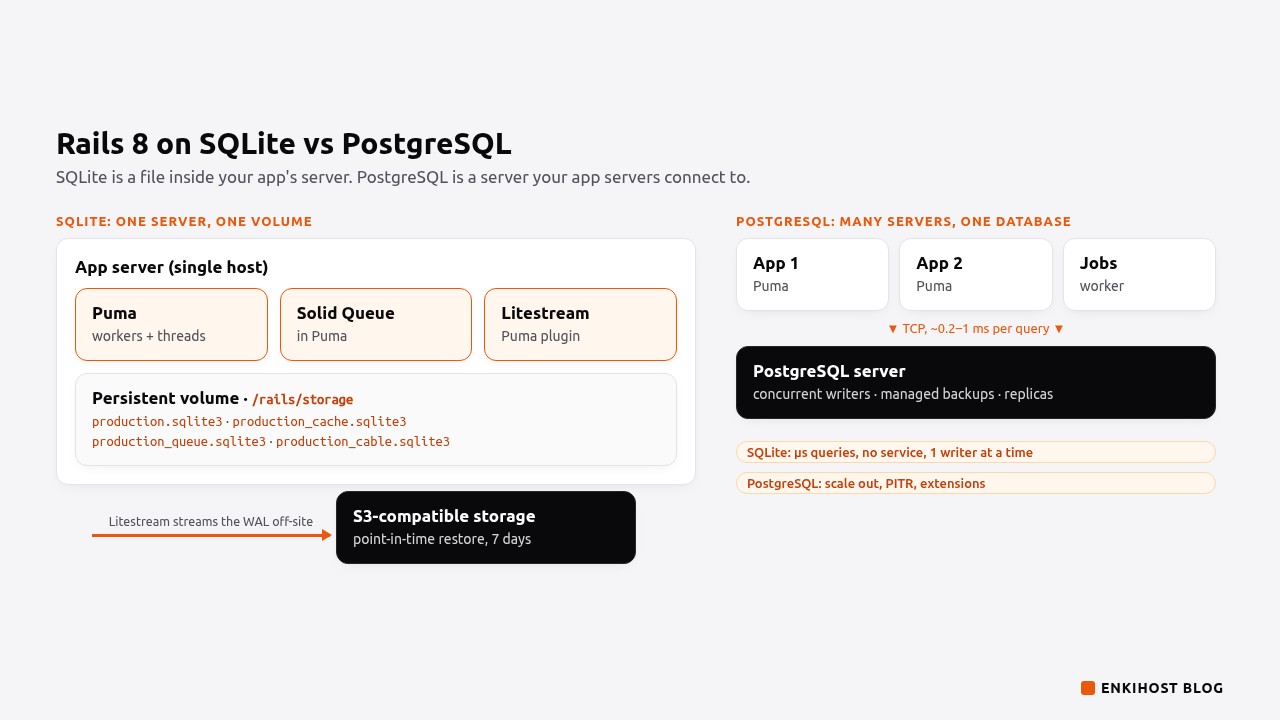
The storage/ directory must be a persistent volume, not part of the image. With Kamal 2 that’s one line in config/deploy.yml: volumes: ["myapp_storage:/rails/storage"]. The Kamal 2 deployment guide covers the rest of a single-server setup.
SQLite vs PostgreSQL for Rails: which is better?
SQLite is a library that reads a file inside your app’s process; PostgreSQL is a server you reach over the network. Most differences follow from that.
| SQLite (Rails 8) | PostgreSQL | |
|---|---|---|
| Query latency | Microseconds, no network | A network round trip per query |
| Concurrent writers | One at a time | Many (row-level locking) |
| App servers | One host | Any number |
| Backups / point-in-time recovery | Your job (Litestream) | Usually included by the provider |
| Extensions | Few | PostGIS, pgvector, pg_stat_statements |
| Services to run | None | A database server |
Pros of SQLite: no database to provision or pay for, very fast reads, the Solid trio replaces Redis on small apps, and a backup is a single file you can open anywhere.
Cons: no horizontal scaling or failover, long write transactions block every other write, and fewer database features.
Pro Tip: most SQLite3::BusyException: database is locked errors come from long write transactions, not traffic. Keep transaction do blocks short and batch bulk writes in jobs.
How do you back up SQLite in production?
Use Litestream: it streams every change in SQLite’s WAL to S3-compatible storage within seconds, so you can restore to just before a failure. Never copy the .sqlite3 file while the app is writing to it.
bundle add litestream
bin/rails generate litestream:install
# config/litestream.yml
dbs:
  - path: storage/production.sqlite3
    replicas:
      - type: s3
        bucket: $LITESTREAM_BUCKET
        path: production.sqlite3
        endpoint: $LITESTREAM_ENDPOINT
        access-key-id: $LITESTREAM_ACCESS_KEY_ID
        secret-access-key: $LITESTREAM_SECRET_ACCESS_KEY
# config/puma.rb
plugin :litestream if ENV["LITESTREAM_ENABLED"]
Replicate production.sqlite3 at minimum; the cache and cable databases can be rebuilt from nothing. Test restores on a schedule. The PostgreSQL backup strategy guide has a restore-drill checklist that applies to SQLite too.
Which one should you choose?
Choose SQLite when the app will honestly stay on one server; choose PostgreSQL when you need more than one server or features SQLite lacks.
| Use case | Choose |
|---|---|
| Internal tool, side project, content site | SQLite |
| Single-tenant app (one instance per customer) | SQLite |
| SaaS that will need a second app server | PostgreSQL |
| Write-heavy app (events, analytics, chat) | PostgreSQL |
| Needs pgvector or PostGIS | PostgreSQL |
A common middle path is PostgreSQL for the primary database with Solid Cache on SQLite, so you don’t need Redis for caching. The Rails caching strategies guide compares the cache stores.
How Heroku, Render, Fly.io and Railway handle SQLite
On a platform, the question is whether you get a persistent disk and what it costs you in scaling and deploys.
| Platform | Persistent disk | Instances with a disk | Deploys with a disk |
|---|---|---|---|
| Heroku | No; the filesystem is ephemeral | — | — |
| Render | Paid services only | One | No zero-downtime deploys |
| Fly.io | Volumes | One Machine per volume | Machine restarts |
| Railway | One volume per service | One; no replicas with a volume | Brief downtime on redeploy |
Author Perspective
I like SQLite in production more than I expected to. For a couple of internal tools it removed a database service and a monthly bill, and the apps got faster because queries stopped crossing a network. Where I’ve been burned is operations, never performance: a “temporary” second server that couldn’t see the database, and a backup script that copied the file mid-write. My rule now: SQLite when the app will stay on one server and Litestream is set up on day one; PostgreSQL the moment a second server enters the picture.
FAQ
Can I run multiple Puma workers with SQLite?
Yes. Puma workers and threads on the same server can share one SQLite file; WAL mode lets readers work in parallel while one writer commits. You can’t run app servers on different hosts against the same file.
Is copying the SQLite file a safe backup?
Not while the app is running. A plain copy during a write can be corrupt, and the WAL file may hold recent commits. Use Litestream, sqlite3’s .backup command or VACUUM INTO.
How do I migrate a Rails app from SQLite to PostgreSQL?
Point database.yml at PostgreSQL, run bin/rails db:prepare, then copy the data with a tool such as pgloader. Check raw SQL for SQLite-specific syntax before switching.