Backing Up PostgreSQL: The Strategy That Actually Survives an Outage

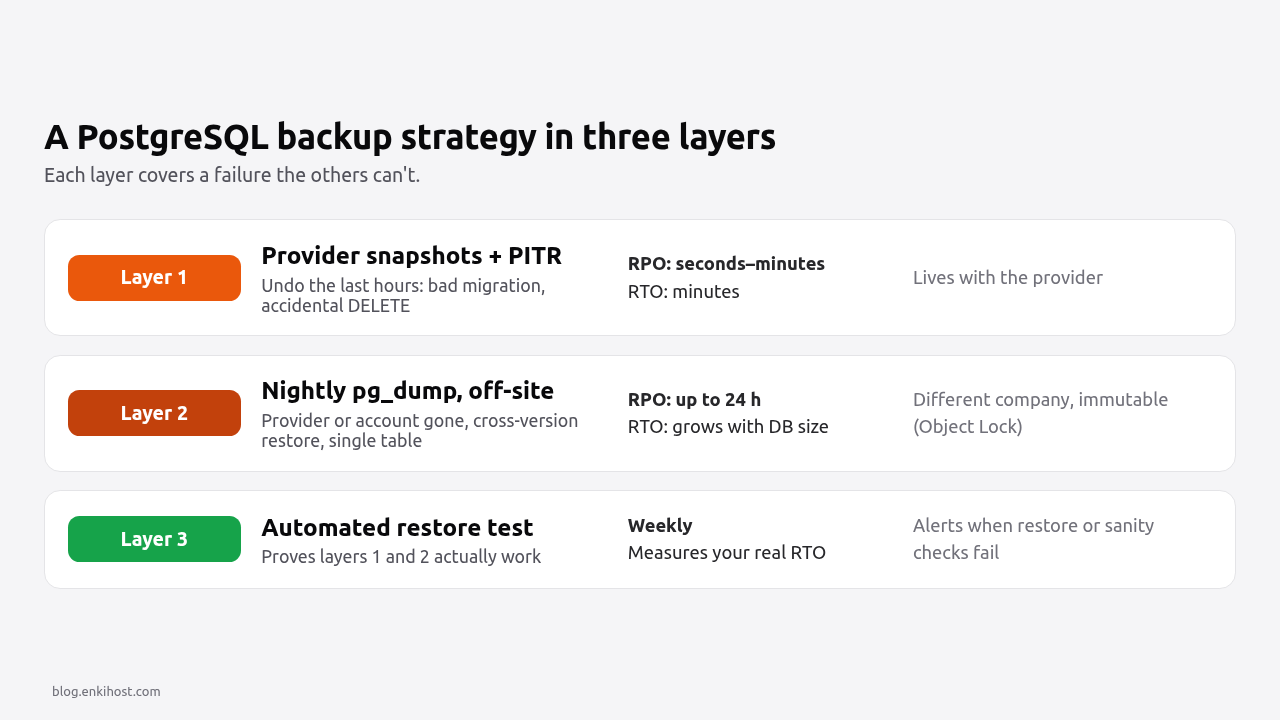
A PostgreSQL backup strategy survives an outage only if three things are true: the backup lives somewhere the outage can’t reach, it’s recent enough that the data you lose is acceptable, and someone has restored it recently enough to know it works. Most failures aren’t missing backups; they’re backups on the same server, backups nobody restored, or dumps that silently stopped working weeks ago. This guide compares pg_dump with WAL-based point-in-time recovery, sets up automated off-site dumps for a Rails app, defines retention, and automates the restore test that proves it all works.
TL;DR
pg_dumpgives you a portable snapshot; you lose everything since the last dump. WAL archiving with a base backup gives point-in-time recovery to any second within the retention window.- A backup on the same server, volume or account as the database isn’t a backup for an outage. Keep at least one copy off-site, ideally immutable.
- Pick retention from how late you notice problems, not from disk space: 7 daily, 4 weekly and 12 monthly copies is a sensible default.
- An untested backup is a hope. Restore into a scratch database on a schedule, run sanity queries, and alert when the restore fails.
- “Managed backups” usually means snapshots plus PITR in the provider’s own infrastructure. Still keep your own logical dumps somewhere else.
Table of Contents
- pg_dump vs point-in-time recovery: which do I need?
- Prerequisites
- Step 1: Take a correct pg_dump
- Step 2: Automate off-site dumps from a Rails app
- Step 3: Set retention and make backups immutable
- Step 4: Add point-in-time recovery on a self-hosted server
- Step 5: Test restores automatically
- Verify it works
- Troubleshooting
- How Heroku, Render, Fly.io and Upsun back up PostgreSQL
- Author Perspective
- PostgreSQL backups on Enkihost
- FAQ
- Sources
pg_dump vs point-in-time recovery: which do I need?
Use pg_dump when losing up to a day of data is acceptable or as an independent second copy; use WAL archiving with point-in-time recovery (PITR) when you need to lose minutes or less, or to rewind to just before a bad DELETE. Most production apps want both.
pg_dump (logical) |
Base backup + WAL (physical, PITR) | Provider snapshot | |
|---|---|---|---|
| What it captures | SQL-level contents of one database | The whole cluster’s data files plus every change since | Disk image of the instance |
| Data you can lose (RPO) | Everything since the last dump | Seconds to minutes (last archived WAL segment) | Since the last snapshot, or seconds if the provider adds PITR |
| Restore to an arbitrary time | No | Yes, to any point in the WAL retention window | Only if the provider offers PITR |
| Restore time (RTO) | Slow on big databases: rebuilds indexes | Fast: copy files, replay WAL | Usually fast |
| Portable across major versions | Yes | No, same major version only | No |
| Restore a single table | Yes (pg_restore -t) |
No, whole cluster | No |
| Tools | pg_dump, pg_restore |
pgBackRest, WAL-G, pg_basebackup |
Provider dashboard / CLI |
| Where you can run it | Anywhere you can connect | Needs server access (archive_command) |
Only on that provider |
The two failure types they protect against are different. A dead disk or a lost region needs any recent copy elsewhere. A buggy migration or a DELETE without a WHERE needs a copy from just before the mistake, and you might not notice for days. PITR solves the second; retention solves “for days”.
Pro Tip: write down your RPO (how much data you can lose) and RTO (how long you can be down) before choosing tools. “One hour of data, four hours of downtime” leads to a very different setup than “nothing, ever”.
Prerequisites
- PostgreSQL 14 or later on the server, and a
pg_dumpclient at least as new as the server (pg_dump --versionvsSELECT version();). - An S3-compatible bucket in a different provider or account from the database (AWS S3, Cloudflare R2, Backblaze B2, Hetzner Object Storage…).
- A Rails 7.2 or 8.x app with
DATABASE_URLset, and Solid Queue or another job runner for scheduling. - About 2× the compressed dump size of free disk space where the dump runs.
Step 1: Take a correct pg_dump
Use the custom format (-Fc): it’s compressed, and pg_restore can restore it selectively and in parallel.
pg_dump "$DATABASE_URL" \
  --format=custom \
  --no-owner \
  --no-privileges \
  --compress=6 \
  --file="myapp-$(date -u +%Y%m%dT%H%M%SZ).dump"
--no-ownerand--no-privilegesdropALTER OWNERandGRANTstatements, so the dump restores into a database with a different role name, which is the normal case on managed hosting.pg_dumptakes a consistent snapshot without blocking reads or writes. It does take light locks, so a migration that needs anACCESS EXCLUSIVElock waits until the dump finishes. Don’t schedule dumps at deploy time.- Check the result is real:
pg_restore --list myapp-*.dump | headshould list your tables. An empty or truncated file is the most common silent failure.
For large databases, the directory format with parallel jobs is much faster:
pg_dump "$DATABASE_URL" --format=directory --jobs=4 --no-owner --no-privileges --file=myapp-dump/
Step 2: Automate off-site dumps from a Rails app
Run the dump from the app itself as a recurring job and upload it to object storage. It works on any platform that can run Rails, including ones without cron.
First, make sure the image has a pg_dump that matches the server’s major version. In the Rails 8 Dockerfile, add the PostgreSQL client to the base packages:
# Dockerfile (base stage)
RUN apt-get update -qq && \
    apt-get install --no-install-recommends -y curl libjemalloc2 libvips postgresql-client && \
    rm -rf /var/lib/apt/lists /var/cache/apt/archives
Debian’s postgresql-client follows the distribution’s PostgreSQL version. If your server is newer, install the matching version from the PGDG apt repository (postgresql-client-17), or pg_dump aborts with a version mismatch.
Add the S3 SDK:
# Gemfile
gem "aws-sdk-s3", require: false
The job:
# app/jobs/database_backup_job.rb
require "open3"
require "aws-sdk-s3"

class DatabaseBackupJob < ApplicationJob
  queue_as :backups
  limits_concurrency to: 1, key: "database_backup" if respond_to?(:limits_concurrency)

  MIN_BYTES = 10.kilobytes

  def perform
    key  = "postgres/daily/#{Time.now.utc.strftime('%Y/%m/%d/%Y%m%dT%H%M%SZ')}.dump"
    path = Rails.root.join("tmp", File.basename(key)).to_s

    _out, err, status = Open3.capture3(
      "pg_dump", ENV.fetch("DATABASE_URL"),
      "--format=custom", "--no-owner", "--no-privileges", "--compress=6",
      "--file=#{path}"
    )
    raise "pg_dump failed: #{err}" unless status.success?

    size = File.size(path)
    raise "pg_dump produced a suspiciously small file (#{size} bytes)" if size < MIN_BYTES

    _out, err, status = Open3.capture3("pg_restore", "--list", path)
    raise "dump is not readable by pg_restore: #{err}" unless status.success?

    File.open(path, "rb") do |file|
      s3.put_object(bucket: ENV.fetch("BACKUP_BUCKET"), key: key, body: file)
    end

    Rails.logger.info("database backup uploaded key=#{key} bytes=#{size}")
  ensure
    File.delete(path) if path && File.exist?(path)
  end

  private

  def s3
    Aws::S3::Client.new(
      region: ENV.fetch("BACKUP_REGION", "auto"),
      endpoint: ENV["BACKUP_ENDPOINT"], # e.g. https://<account>.r2.cloudflarestorage.com
      access_key_id: ENV.fetch("BACKUP_ACCESS_KEY_ID"),
      secret_access_key: ENV.fetch("BACKUP_SECRET_ACCESS_KEY")
    )
  end
end
Schedule it with Solid Queue’s recurring tasks:
# config/recurring.yml
production:
  database_backup:
    class: DatabaseBackupJob
    queue: backups
    schedule: every day at 3am
The size check and pg_restore --list catch a silently empty or unreadable dump the night it happens instead of on restore day. Make the job’s failure page you: Solid Queue keeps failed executions, so alert on them, or report the exception to your error tracker.
On a server with cron, the equivalent is one line:
# crontab -e
0 3 * * * cd /srv/myapp && bin/rails runner 'DatabaseBackupJob.perform_now' >> log/backup.log 2>&1
Pro Tip: give the app’s backup credentials permission to put and get objects in the backup bucket and nothing else: no delete, no bucket settings. If the app is compromised, the attacker can’t erase your backups with the app’s keys. Run the restore test in Step 5 with separate, read-only credentials.
Step 3: Set retention and make backups immutable
Keep backups long enough to cover the time it takes you to notice a problem. A grandfather-father-son schedule is a good default:
| Tier | Keep | Covers |
|---|---|---|
| Daily | 7 | Last week’s mistakes, routine restores |
| Weekly | 4 | A bug discovered after two or three weeks |
| Monthly | 12 | Audits, slow data corruption, “when did this start?” |
The simplest implementation is prefixes plus lifecycle rules: the job writes to postgres/daily/, and on Sundays and the 1st of the month also copies the object to postgres/weekly/ and postgres/monthly/. Add the copy at the end of perform:
# app/jobs/database_backup_job.rb (end of perform, after put_object)
today = Time.now.utc.to_date
%w[weekly monthly].each do |tier|
  next if tier == "weekly"  && !today.sunday?
  next if tier == "monthly" && today.day != 1

  s3.copy_object(
    bucket: ENV.fetch("BACKUP_BUCKET"),
    copy_source: "#{ENV.fetch('BACKUP_BUCKET')}/#{key}",
    key: key.sub("/daily/", "/#{tier}/")
  )
end
Then let the bucket expire them:
{
  "Rules": [
    { "ID": "daily",   "Status": "Enabled", "Filter": { "Prefix": "postgres/daily/" },   "Expiration": { "Days": 8 } },
    { "ID": "weekly",  "Status": "Enabled", "Filter": { "Prefix": "postgres/weekly/" },  "Expiration": { "Days": 35 } },
    { "ID": "monthly", "Status": "Enabled", "Filter": { "Prefix": "postgres/monthly/" }, "Expiration": { "Days": 370 } }
  ]
}
aws s3api put-bucket-lifecycle-configuration --bucket myapp-backups --lifecycle-configuration file://lifecycle.json
For protection against ransomware or a leaked admin key, enable S3 Object Lock in compliance mode (or the equivalent on your provider) with a retention at least as long as the daily tier. Nobody, including you, can delete a locked object before its retention ends.
Step 4: Add point-in-time recovery on a self-hosted server
If you run PostgreSQL yourself, pgBackRest adds base backups, continuous WAL archiving and PITR in one tool. On a managed database you can’t set archive_command, so use the provider’s PITR and keep Step 2’s dumps as the independent copy.
# /etc/pgbackrest/pgbackrest.conf
[global]
repo1-type=s3
repo1-s3-endpoint=s3.eu-central-1.amazonaws.com
repo1-s3-region=eu-central-1
repo1-s3-bucket=myapp-pgbackrest
repo1-path=/pgbackrest
repo1-retention-full=2
repo1-cipher-type=aes-256-cbc
start-fast=y
compress-type=zst

[main]
pg1-path=/var/lib/postgresql/17/main
Keep repo1-s3-key, repo1-s3-key-secret and repo1-cipher-pass out of this file: put them in /etc/pgbackrest/conf.d/secrets.conf with mode 0600, owned by postgres.
# /etc/postgresql/17/main/postgresql.conf
archive_mode = on
archive_command = 'pgbackrest --stanza=main archive-push %p'
wal_level = replica
max_wal_senders = 3
sudo systemctl restart postgresql
sudo -u postgres pgbackrest --stanza=main stanza-create
sudo -u postgres pgbackrest --stanza=main check
sudo -u postgres pgbackrest --stanza=main --type=full backup
# crontab for the postgres user: weekly full, daily differential
30 2 * * 0   pgbackrest --stanza=main --type=full backup
30 2 * * 1-6 pgbackrest --stanza=main --type=diff backup
To recover to just before a mistake, stop PostgreSQL and restore to a target time:
sudo systemctl stop postgresql
sudo -u postgres pgbackrest --stanza=main --delta \
  --type=time --target="2026-11-11 10:41:00+02" --target-action=promote restore
sudo systemctl start postgresql
Practise that on a scratch server first; in a real incident, restore to a new server and copy the lost rows back rather than rewinding production.
Step 5: Test restores automatically
Restore the latest dump into a throwaway database on a schedule and check that the data looks right. This is the step that turns backups into a strategy.
#!/usr/bin/env bash
# bin/restore-test: restore the latest dump into a scratch database and sanity-check it.
set -euo pipefail

: "${RESTORE_DATABASE_URL:?set it to an empty scratch database, never production}"
LATEST=$(aws s3 ls "s3://${BACKUP_BUCKET}/postgres/daily/" --recursive | sort | tail -n 1 | awk '{print $4}')
aws s3 cp "s3://${BACKUP_BUCKET}/${LATEST}" /tmp/restore-test.dump

start=$(date +%s)
pg_restore --clean --if-exists --no-owner --no-privileges --jobs=2 \
  --dbname="$RESTORE_DATABASE_URL" /tmp/restore-test.dump
echo "restore took $(( $(date +%s) - start ))s from ${LATEST}"

psql "$RESTORE_DATABASE_URL" -v ON_ERROR_STOP=1 -At <<'SQL'
SELECT 'users',  count(*) FROM users;
SELECT 'orders', count(*) FROM orders;
SELECT 'latest order', max(created_at) FROM orders;
SELECT 'schema version', max(version) FROM schema_migrations;
SQL

rm -f /tmp/restore-test.dump
Run it weekly from CI or a small server, and fail loudly when:
- the restore exits non-zero,
- a core table has zero rows, or
- the newest
created_atis older than your RPO (the dump is stale).
Write down the restore duration each time. That number is your real RTO for a full restore, and it grows with the database.
Pro Tip: once a quarter, do the full exercise by hand from a laptop that isn’t yours: find the credentials, download the backup, restore it, point a staging app at it. That’s the test that finds the missing runbook step.
Verify it works
# A backup from today exists and isn't tiny
aws s3 ls "s3://${BACKUP_BUCKET}/postgres/daily/$(date -u +%Y/%m/%d)/" --human-readable

# It's a valid archive with your tables in it
aws s3 cp "s3://${BACKUP_BUCKET}/$(aws s3 ls s3://${BACKUP_BUCKET}/postgres/daily/ --recursive | sort | tail -n1 | awk '{print $4}')" - \
  | pg_restore --list | grep -c "TABLE DATA"

# Lifecycle rules are in place
aws s3api get-bucket-lifecycle-configuration --bucket "$BACKUP_BUCKET"

# On a self-hosted server with pgBackRest: archiving and backups are healthy
sudo -u postgres pgbackrest --stanza=main info
The TABLE DATA count should equal the number of tables you expect, and pgbackrest info should show a recent full backup and a WAL archive range ending within the last few minutes.
Troubleshooting
pg_dump: error: aborting because of server version mismatch followed by server version: 17.x; pg_dump version: 16.x. The client is older than the server. Install the matching postgresql-client-17 from the PGDG repository.
pg_restore: error: could not execute query: ERROR: role "u8a7f3" does not exist. The dump includes ownership from the source server. Restore with --no-owner --no-privileges, or take the dump with those flags.
pg_restore: error: unsupported version (1.16) in file header. The dump was made by a newer pg_dump than the pg_restore reading it. Restore with a client at least as new as the one that made the dump.
pg_dump: error: query failed: ERROR: canceling statement due to statement timeout. The app’s statement_timeout applies to the dump. Override it for the dump: PGOPTIONS="-c statement_timeout=0" pg_dump ....
WAL archive check failed or archive_command failed with exit code 1 in the PostgreSQL log. Archiving is broken and WAL is piling up in pg_wal, which eventually fills the disk. Run pgbackrest --stanza=main check for the real error, usually S3 credentials or permissions.
How Heroku, Render, Fly.io and Upsun back up PostgreSQL
All four back up managed PostgreSQL automatically, but the recovery windows, the format and where the copies live differ, and in every case the backups live with the provider.
| Platform | Automatic backups | Point-in-time recovery | Logical exports | Note |
|---|---|---|---|---|
| Heroku | Continuous protection: snapshots plus WAL, stored in the database’s region | Rollback up to 4 days (Standard), 7 days (Premium, Private, Shield); none on Essential | Daily logical backups with PGBackups, optional | heroku pg:backups:capture and pg:backups:download for your own copy |
| Render | Yes, on paid instances; none on Free | Last 3 days (Hobby workspace) or 7 days (Pro and higher) | On-demand exports, kept 7 days | Restores go to a new instance |
| Fly.io | Managed Postgres backs up on a rolling schedule | fly mpg restore --pitr-time into a new cluster |
pg_dump over fly mpg proxy |
Unmanaged Fly Postgres only has daily volume snapshots |
| Upsun | One automated backup a day for production, kept 2 days by default; schedule configurable | No | Manual backups and upsun db:dump |
A restore brings back code with the data unless you pass --no-code |
| Enkihost | Not documented | No | .dump or .sql export from the database card in the dashboard |
Import restores into a scratch database and replaces the live one only on success |
The common gap: a provider’s backups protect you from a failed disk, not from losing access to the provider account, a billing problem, or a region outage. That’s what the off-site dump in Step 2 is for, whichever platform you’re on.
Author Perspective
The backup strategy I trust is boring on purpose: provider PITR for the “undo the last hour” case, a nightly pg_dump to a bucket at a different company for the “the provider is gone” case, and a weekly automated restore that tells me if either one stopped working. The restore test is the piece I’d never skip, because a backup job that exits successfully proves very little: a dump can be empty, truncated or unreadable, and you only find out on the day you need it. That’s also why the job in Step 2 checks the file size and runs pg_restore --list before uploading. Everything before the restore test is just files in a bucket; the test is what turns them into a strategy.
PostgreSQL backups on Enkihost
Enkihost includes managed PostgreSQL with Rails apps and injects DATABASE_URL, so the backup job in Step 2 runs without extra wiring. Because each app runs one process and there’s no cron, schedule it with Solid Queue recurring tasks as shown, running inside Puma.
- Export from the dashboard: the database card exports a
.dumpor.sqlfile at any time, which is the quickest manual backup before a risky migration. - Safe imports: the dashboard import restores into a scratch database first and only replaces the live one if the whole restore succeeds, so a bad dump can’t leave you with half a database.
- Off-site copies are yours: automated backup schedules and PITR aren’t part of what Enkihost documents, so run the Step 2 job to a bucket you control and the Step 5 restore test against it.
- Zero-downtime deploys and the
pg_dumplock note: schedule the backup job away from your usual deploy times so a migration doesn’t wait behind it.
See enkihost.com for details.
For the trade-offs of running the database yourself, see managed PostgreSQL vs self-hosted. For connection settings, see the Rails PostgreSQL setup guide. Before any risky schema change, take a manual dump and follow the zero downtime migrations guide.
FAQ
How often should I back up a PostgreSQL database?
As often as your acceptable data loss requires. A daily pg_dump means you can lose up to a day of data; if that’s too much, add continuous WAL archiving or use a provider with point-in-time recovery, which reduces the loss to seconds or minutes.
Is pg_dump safe to run on a live production database?
Yes. pg_dump reads from a consistent snapshot and doesn’t block normal reads or writes. It does hold light locks for the duration, so migrations that need an exclusive lock wait until it finishes, and it adds read load, so run it at a quiet time.
Can I restore a pg_dump to a newer PostgreSQL version?
Yes. Logical dumps are portable across major versions, which is why pg_dump and pg_restore are a common way to upgrade. Use the newer version’s pg_restore. Physical backups and WAL archives only restore to the same major version.
Are managed database backups enough on their own?
Not for every outage. Managed backups protect against hardware failure, but they live in the provider’s infrastructure and account. Keep an independent logical dump in object storage at a different provider to cover account lockouts, billing problems and provider-wide incidents.
How do I back up a single table in PostgreSQL?
Use pg_dump with –table, for example pg_dump –format=custom –table=orders, or restore one table from a full custom-format dump with pg_restore –table=orders. Restoring a single table is not possible from a physical backup.
Sources
- Backup and Restore — PostgreSQL documentation
- pg_dump — PostgreSQL documentation
- Continuous Archiving and Point-in-Time Recovery — PostgreSQL documentation
- pgBackRest User Guide
- Solid Queue: recurring tasks — GitHub
- Heroku Postgres Data Safety and Continuous Protection — Heroku Dev Center
- Heroku Postgres plans: rollback by tier — Heroku Dev Center
- Heroku PGBackups — Heroku Dev Center
- PostgreSQL Recovery and Backups — Render Docs
- Managed Postgres point-in-time restore — Fly.io changelog
- Back up an environment — Upsun Docs
- Using S3 Object Lock — AWS docs