Zero-Downtime Rails Migrations on PostgreSQL: A Practical Playbook
Zero-downtime Rails migrations come down to two rules: never take a lock that blocks traffic for more than a moment, and never ship a schema change that the currently running code can’t handle. Zero-downtime deploys make the second rule unavoidable, because for a few seconds or minutes the old and new release run side by side against the same database. This playbook shows how to set lock timeouts, split risky changes into expand-and-contract steps, add indexes and constraints without blocking writes, backfill data safely, and let strong_migrations catch the mistakes before they reach production.
TL;DR
- Set
lock_timeout(5–10 s) for migrations. A migration waiting for a lock blocks every query queued behind it, so it should fail fast and be retried instead.- Use expand → migrate → contract: add new columns first, deploy code that handles both shapes, backfill, then remove the old structure in a later deploy.
- Before removing a column, add it to
ignored_columnsand deploy. Otherwise running processes raisePG::UndefinedColumnon their next insert.- On PostgreSQL, add indexes with
algorithm: :concurrentlyanddisable_ddl_transaction!. Add foreign keys and check constraints withvalidate: false, then validate them in a separate migration.- Backfill in batches from a background job, never inside the migration transaction, and install
strong_migrationsto block unsafe operations in development.
Table of Contents
- Why do Rails migrations cause downtime?
- Prerequisites
- Step 1: Install strong_migrations and set timeouts
- Step 2: Add columns safely
- Step 3: Remove and rename columns with expand and contract
- Step 4: Backfill data in batches
- Step 5: Add indexes, foreign keys and NOT NULL without blocking
- Step 6: Decide where migrations run during a deploy
- Step 7: Verify it works
- How Heroku, Render, Fly.io, Upsun and Enkihost run migrations
- Troubleshooting migration failures
- Author Perspective: boring migrations, many deploys
- Running migrations on Enkihost
- FAQ
- Sources
Why do Rails migrations cause downtime?
Rails migrations cause downtime in two ways: a DDL statement takes a lock that blocks reads or writes on a busy table, or the schema changes in a way the still-running old code doesn’t expect. Both are avoidable.
Locks. Most ALTER TABLE statements in PostgreSQL need an ACCESS EXCLUSIVE lock, which conflicts with everything, including plain SELECTs. The ALTER itself may take milliseconds. The danger is waiting for the lock:
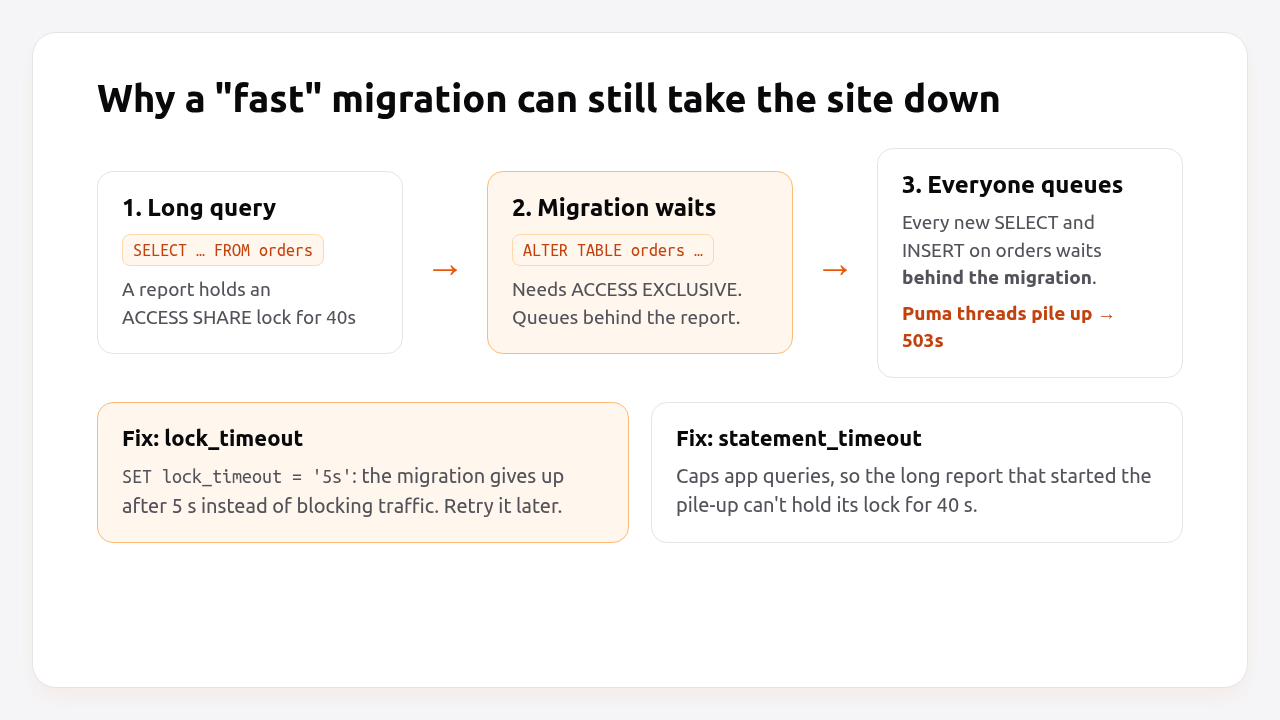
If a long-running query holds even a weak lock on the table, the migration waits. While it waits, every new query on that table queues behind the migration. Puma threads fill up waiting on PostgreSQL, the health check times out, and users see 503s, all because of a migration that would have taken 4 ms.
Code and schema overlap. During a zero-downtime deploy, the new release boots while the old one is still serving traffic. If the migration removes or renames a column, the old processes keep using the old column name and fail. Active Record also caches each table’s columns when a model first loads, so removing a column breaks INSERTs from processes that started before the migration, even if no code reads that column.
Prerequisites
- Rails 7.1+ (examples use Rails 8.0 and Ruby 3.3).
- PostgreSQL 12 or later. Some safe patterns below depend on PostgreSQL 11 and 12 behaviour; notes indicate which.
- A deploy process where migrations run before or during the switch to the new release (Step 6).
- A job backend such as Solid Queue or Sidekiq for backfills.
Step 1: Install strong_migrations and set timeouts
strong_migrations checks each migration against a list of unsafe operations and refuses to run it with an explanation and a safe alternative. Add it before you need it.
bundle add strong_migrations
bin/rails generate strong_migrations:install
Edit the generated initializer:
# config/initializers/strong_migrations.rb
# Give up quickly if a lock isn't available instead of queueing traffic behind us.
StrongMigrations.lock_timeout = 10.seconds

# Long enough for real DDL, short enough to catch runaway statements.
StrongMigrations.statement_timeout = 1.hour

# Retry lock timeouts automatically (only for migrations that are safe to retry).
StrongMigrations.lock_timeout_retries = 3

# Match your production server so version-specific checks are correct.
StrongMigrations.target_version = 16

# Only check migrations created after the gem was installed.
StrongMigrations.start_after = 20261011000000
Also set timeouts for the application’s own connections, so a slow report can’t hold a lock long enough to cause the pile-up described above:
# config/database.yml
production:
  primary:
    url: <%= ENV["DATABASE_URL"] %>
    variables:
      statement_timeout: 15s
      lock_timeout: 5s
variables are sent as SET commands on every new connection. Migrations override them because strong_migrations sets its own values at the start of each run.
If you don’t want the gem, set the lock timeout by hand at the top of each risky migration:
# db/migrate/20261011090000_add_status_to_orders.rb
class AddStatusToOrders < ActiveRecord::Migration[8.0]
  def change
    execute "SET lock_timeout = '5s'"
    add_column :orders, :status, :string
  end
end
Step 2: Add columns safely
Adding a nullable column, or a column with a constant default, is safe on PostgreSQL 11+ because it only changes the catalog. It doesn’t rewrite the table. The lock is held for milliseconds, and the lock_timeout from Step 1 protects you from the queueing problem.
# db/migrate/20261011090100_add_status_to_orders.rb
class AddStatusToOrders < ActiveRecord::Migration[8.0]
  def change
    add_column :orders, :status, :string, default: "pending"
  end
end
What still rewrites the table, and must be avoided on large tables:
| Operation | Safe on PG 11+? | Why |
|---|---|---|
add_column nullable, no default |
Yes | Catalog-only change |
add_column with a constant default |
Yes (PG 11+) | Default stored in the catalog |
add_column with a volatile default (gen_random_uuid(), now()) |
No | Every row needs its own value: full rewrite |
add_column ... null: false without default |
No on non-empty tables | Fails or rewrites; use the NOT NULL pattern in Step 5 |
change_column type (e.g. integer → bigint) |
No | Full rewrite under ACCESS EXCLUSIVE |
change_column varchar(50) → varchar(100) or → text |
Yes | Widening without rewrite |
For a volatile default, add the column without it, set the default for new rows with change_column_default, and backfill existing rows (Step 4).
Pro Tip: Keep each migration to one DDL change on a large table. If the third statement times out on a lock, you don’t want the first two rolled back and re-run in the middle of a deploy.
Step 3: Remove and rename columns with expand and contract
Never remove or rename a column in the same deploy as the code change. Tell Active Record to ignore the column first, deploy, and only then drop it.
Removing a column
Deploy 1: stop using the column and ignore it:
# app/models/user.rb
class User < ApplicationRecord
  self.ignored_columns += ["legacy_role"]
end
Deploy 2: drop it. strong_migrations requires safety_assured here because it can’t know the column is already ignored:
# db/migrate/20261012080000_remove_legacy_role_from_users.rb
class RemoveLegacyRoleFromUsers < ActiveRecord::Migration[8.0]
  def change
    safety_assured { remove_column :users, :legacy_role, :string }
  end
end
Deploy 3 (any later deploy): remove the ignored_columns line.
Renaming a column
rename_column is instant in PostgreSQL, but it breaks every running process that uses the old name. Use the expand-and-contract sequence instead:
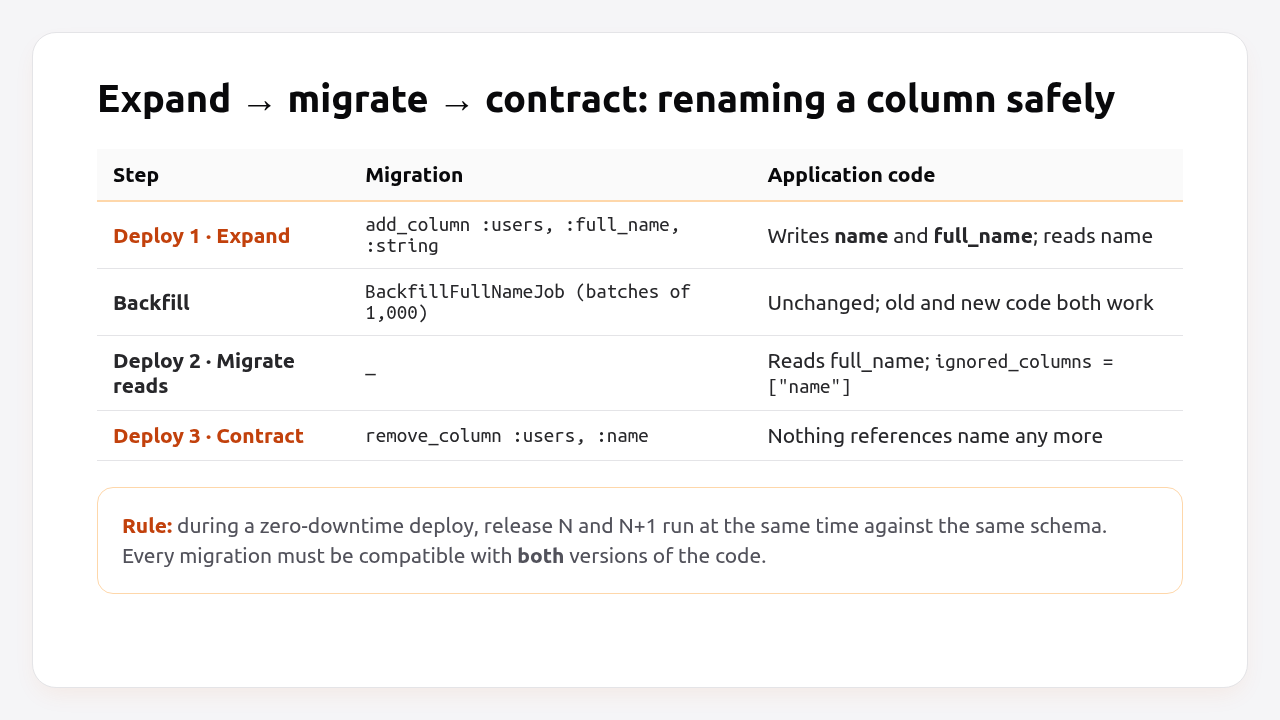
Deploy 1 (expand): add the new column and write to both.
# db/migrate/20261011091000_add_full_name_to_users.rb
class AddFullNameToUsers < ActiveRecord::Migration[8.0]
  def change
    add_column :users, :full_name, :string
  end
end
# app/models/user.rb
class User < ApplicationRecord
  before_save :sync_full_name

  private

  def sync_full_name
    self.full_name = name if will_save_change_to_name?
  end
end
Backfill existing rows (Step 4).
Deploy 2: read from full_name everywhere, keep writing both, and ignore the old column.
Deploy 3 (contract): remove_column :users, :name inside safety_assured, and delete the sync callback.
Renaming a table follows the same pattern, with a new table, dual writes and a backfill. If the table is small and the rename is worth the trouble, a PostgreSQL view with the old name can bridge the gap instead.
Step 4: Backfill data in batches
Backfill from a background job in small batches, outside of any migration transaction. A single UPDATE users SET full_name = name on ten million rows holds row locks for the whole statement, generates huge WAL traffic and can run into statement_timeout.
# app/jobs/backfill_full_name_job.rb
class BackfillFullNameJob < ApplicationJob
  queue_as :low

  BATCH_SIZE = 1_000

  def perform
    User.where(full_name: nil).in_batches(of: BATCH_SIZE) do |batch|
      batch.update_all("full_name = name")
      sleep 0.05 # let replicas and autovacuum keep up
    end
  end
end
Enqueue it once the expand deploy is live:
bin/rails runner 'BackfillFullNameJob.perform_later'
This job is safe to rerun: where(full_name: nil) skips rows that are already done, so a deploy or crash that interrupts it just means you enqueue it again. That’s the at-least-once rule from our background jobs guide.
If you’d rather keep backfills in migrations, for example so they run in every environment, disable the transaction and batch inside the migration:
# db/migrate/20261011093000_backfill_users_full_name.rb
class BackfillUsersFullName < ActiveRecord::Migration[8.0]
  disable_ddl_transaction!

  class MigrationUser < ActiveRecord::Base
    self.table_name = "users"
  end

  def up
    MigrationUser.unscoped.where(full_name: nil).in_batches(of: 1_000) do |batch|
      batch.update_all("full_name = name")
      sleep 0.05
    end
  end

  def down
    # no-op: data backfill
  end
end
The inline model class means the migration doesn’t depend on app/models/user.rb, which may have changed or disappeared by the time someone runs it.
Step 5: Add indexes, foreign keys and NOT NULL without blocking
Each of these has a blocking default and a non-blocking alternative in PostgreSQL. The non-blocking version always takes two steps: create the object without checking existing rows, then validate it separately under a weaker lock.
Indexes
# db/migrate/20261011094000_add_index_on_orders_status.rb
class AddIndexOnOrdersStatus < ActiveRecord::Migration[8.0]
  disable_ddl_transaction!

  def change
    add_index :orders, :status, algorithm: :concurrently
  end
end
CREATE INDEX CONCURRENTLY doesn’t block writes, but it can’t run inside a transaction, which is why you need disable_ddl_transaction!. The same applies to new references: add_reference :orders, :coupon, index: { algorithm: :concurrently }.
Foreign keys
# db/migrate/20261011095000_add_foreign_key_orders_users.rb
class AddForeignKeyOrdersUsers < ActiveRecord::Migration[8.0]
  def change
    add_foreign_key :orders, :users, validate: false
  end
end
# db/migrate/20261011095100_validate_foreign_key_orders_users.rb
class ValidateForeignKeyOrdersUsers < ActiveRecord::Migration[8.0]
  def change
    validate_foreign_key :orders, :users
  end
end
The first migration enforces the constraint for new rows straight away. The second scans existing rows under a SHARE UPDATE EXCLUSIVE lock, so reads and writes keep working.
Making a column NOT NULL
change_column_null :users, :full_name, false scans the whole table under ACCESS EXCLUSIVE. On PostgreSQL 12+, a validated check constraint lets SET NOT NULL skip that scan:
# db/migrate/20261012090000_add_full_name_not_null_check.rb
class AddFullNameNotNullCheck < ActiveRecord::Migration[8.0]
  def change
    add_check_constraint :users, "full_name IS NOT NULL", name: "users_full_name_null", validate: false
  end
end
# db/migrate/20261012090100_validate_full_name_not_null.rb
class ValidateFullNameNotNull < ActiveRecord::Migration[8.0]
  def up
    validate_check_constraint :users, name: "users_full_name_null"
    change_column_null :users, :full_name, false
    remove_check_constraint :users, name: "users_full_name_null"
  end

  def down
    add_check_constraint :users, "full_name IS NOT NULL", name: "users_full_name_null", validate: false
    change_column_null :users, :full_name, true
  end
end
Run the backfill before the second migration, or validation fails on the rows that are still NULL.
| Change | Blocking default | Non-blocking pattern |
|---|---|---|
| Add index | add_index blocks writes |
algorithm: :concurrently + disable_ddl_transaction! |
| Add foreign key | Locks both tables while it scans | validate: false, then validate_foreign_key |
| Add check constraint | Blocks reads/writes while it scans | validate: false, then validate_check_constraint |
| Set NOT NULL | Full scan under ACCESS EXCLUSIVE |
Validated check constraint first (PG 12+) |
| Change column type | Full rewrite | New column + backfill + swap (expand/contract) |
Step 6: Decide where migrations run during a deploy
Run migrations once per release, before the new code takes traffic, while the old release keeps serving. With the expand-and-contract discipline above, the old code is compatible with the new schema, so this ordering is safe.
The Rails 8 Docker entrypoint already runs db:prepare when a container starts the web server, before it answers the health check:
#!/bin/bash -e
# bin/docker-entrypoint (excerpt)
if [ "${@: -2:1}" == "./bin/rails" ] && [ "${@: -1:1}" == "server" ]; then
  ./bin/rails db:prepare
fi
exec "${@}"
That works well with Kamal and other container deploys: the new container migrates, then boots Puma, then passes /up, and only then does the proxy switch traffic. Rails takes a PostgreSQL advisory lock while migrating, so two containers starting together won’t run the same migration twice. The full entrypoint is explained in how to dockerize a Rails app, and the health check side in Rails health check endpoints.
Make sure your deploy timeout covers the migration, though. Kamal waits deploy_timeout (30 s by default) for the new container to turn healthy. A 2-minute index build in the entrypoint fails the deploy even though the migration itself succeeds. For long migrations, run them as a separate step before deploying:
kamal build push
kamal app exec --primary --version=$(git rev-parse HEAD) "bin/rails db:migrate"
kamal deploy --skip-push
Step 7: Verify it works
Check that each migration is caught or allowed by strong_migrations in development, then watch locks in production while it runs.
bin/rails db:migrate
An unsafe migration fails like this before touching the database:
=== Dangerous operation detected #strong_migrations ===

Active Record caches attributes, which causes problems
when removing columns. Be sure to ignore the column:

class User < ApplicationRecord
  self.ignored_columns += ["legacy_role"]
end
During the production run, watch for sessions waiting on locks from a second terminal:
-- psql "$DATABASE_URL"
SELECT pid,
       now() - query_start AS waiting_for,
       wait_event_type,
       left(query, 70) AS query
FROM pg_stat_activity
WHERE wait_event_type = 'Lock'
ORDER BY query_start;
An empty result, or rows that clear in under a second, means the migration isn’t blocking traffic. After a concurrent index build, confirm the index is valid:
SELECT indexrelid::regclass AS index, indisvalid
FROM pg_index
WHERE indrelid = 'orders'::regclass;
How Heroku, Render, Fly.io, Upsun and Enkihost run migrations
Every platform provides a hook that runs migrations once, after the build and before the new release takes traffic. None of them makes the migration itself safe. That’s still your job, using the patterns above.
| Platform | Hook | Runs | Timeout | On failure |
|---|---|---|---|---|
| Heroku | release: in Procfile (release: bin/rails db:migrate) |
One-off dyno before new dynos boot | 1 hour, not extendable | Release not deployed; old dynos keep running |
| Render | Pre-deploy command | Separate instance after build, before deploy (paid services only) | 30 minutes | Deploy fails; previous deploy keeps serving |
| Fly.io | release_command in [deploy] of fly.toml |
Temporary Machine from the new image | Configurable | Deploy aborted |
| Upsun | hooks.deploy |
On the app container during deploy | No documented hard limit | Idempotent requests (GET, PUT, DELETE) are held during the hook; POST and PATCH are not |
| Kamal 2 | Docker entrypoint db:prepare, or kamal app exec |
New container before it turns healthy | deploy_timeout (30 s default) |
New container never healthy; old one keeps serving |
| Enkihost | No release phase; db:prepare in bin/docker-entrypoint |
New container, before Puma starts | Not documented | Container exits, deploy aborted; old container keeps serving |
The Upsun detail is worth calling out: because requests are held while the deploy hook runs, a slow migration there shows up as slow page loads rather than errors, and non-idempotent requests aren’t held at all. Short, lock-safe migrations matter as much there as anywhere else.
# fly.toml
[deploy]
  release_command = "./bin/rails db:migrate"
# Procfile (Heroku)
release: bin/rails db:migrate
web: bundle exec puma -C config/puma.rb
Enkihost does zero-downtime deploys, which means old and new code overlap exactly as described in this guide. The expand-and-contract rules apply there unchanged.
Troubleshooting migration failures
These are the errors you’ll see when a migration hits a lock, runs inside a transaction it can’t use, or races with running code.
PG::LockNotAvailable: canceling statement due to lock timeout
ActiveRecord::LockWaitTimeout: PG::LockNotAvailable: ERROR: canceling statement due to lock timeout
This is lock_timeout doing its job: something held a lock on the table for longer than the timeout. Find the blocker with the pg_stat_activity query above (often a long report, a stuck transaction or an idle in transaction session), then retry. StrongMigrations.lock_timeout_retries does the retry for you.
CREATE INDEX CONCURRENTLY cannot run inside a transaction block
PG::ActiveSqlTransaction: ERROR: CREATE INDEX CONCURRENTLY cannot run inside a transaction block
Add disable_ddl_transaction! to the migration class. Keep that migration to the index only, since nothing else in it is wrapped in a transaction either.
PG::UndefinedColumn right after a deploy
ActiveRecord::StatementInvalid: PG::UndefinedColumn: ERROR: column "legacy_role" of relation "users" does not exist
A process that started before the migration still has the old column list cached and includes it in INSERTs. Use ignored_columns and deploy it before the migration that drops the column.
ActiveRecord::ConcurrentMigrationError
ActiveRecord::ConcurrentMigrationError: Cannot run migrations because another migration process is currently running.
Two processes started migrating at the same time, such as two containers booting together or a release phase plus an entrypoint. The advisory lock protected you. Pick one place to run migrations, and make the other path skip them.
An invalid index left behind
If a concurrent index build fails (a lock timeout, or a duplicate in a unique index), PostgreSQL leaves an INVALID index that slows down writes and isn’t used by reads. Drop it and try again:
# db/migrate/20261011094500_retry_index_on_orders_status.rb
class RetryIndexOnOrdersStatus < ActiveRecord::Migration[8.0]
  disable_ddl_transaction!

  def up
    remove_index :orders, :status, algorithm: :concurrently, if_exists: true
    add_index :orders, :status, algorithm: :concurrently
  end

  def down
    remove_index :orders, :status, algorithm: :concurrently, if_exists: true
  end
end
PG::QueryCanceled: canceling statement due to statement timeout in a backfill
The batch is too large or the WHERE isn’t indexed. Lower the batch size, add an index on the column you filter by, or batch by primary key ranges.
Author Perspective: boring migrations, many deploys
The biggest change in how I handle migrations wasn’t a tool. It was accepting that a schema change can take three deploys. It feels slow the first time. Then you notice that each deploy is small, each one can be rolled back, and none of them needs a maintenance window or a 2 AM slot. strong_migrations is the first gem I add to every Rails app that has real users, because I’d rather argue with a linter in development than with a lock queue in production. If a migration needs safety_assured, I write a comment explaining why. Future me always asks.
Running migrations on Enkihost
Zero-downtime migrations depend on two things: a deploy process where old and new code overlap without dropping requests, and a PostgreSQL database you can reason about. On Enkihost, the patterns in this guide work as written:
- Zero-downtime deploys: the new release takes over without dropping in-flight requests, so expand-and-contract migrations keep both releases working during the overlap.
- PostgreSQL add-on injects
DATABASE_URL, so thedatabase.ymlvariablesforstatement_timeoutandlock_timeoutapply to every connection your app opens. - Per-app resource isolation: your backfill jobs use your app’s allocated CPU and memory, and nobody else’s traffic slows them down.
Rails and Sinatra apps run on Ignite (5 EUR per month after a 14-day free trial, with PostgreSQL and Redis included) or Blaze (16 EUR per month, with high availability and autoscaling). The free Spark plan is for Jekyll sites. See enkihost.com.
FAQ
Is adding a column with a default value safe in PostgreSQL?
Yes, on PostgreSQL 11 and later, as long as the default is a constant. The default is stored in the catalog and the table isn’t rewritten. A volatile default such as now() or gen_random_uuid() still rewrites every row, so add those columns without a default and backfill.
Should I run migrations before or after deploying the new code?
Run them before the new code takes traffic, while the old code is still serving. That only works if every migration is backwards compatible with the old code, which is what the expand and contract pattern guarantees. Destructive changes such as dropping a column go in a later deploy.
Can I roll back a zero-downtime migration?
Usually yes, because expand-style migrations only add things. Rolling back the code is safe since the old code ignores the new column. Contract migrations that drop data are not reversible in practice, which is why they come last and only after the new code has run in production for a while.
Does strong_migrations work with MySQL?
Yes. strong_migrations supports PostgreSQL, MySQL and MariaDB, and adjusts its checks to the database and version you set in target_version. Some safe alternatives differ; for example, MySQL uses online DDL algorithms instead of concurrent index builds.
How long should lock_timeout be for migrations?
Between 5 and 10 seconds is a good default for web apps. It must be shorter than the time your users and health checks will tolerate requests queueing, and long enough that the migration gets its lock on a normally busy table. Combine it with automatic retries.
Sources
- Active Record Migrations — Rails Guides
- ankane/strong_migrations — GitHub
- Explicit Locking: table-level lock modes — PostgreSQL Docs
- ALTER TABLE — PostgreSQL Docs
- CREATE INDEX: building indexes concurrently — PostgreSQL Docs
- Release Phase — Heroku Dev Center
- Deploys: pre-deploy command — Render Docs
- Release command — Fly Docs
- Build and deploy: deploy hook — Upsun Docs
- Kamal configuration overview — Kamal docs