Managed PostgreSQL vs Self-Hosted: Costs, Risks and When Each One Makes Sense
Managed PostgreSQL vs self-hosted comes down to who owns backups, restores, failover, upgrades and the 3 AM pages. A managed database from Heroku, Render or Fly.io costs more per gigabyte of RAM, but the provider runs all of that for you. A self-hosted PostgreSQL on a VM costs a few euros a month in hardware and several hours a month of skilled work, plus the risk that a backup nobody tested doesn’t restore. For most Rails teams without a dedicated ops person, managed is the right default. This guide compares what each option actually includes, shows real prices, and explains when self-hosting is worth it and how to do it safely.
TL;DR
- Managed PostgreSQL buys you automated backups, failover (on HA plans), patching and monitoring. Self-hosting means building, testing and operating all of that yourself.
- Entry-level managed plans are cheap ($5–6/month on Heroku or Render), but production-grade plans with HA start at $38/month (Fly.io Managed Postgres) and $200/month (Heroku Premium-0).
- A VM that can run PostgreSQL costs roughly €5–10/month in 2026, but the real cost is 1–2 days of setup and a few hours a month of maintenance.
- Self-host only if someone on the team has PostgreSQL operations experience, you’ve automated backups with point-in-time recovery, and you test restores regularly.
- Whichever you choose, the Rails side is identical:
DATABASE_URL, a sensible pool size and timeouts.
Table of Contents
- What is the difference between managed and self-hosted PostgreSQL?
- What does a managed PostgreSQL plan actually include?
- Pros and cons of each option
- How much does managed vs self-hosted PostgreSQL cost?
- How Heroku, Render, Fly.io, Upsun and Enkihost run PostgreSQL
- If you self-host: the minimum production setup
- Should you use managed or self-hosted PostgreSQL?
- Author Perspective: the backup you never restored
- PostgreSQL on Enkihost
- FAQ
- Sources
What is the difference between managed and self-hosted PostgreSQL?
With managed PostgreSQL, a provider runs the database server, operating system, backups, replication and upgrades, and gives you a connection URL. With self-hosted PostgreSQL, you run it on a server you control, and every one of those jobs is yours.
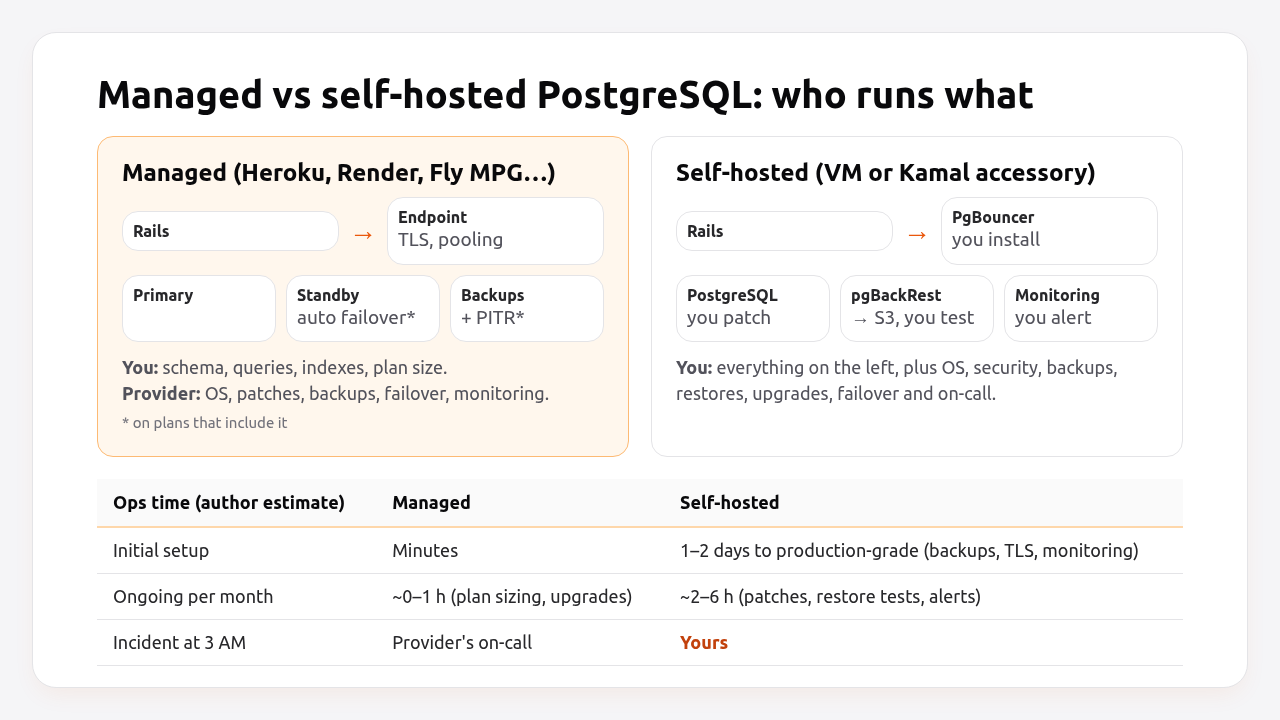
The database engine is the same PostgreSQL either way, and Rails doesn’t care which one you pick. What differs is the work around it:
| Responsibility | Managed | Self-hosted |
|---|---|---|
| Install and configure PostgreSQL | Provider | You |
| OS security patches | Provider | You |
| PostgreSQL minor updates | Provider (scheduled) | You |
| Major version upgrades | Provider tooling, you schedule | You (pg_upgrade or dump/restore) |
| Daily backups | Provider | You (pgBackRest, WAL-G, pg_dump) |
| Point-in-time recovery | Most production plans | You (WAL archiving) |
| Restore testing | Provider tests the mechanism; you test your data | You |
| High availability and failover | HA plans only | You (Patroni, repmgr) |
| Monitoring and alerts | Dashboards included | You (postgres_exporter, alerts) |
| Connection pooling | Often included (PgBouncer) | You |
| Query performance, indexes, schema | You | You |
The last row is the one people forget. A managed database doesn’t fix slow queries or missing indexes. The Rails performance optimization guide applies equally to both.
What does a managed PostgreSQL plan actually include?
Managed plans vary widely, and the entry tier is usually missing the features you’re paying a managed provider for. Read the plan details before assuming you have high availability or point-in-time recovery.
| Feature | Heroku Essential | Heroku Standard / Premium | Render Basic | Fly.io Managed Postgres |
|---|---|---|---|---|
| Dedicated resources | No (shared) | Yes | Shared CPU fraction | Shared-2x and up |
| Automated backups | Yes | Yes | Yes | Yes |
| Point-in-time recovery | No | Yes | Paid plans | Not documented |
| High availability | No | Premium and above | Higher tiers | Included on all plans |
| Connection pooling | No | Server-side pooling on larger plans | PgBouncer on paid plans | PgBouncer included |
| Storage | 1–32 GB | 64 GB+ | Per GB ($0.30) | Per GB ($0.28) |
Plan features from each provider’s documentation in October 2026. Fly.io lists security patches and version upgrades as “not there yet” for Managed Postgres.
Two consequences:
- “Managed” doesn’t automatically mean “highly available”. On Heroku, HA starts at Premium-0 ($200/month). Below that, a hardware failure means downtime while the provider recovers the database.
- Read the backup retention and recovery options. Daily snapshots alone mean you can lose up to a day of data. Point-in-time recovery shrinks that to minutes.
Pros and cons of each option
Managed PostgreSQL
- ✅ Backups, patches and monitoring work from day one, with no setup.
- ✅ Failover and point-in-time recovery on the right plan, operated by people who do it every day.
- ✅ No PostgreSQL operations knowledge needed on the team.
- ❌ Several times more expensive per GB of RAM than a VM.
- ❌ Plan tiers force jumps: you pay for the next tier’s storage to get its connection limit, or the other way round.
- ❌ Limited superuser access and extensions, and sometimes slow major-version upgrades.
- ❌ Data lives where the provider runs, which matters for some data-residency requirements.
Self-hosted PostgreSQL
- ✅ Cheapest per GB of RAM and per GB of disk, by a wide margin.
- ✅ Full control over configuration, extensions, version and location.
- ✅ No connection-limit tiers:
max_connectionsis whatever the hardware supports. - ❌ Backups, restores, failover, patching and monitoring are your job, forever.
- ❌ Mistakes are silent until they’re catastrophic. An unmonitored full disk or a broken WAL archive is found during the incident.
- ❌ The person who knows how it works becomes a single point of failure too.
How much does managed vs self-hosted PostgreSQL cost?
At list prices, a production-ready managed database for a small Rails app costs $19–75/month, and an HA plan from $38/month (Fly.io) to $200/month (Heroku). A self-hosted VM costs about €5–10/month, but adds 1–2 days of setup and a few hours of work every month.
| Option | Plan | RAM | Price/month | HA | Notes |
|---|---|---|---|---|---|
| Heroku | Essential-0 | Shared | $5 | No | 1 GB storage, limited connections |
| Heroku | Standard-0 | 4 GB | $50 | No | 64 GB storage, 200 connections |
| Heroku | Premium-0 | 4 GB | $200 | Yes | HA and longer rollback |
| Render | Basic-256mb | 256 MB | $6 | No | 1 GB storage included, then $0.30/GB |
| Render | Basic-1gb | 1 GB | $19 | No | 10 GB storage included |
| Fly.io | MPG Basic | 1 GB | $38 + storage | Yes | Shared-2x CPU, $0.28/GB storage |
| Fly.io | MPG Starter | 2 GB | $72 + storage | Yes | |
| Self-hosted | Budget EU VM, 2–4 vCPU, 4–8 GB | 4–8 GB | ~€5–10 | No (one VM) | Plus backup storage (a few € for S3-compatible) |
| Self-hosted | Two VMs + replication | 4–8 GB each | ~€10–20 | Manual or Patroni | Plus your time to build failover |
Managed prices from Heroku Elements, Render and Fly.io pricing pages, October 2026. VM prices are a range because European budget providers changed their prices several times in 2026; check current pricing.
The hardware comparison is lopsided: the same euros buy roughly 4–8× more RAM on a VM. Engineering time evens it out. If your time is worth €50/hour and self-hosting costs three hours a month, that’s €150/month, more than most managed plans in the table, before counting the risk.
That arithmetic is the same one behind the true cost of Ruby hosting and startup hosting costs: the database is usually the line item that jumps the most between “MVP” and “production”.
How Heroku, Render, Fly.io, Upsun and Enkihost run PostgreSQL
Each platform offers PostgreSQL as an add-on or service that injects DATABASE_URL, but they put the line between “managed” and “your problem” in different places.
| Platform | Offering | Backups and recovery | HA | Upgrades | Pooling |
|---|---|---|---|---|---|
| Heroku | Heroku Postgres add-on | Continuous protection and rollback on Standard+; pg:backups on all |
Premium+ | pg:upgrade tooling |
Server-side pooling on larger plans; PgBouncer buildpack |
| Render | Render Postgres | Daily backups; point-in-time recovery on paid plans | Higher tiers | Upgrades in place, scheduled by you | Integrated PgBouncer on paid plans |
| Fly.io | Managed Postgres (MPG) | Automatic backups and recovery | Included, automatic failover | Not yet available | PgBouncer on every cluster |
| Fly.io | Unmanaged Postgres on Machines | You (it’s an app you run) | You | You | You |
| Upsun | postgresql service |
Manual and scheduled backups of the environment | Not by default | Change the service version in config | Not part of the standard service |
| Enkihost | PostgreSQL included: 512 MB RAM / 5 GB disk on Ignite, five 2 GB databases on Blaze | Not documented | Blaze plan lists high availability | Not documented | Not documented |
The Fly.io split is instructive: it has both. Fly’s older Postgres offering was explicitly “not managed”, an app running on Machines that you operate yourself, and Managed Postgres was introduced for teams who don’t want that job. The cost difference between the two is the cost of operations.
Enkihost’s included PostgreSQL injects DATABASE_URL, so Rails connects to it the same way as on any platform above, with no change to database.yml.
If you self-host: the minimum production setup
If you self-host, the minimum is: PostgreSQL from the official repository, no public access, TLS, continuous WAL archiving with point-in-time recovery to object storage, monitoring with alerts, and a monthly restore test. Anything less is a database waiting for an incident.
1. Install from the PostgreSQL project’s repository so you get current minor releases:
sudo apt install -y postgresql-common
sudo /usr/share/postgresql-common/pgdg/apt.postgresql.org.sh -y
sudo apt install -y postgresql-17 pgbackrest
2. Lock down access. Listen only on the private network, require TLS and SCRAM passwords:
# /etc/postgresql/17/main/postgresql.conf
listen_addresses = 'localhost,10.0.0.5'
ssl = on
password_encryption = scram-sha-256

# Rough starting values for a dedicated 8 GB server
shared_buffers = 2GB
effective_cache_size = 6GB
work_mem = 16MB
maintenance_work_mem = 512MB
max_connections = 100

# WAL archiving for point-in-time recovery
wal_level = replica
archive_mode = on
archive_command = 'pgbackrest --stanza=main archive-push %p'
# /etc/postgresql/17/main/pg_hba.conf
# TYPE    DATABASE        USER   ADDRESS        METHOD
local     all             postgres               peer
hostssl   app_production  app    10.0.0.0/24    scram-sha-256
3. Back up continuously with pgBackRest to an S3-compatible bucket, encrypted:
; /etc/pgbackrest/pgbackrest.conf
[global]
repo1-type=s3
repo1-s3-bucket=myapp-pg-backups
repo1-s3-endpoint=s3.eu-central-1.amazonaws.com
repo1-s3-region=eu-central-1
repo1-s3-key=AKIA_REPLACE_ME
repo1-s3-key-secret=REPLACE_ME
repo1-path=/pgbackrest
repo1-retention-full=2
repo1-cipher-type=aes-256-cbc
repo1-cipher-pass=REPLACE_WITH_LONG_RANDOM_PASSPHRASE
start-fast=y
compress-type=zst

[main]
pg1-path=/var/lib/postgresql/17/main
sudo -u postgres pgbackrest --stanza=main stanza-create
sudo -u postgres pgbackrest --stanza=main check
sudo -u postgres pgbackrest --stanza=main --type=full backup
# /etc/cron.d/pgbackrest
30 2 * * 0   postgres  pgbackrest --stanza=main --type=full backup
30 2 * * 1-6 postgres  pgbackrest --stanza=main --type=diff backup
4. Test restores every month on a separate machine, to a point in time:
sudo systemctl stop postgresql
sudo -u postgres pgbackrest --stanza=main --delta \
  --type=time "--target=2026-10-22 09:00:00+03" --target-action=promote restore
sudo systemctl start postgresql
sudo -u postgres psql -d app_production -c "SELECT max(created_at) FROM orders;"
5. Monitor and alert at least on: disk usage above 80%, replication or archive lag, failed backups (pgbackrest info), connection count near max_connections, and long-running transactions.
Running PostgreSQL as a Kamal accessory works the same way, but the data volume and backups are still yours. Kamal won’t replicate or back it up for you. Connection sizing for either setup is covered in the connection pool guide.
Should you use managed or self-hosted PostgreSQL?
Choose by your team’s operations experience first and by budget second.
| Situation | Recommendation |
|---|---|
| Solo developer or small team, no ops experience | Managed. The savings from self-hosting are smaller than the cost of one bad incident. |
| MVP or side project | Entry-level managed plan. Upgrade the plan before launch, not after the first outage. |
| Production SaaS with paying customers | Managed with daily backups and point-in-time recovery. HA once downtime costs more than the plan. |
| Team with a PostgreSQL-savvy engineer, cost-sensitive, large data | Self-hosted on dedicated hardware with pgBackRest, monitoring and documented runbooks. |
| Strict data residency or custom extensions | Self-hosted, or a managed provider in the required region that supports the extension. |
| Many small apps, each with a small database | One self-hosted or managed server with a database per app, if isolation requirements allow it. |
Author Perspective: the backup you never restored
I’ve self-hosted PostgreSQL for years and I’d still tell most teams to use a managed database. Running PostgreSQL isn’t hard. The hard part is the discipline: a restore test every month, alerts somebody actually reads, a runbook for the full-disk night, and upgrades done before the version goes out of support. The worst database incident I ever saw wasn’t a crash. It was a team discovering, mid-crisis, that their nightly pg_dump had been producing empty files for six weeks. If you self-host, put “restore last night’s backup to a scratch server” on the calendar and treat it as seriously as a deploy. If that sounds like a chore nobody will do, that’s your answer: go managed.
PostgreSQL on Enkihost
For Rails apps on Enkihost, PostgreSQL is included in the plan, so the database comes up next to your app without you building the server yourself:
- PostgreSQL add-on that injects
DATABASE_URL, so Rails connects with the standarddatabase.yml, and Solid Queue, Solid Cache and Solid Cable can share it. - Redis add-on that injects
REDIS_URLfor apps that want to keep caching or Sidekiq off the database. - Per-app resource isolation, so your app’s queries aren’t competing with someone else’s traffic on the app side.
- Zero-downtime deploys that work with the expand-and-contract migration patterns your database changes need.
Rails and Sinatra apps run on Ignite (9 EUR per month after a 14-day free trial, with PostgreSQL and Redis included) or Blaze (29 EUR per month, with high availability and autoscaling). The free Spark plan is for Jekyll sites. See enkihost.com.
FAQ
Is managed PostgreSQL worth the cost?
For most small and medium Rails teams, yes. The extra monthly cost is usually less than the engineering time needed to build and maintain reliable backups, monitoring, patching and failover yourself, and much less than the cost of losing data. Self-hosting pays off mainly for teams with PostgreSQL operations experience and large databases.
Can I run PostgreSQL in Docker in production?
Yes, many teams run PostgreSQL in a container, including as a Kamal accessory, with the data directory on a persistent volume. The container changes nothing about the operational work: you still need WAL archiving, tested restores, monitoring, upgrades and a plan for host failure.
How often should I back up a production PostgreSQL database?
Continuously, if you can. Archive the write-ahead log for point-in-time recovery, combined with a full backup weekly and differential backups daily. That limits data loss to minutes. A nightly pg_dump alone can lose up to a day of data and takes longer to restore for large databases.
Does managed PostgreSQL include high availability?
Not always. Entry-level and many mid-tier plans run a single instance without automatic failover. On Heroku, high availability starts with the Premium tier, while Fly.io Managed Postgres includes it on every plan. Check the plan details for failover before relying on it.
Is it hard to migrate from managed to self-hosted PostgreSQL later?
It is straightforward for small databases: dump with pg_dump, restore with pg_restore, and change DATABASE_URL during a short maintenance window. Large databases need logical replication to keep downtime short. Rails itself needs no changes beyond the connection URL.
Sources
- Heroku Postgres plans — Heroku Elements
- Heroku Postgres: data safety and continuous protection — Heroku Dev Center
- Render Postgres — Render Docs
- Render pricing — Render
- Fly.io Managed Postgres — Fly Docs
- PostgreSQL service — Upsun Docs
- pgBackRest User Guide — pgbackrest.org
- Continuous Archiving and Point-in-Time Recovery — PostgreSQL Docs
- PostgreSQL apt repository — postgresql.org
- Hetzner cloud price increases in 2026 — Northflank