Rails Performance Optimization: What to Fix First, With Measured Impact

Rails performance optimization works best in a fixed order: measure where the time goes, fix database queries (N+1s and missing indexes cause most slow Rails pages), cache what’s expensive and rarely changes, enable YJIT and jemalloc for a free runtime boost, and move slow work out of the request. Changing hosting or adding servers comes after all of that, not before. This guide ranks each optimization by impact and effort, shows the code for each one, and explains how CPU limits on Heroku, Render, Fly.io and Upsun change what “fast” means for your app.
TL;DR
- Measure before changing anything:
rack-mini-profilerfor individual pages, an APM for production p95, andpg_stat_statementsfor the database.- Database work is usually the biggest slice of a slow request. Eliminate N+1 queries with
includesandstrict_loading, add indexes found withEXPLAIN ANALYZE, and load only the columns you need.- YJIT is on by default in Rails 7.2+ on Ruby 3.3+. Shopify measured a 17% speedup in production, and Railsbench runs about 1.7× faster.
- Fragment caching and HTTP caching (
fresh_when) turn repeated work into near-zero work. Background jobs take slow work out of the request entirely.- On shared-CPU instances, throttling can dominate latency: Fly.io’s shared CPUs guarantee 6.25% of a core, with burst credits on top. Check your instance’s CPU allocation before blaming Ruby.
Table of Contents
- What does Rails performance optimization involve?
- How do I find what’s slow in a Rails app?
- Which Rails optimizations have the most impact?
- 1. Fix database queries
- 2. Cache what’s expensive
- 3. Use YJIT and jemalloc
- 4. Render views and JSON faster
- 5. Move slow work out of the request
- How CPU limits on Heroku, Render, Fly.io, Upsun and Enkihost affect Rails performance
- Which optimizations fit your app?
- Author Perspective: the 80/20 of Rails speed
- Rails performance on Enkihost
- FAQ
- Sources
What does Rails performance optimization involve?
Rails performance optimization means reducing the time each request and job spends in the database, in Ruby, in rendering and in waiting on other services, so pages respond faster and each server handles more traffic. It’s mostly about doing less work, not doing the same work faster.
A Rails request spends its time in a few places, and the log line for every request already tells you how it splits:
Completed 200 OK in 1840ms (Views: 212.4ms | ActiveRecord: 1544.1ms (311 queries, 0 cached) | GC: 21.3ms)
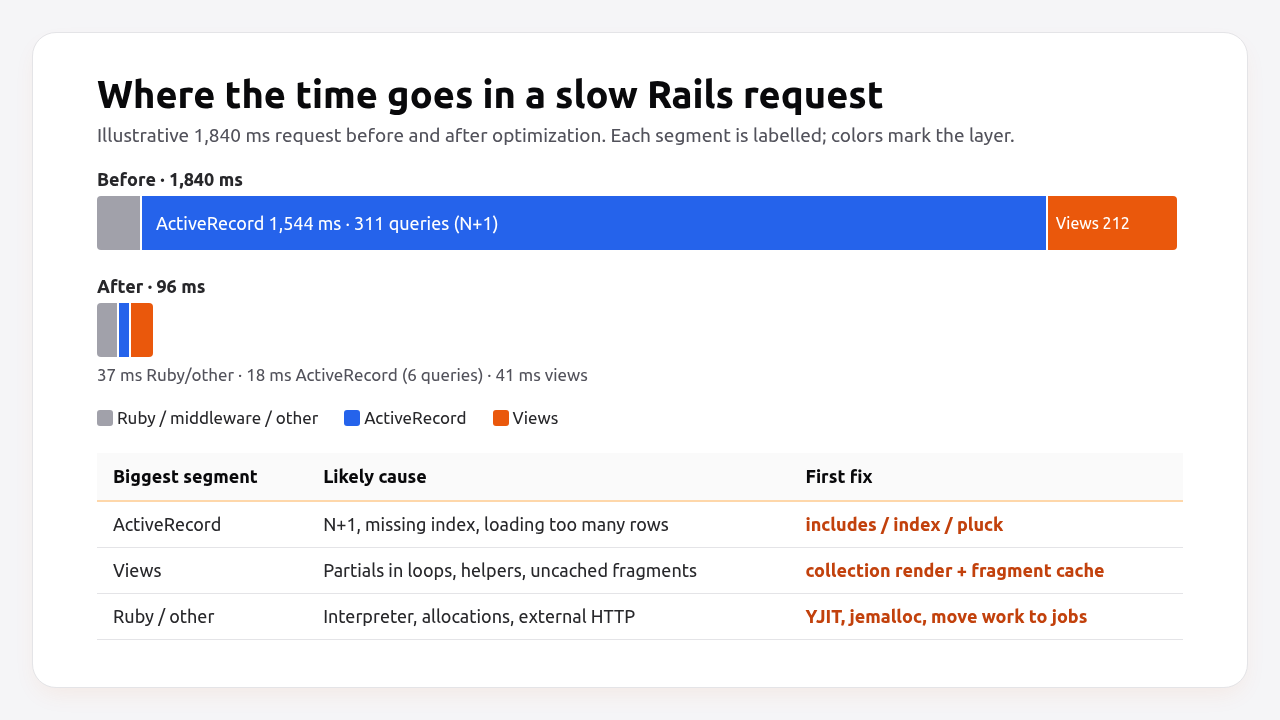
In this example, more than 80% of the time is in ActiveRecord, and 311 queries for one page means an N+1. Optimizing the view layer or switching servers would barely move the number. That’s why measuring comes first: the biggest segment tells you where to start.
How do I find what’s slow in a Rails app?
Use three tools at three levels: a page profiler in development and staging, an APM in production, and the database’s own statistics. Each one answers a different question.
| Tool | Where | Answers | Overhead |
|---|---|---|---|
rack-mini-profiler |
Dev/staging, per page | Which queries and partials make this page slow? | Visible badge, dev only |
stackprof / vernier |
Dev/staging, per code path | Which Ruby methods use the CPU? | Low (sampling) |
| APM (Scout, AppSignal, New Relic, Datadog, OpenTelemetry) | Production | Which endpoints are slow at p95, and why? | Low |
pg_stat_statements / PgHero |
Production DB | Which queries cost the most time in total? | Very low |
derailed_benchmarks |
Local | Memory and boot cost of gems | Local only |
Set up the page profiler first:
# Gemfile
group :development do
  gem "rack-mini-profiler"
  gem "stackprof"   # enables flamegraphs with ?pp=flamegraph
end
Load any page and a badge in the corner shows total time, SQL count and each query with its backtrace. Add ?pp=flamegraph to the URL for a CPU flamegraph.
For the database, enable pg_stat_statements and look at total time, not just slowest single query. A 3 ms query that runs 2 million times a day costs more than a 2-second report that runs twice:
-- requires: shared_preload_libraries = 'pg_stat_statements' and CREATE EXTENSION pg_stat_statements;
SELECT round(total_exec_time::numeric / 1000, 1) AS total_s,
       calls,
       round(mean_exec_time::numeric, 2) AS mean_ms,
       left(query, 80) AS query
FROM pg_stat_statements
ORDER BY total_exec_time DESC
LIMIT 10;
In production, an APM or OpenTelemetry tracing gives you the same breakdown across every request.
Which Rails optimizations have the most impact?
In most Rails apps, query fixes and caching give the biggest gains, YJIT and jemalloc are the cheapest, and moving work to background jobs removes the slowest requests entirely.
| Optimization | Typical impact | Effort | Risk | When it helps most |
|---|---|---|---|---|
| Fix N+1 queries | Very high on affected pages | Low | Low | List and index pages |
| Add missing indexes | Very high on affected queries | Low | Low (use CONCURRENTLY) |
Large tables, filters, sorts |
Load less data (select, pluck, pagination) |
High | Low | Low | Wide tables, big result sets |
| Fragment caching | High on cache hits | Medium | Stale data if keys are wrong | Read-heavy pages |
HTTP caching (fresh_when, ETags) |
High for repeat visitors and APIs | Low | Low | APIs, public pages |
| YJIT | ~15–20% less Ruby time | None (default in 7.2+) | Slightly more memory | CPU-bound Ruby |
| jemalloc | Less memory, often slightly faster | Very low | Very low | Multi-threaded Puma/Sidekiq |
| Background jobs | Removes slow work from requests | Medium | Need retries, idempotency | Emails, exports, API calls |
| Faster JSON serialization | Medium on APIs | Medium | Low | Large JSON responses |
| More/bigger servers | Linear at best | Low effort, ongoing cost | Hides problems | After everything above |
Pros of fixing code first: the gains are permanent, they reduce cost because every server does more, and they make the next performance problem easier to find.
Cons: it takes engineering time, and some fixes (caching) add complexity that needs testing. Scaling hardware is faster to apply, but its cost keeps coming back every month. See how to scale a Rails app for when that’s the right call.
1. Fix database queries
Most slow Rails pages are slow because of the database: too many queries, queries without indexes, or queries that load far more data than the page uses.
Eliminate N+1 queries. Preload associations that the view iterates over:
# app/controllers/orders_controller.rb
def index
  # Before: 1 query for orders + 1 per order for customer + 1 per order for line items
  # @orders = Order.order(created_at: :desc).limit(50)

  @orders = Order.includes(:customer, line_items: :product)
                 .order(created_at: :desc)
                 .limit(50)
end
Make N+1s impossible to miss. strict_loading raises (or logs) when an association is lazy-loaded:
# config/environments/development.rb
config.active_record.strict_loading_by_default = true
config.active_record.action_on_strict_loading_violation = :raise
# config/environments/production.rb
config.active_record.action_on_strict_loading_violation = :log
In production, log violations instead of raising, so you find the remaining N+1s without breaking pages.
Add the indexes your queries need. Check the plan for any slow query:
EXPLAIN (ANALYZE, BUFFERS)
SELECT * FROM orders WHERE account_id = 42 AND status = 'paid' ORDER BY created_at DESC LIMIT 50;
-- Seq Scan on orders ... rows removed by filter: 1840221   <- needs an index
# db/migrate/20261020090000_add_index_orders_on_account_status_created.rb
class AddIndexOrdersOnAccountStatusCreated < ActiveRecord::Migration[8.0]
  disable_ddl_transaction!

  def change
    add_index :orders, [:account_id, :status, :created_at], algorithm: :concurrently
  end
end
The column order matters: equality filters first (account_id, status), then the sort column. Build indexes concurrently on large tables, as the migration above does.
Load only what you use.
# Need only IDs and emails for a mailing? Don't instantiate 50,000 models.
emails = User.where(newsletter: true).pluck(:email)

# Need a count? Count in the database.
@unpaid_count = account.invoices.unpaid.count

# Showing a count on every row? Use a counter cache instead of COUNT per row.
class Comment < ApplicationRecord
  belongs_to :post, counter_cache: true
end
Pro Tip: Sort the APM’s endpoint list by total time consumed (average × calls), not by slowest average. The endpoint that’s 200 ms slower but called 50 times more often is usually the better target.
2. Cache what’s expensive
Cache results that are expensive to compute and change much less often than they’re read. Three levels work well together:
- Fragment caching for rendered HTML:
cache @product do ... end, with Russian doll nesting andtouch: true. - Low-level caching for computed data and API responses:
Rails.cache.fetch([record, "stats"], expires_in: 12.hours) { ... }. - HTTP caching so browsers and CDNs don’t even ask Rails again:
# app/controllers/products_controller.rb
def show
  @product = Product.find(params[:id])
  fresh_when @product, public: true   # 304 Not Modified if the ETag matches
end
With fresh_when, a returning visitor whose cached copy is current gets a 304 Not Modified without the view ever rendering. The setup for Redis-backed caches is in the Rails Redis caching guide. A full comparison of caching strategies follows in a separate post.
3. Use YJIT and jemalloc
YJIT and jemalloc are the closest thing to free performance in Ruby: no code changes, measured gains, and both are already the default in a new Rails 8 app.
YJIT is Ruby’s JIT compiler. Rails 7.2+ enables it automatically on Ruby 3.3+ through config.yjit = true. The measured gains are substantial: at RubyKaigi 2024 the YJIT team reported a 17% speedup on millions of requests per second in Shopify’s production, and Railsbench running about 1.7× faster. Their Ruby 3.3 write-up also puts YJIT’s memory overhead below 8% for Shopify’s storefront renderer. Check it’s on:
bin/rails runner 'puts RubyVM::YJIT.enabled?'
# true
If it’s false, your Ruby was compiled without YJIT (it needs Rust at build time) or config.yjit is disabled. The official Docker ruby images include it.
jemalloc replaces glibc’s memory allocator. It reduces fragmentation in multi-threaded Ruby processes and often lowers memory use substantially, which means more Puma workers per GB of RAM. The Rails 8 bin/docker-entrypoint preloads it with LD_PRELOAD. See the memory leak guide for how to confirm it’s loaded.
| YJIT | jemalloc | |
|---|---|---|
| What it improves | Ruby CPU time | Memory use and allocation speed |
| Measured effect | 17% faster in Shopify production (Ruby 3.3) | Frequently 20–40% less RSS in threaded apps |
| Cost | More memory for compiled code | Essentially none |
| Enabled by default | Rails 7.2+ on Ruby 3.3+ | Rails 8 Dockerfile |
4. Render views and JSON faster
After queries, rendering is the next biggest slice for HTML pages, and serialization for APIs. Most of the fixes are about rendering less often, and in fewer calls.
Render collections in one call. Rendering a partial inside an each loop looks up and instruments the partial once per item. Collection rendering does it once, and allows cached reads in bulk:
<%# Slower: one partial render per order %>
<% @orders.each do |order| %>
  <%= render "orders/order", order: order %>
<% end %>

<%# Faster: one render call, and cached fragments fetched with read_multi %>
<%= render partial: "orders/order", collection: @orders, cached: true %>
Serialize JSON with plain hashes. For large API responses, building hashes and calling to_json is much cheaper than rendering a Jbuilder template per record:
# app/controllers/api/orders_controller.rb
def index
  orders = Order.where(account: current_account).order(id: :desc).limit(100)
  render json: orders.map { |o| { id: o.id, total_cents: o.total_cents, status: o.status, created_at: o.created_at.iso8601 } }
end
Let the proxy compress. Thruster gzips responses and serves assets from public/assets with long cache headers, so Puma threads aren’t spent on static files.
5. Move slow work out of the request
Anything that doesn’t have to finish before the user sees the next page should run in a background job: emails, PDFs, exports, image processing, webhooks and calls to slow APIs.
# Before: the user waits for the PDF and the email
def create
  @invoice = Invoice.create!(invoice_params)
  InvoicePdf.new(@invoice).generate   # 2.4 s
  InvoiceMailer.created(@invoice).deliver_now   # 0.6 s
  redirect_to @invoice
end

# After: the request takes ~50 ms
def create
  @invoice = Invoice.create!(invoice_params)
  GenerateInvoicePdfJob.perform_later(@invoice.id)
  InvoiceMailer.created(@invoice).deliver_later
  redirect_to @invoice
end
The request gets faster, but just as importantly, the Puma thread is free 3 seconds sooner, which raises how many requests the same server can handle. Combine this with strict timeouts on every external call, as covered in the Rails request timeout guide.
How CPU limits on Heroku, Render, Fly.io, Upsun and Enkihost affect Rails performance
The CPU your instance actually gets can matter as much as your code. Shared-CPU instances are throttled when they use more than their share, and a throttled Ruby process shows up as slow requests even though nothing in the app changed.
| Platform | Shared CPU option | What you’re guaranteed | Dedicated CPU option |
|---|---|---|---|
| Heroku | Eco, Basic, Standard dynos | Shared with other tenants; no fixed CPU number published | Performance-M and up |
| Render | Starter (0.5 CPU), Standard (1 CPU), Pro (2 CPU) | The CPU fraction of the instance type | Higher instance types |
| Fly.io | shared-cpu-* Machines |
6.25% of a core per vCPU, plus burst credits (up to 500 s of full-core time) | performance-* Machines |
| Upsun | CPU set per container with upsun resources:set |
The CPU you allocate to the container | Larger allocations |
| Enkihost | Ignite: 1.0 vCPU on shared hosting | The plan’s allocated vCPU, isolated per app | Blaze: 2 dedicated vCPUs |
The Fly.io numbers show why this matters. A shared-cpu-1x Machine is guaranteed 5 ms of CPU time in every 80 ms period. It can burst above that while it has burst balance, and once the balance runs out its tasks are throttled for the rest of each period. A Rails app serving steady traffic on a shared machine can run fast for minutes and then become slow without any code change. If your p95 latency rises during sustained load and CPU usage sits flat at a ceiling, that’s throttling, not Ruby.
Enkihost allocates memory and CPU per app with per-app resource isolation, so you know what you’re tuning against and a neighbour’s traffic spike doesn’t consume your share.
Which optimizations fit your app?
Start with the row that matches your app, then work down the impact table.
| App type | Start with | Then |
|---|---|---|
| Content site or blog-like app | HTTP caching (fresh_when), fragment caching, CDN for assets |
YJIT check, database indexes for listing pages |
| SaaS dashboard | N+1 elimination with strict_loading, composite indexes |
Fragment caching per account, background jobs for reports |
| JSON API | Plain-hash serialization, pagination, pluck |
HTTP caching with ETags, YJIT, connection pool sizing |
| E-commerce | Indexes on catalogue filters, caching product pages | Background jobs for emails and webhooks, CDN for images |
| Admin/back-office | Pagination and pluck on huge tables |
Move exports and imports to jobs |
Author Perspective: the 80/20 of Rails speed
Across the Rails apps I’ve optimized, the same few changes delivered most of the improvement almost every time: an includes on the three busiest index pages, two or three composite indexes found with pg_stat_statements, fragment caching on the one page everybody visits, and moving email and PDF generation into jobs. YJIT and jemalloc came for free on top. The expensive rewrites people expected to need, like a new serializer library, a different web server or a rewrite of the front end, were rarely necessary. My advice: spend one day measuring before you spend a week optimizing. The profile usually points somewhere unexpected and much easier to fix.
Rails performance on Enkihost
Performance work pays off when the resources underneath are predictable, so the gains you measure in staging hold in production. On Enkihost:

- Allocated memory and CPU per app with per-app resource isolation, so a request that takes 90 ms today takes 90 ms tomorrow, regardless of other tenants.
- PostgreSQL and Redis add-ons that inject
DATABASE_URLandREDIS_URL, so indexes,pg_stat_statementswork and Redis-backed fragment caching are a configuration step, not a project. - Zero-downtime deploys, so shipping performance fixes one at a time and comparing p95 between releases doesn’t interrupt users.
- Plans for Rails and Sinatra: Ignite at 9 EUR per month after a 14-day free trial, with PostgreSQL and Redis included, or Blaze at 29 EUR with high availability and autoscaling. The free Spark plan is for Jekyll sites.
See enkihost.com.
FAQ
Why is my Rails app slow?
In most Rails apps, slowness comes from the database: N+1 queries, missing indexes and loading more rows or columns than the page needs. The next most common causes are slow external API calls inside requests, expensive view rendering without caching, and CPU throttling on small shared instances. Check the Views and ActiveRecord times in the request log to see which applies.
Is Ruby on Rails fast enough for production?
Yes. Rails powers large, high-traffic applications, and with YJIT, Ruby 3.3 runs Rails code noticeably faster than earlier versions: Shopify measured a 17 percent production speedup. Most performance problems in Rails apps come from application code and database access, not from the framework’s raw speed.
Should I enable YJIT in production?
Yes, for nearly all Rails apps on Ruby 3.3 or later. Rails 7.2 and newer enable it by default. It reduces Ruby CPU time significantly at the cost of some extra memory for compiled code, so check memory headroom on very small instances.
How do I find N+1 queries in Rails?
Turn on strict_loading in development so lazy-loaded associations raise an error, use rack-mini-profiler to see the number of queries per page, and look for repeated similar queries in the development log. In production, log strict loading violations or use your APM’s N+1 detection.
What is a good response time for a Rails app?
For server-rendered pages, a median under 100 milliseconds and a p95 under 500 milliseconds is a solid target for most apps. APIs called by other services often aim lower. The p95 matters more than the average, because it reflects what your slowest regular users experience.
Sources
- Tuning Performance for Deployment — Rails Guides
- Active Record Query Interface: eager loading and strict_loading — Rails Guides
- Caching with Rails: conditional GET — Rails Guides
- Ruby 3.3’s YJIT: Faster While Using Less Memory — Rails at Scale
- YJIT Makes Rails 1.7x Faster — RubyKaigi 2024
- MiniProfiler/rack-mini-profiler — GitHub
- pg_stat_statements — PostgreSQL Docs
- CPU performance of Machines — Fly Docs
- Heroku pricing and dyno types — Heroku
- Render pricing — Render
- Manage resources — Upsun Docs