Rails Request Timeout: Configure Every Layer from the Router to the Database

A Rails request timeout isn’t one setting. It’s a stack of them: the platform router (30 seconds on Heroku, 30 on kamal-proxy, 5 minutes on Upsun, 100 minutes on Render), the HTTP proxy in front of Puma, an optional Rack::Timeout inside the app, and the timeouts on every database query and outbound HTTP call. When the outermost one fires first, the user gets a 503 while a Puma thread keeps working on a response nobody will read. This guide shows how to build a timeout budget where inner layers fail first and cleanly, with the exact configuration for each layer and each platform.
TL;DR
- Order your timeouts from the inside out: database and HTTP clients (2–5 s) <
Rack::Timeout(10–15 s) < proxy and router (30 s). The inner ones give you specific errors you can handle. The outer one only gives you a 503.- Puma has no request timeout. Its
worker_timeoutonly restarts workers that stop responding entirely.- Set
statement_timeoutindatabase.ymland explicitopen_timeout/read_timeouton every HTTP client.Net::HTTPwaits 60 seconds by default.- In the Rails 8 Docker setup, Thruster’s
HTTP_WRITE_TIMEOUT(30 s) and kamal-proxy’sresponse_timeout(30 s) cap every response unless you raise them.- Anything that legitimately takes longer than a few seconds belongs in a background job, not in a longer timeout.
Table of Contents
- What is a request timeout in Rails?
- What timeout should a Rails app use?
- Prerequisites
- Step 1: Set database timeouts
- Step 2: Set HTTP client timeouts
- Step 3: Add Rack::Timeout as the last line of defence
- Step 4: Align the proxy and router
- Step 5: Move long work out of the request
- Step 6: Verify it works
- How Heroku, Render, Fly.io, Upsun and Enkihost handle request timeouts
- Troubleshooting request timeout errors
- Author Perspective: a timeout is a decision, not a default
- Request timeouts on Enkihost
- FAQ
- Sources
What is a request timeout in Rails?
A request timeout is the maximum time some layer will wait for a response before giving up. In a production Rails app there are at least four such layers, and Rails itself sets none of them by default.
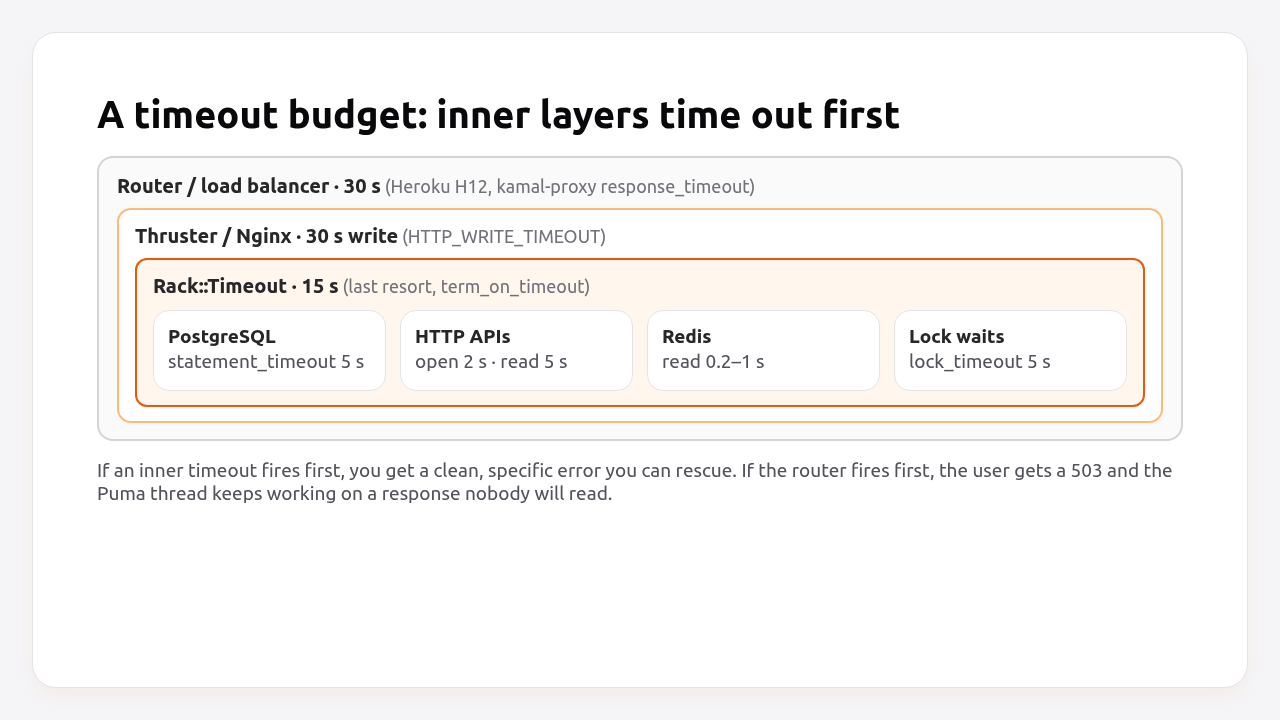
From the outside in:
- The platform router or load balancer (Heroku router, Render’s proxy, Fly Proxy, kamal-proxy, a cloud load balancer). When it gives up, the client gets a 503 or 504. Your app isn’t told and keeps working.
- The HTTP proxy in front of Puma. In the Rails 8 Docker setup that’s Thruster, elsewhere often Nginx.
- Inside the app.
Rack::Timeoutcan interrupt a request that runs too long. Puma itself never does. - Each dependency call. PostgreSQL’s
statement_timeout, HTTP client timeouts, Redis timeouts, lock timeouts.
The rule that makes this work: every inner timeout must be shorter than the one outside it. Then a slow query fails as ActiveRecord::QueryCanceled after 5 seconds, which you can rescue, log and show a friendly error for, instead of the router cutting the connection at 30 seconds while the query keeps running.
What timeout should a Rails app use?
For a typical Rails web app: 5 seconds for database statements and outbound HTTP reads, 15 seconds for the whole request inside Rails, and 30 seconds at the proxy and router. Adjust the numbers to your app, but keep the order.
| Layer | Setting | Recommended | Default |
|---|---|---|---|
| PostgreSQL query | statement_timeout |
5 s (web), longer for jobs | None (0) |
| PostgreSQL lock wait | lock_timeout |
5 s | None (0) |
| PostgreSQL connect | connect_timeout |
2 s | OS TCP timeout |
| DB pool checkout | checkout_timeout |
5 s | 5 s |
| HTTP client connect | open_timeout |
2 s | 60 s (Net::HTTP) |
| HTTP client read | read_timeout |
5–10 s | 60 s (Net::HTTP) |
| Redis | read_timeout / write_timeout |
0.2–1 s | 1 s (cache store) |
| Whole request in Rails | Rack::Timeout service_timeout |
15 s | Not installed |
| Proxy (Thruster) | HTTP_WRITE_TIMEOUT |
30 s | 30 s |
| Proxy (kamal-proxy) | response_timeout |
30 s | 30 s |
| Router | Platform limit | Not configurable on most | Heroku 30 s |
Prerequisites
- Rails 7.1+ (examples use Rails 8.0, Ruby 3.3, Puma 6, PostgreSQL 16).
- Access to
config/database.yml, your HTTP client configuration and your deploy config (config/deploy.ymlor the platform settings). - A background job backend for Step 5. Solid Queue is the Rails 8 default.
Step 1: Set database timeouts
Set statement_timeout and lock_timeout for web processes through database.yml variables, so every connection gets them as soon as it opens.
# config/database.yml
production:
  primary:
    adapter: postgresql
    url: <%= ENV["DATABASE_URL"] %>
    pool: <%= ENV.fetch("RAILS_MAX_THREADS", 3) %>
    connect_timeout: 2
    checkout_timeout: 5
    variables:
      statement_timeout: <%= ENV.fetch("DB_STATEMENT_TIMEOUT", "5s") %>
      lock_timeout: 5s
Job workers often run legitimate long queries, such as reports and exports. Give them a longer limit through the same environment variable:
# Worker process environment
DB_STATEMENT_TIMEOUT=60s bin/jobs
For a single known-slow query in the web process, raise the limit locally instead of globally:
# app/models/report.rb
def self.yearly_totals
  transaction do
    connection.execute("SET LOCAL statement_timeout = '20s'")
    Order.where(created_at: 1.year.ago..).group("date_trunc('month', created_at)").sum(:total_cents)
  end
end
SET LOCAL only lasts until the end of the transaction, so the connection goes back to the pool with the normal 5-second limit. Migrations need different values. See zero-downtime Rails migrations for how strong_migrations overrides them.
Step 2: Set HTTP client timeouts
Outbound HTTP calls are the most common cause of hung requests, because Ruby’s Net::HTTP waits 60 seconds to open a connection and another 60 seconds for each read by default. Set explicit, short timeouts on every client.
# Net::HTTP
uri = URI("https://api.example.com/rates")
response = Net::HTTP.start(uri.host, uri.port, use_ssl: true, open_timeout: 2, read_timeout: 5, write_timeout: 5) do |http|
  http.get(uri.request_uri)
end
# config/initializers/faraday.rb (shared client with timeouts and retries)
PAYMENTS_API = Faraday.new(url: ENV.fetch("PAYMENTS_API_URL")) do |f|
  f.options.open_timeout = 2
  f.options.timeout = 5          # read timeout
  f.request :retry, max: 2, interval: 0.2, exceptions: [Faraday::TimeoutError, Faraday::ConnectionFailed]
  f.response :raise_error
end
Many API gems wrap their own client and have their own defaults, often generous ones. Set them explicitly:
# config/initializers/stripe.rb
Stripe.open_timeout = 2
Stripe.read_timeout = 10
Stripe.max_network_retries = 2
Then decide what the user sees when the call fails:
# app/controllers/quotes_controller.rb
def show
  @rates = ExchangeRates.current
rescue Faraday::TimeoutError, Net::OpenTimeout, Net::ReadTimeout
  @rates = ExchangeRates.last_known
  flash.now[:notice] = "Live rates are temporarily unavailable. Showing the last known rates."
end
Pro Tip: Cache the last successful response of any third-party call your pages depend on, as described in the Rails Redis caching guide. A timeout then degrades to slightly stale data instead of an error page.
Step 3: Add Rack::Timeout as the last line of defence
Rack::Timeout stops a request inside your app after a fixed time, so a request stuck in code without its own timeout doesn’t hold a Puma thread forever. Use it as a backstop for the timeouts in Steps 1 and 2, not instead of them.
# Gemfile
gem "rack-timeout", require: "rack/timeout/base"
# config/initializers/rack_timeout.rb
Rails.application.config.middleware.insert_before Rack::Runtime, Rack::Timeout,
  service_timeout: Integer(ENV.fetch("RACK_TIMEOUT_SERVICE_TIMEOUT", 15)),
  wait_timeout: Integer(ENV.fetch("RACK_TIMEOUT_WAIT_TIMEOUT", 30)),
  term_on_timeout: Integer(ENV.fetch("RACK_TIMEOUT_TERM_ON_TIMEOUT", 1))

# Rack::Timeout logs every state change at INFO; keep only problems.
Rack::Timeout::Logger.level = Logger::WARN
What the options do:
service_timeout: 15raisesRack::Timeout::RequestTimeoutExceptionin the request thread after 15 seconds.wait_timeout: 30drops requests that already waited 30 seconds in a queue before reaching Rails. It uses theX-Request-Startheader, which Heroku’s router sets. There’s no point starting work the router has already given up on.term_on_timeout: 1sendsSIGTERMto the Puma worker after a timeout, so Puma replaces it with a clean process.
That last option exists for a reason. Rack::Timeout interrupts the thread at whatever line it’s on, which can be halfway through writing to a socket, inside a mutex or in the middle of a C extension, and that can leave the process in a corrupted state. Restarting the worker after a timeout is the safe trade-off. It only works with Puma in clustered mode (workers > 0).
Step 4: Align the proxy and router
The proxy in front of Puma and the platform router must allow at least as long as Rack::Timeout, or they’ll cut requests before your app can handle the timeout itself.
Rails 8 with Thruster (the default in the generated Dockerfile): Thruster enforces a 30-second write timeout on responses. Its defaults line up with a 30-second router, so leave them unless you need longer:
# Container environment (Thruster)
HTTP_READ_TIMEOUT=30    # client must send headers and body within 30s
HTTP_WRITE_TIMEOUT=30   # response must be written within 30s
HTTP_IDLE_TIMEOUT=60    # keep-alive idle connections
Kamal 2: kamal-proxy waits 30 seconds by default:
# config/deploy.yml
proxy:
  ssl: true
  host: example.com
  response_timeout: 30
  buffering:
    requests: true
    responses: true
    max_request_body: 40_000_000   # 40 MB uploads
Puma has no request timeout. Its related settings do different things:
# config/puma.rb
worker_timeout 60          # restart a worker that hasn't checked in with the master for 60 s (hung process, not slow request)
persistent_timeout 20      # how long to keep an idle keep-alive connection open
If you raise the router or proxy limit for one slow endpoint, you raise it for everything. Prefer moving that endpoint’s work to a job (Step 5).
Step 5: Move long work out of the request
Anything that regularly takes more than a few seconds, like exports, reports, imports, image processing or calls to slow APIs, should run in a background job, with the page showing progress instead of waiting.
# app/controllers/exports_controller.rb
def create
  export = current_user.exports.create!(status: "queued")
  ExportJob.perform_later(export.id)
  redirect_to export_path(export), notice: "Your export is being prepared."
end
# app/jobs/export_job.rb
class ExportJob < ApplicationJob
  queue_as :exports

  def perform(export_id)
    export = Export.find(export_id)
    export.update!(status: "running")
    file = OrdersCsv.new(export.user).generate   # can take minutes; the job has a 60s statement_timeout
    export.file.attach(io: file, filename: "orders-#{Date.current}.csv")
    export.update!(status: "done")
    Turbo::StreamsChannel.broadcast_replace_to(export, target: export, partial: "exports/export", locals: { export: export })
  end
end
The page subscribes with turbo_stream_from @export and updates when the job finishes. No request ever waits longer than a few hundred milliseconds. The background jobs guide covers where these jobs should run.
Step 6: Verify it works
Test each layer with a deliberately slow request on staging, and confirm the innermost timeout fires first with the error you expect.
Add a temporary route that only exists on staging:
# config/routes.rb
if ENV["APP_ENV"] == "staging"
  get "/debug/slow_sql" => ->(_env) { ActiveRecord::Base.connection.execute("SELECT pg_sleep(10)"); [200, {}, ["done"]] }
  get "/debug/slow_ruby" => ->(_env) { sleep 20; [200, {}, ["done"]] }
end
time curl -s -o /dev/null -w "%{http_code}\n" https://staging.example.com/debug/slow_sql
# 500 after ~5s, log shows ActiveRecord::QueryCanceled (statement_timeout fired)

time curl -s -o /dev/null -w "%{http_code}\n" https://staging.example.com/debug/slow_ruby
# 500 after ~15s, log shows Rack::Timeout::RequestTimeoutException (Rack::Timeout fired)
If the first request takes 30 seconds and returns 503 or 504, statement_timeout isn’t applied. Check with SHOW statement_timeout; from bin/rails dbconsole on that environment. If the second takes 30 seconds, Rack::Timeout isn’t in the middleware stack (bin/rails middleware | grep Timeout).
Remove the debug routes after testing. The staging environment guide explains how to keep staging-only code like this contained.
How Heroku, Render, Fly.io, Upsun and Enkihost handle request timeouts
The platform limits vary from 30 seconds to 100 minutes, and only some of them can be changed. That’s the outermost layer of your budget, so it’s worth knowing exactly.
| Platform | Router limit | Configurable? | What the client sees | Notes |
|---|---|---|---|---|
| Heroku | 30 s to first byte, then a 55 s rolling window | No | 503, H12 Request timeout in logs |
The dyno keeps processing after the router gives up |
| Render | 100 minutes | No | Connection closed | Long limit means slow requests tie up instances instead of failing fast |
| Fly.io | 60 s idle (no data sent) | No | Connection closed | Streaming data resets the idle timer |
| Upsun | 5 minutes hard cap per web request | No | 504 | Upsun recommends queues for longer work |
| Kamal 2 | response_timeout, 30 s default |
Yes | 504 from kamal-proxy | Thruster’s 30 s write timeout applies inside the container too |
| Enkihost | Not documented | Not documented | Not documented | Set the in-app timeouts from Steps 1–3 |
Notice that Render’s very generous limit is not a feature for typical web pages. Without your own timeouts, a hung request on Render can hold a Puma thread for over an hour, and a handful of those take an instance out of service. The more permissive the platform, the more important Steps 1 to 3 become.
Enkihost runs each app with per-app resource isolation, so a slow request in one app doesn’t slow down others. The in-app layers from this guide (database, HTTP client and Rack::Timeout) are what keep your own Puma threads free.
Troubleshooting request timeout errors
H12 Request timeout on Heroku
heroku[router]: at=error code=H12 desc="Request timeout" method=GET path="/reports/export" host=app.example.com request_id=5f1a… dyno=web.1 connect=0ms service=30000ms status=503 bytes=0
The router waited 30 seconds for the first byte. Find the slow part with your APM or the request ID in your logs. It’s usually a query or an external call without a timeout. Add the inner timeouts, and move the work to a job if it’s legitimately long.
Rack::Timeout::RequestTimeoutException
Rack::Timeout::RequestTimeoutException: Request ran for longer than 15000ms
Rack::Timeout fired before any inner timeout. The backtrace shows the line that was running. Add a specific timeout there (database, HTTP, Redis), so next time you get a specific, recoverable error instead.
PG::QueryCanceled: canceling statement due to statement timeout
ActiveRecord::QueryCanceled: PG::QueryCanceled: ERROR: canceling statement due to statement timeout
This is the system working: a query ran longer than statement_timeout. Fix the query (an index, avoiding N+1, a smaller result set), raise the limit locally with SET LOCAL for that one query, or move it to a job.
Net::ReadTimeout or Net::OpenTimeout
Net::ReadTimeout: Net::ReadTimeout with #<TCPSocket:(closed)>
An outbound HTTP call exceeded its timeout. Rescue it at the call site and fall back (cached data, a retry in a job, a clear message). If it happens constantly, the provider is slow or your timeout is too aggressive for that API’s normal latency.
504 Gateway Timeout from kamal-proxy
The app didn’t respond within response_timeout. Check kamal app logs for the request. If the response is a large file download that legitimately takes longer to stream, raise response_timeout and Thruster’s HTTP_WRITE_TIMEOUT together, or serve the file from object storage with a signed URL.
Author Perspective: a timeout is a decision, not a default
Most production incidents I’ve seen around timeouts weren’t caused by a slow system. They were caused by a fast system waiting politely on a slow one: a payment API with an 80-second default, a geocoder without any timeout, a report query that ran for four minutes while the router had given up after thirty seconds. Now I treat every outbound call as a decision: how long am I willing to wait, and what does the user see if it takes longer? Writing that down for each dependency takes an hour. It turns a whole class of “the site is down” incidents into “one widget shows cached data”.
Request timeouts on Enkihost
Request timeouts protect your Puma threads. The fewer threads stuck waiting, the more capacity your app has for real requests. On Enkihost:
- Per-app resource isolation: a burst of slow requests in another app can’t eat your CPU or memory, so your timeouts behave the same at noon as at midnight.
- PostgreSQL add-on injects
DATABASE_URL, sostatement_timeoutandlock_timeoutfromdatabase.ymlvariablesapply to every connection. - Redis add-on injects
REDIS_URLfor caching the last good response of slow third-party APIs, or for Sidekiq to run long work outside the request. - Zero-downtime deploys, so shipping a timeout change doesn’t drop in-flight requests.
Rails and Sinatra apps run on Ignite (9 EUR per month after a 14-day free trial, with PostgreSQL and Redis included) or Blaze (29 EUR per month, with high availability and autoscaling). The free Spark plan is for Jekyll sites. See enkihost.com.
FAQ
Does Puma have a request timeout?
No. Puma does not stop slow requests. Its worker_timeout setting only restarts a worker process that stops checking in with the master, which catches hung processes, not slow requests. Use database and HTTP client timeouts, and Rack::Timeout as a backstop, to limit request duration.
Is Rack::Timeout safe to use?
It is safe if you treat it as a last resort and restart the worker after it fires. Rack::Timeout interrupts the request thread at an arbitrary point, which can leave the process in a bad state, so enable term_on_timeout with Puma in clustered mode and rely on specific timeouts for databases and HTTP calls first.
How do I increase the Heroku 30 second timeout?
You can’t. Heroku’s router limit of 30 seconds to the first byte is fixed. Long operations should run in a background job, with the page polling or receiving a Turbo Stream update when the job finishes. For large downloads, generate the file in a job and serve it from object storage.
What should statement_timeout be for a Rails app?
Around 5 seconds for web processes is a good starting point, because almost no query behind a web page should take longer. Background workers can use a longer limit, such as 60 seconds, set through a separate environment variable. Migrations need their own values.
Why does my request time out on the router but keep running in Rails?
Routers and proxies don’t tell the application when they give up. They close the client connection and the Rails process keeps working until it finishes or something inside the app stops it. That is why inner timeouts must be shorter than the router limit.
Sources
- Request Timeout — Heroku Dev Center
- Error codes: H12 — Heroku Dev Center
- zombocom/rack-timeout — GitHub
- basecamp/thruster: configuration — GitHub
- Kamal proxy configuration: response_timeout — Kamal docs
- Puma configuration: worker_timeout — GitHub
- Client Connection Defaults: statement_timeout — PostgreSQL Docs
- Net::HTTP — Ruby documentation
- Building real-time AI chat: request duration on Render — Render
- Fly.io community: 60 second idle timeout
- Unstable website? Use queues — Upsun Dev Center