Rails Memory Leak in Production: How to Find It, Fix It and Stop the OOM Kills

A Rails memory leak in production shows up as Puma or Sidekiq processes whose memory grows until the platform kills them: Heroku logs R14 (Memory quota exceeded), Render restarts the instance with “Ran out of memory”, and the Linux OOM killer ends the process on Fly.io or your own server. Most of the time it isn’t a true leak. It’s memory bloat from allocating too much per request, or heap fragmentation from glibc’s allocator, and each one has a different fix. This guide shows how to tell the three apart from a memory graph, fix fragmentation in five minutes with jemalloc, find real leaks with heap dumps, and keep production stable while you investigate.
TL;DR
- Look at the shape of RSS over 24–48 hours. A leak never levels off. Bloat jumps high and then stays flat. Fragmentation climbs in steps.
- Fix fragmentation first: run Ruby with jemalloc (
LD_PRELOAD), or setMALLOC_ARENA_MAX=2. The Rails 8 Dockerfile already preloads jemalloc.- Find bloat with
derailed_benchmarksandmemory_profiler: look for endpoints that load whole tables, build huge strings or instantiate thousands of records.- Find real leaks by taking three heap dumps from a live worker a few minutes apart and diffing them. The objects that survive every dump are the leak.
- While you investigate, cap the damage with a container memory limit and
puma_worker_killer, but don’t let the stopgap become the fix.
Table of Contents
- Is it really a Rails memory leak?
- Prerequisites
- Step 1: Measure memory per process over time
- Step 2: Rule out fragmentation with jemalloc
- Step 3: Find memory bloat per request
- Step 4: Find a real leak with heap dumps
- Step 5: Fix the usual causes of Rails memory leaks
- Step 6: Contain it while you fix it
- Step 7: Verify it works
- How Heroku, Render, Fly.io, Upsun and Enkihost handle memory limits
- Troubleshooting memory errors
- Author Perspective: it was never the framework
- Memory-stable Rails apps on Enkihost
- FAQ
- Sources
Is it really a Rails memory leak?
A real memory leak means objects are retained forever, so memory grows without limit for as long as the process runs. Most “leaks” in Rails apps are one of two other things, and the memory graph tells you which.
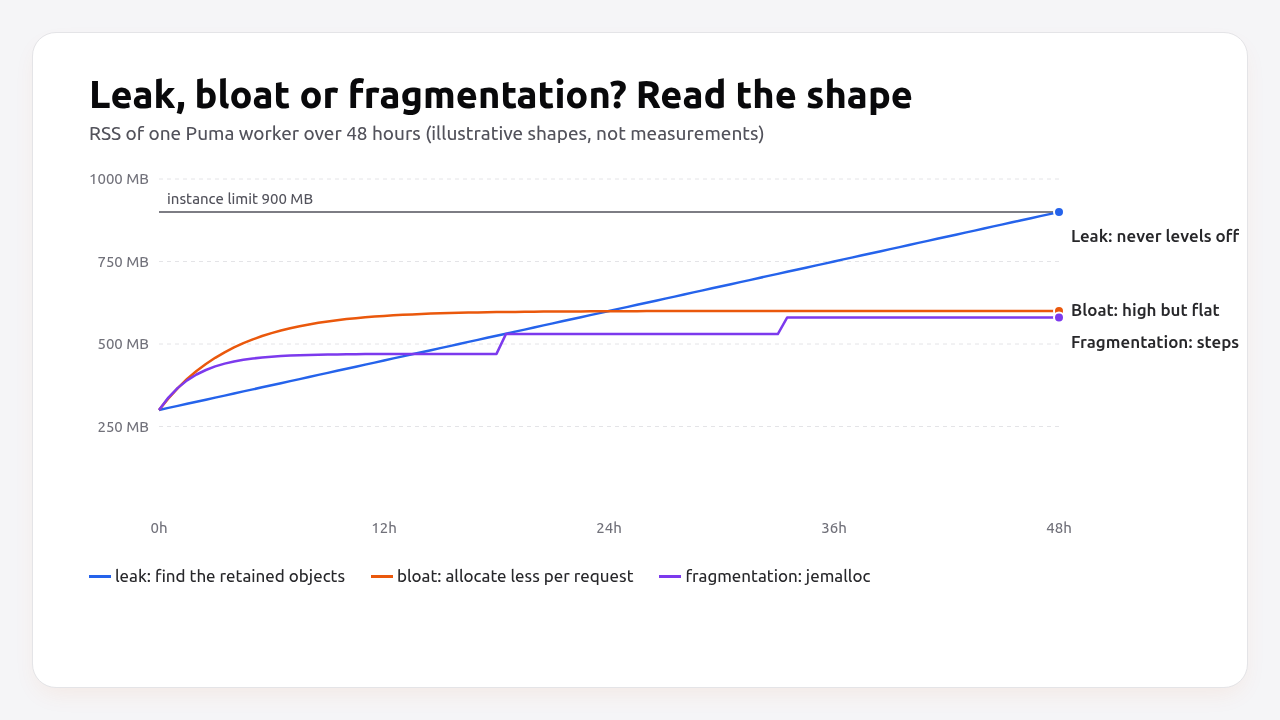
| Pattern | Shape of RSS over time | Cause | Fix |
|---|---|---|---|
| Leak | Grows steadily, never levels off | Objects kept alive by a reference that never goes away (global cache, class variable, subscriber) | Find and remove the reference (heap dumps) |
| Bloat | Jumps quickly, then flat at a high level | Some requests allocate huge numbers of objects at once | Allocate less (batching, pluck, streaming) |
| Fragmentation | Rises in steps, eventually flattens much higher than the live heap | glibc malloc arenas in a multi-threaded process don’t return memory | jemalloc or MALLOC_ARENA_MAX=2 |
Heroku’s own guidance makes the same point: most apps that “leak” level out if you let them run long enough. That matters because the fixes are different. Restarting workers hides all three. Only one of them needs a heap dump.
Ruby’s own behaviour adds one more thing to know: Ruby rarely returns heap pages to the operating system. A process that spiked to 900 MB once will often stay near 900 MB, even after the objects are freed. That’s why bloat looks permanent.
Prerequisites
- Rails 7.1+ on Ruby 3.3+ (examples use Rails 8.0 and Ruby 3.3).
- Per-process memory metrics (RSS) from your platform, APM or the
get_process_memgem. - A staging environment where you can reproduce traffic. Heap dumps are large and slow.
- These gems in your Gemfile:
# Gemfile
group :development, :staging do
  gem "derailed_benchmarks"
  gem "memory_profiler"
  gem "heapy"
end

gem "get_process_mem"
gem "rbtrace", require: false   # only required when you opt in, see Step 4
Step 1: Measure memory per process over time
You can’t diagnose memory from a single number. Record RSS per process every minute for at least a day, labelled by process type, so you can see the shape.
# config/initializers/memory_logger.rb
if ENV["LOG_MEMORY"] == "1"
  Thread.new do
    mem = GetProcessMem.new
    loop do
      sleep 60
      stats = GC.stat
      Rails.logger.info(
        "[memory] pid=#{Process.pid} rss_mb=#{mem.mb.round} " \
        "heap_live_slots=#{stats[:heap_live_slots]} major_gc=#{stats[:major_gc_count]} " \
        "old_objects=#{stats[:old_objects]}"
      )
    end
  end
end
Two numbers matter:
rss_mbis what the platform sees and what triggers OOM kills.heap_live_slotsandold_objectsare what Ruby is actually keeping alive. If RSS grows but live slots stay flat, the problem is fragmentation, not Ruby objects. If both grow together without limit, it’s a leak.
Send the log lines to your log platform and graph them, or export them as metrics as shown in the Rails monitoring guide.
Step 2: Rule out fragmentation with jemalloc
Try jemalloc before anything else. It takes five minutes and often cuts RSS by 20–40% in multi-threaded Puma and Sidekiq processes, which makes many “leaks” disappear.
The Rails 8 Dockerfile already installs libjemalloc2, and bin/docker-entrypoint preloads it:
#!/bin/bash -e
# bin/docker-entrypoint (excerpt)
if [ -z "${LD_PRELOAD+x}" ]; then
    LD_PRELOAD=$(find /usr/lib -name libjemalloc.so.2 -print -quit)
    export LD_PRELOAD
fi
exec "${@}"
Check that it’s actually loaded in the running process:
# Inside the container or on the server
grep -l jemalloc /proc/$(pgrep -f "puma" | head -1)/maps && echo "jemalloc loaded"
If you can’t use jemalloc (some buildpacks), limit glibc’s arenas instead:
MALLOC_ARENA_MAX=2
Heroku sets MALLOC_ARENA_MAX=2 by default on apps created after September 2019. The trade-off is a small amount of lock contention between threads in exchange for much less fragmentation.
If memory flattens after this change, you’re done. If it keeps growing linearly, move on to the leak hunt. Our Dockerize a Rails app guide covers the full Dockerfile with jemalloc.
Step 3: Find memory bloat per request
Bloat comes from individual requests or jobs that allocate a lot at once. Measure allocations per endpoint and per job, then fix the worst ones.
Start with what your app costs before it serves a single request:
bundle exec derailed bundle:mem
# TOP: 92.4258 MiB
#   rails/all: 31.2 MiB
#   aws-sdk-s3: 14.8 MiB
#   ...
Gems you don’t use at runtime but still load at boot are pure memory overhead in every process. Move them to require: false or remove them.
Then hit a suspicious endpoint repeatedly in production mode and watch memory:
RAILS_ENV=production SECRET_KEY_BASE_DUMMY=1 \
PATH_TO_HIT=/reports/monthly TEST_COUNT=5000 \
bundle exec derailed exec perf:mem_over_time
To see exactly what one block of code allocates:
# bin/rails runner (staging)
require "memory_profiler"

report = MemoryProfiler.report do
  MonthlyReport.new(Account.find(42)).to_csv
end
report.pretty_print(to_file: "tmp/monthly_report_mem.txt", scale_bytes: true)
The report lists allocated and retained memory by gem, file, line and class. Typical findings and their fixes:
| Finding | Fix |
|---|---|
Account.all.each, Order.where(...).to_a on big tables |
find_each(batch_size: 1_000) or in_batches |
| Loading full records to read one column | pluck(:id, :email) |
| Building a large CSV/JSON string in memory | Stream with ActionController::Live or write to a tempfile |
includes loading huge associations |
Paginate, or preload only what the view uses |
| Image processing in the web process | Move to a background job with its own memory budget |
Pro Tip: Background jobs are the most common source of bloat. A single export job that loads 200,000 records can push a Sidekiq or Solid Queue process from 300 MB to 1.5 GB, and it stays there afterwards because Ruby keeps the heap. Batch it, and consider running heavy jobs in a separate worker process. See Rails background jobs in production.
Step 4: Find a real leak with heap dumps
If memory and live object counts keep growing linearly, take heap dumps from a running worker and diff them. Objects that appear in a later dump and are still there in the one after that are your leak.
Enable rbtrace only when you opt in. It opens a control channel into the process, so don’t leave it on permanently:
# config/initializers/rbtrace.rb
require "rbtrace" if ENV["ENABLE_RBTRACE"] == "1"
Deploy to one instance with ENABLE_RBTRACE=1, let it warm up, then take three dumps a few minutes apart under normal traffic:
PID=$(pgrep -f "puma: cluster worker 0")

# 1. Record file and line for every new allocation from now on.
bundle exec rbtrace -p "$PID" -e "require 'objspace'; ObjectSpace.trace_object_allocations_start"
sleep 300

# 2. Three dumps, ten minutes apart.
for n in 1 2 3; do
  bundle exec rbtrace -p "$PID" -e "Thread.new { GC.start; File.open('/tmp/heap-$n.json', 'w') { |f| ObjectSpace.dump_all(output: f) } }"
  sleep 600
done
Allocation tracing makes the dumps useful, because every object gets a file and line, but it adds CPU and memory overhead. Do this on one low-traffic instance and restart the worker afterwards.
Diff the dumps with heapy:
heapy diff /tmp/heap-1.json /tmp/heap-2.json /tmp/heap-3.json
# Retained STRING 412330 objects of size 32983200/... (in bytes) at: app/services/price_cache.rb:14
# Retained HASH   20511 objects ... at: app/models/concerns/memoized_settings.rb:9
heapy diff reports objects that were allocated after the first dump and are still alive in the third. That’s exactly the definition of a leak. The file and line point straight at the code that keeps them. For a single dump, heapy read /tmp/heap-1.json gives a summary by generation.
Step 5: Fix the usual causes of Rails memory leaks
Almost every Rails leak comes from a long-lived object that collects data per request and never lets go. Search for these patterns:
1. Unbounded class-level caches
# Leaks: one entry per distinct key, forever, in every process
class PriceCache
  @prices = {}
  def self.for(sku) = @prices[sku] ||= Price.lookup(sku)
end
# Fixed: bounded, shared and expiring
class PriceCache
  def self.for(sku)
    Rails.cache.fetch(["price", sku], expires_in: 10.minutes) { Price.lookup(sku) }
  end
end
2. Subscribing or registering inside a request
# Leaks: adds a new subscriber (and its closure) on every request
def index
  ActiveSupport::Notifications.subscribe("sql.active_record") { |*args| @queries << args }
end
Subscribe once in an initializer, or use ActiveSupport::Notifications.subscribed(callback, "sql.active_record") { ... }, which unsubscribes when the block ends.
3. Defining classes or methods at runtime
Class.new, define_method or Struct.new inside a request creates new classes that are never collected while they’re referenced, including from method caches. Define them once at load time.
4. Global arrays that only grow
Instrumentation buffers, in-memory audit logs, “recent errors” lists. If something only ever calls <<, it’s a leak. Cap it with a ring buffer or move it to Redis or the database.
5. Gems and native extensions
Update gems before you dig too deep. Leaks in C extensions don’t show up in Ruby heap dumps: RSS grows but heap_live_slots doesn’t, and jemalloc doesn’t help. Check the gem’s changelog and issue tracker, and bisect by disabling features.
6. YJIT memory (not a leak)
Rails 7.2+ enables YJIT by default on Ruby 3.3+. It stores compiled code in memory, which adds a predictable amount per process and then levels off. On Ruby 3.4, --yjit-mem-size caps it if memory is tight.
Step 6: Contain it while you fix it
While you hunt the cause, protect production: limit each process’s memory so one bad worker gets restarted instead of dragging the machine into swap, and restart workers before they reach the limit.
# config/initializers/puma_worker_killer.rb
if defined?(PumaWorkerKiller) && ENV["PUMA_WORKER_KILLER"] == "1"
  PumaWorkerKiller.config do |config|
    config.ram           = Integer(ENV.fetch("PWK_RAM_MB", 1024))  # total MB available to Puma
    config.frequency     = 20     # seconds between checks
    config.percent_usage = 0.90   # restart the largest worker above 90% of ram
    config.rolling_restart_frequency = 12 * 3600 # also restart every 12h as a backstop
  end
  PumaWorkerKiller.start
end
Puma restarts a killed worker by forking a fresh one from the master, so other workers keep serving. With Kamal or Docker, also set a hard container limit so the kernel stops a runaway process before it affects other apps:
# config/deploy.yml
servers:
  web:
    hosts:
      - 10.0.0.11
    options:
      memory: 1g
  job:
    hosts:
      - 10.0.0.11
    cmd: bin/jobs
    options:
      memory: 768m
These are tourniquets. Log every restart and keep the investigation going. A worker killer that fires every 20 minutes hides a leak that will eventually outrun it.
Step 7: Verify it works
A fix is confirmed when RSS levels off over at least 24 hours of real traffic and the platform’s memory errors stop.
# RSS of each Puma worker, in MB
ps -o pid,rss,cmd -C ruby | awk 'NR>1 {printf "%s %d MB %s\n", $1, $2/1024, $3" "$4" "$5}'
Compare the [memory] log lines from Step 1 before and after the deploy:
- Leak fixed:
heap_live_slotsandold_objectslevel off. RSS levels off at roughly the same height every day. - Bloat fixed: the jump after the expensive endpoint or job is smaller, or gone.
- Fragmentation fixed: RSS levels off lower, while live slots look the same as before.
Also check the platform side: no R14/R15 on Heroku, no “Ran out of memory” events on Render, and no Out of memory: Killed process lines in the kernel log or Fly.io machine logs.
How Heroku, Render, Fly.io, Upsun and Enkihost handle memory limits
Every platform enforces a memory limit per instance. They differ in whether you get swap, what happens when you cross the limit, and how visible it is.
| Platform | What happens over the limit | Error you’ll see | Swap | Memory metrics |
|---|---|---|---|---|
| Heroku | Dyno swaps to disk above 100%; restarted at roughly 2× the quota | Error R14 (Memory quota exceeded), Error R15 (Memory quota vastly exceeded) |
Yes, on Eco/Basic/Standard dynos | Dashboard metrics, Ruby language metrics |
| Render | Instance is restarted | Ran out of memory (used over 512MB) while running your code. |
No | Per-instance memory graph |
| Fly.io | Kernel OOM killer ends the process; the machine restarts it | Out of memory: Killed process 351 (ruby) |
Optional, swap_size_mb in fly.toml |
Grafana dashboards per machine |
| Upsun | Container processes are OOM-killed | OOM messages in the container logs | No | Resource usage per container |
| Kamal / Docker | Kernel OOM killer inside the cgroup | OOMKilled: true in docker inspect |
Host setting | Whatever you install |
| Enkihost | Container stopped at its memory limit and restarted | Not documented | Not documented | Not documented |
Heroku’s swap behaviour is a double-edged sword. It prevents an instant crash, but a dyno at 150% of its quota swaps constantly and gets very slow, which looks like a performance problem rather than a memory problem. On Render and Fly.io the failure is immediate and obvious. That’s harder on users, but easier to diagnose.
Enkihost runs each app with allocated memory and per-app resource isolation, so a memory problem in one app stays inside that app. Treat the allocation as the budget to size Puma workers against, using the scaling guide’s rule of thumb.
Troubleshooting memory errors
These are the messages that tell you you’ve run out of memory, and what each one usually means.
Error R14 (Memory quota exceeded)
heroku[web.1]: Process running mem=612M(119.6%)
heroku[web.1]: Error R14 (Memory quota exceeded)
The dyno is swapping. Lower WEB_CONCURRENCY, enable jemalloc or check that MALLOC_ARENA_MAX=2 is set, then look at the memory shape. If R14 appears right after boot, the app is simply too big for the dyno with that many workers.
Ran out of memory (used over 512MB) while running your code
Render restarted the instance. Check the memory graph: a sawtooth that climbs and drops at each restart is a leak or bloat. A spike right after deploy usually means too many Puma workers for the instance size.
Out of memory: Killed process 351 (ruby)
[ 4123.552811] Out of memory: Killed process 351 (ruby) total-vm:2153372kB, anon-rss:987644kB
The kernel stopped the process. On Fly.io, add swap as a buffer (swap_size_mb = 512) while you investigate, and lower workers or move to a larger machine. With Docker, docker inspect --format '{{.State.OOMKilled}}' <container> confirms it.
failed to allocate memory (NoMemoryError)
NoMemoryError: failed to allocate memory
Ruby itself couldn’t get memory from the OS, usually inside one huge allocation such as reading a multi-gigabyte file into a string or building a giant array. Find the line in the backtrace and stream or batch that operation.
Memory grows only in Sidekiq or Solid Queue
Jobs run longer and process more data than requests, so bloat and leaks show up there first. Profile the heaviest job class with memory_profiler, batch with find_each, and run memory-hungry jobs in a dedicated queue and process with a lower thread count.
Author Perspective: it was never the framework
Every time a client told me “Rails leaks memory”, the cause turned out to be in the app. Twice it was a class-level hash used as a cache. Once it was a subscribe call inside a controller action. Several times it was a nightly export loading an entire table. Once, the “leak” disappeared completely when we turned on jemalloc. My process is the same every time: graph RSS and live slots for a day, turn on jemalloc, profile the heaviest endpoint and job, and only then take heap dumps. It’s slower than adding puma_worker_killer and moving on, but it fixes the cause instead of scheduling the symptom.
Memory-stable Rails apps on Enkihost
Memory problems are easier to solve when the memory budget is clear and other apps can’t interfere with it. On Enkihost:

- Allocated memory and CPU per app, so
WEB_CONCURRENCYandPWK_RAM_MBhave a fixed number to be sized against. - Per-app resource isolation: a leaking app hits its own limit and doesn’t slow down or crash anyone else’s.
- Zero-downtime deploys, so shipping a memory fix, or rolling back one that didn’t help, doesn’t interrupt users.
- Redis and PostgreSQL add-ons that inject
REDIS_URLandDATABASE_URL, which makes it easy to move an in-process cache, the most common leak, intoRails.cache.
Rails and Sinatra apps run on Ignite (9 EUR per month after a 14-day free trial, with PostgreSQL and Redis included) or Blaze (29 EUR per month, with high availability and autoscaling). The free Spark plan is for Jekyll sites. See enkihost.com.
FAQ
Does Ruby on Rails have memory leaks?
Rails itself rarely leaks. Most memory growth in Rails apps comes from application code that keeps objects in long-lived structures, from requests or jobs that allocate too much at once, or from heap fragmentation in glibc malloc. A true leak grows without limit; bloat and fragmentation level off.
Why doesn’t Ruby release memory back to the operating system?
Ruby allocates memory in heap pages and only releases a page when every object on it is freed, which rarely happens in a busy process. glibc malloc also keeps freed memory in its arenas. The result is that RSS stays near its peak even after objects are garbage collected. jemalloc reduces this effect significantly.
Is puma_worker_killer a good solution for memory leaks?
It is a good stopgap, not a solution. It restarts Puma workers that exceed a memory threshold or on a schedule, which keeps production stable while you investigate. If it restarts workers frequently, the underlying leak or bloat is still there and will keep getting worse as traffic grows.
How much memory does a Rails app need per Puma worker?
A typical Rails app uses between 200 and 500 megabytes per Puma worker after warm-up, depending on gems, YJIT and the work each request does. Measure your own after a day of real traffic, then size the number of workers so the total stays under about 80 percent of the instance memory.
Does YJIT increase memory usage?
Yes, YJIT keeps compiled machine code in memory, which adds a predictable amount per process that levels off after warm-up. It is not a leak. On Ruby 3.4 you can cap it with the yjit-mem-size option if your instances are memory constrained.
Sources
- Troubleshooting Memory Issues in Ruby Apps — Heroku Dev Center
- Error codes: R14 and R15 — Heroku Dev Center
- zombocom/derailed_benchmarks — GitHub
- SamSaffron/memory_profiler — GitHub
- zombocom/heapy — GitHub
- tmm1/rbtrace — GitHub
- zombocom/puma_worker_killer — GitHub
- ObjectSpace — Ruby documentation
- Render community: Ran out of memory while running your code
- App configuration: swap_size_mb — Fly Docs