How to Scale a Rails App: Vertical, Horizontal and Database Scaling in the Right Order
To scale a Rails app, first find the bottleneck (web capacity, database, memory or background jobs), then fix it in the cheapest order: tune and enlarge one instance, make the app stateless, add more web and worker instances behind a load balancer, and only then scale the database with connection pooling and read replicas. Most Rails apps that “need to scale” are fighting one slow query or a memory-hungry process, not a lack of servers. This guide explains each step, what it costs on Heroku, Render and Fly.io, and which approach fits which stage of an app.
TL;DR
- Measure before scaling: request queue time and p95 latency tell you whether you need more web capacity or faster code. CPU and memory tell you which resource runs out first.
- Scale vertically first. One bigger instance with tuned Puma workers is simpler and often cheaper than three small ones.
- Before going horizontal, make the app stateless: uploads in object storage, a shared cache, cookie or database sessions, and nothing written to local disk.
- Horizontal scaling multiplies database connections. Budget them, and add PgBouncer before PostgreSQL runs out of slots.
- Scale the database last: indexes and caching first, then a read replica with Rails
connects_to, then a bigger primary.
Table of Contents
- What does it mean to scale a Rails app?
- How do I know which part of my Rails app needs scaling?
- Vertical vs horizontal scaling for Rails
- Step 1: Get the most out of one instance
- Step 2: Make the app stateless
- Step 3: Scale web and workers horizontally
- Step 4: Scale the database
- How much does it cost to scale a Rails app?
- How Heroku, Render, Fly.io, Upsun and Enkihost scale Rails apps
- Which scaling approach should you choose?
- Author Perspective: most apps never need step four
- Scaling a Rails app on Enkihost
- FAQ
- Sources
What does it mean to scale a Rails app?
Scaling a Rails app means increasing how many requests and jobs it can handle while keeping response times acceptable. You can do that by giving a server more resources (vertical), by running more copies of the app (horizontal), or by reducing the work each request does.
Rails itself scales well. Shopify, GitHub and Basecamp run Rails at very large scale. What limits a typical app is how many Ruby processes fit in your memory budget, how fast the database answers, and whether anything in the app assumes there’s only one server. That’s why scaling Rails is mostly an infrastructure and architecture question, with a little Puma configuration on top.
How do I know which part of my Rails app needs scaling?
Look at four numbers: request queue time, p95 response time, CPU and memory per process, and database time per request. The combination tells you which resource is actually running out.
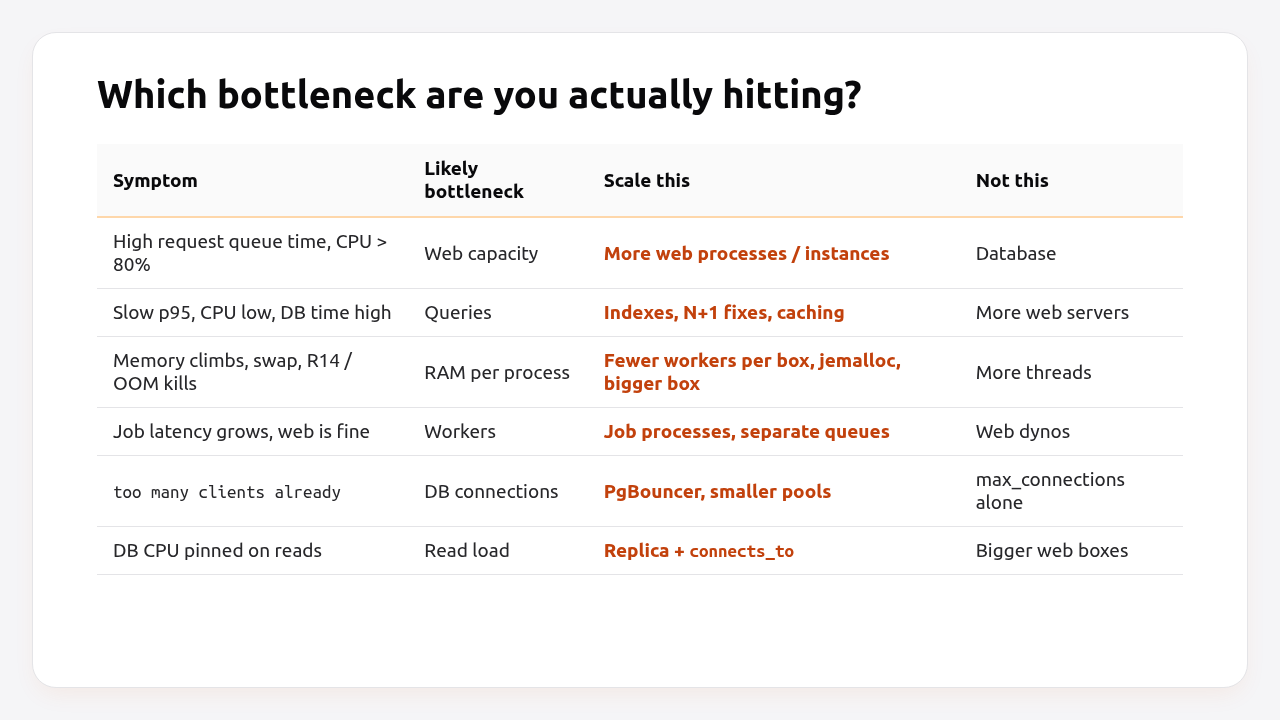
- Request queue time is how long a request waits before a Puma thread picks it up. If it climbs while CPU is high, you’re out of web capacity, and more processes or instances help. Most APM tools report it when the proxy sets an
X-Request-Startheader. - p95 latency with low CPU means requests are waiting on something: usually the database, sometimes an external API. Adding servers won’t help. Fixing queries and caching will.
- Memory limits how many Puma workers fit on one machine. A typical Rails worker uses 200–500 MB, and it grows over time. If processes are being OOM-killed, more threads make it worse.
- Job queue latency growing while the web tier is fine means you need more worker capacity, not more web servers.
Set up these metrics before you scale anything. The Rails monitoring guide shows the instrumentation. The cause is often not where you’d expect.
Vertical vs horizontal scaling for Rails
Vertical scaling gives one server more CPU and memory. Horizontal scaling runs more identical servers behind a load balancer. Rails apps usually need both, in that order, because vertical scaling is simpler and horizontal scaling requires a stateless app.
| Vertical (bigger instance) | Horizontal (more instances) | |
|---|---|---|
| What changes | More CPU cores and RAM → more Puma workers per instance | More instances, each with the same Puma config |
| App changes needed | None | Must be stateless: shared cache, sessions, file storage |
| Failure tolerance | One instance = single point of failure | Survives one instance dying |
| Deploys | Simple | Needs a load balancer with health checks |
| DB connections | Grow slowly | Grow with every instance |
| Upper limit | The largest machine you can buy | Effectively the database |
| Cost curve | Often cheaper per GB at the low end | Linear; autoscaling can lower average cost |
Pros of vertical scaling: no code changes, no load balancer, fewer moving parts, and processes on the same machine share memory through copy-on-write when Puma preloads the app.
Cons of vertical scaling: a single machine is a single point of failure, there’s a ceiling, and a deploy or crash affects all traffic at once.
Pros of horizontal scaling: redundancy, zero-downtime rolling deploys, and capacity that grows with traffic and can shrink at night.
Cons of horizontal scaling: every instance adds database connections, local state breaks, and you pay for a load balancer and duplicated memory overhead.
Step 1: Get the most out of one instance
Before adding servers, make sure the one you have is used well: the right number of Puma workers for its cores and memory, jemalloc, and no obviously slow endpoints.
# config/puma.rb
# One worker per CPU core is a good starting point; memory is usually the real limit.
workers ENV.fetch("WEB_CONCURRENCY") { Etc.nprocessors }
threads_count = ENV.fetch("RAILS_MAX_THREADS", 3)
threads threads_count, threads_count

preload_app!                # share memory between workers via copy-on-write
port ENV.fetch("PORT", 3000)
The rough sizing rule: WEB_CONCURRENCY ≈ number of cores, as long as workers × memory per worker fits in about 80% of RAM. With 2 GB and workers at around 350 MB, that’s four workers at most, whatever the core count says.
Three cheap wins that often double capacity before you touch infrastructure:
- jemalloc. The Rails 8 Dockerfile preloads it. It often cuts Ruby memory use by 20–40%, which means more workers per GB.
- Fix the top three slowest endpoints. One N+1 query on a popular page can consume more capacity than everything else together.
- Move slow work to background jobs. A request that waits eight seconds for a PDF holds a Puma thread for eight seconds. See running Rails background jobs in production.
Pro Tip: Vertical scaling has a hidden benefit with Puma. All workers on one machine share the preloaded application code in memory, so four workers on one 2 GB instance use less total memory than four single-worker 512 MB instances.
Step 2: Make the app stateless
A Rails app is ready for horizontal scaling when any request can go to any instance and get the same result. That rules out storing anything on the local disk or in process memory that another instance would need.
| State | Where it lives on one server | Where it must live with N servers |
|---|---|---|
| File uploads (Active Storage) | storage/ on local disk |
S3-compatible object storage |
| Cache | :memory_store or :file_store |
Solid Cache (database) or Redis |
| Sessions | Cookie store (fine) or :cache_store with a local cache |
Cookie store, or cache store on a shared cache |
| Background jobs | :async adapter (in-process) |
Solid Queue or Sidekiq |
| Action Cable | async adapter |
Solid Cable or Redis adapter |
| Generated files, exports | tmp/, public/ |
Object storage, with a signed URL to the user |
| Cron / scheduled tasks | System crontab on the server | Solid Queue recurring tasks, run once |
The matching production configuration:
# config/environments/production.rb
Rails.application.configure do
  config.active_storage.service = :amazon            # defined in config/storage.yml
  config.cache_store = :solid_cache_store            # or :redis_cache_store, { url: ENV["REDIS_URL"] }
  config.active_job.queue_adapter = :solid_queue     # or :sidekiq
  config.session_store :cookie_store, key: "_myapp_session"
end
# config/storage.yml
amazon:
  service: S3
  access_key_id: <%= ENV["S3_ACCESS_KEY_ID"] %>
  secret_access_key: <%= ENV["S3_SECRET_ACCESS_KEY"] %>
  region: <%= ENV.fetch("S3_REGION", "eu-central-1") %>
  bucket: <%= ENV["S3_BUCKET"] %>
  endpoint: <%= ENV["S3_ENDPOINT"] %>   # set for R2, Hetzner, MinIO, etc.
# config/cable.yml
production:
  adapter: solid_cable
  connects_to:
    database:
      writing: cable
  polling_interval: 0.1.seconds
  message_retention: 1.day
Test it before you need it: run two instances behind a local load balancer (or docker compose up --scale web=2 with a proxy in front), upload a file, log in and out, and reload pages a dozen times. If anything is inconsistent, there’s still local state somewhere.
Step 3: Scale web and workers horizontally
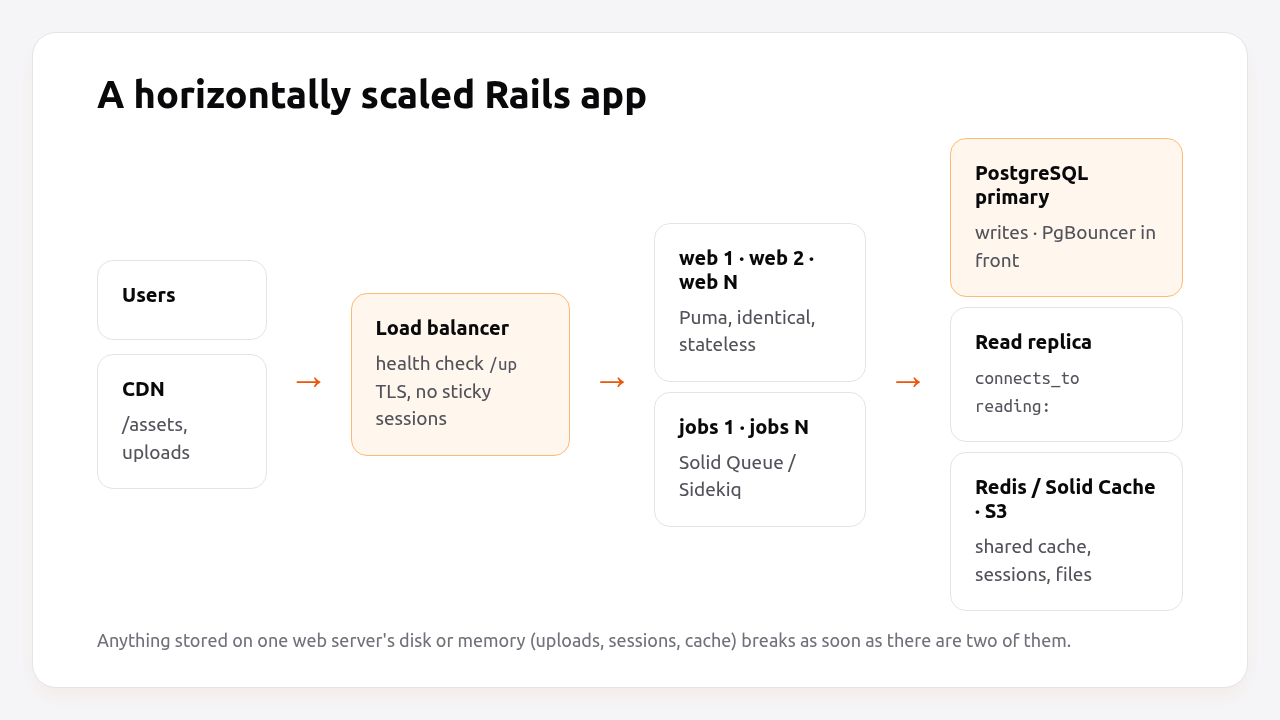
With a stateless app, add identical web instances behind a load balancer that health-checks each one, and scale job workers separately based on queue latency. Web and workers should never share a scaling decision.
The pieces that must be in place:
- A health check that the load balancer uses to route traffic only to booted instances. Keep it shallow. The Rails health check guide explains why.
- No sticky sessions. With cookie-based sessions you don’t need them, and they defeat even load distribution.
- Migrations run once per deploy, not once per instance. The Rails advisory lock protects you from parallel runs, but one place is cleaner.
- Connection budget. Every web instance adds
workers × threadsconnections per database. Do the arithmetic from the connection pool guide before scaling from 2 to 10 instances.
With Kamal, horizontal scaling means adding hosts and putting a load balancer in front:
# config/deploy.yml
service: myapp
image: myorg/myapp

servers:
  web:
    hosts:
      - 10.0.0.11
      - 10.0.0.12
      - 10.0.0.13
  job:
    hosts:
      - 10.0.0.21
    cmd: bin/jobs

proxy:
  ssl: false            # TLS ends at the load balancer
  host: example.com
  healthcheck:
    path: /up
On a PaaS, it’s a slider or a command: heroku ps:scale web=3 worker=2, fly scale count web=3 worker=2, or the instance count in Render’s dashboard.
Step 4: Scale the database
The database is the last thing to scale and the hardest. Before adding hardware, make sure each query is fast: indexes on the columns you filter and join on, no N+1 queries, and caching for expensive read-heavy pages. After that, the options are pooling, read replicas, and a bigger primary.
1. Connection pooling. Many web instances mean many idle connections. PgBouncer in transaction mode lets hundreds of Rails connections share a few dozen PostgreSQL backends.
2. Read replicas. Rails has built-in support for sending reads to a replica:
# config/database.yml
production:
  primary:
    url: <%= ENV["DATABASE_URL"] %>
  primary_replica:
    url: <%= ENV["DATABASE_REPLICA_URL"] %>
    replica: true
# app/models/application_record.rb
class ApplicationRecord < ActiveRecord::Base
  primary_abstract_class
  connects_to database: { writing: :primary, reading: :primary_replica }
end
# config/environments/production.rb
Rails.application.configure do
  # Send GET/HEAD requests to the replica, unless this session wrote in the last 2 seconds.
  config.active_record.database_selector = { delay: 2.seconds }
  config.active_record.database_resolver = ActiveRecord::Middleware::DatabaseSelector::Resolver
  config.active_record.database_resolver_context = ActiveRecord::Middleware::DatabaseSelector::Resolver::Session
end
Or switch explicitly for reports and expensive pages:
# app/controllers/reports_controller.rb
def index
  @rows = ActiveRecord::Base.connected_to(role: :reading) do
    Order.where(created_at: 30.days.ago..).group(:status).count
  end
end
Replicas lag behind the primary by milliseconds to seconds. The 2-second delay in the selector means a user who just saved something reads from the primary and sees their own write.
3. A bigger primary. Vertical scaling works for databases too, and it’s often the right answer up to surprisingly large sizes. Sharding (Rails supports it with connects_to shards:) is a last resort that very few apps ever need.
How much does it cost to scale a Rails app?
Scaling from one instance to four costs anywhere from about $50 to $1,000 a month depending on the platform, and the price of autoscaling varies even more. Here’s what roughly comparable web capacity cost on public price lists in October 2026, compute only, without databases or bandwidth:
| Platform | Instance used | RAM | Price per instance/month | 4 instances | Autoscaling |
|---|---|---|---|---|---|
| Heroku | Standard-2X | 1 GB | $50 | $200 | Only on Performance dynos ($250+ each) |
| Heroku | Performance-M | 2.5 GB | $250 | $1,000 | Yes |
| Render | Standard | 2 GB | $25 | $100 | On Pro workspace plans and above |
| Fly.io | shared-cpu-1x | 2 GB | $13.39 | $53.56 | Autostop/autostart; metrics-based autoscaler app |
| Fly.io | performance-1x | 2 GB | $33.00 | $132.00 | Same |
Prices from each provider’s public pricing page; Fly.io figures are for its lowest-priced regions (iad, ewr) and assume a full month of uptime. Render also charges a workspace plan fee on top of compute ($25/month on Pro).
Two things stand out. First, the cost of one extra instance varies by a factor of about 20 across platforms for similar memory. Second, autoscaling is a premium feature on Heroku, where it’s tied to Performance dynos, so many small teams scale manually or not at all.
How Heroku, Render, Fly.io, Upsun and Enkihost scale Rails apps
Heroku, Render, Fly.io and Upsun scale Rails horizontally by running more copies of the same process type behind their router. Enkihost ties scaling to the plan, with autoscaling on Blaze. They differ in instance sizes, whether autoscaling is included, and how workers scale separately from web.
| Platform | Horizontal scaling | Vertical scaling | Autoscaling | Workers |
|---|---|---|---|---|
| Heroku | heroku ps:scale web=N |
Change dyno type | Performance dynos only, based on response time | Separate worker process type |
| Render | Instance count per service | Change instance type | CPU/memory targets on Pro workspace plans | Separate Background Worker service |
| Fly.io | fly scale count web=N per process group |
fly scale vm / fly scale memory |
Autostop/autostart by traffic; separate autoscaler for metrics | Process groups in fly.toml |
| Upsun | Instance count per app (horizontal scaling) | upsun resources:set for CPU/RAM per container |
Not automatic by default | Workers defined in app config |
| Enkihost | Blaze plan: high availability and autoscaling | Move from Ignite to Blaze | Blaze only; triggers not documented | No separate worker; Solid Queue inside Puma |
The common thread is the Rails side. On every platform, the app must be stateless before a second instance helps, and every extra instance adds database connections that someone has to budget for.
Enkihost runs each app with allocated memory and CPU and per-app resource isolation, so Step 1 (tuning Puma workers to the resources you have) applies directly. Moving to a larger plan is the vertical scaling path there.
Which scaling approach should you choose?
Pick the cheapest step that removes your current bottleneck. Here’s how that usually maps to the stage an app is at:
| Stage | Typical traffic | Recommendation |
|---|---|---|
| Side project / MVP | < 10 req/s | One instance, Solid Queue in Puma, Solid Cache. Don’t scale; measure. |
| Small business app | 10–50 req/s | Vertical: a bigger instance, tuned Puma workers, jemalloc, background jobs for slow work. |
| Growing SaaS | 50–300 req/s | Stateless app, 2–4 web instances behind a load balancer for redundancy, separate job workers, PgBouncer. |
| Read-heavy content or API | Any, DB-bound | Caching first, then a read replica with connects_to and the database selector. |
| Spiky traffic (launches, campaigns) | Bursts of 10× | Horizontal with autoscaling or scheduled scale-up, and a CDN in front of assets and cacheable pages. |
If you only remember one thing: scale for redundancy at two instances, scale for capacity only when the metrics say so.
Author Perspective: most apps never need step four
Most “we need to scale” conversations I’ve been in ended with an index, a cache and a bigger instance. The apps that truly needed ten web servers and a replica were rare, and when they did, it was obvious from the metrics months in advance. What I see much more often is a team that went horizontal too early. They had three small instances where one medium one would do, uploads still on local disk, and a connection count nobody had added up. My advice: run two instances as soon as uptime matters, because that’s redundancy, not scaling. Everything beyond that should be driven by a graph, not a hunch.
Scaling a Rails app on Enkihost
Most of scaling a Rails app is getting the most out of the resources you have, then making sure nothing breaks when you add more. Enkihost covers the pieces this guide depends on:
- Allocated memory and CPU per app, with per-app resource isolation. You size
WEB_CONCURRENCYandRAILS_MAX_THREADSfor a known budget, and a noisy neighbour doesn’t eat it. - PostgreSQL and Redis add-ons inject
DATABASE_URLandREDIS_URL, which covers the shared cache, sessions and job queue that a stateless app needs. - Zero-downtime deploys, so a release doesn’t drop requests while it rolls out.
- Clear plans: Ignite (5 EUR per month, 14-day free trial) and Blaze (16 EUR per month, with dedicated vCPUs, high availability and autoscaling), so the cost of moving up a step is known in advance.
See enkihost.com.
FAQ
Can Ruby on Rails scale?
Yes. Rails powers some of the largest web applications, including Shopify, GitHub and Basecamp. Scaling limits in practice come from database design, memory per process and application state, not from the framework. A stateless Rails app scales horizontally like any other web stack.
Should I scale vertically or horizontally first?
Vertically first. A bigger instance with tuned Puma workers needs no code changes and keeps operations simple. Move to horizontal scaling when you need redundancy, when you reach the largest practical instance, or when traffic is spiky enough that autoscaling saves money.
How many requests per second can one Rails server handle?
It depends on how much work each request does. A useful estimate is total Puma threads divided by average response time in seconds: 4 workers with 3 threads and 100 ms average responses handle about 120 requests per second at full load. Database time and external calls change that number far more than the server size does.
Do I need Kubernetes to scale a Rails app?
No. A load balancer in front of several identical instances, deployed with Kamal or a PaaS, covers the needs of most Rails apps. Kubernetes becomes worthwhile when you run many services and have a team to operate it, not because a single Rails app grew.
When should I add a read replica?
Add a read replica when the primary database’s CPU is consistently high because of read queries, after you’ve already added indexes and caching. Rails supports replicas natively with connects_to and the automatic database selector. Replicas don’t help with write load.
Sources
- Multiple Databases with Active Record — Rails Guides
- Active Storage Overview — Rails Guides
- Puma: workers, threads and preload_app — GitHub
- Kamal configuration: servers and roles — Kamal docs
- Heroku pricing and dyno types — Heroku
- Scaling Your Dyno Formation — Heroku Dev Center
- Render pricing — Render
- Scaling your service — Render Docs
- Fly.io resource pricing — Fly Docs
- Autostop/autostart Machines — Fly Docs
- Manage resources — Upsun Docs