Rails PostgreSQL Setup: From Local Install to Production with Rails 8
A Rails PostgreSQL setup has three parts: a PostgreSQL server you can reach locally (installed natively or in Docker), a config/database.yml that reads DATABASE_URL in production, and bin/rails db:prepare to create databases and load schemas. Rails 8 adds a twist many guides skip: in production, one app uses four databases (primary, cache, queue and cable), and DATABASE_URL only configures the first. This How-To walks through a working setup from a fresh laptop to production, including least-privilege roles, extensions, UUID primary keys, SSL, and how Heroku, Render, Fly.io, Upsun and Kamal provide the connection.
TL;DR
- Create the app with
rails new myapp -d postgresql, or switch an existing app withbin/rails db:system:change --to=postgresql.- Run PostgreSQL locally with
docker run postgres:17, Homebrew or apt, and point development at it withDATABASE_URLorhost/usernameindatabase.yml.- In production, Rails 8 uses separate
primary,cache,queueandcabledatabases. Give each a URL (DATABASE_URL,CACHE_DATABASE_URL, …) or derive the names fromDATABASE_URL.- Use a dedicated role that owns the app’s databases, enable extensions in migrations (
enable_extension "citext"), and require SSL for any connection that leaves the private network.bin/rails db:preparecreates missing databases, loads schemas and runs pending migrations, and it’s what the Rails 8 Docker entrypoint runs on boot.
Table of Contents
- How does Rails connect to PostgreSQL?
- Prerequisites
- Step 1: Install PostgreSQL locally
- Step 2: Create or switch the Rails app to PostgreSQL
- Step 3: Configure database.yml for development and production
- Step 4: Create roles with least privilege
- Step 5: Extensions, UUID keys and schema format
- Step 6: Secure the production connection
- Step 7: Verify it works
- How Heroku, Render, Fly.io, Upsun and Enkihost provide PostgreSQL to Rails
- Troubleshooting Rails PostgreSQL errors
- Author Perspective: boring database setup is a feature
- PostgreSQL for Rails on Enkihost
- FAQ
- Sources
How does Rails connect to PostgreSQL?
Rails connects to PostgreSQL through the pg gem, using settings from config/database.yml merged with the DATABASE_URL environment variable. In production, platforms inject DATABASE_URL, and Rails uses it for the primary database.
Rails 8 production apps use four databases by default:
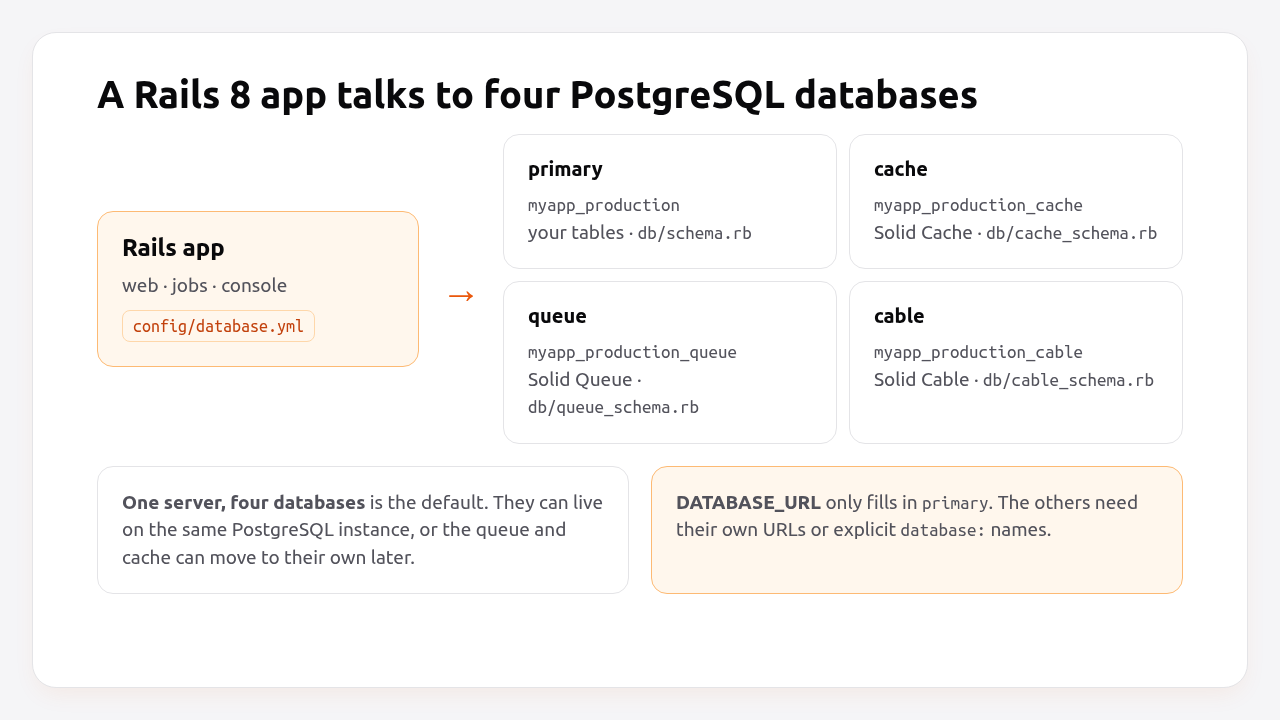
| Database | Used by | Schema file | Migrations |
|---|---|---|---|
primary |
Your models | db/schema.rb |
db/migrate |
cache |
Solid Cache | db/cache_schema.rb |
db/cache_migrate |
queue |
Solid Queue | db/queue_schema.rb |
db/queue_migrate |
cable |
Solid Cable | db/cable_schema.rb |
db/cable_migrate |
In development and test, the generated config uses a single database per environment, because Solid Queue and Solid Cache aren’t used there by default. The split only appears in production, which is exactly why it surprises people on their first deploy.
Prerequisites
- Ruby 3.3+ and Rails 8.0/8.1 (
gem install rails). - PostgreSQL 16, 17 or 18 client libraries (
libpq) so thepggem can compile. - Docker, Homebrew or apt, depending on how you want to run PostgreSQL locally.
Step 1: Install PostgreSQL locally
Pick one way to run PostgreSQL on your machine. Docker keeps it isolated and makes the version explicit; a native install is slightly faster and survives reboots without extra steps.
Docker (any OS):
docker run --name pg17 -d \
  -e POSTGRES_PASSWORD=postgres \
  -p 5432:5432 \
  -v pg17data:/var/lib/postgresql/data \
  postgres:17
macOS (Homebrew):
brew install postgresql@17
brew services start postgresql@17
echo 'export PATH="/opt/homebrew/opt/postgresql@17/bin:$PATH"' >> ~/.zshrc
Debian / Ubuntu:
sudo apt install -y postgresql postgresql-contrib libpq-dev
sudo -u postgres createuser --superuser "$USER"
The last command creates a PostgreSQL role with your Unix username, so local connections over the socket work without a password. That’s convenient for development only.
Step 2: Create or switch the Rails app to PostgreSQL
For a new app, choose PostgreSQL when you generate it:
rails new myapp -d postgresql
cd myapp
For an existing SQLite or MySQL app, Rails can rewrite the configuration and Gemfile for you:
bin/rails db:system:change --to=postgresql
bundle install
That command changes config/database.yml, the Gemfile (pg instead of sqlite3) and the Dockerfile packages. It doesn’t move your data. For that, export from the old database and import into PostgreSQL, or use a tool like pgloader.
Step 3: Configure database.yml for development and production
Use DATABASE_URL everywhere it’s available, and keep database.yml small. Here’s a complete file for a Rails 8 app that works with Docker locally and with any platform in production.
# config/database.yml
default: &default
  adapter: postgresql
  encoding: unicode
  pool: <%= ENV.fetch("RAILS_MAX_THREADS") { 3 } %>
  connect_timeout: 2
  variables:
    statement_timeout: <%= ENV.fetch("DB_STATEMENT_TIMEOUT", "5s") %>

development:
  <<: *default
  database: myapp_development
  # For Docker: postgres://postgres:postgres@localhost:5432
  url: <%= ENV["DATABASE_URL"] %>

test:
  <<: *default
  database: myapp_test
  url: <%= ENV["TEST_DATABASE_URL"] %>

<%
  # Derive sibling database names from DATABASE_URL: .../myapp_production -> .../myapp_production_cache
  sibling = ->(suffix) { ENV["DATABASE_URL"].to_s.sub(%r{/([^/?]+)(\?|$)}, "/\\1_#{suffix}\\2") }
%>
production:
  primary: &primary_production
    <<: *default
    url: <%= ENV["DATABASE_URL"] %>
  cache:
    <<: *primary_production
    url: <%= ENV.fetch("CACHE_DATABASE_URL") { sibling.call("cache") } %>
    migrations_paths: db/cache_migrate
  queue:
    <<: *primary_production
    url: <%= ENV.fetch("QUEUE_DATABASE_URL") { sibling.call("queue") } %>
    migrations_paths: db/queue_migrate
  cable:
    <<: *primary_production
    url: <%= ENV.fetch("CABLE_DATABASE_URL") { sibling.call("cable") } %>
    migrations_paths: db/cable_migrate
How this resolves:
- Development uses
myapp_developmenton the local socket, unlessDATABASE_URLis set (for example to the Docker container). When both are present, the URL’s connection details are combined with the keys in the file. - Production reads
DATABASE_URLforprimary. The other three databases use their own*_DATABASE_URLif set, and otherwise the same server and credentials with a suffixed database name. variablessetsstatement_timeouton every connection, as explained in the Rails request timeout guide.
Then create everything:
bin/rails db:prepare
db:prepare is idempotent. It creates databases that don’t exist and loads their schema, and on existing databases it runs pending migrations. Run with RAILS_ENV=production to create all four production databases.
Pro Tip: Managed plans with a single database per add-on, like Heroku Postgres Essential, don’t let you create extra databases. Either give each one its own add-on and *_DATABASE_URL, or keep everything in the primary database: copy db/queue_schema.rb (and the cache and cable schemas) into regular migrations, remove the cache, queue and cable entries, and drop the connects_to settings, as the Solid Queue README describes for single-database setups. The second is simpler for small apps.
Step 4: Create roles with least privilege
In production, the app should connect as a dedicated role that owns its own databases and nothing else, never as the postgres superuser.
On a server you manage:
-- psql as the postgres superuser
CREATE ROLE myapp LOGIN PASSWORD 'use-a-long-random-password';

CREATE DATABASE myapp_production       OWNER myapp;
CREATE DATABASE myapp_production_cache OWNER myapp;
CREATE DATABASE myapp_production_queue OWNER myapp;
CREATE DATABASE myapp_production_cable OWNER myapp;

-- Optional: a read-only role for reporting tools
CREATE ROLE myapp_readonly LOGIN PASSWORD 'another-long-random-password';
\c myapp_production
GRANT CONNECT ON DATABASE myapp_production TO myapp_readonly;
GRANT USAGE ON SCHEMA public TO myapp_readonly;
GRANT SELECT ON ALL TABLES IN SCHEMA public TO myapp_readonly;
ALTER DEFAULT PRIVILEGES FOR ROLE myapp IN SCHEMA public GRANT SELECT ON TABLES TO myapp_readonly;
Owning the databases lets the myapp role run migrations. The read-only role is what you give to a BI tool or a support dashboard, so a mistake there can never change data.
On managed platforms, the provider creates the role and database for you, and DATABASE_URL already contains them.
Step 5: Extensions, UUID keys and schema format
Enable PostgreSQL extensions in migrations, so every environment, including CI and new developers’ laptops, gets them automatically.
# db/migrate/20261025090000_enable_extensions.rb
class EnableExtensions < ActiveRecord::Migration[8.0]
  def change
    enable_extension "citext"    # case-insensitive text, great for emails
    enable_extension "pg_trgm"   # trigram indexes for fast ILIKE / similarity search
    enable_extension "unaccent"  # accent-insensitive search
  end
end
# db/migrate/20261025090100_create_users.rb
class CreateUsers < ActiveRecord::Migration[8.0]
  def change
    create_table :users do |t|
      t.citext :email, null: false
      t.string :name
      t.timestamps
    end
    add_index :users, :email, unique: true
  end
end
UUID primary keys. If you want UUIDs instead of integer IDs, for example for public URLs that shouldn’t be guessable, configure the generators once:
# config/initializers/generators.rb
Rails.application.config.generators do |g|
  g.orm :active_record, primary_key_type: :uuid
end
New tables then use id: :uuid with gen_random_uuid(), built into PostgreSQL 13+. Random UUIDs scatter inserts across the index, which is slower for very large tables. PostgreSQL 18 adds a built-in uuidv7() function that generates time-ordered UUIDs and avoids that.
Schema format. db/schema.rb covers tables, indexes, foreign keys, check constraints and enums. Switch to structure.sql only if you use database features schema.rb can’t express, like triggers, functions, views or row-level security:
# config/application.rb
config.active_record.schema_format = :sql
Step 6: Secure the production connection
In production, connect over a private network when the platform offers one, and require TLS whenever the connection crosses a network you don’t control.
Add sslmode to the URL:
# Encrypted, without certificate verification (common default on managed platforms)
DATABASE_URL="postgres://myapp:secret@db.example.com:5432/myapp_production?sslmode=require"

# Encrypted and verified against the provider's CA certificate
DATABASE_URL="postgres://myapp:secret@db.example.com:5432/myapp_production?sslmode=verify-full&sslrootcert=/rails/config/db-ca.pem"
require protects against eavesdropping. verify-full also protects against someone impersonating the database server, so use it when your provider publishes a CA certificate.
Keep the password out of the repository. Set DATABASE_URL through your platform’s secret store, as described in how to manage environment variables in Rails. Size the pool to your threads, using the arithmetic from the connection pool guide.
Step 7: Verify it works
Check that Rails connects to the server and version you expect, that all production databases exist, and that the connection is encrypted.
bin/rails runner 'puts ActiveRecord::Base.connection.select_value("SELECT version()")'
# PostgreSQL 17.6 on x86_64-pc-linux-gnu ...

bin/rails db:migrate:status
RAILS_ENV=production bin/rails runner '
  ActiveRecord::Base.configurations.configs_for(env_name: "production").each do |c|
    ActiveRecord::Base.establish_connection(c)
    puts "#{c.name}: #{ActiveRecord::Base.connection.current_database}"
  end'
# primary: myapp_production
# cache: myapp_production_cache
# queue: myapp_production_queue
# cable: myapp_production_cable
Confirm TLS from the database side:
SELECT datname, usename, ssl, version
FROM pg_stat_ssl JOIN pg_stat_activity USING (pid)
WHERE usename = 'myapp';
-- ssl = t for every application connection
How Heroku, Render, Fly.io, Upsun and Enkihost provide PostgreSQL to Rails
All five platforms create the database and give Rails a connection string, but they hand it over differently, and they differ in whether one add-on can hold Rails 8’s four databases.
| Platform | How you create it | How Rails gets the URL | Multiple databases per instance | TLS |
|---|---|---|---|---|
| Heroku | heroku addons:create heroku-postgresql:essential-0 |
DATABASE_URL config var |
Essential: no (one database per add-on); Standard+: yes | Required |
| Render | databases: in render.yaml or the dashboard |
fromDatabase → connectionString |
Yes, create more on the same instance | Internal URL on the private network; external URL with TLS |
| Fly.io | fly mpg create, or fly launch offers it |
DATABASE_URL secret set on attach |
Yes | Private network (WireGuard) |
| Upsun | services + relationships in .upsun/config.yaml |
Relationship variables (POSTGRESQL_HOST, …); compose DATABASE_URL in .environment |
Yes, with endpoints per schema | Internal network |
| Kamal 2 | postgres accessory, or an external managed database |
DATABASE_URL in env.secret |
Yes | Your configuration |
| Enkihost | Included in Ignite and Blaze; enable it for the app in the dashboard | DATABASE_URL, injected at deploy |
Ignite: one PostgreSQL; Blaze: five | Internal network |
On Upsun, the .environment file is where you build DATABASE_URL from the relationship variables:
# .environment (Upsun)
export DATABASE_URL="postgresql://${POSTGRESQL_USERNAME}:${POSTGRESQL_PASSWORD}@${POSTGRESQL_HOST}:${POSTGRESQL_PORT}/${POSTGRESQL_PATH}"
On Render, wire it in the Blueprint:
# render.yaml
databases:
  - name: myapp-db
    plan: basic-1gb
    postgresMajorVersion: "17"

services:
  - type: web
    name: myapp
    runtime: ruby
    buildCommand: bundle install && bin/rails assets:precompile
    preDeployCommand: bin/rails db:prepare
    startCommand: bundle exec puma -C config/puma.rb
    envVars:
      - key: DATABASE_URL
        fromDatabase:
          name: myapp-db
          property: connectionString
Enkihost’s included PostgreSQL injects DATABASE_URL in the same way, so the database.yml above works there without changes. The managed vs self-hosted trade-offs are covered in managed PostgreSQL vs self-hosted.
Troubleshooting Rails PostgreSQL errors
connection to server on socket "/var/run/postgresql/.s.PGSQL.5432" failed
PG::ConnectionBad: connection to server on socket "/var/run/postgresql/.s.PGSQL.5432" failed: No such file or directory
  Is the server running locally and accepting connections on that socket?
Rails is trying the local socket because no host is configured, but PostgreSQL isn’t running locally, or it runs in Docker. Start the server, or set DATABASE_URL=postgres://postgres:postgres@localhost:5432 to use TCP.
FATAL: role "albert" does not exist
PG::ConnectionBad: connection to server on socket "/tmp/.s.PGSQL.5432" failed: FATAL: role "albert" does not exist
Without a username, PostgreSQL uses your OS username. Create the role (createuser --superuser albert on a dev machine) or set username/password or a URL.
password authentication failed for user
PG::ConnectionBad: FATAL: password authentication failed for user "myapp"
The password is wrong, or it contains characters that break the URL. URL-encode special characters in DATABASE_URL (@ becomes %40, / becomes %2F), or use separate username/password keys.
ActiveRecord::NoDatabaseError
ActiveRecord::NoDatabaseError: We could not find your database: myapp_development.
Available database configurations can be found in config/database.yml.
The server is reachable but the database doesn’t exist yet. Run bin/rails db:prepare (or db:create).
relation "solid_queue_jobs" does not exist
ActiveRecord::StatementInvalid: PG::UndefinedTable: ERROR: relation "solid_queue_jobs" does not exist
The queue database exists but its schema wasn’t loaded. That’s typical when a deploy ran db:migrate instead of db:prepare, or when the queue config points at the wrong database. Run RAILS_ENV=production bin/rails db:prepare.
permission denied to create extension
PG::InsufficientPrivilege: ERROR: permission denied to create extension "pg_trgm"
The role isn’t allowed to create that extension. On managed platforms, check the provider’s list of supported extensions; most allow citext, pg_trgm, unaccent and pgcrypto. On your own server, create the extension once as a superuser, or make the app role the database owner (PostgreSQL 13+ allows owners to create “trusted” extensions).
pg gem fails to install
Can't find the 'libpq-fe.h header
*** extconf.rb failed ***
Install the client headers: sudo apt install libpq-dev on Debian/Ubuntu, or brew install libpq on macOS and then bundle config build.pg --with-pg-config=$(brew --prefix libpq)/bin/pg_config.
Author Perspective: boring database setup is a feature
I like database setups that a new developer can understand in five minutes: one database.yml that reads URLs, one bin/rails db:prepare, extensions in migrations, and a dedicated role in production. The Rails 8 move to separate queue, cache and cable databases is a good change, but it caught me out on my first deploy, because the platform gave me one DATABASE_URL and Rails wanted four databases. Deriving the sibling names from that URL, with an explicit override per database, has worked everywhere I’ve deployed since, from Heroku to a single Debian server.
PostgreSQL for Rails on Enkihost
On Enkihost, PostgreSQL is included in the Ignite and Blaze plans and enabled per app, and the Rails side stays exactly as described here:
- PostgreSQL add-on that injects
DATABASE_URL, so the productiondatabase.ymlabove, with Solid Queue, Solid Cache and Solid Cable, works without editing. - Redis add-on that injects
REDIS_URL, if you’d rather run Sidekiq or a Redis cache next to PostgreSQL. - Zero-downtime deploys, with
db:prepareand expand-and-contract migrations keeping the schema compatible during the switch. - Per-app resource isolation, so your connection pool and queries run on resources allocated to your app.
Rails and Sinatra apps run on Ignite (9 EUR per month after a 14-day free trial, with PostgreSQL and Redis included) or Blaze (29 EUR per month, with high availability and autoscaling). The free Spark plan is for Jekyll sites. See enkihost.com.
FAQ
How do I switch a Rails app from SQLite to PostgreSQL?
Run bin/rails db:system:change –to=postgresql, then bundle install. That updates database.yml, the Gemfile and the Dockerfile packages. It does not migrate data, so export the existing data and import it into PostgreSQL separately, for example with pgloader or a custom script.
What does DATABASE_URL do in Rails?
DATABASE_URL holds the connection details for the primary database as a single URL. Rails merges it with the configuration in database.yml, and it is how most hosting platforms pass database credentials to the app. In multi-database setups, the other databases need their own URLs or explicit settings.
Why does Rails 8 create four databases in production?
Rails 8 ships Solid Cache, Solid Queue and Solid Cable as defaults, and gives each its own database so cache writes, job polling and cable messages don’t compete with application tables for locks and I/O. All four can live on one PostgreSQL server.
Should I use UUIDs or integer IDs in Rails with PostgreSQL?
Integer IDs are smaller and faster to index, and they are fine for most tables. Use UUIDs when IDs are exposed publicly and shouldn’t be guessable, or when records are created in several systems. On PostgreSQL 18, time-ordered UUIDv7 values reduce the index performance cost of random UUIDs.
Which PostgreSQL version should I use with Rails?
Use the newest major version your hosting provider supports, currently PostgreSQL 17 or 18. Rails 8 supports all maintained PostgreSQL versions. Keep development, CI and production on the same major version to avoid surprises with features and query plans.
Sources
- Configuring Rails Applications: configuring a database — Rails Guides
- Multiple Databases with Active Record — Rails Guides
- Active Record and PostgreSQL — Rails Guides
- ged/ruby-pg — GitHub
- Database Connection Control: sslmode — PostgreSQL Docs
- UUID functions: uuidv7 — PostgreSQL 18 Docs
- Heroku Postgres — Heroku Dev Center
- Render Postgres — Render Docs
- Fly.io Managed Postgres — Fly Docs
- PostgreSQL service — Upsun Docs