How to Manage Environment Variables in Rails: dotenv, ENV.fetch, Validation and Platform Secrets

To manage environment variables in Rails well, keep deploy-specific settings (database URLs, API hosts, thread counts, feature flags) in ENV, read them through one typed configuration object with ENV.fetch, validate the required ones when the app boots, and set them through your platform’s secret store, never in git. Use dotenv only for local development. Most configuration bugs in production are a missing variable that nobody noticed until a code path used it, or a "false" string that Ruby treats as true. This How-To shows a setup that catches both, with the commands for Heroku, Render, Fly.io, Upsun and Kamal.
TL;DR
- Use
ENVfor values that differ between deploy targets or are injected by the platform (DATABASE_URL,REDIS_URL,RAILS_MAX_THREADS). Use encrypted credentials for secrets you want versioned in git.- Read variables with
ENV.fetch("NAME")so a missing one raises immediately, and parse booleans and integers explicitly.ENVvalues are always strings, and"false"is truthy.- Put all reads in one
AppConfigmodule and validate the required variables at boot, skipping validation whenSECRET_KEY_BASE_DUMMYis set during asset builds.- Use
dotenvfor development and test only. Commit.env.exampleand never commit.env.- Changing a variable restarts the app on Heroku and Fly.io. Build-time and runtime variables are different things, so never pass secrets as Docker build args.
Table of Contents
- Should I use environment variables or Rails credentials?
- Prerequisites
- Step 1: Load variables locally with dotenv
- Step 2: Read variables through one typed config object
- Step 3: Validate required variables at boot
- Step 4: Set variables in production
- Step 5: Keep build-time and runtime variables apart
- Step 6: Verify it works
- How Heroku, Render, Fly.io, Upsun and Enkihost manage environment variables
- Troubleshooting environment variables in Rails
- Author Perspective: configuration is code you can’t see
- Environment variables on Enkihost
- FAQ
- Sources
Should I use environment variables or Rails credentials?
Use environment variables for anything the platform injects or that changes between deploy targets, and Rails encrypted credentials for secrets you want versioned, reviewed and encrypted in the repository. Many apps use both, and that’s fine as long as each setting has exactly one home.
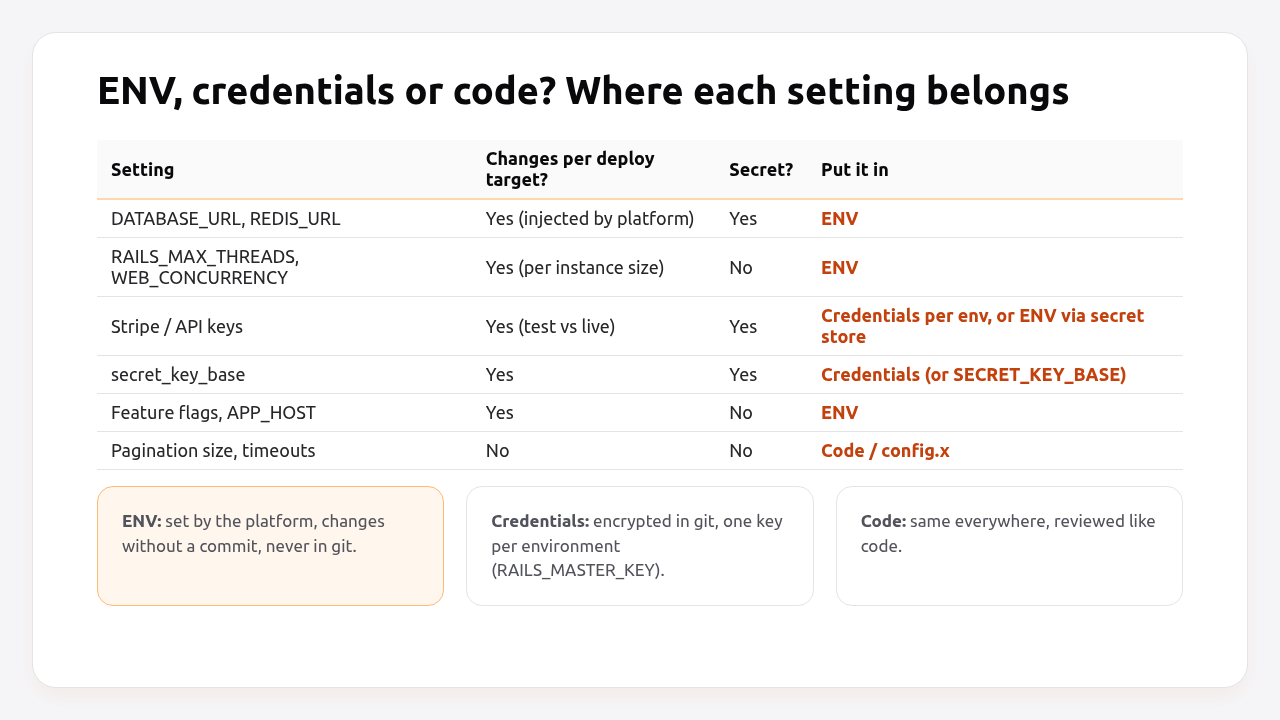
| Environment variables | Encrypted credentials | Code / config.x |
|
|---|---|---|---|
| Where it lives | Platform, shell, secret manager | config/credentials/*.yml.enc in git |
Ruby files in git |
| Change without a deploy | Yes (restart) | No | No |
| Versioned and reviewable | No | Yes, encrypted | Yes |
| Good for | URLs injected by add-ons, thread counts, hosts, feature flags | API keys, secret_key_base, signing keys |
Constants that are the same everywhere |
| Main risk | Missing or mistyped in one environment | Lost key, key shared too widely | Secrets committed in plain text |
The rest of this guide is about ENV. Credentials get their own guide later this month.
Pro Tip: Rails 8.2, still in development at the time of writing, adds Rails.app.creds, which looks a key up in ENV first and falls back to encrypted credentials. The AppConfig pattern below gives you the same “one place to read config” today.
Prerequisites
- Rails 7.1+ (examples use Rails 8.0/8.1 and Ruby 3.3).
- The
dotenvgem (3.x) for development and test. - Access to your platform’s dashboard or CLI, or a Kamal setup with
.kamal/secrets.
Step 1: Load variables locally with dotenv
dotenv loads variables from .env files into ENV when Rails boots in development and test. Since version 3, the dotenv gem includes the Rails integration, so dotenv-rails isn’t needed.
# Gemfile
group :development, :test do
  gem "dotenv"
end
Files are loaded in this order, and the first one that sets a variable wins:
| File | Commit to git? | Purpose |
|---|---|---|
.env.development.local / .env.test.local |
No | Your personal overrides per environment |
.env.local |
No | Your personal overrides (not loaded in test) |
.env.development / .env.test |
Yes, if no secrets | Shared defaults per environment |
.env |
No | Shared local defaults |
Commit an example file that documents every variable, with safe placeholder values:
# .env.example — copy to .env and fill in
APP_HOST=localhost:3000
DATABASE_URL=postgres://postgres:postgres@localhost:5432/myapp_development
REDIS_URL=redis://localhost:6379/0
STRIPE_SECRET_KEY=sk_test_replace_me
SMTP_PASSWORD=
FEATURE_NEW_CHECKOUT=false
RAILS_MAX_THREADS=3
# .gitignore
/.env
/.env.*
!/.env.example
Variables that are already set in the real environment take precedence over .env files, so a shell export or a CI variable always wins over the file.
Step 2: Read variables through one typed config object
Read every variable in one place, convert it to the right type, and use that object everywhere else. Scattered ENV["X"] calls hide what the app depends on, and they return strings even when you meant a number or a boolean.
# config/initializers/00_app_config.rb
module AppConfig
  BOOLEAN = ActiveModel::Type::Boolean.new

  module_function

  # Required string: raises KeyError if missing.
  def fetch(name) = ENV.fetch(name)

  def string(name, default:) = ENV.fetch(name, default)
  def integer(name, default:) = Integer(ENV.fetch(name, default.to_s))
  def boolean(name, default:) = BOOLEAN.cast(ENV.fetch(name, default.to_s))

  # Typed accessors used by the app.
  def app_host = string("APP_HOST", default: "localhost:3000")
  def stripe_secret_key = fetch("STRIPE_SECRET_KEY")
  def smtp_password = fetch("SMTP_PASSWORD")
  def new_checkout? = boolean("FEATURE_NEW_CHECKOUT", default: false)
  def max_threads = integer("RAILS_MAX_THREADS", default: 3)
end
The file name starts with 00_ so it loads before other initializers that may use it. Then use it in configuration and code:
# config/environments/production.rb
Rails.application.configure do
  config.action_mailer.default_url_options = { host: AppConfig.app_host, protocol: "https" }
  config.hosts << AppConfig.app_host
end
# config/initializers/stripe.rb
Stripe.api_key = AppConfig.stripe_secret_key unless ENV["SECRET_KEY_BASE_DUMMY"]
<%# app/views/carts/show.html.erb %>
<% if AppConfig.new_checkout? %>
  <%= render "checkouts/new_flow" %>
<% end %>
Why the explicit types matter:
ENV["FEATURE_NEW_CHECKOUT"] = "false"
!!ENV["FEATURE_NEW_CHECKOUT"]                        # => true  (any non-nil string is truthy)
AppConfig.boolean("FEATURE_NEW_CHECKOUT", default: false) # => false
ActiveModel::Type::Boolean treats "false", "0", "off", "f" and "" as false, the same rules Rails uses for form checkboxes. Integer(...) raises on "three" instead of quietly returning 0 like "three".to_i.
Step 3: Validate required variables at boot
Check every required variable when the app boots in production, and fail with one clear message listing all missing names. A deploy that fails health checks because of a missing variable is far better than a checkout page that fails three days later.
# config/initializers/00_app_config.rb (continued)
module AppConfig
  REQUIRED_IN_PRODUCTION = %w[
    DATABASE_URL
    APP_HOST
    STRIPE_SECRET_KEY
    SMTP_PASSWORD
  ].freeze

  def self.validate!
    missing = REQUIRED_IN_PRODUCTION.select { |name| ENV[name].blank? }
    return if missing.empty?

    raise KeyError, "missing required config: #{missing.join(', ')}"
  end
end

# Skip during `assets:precompile`, which boots the app without real secrets.
AppConfig.validate! if Rails.env.production? && ENV["SECRET_KEY_BASE_DUMMY"].blank?
Because the check runs during boot, a release with a missing variable never passes the /up health check, and the old release keeps serving. That interaction is explained in the Rails health check guide. The SECRET_KEY_BASE_DUMMY guard keeps assets:precompile working in the Docker build, which deliberately runs without secrets, as covered in the assets precompile guide.
Step 4: Set variables in production
Set production variables through the platform’s own secret store, from the CLI or dashboard, never from a file committed to the repository.
Heroku:
heroku config:set STRIPE_SECRET_KEY=sk_live_xxx SMTP_PASSWORD=xxx APP_HOST=example.com -a myapp
heroku config -a myapp
Render: set variables on the service, or in an Environment Group shared by web and worker services. In render.yaml, reference the group and keep secret values out of the file:
# render.yaml
envVarGroups:
  - name: myapp-shared
    envVars:
      - key: APP_HOST
        value: example.com
      - key: STRIPE_SECRET_KEY
        sync: false        # set the value in the dashboard, never in git

services:
  - type: web
    name: myapp-web
    runtime: ruby
    buildCommand: bundle install && bin/rails assets:precompile
    startCommand: bundle exec puma -C config/puma.rb
    envVars:
      - fromGroup: myapp-shared
      - key: DATABASE_URL
        fromDatabase:
          name: myapp-db
          property: connectionString
Fly.io: non-secret values go in fly.toml, secrets go through fly secrets:
# fly.toml
[env]
  APP_HOST = "example.com"
  RAILS_MAX_THREADS = "3"
fly secrets set STRIPE_SECRET_KEY=sk_live_xxx SMTP_PASSWORD=xxx
fly secrets list   # shows names and digests, never values
Upsun: variables prefixed with env: are exposed as environment variables. Mark secrets as sensitive and hide them from the build:
upsun variable:create --level environment --environment main \
  --name env:STRIPE_SECRET_KEY --value sk_live_xxx \
  --sensitive true --visible-build false --visible-runtime true
Kamal 2: declare variable names in config/deploy.yml and resolve the values locally in .kamal/secrets, optionally from a password manager:
# config/deploy.yml
env:
  clear:
    APP_HOST: example.com
    RAILS_MAX_THREADS: 3
  secret:
    - RAILS_MASTER_KEY
    - DATABASE_URL
    - STRIPE_SECRET_KEY
    - SMTP_PASSWORD
# .kamal/secrets (committed: contains only commands and references, no values)
SECRETS=$(kamal secrets fetch --adapter 1password --account my-team --from Production/myapp RAILS_MASTER_KEY STRIPE_SECRET_KEY SMTP_PASSWORD DATABASE_URL)

RAILS_MASTER_KEY=$(kamal secrets extract RAILS_MASTER_KEY ${SECRETS})
STRIPE_SECRET_KEY=$(kamal secrets extract STRIPE_SECRET_KEY ${SECRETS})
SMTP_PASSWORD=$(kamal secrets extract SMTP_PASSWORD ${SECRETS})
DATABASE_URL=$(kamal secrets extract DATABASE_URL ${SECRETS})
Kamal also ships adapters for Bitwarden, LastPass, AWS Secrets Manager, GCP Secret Manager and Doppler. The full Kamal deployment is in minimal Rails deployments with Kamal 2 and Thruster, and per-environment destinations are in the staging environment guide.
Step 5: Keep build-time and runtime variables apart
Runtime variables are available when the app runs. Build-time variables are available while the image or slug is built, and they can end up stored in it. Secrets belong only at runtime.
| Build time | Runtime | |
|---|---|---|
| Used for | bundle install from private gem servers, assets:precompile |
Everything the running app reads |
| Rails needs secrets? | No, with SECRET_KEY_BASE_DUMMY=1 |
Yes |
| Docker | ARG / --build-arg, visible in docker history |
-e / env at docker run |
| Safe for secrets | Only with BuildKit secret mounts | Yes |
If a build genuinely needs a secret, such as a token for a private gem server, use a BuildKit secret mount so it’s never written to a layer:
# Dockerfile (build stage)
RUN --mount=type=secret,id=BUNDLE_GITHUB__COM \
    BUNDLE_GITHUB__COM="$(cat /run/secrets/BUNDLE_GITHUB__COM)" bundle install
docker build --secret id=BUNDLE_GITHUB__COM,env=BUNDLE_GITHUB__COM -t myapp .
Render turns service environment variables into Docker build arguments automatically, so on Render, don’t reference secret variables in ARG lines. Use secret files instead.
Step 6: Verify it works
Confirm that the running app sees the variables you expect, with the right types, and that a missing one stops the boot.
# Locally: missing variable fails fast in production mode
# (dotenv doesn't load in production mode, so set the others explicitly)
env -u STRIPE_SECRET_KEY RAILS_ENV=production DATABASE_URL=postgres://localhost/myapp_development \
  APP_HOST=localhost SMTP_PASSWORD=x bin/rails runner 'puts :booted'
# KeyError: missing required config: STRIPE_SECRET_KEY

# Types are parsed, not strings
FEATURE_NEW_CHECKOUT=false bin/rails runner 'p AppConfig.new_checkout?'
# false
In production, check names without printing values:
kamal app exec --reuse 'bin/rails runner "puts AppConfig::REQUIRED_IN_PRODUCTION.map { |k| [k, ENV[k].present?] }.to_h"'
# {"DATABASE_URL"=>true, "APP_HOST"=>true, "STRIPE_SECRET_KEY"=>true, "SMTP_PASSWORD"=>true}
Never print secret values in a shared terminal or CI log. Check for presence, length or a prefix (sk_live_), not the value itself.
How Heroku, Render, Fly.io, Upsun and Enkihost manage environment variables
Heroku, Render, Fly.io and Upsun store variables encrypted, inject them at runtime and restart or redeploy the app when they change. On Enkihost, a change applies on the next deploy. They differ in grouping, build-time visibility and how changes are applied.
| Platform | Where set | Shared across services | Visible at build | Effect of a change |
|---|---|---|---|---|
| Heroku | Config vars (heroku config:set) |
Per app; add-ons inject their own (DATABASE_URL, REDIS_URL) |
Yes, during slug compilation | New release, dynos restart |
| Render | Service env vars, Environment Groups | Yes, via groups | Yes (Docker: as build args) | Redeploy of the service |
| Fly.io | fly secrets and [env] in fly.toml |
Per app | Secrets: no (use build secrets) | Machines restart (--stage to defer) |
| Upsun | upsun variable:create, env: prefix |
Project and environment levels, inherited by child environments | Configurable (--visible-build) |
Redeploy of the environment |
| Kamal 2 | env in deploy.yml + .kamal/secrets |
Per destination | Only if passed as build args | Next kamal deploy or kamal env push |
| Enkihost | Dashboard environment variables | Per app; DATABASE_URL and REDIS_URL injected |
Not documented | Applied on the next deploy |
Upsun’s inheritance is the detail to watch: variables set at the project level are visible to every environment, including preview branches, unless overridden. Keep live payment keys at the environment level on main only.
Enkihost’s included PostgreSQL and Redis inject DATABASE_URL and REDIS_URL, the same names Heroku and most other platforms use, so database.yml and the AppConfig pattern above work unchanged.
Troubleshooting environment variables in Rails
KeyError: key not found: "STRIPE_SECRET_KEY"
KeyError: key not found: "STRIPE_SECRET_KEY"
  config/initializers/stripe.rb:1:in `<main>'
ENV.fetch is doing its job: the variable isn’t set where the process runs. Check the right process type. Workers need the same variables as web. Check the right environment (staging vs production), and remember that Kamal reads .kamal/secrets on the machine you deploy from.
A feature flag set to false is still on
ENV["FLAG"] returns the string "false", which is truthy in Ruby. Parse it with ActiveModel::Type::Boolean.new.cast, as in AppConfig.boolean.
The variable changed but the app still uses the old value
Environment variables are read when the process starts. On Kamal, run kamal deploy (or kamal env push followed by kamal app boot). On Fly.io, fly secrets set --stage doesn’t restart machines until the next deploy. Values memoized in a constant at boot also need a restart.
Variable works at runtime but not during assets:precompile
The build runs in a different environment from the running app. Make initializers tolerant of missing secrets during the build (unless ENV["SECRET_KEY_BASE_DUMMY"]), or provide non-secret build-time values explicitly. Never copy runtime secrets into build arguments.
Values have quotes or trailing spaces
STRIPE_SECRET_KEY="sk_live_xxx" # quotes become part of the value in some tools
Docker --env-file and some dashboards keep quotes literally. Paste raw values without quotes, and strip whitespace when reading if values come from copy-paste: ENV.fetch(name).strip.
.env was committed by mistake
Remove it from the repository (git rm --cached .env), add it to .gitignore, and rotate every secret it contained. Removing it from history doesn’t help if it was ever pushed, because it may already be cached or forked.
Author Perspective: configuration is code you can’t see
Environment variables are the part of an app that no code review ever sees, which is why I treat them with more suspicion than code. The AppConfig module with a REQUIRED_IN_PRODUCTION list has paid for itself on every project I’ve used it on. It turns “it works on staging but not in production” into a failed deploy with a precise message, and new developers read one file to learn what the app needs. The other habit I’d recommend is boring but effective: every time you add a variable, add it to .env.example in the same commit. Six months later, that file is the only documentation anyone will trust.
Environment variables on Enkihost
Managing configuration is easier when the platform injects the infrastructure variables for you, and you only handle your own. On Enkihost:
- PostgreSQL and Redis add-ons inject
DATABASE_URLandREDIS_URL, so infrastructure connection details never need to be copied by hand or stored in the repository. - Zero-downtime deploys: with boot-time validation, a release with a missing variable fails its checks while the current release keeps serving.
- Per-app resource isolation: thread and worker counts set through
RAILS_MAX_THREADSandWEB_CONCURRENCYapply to resources allocated to your app alone. - Plans for Rails and Sinatra: Ignite at 9 EUR per month after a 14-day free trial, with PostgreSQL and Redis included, or Blaze at 29 EUR with high availability and autoscaling. The free Spark plan is for Jekyll sites.
See enkihost.com.
FAQ
Does Rails load .env files automatically?
No. Rails does not read .env files on its own. Add the dotenv gem to the development and test groups, and it loads .env files when Rails boots in those environments. In production, set variables through the platform or container runtime instead of files.
Should I use ENV or Rails credentials for API keys?
Either works, but pick one per key and be consistent. Credentials keep secrets encrypted and versioned in git, with one key per environment. Environment variables let you change a value without a commit, and suit values the platform injects. Many teams keep third-party API keys in credentials and infrastructure URLs in ENV.
Why is my boolean environment variable always true?
Environment variable values are always strings, and any non-empty string, including false, is truthy in Ruby. Convert the value with ActiveModel::Type::Boolean.new.cast, which treats false, 0, off and an empty string as false.
How do I share environment variables between web and worker processes?
Use your platform’s grouping feature: Render Environment Groups, Upsun project-level variables, the env section of Kamal’s deploy.yml, which applies to all roles, or config vars on a single Heroku app, which apply to every process type. Make sure workers get every variable the web process needs.
Are environment variables secure for secrets?
They are secure enough for most apps when set through a platform’s encrypted secret store, because they never touch the repository. Their weaknesses are that any code in the process can read them and that they can leak through error reports or debug output, so avoid printing them and keep the number of people with access small.
Sources
- Configuring Rails Applications — Rails Guides
- Rails::Application#config_for — Rails API
- Add Rails.app.creds for combined ENV and credentials lookup — rails/rails PR #56404
- bkeepers/dotenv — GitHub
- Configuration and Config Vars — Heroku Dev Center
- Environment Variables and Secrets — Render Docs
- Secrets and Fly Apps — Fly Docs
- Variables — Upsun Docs
- Kamal secrets and adapters — Kamal docs
- Build secrets — Docker Docs