Rails Caching Strategies: HTTP, Fragment, Low-Level and Which Cache Store to Use

The best Rails caching strategy is a layered one: let browsers and CDNs answer repeat requests with HTTP caching, cache rendered HTML with fragment and Russian doll caching, cache expensive data with Rails.cache.fetch, and let Rails’ per-request query cache handle the rest. Each layer avoids a different kind of work and expires in a different way, so choosing the right one for each page matters more than choosing the “fastest” cache store. This guide compares every Rails caching strategy, the cache stores behind them (Solid Cache, Redis, Memcached), how to invalidate safely, and which combination fits which kind of app.
TL;DR
- HTTP caching (
fresh_when,expires_in) is the cheapest layer: a304 Not Modifiedor a CDN hit skips rendering entirely.- Fragment caching with key-based expiration (
cache @record) is the workhorse for server-rendered pages. Russian doll nesting plustouch: truekeeps it correct.- Low-level caching (
Rails.cache.fetch) is for computed data and third-party API responses. Use versioned keys and a TTL.- Cache size often matters more than read speed: 37signals found Solid Cache reads about 40% slower than Redis, but a 6× larger cache cut Basecamp’s p95 from 375 ms to 225 ms.
- Prefer key-based expiration over deleting cache entries by hand. Stale-cache bugs nearly always come from manual invalidation.
Table of Contents
- What caching strategies does Rails offer?
- HTTP caching: let the browser and CDN do the work
- Fragment and Russian doll caching
- Low-level caching with Rails.cache.fetch
- Query cache, memoization and counter caches
- Which cache store should a Rails app use?
- How do you invalidate the Rails cache safely?
- How Heroku, Render, Fly.io, Upsun and Enkihost support Rails caching
- Which caching strategy fits your app?
- Author Perspective: cache the page people actually visit
- Caching on Enkihost
- FAQ
- Sources
What caching strategies does Rails offer?
Rails offers caching at five layers: HTTP responses (browser and CDN), rendered fragments, arbitrary data through Rails.cache, SQL results within a request, and in-process memoization. Each layer saves different work.
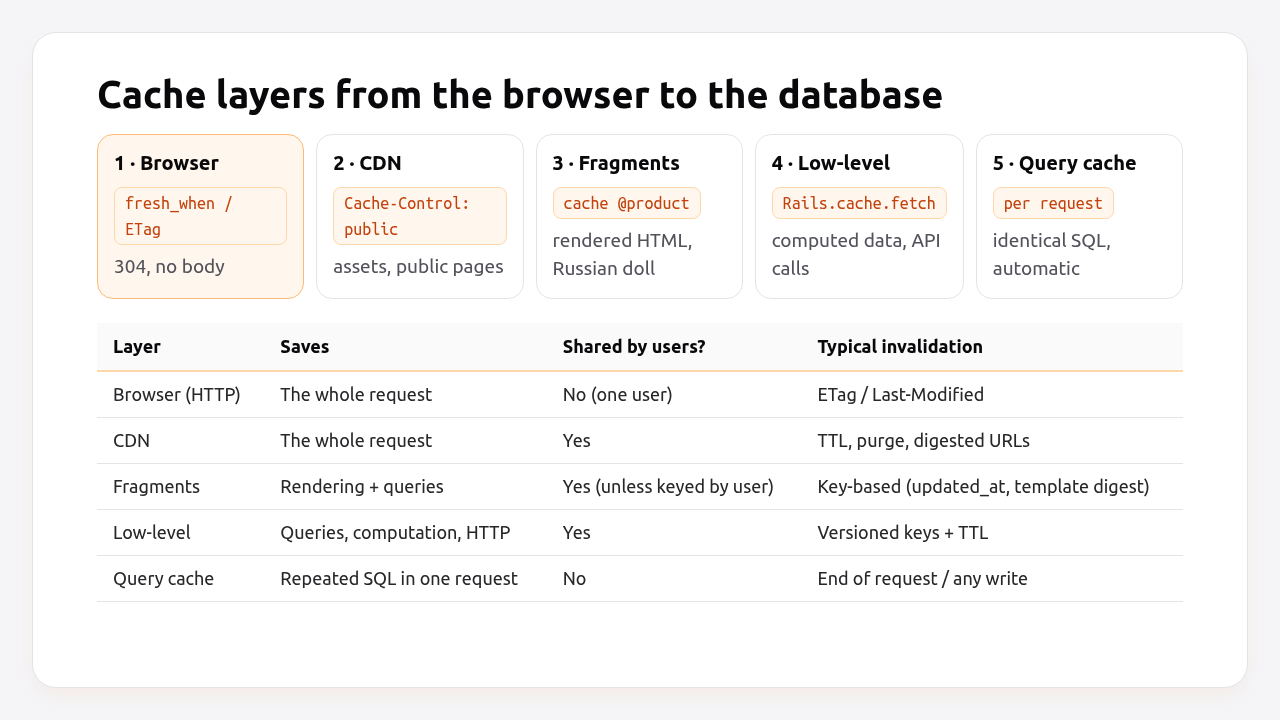
| Strategy | What it saves | Where it’s stored | Expires by | Best for |
|---|---|---|---|---|
HTTP conditional GET (fresh_when, stale?) |
Rendering and body transfer | Browser | ETag / Last-Modified | Show pages, APIs |
HTTP expiry (expires_in) + CDN |
The whole request reaching Rails | Browser, CDN | TTL, purge | Public pages, assets |
Fragment caching (cache) |
Rendering and the queries inside | Cache store | Key changes (record version + template digest) | Server-rendered views |
| Russian doll caching | Re-rendering unchanged children | Cache store | touch: true cascades |
Nested views |
Collection caching (cached: true) |
N cache round-trips | Cache store | Per item key | Lists |
Low-level (Rails.cache.fetch) |
Queries, computation, API calls | Cache store | Versioned key + TTL | Aggregates, external data |
| SQL query cache | Identical queries in one request | Process memory | End of request, any write | Automatic |
Memoization (@x ||=) |
Repeated work in one object | Object | Object lifetime | Per-request helpers |
| Counter caches | COUNT(*) queries |
Database column | Maintained on write | Counts on list pages |
Page and action caching were removed from Rails core in Rails 4 and live on as the actionpack-page_caching and actionpack-action_caching gems. HTTP caching with a CDN covers most of what page caching used to do.
HTTP caching: let the browser and CDN do the work
HTTP caching is the cheapest strategy because a cache hit never reaches Rails, or reaches it only long enough to answer 304 Not Modified.
Conditional GET compares an ETag or a Last-Modified date with what the browser already has:
# app/controllers/articles_controller.rb
def show
  @article = Article.find(params[:id])
  fresh_when @article, public: true
end
If the article hasn’t changed since the browser’s last request, Rails answers 304 Not Modified without rendering the view. With stale? you can skip expensive work only when needed:
def show
  @article = Article.find(params[:id])
  if stale?(@article)
    @related = RelatedArticles.for(@article)   # only computed on a cache miss
    render :show
  end
end
Expiry headers and a CDN let shared caches serve a response for a fixed time without asking Rails at all:
# app/controllers/pages_controller.rb
def pricing
  expires_in 10.minutes, public: true, stale_while_revalidate: 1.minute
end
Only mark responses public if they’re identical for every visitor. Anything with a logged-in user’s name, a CSRF token or a flash message must stay private. Assets are a special case: their digested filenames make a one-year immutable cache safe, as covered in the assets precompile guide.
Fragment and Russian doll caching
Fragment caching stores rendered HTML for part of a view, keyed by the record’s version and a digest of the template. When either changes, the key changes, and the old entry is never read again.
<%# app/views/projects/show.html.erb %>
<% cache @project do %>
  <h1><%= @project.name %></h1>

  <% cache [@project, "todo_lists"] do %>
    <%= render partial: "todo_lists/todo_list", collection: @project.todo_lists, cached: true %>
  <% end %>
<% end %>
# app/models/todo_list.rb
class TodoList < ApplicationRecord
  belongs_to :project, touch: true
  has_many :todos
end

# app/models/todo.rb
class Todo < ApplicationRecord
  belongs_to :todo_list, touch: true
end
When a single todo changes, touch: true updates its list’s and its project’s updated_at. The project and that list re-render. Every other list’s fragment is reused from the cache. That’s Russian doll caching: the outer dolls are rebuilt, the untouched inner dolls aren’t.
Pros and cons of fragment caching:
- ✅ Large savings on read-heavy pages, with correctness handled by keys.
- ✅ Template digests invalidate fragments automatically when you change a view.
- ❌
touch: trueadds writes, which can become a hotspot on very busy parent records. - ❌ Per-user content needs the user in the key (
cache [current_user, @project]), which lowers the hit rate.
Low-level caching with Rails.cache.fetch
Low-level caching stores any serializable value: computed aggregates, rendered JSON, or responses from slow third-party APIs.
# app/models/account.rb
def dashboard_stats
  Rails.cache.fetch([self, "dashboard_stats", "v2"], expires_in: 15.minutes, race_condition_ttl: 10.seconds) do
    {
      revenue_30d: invoices.paid.where(paid_at: 30.days.ago..).sum(:total_cents),
      active_users: users.where(last_seen_at: 7.days.ago..).count,
      open_tickets: tickets.open.count
    }
  end
end
The key includes the record (and its version), a name and a schema version ("v2"). Bump the version when you change the shape of the cached value, so old entries with the previous shape aren’t read by new code. race_condition_ttl prevents a stampede where many processes recompute the same expired key at once.
The production setup for a Redis-backed store, including timeouts and error handling, is in the Rails Redis caching guide.
Query cache, memoization and counter caches
These three need no cache store, and they’re often the quickest wins.
- The SQL query cache is on by default for every request and job. Identical
SELECTs return the in-memory result. It’s cleared after any write, so it never serves stale data within a request. You’ll see it asCACHE Product Loadin development logs. - Memoization (
@current_account ||= ...) avoids repeating work within one object or request. Never memoize at the class level across requests. That’s how memory leaks start, as covered in the memory leak guide. - Counter caches replace
COUNT(*)with a column that Rails maintains:
# db/migrate/20261024090000_add_comments_count_to_posts.rb
class AddCommentsCountToPosts < ActiveRecord::Migration[8.0]
  def change
    add_column :posts, :comments_count, :integer, default: 0, null: false
  end
end
# app/models/comment.rb
class Comment < ApplicationRecord
  belongs_to :post, counter_cache: true
end
bin/rails runner 'Post.find_each { |p| Post.reset_counters(p.id, :comments) }'
Which cache store should a Rails app use?
Use Solid Cache, the Rails 8 default, unless you have a specific reason not to: it needs no extra service and can hold a much larger cache for the money. Choose Redis or Memcached when you need the lowest read latency or a very high write rate.
| Store | Storage | Read latency | Cache size for the money | Shared across servers | Extra service | Notes |
|---|---|---|---|---|---|---|
:memory_store |
Process RAM | Fastest | Tiny, per process | No | No | Dev, single-process apps only |
:file_store |
Local disk | Fast | Medium, per server | No | No | Breaks with multiple servers |
:solid_cache_store |
SQL database (SSD) | ~1 ms-ish, slower than RAM | Very large, cheap | Yes | No | Rails 8 default, FIFO eviction |
:redis_cache_store |
RAM | Sub-millisecond | Limited by RAM | Yes | Yes | Needs allkeys-lfu eviction |
:mem_cache_store |
RAM | Sub-millisecond | Limited by RAM | Yes | Yes | Simple, LRU, no persistence |
The most useful real-world number here comes from 37signals, who moved Basecamp’s cache from Redis to Solid Cache. Reads got about 40% slower, but the cache became 6× larger on storage that’s 80% cheaper, and because far more fragments stayed cached, Basecamp’s 95th-percentile request duration fell from 375 ms to 225 ms. For fragment-heavy apps, hit rate beats raw speed.
Solid Cache’s defaults are a good start: entries older than two weeks (max_age) are removed, and you can cap max_size to stay within your disk budget:
# config/cache.yml
default: &default
  store_options:
    max_age: <%= 30.days.to_i %>
    max_size: <%= 2.gigabytes %>
    namespace: <%= Rails.env %>

production:
  database: cache
  <<: *default
Put the cache in its own database, as the Rails 8 generator does, so cache writes don’t compete with your application tables. That extra database also counts towards your connection total, as explained in the connection pool guide.
How do you invalidate the Rails cache safely?
Invalidate by changing the key, not by deleting entries. Key-based expiration means a cached value can never be stale for its key, because any change to the underlying data produces a new key.
| Invalidation method | How | Risk |
|---|---|---|
| Key-based (recommended) | Key includes cache_key_with_version, template digest, schema version |
Old entries linger until evicted (harmless) |
| TTL | expires_in: 15.minutes |
Data can be up to 15 minutes old |
| Touch cascades | belongs_to ..., touch: true |
Extra writes on parent records |
| Explicit delete | Rails.cache.delete(key) in callbacks |
Easy to miss a code path, leading to stale data |
| Global clear | Rails.cache.clear |
Cold cache, load spike on the database |
A few rules that prevent most stale-cache bugs:
- Include everything the output depends on in the key: the record, the current user if it’s personalised, the locale, and a version string for the data shape.
- Combine key-based expiration with a TTL for anything that depends on data you don’t control, like third-party APIs or exchange rates.
- Avoid
Rails.cache.clearin deploys. Template digests already handle view changes. Clearing everything at once sends every request to the database at the same moment. - Watch the hit rate. A sudden drop after a deploy usually means a key now includes something that changes on every request.
How Heroku, Render, Fly.io, Upsun and Enkihost support Rails caching
Every platform supports Rails’ cache stores. They differ in which managed store they offer and whether Solid Cache’s database can live alongside your primary one.
| Platform | Managed in-memory store | Solid Cache | CDN | Notes |
|---|---|---|---|---|
| Heroku | Heroku Key-Value Store; Memcached via add-ons (e.g. MemCachier) | On Heroku Postgres (a separate database needs another add-on) | Via add-ons | Key-Value Store defaults to noeviction; switch to allkeys-lfu for caches |
| Render | Render Key Value (Valkey) | On Render Postgres | Built-in for static sites; use a CDN for apps | Choose allkeys-lru at creation for caches |
| Fly.io | Upstash Redis (fly redis create) |
On Managed Postgres | Use an external CDN | Enable eviction on Upstash for caches |
| Upsun | redis and memcached services |
On the postgresql service |
Fastly integration on some plans | Ephemeral redis service is meant for caches |
| Enkihost | Redis included (128 MB on Ignite) | On the included PostgreSQL (one database on Ignite, shared with the primary) | None; use an external CDN | Eviction policy not documented; check CONFIG GET maxmemory-policy |
Enkihost includes PostgreSQL and Redis, injected as DATABASE_URL and REDIS_URL, so both Solid Cache and :redis_cache_store work without extra wiring.
Which caching strategy fits your app?
Pick the layers that match how your pages are used. Most apps need two or three, not all of them.
| App type | Start with | Add next | Store |
|---|---|---|---|
| Content site, blog, marketing pages | HTTP expiry + CDN, fresh_when |
Fragment caching for shared partials | Solid Cache |
| SaaS dashboard (per-account data) | Low-level caching of aggregates per account | Fragment caching keyed by account | Solid Cache, or Redis if write-heavy |
| Collaboration app (Basecamp-like) | Russian doll fragment caching with touch: true |
Collection caching | Solid Cache (large cache wins) |
| Public JSON API | Conditional GET with ETags | Low-level caching of serialized responses | Redis or Solid Cache |
| E-commerce catalogue | Fragment caching of product cards, CDN for images | Low-level caching of prices and stock with short TTLs | Redis for hot keys, Solid Cache for fragments |
| App calling slow third-party APIs | Low-level caching with TTL and race_condition_ttl |
Serving the last good value on errors | Either |
Author Perspective: cache the page people actually visit
Caching projects tend to start in the wrong place. Someone wraps a dozen small partials in cache blocks, the hit rate is poor, and the app is barely faster. What works for me is starting from the traffic: find the two or three pages that get most of the requests, look at why they’re slow, and cache those properly, usually with one outer fragment keyed on the right record, touch: true on its children and collection caching for the list. Then add HTTP caching for anything public. And measure the hit rate, because a cache you can’t see is a cache you can’t trust.
Caching on Enkihost
A good caching strategy needs a shared store, and a database that can hold a large cache if you choose Solid Cache. On Enkihost:

- PostgreSQL add-on that injects
DATABASE_URL, so Solid Cache works with Rails 8 defaults and no extra service. - Redis add-on that injects
REDIS_URLwhen you need sub-millisecond reads or already run Sidekiq. - Per-app resource isolation, so cache hit latency and memory don’t depend on other tenants.
- Zero-downtime deploys: template digests change fragment keys on deploy, and the old release keeps serving its own cached fragments until the switch.
Rails and Sinatra apps run on Ignite (9 EUR per month after a 14-day free trial, with PostgreSQL and Redis included) or Blaze (29 EUR per month, with high availability and autoscaling). The free Spark plan is for Jekyll sites. See enkihost.com.
FAQ
What is Russian doll caching in Rails?
Russian doll caching nests fragment caches inside each other, such as a project fragment containing todo list fragments. With touch: true on the child associations, changing one inner record updates its parents’ timestamps, so only the affected fragments re-render while all unchanged inner fragments are reused from the cache.
Is Solid Cache faster than Redis?
No, individual reads are slower. 37signals measured Solid Cache reads about 40 percent slower than their previous Redis cache. But because a disk-backed cache can be much larger for the same cost, more requests hit the cache, and Basecamp’s p95 request time dropped from 375 to 225 milliseconds after switching.
Does Rails cache in development by default?
No. Caching is off in development unless you run bin/rails dev:cache, which toggles perform_caching and switches the cache store. The SQL query cache, however, is active in every environment.
When should I use HTTP caching instead of fragment caching?
Use HTTP caching when the whole response can be reused, either by the same browser via ETags or by every visitor via a CDN. Use fragment caching when parts of a page are reusable but the page as a whole is personalised, for example a product list inside a page with the user’s cart.
How do I clear the Rails cache?
Run Rails.cache.clear from a console or runner, but avoid it in routine deploys. Template digests already invalidate view fragments when templates change, and versioned keys handle data changes. Clearing everything at once forces every request to recompute, which can overload the database.