Sinatra vs Rails: When a Lighter Runtime Is the Right Choice

Sinatra vs Rails isn’t a question of which framework is better; it’s a question of how much of Rails your app would actually use. Sinatra gives you routing and a request/response cycle in a process that, in our measurements, uses about a third of the memory of a default Rails 8.1 app and boots in a fraction of the time. Rails gives you an ORM, migrations, background jobs, mailers, asset handling, security defaults and conventions that a team can rely on. This post compares the two with numbers we measured ourselves, shows what you have to rebuild when you pick Sinatra, and gives a recommendation by use case, including when the lighter runtime really saves resources and when it doesn’t.
TL;DR
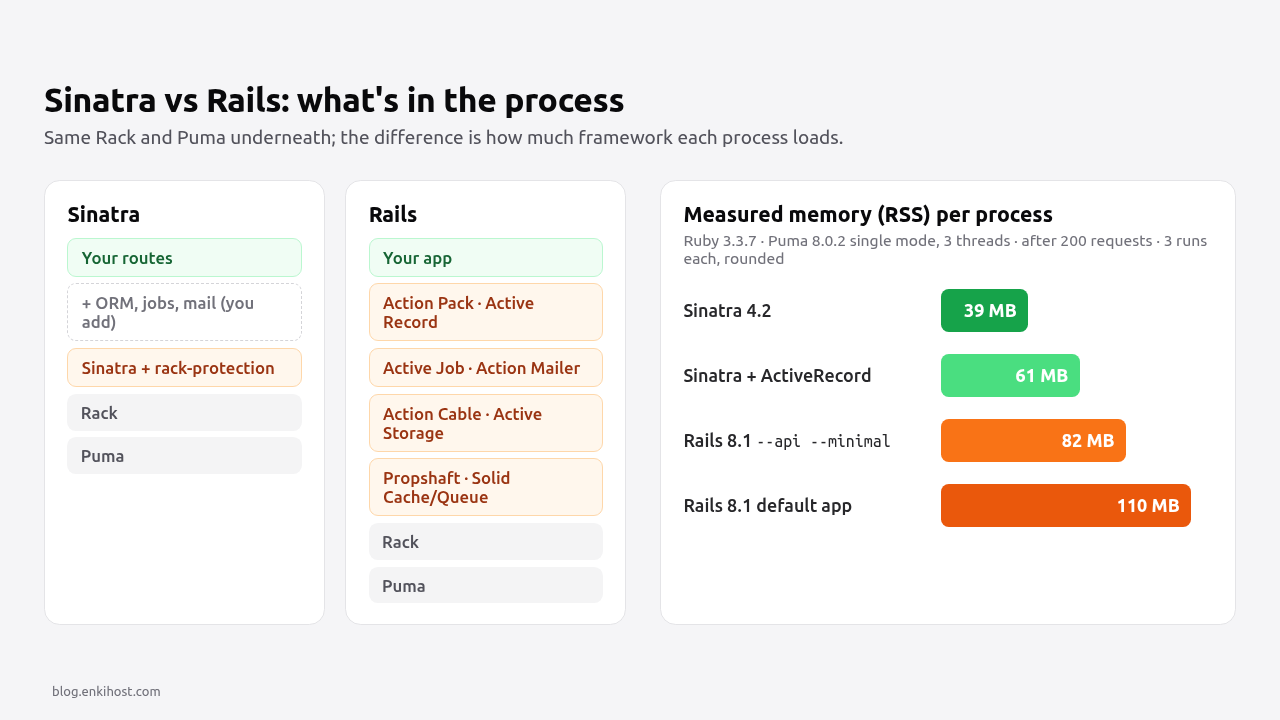
- Measured on Ruby 3.3.7 with Puma 8 (one process, 3 threads): Sinatra 4.2 used about 39 MB, Sinatra + ActiveRecord about 61 MB, a minimal Rails 8.1 API about 82 MB and a default Rails 8.1 app about 110 MB of RSS.
- Sinatra fits small HTTP services: webhooks receivers, internal APIs, proxies, status pages and single-purpose tools, where you’d use 10% of Rails.
- Rails fits anything with a database schema that will grow, users, background jobs, mailers, an admin, or more than one developer.
- The memory difference matters when you run many small services in a fixed memory budget, or many Puma workers. For one app, the memory spent on your own code and data usually outweighs the framework.
- A Rails app with
--api --minimalcloses about half of the gap; adding ActiveRecord to Sinatra closes much of it from the other side.
What is the difference between Sinatra and Rails?
Sinatra is a small DSL for mapping HTTP routes to Ruby blocks on top of Rack; Rails is a full-stack framework with an ORM, migrations, jobs, mailers, caching, asset handling and conventions for where everything goes. Both run on Rack and Puma, so the deploy looks the same; the difference is how much comes in the box.
| Sinatra 4.2 | Rails 8.1 | |
|---|---|---|
| Core | Routing, filters, templates, helpers | Full MVC stack |
| Database | Bring your own (ActiveRecord, Sequel, ROM, raw pg) |
Active Record, migrations, schema, multiple databases |
| Background jobs | Bring your own (Sidekiq directly) | Active Job + Solid Queue by default |
Bring your own (mail gem) |
Action Mailer, previews, Action Mailbox | |
| WebSockets | Bring your own (Faye, async-websocket) |
Action Cable + Solid Cable |
| Security defaults | rack-protection (enabled by Sinatra::Base), you add CSRF on forms and sessions config |
CSRF, CSP helper, encrypted credentials, Host Authorization, parameter filtering |
| Project structure | None enforced; one file is valid | Conventional directories, generators, autoloading (Zeitwerk) |
| Testing | rack-test + your test framework |
Minitest integration, system tests, fixtures |
| Memory (measured, 1 process) | ≈ 39 MB (≈ 61 MB with ActiveRecord) | ≈ 82 MB (--api --minimal), ≈ 110 MB (default app) |
How much less memory does Sinatra use than Rails?
In our measurements, a bare Sinatra app used about 35% of the memory of a default Rails 8.1 app, and Sinatra with ActiveRecord about 55%. The gap is a fixed cost per process: it’s the framework code loaded into memory, not something that grows with traffic.
How we measured it (so you can reproduce it):
- Ruby 3.3.7, Puma 8.0.2 in single mode with 3 threads,
RACK_ENV/RAILS_ENV=production, on an Intel i5-9300H laptop running Debian. - Apps: a one-route Sinatra 4.2.1 app; the same app with ActiveRecord 8.1 and SQLite answering
Post.count;rails new --api --minimal(Rails 8.1.4.1); and a defaultrails newapp (Propshaft, Hotwire, Solid Cache/Queue/Cable, Active Storage, Action Mailer…), all serving/up. - Each app was booted, sent 200 requests, and its resident memory (RSS) read with
ps. Three runs each; results varied by less than 5 MB.
| App | RSS after 200 requests | Boot to first 200 |
|---|---|---|
| Sinatra 4.2 | 39–40 MB | ≈ 0.5 s |
| Sinatra 4.2 + ActiveRecord 8.1 | 61–62 MB | — |
Rails 8.1 --api --minimal |
82 MB | ≈ 1.5–1.7 s |
| Rails 8.1 default app | 109–114 MB | ≈ 1.3–1.4 s (with Bootsnap) |
The measurement script:
#!/usr/bin/env bash
# measure.sh DIR PORT: boot an app with Puma, send 200 requests, print RSS.
dir=$1; port=$2
cd "$dir"
bundle exec puma -t 3:3 -w 0 -p "$port" -e production config.ru >/dev/null 2>&1 &
pid=$!
until curl -s -o /dev/null "http://127.0.0.1:$port/up"; do sleep 0.1; done
for i in $(seq 1 200); do curl -s -o /dev/null "http://127.0.0.1:$port/up"; done
echo "$dir rss_kb=$(ps -o rss= -p $pid)"
kill $pid
Three things to keep in mind when reading these numbers:
- They’re a floor. Your own gems, code and data come on top, and a production app keeps growing for a while after boot as caches and the heap warm up. Run the same script against your own app after a few thousand real requests to see how much of its memory is actually the framework.
- Workers multiply the gap. In cluster mode, each Puma worker carries the framework. Copy-on-write with
preload_app!shares part of it, but less over time as the heap gets written to. The Puma workers and threads guide explains how much. - Boot time matters less than it looks. One second of boot is irrelevant for a web app, but it adds up for test suites, CLI tools and anything started per request.
What do you have to build yourself with Sinatra?
Everything Rails would have given you that your app needs. For a webhook receiver that’s nearly nothing; for a product with users it’s most of a framework.
| Need | In Rails | In Sinatra, typically |
|---|---|---|
| Database + migrations | Active Record, bin/rails db:migrate |
sinatra-activerecord (adds rake tasks) or Sequel with its migrator |
| Configuration per environment | config/environments/*.rb, credentials |
Sinatra::Base.configure :production do … end + ENV |
| Background jobs | Active Job + Solid Queue | Sidekiq directly, or a thread pool for trivial work |
| Action Mailer | mail gem + an SMTP provider |
|
| CSRF protection for forms | On by default | Rack::Protection::AuthenticityToken + session setup |
| Code reloading in development | Built in | rerun or sinatra-contrib’s Sinatra::Reloader |
| Logging | Tagged, filtered logs | Rack::CommonLogger or your own JSON logger |
| Health check | /up generated |
One route |
The trap isn’t any one of these; it’s the slow accumulation. A Sinatra app that has grown an ORM, a job system, a mailer, an auth layer and a homemade config loader often uses as much memory as Rails and has none of its conventions. The story of moving a project from Rails to Sinatra is a real-world example of where the savings came from and what had to be rebuilt.
Pros and cons
Sinatra
- ✅ Small memory footprint and fast boot.
- ✅ Entire request path fits in your head; easy to debug and to audit.
- ✅ Few dependencies, so smaller upgrade surface and fewer CVEs to track.
- ❌ No conventions: each Sinatra codebase is organised differently.
- ❌ You assemble and maintain the stack yourself as needs grow.
- ❌ Smaller ecosystem of plug-in gems (engines, admin panels, auth).
Rails
- ✅ Productive from day one for CRUD, auth, jobs, mail, real-time.
- ✅ Conventions make onboarding and handovers fast.
- ✅ Security defaults that would take days to rebuild correctly.
- ✅ Huge ecosystem and documented upgrade paths.
- ❌ Larger fixed memory per process and slower boot.
- ❌ More moving parts to upgrade every year or two.
When does Sinatra save resources, and when doesn’t it?
Sinatra saves resources when the framework is a large share of each process’s memory: many small services, many processes, or a tight memory allocation. It doesn’t save much when your app’s own code and data dominate.
| Scenario | Does Sinatra save meaningful memory? | Why |
|---|---|---|
| A webhook receiver or small JSON API next to a main app | Yes | ~40–60 MB instead of ~80–110 MB, and nothing else is needed |
| 5 small internal services in a fixed memory budget | Yes | Savings multiply by service count |
| Many Puma workers on one machine | Somewhat | Savings multiply by worker count, reduced by copy-on-write |
| A product app with users, admin, jobs and mail | No | You add back most of Rails; the app’s own memory dominates |
| A background-job-heavy app | No | Memory goes to jobs and their data, not the web framework |
| Short-lived CLI or per-request processes | Yes | Boot time and memory are paid every time |
The other cost is time. A Sinatra app with users needs you to build and maintain what Rails would have given you, and that engineering time is usually worth more than the memory saved. Spend memory before you spend weeks.
Pro Tip: before switching frameworks to save memory, try the cheaper Rails options: rails new --api --minimal for API-only services, require only the frameworks you use in config/application.rb, jemalloc (LD_PRELOAD=libjemalloc.so.2, already in the Rails 8 Dockerfile), and fewer Puma workers with more threads.
A production-ready Sinatra app
If Sinatra is the right fit, a production setup is a handful of files. Use the modular style (Sinatra::Base) so the app is a class you can test and mount.
# Gemfile
source "https://rubygems.org"

ruby "3.3.7"

gem "sinatra", "~> 4.2"
gem "puma", ">= 6.0"
gem "rackup"
gem "json"
gem "pg"
gem "sequel", "~> 5.0"

group :development, :test do
  gem "rack-test"
  gem "minitest"
end
# app.rb
require "sinatra/base"
require "json"
require "sequel"

DB = Sequel.connect(ENV.fetch("DATABASE_URL"), max_connections: ENV.fetch("MAX_THREADS", 3).to_i)

class App < Sinatra::Base
  configure do
    set :show_exceptions, false
    set :host_authorization, { permitted_hosts: ENV.fetch("ALLOWED_HOSTS", "").split(",") }
  end

  configure :production do
    set :logging, true
  end

  before { content_type :json }

  get "/up" do
    { status: "ok" }.to_json
  end

  post "/webhooks/:source" do
    payload = request.body.read
    halt 400, { error: "empty body" }.to_json if payload.empty?

    DB[:webhook_events].insert(source: params[:source], payload: payload, received_at: Time.now)
    status 202
    { accepted: true }.to_json
  end

  error do
    status 500
    { error: "internal error" }.to_json
  end
end
# config.ru
require_relative "app"
run App
# config/puma.rb
threads_count = ENV.fetch("MAX_THREADS", 3).to_i
threads threads_count, threads_count
port ENV.fetch("PORT", 9292)
environment ENV.fetch("RACK_ENV", "production")
workers ENV.fetch("WEB_CONCURRENCY", 0).to_i
preload_app! if ENV.fetch("WEB_CONCURRENCY", 0).to_i > 0
Sinatra 4.1 added host authorization (set :host_authorization), the equivalent of Rails’ config.hosts; when permitted_hosts is empty, all hosts are allowed. Set ALLOWED_HOSTS to your domain in production. For a step-by-step deploy, see how to send transactional emails from Sinatra, which builds a deployed Sinatra service end to end.
Which one should you choose?
Choose by what the app will need in a year, not by what it needs today.
| Use case | Choose | Reason |
|---|---|---|
| Webhook receiver, callback endpoint, small proxy | Sinatra | A few routes, no schema to evolve |
| Internal JSON API with 1–3 tables | Sinatra (with Sequel or ActiveRecord) | Small, stable, easy to audit |
| Status page, landing page with a form, single-purpose tool | Sinatra | Minimal footprint, fast to ship |
| SaaS product, marketplace, anything with accounts | Rails | Auth, jobs, mail and admin come with the framework |
| API that will grow, with a team | Rails --api |
Conventions and migrations pay off over time |
| Prototype that might become a product | Rails | Rewriting a grown Sinatra app is costlier than starting in Rails |
| Many tiny services in a fixed memory budget | Sinatra | Fixed per-process cost multiplied by service count |
If you’re unsure, start with Rails. It’s much easier to extract a small Sinatra service from a Rails app later than to grow a Sinatra app into a framework. Why Rails remains ideal for small projects makes that case in more detail.
How Heroku, Render, Fly.io and Railway run Sinatra
All four run Sinatra as a regular Rack app: a Gemfile, a config.ru and a start command. The differences are in how the runtime is detected and how memory is allocated.
| Platform | How Sinatra is detected/run | Start command | Memory model |
|---|---|---|---|
| Heroku | Ruby buildpack detects the Gemfile; config.ru defaults to rackup |
web: bundle exec puma -C config/puma.rb in Procfile |
Fixed per dyno size |
| Render | Native Ruby runtime or Docker | Start command in the service settings | Fixed per instance type |
| Fly.io | Dockerfile (fly launch generates one) |
CMD in the Dockerfile |
Per Machine size, set in fly.toml |
| Railway | Railpack detects Ruby from the Gemfile and uses config.ru |
Inferred, or a custom start command | Usage-based, up to the plan’s per-service limit |
| Enkihost | Sinatra is a supported runtime alongside Rails and Hanami | Rack app with config.ru |
Allocated memory per app |
On every one of them, the small footprint turns into headroom: a Sinatra service leaves much more of its allocation free for threads, caches and traffic spikes than a Rails app in the same allocation.
Author Perspective
I like both frameworks and I keep coming back to the same split. For anything with users and a schema that changes every month, Rails wins so clearly that the memory question doesn’t matter: every hour not spent rebuilding auth, mailers or migrations goes into the product. For small services that sit next to a product (a webhook inbox, a status endpoint, a small API another team consumes), Sinatra is a pleasure: one file you can read top to bottom, a process that boots in half a second, and very little to upgrade. The pattern to watch for is starting a product in Sinatra to save memory and then rebuilding Rails one gem at a time. If you’re adding a third “small” dependency to replace a Rails feature, that’s the signal to reconsider.
Sinatra and Rails on Enkihost
Enkihost runs Sinatra, Rails and Hanami apps as first-class runtimes, so you can pick the framework that fits each service instead of the one your host supports.
- Allocated memory per app: each app has its own memory and CPU allocation, so a Sinatra service’s smaller footprint is headroom you can use for more threads or a cache, not memory taken by a neighbour.
- Per-app resource isolation: a webhook receiver in Sinatra and the main Rails app run separately, so a spike in one doesn’t slow the other.
- Managed PostgreSQL and Redis inject
DATABASE_URLandREDIS_URL, which work the same in Sequel, ActiveRecord-in-Sinatra or Rails. - Zero-downtime deploys with
git pushfor both frameworks, with the/uproute from this post.
See enkihost.com for details.
FAQ
Is Sinatra faster than Rails?
For the framework overhead alone, yes: Sinatra does less work per request and boots in about half a second versus one to two seconds for Rails in our tests. In real apps, response time is usually dominated by database queries and rendering, so the difference users notice is small.
Can Sinatra use ActiveRecord?
Yes. Require active_record and connect with establish_connection, or use the sinatra-activerecord gem, which adds rake tasks for migrations. In our measurement, adding ActiveRecord raised a Sinatra app’s memory from about 39 MB to about 61 MB.
Is Sinatra still maintained?
Yes. Sinatra 4.x supports Rack 3, and recent releases added features such as host authorization. It’s a mature, slow-moving project, which suits the kind of small services it’s used for.
Can I mount a Sinatra app inside Rails?
Yes. Any Rack app can be mounted in config/routes.rb with mount MySinatraApp, at: “/path”. It then runs inside the Rails process and shares its memory, so this is for organising code, not for saving resources.
Should I use Hanami instead of Sinatra or Rails?
Consider Hanami if you want more structure than Sinatra with a smaller, more modular core than Rails. It has its own conventions, routing, actions and database layer, but a smaller ecosystem than Rails.
Sources
- Sinatra README — sinatrarb.com
- Sinatra changelog: host authorization (4.1) — GitHub
- Rails on Rack — Rails Guides
- Using Rails for API-only Applications — Rails Guides
- Puma: clustered mode and preload_app! — Puma docs
- Sequel: The Database Toolkit for Ruby
- Deploying Rack-based Apps — Heroku Dev Center
- Native runtimes: Ruby — Render Docs
- Run a Ruby app — Fly Docs
- Ruby — Railpack Docs
- Hanami