Setting Up Transactional Emails in Sinatra in 5 Minutes with Enkimail

Sending transactional emails in Sinatra doesn’t need ActionMailer, an SMTP server or a pile of configuration. Sinatra has no mailer of its own, so you add one gem, enkimail. It brings in the mail gem to build the message and delivers it through the Enkimail API. Then you set one environment variable, ENKIMAIL_API_KEY. This guide takes you from an empty Gemfile to a welcome email in a real inbox in about five minutes. It covers HTML and plain-text templates, tests, background delivery, and the errors you’ll actually see.
TL;DR
- Add
gem "enkimail"to your Gemfile. It installs therequire "mail"beforerequire "enkimail".- Point
Mail.defaultsatEnkimail::DeliveryMethodwithapi_key: ENV.fetch("ENKIMAIL_API_KEY"). That’s the whole integration.- The gem sends over HTTPS (port 443) to
https://api.enkimail.com/api/v1/transactional_emails, so it keeps working on hosts that block outbound SMTP ports 25, 465 and 587.- Your
fromaddress must be a verified sender on a verified domain in Enkimail, or the API rejects the email.- Every failure raises
Enkimail::Error: rescue it in the route, or send from a Sidekiq job so retries happen automatically.
Table of Contents
- How do you send transactional emails in Sinatra?
- Prerequisites
- Step 1: Add the enkimail and mail gems
- Step 2: Configure the API key
- Step 3: Write the email templates
- Step 4: Send the email from a Sinatra route
- Step 5: Verify it works
- Should you send emails in the request or in a background job?
- How Heroku, Render, Fly.io, Upsun and Enkihost handle transactional email
- Troubleshooting transactional emails in Sinatra
- Author Perspective: email should be the boring part
- Sinatra and Enkimail on Enkihost
- FAQ
- Sources
How do you send transactional emails in Sinatra?
You build the message with the mail gem and hand it to a delivery method that talks to an email provider. With Enkimail, that delivery method is Enkimail::DeliveryMethod, and it only needs your API key.
Transactional emails are the ones your app sends to one user because of something that user did: a welcome email, a password reset, a receipt, a login code. They aren’t newsletters. They have to arrive in seconds and not land in spam.
Rails ships ActionMailer for this. Sinatra ships nothing, which is part of its charm. The enkimail gem registers itself with ActionMailer in Rails, but its delivery method is a plain Ruby class with initialize(settings) and deliver!(mail). The mail gem (the library ActionMailer is built on) accepts exactly that, so it plugs straight into Sinatra. The gem’s README documents this setup:
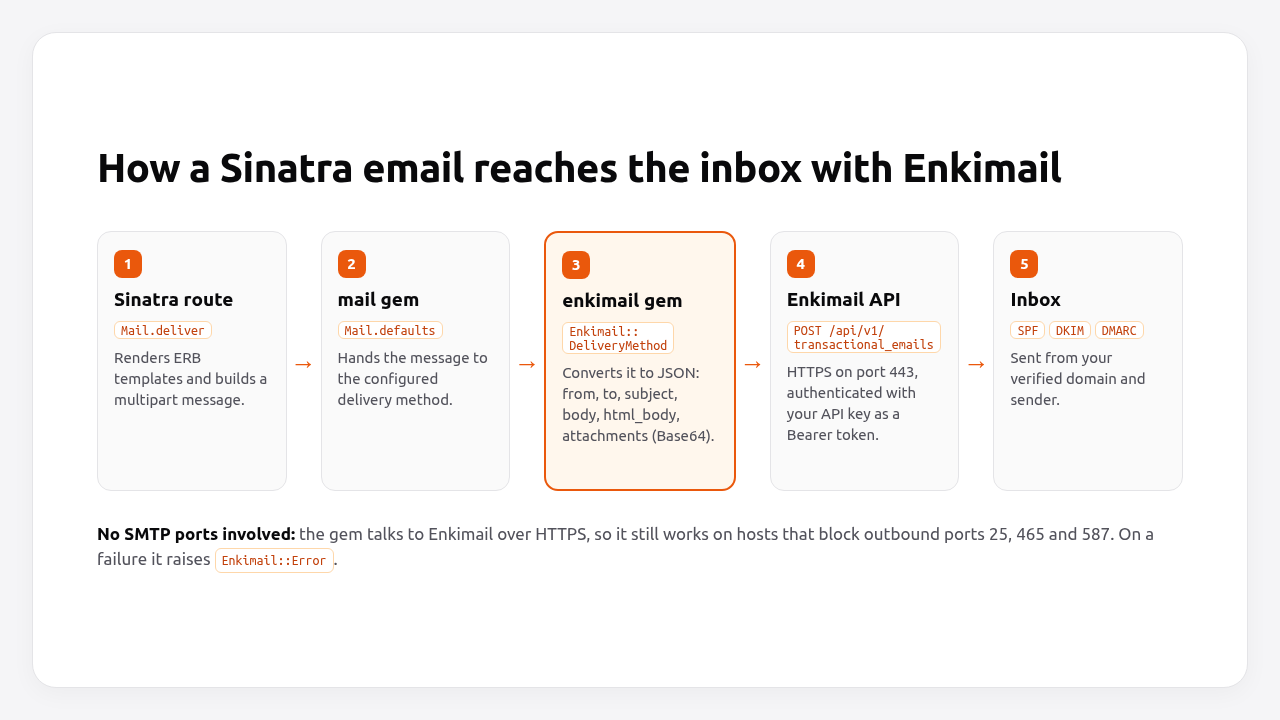
The gem converts each message into a JSON payload with from, to, cc, bcc, subject, body (plain text), html_body and attachments (Base64-encoded). It sends that payload with Faraday and a Bearer token. There’s no SMTP, no Net::SMTP and no open port 587.
Pro Tip: if you’ve been running your own Postfix server, compare the setup with configuring Postfix and OpenDKIM on Debian. An API-based provider replaces all of that with one environment variable.
Prerequisites
You need a running Sinatra app and an Enkimail account with three things set up.
| Requirement | Why | Where |
|---|---|---|
| Ruby 3.3+ and Sinatra 4.x | The examples use Sinatra 4.2 and Ruby 3.3 syntax | .ruby-version, Gemfile |
| An Enkimail account | The Free plan is enough to follow along | enkimail.com |
| A verified domain | Enkimail adds SPF and DKIM for it, which deliverability depends on | Enkimail dashboard: add the copy-paste DNS records |
| A verified sender | The from address must be one of your sender identities |
Enkimail dashboard |
| An API key | Authenticates every request as Authorization: Bearer <key> |
Enkimail dashboard |
The DNS records take the longest because you wait for propagation. Start with them, and write the code while they verify.
Step 1: Add the enkimail and mail gems
Add enkimail to your Gemfile. It depends on faraday and mail (>= 2.8), so both are installed for you.
# Gemfile
source "https://rubygems.org"

gem "sinatra", "~> 4.1"
gem "rackup", "~> 2.2"
gem "puma", "~> 6.6"
gem "enkimail", "~> 0.1.6"

group :test do
  gem "minitest", "~> 5.25"
  gem "rack-test", "~> 2.2"
end
bundle install
At the time of writing, this resolves to enkimail 0.1.6, mail 2.9, faraday 2.14 and sinatra 4.2.
Step 2: Configure the API key
The API key is the only setting the gem needs. Put it in an environment variable and give it to Mail.defaults. Never commit the key.
# .env (keep it out of git) or your host's environment settings
ENKIMAIL_API_KEY=your_enkimail_api_key
Then create a small mailer file. Both the routes and the background jobs will use it:
# mailer.rb
require "erb"
require "mail"
require "enkimail"

Mail.defaults do
  if ENV["RACK_ENV"] == "test"
    delivery_method :test
  else
    delivery_method Enkimail::DeliveryMethod,
                    api_key: ENV.fetch("ENKIMAIL_API_KEY"),
                    base_url: ENV["ENKIMAIL_BASE_URL"] # optional, defaults to https://api.enkimail.com
  end
end

module Mailer
  TEMPLATES = File.expand_path("views/emails", __dir__)

  module_function

  def welcome(email:, name:)
    text = render("welcome.text", name: name)
    html = render("welcome.html", name: name)

    Mail.deliver do
      from    "hello@yourdomain.com" # must be a verified sender in Enkimail
      to      email
      subject "Welcome aboard, #{name}!"

      text_part { body text }
      html_part do
        content_type "text/html; charset=UTF-8"
        body html
      end
    end
  end

  def render(template, locals)
    ERB.new(File.read(File.join(TEMPLATES, "#{template}.erb"))).result_with_hash(locals)
  end
end
Three details in this file matter:
- The
fromaddress is plain code, not configuration. The gem doesn’t read it from anywhere. It must be one of your verified senders, or the API rejects the email. ENV.fetchinstead ofENV[]. A missing key crashes the app at boot withKeyError, not later on the first signup.delivery_method :testin tests. Themailgem stores messages inMail::TestMailer.deliveriesinstead of calling the API, so your test suite never sends a real email.- Plain ERB, not Sinatra’s
erbhelper. Theerbhelper only exists inside a request. Plain ERB also works from a Sidekiq job, where there’s no request.
base_url is the gem’s only other option. Leave ENKIMAIL_BASE_URL unset in production, and the gem uses https://api.enkimail.com. Set it only to point a staging or development app at another API host.
Pro Tip: if you’re managing more than a couple of secrets, the patterns in managing environment variables in Rails (.env for development, the platform’s settings for production, fail fast at boot) apply to Sinatra unchanged.
Step 3: Write the email templates
Send both an HTML part and a plain-text part. Clients that can’t render HTML show the text, and spam filters treat a text alternative as a good sign.
<%# views/emails/welcome.text.erb %>
Hi <%= name %>,

Thanks for signing up. Your account is ready.

The Team
<%# views/emails/welcome.html.erb %>
<!doctype html>
<html>
  <body style="font-family: sans-serif; color: #27272a;">
    <h1 style="color: #ea580c;">Hi <%= ERB::Util.h(name) %>,</h1>
    <p>Thanks for signing up. Your account is ready.</p>
    <p>The Team</p>
  </body>
</html>
Plain ERB doesn’t escape output. ERB::Util.h stops a user called Ada <script> from injecting HTML into your email. Use inline styles: most email clients ignore <style> blocks and external stylesheets.
When the message has both parts, the gem sends the text as body and the HTML as html_body. For a single-part message, it uses the Content-Type to decide which of the two fields to fill.
Step 4: Send the email from a Sinatra route
Call the mailer from the route and rescue Enkimail::Error, the one exception the gem raises for API errors, connection failures and a missing key.
# app.rb
require "sinatra"
require_relative "mailer"

post "/signup" do
  Mailer.welcome(email: params.fetch("email"), name: params.fetch("name"))
  status 201
  "Welcome email sent to #{params["email"]}\n"
rescue Enkimail::Error => e
  logger.error(e.message)
  halt 502, "We couldn't send the welcome email. Please try again.\n"
end
In a real app, you’d create the user first and send the email after the record is saved. If the email fails, the account still exists, and the user can ask for the email again.
Attachments work the same way as in any mail message. The gem Base64-encodes them for the API:
# mailer.rb, inside the Mailer module
def invoice(email:, pdf_path:)
  Mail.deliver do
    from    "billing@yourdomain.com" # must be a verified sender in Enkimail
    to      email
    subject "Your invoice"
    body    "Your invoice is attached."
    add_file filename: File.basename(pdf_path), content: File.binread(pdf_path)
  end
end
Step 5: Verify it works
Check it in two ways: an automated test that never touches the API, and one real email to your own inbox.
Automated test
# test/mailer_test.rb
ENV["RACK_ENV"] = "test"

require "minitest/autorun"
require "rack/test"
require_relative "../app"

class SignupTest < Minitest::Test
  include Rack::Test::Methods

  def app = Sinatra::Application

  def setup = Mail::TestMailer.deliveries.clear

  def test_signup_sends_welcome_email
    post "/signup", email: "ada@example.com", name: "Ada"

    assert_equal 201, last_response.status
    mail = Mail::TestMailer.deliveries.last
    assert_equal ["ada@example.com"], mail.to
    assert_equal "Welcome aboard, Ada!", mail.subject
    assert_includes mail.html_part.body.decoded, "Hi Ada"
  end
end
bundle exec ruby test/mailer_test.rb
# 1 runs, 5 assertions, 0 failures, 0 errors, 0 skips
A real email
Replace hello@yourdomain.com in mailer.rb with one of your verified senders. Then start the app with your real key and sign up with your own address:
ENKIMAIL_API_KEY=your_enkimail_api_key bundle exec ruby app.rb -p 4567
curl -i -X POST http://localhost:4567/signup -d email=you@example.com -d name=Ada
# HTTP/1.1 201 Created
# Welcome email sent to you@example.com
The email should arrive within seconds. In Gmail, open it and choose Show original. SPF: PASS and DKIM: PASS confirm that the domain verification worked. If the request returns 502 instead, the app log has the exact Enkimail::Error message. See Troubleshooting.
Should you send emails in the request or in a background job?
For a side project, sending in the request is fine. In production, send from a background job. The gem doesn’t set an HTTP timeout, so a slow API call holds a Puma thread until Ruby’s Net::HTTP gives up after 60 seconds. A failed send is also simply lost unless something retries it.
| In the request | In a Sidekiq job | |
|---|---|---|
| Setup | None | Redis and a worker process |
| Response time | Includes the API round trip | Immediate |
| Failed send | User sees an error, email is lost | Retried automatically with backoff |
| Best for | Prototypes, admin tools, low traffic | Signups, password resets, receipts |
Sidekiq works with plain Ruby. Because the mailer from Step 2 doesn’t depend on Sinatra, the job can reuse it:
# jobs/welcome_email_job.rb
require "sidekiq"
require_relative "../mailer"

class WelcomeEmailJob
  include Sidekiq::Job
  sidekiq_options retry: 5

  def perform(email, name)
    Mailer.welcome(email: email, name: name)
  end
end
# app.rb: enqueue instead of sending inline
require_relative "jobs/welcome_email_job"

post "/signup" do
  WelcomeEmailJob.perform_async(params.fetch("email"), params.fetch("name"))
  status 202
  "Welcome email queued\n"
end
bundle add sidekiq
bundle exec sidekiq -r ./jobs/welcome_email_job.rb
Sidekiq reads REDIS_URL from the environment, and any Enkimail::Error raised in perform triggers a retry. For the trade-offs between Sidekiq and Solid Queue, and for running workers in production, see Rails background jobs in production. Most of it applies to Sinatra too.
Pro Tip: on the Free plan, Enkimail allows 50 emails per hour. A job queue spreads a signup spike over time. Sending inline would hit the limit and fail for the users who sign up after it.
How Heroku, Render, Fly.io, Upsun and Enkihost handle transactional email
None of the five sends your app’s transactional email for you in a way you’d use for production. You bring a provider, and on some platforms SMTP isn’t even an option, which makes an HTTPS API the safer default.
| Platform | Built-in email | SMTP from the app | What they recommend |
|---|---|---|---|
| Heroku | No | Allowed | Attach an email add-on from Elements (Mailer To Go, CloudMailin…), which injects SMTP config vars |
| Render | No | Blocked on free web services (ports 25, 465, 587) since September 2025 | Use the provider’s HTTP API, or upgrade to a paid instance |
| Fly.io | No | Allowed, but shared IPs have no reverse DNS | Relay through a transactional email service, ideally over HTTPS |
| Upsun | SMTP proxy (PLATFORM_SMTP_HOST), SendGrid-backed |
Port 25 only to the proxy; 465/587 to external servers | Built-in proxy is “best-effort”, on for production only, and can’t be white-labeled |
| Enkihost | No; the included services are PostgreSQL and Redis | Not documented | Enkimail over HTTPS with one environment variable |
Render’s change is the one that catches people out: code that sends fine locally times out in production with ETIMEDOUT, and changing SMTP providers doesn’t help. Render support’s own advice is to switch to the provider’s API. Upsun’s proxy is handy for a contact form, but the docs say emails “aren’t guaranteed to be deliverable”, so you’d still want a dedicated provider for password resets.
The enkimail gem avoids all of this, because it only needs outbound HTTPS, which every platform allows.
Troubleshooting transactional emails in Sinatra
These are the errors you’ll see, with the messages the gem and Ruby actually print.
uninitialized constant Mail (NameError)
The mail gem is installed with enkimail, but require "enkimail" doesn’t load it, and neither does Sinatra. Add require "mail" before require "enkimail", as in mailer.rb above.
key not found: "ENKIMAIL_API_KEY" (KeyError)
The variable isn’t set in the process environment. Check how the app starts. A .env file is only read if something loads it, such as dotenv or your process manager. On your host, set it in the app’s environment settings and restart the app.
Enkimail API Key is missing. Please set config.action_mailer.enkimail_settings = { api_key: '...' }
The variable exists but is empty (ENKIMAIL_API_KEY=). The message mentions ActionMailer because the gem was written for Rails. In Sinatra, the fix is still to set a non-empty value.
Enkimail API Error (401): ...
The API rejected the key. Make sure it was copied completely, with no trailing space or newline from echo or a copy-paste, and that it wasn’t revoked in the dashboard.
Enkimail API Error (4xx): ... about the sender or domain
The from address isn’t a verified sender, or its domain isn’t verified yet. Emails from unverified domains or senders are rejected. Check the from address in your mailer against the sender identities in the dashboard, and wait for the DNS records to verify.
Enkimail Connection Error: Failed to open TCP connection to api.enkimail.com:443 ...
The app couldn’t reach the API: no outbound network, DNS failure, or a firewall. Run curl -I https://api.enkimail.com from the same server or container. Inside a background job this is the error a retry fixes.
The email arrives in spam
Check the SPF and DKIM results in the original message headers. If they fail, the DNS records from the Enkimail dashboard aren’t published exactly as given. Also send a plain-text part, avoid an image-only body, and make sure the from domain matches the verified domain.
Author Perspective: email should be the boring part
I built Enkimail because I kept rebuilding the same thing. Every new Sinatra or Rails side project needed a welcome email and a password reset. Every time, I was choosing between a provider whose pricing jumps once a project gets real and running my own Postfix with OpenDKIM. I’ve done the second one. It works, and I’m proud of the 9.9/10 mail-tester score. But it’s a server you have to patch, an IP reputation you have to watch, and a weekend you don’t get back.
What I want from transactional email is to be unable to tell it’s there: one gem, one key, an exception when something goes wrong, and a dashboard showing what was sent. In Sinatra that matters even more, because I swapped Rails for Sinatra so I wouldn’t carry framework weight I don’t use. Five lines of Mail.defaults is about the right amount of email infrastructure for a small app.
Sinatra and Enkimail on Enkihost
Enkihost hosts Sinatra apps alongside Rails and Jekyll. It pairs well with an API-based email provider like Enkimail because neither needs SMTP plumbing.
- Ruby hosting built by Rubyists: deploy the Sinatra app from this guide as is.
ENKIMAIL_API_KEYis just one more environment variable. - Redis add-on injects
REDIS_URL, which Sidekiq reads automatically, so the background-job version of the mailer works without extra configuration. - PostgreSQL add-on injects
DATABASE_URLfor the users your signup route creates. - Zero-downtime deploys, so rotating the API key or changing a template doesn’t drop a request halfway through a signup.
- Per-app resource isolation: a burst of email jobs in another app doesn’t slow down yours.
A Sinatra app runs on Ignite at 9 EUR per month after a 14-day free trial, with PostgreSQL and Redis included, or on Blaze at 29 EUR. Combined with Enkimail’s Free plan (1,200 emails a day), sending its transactional email costs nothing extra. See enkihost.com.
FAQ
Does the enkimail gem require Rails?
No. The gem registers itself with ActionMailer when Rails is loaded, but its delivery method is a plain Ruby class. In Sinatra or any Ruby script, pass Enkimail::DeliveryMethod and your API key to Mail.defaults from the mail gem and send messages as usual.
Can I send through Enkimail with SMTP instead of the API?
Yes. Enkimail provides SMTP credentials as well as the REST API, and the mail gem can deliver over SMTP. The API is the better default because it uses HTTPS on port 443, which works on hosts that block outbound SMTP ports, such as Render’s free web services.
How many transactional emails can I send for free?
The Enkimail Free plan allows 1,200 emails per day and 50 per hour, with 1 verified domain and 1 sender identity. The Pro plan costs 2.99 EUR per month and raises that to 5,000 per day and 200 per hour, with 10 domains, 15 sender identities and webhooks.
How do I test Sinatra emails without sending real ones?
Set the mail gem’s delivery method to :test when RACK_ENV is test. Messages are then stored in Mail::TestMailer.deliveries instead of being sent, so your tests can check the recipient, subject and body without calling the Enkimail API.
Can I use the same setup in Hanami, Roda or a plain Ruby script?
Yes. The setup only depends on the mail gem, not on Sinatra. Require mail and enkimail, configure Mail.defaults with your API key once at boot, and call Mail.deliver wherever you need to send an email.
Sources
- enkimail gem — RubyGems
- aiw3ndil/enkimail — GitHub
- Enkimail features and pricing
- mikel/mail: the Ruby mail gem — GitHub
- Sinatra README
- Sidekiq: Getting Started — GitHub wiki
- Sending Email from Your App — Heroku Dev Center
- Mailer To Go — Heroku Dev Center
- Free web services will no longer allow outbound traffic to SMTP ports — Render changelog
- Outbound port 25 on new accounts — Fly.io community
- Send email — Upsun docs