Puma Workers and Threads: How to Size Them for Your Rails App and Server

Puma workers and threads decide how many requests a Rails server handles at once. Workers are separate Ruby processes that run Ruby code in parallel on different CPU cores. Threads inside each worker let it keep serving while other requests wait on the database or an API. The starting point for most apps is one worker per CPU core available to the container and three threads per worker (the Rails 7.2+ default), with the number of workers capped by memory. This guide explains why those numbers work, how to adjust them for your app, the container and platform traps that break the rule, what changed in Puma 7 and 8, and how to prove your settings with a load test.
TL;DR
- Workers (
WEB_CONCURRENCY) give you CPU parallelism. Start with one per CPU core actually available to the container, then lower it untilworkers × memory per workerfits in about 80% of RAM.- Threads (
RAILS_MAX_THREADS) let a worker overlap I/O waits. Rails 7.2+ defaults to 3, a good balance between throughput and latency for typical apps.- Inside Docker,
Etc.nprocessorsreports the host’s cores, not the container’s CPU quota. UseConcurrent.available_processor_countor setWEB_CONCURRENCYexplicitly.- Keep the database pool equal to threads, and count total connections across every worker and server.
- Puma 7 renamed hooks (
on_worker_boot→before_worker_boot) and enablespreload_app!by default in cluster mode. Puma 8 binds to::when IPv6 is available.
Table of Contents
- How do Puma workers and threads work?
- How many Puma workers should I run per CPU core?
- How many threads should each Puma worker use?
- Prerequisites
- Step 1: Write a production config/puma.rb
- Step 2: Measure memory per worker
- Step 3: Detect CPUs correctly in containers
- Step 4: Load-test and adjust
- Step 5: Verify it works
- How Heroku, Render, Fly.io, Upsun and Enkihost affect Puma sizing
- Troubleshooting Puma configuration
- Author Perspective: tune for p95, not for a benchmark
- Running Puma on Enkihost
- FAQ
- Sources
How do Puma workers and threads work?
In cluster mode, a Puma master process loads the app and forks workers. Each worker is a full Ruby process with its own Global VM Lock (GVL), so workers run Ruby code truly in parallel. Threads inside a worker share one GVL: only one runs Ruby at a time, but the others can wait on I/O meanwhile.
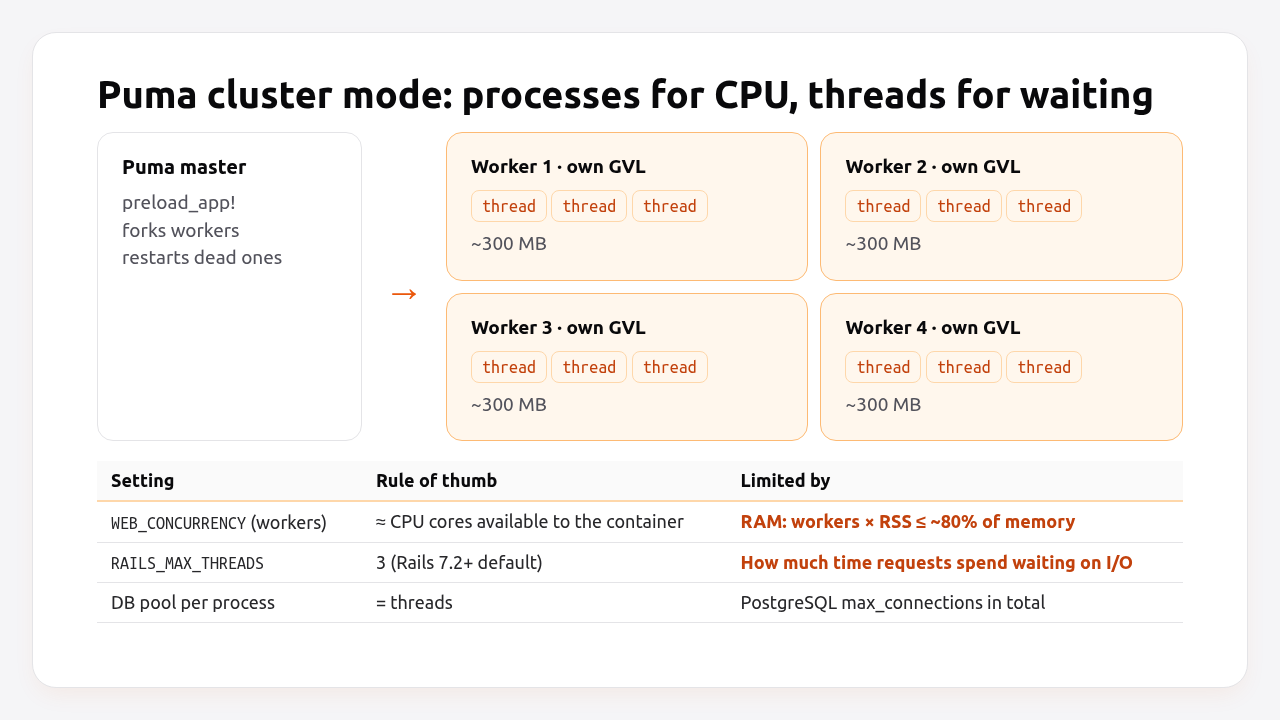
That’s why the two settings solve different problems:
| Workers | Threads | |
|---|---|---|
| What they are | Separate OS processes | Threads inside one process |
| Run Ruby in parallel? | Yes, one per core | No, they share the GVL |
| Help with | CPU-bound work (rendering, serialization) | I/O waits (database, HTTP calls, Redis) |
| Cost | Memory: each one is a full Rails process | Small memory, more GVL contention and latency |
| Setting | WEB_CONCURRENCY → workers |
RAILS_MAX_THREADS → threads |
| Failure isolation | A crashed worker is restarted by the master | A stuck thread blocks one request slot |
Maximum concurrent requests per server = workers × threads. Four workers with three threads handle twelve requests at once. A thirteenth waits in Puma’s backlog.
How many Puma workers should I run per CPU core?
Run about one worker per CPU core available to the process, and reduce that number if memory runs out. More workers than cores just compete for CPU. Fewer leaves cores idle when traffic is CPU-bound.
The two limits, in order:
- CPU:
workers ≈ cores. Withpreload_app!, workers share loaded code through copy-on-write, so the memory cost of each extra worker is lower than a separate process would be. - Memory:
workers × RSS per worker + master ≤ ~80% of RAM. A typical Rails worker uses 200–500 MB after warm-up. On a 2 GB instance with 400 MB workers, that’s four workers at most, even with eight cores.
Heroku’s own recommendations show the memory limit at work: one worker (two if memory allows) on 512 MB dynos, two on Standard-2X and Performance-M, and eight on Performance-L, all with three threads.
Pro Tip: On Puma 7+, consider fork_worker. Workers are then re-forked from an already-warmed worker 0 instead of the master, which improves copy-on-write sharing after warm-up and reduces memory per worker for apps with lots of lazily-loaded code.
How many threads should each Puma worker use?
Use 3 threads per worker unless measurements tell you otherwise. Rails changed its default from 5 to 3 in Rails 7.2 because, with the GVL, more threads add throughput only when requests spend most of their time waiting on I/O, and they increase latency for everyone else.
| App profile | Time waiting on I/O | Threads per worker |
|---|---|---|
| CPU-heavy (rendering big pages, JSON serialization, image work in-request) | < 25% | 1–2 |
| Typical CRUD app with PostgreSQL | 25–50% | 3 (default) |
| I/O-heavy (calls to external APIs, slow storage) | > 50% | 5–8, and fix the slow calls |
More threads don’t make one request faster. They let more requests wait at the same time. If your requests mostly wait on a slow API, fixing the timeout and moving the call to a job, as described in the Rails request timeout guide, beats adding threads.
Prerequisites
- Rails 7.2+ (examples use Rails 8.0/8.1, Ruby 3.3 with YJIT, Puma 7 or 8).
- A staging environment that matches production instance size, for load testing.
- A load-testing tool:
hey,ohaork6.
Step 1: Write a production config/puma.rb
Read every concurrency setting from the environment, so you can tune per instance size without code changes. This config works with Puma 7 and 8:
# config/puma.rb
require "concurrent"

# Threads per worker. Rails 7.2+ default is 3.
threads_count = ENV.fetch("RAILS_MAX_THREADS", 3).to_i
threads threads_count, threads_count

# Workers: explicit WEB_CONCURRENCY wins; otherwise use the CPUs the container may use.
default_workers = [Concurrent.available_processor_count.floor, 1].max
workers ENV.fetch("WEB_CONCURRENCY", default_workers).to_i

# Load the app once in the master, then fork (default in cluster mode since Puma 7).
preload_app!

port ENV.fetch("PORT", 3000)
environment ENV.fetch("RAILS_ENV", "development")
pidfile ENV.fetch("PIDFILE", "tmp/pids/server.pid")

# Restart a worker that stops checking in with the master for 60 s.
worker_timeout 60

# Allow `bin/rails restart`.
plugin :tmp_restart

# Run Solid Queue inside Puma on small apps.
plugin :solid_queue if ENV["SOLID_QUEUE_IN_PUMA"]

# Local control socket for `pumactl stats`.
activate_control_app "unix://#{File.expand_path("../tmp/pumactl.sock", __dir__)}", { no_token: true }
Two things you no longer need:
on_worker_boot { ActiveRecord::Base.establish_connection }. Rails reconnects automatically after fork. Puma 7 also renamed the hook tobefore_worker_bootand deprecated the old name.- Single-mode special cases for tiny instances. If
WEB_CONCURRENCYis0or1on very small instances, considerworkers 0(single mode). It saves the master’s memory, at the cost of zero-downtime phased restarts.
Align the database pool with the thread count:
# config/database.yml (excerpt)
production:
  primary:
    url: <%= ENV["DATABASE_URL"] %>
    pool: <%= ENV.fetch("RAILS_MAX_THREADS", 3) %>
Total connections are workers × threads per server, for every database the process uses, as explained in the connection pool guide.
Step 2: Measure memory per worker
Measure each worker’s real memory after it has served traffic for a while. Freshly booted workers look much smaller than they’ll be in an hour.
# On the server or inside the container
ps -o pid,rss,cmd -C ruby --sort=-rss | awk 'NR==1 || /puma/ {printf "%-8s %6d MB  %s %s %s %s\n", $1, $2/1024, $3, $4, $5, $6}'
# PID        RSS
# 4127       382 MB  puma: cluster worker 0: 1 [app]
# 4131       376 MB  puma: cluster worker 1: 1 [app]
# 4110       141 MB  puma 7.1.0 (tcp://[::]:3000) [app]
Then do the arithmetic for your instance:
usable RAM      = instance RAM × 0.8
workers (max)   = (usable RAM − master RSS) ÷ worker RSS after warm-up
With 2 GB: (1638 MB − 141 MB) ÷ 382 MB ≈ 3.9, so 3 workers, leaving headroom for growth during the day. If that’s fewer workers than you have cores, you’re memory-bound. jemalloc (already preloaded by the Rails 8 Dockerfile) often reduces worker RSS a lot. The memory leak guide shows how to confirm it’s loaded.
Step 3: Detect CPUs correctly in containers
Inside a container with a CPU limit, Ruby’s Etc.nprocessors returns the number of host CPUs, not the container’s quota. On a 32-core host running your container with --cpus=2, it says 32, and Puma would fork 32 workers into a 2-CPU, memory-limited container.
docker run --rm --cpus=2 ruby:3.3-slim ruby -retc -e 'puts Etc.nprocessors'
# 32  (host CPUs)

docker run --rm --cpus=2 ruby:3.3-slim bash -c 'gem install concurrent-ruby -q && ruby -rconcurrent -e "puts Concurrent.available_processor_count"'
# 2.0 (container quota)
Concurrent.available_processor_count (concurrent-ruby 1.3+, already a Rails dependency) reads the cgroup CPU quota, which is why the puma.rb above uses it. On platforms with fractional CPUs it can return values like 0.5, hence the floor and max 1. When in doubt, set WEB_CONCURRENCY explicitly per instance type. It’s the one setting you always want under your control.
Step 4: Load-test and adjust
Load-test a staging server of the same size as production, with realistic pages, and compare throughput and p95 latency for a few worker/thread combinations. The right setting is the one with the best p95 at your expected peak traffic, not the highest throughput.
# Concurrency = workers × threads, e.g. 3 × 3 = 9
hey -z 60s -c 9  -H "Cookie: _myapp_session=…" https://staging.example.com/dashboard
hey -z 60s -c 18 -H "Cookie: _myapp_session=…" https://staging.example.com/dashboard
Try these combinations, one at a time, by changing environment variables and restarting:
| Run | WEB_CONCURRENCY |
RAILS_MAX_THREADS |
Watch |
|---|---|---|---|
| A | cores | 3 | Baseline |
| B | cores | 5 | Does throughput rise without hurting p95? |
| C | cores | 1 | Is p95 much better? Your app may be CPU-bound |
| D | cores − 1 | 3 | Does memory headroom matter more than the extra worker? |
For each run, record requests per second, p50, p95 and p99 from the tool’s output, along with CPU and memory per worker. Typical patterns:
- Throughput flat, p95 up when adding threads: CPU-bound. Keep threads at 2–3.
- Throughput up, p95 stable with more threads: I/O-bound. 5 threads may be worth it, if the database pool and
max_connectionsallow it. - Memory near the limit: fewer workers, and look at memory per worker before anything else.
Step 5: Verify it works
Confirm that production runs the worker and thread counts you chose, and that requests aren’t queueing.
bundle exec pumactl --control-url "unix://$(pwd)/tmp/pumactl.sock" stats | ruby -rjson -e '
  s = JSON.parse(STDIN.read)
  puts "workers: #{s["booted_workers"]}/#{s["workers"]}"
  s["worker_status"].each { |w| l = w["last_status"]; puts "  worker #{w["index"]}: running=#{l["running"]} capacity=#{l["pool_capacity"]} max=#{l["max_threads"]} backlog=#{l["backlog"]}" }'
# workers: 3/3
#   worker 0: running=3 capacity=3 max=3 backlog=0
#   worker 1: running=3 capacity=1 max=3 backlog=0
#   worker 2: running=3 capacity=2 max=3 backlog=0
backloggreater than 0 for long stretches means requests are waiting for a free thread. You need more capacity: more workers if CPU allows, otherwise more instances.pool_capacityat 0 on all workers during normal traffic means every thread is busy all the time, which is the same conclusion.
In production, your APM’s request queue time tells the same story across all servers. Keep it in single-digit milliseconds at normal load. When it isn’t, add capacity: more workers if CPU and memory allow, otherwise more instances.
How Heroku, Render, Fly.io, Upsun and Enkihost affect Puma sizing
The instance’s CPU allocation and memory decide your Puma settings, and each platform presents those differently. Shared CPUs in particular make “one worker per core” misleading.
| Platform | CPU you get | Memory | Sets WEB_CONCURRENCY? |
Practical starting point |
|---|---|---|---|---|
| Heroku | Shared on Eco/Basic/Standard; dedicated on Performance | 512 MB – 14 GB+ | No, you set it | Heroku’s table: 1 (512 MB), 2 (Standard-2X, Perf-M), 8 (Perf-L); 3 threads |
| Render | 0.5 (Starter), 1 (Standard), 2 (Pro) CPUs | 512 MB – 4 GB+ | No | 1 worker on Starter/Standard, 2 on Pro; 3 threads |
| Fly.io | Shared vCPU: 6.25% baseline + burst; performance vCPU: dedicated | Chosen per Machine | No | 1 worker per shared vCPU, 1 per performance vCPU; watch throttling |
| Upsun | CPU set per container with upsun resources:set |
Set per container | No | Workers ≈ allocated CPUs, capped by container memory |
| Kamal / VPS | Whole machine (or your container limits) | Whole machine | No | Cores, capped by memory; use available_processor_count |
| Enkihost | Ignite: 1.0 vCPU; Blaze: 2 dedicated vCPUs | Ignite: 2 GB shared by up to two apps; Blaze: 4 GB | Not documented | 1 worker, 3 threads on Ignite; 2 workers on Blaze, capped by memory |
The Fly.io case shows why measurement beats rules. A shared-cpu-2x Machine has two vCPUs, but each is guaranteed only 6.25% of a core, with burst credits on top. Two workers there run fast during bursts and get throttled under sustained load. For steady traffic, a performance Machine with fewer workers can beat a shared one with more. CPU throttling is covered in detail in the Rails performance optimization guide.
Enkihost allocates memory and CPU per app with per-app resource isolation, so you size WEB_CONCURRENCY against a known allocation, and the numbers you measure don’t shift with other tenants’ traffic.
Troubleshooting Puma configuration
ActiveRecord::ConnectionTimeoutError under load
ActiveRecord::ConnectionTimeoutError: could not obtain a connection from the pool within 5.000 seconds (waited 5.000 seconds); all pooled connections were in use
RAILS_MAX_THREADS is higher than the database pool, or something else in the process (Solid Queue in Puma, load_async) uses connections too. Set pool from the same variable, plus headroom for those extra threads.
Terminating timed out worker
[4110] ! Terminating timed out worker (Worker 1 failed to check in within 60 seconds): 4131
A worker stopped responding to the master for 60 seconds. That’s a whole process stuck, not a slow request: a deadlock, a C extension hanging, or the machine swapping heavily. Check memory first. Then use rbspy dump --pid <worker pid> or bundle exec pumactl --control-url unix://$(pwd)/tmp/pumactl.sock thread-backtraces to see where it’s stuck.
Memory errors right after a deploy
R14 on Heroku or OOM kills elsewhere, immediately after boot, mean too many workers for the instance. On containers, check that Etc.nprocessors isn’t being used to pick the worker count (see Step 3). Set WEB_CONCURRENCY explicitly.
WARNING: Detected N Thread(s) started in app boot
! WARNING: Detected 2 Thread(s) started in app boot:
! #<Thread:0x… config/initializers/metrics.rb:3 sleep> - …
Something started a thread while the app loaded in the master (a metrics client, a background poller). Threads don’t survive fork, so that work silently stops in every worker. Start such threads in a before_worker_boot hook (Puma 7+) or lazily on first use.
Deprecation warnings for on_worker_boot after upgrading Puma
Puma 7 renamed hooks and deprecated the old names: on_worker_boot → before_worker_boot, on_worker_shutdown → before_worker_shutdown, on_restart → before_restart, on_booted → after_booted. Rename them, or delete them if they only re-established Active Record connections.
Author Perspective: tune for p95, not for a benchmark
I used to tune Puma for the biggest requests-per-second number in a load test, and the result was always more threads. In production that showed up as worse tail latency: with the GVL, every extra thread waiting to run Ruby delays everyone else’s response a little. These days I start with the Rails defaults, cores-many workers and three threads, measure memory after a day of real traffic, and change only one number at a time, judging by p95 at peak hours. Nine times out of ten, the change that helps is fewer workers on a memory-starved instance, or fixing the slow endpoint that holds a thread for two seconds. A higher thread count rarely is.
Running Puma on Enkihost
Puma sizing is arithmetic on CPU and memory, so it’s easiest when those numbers are fixed and yours alone. On Enkihost:
- Allocated memory and CPU per app, so
WEB_CONCURRENCYis sized against a known budget instead of guessing at a shared host’s free memory. - Per-app resource isolation: other apps’ traffic doesn’t steal the CPU your workers were sized for, so load-test results hold in production.
- Zero-downtime deploys, so changing
WEB_CONCURRENCYorRAILS_MAX_THREADSand redeploying doesn’t drop requests. - PostgreSQL and Redis add-ons that inject
DATABASE_URLandREDIS_URL, with the pool sized from the sameRAILS_MAX_THREADSvariable.
Rails and Sinatra apps run on Ignite (9 EUR per month after a 14-day free trial, with PostgreSQL and Redis included) or Blaze (29 EUR per month, with high availability and autoscaling). The free Spark plan is for Jekyll sites. See enkihost.com.
FAQ
What is the default number of Puma threads in Rails?
Since Rails 7.2, new apps default to 3 threads per Puma worker, set through RAILS_MAX_THREADS in config/puma.rb. Earlier versions defaulted to 5. The change was made because fewer threads give better latency for typical Rails apps, where the GVL limits how much extra threads help.
Should I use Puma workers or threads?
Use both. Workers give true parallelism across CPU cores, and threads let each worker keep serving while other requests wait on the database or network. A common production setup is one worker per available CPU core, limited by memory, with three threads per worker.
How much memory does each Puma worker use?
A typical Rails app uses between 200 and 500 megabytes per Puma worker after warm-up, depending on gems, YJIT and the work requests do. Measure the resident memory of each worker after several hours of real traffic, because freshly booted workers are much smaller.
Should I run Puma in single mode or cluster mode?
Use cluster mode with at least two workers whenever memory allows, because a crashed or slow worker doesn’t take down the whole server, and you get parallelism across cores. Single mode is reasonable on very small instances, around 512 megabytes, where the master process’s memory would be better spent on the app itself.
Does WEB_CONCURRENCY need to match the CPU count exactly?
No, it is a starting point. Use the number of CPUs actually available to the container, then reduce it if memory is tight, or adjust it based on load tests. On shared-CPU instances with throttling, fewer workers often perform better under sustained load than the vCPU count suggests.
Sources
- Puma: clustered mode, workers and threads — GitHub
- Welcome to Puma 7: upgrade notes — puma.io
- Puma changelog (History.md) — GitHub
- Ruby on Rails 7.2 Release Notes — Rails Guides
- Tuning Performance for Deployment — Rails Guides
- Concurrent.available_processor_count — concurrent-ruby
- Deploying Rails Applications with the Puma Web Server — Heroku Dev Center
- CPU performance of Machines — Fly Docs
- Render pricing — Render
- Manage resources — Upsun Docs