Rails Maintenance Mode: A 503 Page, Read-Only Mode and Platform Switches Done Right
Rails maintenance mode is a switch that makes every public request return a maintenance page with HTTP 503 and a Retry-After header, while health checks, admins and your own team can still get through. You need it far less often than you’d think, because zero-downtime deploys and expand-and-contract migrations cover most releases. When you do need it, for a major PostgreSQL upgrade, a restore or a security incident, it has to work across every instance at once and must not trigger restarts or hurt your search rankings. This How-To builds a small Rack middleware for full and read-only maintenance, and shows the built-in switches on Kamal, Heroku and Render.
TL;DR
- Return
503 Service UnavailablewithRetry-After, never a 200 “we’ll be back” page. Search engines treat 503 as temporary.- Keep
/upanswering 200 during maintenance, or the platform decides every instance is unhealthy and starts restarting them.- Toggle maintenance through a shared store (Redis or Solid Cache) so all instances switch at once, with an environment variable as a fallback for when the database itself is down.
- Prefer read-only mode when you can: let users browse while writes are paused, using
ActiveRecord::Base.while_preventing_writes.- Kamal 2.6+ has
kamal app maintenanceandkamal app live; Heroku hasheroku maintenance:on; Render has a maintenance mode toggle on paid web services.
Table of Contents
- When do you need Rails maintenance mode?
- Prerequisites
- Step 1: Create a self-contained 503 page
- Step 2: Add a maintenance middleware
- Step 3: Add a read-only mode
- Step 4: Toggle it from the command line
- Step 5: Pause background jobs
- Step 6: Verify it works
- How Heroku, Render, Fly.io, Upsun, Kamal and Enkihost handle maintenance mode
- Troubleshooting maintenance mode
- Author Perspective: the best maintenance window is the one you skip
- Maintenance and deploys on Enkihost
- FAQ
- Sources
When do you need Rails maintenance mode?
You need maintenance mode only when the app can’t safely serve requests: during a database restore, a major PostgreSQL upgrade, a move to a new database server, or while containing a security incident. Ordinary deploys and migrations should never need it.
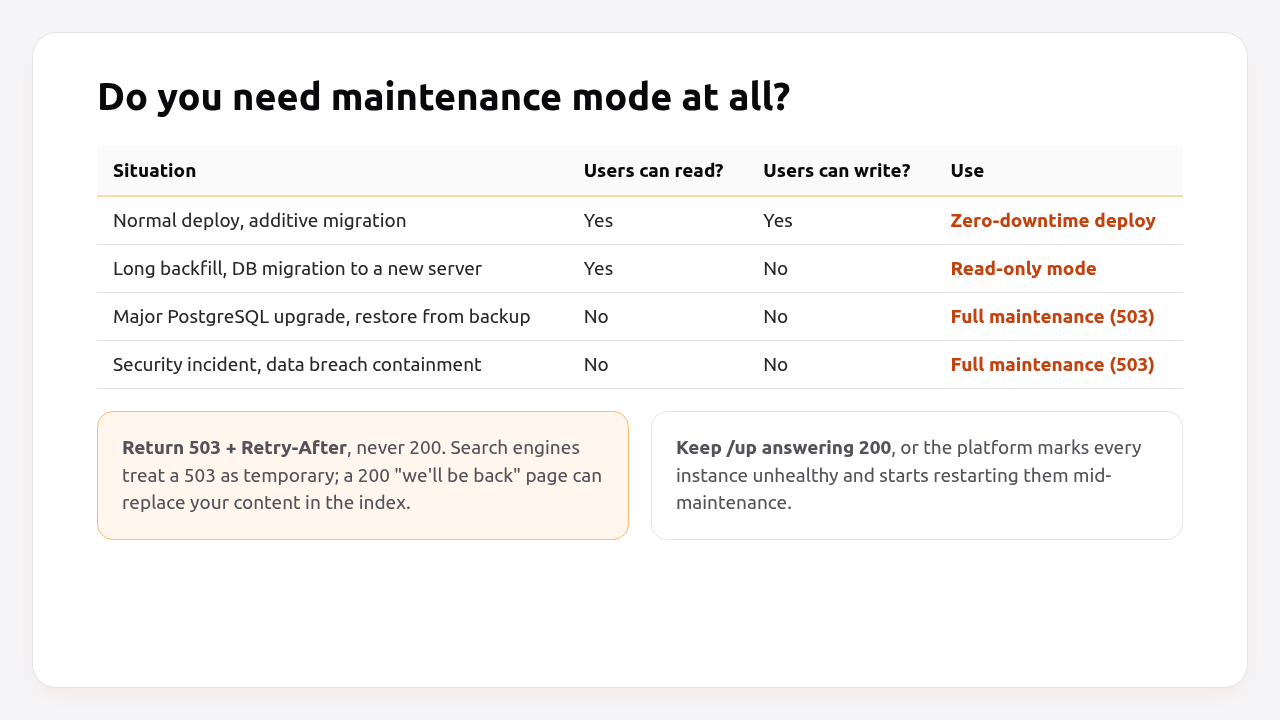
| Situation | Reads | Writes | What to use |
|---|---|---|---|
| Normal deploy, additive migration | ✅ | ✅ | Zero-downtime deploy |
| Backfilling or migrating data between servers | ✅ | ❌ | Read-only mode |
| Major PostgreSQL upgrade, restore from backup | ❌ | ❌ | Full maintenance |
| Security incident containment | ❌ | ❌ | Full maintenance |
If you’re reaching for maintenance mode to run a migration, check the zero-downtime migrations playbook first. Most schema changes can ship without it.
Prerequisites
- Rails 7.1+ (examples use Rails 8.0 and Ruby 3.3, with Rack 3).
- A cache store shared by all instances (Redis or Solid Cache) for the toggle.
:memory_storewon’t work with more than one process. - A
/uphealth check, as Rails 7.1+ generates. See the Rails health check guide.
Step 1: Create a self-contained 503 page
Create public/503.html with inline CSS and no external assets. During maintenance, requests for stylesheets and images may not be served, so the page has to work on its own.
<!-- public/503.html -->
<!doctype html>
<html lang="en">
<head>
  <meta charset="utf-8">
  <meta name="viewport" content="width=device-width, initial-scale=1">
  <meta name="robots" content="noindex">
  <title>Down for maintenance</title>
  <style>
    body { font: 16px/1.5 system-ui, sans-serif; background: #f5f5f7; color: #27272a; display: grid; place-items: center; min-height: 100vh; margin: 0; }
    main { background: #fff; border: 1px solid #e4e4e7; border-radius: 16px; padding: 40px; max-width: 480px; text-align: center; }
    h1 { color: #09090b; font-size: 24px; margin: 0 0 8px; }
    .dot { display: inline-block; width: 10px; height: 10px; border-radius: 50%; background: #ea580c; margin-right: 6px; }
  </style>
</head>
<body>
  <main>
    <h1><span class="dot"></span>We'll be right back</h1>
    <p>We're doing scheduled maintenance and expect to be back within 30 minutes.</p>
    <p>Status updates: <a href="https://status.example.com">status.example.com</a></p>
  </main>
</body>
</html>
Link to a status page hosted somewhere else, so users can follow progress even though your app is down.
Step 2: Add a maintenance middleware
A small Rack middleware checks a shared flag on every request and returns the 503 page, letting health checks, assets and authorised people through.
# lib/middleware/maintenance_mode.rb
class MaintenanceMode
  CACHE_KEY = "maintenance:mode"          # "full", "read_only" or nil
  ALWAYS_ALLOWED = %w[/up].freeze
  ALLOWED_PREFIXES = %w[/assets/].freeze
  CHECK_INTERVAL = 5                      # seconds between cache reads per process

  def self.mode
    @mutex ||= Mutex.new
    @mutex.synchronize do
      now = Process.clock_gettime(Process::CLOCK_MONOTONIC)
      if @checked_at.nil? || now - @checked_at > CHECK_INTERVAL
        @mode = ENV["MAINTENANCE_MODE"].presence || safe_cache_read
        @checked_at = now
      end
      @mode
    end
  end

  def self.safe_cache_read
    Rails.cache.read(CACHE_KEY)
  rescue StandardError
    nil # if the cache is down, fall back to ENV only
  end

  def initialize(app)
    @app = app
    @page = Rails.public_path.join("503.html").read
  end

  def call(env)
    return @app.call(env) unless self.class.mode == "full"

    request = Rack::Request.new(env)
    return @app.call(env) if allowed?(request)

    if request.get_header("HTTP_ACCEPT").to_s.include?("application/json")
      [503, headers("application/json"), [{ error: "maintenance", retry_after: retry_after }.to_json]]
    else
      [503, headers("text/html; charset=utf-8"), [@page]]
    end
  end

  private

  def allowed?(request)
    ALWAYS_ALLOWED.include?(request.path) ||
      ALLOWED_PREFIXES.any? { |prefix| request.path.start_with?(prefix) } ||
      bypass_token?(request) ||
      allowed_ip?(request)
  end

  def bypass_token?(request)
    token = ENV["MAINTENANCE_BYPASS_TOKEN"].to_s
    provided = request.get_header("HTTP_X_MAINTENANCE_BYPASS").to_s.presence || request.cookies["maintenance_bypass"].to_s
    token.present? && ActiveSupport::SecurityUtils.secure_compare(provided, token)
  end

  def allowed_ip?(request)
    ENV.fetch("MAINTENANCE_ALLOWED_IPS", "").split(",").map(&:strip).include?(request.ip)
  end

  def retry_after = ENV.fetch("MAINTENANCE_RETRY_AFTER", "1800")

  def headers(content_type)
    { "content-type" => content_type, "retry-after" => retry_after, "cache-control" => "no-store" }
  end
end
Middleware is loaded while the app boots, before autoloading is available, so require it explicitly and exclude the folder from autoload_lib:
# config/application.rb
require_relative "boot"
require "rails/all"
require_relative "../lib/middleware/maintenance_mode"

Bundler.require(*Rails.groups)

module Myapp
  class Application < Rails::Application
    config.load_defaults 8.0
    config.autoload_lib(ignore: %w[assets tasks middleware])

    config.middleware.insert_before 0, MaintenanceMode
  end
end
Design decisions worth knowing:
- Shared flag, local memo. Each process reads the flag from the cache at most every 5 seconds, so 30 Puma threads don’t hit Redis on every request, and all instances switch within 5 seconds.
MAINTENANCE_MODEenv fallback. If the maintenance is because the database is down and your cache is Solid Cache (stored in that database), the cache read fails. SettingMAINTENANCE_MODE=fulland restarting still works.request.iprespects trusted proxies. Behind a load balancer, make sureconfig.action_dispatch.trusted_proxiesis right, or every request will appear to come from the proxy’s IP.Retry-Aftertells browsers, crawlers and API clients when to try again. Google’s guidance is to return 503 for planned downtime and to keep it short.
Pro Tip: For the bypass cookie, give your team a one-line bookmarklet or a hidden route that sets maintenance_bypass=<token>. It’s easier than everyone configuring a header, and you can test the real site before switching it back on.
Step 3: Add a read-only mode
Read-only mode keeps the site browsable while blocking writes. It’s usually a better experience than a 503 page, and a safer one for data migrations: nothing can change underneath you.
# lib/middleware/read_only_mode.rb
class ReadOnlyMode
  SAFE_METHODS = %w[GET HEAD OPTIONS].freeze

  def initialize(app)
    @app = app
  end

  def call(env)
    return @app.call(env) unless MaintenanceMode.mode == "read_only"

    request = Rack::Request.new(env)
    unless SAFE_METHODS.include?(request.request_method)
      return [503, { "content-type" => "text/plain", "retry-after" => "600" },
              ["The site is temporarily read-only for maintenance. Please try again shortly."]]
    end

    ActiveRecord::Base.while_preventing_writes { @app.call(env) }
  end
end
# config/application.rb (add below the MaintenanceMode line)
require_relative "../lib/middleware/read_only_mode"
config.middleware.insert_after MaintenanceMode, ReadOnlyMode
while_preventing_writes makes Active Record raise ActiveRecord::ReadOnlyError for any INSERT, UPDATE or DELETE during the request. Watch for code that writes on GET requests, like last_seen_at updates, view counters or session records in the database. Wrap those in a rescue, or skip them while MaintenanceMode.mode == "read_only". Show a banner in the layout so users know why forms are disabled:
<%# app/views/layouts/application.html.erb %>
<% if MaintenanceMode.mode == "read_only" %>
  <div class="notice">Maintenance in progress: you can browse, but changes are paused for a few minutes.</div>
<% end %>
Step 4: Toggle it from the command line
Add three Rake tasks so turning maintenance on and off is one command that writes the shared flag.
# lib/tasks/maintenance.rake
namespace :maintenance do
  desc "Full maintenance: every public request gets a 503"
  task on: :environment do
    Rails.cache.write(MaintenanceMode::CACHE_KEY, "full")
    puts "Maintenance ON (full). All instances switch within #{MaintenanceMode::CHECK_INTERVAL}s."
  end

  desc "Read-only maintenance: GET works, writes return 503"
  task read_only: :environment do
    Rails.cache.write(MaintenanceMode::CACHE_KEY, "read_only")
    puts "Maintenance ON (read-only)."
  end

  desc "Back to normal"
  task off: :environment do
    Rails.cache.delete(MaintenanceMode::CACHE_KEY)
    puts "Maintenance OFF."
  end
end
Run them where your app runs:
kamal app exec --reuse "bin/rails maintenance:on"
heroku run bin/rails maintenance:read_only -a myapp
fly ssh console -C "bin/rails maintenance:off"
The cache entry has no expiry on purpose. Maintenance stays on until someone explicitly turns it off, and that someone should be in your runbook.
Step 5: Pause background jobs
Maintenance mode stops web requests, but job workers keep running, and they may write to the database you’re upgrading or restoring. Pause them too.
With Solid Queue, pause the queues from a console or Mission Control:
# bin/rails console
SolidQueue::Queue.all.each(&:pause)    # during maintenance
SolidQueue::Queue.all.each(&:resume)   # afterwards
With Kamal, you can also stop the job role entirely: kamal app stop --roles=job, then kamal app boot --roles=job afterwards. For Sidekiq, send TSTP to stop fetching new jobs (kill -TSTP <pid>) or scale the worker to zero on your platform. The background jobs guide explains how in-flight jobs behave on shutdown.
Step 6: Verify it works
Turn maintenance on in staging and check status codes, headers, the health check and the bypass.
bin/rails maintenance:on
sleep 6

curl -sI https://staging.example.com/ | grep -iE "^HTTP|retry-after|cache-control"
# HTTP/2 503
# retry-after: 1800
# cache-control: no-store

curl -s -o /dev/null -w "%{http_code}\n" https://staging.example.com/up
# 200

curl -s -o /dev/null -w "%{http_code}\n" -H "X-Maintenance-Bypass: $MAINTENANCE_BYPASS_TOKEN" https://staging.example.com/
# 200

curl -s -H "Accept: application/json" https://staging.example.com/api/orders
# {"error":"maintenance","retry_after":"1800"}

bin/rails maintenance:read_only && sleep 6
curl -s -o /dev/null -w "%{http_code}\n" https://staging.example.com/products      # 200
curl -s -o /dev/null -w "%{http_code}\n" -X POST https://staging.example.com/cart  # 503

bin/rails maintenance:off
Also confirm that the platform didn’t restart anything while maintenance was on: no failed health checks in the deploy dashboard, and the same container or dyno IDs before and after.
How Heroku, Render, Fly.io, Upsun, Kamal and Enkihost handle maintenance mode
Heroku, Render and Kamal have a built-in maintenance switch at the router or proxy level. Fly.io and Upsun don’t, so you use app-level middleware like the one above. Platform switches are simpler, but they’re all-or-nothing: no read-only mode, and usually no bypass for your team.
| Platform | Built-in switch | Response | Custom page | Team bypass | Read-only option |
|---|---|---|---|---|---|
| Heroku | heroku maintenance:on |
503 from the router | MAINTENANCE_PAGE_URL config var |
No (dynos keep running, heroku run works) |
No |
| Render | Maintenance Mode toggle (paid web services) | 503 | Custom page URL, ideally a static site | Private network and SSH still reach the service | No |
| Kamal 2.6+ | kamal app maintenance, kamal app live |
503 from kamal-proxy | error_pages_path with a 503.html, --message |
No | No |
| Fly.io | None | — | App-level | App-level | App-level |
| Upsun | None | — | App-level | App-level | App-level |
| Enkihost | None documented | — | App-level | App-level | App-level |
With Kamal, the proxy-level switch looks like this:
# config/deploy.yml
error_pages_path: public   # kamal-proxy serves public/503.html during maintenance
kamal app maintenance --message "Database upgrade in progress, back by 10:30 UTC"
# ...do the work...
kamal app live
A useful combination is the platform switch for full maintenance, because it doesn’t depend on your app booting at all, plus the app-level middleware for read-only mode and team bypass.
Enkihost does zero-downtime deploys, which removes the most common reason teams reach for maintenance mode. For the rare full-maintenance case, the middleware in this guide works unchanged because it only depends on Rails and a shared cache.
Troubleshooting maintenance mode
Instances restart during maintenance
The health check returns 503 too. Make sure /up is in ALWAYS_ALLOWED, and that MaintenanceMode sits before any middleware that would block it. On Render, a failing health check for 60 seconds triggers a restart. On Kamal, the next deploy would fail.
Only some instances show the maintenance page
The flag is in a per-process store (:memory_store, a file in the container) or instances use different cache namespaces. Use Redis or Solid Cache shared by all instances, and wait at least CHECK_INTERVAL seconds.
The maintenance page is unstyled or shows broken images
The page references assets through the asset pipeline or the CDN. Inline the CSS and images (or use a data URI), as in Step 1.
Users still see the maintenance page after turning it off
A CDN or browser cached the 503. Send cache-control: no-store (the middleware does), and purge the CDN cache for HTML paths after maintenance.
ActiveRecord::ReadOnlyError on GET requests
ActiveRecord::ReadOnlyError: Write query attempted while in readonly mode: UPDATE "users" SET "last_seen_at" = ...
Something writes during a GET. Skip that write in read-only mode, or rescue ActiveRecord::ReadOnlyError around it. Keep a list of these places. It’s also a useful map of side effects in your app.
Author Perspective: the best maintenance window is the one you skip
I keep maintenance mode in every app, and I’m happy when it goes unused for a year. Every time I’ve used it in the last few years, the real job was a database operation, like a major version upgrade or a restore drill, not a deploy. What made those windows calm wasn’t the 503 page. It was the runbook: who turns it on, which queues get paused, how we verify the database, who turns it off, and what we tell users on the status page. If you add the middleware from this post, add that runbook in the same pull request. The code takes an hour. The runbook is what makes the night boring.
Maintenance and deploys on Enkihost
On Enkihost, maintenance mode is a tool for exceptional situations, not part of every release:
- Zero-downtime deploys: new releases take over without dropping requests, so routine deploys and additive migrations never need a maintenance window.
- Redis add-on that injects
REDIS_URL, a natural home for the shared maintenance flag that every instance reads. - PostgreSQL add-on that injects
DATABASE_URL, withwhile_preventing_writesgiving you a read-only mode for data work without stopping the site. - Per-app resource isolation, so maintenance on one app doesn’t affect other apps.
Rails and Sinatra apps run on Ignite (9 EUR per month after a 14-day free trial, with PostgreSQL and Redis included) or Blaze (29 EUR per month, with high availability and autoscaling). The free Spark plan is for Jekyll sites. See enkihost.com.
FAQ
What HTTP status code should a maintenance page return?
Return 503 Service Unavailable with a Retry-After header. It tells browsers, API clients and search engines that the outage is temporary and when to retry. A maintenance page returned with status 200 can be indexed by search engines in place of your real content.
Does maintenance mode hurt SEO?
Short maintenance with a 503 status and Retry-After header does not hurt rankings. Search engines treat it as temporary and come back later. Problems start when maintenance lasts for days or when the page returns 200, which signals that the maintenance page is your actual content.
Is there a gem for Rails maintenance mode?
There are gems such as turnout, but a maintenance middleware is small enough to own, as shown in this guide, and you control exactly which paths, IPs and tokens bypass it. On Kamal, Heroku and Render you can also use the platform’s built-in switch without any gem.
How do I let admins use the site during maintenance?
Allow requests that carry a secret bypass token in a header or cookie, or that come from allowlisted IP addresses. Compare the token with ActiveSupport::SecurityUtils.secure_compare and keep the token in an environment variable rather than in code.
Should background jobs keep running during maintenance?
Usually not. Jobs can write to the database you are upgrading or restoring, or call external services with half-migrated data. Pause Solid Queue queues or stop the job workers before starting, and resume them after you have verified the database.
Sources
- Rails on Rack: configuring the middleware stack — Rails Guides
- ActiveRecord::ConnectionHandling#while_preventing_writes — Rails API
- Kamal app commands: maintenance and live — Kamal docs
- Kamal configuration: error_pages_path — Kamal docs
- Maintenance Mode — Heroku Dev Center
- Maintenance Mode — Render Docs
- rails/solid_queue: pausing queues — GitHub
- How to deal with planned site downtime — Google Search Central
- Retry-After header — MDN