Rails + Redis: What ActionCable, Cache and Queues Each Use It For

A Rails app can use Redis for three different jobs: the cache (redis_cache_store), the ActionCable pub/sub adapter, and the job queue behind Sidekiq. They look the same in REDIS_URL, but they want opposite things from Redis. A cache wants old keys evicted when memory fills up; a queue must never lose a key; ActionCable barely stores anything at all. This post explains what each of the three writes to Redis, which maxmemory-policy each needs, how much memory and how many connections to plan for, and when one Redis instance is enough.
TL;DR
- The cache stores expiring copies of data and needs an evicting policy (
allkeys-lruorallkeys-lfu). Sidekiq stores jobs and needsnoeviction. ActionCable only uses pub/sub and stores almost nothing.- Logical databases (
/0,/1,/2) on one Redis share the samemaxmemoryand eviction policy, so they don’t separate a cache from a queue. Use two instances, or move one role off Redis.- Size Redis per role: the cache to your hot data set, the queue to its worst backlog, ActionCable to almost nothing.
- Count connections per process: cache pool + Sidekiq client pool + one ActionCable subscriber per Puma process, plus Sidekiq’s own pool.
- Rails 8 can run all three without Redis (Solid Cache, Solid Cable, Solid Queue). Redis is a choice, not a requirement.
Table of Contents
- What does Rails use Redis for?
- Can cache, ActionCable and Sidekiq share one Redis?
- Configuring each role
- How much Redis memory does each role need?
- How many Redis connections does a Rails app open?
- Verify it works
- Troubleshooting
- How Heroku, Render, Fly.io and Upsun provide Redis
- Author Perspective
- Redis on Enkihost
- FAQ
- Sources
What does Rails use Redis for?
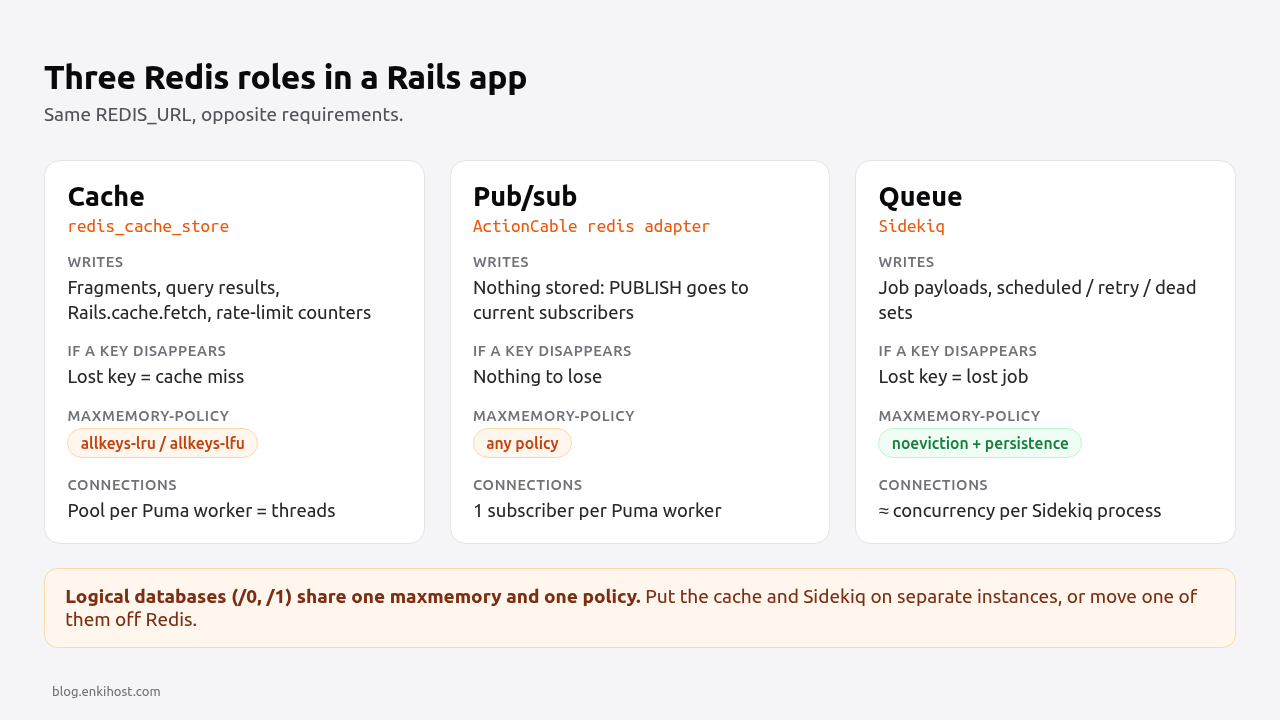
Rails uses Redis in three independent roles, and each one stores a different kind of data with different durability needs.
| Role | Rails component | What it writes | If a key disappears | Required policy | Persistence |
|---|---|---|---|---|---|
| Cache | :redis_cache_store |
Serialized fragments, query results, Rails.cache.fetch values, rate-limit counters |
A cache miss, the value is recomputed | allkeys-lru / allkeys-lfu |
Not needed |
| Pub/sub | ActionCable redis adapter |
Nothing durable: PUBLISH messages go to whoever is subscribed right now |
Nothing: messages are never stored | Any | Not needed |
| Queue | Sidekiq (via Active Job or directly) | Job payloads in lists, scheduled and retry sets, stats | A job is lost, silently | noeviction |
AOF or RDB recommended |
The cache is disposable by design, which is why you can evict it. The queue is the opposite: a queued job exists only in Redis until a worker picks it up, so an evicted key is a welcome email that never goes out. ActionCable sits apart: the Redis adapter uses SUBSCRIBE and PUBLISH, and published messages are delivered to subscribers and gone. It needs Redis to be reachable, not to have memory.
Can cache, ActionCable and Sidekiq share one Redis?
ActionCable can share with either. The cache and Sidekiq should not share an instance, because a Redis instance has exactly one maxmemory and one maxmemory-policy, and they need opposite policies.
Using separate logical databases (redis://host:6379/0 for the cache, /1 for Sidekiq) doesn’t help. Logical databases are namespaces inside one server: memory is counted for the whole instance and the eviction policy applies to all of them. With allkeys-lru, a busy cache will push Sidekiq’s job keys out. With noeviction, a full cache makes every write fail, including job enqueues.
| Setup | Works? | Why |
|---|---|---|
Cache + ActionCable on one instance (allkeys-lru) |
Yes | Pub/sub stores no keys, so eviction doesn’t affect it |
Sidekiq + ActionCable on one instance (noeviction) |
Yes | Same reason |
| Cache + Sidekiq, separate logical databases | No | Shared memory and policy |
Cache + Sidekiq, volatile-lru and TTLs on every cache key |
Risky | Only works if every cache write has an expires_in; one write without it can’t be evicted and fills memory |
| Cache on Solid Cache, Sidekiq + ActionCable on Redis | Yes | The cache moves to the database, Redis gets noeviction |
If you only have one Redis instance, give it to Sidekiq with noeviction and put the cache on Solid Cache (the Rails 8 default), or keep the cache on Redis and run jobs on Solid Queue. Either way, one role per policy.
Pro Tip: Sidekiq checks the policy at boot and logs WARNING: Your Redis instance will evict Sidekiq data under heavy load. The 'noeviction' maxmemory policy is recommended (current policy: 'allkeys-lru'). Treat that line as an error, not a warning.
Configuring each role
Point each role at its own environment variable, even if two of them hold the same URL today. Splitting them later is then a config change, not a code change.
Cache
# config/environments/production.rb
Rails.application.configure do
  config.cache_store = :redis_cache_store, {
    url: ENV.fetch("REDIS_CACHE_URL") { ENV.fetch("REDIS_URL") },
    namespace: "cache",
    pool: { size: ENV.fetch("RAILS_MAX_THREADS", 3).to_i, timeout: 1 },
    connect_timeout: 1,
    read_timeout: 0.2,
    write_timeout: 0.2,
    reconnect_attempts: 1,
    error_handler: ->(method:, returning:, exception:) {
      Rails.logger.warn("cache #{method} failed: #{exception.class}: #{exception.message}")
    }
  }
end
The short timeouts and the error_handler make a Redis outage a slow site rather than a broken one: a failed read is a miss. Since Rails 7.1, redis_cache_store uses a connection pool by default; size it to the Puma thread count. The Rails Redis caching guide covers fragment caching and eviction in more depth.
ActionCable
# config/cable.yml
development:
  adapter: async

test:
  adapter: test

production:
  adapter: redis
  url: <%= ENV.fetch("REDIS_CABLE_URL") { ENV.fetch("REDIS_URL") } %>
  channel_prefix: myapp_production
channel_prefix matters when two apps or environments share a Redis server: without it, a broadcast in staging reaches production subscribers on the same stream name. The redis adapter needs the redis gem in the Gemfile.
Sidekiq
# config/initializers/sidekiq.rb
redis_config = {
  url: ENV.fetch("REDIS_QUEUE_URL") { ENV.fetch("REDIS_URL") },
  network_timeout: 3,
  pool_timeout: 3
}

Sidekiq.configure_server do |config|
  config.redis = redis_config
end

Sidekiq.configure_client do |config|
  config.redis = redis_config
end
# config/sidekiq.yml
:concurrency: 5
:timeout: 25
:queues:
  - critical
  - default
  - low
# config/application.rb
config.active_job.queue_adapter = :sidekiq
Sidekiq 7 sizes its server-side connection pools from concurrency, so don’t set size in configure_server. The background jobs guide compares Sidekiq with Solid Queue and covers shutdown and retries.
How much Redis memory does each role need?
Size each role separately, from your own data, because the three grow for different reasons.
| Role | Grows with | How to estimate | What happens when full |
|---|---|---|---|
| Cache | Hot data set and TTLs | Run it with eviction, then watch evicted_keys and hit rate; grow until evictions stop hurting the hit rate |
Least-used keys evicted, more misses |
| Sidekiq | Backlog: jobs enqueued faster than processed, plus retry and dead sets | Average payload size × worst backlog you expect, plus the dead set (Sidekiq keeps up to 10,000 dead jobs for 6 months by default) | OOM command not allowed on enqueue |
| ActionCable | Number of subscriptions (connections, not keys) | Negligible memory; watch pubsub_channels and client output buffers |
Slow subscribers can be disconnected by client-output-buffer-limit |
Two measurements tell you more than any rule of thumb:
# Average and largest job payload in the default queue
redis-cli -u "$REDIS_QUEUE_URL" --no-auth-warning LRANGE queue:default 0 99 | awk '{ n++; s+=length($0); if (length($0)>m) m=length($0) } END { print "jobs:", n, "avg bytes:", (n ? s/n : 0), "max bytes:", m }'

# Memory, evictions and hit rate for the cache instance
redis-cli -u "$REDIS_CACHE_URL" --no-auth-warning INFO memory | grep -E 'used_memory_human|maxmemory_human|maxmemory_policy'
redis-cli -u "$REDIS_CACHE_URL" --no-auth-warning INFO stats  | grep -E 'evicted_keys|keyspace_hits|keyspace_misses'
Most Sidekiq memory problems come from big payloads, not job count. Pass record IDs to jobs, not serialized objects or file contents; a job argument that holds a 200 KB JSON blob costs 200 KB per queued job.
Pro Tip: don’t over-provision the cache “just in case”. A cache that never evicts usually means TTLs are longer than they need to be or keys are never read again. Check keyspace_hits against keyspace_misses before you buy more memory.
How many Redis connections does a Rails app open?
Per Puma process, roughly one cache pool, one Sidekiq client pool and one ActionCable subscriber; per Sidekiq process, its concurrency plus a few internal connections. Add them up before you hit a provider’s connection limit.
| Process | Connections | Example: 2 Puma workers × 3 threads, 1 Sidekiq at concurrency 5 |
|---|---|---|
| Puma worker: cache pool | Up to pool size |
2 × 3 = 6 |
| Puma worker: Sidekiq client pool (enqueueing) | Up to its pool size, opened on demand | 2 × 3 = 6 |
| Puma worker: ActionCable | 1 subscriber per worker, plus pooled connections for broadcasts | 2 × 2 = 4 |
| Sidekiq process | About concurrency + a few internal |
5 + 2 = 7 |
| Total | ≈ 23 |
Pools open connections lazily, so the real number is usually lower than the ceiling. Scale it the same way you scale the database pool in the connection pool sizing guide: the multiplier is always processes × threads. Check the live count with redis-cli INFO clients | grep connected_clients.
Verify it works
Confirm each role reaches the right instance with the right policy:
# Policy per instance: expect allkeys-lru (cache) and noeviction (queue)
redis-cli -u "$REDIS_CACHE_URL" --no-auth-warning CONFIG GET maxmemory-policy
redis-cli -u "$REDIS_QUEUE_URL" --no-auth-warning CONFIG GET maxmemory-policy
# Cache round-trip from the app
bin/rails runner 'Rails.cache.write("probe", 1, expires_in: 60); p Rails.cache.read("probe")'

# ActionCable: subscribe in one terminal...
redis-cli -u "$REDIS_CABLE_URL" --no-auth-warning PSUBSCRIBE 'myapp_production:*'
# ...and broadcast from another
bin/rails runner 'ActionCable.server.broadcast("probe", { ok: true })'

# Sidekiq: confirm the connection and that queues are draining
bin/rails runner 'p Sidekiq.redis { |c| c.call("PING") }; p Sidekiq::Stats.new.enqueued'
Managed providers sometimes disable CONFIG. If CONFIG GET returns ERR unknown command, read the policy from INFO memory (maxmemory_policy) or the provider’s dashboard.
Troubleshooting
Redis::CommandError: OOM command not allowed when used memory > 'maxmemory'. The instance is full and on noeviction. If it’s the cache, switch it to allkeys-lru. If it’s Sidekiq, look at the retry and dead sets and at payload sizes before adding memory.
ConnectionPool::TimeoutError: Waited 1 sec, 0/3 available. More threads want a connection than the pool holds, usually because the pool is smaller than RAILS_MAX_THREADS or a slow Redis call holds connections. Match the pool to the thread count.
Redis::CannotConnectError: Error connecting to Redis on 127.0.0.1:6379 (Errno::ECONNREFUSED). REDIS_URL isn’t set in that process, so the client fell back to localhost. Common in a release or build step that doesn’t get runtime variables.
ActionCable broadcasts arrive in development but not in production. Production is still on the async adapter, which only delivers within one process. Check config/cable.yml and that the redis gem is installed.
Jobs enqueued but never run, and the queue keeps growing. The worker connects to a different Redis or logical database than the web process. Print Sidekiq.redis { |c| c.call("CLIENT", "INFO") } in both and compare.
How Heroku, Render, Fly.io and Upsun provide Redis
All four give you managed Redis or Valkey; the differences that matter here are the default eviction policy and whether you can run more than one instance per app.
| Platform | Product | Default eviction | Multiple instances | Note for the three roles |
|---|---|---|---|---|
| Heroku | Heroku Key-Value Store | noeviction |
Yes, each a separate add-on | Fine for Sidekiq; change the cache instance with heroku redis:maxmemory --policy allkeys-lfu |
| Render | Render Key Value (Valkey) | Chosen at creation | Yes | Pick allkeys-lru for the cache instance, noeviction for the queue instance |
| Fly.io | Upstash for Redis (fly redis create) |
Writes rejected when full unless eviction is enabled | Yes | Enable eviction only on the cache database |
| Upsun | redis and redis-persistent services |
Configurable per service | Yes, as separate services | redis for the cache, redis-persistent for Sidekiq |
| Enkihost | Managed Redis, injected as REDIS_URL |
Check with CONFIG GET maxmemory-policy |
One or more instances, depending on the account | With one instance, keep it for one policy |
Author Perspective
My rule is one eviction policy per Redis instance, no exceptions. Sharing an instance between the cache and Sidekiq is tempting because it’s one less thing to provision, but the failure it allows is the worst kind: nothing crashes, and some jobs simply never run, with only the evicted_keys counter as evidence. If I only have one instance, the queue gets it with noeviction and the cache moves to Solid Cache in the database. A slower cache is a performance problem I can measure; a lost job is a correctness problem a user reports days later. And for a new Rails 8 app, I’d start with the Solid trio and add Redis only when a measurement asks for it.
Redis on Enkihost
Enkihost includes managed Redis with Rails apps and injects REDIS_URL, so the configuration above works as written. Read maxmemory-policy before deciding what to put on it.
- One process per app: Enkihost runs a single process per app, so Sidekiq runs in embedded mode inside Puma, or jobs run on Solid Queue with
SOLID_QUEUE_IN_PUMA=true. The connection table above collapses to the Puma rows plus the embedded Sidekiq’s concurrency. - Managed PostgreSQL is included too, so Solid Cache or Solid Queue is always an option when you’d rather keep a role off Redis.
- Per-app resource isolation: your app’s CPU and memory are its own, but each Redis instance has a fixed memory limit, so the sizing section above is the part to take seriously.
- Zero-downtime deploys: old and new release share the same Redis during the switch, so keep job argument formats backward compatible across one deploy.
See enkihost.com for details.
FAQ
Does Rails 8 need Redis?
No. Rails 8 defaults to Solid Cache, Solid Queue and Solid Cable, which store the cache, jobs and ActionCable messages in a SQL database. Redis is only needed if you choose redis_cache_store, the ActionCable redis adapter or Sidekiq.
Can I use different Redis databases for cache and Sidekiq?
Not safely. Logical databases on one Redis server share the same maxmemory limit and maxmemory-policy, so a cache with allkeys-lru can evict Sidekiq jobs, and a queue with noeviction makes a full cache fail writes. Use two Redis instances instead.
Does ActionCable store messages in Redis?
No. The ActionCable redis adapter uses Redis pub/sub: broadcasts are delivered to the processes subscribed at that moment and are not stored. If a client is disconnected when a message is published, it misses that message.
What maxmemory-policy should Redis use for Sidekiq?
noeviction. With any evicting policy, Redis can delete queued, scheduled or retrying jobs under memory pressure without an error. With noeviction, a full Redis rejects new writes with an OOM error, which you can see and fix.
Should I use Solid Cache or Redis for caching in Rails?
Use Solid Cache if you want one less service or have only one Redis instance that Sidekiq needs. Use Redis when cache reads must be as fast as possible or you already run a dedicated cache instance. Both work with the same Rails.cache API.
Sources
- Caching with Rails: RedisCacheStore — Rails Guides
- Action Cable Overview: Redis adapter and channel_prefix — Rails Guides
- Using Redis: memory and eviction — Sidekiq wiki
- Advanced Options: concurrency and connection pools — Sidekiq wiki
- Key eviction — Redis docs
- Pub/Sub — Redis docs
- Heroku Key-Value Store: maxmemory policy — Heroku Dev Center
- Render Key Value — Render Docs
- Upstash for Redis — Fly Docs
- Redis service — Upsun Docs