Rails Credentials Guide: Per-Environment Secrets, Master Keys, Rotation and Deploys

Rails credentials are encrypted YAML files committed to your repository, decrypted at boot with a key that lives outside it: config/master.key locally, or the RAILS_MASTER_KEY environment variable on a server. Used well, they give you versioned, reviewable secrets with one key per environment. Used carelessly, a single master.key gets shared with every developer, CI and contractor, and losing it means losing every secret at once. This guide covers per-environment credentials, reading values so a missing one fails loudly, passing keys to Kamal, CI and each hosting platform, rotating a leaked key, and fixing the decrypt and merge-conflict errors everyone eventually hits.
TL;DR
- Use per-environment credentials:
bin/rails credentials:edit --environment productioncreatesconfig/credentials/production.yml.encandproduction.key. Each environment gets its own key.- Commit the
.yml.encfiles. Never commit.keyfiles. Store each key in a password manager, and give the production key only to the platform and two or three people.- On servers, set
RAILS_MASTER_KEYto the environment’s key through the platform’s secret store. It takes precedence over key files.- Read with
credentials.dig(:stripe, :secret_key)inside a helper that raises when the value is missing, so a missing secret fails at boot, not at checkout.- Rotating the key re-encrypts the file but doesn’t change the secrets inside. If a key leaks, rotate every secret it protected at its provider as well.
Table of Contents
- How do Rails credentials work?
- Prerequisites
- Step 1: Create per-environment credentials
- Step 2: Structure and read credentials safely
- Step 3: Provide the key in CI, Kamal and production
- Step 4: Make credential changes reviewable
- Step 5: Rotate a master key
- Step 6: Verify it works
- How Heroku, Render, Fly.io, Upsun and Enkihost handle Rails credentials
- Troubleshooting Rails credentials
- Author Perspective: one key per environment, no exceptions
- Rails credentials on Enkihost
- FAQ
- Sources
How do Rails credentials work?
Rails encrypts a YAML file with AES-128-GCM using a key you keep outside the repository. At boot, Rails reads the key from RAILS_MASTER_KEY or a key file, decrypts the YAML into Rails.application.credentials, and your code reads values from it.
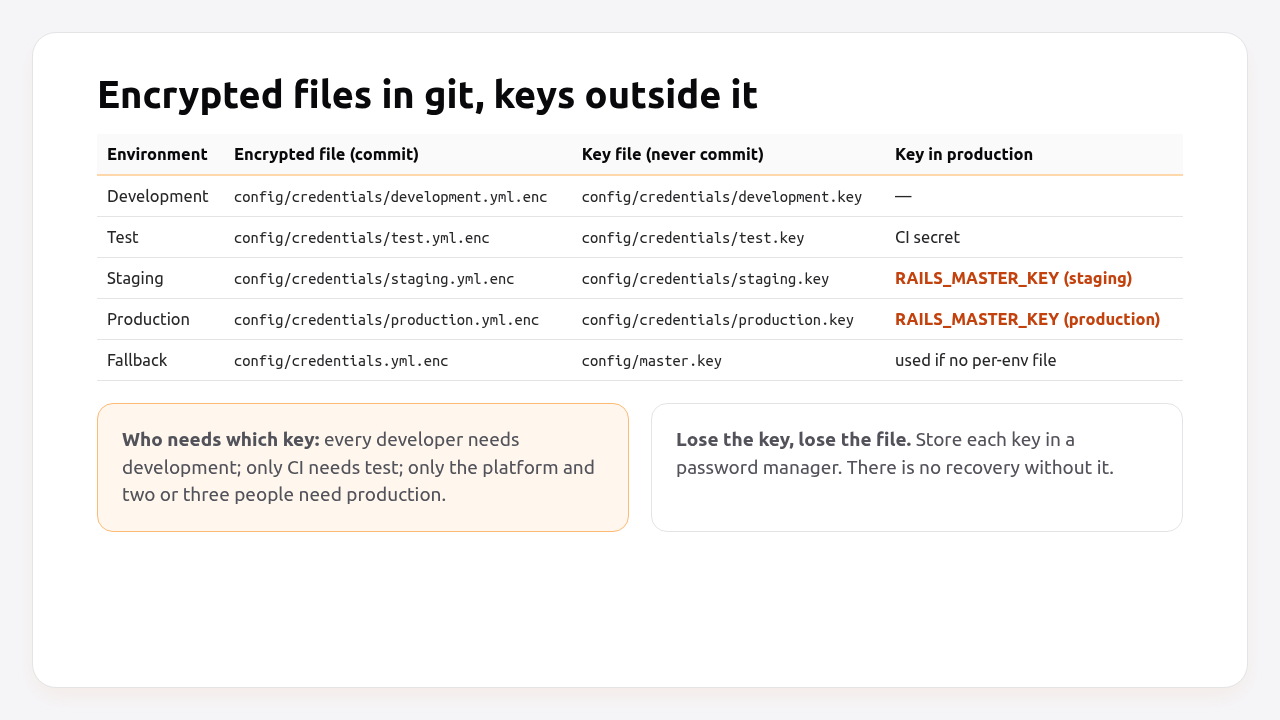
Rails looks for credentials in this order for the current RAILS_ENV:
config/credentials/<env>.yml.enc, decrypted withRAILS_MASTER_KEYorconfig/credentials/<env>.key.- If that file doesn’t exist,
config/credentials.yml.enc, decrypted withRAILS_MASTER_KEYorconfig/master.key.
New apps start with the single config/credentials.yml.enc and config/master.key. That’s fine for a solo project. It stops being fine the day a second person or a CI system needs to decrypt development secrets without seeing production ones.
Prerequisites
- Rails 7.1+ (examples use Rails 8.0/8.1 and Ruby 3.3).
credentials:fetchrequires Rails 8.1. - An
EDITORset in your shell (export EDITOR="code --wait"orvim). - A password manager for storing keys (1Password, Bitwarden or similar).
Step 1: Create per-environment credentials
Create one encrypted file and key per environment you deploy. Each file holds only that environment’s secrets.
EDITOR="code --wait" bin/rails credentials:edit --environment production
# Adding config/credentials/production.key to store the encryption key: 0f3c…
# Save this in a password manager your team can access.
# File encrypted and saved.

bin/rails credentials:edit --environment staging
bin/rails credentials:edit --environment development
Make sure no key file can be committed:
# .gitignore
/config/master.key
/config/credentials/*.key
Store each key’s contents in your password manager straight away, in a vault whose access matches who should decrypt that environment. If the production.key file only exists on one laptop, that laptop is now critical infrastructure.
If you’re moving from a single credentials.yml.enc, copy the production values into the new production file. When production.yml.enc exists, Rails ignores the shared file in production. Then remove production secrets from the shared file and keep it for development, or delete it.
Step 2: Structure and read credentials safely
Group secrets by service, mirror the same structure in every environment, and read them through a helper that raises a clear error when a value is missing.
# bin/rails credentials:edit --environment production
secret_key_base: 3f9a…   # generated by Rails

stripe:
  secret_key: sk_live_…
  webhook_secret: whsec_…

smtp:
  user_name: postmaster@mg.example.com
  password: …

active_record_encryption:
  primary_key: …
  deterministic_key: …
  key_derivation_salt: …

kamal:
  registry_password: …
Generate the Active Record Encryption keys with bin/rails db:encryption:init and paste the output under active_record_encryption.
Read values with dig, and fail loudly when something required is missing:
# config/initializers/00_credentials.rb
module Creds
  module_function

  def fetch(*path)
    value = Rails.application.credentials.dig(*path)
    return value if value.present?

    raise KeyError, "missing credential: #{path.join('.')} (#{Rails.env})"
  end
end
# config/initializers/stripe.rb
unless ENV["SECRET_KEY_BASE_DUMMY"]
  Stripe.api_key = Creds.fetch(:stripe, :secret_key)
end
# config/environments/production.rb
config.action_mailer.smtp_settings = {
  address: "smtp.mailgun.org",
  port: 587,
  user_name: Creds.fetch(:smtp, :user_name),
  password: Creds.fetch(:smtp, :password),
  authentication: :plain,
  enable_starttls_auto: true
}
Why the helper: Rails.application.credentials.dig(:stripe, :secret_key) returns nil for a typo or a missing key, and nil as an API key fails much later with a confusing error from the gem. Top-level keys also support a bang form (Rails.application.credentials.secret_key_base!) that raises when blank.
The SECRET_KEY_BASE_DUMMY guard lets assets:precompile boot the app without any key, as explained in the assets precompile guide.
Pro Tip: Credentials and environment variables can coexist. A common split is credentials for third-party API keys, and ENV for anything the platform injects, like DATABASE_URL and REDIS_URL. The environment variables guide covers the ENV side, and Rails 8.2 is adding Rails.app.creds to read both through one API.
Step 3: Provide the key in CI, Kamal and production
Each system that boots the app needs exactly one key: the one for the environment it runs. Set it as RAILS_MASTER_KEY through that system’s secret store.
GitHub Actions (test environment only):
# .github/workflows/ci.yml (excerpt)
env:
  RAILS_ENV: test
  RAILS_MASTER_KEY: ${{ secrets.RAILS_TEST_KEY }}
Kamal 2. Read the key file on the machine that deploys, and fetch other values straight from credentials with Rails 8.1’s credentials:fetch:
# .kamal/secrets (safe to commit: only commands, no values)
RAILS_MASTER_KEY=$(cat config/credentials/production.key)
KAMAL_REGISTRY_PASSWORD=$(bin/rails credentials:fetch kamal.registry_password --environment production)
# .kamal/secrets.staging
RAILS_MASTER_KEY=$(cat config/credentials/staging.key)
KAMAL_REGISTRY_PASSWORD=$(bin/rails credentials:fetch kamal.registry_password --environment staging)
# config/deploy.yml (excerpt)
env:
  secret:
    - RAILS_MASTER_KEY
If the key lives only in a password manager, fetch it with a Kamal secrets adapter instead of cat. Per-environment Kamal destinations are covered in the staging environment guide.
Platforms:
heroku config:set RAILS_MASTER_KEY="$(cat config/credentials/production.key)" -a myapp
fly secrets set RAILS_MASTER_KEY="$(cat config/credentials/production.key)"
upsun variable:create --level environment --environment main --name env:RAILS_MASTER_KEY \
  --value "$(cat config/credentials/production.key)" --sensitive true --visible-build false
On Render, add RAILS_MASTER_KEY as a secret environment variable on the service, or in an environment group shared by web and worker services.
Never pass RAILS_MASTER_KEY as a Docker build argument. Build with SECRET_KEY_BASE_DUMMY=1 and provide the key only at runtime.
Step 4: Make credential changes reviewable
Encrypted files show up in a pull request as unreadable blobs. Rails can register a git diff driver that shows the decrypted change for anyone who has the key locally.
bin/rails credentials:diff --enroll
# Enrolled project in credentials file diffing with `git diff`
That adds this line to .gitattributes and configures the rails_credentials diff driver in your local git config:
# .gitattributes
config/credentials/*.yml.enc diff=rails_credentials
config/credentials.yml.enc diff=rails_credentials
Now git diff and git log -p show decrypted YAML for the environments whose keys you have, and the encrypted blob for the rest. Each teammate runs --enroll once. Reviewers without the production key still see that the production file changed, which is a useful signal in itself.
Merge conflicts. Two branches that both edit the same encrypted file can’t be merged line by line. Take one side, then re-apply the other side’s change by hand:
git checkout --theirs config/credentials/production.yml.enc
bin/rails credentials:edit --environment production   # re-add the keys from your branch
git add config/credentials/production.yml.enc
Keeping credentials per environment makes these conflicts much rarer, because most branches only touch development credentials.
Step 5: Rotate a master key
Rotate a key when someone who had it leaves, or when it may have leaked. You decrypt the content with the old key, create a new file with a new key, update every system, and then rotate the secrets inside if the old key was exposed.
# 1. Export the decrypted content to a temporary file (never into the repo)
umask 077
bin/rails credentials:show --environment production > /tmp/production-credentials.yml

# 2. Move the old files aside
mv config/credentials/production.yml.enc config/credentials/production.yml.enc.old
mv config/credentials/production.key config/credentials/production.key.old

# 3. Create the new file and key with the same content
EDITOR="cp /tmp/production-credentials.yml" bin/rails credentials:edit --environment production
# Adding config/credentials/production.key to store the encryption key: 8d21…

# 4. Clean up the plaintext copy
shred -u /tmp/production-credentials.yml
rm config/credentials/production.yml.enc.old config/credentials/production.key.old
The EDITOR="cp …" trick works because credentials:edit runs $EDITOR <tempfile>. Copying your exported YAML into that temp file is the “edit”.
Then:
- Save the new key in the password manager and delete the old entry.
- Update
RAILS_MASTER_KEYon every platform and CI system that uses it. - Commit the new
production.yml.encand deploy. Old releases can’t decrypt the new file, so deploy promptly after the key change. - If the old key leaked, rotate the secrets themselves: new Stripe keys, new SMTP password, new registry token. A new master key doesn’t help if an attacker already decrypted the old file.
Rotating secret_key_base is a separate decision: it invalidates sessions, signed cookies and signed IDs. If you must, use cookie rotation (config.action_dispatch.cookies_rotations) to accept the old secret for a while.
Step 6: Verify it works
Check that each environment decrypts with its own key and contains the keys your code needs, without printing secret values.
# The right file decrypts with the right key
RAILS_ENV=production RAILS_MASTER_KEY="$(cat config/credentials/production.key)" \
  bin/rails runner 'puts Rails.application.credentials.config.keys.sort.inspect'
# [:active_record_encryption, :kamal, :secret_key_base, :smtp, :stripe]

# A wrong key fails loudly
RAILS_ENV=production RAILS_MASTER_KEY="$(cat config/credentials/staging.key)" bin/rails runner 'puts :ok'
# ActiveSupport::MessageEncryptor::InvalidMessage

# Compare structure between environments (keys only)
for env in staging production; do
  echo "== $env"; bin/rails credentials:show --environment $env | grep -E '^[a-z_]+:' | sort
done
In production, confirm the app booted with real values by checking a prefix, not the value:
kamal app exec --reuse 'bin/rails runner "puts Creds.fetch(:stripe, :secret_key)[0, 8]"'
# sk_live_
How Heroku, Render, Fly.io, Upsun and Enkihost handle Rails credentials
None of the platforms knows about Rails credentials specifically. They all store RAILS_MASTER_KEY as an encrypted variable and inject it at runtime. What differs is how secrets are scoped and inherited.
| Platform | Where the key goes | Scoped per environment | Visible during build | Restart on change |
|---|---|---|---|---|
| Heroku | Config var on each app (staging and production are separate apps) | Yes, per app | Yes, so use SECRET_KEY_BASE_DUMMY for asset builds |
Yes |
| Render | Secret env var on the service or an environment group | Per service or group | Yes, and Docker services get env vars as build args | Redeploy |
| Fly.io | fly secrets set |
Per app | No (runtime only) | Yes, machines restart |
| Upsun | env:RAILS_MASTER_KEY variable |
Per environment, inherited by child branches unless overridden | Configurable (--visible-build false) |
Redeploy |
| Kamal 2 | .kamal/secrets → env.secret |
Per destination | Only if you pass it as a build arg (don’t) | Next deploy |
| Enkihost | Dashboard environment variable | Per app | Not documented | Next deploy |
Upsun’s inheritance deserves attention: a production RAILS_MASTER_KEY set at the project level is visible to every preview environment created from it. Set it on the production environment only, and give preview branches the staging key.
Enkihost injects DATABASE_URL and REDIS_URL from the included PostgreSQL and Redis, so those never need to live in credentials. The RAILS_MASTER_KEY pattern in this guide applies there like on any platform.
Troubleshooting Rails credentials
ActiveSupport::MessageEncryptor::InvalidMessage
ActiveSupport::MessageEncryptor::InvalidMessage: ActiveSupport::MessageEncryptor::InvalidMessage
The key doesn’t match the file: the staging key with the production file, a stale RAILS_MASTER_KEY after a rotation, or a key with a trailing newline copied into a dashboard. Compare the first and last few characters of the key in the platform with the one in your password manager, and remember that RAILS_MASTER_KEY overrides the key file.
Missing encryption key to decrypt file with
Missing encryption key to decrypt file with. Ask your team for your master key and write it to
/rails/config/credentials/production.key or put it in the ENV['RAILS_MASTER_KEY'].
No key is available for this environment. Set RAILS_MASTER_KEY. If this happens during docker build, the build is booting the app with credentials: use SECRET_KEY_BASE_DUMMY=1 for assets:precompile.
Couldn't decrypt config/credentials/production.yml.enc. Perhaps you passed the wrong key?
You ran credentials:edit or credentials:show with the wrong key file present locally. Check which .key file exists, and whether RAILS_MASTER_KEY is exported in your shell from earlier work on another environment.
No $EDITOR to open file in
No $EDITOR to open file in. Assign one like this:

EDITOR="mate --wait" bin/rails credentials:edit
Set EDITOR. For GUI editors, include the wait flag (code --wait, subl -w), or Rails encrypts the file immediately, before you’ve typed anything.
A credential is nil in production but works locally
Development and production read different files. The key exists in development.yml.enc but not in production.yml.enc. Compare the key structure of both files as shown in Step 6, and use Creds.fetch so the next missing value fails at boot.
Rails ignores config/credentials.yml.enc in production
That’s expected once config/credentials/production.yml.enc exists: the per-environment file takes precedence, and Rails never merges the two. Move the values you need into the production file.
Author Perspective: one key per environment, no exceptions
The single master.key pattern is the one I see cause the most trouble, not because the encryption is weak, but because the key spreads. It ends up in a Slack message for the new developer, in three CI providers and on a contractor’s laptop, and then nobody can say who could decrypt production. Splitting into per-environment files took me an afternoon on each project, and afterwards onboarding got simpler, not harder: new developers get the development key on day one and nothing else. The second habit is Creds.fetch instead of bare dig. A missing production secret should stop a deploy, not a customer.
Rails credentials on Enkihost
Secrets management is mostly about keeping the number of things you store small and the keys in as few places as possible. On Enkihost:
- PostgreSQL and Redis add-ons inject
DATABASE_URLandREDIS_URL, so infrastructure connection strings never need to go into credentials or be rotated by hand. - Zero-downtime deploys: with
Creds.fetchat boot, a release missing a secret fails before it takes traffic, and the current release keeps running. - Per-app resource isolation, keeping each app’s runtime, and the secrets it decrypts, separate from other apps.
- Plans for Rails and Sinatra: Ignite at 9 EUR per month after a 14-day free trial, with PostgreSQL and Redis included, or Blaze at 29 EUR with high availability and autoscaling. The free Spark plan is for Jekyll sites.
See enkihost.com.
FAQ
Is it safe to commit credentials.yml.enc to git?
Yes. The file is encrypted with AES-128-GCM and is meant to be committed, so secrets are versioned alongside the code. What must never be committed is the key: config/master.key or config/credentials/*.key. Anyone with both the file and the key can read every secret in it.
What happens if I lose my Rails master key?
The encrypted file can no longer be decrypted, and there is no recovery. You have to create a new credentials file with a new key and re-enter every secret, getting fresh values from each provider where needed. Store every key in a password manager as soon as it is generated to avoid this.
Should I use Rails credentials or environment variables?
Use credentials for secrets you want versioned and reviewed with the code, such as third-party API keys, and environment variables for values the platform injects or that change without a code change, such as DATABASE_URL. Mixing both is common; keep each secret in exactly one place.
How do I use different credentials for staging and production?
Create a file per environment with bin/rails credentials:edit –environment staging and –environment production. If staging runs with RAILS_ENV=production, point config.credentials.content_path and key_path at the staging files based on an APP_ENV variable, and set RAILS_MASTER_KEY on the staging server to the staging key.
How do I see who changed a credential?
Run bin/rails credentials:diff –enroll once per developer. Git then shows decrypted diffs for files whose key you have, so git log -p on the credentials file shows each change with its author and commit, while the values stay encrypted in the repository.
Sources
- Securing Rails Applications: custom credentials — Rails Guides
- Rails::Application#credentials — Rails API
- Active Record Encryption: setup — Rails Guides
- Rails 8.1 supports command-line credentials fetching for Kamal — Gaurav Varma
- Kamal: secrets — Kamal docs
- Configuration and Config Vars — Heroku Dev Center
- Environment Variables and Secrets — Render Docs
- Secrets and Fly Apps — Fly Docs
- Variables — Upsun Docs