Rails Environment Variables and Secrets: The Secure Way to Handle API Keys

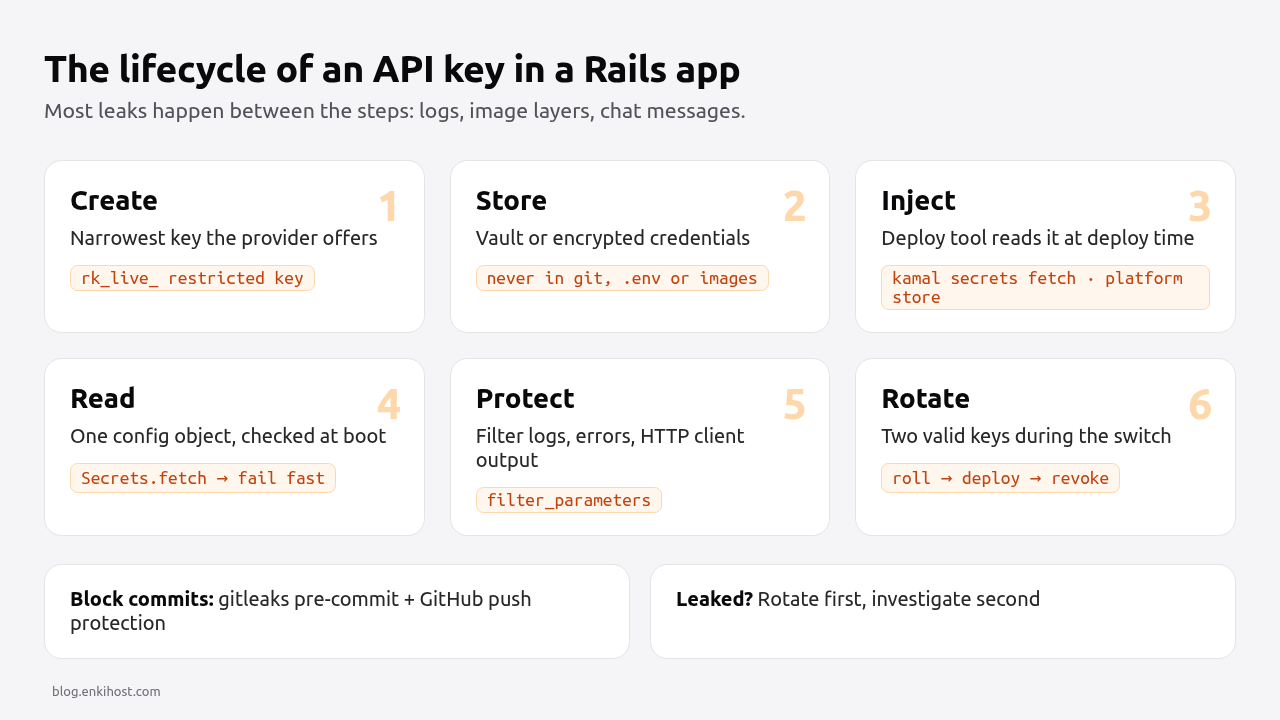
An API key in a Rails app has a lifecycle: it’s created in a provider’s dashboard, stored somewhere, injected into the running app, used in requests, written to logs if you’re careless, and eventually rotated, often in a hurry. Handling Rails secrets securely means getting each of those steps right, not just picking between credentials.yml.enc and environment variables. This guide uses a Stripe integration as the running example: where each key belongs, how to make committing one impossible, how to inject secrets at deploy time from a vault, how to keep them out of logs and error reports, and how to rotate a key without downtime.
TL;DR
- Store per-environment third-party keys either in per-environment Rails credentials or in your platform’s secret store. Pick one per key and read it through one config object.
- Never put a secret in the repo, a Docker image layer, a build argument or a log line. Block it mechanically with a pre-commit scanner and GitHub push protection.
- Inject secrets at deploy time from a vault (1Password, Bitwarden, AWS Secrets Manager, the platform’s secret store), not from a
.envfile copied to a server.- Use the least-privileged key the provider offers: Stripe restricted keys (
rk_live_…) instead of the full secret key wherever you can.- Plan rotation before you need it: support two valid keys during the switch, and have a written leak playbook.
Table of Contents
- Should API keys go in credentials or environment variables?
- Prerequisites
- Step 1: Read every secret through one object
- Step 2: Make committing a key impossible
- Step 3: Inject secrets at deploy time from a vault
- Step 4: Keep secrets out of images, logs and error reports
- Step 5: Use least-privilege keys (the Stripe example)
- Step 6: Rotate keys without downtime
- Verify it works
- Troubleshooting
- What to do when an API key leaks
- How Heroku, Render, Fly.io and Upsun store secrets
- Author Perspective
- Secrets on Enkihost
- FAQ
- Sources
Should API keys go in credentials or environment variables?
Both are secure when used correctly. Use encrypted credentials when you want secrets versioned and reviewed with the code; use the platform’s environment variables when operators need to change a value without a commit, or when the platform injects it for you (DATABASE_URL, REDIS_URL).
Encrypted credentials (config/credentials/production.yml.enc) |
Platform environment variables / secret store | |
|---|---|---|
| Where the value lives | In git, encrypted with AES-256-GCM | In the platform, encrypted at rest |
| What you must protect | One key per environment (RAILS_MASTER_KEY / production.key) |
Access to the platform account |
| Change history | Git history (diff is opaque without the key) | Platform audit log, if it has one |
| Changing a value | Commit + deploy | Dashboard/CLI, then restart or redeploy |
| Who can read it | Anyone with the repo and the key | Anyone with platform access |
| Best for | App-owned keys: third-party APIs, signing secrets | Infrastructure URLs, values that differ per server, values ops rotate |
The insecure options are the ones in between: a plaintext .env committed “just for staging”, a key pasted into config/initializers/stripe.rb, or one master.key shared across development and production. The Rails credentials guide sets up per-environment credentials, and the environment variables guide covers dotenv and boot-time validation. This post assumes you’ve picked one and focuses on keeping the key safe end to end.
Prerequisites
- A Rails 7.2 or 8.x app with
config.require_master_key = trueinconfig/environments/production.rb. git2.9+ (forcore.hooksPath) and either thepre-committool or a plain shell hook.- An account on a password manager or secret store your deploy tool can read (1Password, Bitwarden, AWS Secrets Manager, Doppler) or a platform with a secret store.
- A Stripe test account, for the examples.
Step 1: Read every secret through one object
Read secrets in one place, fail at boot if one is missing, and never call ENV[...] or credentials.dig from business code. That makes it obvious which secrets exist and lets you move a key between credentials and ENV without touching callers.
# config/initializers/secrets.rb
module Secrets
  class Missing < StandardError; end

  module_function

  # Prefer an environment variable, fall back to encrypted credentials.
  def fetch(name, *credential_path)
    value = ENV[name].presence || Rails.application.credentials.dig(*credential_path)
    return value if value.present?

    raise Missing, "Missing secret #{name} (ENV) / credentials.#{credential_path.join('.')}" if Rails.env.production?
    nil
  end

  def stripe_secret_key     = fetch("STRIPE_SECRET_KEY", :stripe, :secret_key)
  def stripe_webhook_secret = fetch("STRIPE_WEBHOOK_SECRET", :stripe, :webhook_secret)
  def stripe_publishable    = fetch("STRIPE_PUBLISHABLE_KEY", :stripe, :publishable_key)
end

# Fail the boot, not the first checkout, if a production secret is missing.
Rails.application.config.after_initialize do
  if Rails.env.production? && !ENV["SECRET_KEY_BASE_DUMMY"]
    Secrets.stripe_secret_key
    Secrets.stripe_webhook_secret
  end
end
# config/initializers/stripe.rb
Stripe.api_key = Secrets.stripe_secret_key
Stripe.max_network_retries = 2
The SECRET_KEY_BASE_DUMMY check lets assets:precompile run in the Docker build without real secrets, which the Rails 8 Dockerfile relies on. Failing at boot matters on any platform with health-checked or zero-downtime deploys: the new release never takes traffic, and the old one keeps serving.
Step 2: Make committing a key impossible
Don’t rely on care. Add a scanner that blocks the commit locally and enable push protection on the remote, so a key needs to get past two automatic checks to land in git.
First, ignore the files that hold keys:
# .gitignore
/config/master.key
/config/credentials/*.key
/.env
/.env.*
!/.env.example
/.kamal/secrets*
!/.kamal/secrets.example
Then add gitleaks as a pre-commit hook:
# .pre-commit-config.yaml
repos:
  - repo: https://github.com/gitleaks/gitleaks
    rev: v8.21.2
    hooks:
      - id: gitleaks
pip install pre-commit      # or: brew install pre-commit
pre-commit install          # installs .git/hooks/pre-commit
pre-commit run --all-files  # scan everything once
Test it with a fake key:
# Generate a fake live-looking key so no real-looking key is written in this post
echo "Stripe.api_key = \"sk_live_$(openssl rand -hex 24)\"" > leak_test.rb
git add leak_test.rb && git commit -m "test"   # gitleaks should block this
git restore --staged leak_test.rb && rm leak_test.rb
Scan the history too, since a key removed in a later commit is still in the repo:
gitleaks git --redact --verbose .
On GitHub, push protection is on by default for public repositories; for private ones, enable it under Settings → Code security (it’s part of GitHub Secret Protection). It rejects pushes that contain recognised provider keys, including Stripe’s.
Pro Tip: put the same scanner in CI (gitleaks git --log-opts="origin/main..HEAD"). Local hooks can be skipped with git commit --no-verify; CI can’t.
Step 3: Inject secrets at deploy time from a vault
Keep the source of truth in a vault and have the deploy tool fetch values at deploy time. Nothing secret then lives in the repo, on a laptop’s disk, or in a long-lived .env on a server.
With Kamal 2, .kamal/secrets is a script-like dotenv file evaluated on deploy. It can pull from 1Password, Bitwarden, LastPass, AWS Secrets Manager, Doppler and others:
# .kamal/secrets
SECRETS=$(kamal secrets fetch --adapter 1password --account my-team --from "Production/myapp" \
  RAILS_MASTER_KEY STRIPE_SECRET_KEY STRIPE_WEBHOOK_SECRET KAMAL_REGISTRY_PASSWORD)

RAILS_MASTER_KEY=$(kamal secrets extract RAILS_MASTER_KEY $SECRETS)
STRIPE_SECRET_KEY=$(kamal secrets extract STRIPE_SECRET_KEY $SECRETS)
STRIPE_WEBHOOK_SECRET=$(kamal secrets extract STRIPE_WEBHOOK_SECRET $SECRETS)
KAMAL_REGISTRY_PASSWORD=$(kamal secrets extract KAMAL_REGISTRY_PASSWORD $SECRETS)
# config/deploy.yml (excerpt)
env:
  secret:
    - RAILS_MASTER_KEY
    - STRIPE_SECRET_KEY
    - STRIPE_WEBHOOK_SECRET
  clear:
    STRIPE_PUBLISHABLE_KEY: pk_live_51HxYz...publishable   # publishable keys are not secret
On a PaaS, the platform’s secret store is the vault: set the value once with the CLI or dashboard, and it’s injected as an environment variable into each release. Either way, the rule is the same: humans write secrets into the vault, machines read them out at deploy, and nobody copies them through chat or email.
In CI, use the CI provider’s encrypted secrets (GitHub Actions secrets.*) and scope them to the deploy job and the protected branch only, so a pull request from a fork can’t read them.
Step 4: Keep secrets out of images, logs and error reports
Most leaks don’t come from git; they come from places that copy values without anyone noticing: image layers, request logs, exception reports and inspect output.
Docker images. ARG and ENV values are stored in the image metadata and visible to anyone who can pull it (docker history --no-trunc). If a build step really needs a secret, use a BuildKit secret mount, which is never written to a layer:
# Dockerfile (build stage): only if a private gem server needs a token at build time
RUN --mount=type=secret,id=bundle_token \
    BUNDLE_GEMS__EXAMPLE__COM="$(cat /run/secrets/bundle_token)" bundle install
docker build --secret id=bundle_token,env=BUNDLE_TOKEN -t myapp .
Logs. Rails filters parameters by partial name match. New apps generate a good default; add your own names:
# config/initializers/filter_parameter_logging.rb
Rails.application.config.filter_parameters += [
  :passw, :email, :secret, :token, :_key, :crypt, :salt, :certificate, :otp, :ssn, :cvv, :cvc,
  :api_key, :authorization, :stripe_signature
]
This covers request params and Active Record inspect output. It does not cover strings you log yourself: Rails.logger.info("calling Stripe with #{Stripe.api_key}") writes the key. Log identifiers (a customer ID), never credentials.
Outgoing request logging. HTTP client instrumentation that logs headers will log Authorization: Bearer sk_live_…. If you add Faraday’s logger, turn headers off or filter them:
conn = Faraday.new(url: "https://api.example.com") do |f|
  f.response :logger, Rails.logger, headers: false, bodies: false do |logger|
    logger.filter(/(Bearer\s+)\S+/, '\1[FILTERED]')
  end
end
Error trackers. Sentry, Honeybadger and AppSignal reuse filter_parameters for params, but environment variables and local variables can still be captured. Check the tracker’s scrubbing settings and turn off sending the full ENV.
The secure Rails deployment checklist has the rest of the production hardening list.
Step 5: Use least-privilege keys (the Stripe example)
Use the narrowest key the provider offers for each job, and separate test and live keys by environment. A leaked restricted key that can only create Checkout Sessions is an incident; a leaked full secret key is a disaster.
| Stripe key | Prefix | Secret? | Use it for |
|---|---|---|---|
| Publishable key | pk_live_ / pk_test_ |
No | Stripe.js in the browser |
| Secret key | sk_live_ / sk_test_ |
Yes, full account access | Only where you truly need every permission |
| Restricted key | rk_live_ / rk_test_ |
Yes, scoped | Server-side calls: e.g. write on Checkout Sessions, read on Customers |
| Webhook signing secret | whsec_ |
Yes | Verifying webhook payloads |
Verify every webhook with the signing secret, using the raw request body:
# app/controllers/stripe_webhooks_controller.rb
class StripeWebhooksController < ActionController::API
  def create
    event = Stripe::Webhook.construct_event(
      request.raw_post,
      request.headers["Stripe-Signature"],
      Secrets.stripe_webhook_secret
    )

    case event.type
    when "checkout.session.completed"
      FulfillOrderJob.perform_later(event.data.object.id)
    end

    head :ok
  rescue JSON::ParserError, Stripe::SignatureVerificationError
    head :bad_request
  end
end
Development and test should only ever see sk_test_/rk_test_ keys. A boot-time guard catches the mistake of a live key on a laptop:
# config/initializers/stripe.rb (after setting the key)
if !Rails.env.production? && Stripe.api_key.to_s.match?(/\A(sk|rk)_live_/)
  raise "Refusing to boot #{Rails.env} with a live Stripe key"
end
Step 6: Rotate keys without downtime
Rotate by overlapping: create the new key, deploy it, confirm it works, then revoke the old one. Most providers support two valid keys at once for exactly this.
- Create the new key. In Stripe, Roll key on the secret or restricted key lets you keep the old key valid for a set period while you deploy the new one. Webhook endpoints can likewise roll their signing secret with an overlap.
- Update the vault or credentials and deploy. With a zero-downtime deploy, old and new releases briefly run with different keys, which is fine because both are valid.
- Verify with real traffic or a test call from a console in production.
- Revoke the old key once nothing uses it. Check the provider’s API logs for requests still using it.
For your own signing secrets, support a list during rotation. Rails does this for cookies and message verifiers with rotate; for webhooks you receive, accept either secret during the overlap:
def verified_event
  secrets = [Secrets.stripe_webhook_secret, ENV["STRIPE_WEBHOOK_SECRET_PREVIOUS"]].compact
  secrets.each do |secret|
    return Stripe::Webhook.construct_event(request.raw_post, request.headers["Stripe-Signature"], secret)
  rescue Stripe::SignatureVerificationError
    next
  end
  raise Stripe::SignatureVerificationError.new("No matching signing secret", request.headers["Stripe-Signature"])
end
Put a rotation date in the vault entry. A key that’s been rotated before is a key you know how to rotate when it matters.
Verify it works
# 1. Nothing secret in the repo or its history
gitleaks git --redact .

# 2. No secrets in the image metadata
docker history --no-trunc myapp:latest | grep -iE 'sk_live|rk_live|whsec|master_key' || echo "image clean"

# 3. Production boots only with its secrets: remove one and the release should fail to start
docker run --rm -e RAILS_ENV=production -e SECRET_KEY_BASE=dummy myapp:latest bin/rails runner 'puts :booted'
# expect: Secrets::Missing: Missing secret STRIPE_SECRET_KEY ...

# 4. Logs are filtered
grep -E 'sk_live_|rk_live_|whsec_' log/production.log || echo "logs clean"
And in a request spec, confirm filtering for your own parameter names:
# spec/requests/filtering_spec.rb
RSpec.describe "parameter filtering" do
  it "filters API keys" do
    filter = ActiveSupport::ParameterFilter.new(Rails.application.config.filter_parameters)
    expect(filter.filter("api_key" => "sk_live_x")["api_key"]).to eq("[FILTERED]")
  end
end
Troubleshooting
ActiveSupport::MessageEncryptor::InvalidMessage at boot. The key doesn’t match the credentials file: usually the development master.key used against production.yml.enc. Set RAILS_MASTER_KEY to the contents of config/credentials/production.key.
Missing encryption key to decrypt file with. Ask your team for your master key and write it to config/master.key or put it in ENV['RAILS_MASTER_KEY']. The key isn’t available in that process, often during a build step. Use SECRET_KEY_BASE_DUMMY=1 for assets:precompile instead of passing the real key to the build.
Stripe::AuthenticationError: Invalid API Key provided: sk_live_****abcd. The key was revoked or rolled, or a test key is used against live mode objects. Check which key the release actually loaded with Secrets.stripe_secret_key.last(4) in a console.
Stripe::SignatureVerificationError: No signatures found matching the expected signature for payload. Usually the wrong whsec_ (each endpoint has its own, and the Stripe CLI uses a different one), or the body was parsed before verification. Use request.raw_post.
remote: error: GH013: Repository rule violations found with Push cannot contain secrets. GitHub push protection caught a key. Rewrite the commit to remove it (git reset --soft HEAD~1, fix, recommit), and rotate the key if it was ever pushed anywhere else.
What to do when an API key leaks
Revoke first, investigate second. Once a key has been in a public repo, a log shipped to a third party or a screenshot, assume it’s been copied; automated scanners pick up keys pushed to public GitHub repositories within minutes.
- Rotate the key now in the provider’s dashboard (roll with no overlap, or a very short one).
- Deploy the new key from the vault.
- Check the provider’s logs for requests you didn’t make while the old key was valid.
- Remove it from where it leaked: delete the log lines, purge the CI artifact, rewrite git history if needed (
git filter-repo), knowing rewriting doesn’t un-leak it. - Add the missing control from Steps 2 and 4 so the same path can’t leak the next key.
How Heroku, Render, Fly.io and Upsun store secrets
All four store secrets encrypted and inject them as environment variables; they differ in whether values can be read back and whether build steps can see them.
| Platform | Where secrets live | Read back after setting? | Visible during build | Notes |
|---|---|---|---|---|
| Heroku | Config vars (heroku config:set) |
Yes, by anyone with app access | Yes | Changing one creates a new release and restarts dynos |
| Render | Environment variables, Environment Groups, Secret Files | Yes, in the dashboard | Yes | Secret Files mount a file (e.g. a .key) instead of a variable |
| Fly.io | fly secrets set |
No: values aren’t shown again, only digests | No; use build secrets | --stage sets without restarting |
| Upsun | upsun variable:create --sensitive true |
No for sensitive variables | Configurable (--visible-build) |
Project-level variables are inherited by preview environments |
| Enkihost | Environment variables in the app’s dashboard | Not documented | Not documented | Applied on the next deploy |
Fly.io and Upsun’s write-only secrets are the safer model: someone with dashboard access can replace a key but not copy it. Upsun’s inheritance is the one to watch with live payment keys: set them at the production environment level only.
Author Perspective
I don’t think secret leaks are mainly a “code” problem. The risky paths are the ones that copy values without anyone deciding to: a debug log that prints request headers, a .env file in the Docker build context, a key pasted into an issue so someone can reproduce a bug quickly. Policies don’t close those paths; mechanisms do. A pre-commit scanner, a .dockerignore that starts with .env*, a filter in the HTTP client logger and a boot-time check that refuses live keys outside production each take minutes to add. The other habit I’d recommend is rotating one key on purpose every few months, because the first rotation always reveals a step nobody wrote down, and it’s better to find it on a quiet afternoon than during an incident.
Secrets on Enkihost
On Enkihost, secrets go in the app’s environment variables in the dashboard, and the included PostgreSQL and Redis inject DATABASE_URL and REDIS_URL, so infrastructure credentials never need to be in your repo or your credentials file at all.
- Environment variables apply on the next deploy, so rotating a key is: update the variable, deploy, then revoke the old key.
- Zero-downtime deploys plus the boot-time
Secretscheck: a release with a missing or wrong secret fails to start and the current release keeps serving. - Per-app resource isolation: each app runs in its own container with only its own variables.
- Build with
SECRET_KEY_BASE_DUMMY=1, as the Rails 8 Dockerfile does, so no real secret is needed when the image is built.
See enkihost.com for details.
FAQ
Is it safe to commit credentials.yml.enc to git?
Yes, as long as the key that decrypts it is not committed. The file is encrypted with AES-256-GCM. Commit config/credentials/production.yml.enc and keep config/credentials/production.key and config/master.key out of git and in a password manager or the platform’s secret store.
Are environment variables secure enough for API keys?
Yes, for most apps. Environment variables set through a platform’s secret store are encrypted at rest and only exposed to the app’s processes. The risks are leaking them through logs, error reports, child processes or Docker image layers, not the variables themselves.
Should the Stripe publishable key be kept secret?
No. The publishable key (pk_live_ or pk_test_) is designed to be used in the browser with Stripe.js and can only create tokens and similar client-side objects. Keep the secret key, restricted keys and webhook signing secrets server-side only.
How do I remove a secret that was committed to git?
Rotate the secret first, because anyone who cloned or scanned the repo already has it. Then remove it from history with git filter-repo or BFG and force-push, and ask collaborators to re-clone. Rewriting history alone does not make the old key safe.
Do I need a separate master key for each Rails environment?
Yes. With per-environment credentials, each environment has its own key file, so a developer’s development key can’t decrypt production secrets. Store the production key only in the deploy platform or vault, not on developer machines.
Sources
- Securing Rails Applications: custom credentials — Rails Guides
- Configuring Rails Applications: filter_parameters — Rails Guides
- Kamal secrets: adapters and .kamal/secrets — Kamal docs
- gitleaks — GitHub
- Push protection for repositories — GitHub Docs
- Build secrets — Docker Docs
- API keys: restricted keys and rolling keys — Stripe Docs
- Check webhook signatures — Stripe Docs
- Configuration and Config Vars — Heroku Dev Center
- Environment Variables and Secrets — Render Docs
- Secrets and Fly Apps — Fly Docs
- Set variables — Upsun Docs