Secure Rails Deployment: A Production Checklist from Gems to Server Hardening

A secure Rails deployment means closing the gaps at every layer between the internet and your data: no known-vulnerable gems, no secrets in the repository or the image, strict hosts and security headers, rate limits on login and password reset, a hardened server or container, and a database nobody can reach from the internet. Rails ships safe defaults for most of the application layer, and a PaaS takes care of the operating system, but neither covers everything. This checklist goes layer by layer, with the exact configuration and a command to verify each item, for apps on Heroku, Render, Fly.io, Upsun or your own servers with Kamal.
TL;DR
- Run
bin/brakemanandbundler-auditin CI on every pull request, and keep Ruby, Rails and gems on supported versions. Rails 7.2+ generates both checks for new apps.- Keep secrets in per-environment credentials or the platform’s secret store, never in the image, the repo or logs. Set
config.hosts,force_ssland a Content Security Policy in production.- Use Rails 8’s built-in
rate_limiton sign-in, sign-up, password reset and API endpoints.- On your own servers: SSH keys only, no root login, a firewall that exposes only 22/80/443, automatic security updates, and containers running as a non-root user.
- Never expose PostgreSQL or Redis to the internet. Use a private network, TLS, a least-privilege role and tested backups.
Table of Contents
- What does a secure Rails deployment involve?
- Prerequisites
- Step 1: Scan dependencies and code in CI
- Step 2: Keep secrets out of code, images and logs
- Step 3: Lock down production configuration
- Step 4: Rate-limit authentication and expensive endpoints
- Step 5: Harden the server and container
- Step 6: Protect the database and Redis
- Step 7: Verify it works
- How Heroku, Render, Fly.io, Upsun and Enkihost share security responsibilities
- Troubleshooting security settings
- Author Perspective: boring security wins
- Secure Rails hosting on Enkihost
- FAQ
- Sources
What does a secure Rails deployment involve?
A secure Rails deployment covers six layers: the network edge, the host, the container, the application, the secrets and the data. Each one has its own risks, and a weakness in any of them is enough.
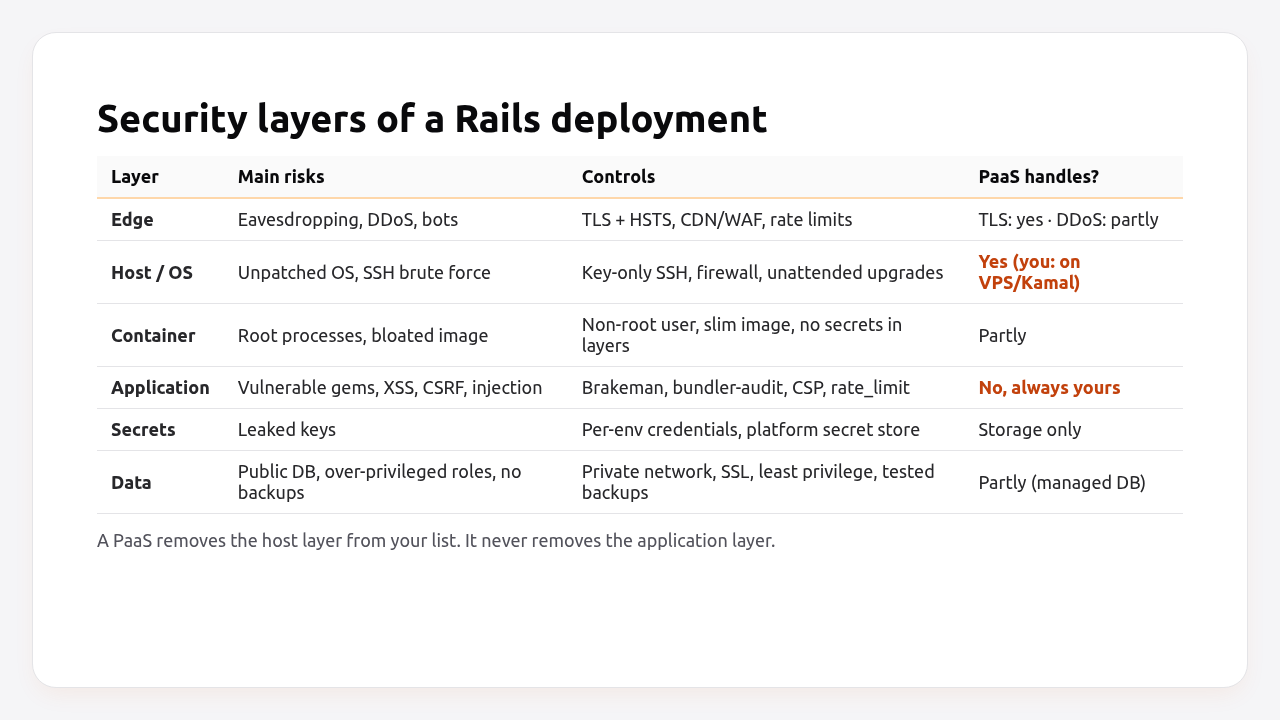
| Layer | Typical failure | Control in this guide |
|---|---|---|
| Edge | Plain HTTP, credential stuffing | TLS + HSTS, rate_limit (Steps 3, 4) |
| Host | Unpatched OS, SSH brute force | Key-only SSH, firewall, unattended upgrades (Step 5) |
| Container | App running as root, secrets in layers | Non-root user, runtime-only secrets (Steps 2, 5) |
| Application | Vulnerable gem, XSS, mass assignment | Brakeman, bundler-audit, CSP, host authorization (Steps 1, 3) |
| Secrets | Leaked master key or API token | Per-environment credentials, secret store (Step 2) |
| Data | Public database port, superuser app role | Private network, TLS, least privilege (Step 6) |
Rails covers a lot by default: CSRF protection, escaped output in views, parameterised queries in Active Record, strong parameters, signed and encrypted cookies. Most real incidents come from the parts around it, which is what this checklist focuses on.
Prerequisites
- Rails 7.2+ (examples use Rails 8.0/8.1 and Ruby 3.3). On older versions, add the gems manually.
- A CI pipeline (GitHub Actions in the examples).
- SSH access to your servers if you deploy with Kamal or to a VPS.
Step 1: Scan dependencies and code in CI
Most exploitable Rails vulnerabilities come from outdated dependencies, so catch them automatically. Brakeman finds risky patterns in your own code. bundler-audit checks Gemfile.lock against the Ruby advisory database.
# Gemfile
group :development, :test do
  gem "brakeman", require: false
  gem "bundler-audit", require: false
end
# .github/workflows/ci.yml
name: CI
on: [pull_request, push]

jobs:
  security:
    runs-on: ubuntu-latest
    steps:
      - uses: actions/checkout@v4
      - uses: ruby/setup-ruby@v1
        with:
          bundler-cache: true
      - name: Brakeman (static analysis)
        run: bin/brakeman --no-pager --exit-on-warn
      - name: bundler-audit (vulnerable gems)
        run: bundle exec bundler-audit check --update
      - name: importmap audit (vulnerable JS packages)
        run: bin/importmap audit
New Rails 7.2+ apps generate a similar workflow, plus bin/brakeman. Keep it, and make the security job required for merging.
Then keep versions current:
- Ruby and Rails must be on versions that still receive security fixes. Check the Rails maintenance policy and Ruby’s branch status before each quarter.
- Enable Dependabot or Renovate for Bundler, npm and GitHub Actions, so security updates arrive as pull requests.
# .github/dependabot.yml
version: 2
updates:
  - package-ecosystem: bundler
    directory: "/"
    schedule:
      interval: weekly
  - package-ecosystem: github-actions
    directory: "/"
    schedule:
      interval: weekly
Step 2: Keep secrets out of code, images and logs
Secrets belong in encrypted credentials or the platform’s secret store, and they should reach the app only at runtime.
- Use per-environment credentials and a separate
RAILS_MASTER_KEYper environment, as described in the Rails credentials guide. - Use the platform’s secret store for environment variables, and validate them at boot, as in how to manage environment variables in Rails.
- Build images with
SECRET_KEY_BASE_DUMMY=1and excludeconfig/master.key,config/credentials/*.keyand.env*in.dockerignore, as in how to dockerize a Rails app. - Filter sensitive parameters from logs and error reports:
# config/initializers/filter_parameter_logging.rb
Rails.application.config.filter_parameters += [
  :passw, :email, :secret, :token, :_key, :crypt, :salt, :certificate, :otp, :ssn, :cvv, :cvc
]
Add secret scanning to CI so a pasted key is caught before it reaches the default branch:
# .github/workflows/ci.yml (another job)
  secrets:
    runs-on: ubuntu-latest
    steps:
      - uses: actions/checkout@v4
        with:
          fetch-depth: 0
      - uses: gitleaks/gitleaks-action@v2
        env:
          GITHUB_TOKEN: ${{ secrets.GITHUB_TOKEN }}
Step 3: Lock down production configuration
A handful of production settings close entire classes of attacks: only answer for your own hostnames, only over HTTPS, and only load scripts you trust.
# config/environments/production.rb
Rails.application.configure do
  # HTTPS everywhere, behind a TLS-terminating proxy.
  config.assume_ssl = true
  config.force_ssl = true
  config.ssl_options = { hsts: { expires: 1.year, subdomains: true }, redirect: { exclude: ->(r) { r.path == "/up" } } }

  # Only respond to your own domains (prevents host header attacks, DNS rebinding).
  config.hosts = ["example.com", /.*\.example\.com/]
  config.host_authorization = { exclude: ->(r) { r.path == "/up" } }

  # Don't leak stack traces or internals.
  config.consider_all_requests_local = false

  # Log at info, never debug, in production.
  config.log_level = ENV.fetch("RAILS_LOG_LEVEL", "info")
end
HTTPS configuration in detail, including HSTS preload and redirects behind each platform’s proxy, gets its own guide later this month.
Content Security Policy. CSP tells the browser which sources may load scripts, styles and images. That makes most XSS bugs much harder to exploit. Rails generates a commented-out initializer. Enable it:
# config/initializers/content_security_policy.rb
Rails.application.configure do
  config.content_security_policy do |policy|
    policy.default_src :self
    policy.script_src  :self
    policy.style_src   :self
    policy.img_src     :self, :data, "https://cdn.example.com"
    policy.font_src    :self, :data
    policy.connect_src :self
    policy.object_src  :none
    policy.frame_ancestors :none
    policy.base_uri    :self
    policy.form_action :self
  end

  # Allow importmap and inline Turbo scripts with a per-request nonce.
  config.content_security_policy_nonce_generator = ->(request) { SecureRandom.base64(16) }
  config.content_security_policy_nonce_directives = %w[script-src style-src]

  # Start in report-only mode, fix violations, then enforce.
  config.content_security_policy_report_only = ENV["CSP_REPORT_ONLY"] == "1"
end
Use javascript_importmap_tags and csp_meta_tag in the layout so the nonce is applied. Roll out with CSP_REPORT_ONLY=1 first, watch the browser console and reports for a few days, then enforce.
Other headers. Rails already sends X-Frame-Options: SAMEORIGIN, X-Content-Type-Options: nosniff and Referrer-Policy: strict-origin-when-cross-origin by default. Add a Permissions-Policy that disables browser features you don’t use:
# config/initializers/permissions_policy.rb
Rails.application.config.permissions_policy do |policy|
  policy.camera      :none
  policy.microphone  :none
  policy.geolocation :none
  policy.usb         :none
  policy.payment     :self
end
Step 4: Rate-limit authentication and expensive endpoints
Rails 8 has a built-in rate_limit for controllers, backed by Rails.cache. Put it on every endpoint that attackers would hammer: sign-in, sign-up, password reset, OTP verification, and expensive searches or exports.
# app/controllers/sessions_controller.rb
class SessionsController < ApplicationController
  rate_limit to: 10, within: 3.minutes, only: :create,
             with: -> { redirect_to new_session_url, alert: "Too many attempts. Try again in a few minutes." }

  def create
    # ...
  end
end
# app/controllers/passwords_controller.rb
class PasswordsController < ApplicationController
  rate_limit to: 5, within: 15.minutes, only: :create, by: -> { params[:email].to_s.downcase }
end
# app/controllers/api/base_controller.rb
class Api::BaseController < ActionController::API
  rate_limit to: 300, within: 1.minute, by: -> { request.headers["Authorization"].to_s }
end
Three things make rate limiting actually work in production:
- A shared cache store (Solid Cache or Redis). With
:memory_store, each Puma process counts separately, and the limit is effectively multiplied by your process count. - The right client IP. The default key is
request.remote_ip. Behind a load balancer, setconfig.action_dispatch.trusted_proxiescorrectly, or every request looks like it comes from the proxy and one attacker can lock out all users. - Limits per account, not just per IP, for password reset and OTP, using
by:. Attackers rotate IPs. They can’t rotate your user’s email address.
For blocking at the edge before requests reach Rails, a CDN or WAF (Cloudflare, Fastly) or rack-attack adds IP blocklists and throttles for the whole app.
Step 5: Harden the server and container
On a PaaS, the provider hardens and patches the host. With Kamal or a VPS, you do. These are the minimum steps for a Debian or Ubuntu server.
# Create a deploy user with sudo, add your SSH key, then:
sudo tee /etc/ssh/sshd_config.d/10-hardening.conf >/dev/null <<'EOF'
PermitRootLogin no
PasswordAuthentication no
KbdInteractiveAuthentication no
PubkeyAuthentication yes
EOF
sudo systemctl reload ssh

# Firewall: only SSH, HTTP and HTTPS from the internet
sudo apt install -y ufw
sudo ufw default deny incoming
sudo ufw default allow outgoing
sudo ufw allow 22/tcp
sudo ufw allow 80/tcp
sudo ufw allow 443/tcp
sudo ufw enable

# Automatic security updates
sudo apt install -y unattended-upgrades
sudo dpkg-reconfigure -plow unattended-upgrades

# Ban IPs that repeatedly fail SSH
sudo apt install -y fail2ban
One Docker-specific trap: Docker publishes container ports by editing iptables directly, which bypasses ufw. A postgres accessory published with port: 5432 is reachable from the internet even though ufw says otherwise. Bind accessories to localhost or the private interface:
# config/deploy.yml
accessories:
  db:
    image: postgres:17
    host: 10.0.0.5
    port: "127.0.0.1:5432:5432"   # not "5432:5432"
    env:
      secret:
        - POSTGRES_PASSWORD
    directories:
      - data:/var/lib/postgresql/data
Container hardening. The Rails 8 Dockerfile already does the important things: a slim base image, a multi-stage build without compilers in the final image, and USER 1000:1000 so the app doesn’t run as root. Keep those, rebuild regularly so base image security fixes get in, and scan the image:
docker run --rm -v /var/run/docker.sock:/var/run/docker.sock aquasec/trivy image --severity HIGH,CRITICAL myorg/myapp:latest
Step 6: Protect the database and Redis
PostgreSQL and Redis should never be reachable from the public internet. The app should connect over a private network, with TLS when it crosses machines, using a role that can only touch its own databases.
- Network: bind to private interfaces only (
listen_addresses = 'localhost,10.0.0.5'), and restrictpg_hba.confto the app servers’ private IPs. - TLS:
sslmode=requireorverify-fullinDATABASE_URL. - Least privilege: a dedicated app role that owns its databases, never
postgres. A separate read-only role for reporting tools. - Redis: require a password (
requirepass) or ACLs, bind to the private interface, and userediss://across networks. - Backups: encrypted, off the server, and restored regularly. A backup you haven’t restored is a hope, not a backup.
The full PostgreSQL setup, including roles and SSL, is in the Rails PostgreSQL setup guide.
Step 7: Verify it works
Check every layer from the outside, as an attacker would, and from the inside.
# 1. Code and dependencies
bin/brakeman --no-pager -q
bundle exec bundler-audit check --update

# 2. Only 22, 80 and 443 are open from the internet
nmap -Pn -p 1-10000 app.example.com
# 22/tcp open ssh · 80/tcp open http · 443/tcp open https

# 3. Database and Redis are NOT reachable from the internet
nc -zv -w 3 app.example.com 5432 ; nc -zv -w 3 app.example.com 6379
# both: Connection timed out / refused

# 4. Security headers
curl -sI https://example.com | grep -iE "strict-transport|content-security|x-frame|x-content-type|referrer-policy|permissions-policy"

# 5. Unknown hosts are rejected
curl -s -o /dev/null -w "%{http_code}\n" -H "Host: evil.example" https://example.com/
# 403

# 6. Rate limit kicks in (password reset has no custom `with:`, so it answers 429)
for i in $(seq 1 7); do curl -s -o /dev/null -w "%{http_code} " -X POST https://example.com/passwords -d "email=a@example.com"; done; echo
# 302 302 302 302 302 429 429

# 7. SSH refuses passwords
ssh -o PreferredAuthentications=password -o PubkeyAuthentication=no deploy@app.example.com
# Permission denied (publickey).
An online check such as securityheaders.com or Mozilla Observatory gives a quick second opinion on headers and TLS.
How Heroku, Render, Fly.io, Upsun and Enkihost share security responsibilities
Every PaaS takes over the host layer, meaning OS patches, the kernel and physical security, and provides TLS certificates. None of them secures your application code or your gem versions. The middle layers differ.
| Responsibility | Heroku | Render | Fly.io | Upsun | Enkihost | Kamal / VPS |
|---|---|---|---|---|---|---|
| OS and kernel patching | Platform | Platform | Platform | Platform | Platform | You |
| TLS certificates | Automated Certificate Management | Automatic | Automatic (fly certs) |
Automatic (Let’s Encrypt) | Automatic (Let’s Encrypt at the proxy) | kamal-proxy (Let’s Encrypt) |
| Private networking to the database | Private Spaces (paid) | Private network between services | Private network (WireGuard, 6PN) | Internal service network | Internal network between the app, PostgreSQL and Redis | You |
| DDoS protection | Platform edge | Platform edge | Platform edge | Platform edge; Fastly on some plans | Not documented | You / CDN |
| Base image updates | Stack updates | Native runtimes: platform; Docker: you | You (your Dockerfile) | Platform images | You with your own Dockerfile; platform if it’s generated | You |
| App code, gems, Rails config | You | You | You | You | You | You |
The last row is the important one: even the most managed platform can’t keep your Gemfile.lock free of vulnerable gems or your controllers rate-limited. On Docker-based platforms (Fly.io, Render’s Docker runtime, Kamal), keeping the base image current is also your job, since the platform runs exactly the image you built.
Enkihost is shared hosting with per-app resource isolation and allocated memory and CPU, so the host layer is managed for you, and the application-layer steps in this guide (Steps 1–4 and 6) apply exactly as written.
Troubleshooting security settings
Blocked hosts: example.com
[ActionDispatch::HostAuthorization::DefaultResponseApp] Blocked hosts: www.example.com
The request used a hostname not in config.hosts. Add it (a regex such as /.*\.example\.com/ covers subdomains), and exclude /up so health checks by IP still work.
Refused to execute inline script because it violates the following Content Security Policy directive
Refused to execute inline script because it violates the following Content Security Policy directive: "script-src 'self' 'nonce-…'".
An inline <script> without a nonce. Use javascript_tag nonce: true, move the code into a module loaded by importmap, or, for third-party snippets, add their domain explicitly. Roll out in report-only mode first to find these.
ActionController::InvalidAuthenticityToken after enabling HTTPS
ActionController::InvalidAuthenticityToken (HTTP Origin header (https://example.com) didn't match request.base_url (http://example.com))
Rails thinks the request is HTTP because TLS ends at the proxy. Set config.assume_ssl = true, or make sure the proxy sends X-Forwarded-Proto: https.
Everyone gets 429 Too Many Requests at once
All requests share one IP from Rails’ point of view, the load balancer’s. Configure config.action_dispatch.trusted_proxies with your proxy’s addresses so request.remote_ip returns the client IP, or rate-limit by account with by:.
Brakeman reports a warning you’ve reviewed
Mark it as ignored with a note, so it doesn’t block CI but stays documented:
bin/brakeman -I # interactive: writes config/brakeman.ignore with your note
Author Perspective: boring security wins
The security incidents I’ve seen in Rails projects were never clever. One was a gem two years out of date with a published exploit. One was a database port open to the internet because Docker bypassed the firewall. One was a password reset endpoint without a rate limit. All three would have been caught by this checklist, and most of it runs automatically once it’s set up: Brakeman and bundler-audit on every pull request, Dependabot every week, unattended upgrades every night. The parts that need a person are a quarterly look at versions and an nmap run against your own servers. Both take less than an hour, and they’re the most valuable hour on the calendar.
Secure Rails hosting on Enkihost
Security is easier when there are fewer layers to own. On Enkihost:
- Per-app resource isolation: each app runs with its own allocated memory and CPU, so another app’s problem doesn’t become yours.
- PostgreSQL and Redis add-ons that inject
DATABASE_URLandREDIS_URL, so credentials for your data stores come from the platform instead of being copied around by hand. - Zero-downtime deploys, so shipping a security update to a gem is a routine deploy, not a maintenance window you’re tempted to postpone.
- Plans for Rails and Sinatra: Ignite at 9 EUR per month after a 14-day free trial, with PostgreSQL and Redis included, or Blaze at 29 EUR with high availability and autoscaling. The free Spark plan is for Jekyll sites.
See enkihost.com.
FAQ
Is Ruby on Rails secure by default?
Rails has strong defaults: CSRF protection, automatic HTML escaping, parameterised queries in Active Record, strong parameters and encrypted cookies. Most Rails vulnerabilities in practice come from outdated gems, custom code that bypasses these defaults, missing rate limits and insecure infrastructure, which is why the deployment checklist matters as much as the framework.
How often should I update gems for security?
Apply security updates as soon as they are published, ideally within days, and review other updates weekly. Running bundler-audit in CI and enabling Dependabot or Renovate makes this routine, because vulnerable versions fail the build and fixes arrive as pull requests.
Does Rails 8 include rate limiting?
Yes. Rails 8 controllers support rate_limit with a limit, a time window and an optional key, stored in Rails.cache. The Rails 8 authentication generator already applies it to the sessions controller. Use a shared cache store in production so the limit applies across all processes.
Do I need a firewall if I use a PaaS?
Not for the host, because the platform controls network access to its machines. You still need to make sure your database and Redis aren’t publicly accessible, which on most platforms means using the private network URL rather than an external one, and restricting any external access to specific IP addresses.
What is the most common security mistake in Rails deployments?
Running outdated dependencies with known vulnerabilities, closely followed by secrets committed to the repository and databases reachable from the internet. All three are preventable with automated checks: bundler-audit and Brakeman in CI, secret scanning, and a port scan of your own servers.
Sources
- Securing Rails Applications — Rails Guides
- ActionController::RateLimiting — Rails API
- Maintenance policy for Ruby on Rails — rubyonrails.org
- presidentbeef/brakeman — GitHub
- rubysec/bundler-audit — GitHub
- Docker and ufw: packet filtering and firewalls — Docker Docs
- Heroku security — Heroku
- Render private networking — Render Docs
- Private networking — Fly Docs
- Upsun security and compliance — Upsun Docs