Custom Domains and Automatic SSL for Your Rails App: The CNAME Walkthrough
Putting a custom domain on a Rails app takes two DNS records and three lines of Rails config, but each step has one detail that makes it fail silently. You point www at the platform with a CNAME and the apex domain with an A record or ALIAS; the platform’s proxy then proves to Let’s Encrypt that it controls the domain and issues a certificate, and renews it before it expires. This walkthrough covers which record to use where, how automatic SSL actually gets issued and renewed, the Rails settings a new hostname needs (config.hosts, force_ssl, mailer URLs), and the DNS mistakes behind most “certificate pending” screens.
TL;DR
- Use a CNAME for subdomains like
www.example.com. The apex (example.com) can’t have a CNAME; use an A/AAAA record to the platform’s IPs, or your DNS provider’s ALIAS / ANAME / CNAME flattening.- Automatic SSL works by the HTTP-01 challenge: Let’s Encrypt fetches a token from
http://yourdomain/.well-known/acme-challenge/through your DNS, so DNS must point only at the platform before a certificate can be issued.- Most stuck certificates are a leftover AAAA record, a CAA record that doesn’t allow Let’s Encrypt, or a CDN proxy in front that intercepts the challenge.
- In Rails, add the new hostname to
config.hosts, keepforce_sslandassume_sslon, and updateaction_mailer.default_url_options.- Certificates are renewed automatically, but Let’s Encrypt no longer sends expiry emails: monitor expiry yourself.
Table of Contents
- How does a custom domain get automatic SSL?
- CNAME or A record: which DNS record should I use?
- Prerequisites
- Step 1: Lower the TTL and clean up old records
- Step 2: Add the DNS records
- Step 3: Check CAA records
- Step 4: Configure Rails for the new domain
- Step 5: Verify DNS and the certificate
- How is the certificate renewed?
- Troubleshooting DNS and SSL errors
- How Heroku, Render, Fly.io and Upsun handle custom domains
- Author Perspective
- Custom domains on Enkihost
- FAQ
- Sources
How does a custom domain get automatic SSL?
The platform’s proxy asks Let’s Encrypt for a certificate, Let’s Encrypt checks that the domain resolves to that proxy by fetching a token over HTTP, and the proxy installs the certificate it gets back. Your app never sees any of it.
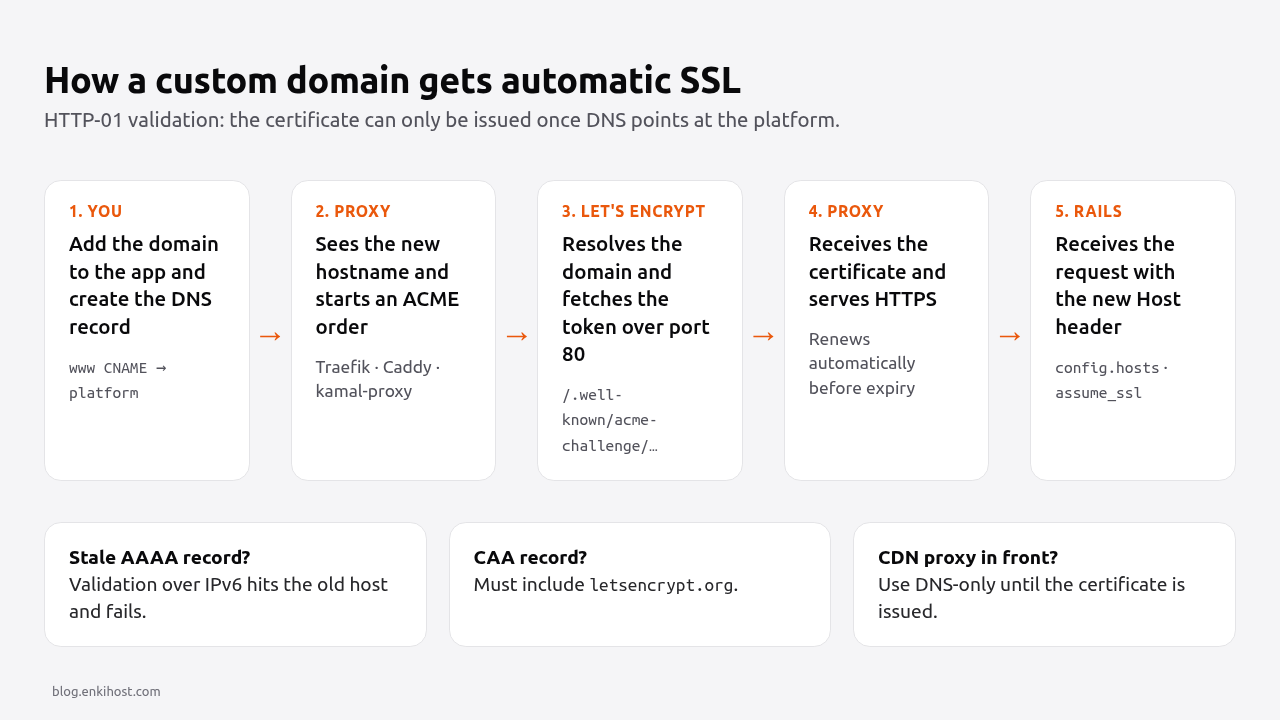
- You add
www.example.comto the app in the platform’s dashboard and create the DNS record. - The proxy (Traefik, Caddy, kamal-proxy, or the platform’s own router) sees a new hostname and starts an ACME order with Let’s Encrypt.
- Let’s Encrypt gives it a token. The proxy serves it at
http://www.example.com/.well-known/acme-challenge/<token>. - Let’s Encrypt resolves
www.example.comfrom several network locations, connects on port 80 and fetches the token. If it matches, the domain is validated. - The proxy downloads the certificate and starts serving HTTPS for that hostname. It renews it on its own before it expires.
The consequence for you: the certificate can only be issued after DNS points at the platform, and port 80 has to be reachable for the challenge. Platforms that offer DNS-01 validation (proving control with a TXT record instead) can issue before you switch traffic, which helps for zero-downtime migrations.
CNAME or A record: which DNS record should I use?
Use a CNAME for any subdomain, and an A/AAAA record or an ALIAS-type record for the apex domain. The DNS standard doesn’t allow a CNAME at the apex, because the apex must also hold SOA and NS records and a CNAME can’t coexist with other records.
| Hostname | Record type | Points to | Pros | Cons |
|---|---|---|---|---|
www.example.com |
CNAME |
The platform’s hostname for your app | Follows the platform if its IPs change | Not allowed at the apex |
example.com |
A (+ AAAA) |
The platform’s IPv4 (and IPv6) addresses | Works with every DNS provider | Breaks if the platform changes IPs |
example.com |
ALIAS / ANAME / CNAME flattening |
The platform’s hostname | Apex that follows the platform like a CNAME | Only on some DNS providers (Cloudflare, DNSimple, Route 53 alias for AWS targets, …) |
*.example.com |
CNAME wildcard |
The platform’s hostname | One record for every tenant subdomain | Wildcard certificates need DNS-01, not HTTP-01 |
The common setup is www as the canonical hostname with a CNAME, and the apex redirecting to it. A www canonical also keeps cookies scoped more tightly and avoids apex-record limitations entirely.
Prerequisites
- A domain at a DNS provider where you can edit records.
- A Rails 7.2 or 8.x app already deployed on a platform that supports custom domains, with the platform’s DNS target (hostname or IPs) for the app.
digandcurllocally (dnsutils/bind-utilson Linux, preinstalled on macOS).
Step 1: Lower the TTL and clean up old records
Lower the TTL of the records you’re about to change to 300 seconds a day before, and delete any records for the same names that point elsewhere.
# What exists today for both names
dig +noall +answer example.com A example.com AAAA www.example.com CNAME www.example.com A
Look for two things:
- A leftover
AAAArecord pointing at an old host. When an AAAA record exists, Let’s Encrypt connects over IPv6 first and only falls back to IPv4 if that connection can’t be made. A stale host that answers with a 404 fails validation even though the A record is correct. - The current TTL (the number after the name). If it’s
86400, resolvers can keep the old answer for a day after you change it.
Step 2: Add the DNS records
Add the platform’s target for www as a CNAME and the apex as A/AAAA or ALIAS. In zone-file form:
; example.com zone
example.com.      300  IN  A      203.0.113.10
example.com.      300  IN  AAAA   2001:db8::10
www.example.com.  300  IN  CNAME  myapp.platform-target.example.
Replace the IPs and the CNAME target with the values your platform shows for the app. With an ALIAS-capable provider, use the platform hostname for the apex instead of IPs:
example.com. 300 IN ALIAS myapp.platform-target.example.
Then add both hostnames to the app in the platform’s dashboard, so the proxy knows to route them and request certificates for them.
Pro Tip: if your DNS is on Cloudflare, set the records to “DNS only” (grey cloud) until the certificate is issued. With the proxy on, Cloudflare answers the HTTP-01 challenge itself, the platform never sees it, and issuance stalls.
Step 3: Check CAA records
CAA records list which certificate authorities may issue for your domain. If any exist and don’t include Let’s Encrypt, issuance fails.
dig +short example.com CAA
- No output: any CA may issue. Nothing to do.
- Output without
letsencrypt.org: add it.
example.com. 3600 IN CAA 0 issue "letsencrypt.org"
Some platforms also use Google Trust Services or another CA as a fallback; their docs list the CAA values to add (pki.goog for Google).
Step 4: Configure Rails for the new domain
Rails needs to accept the new Host header, generate links with it, and keep forcing HTTPS. Since Rails 6, Host Authorization blocks requests whose Host isn’t in config.hosts when it’s set.
# config/environments/production.rb
Rails.application.configure do
  # The platform's proxy terminates TLS; trust it and redirect http to https.
  config.assume_ssl = true
  config.force_ssl = true
  config.ssl_options = { redirect: { exclude: ->(request) { request.path == "/up" } } }

  # Accept the custom domain(s) and the platform's default hostname.
  config.hosts = [
    "example.com",
    "www.example.com",
    ENV["APP_HOSTNAME"] # the platform's default hostname, if you still use it
  ].compact
  config.host_authorization = { exclude: ->(request) { request.path == "/up" } }

  # Links in emails and URL helpers outside a request.
  config.action_mailer.default_url_options = { host: "www.example.com", protocol: "https" }
  Rails.application.routes.default_url_options = { host: "www.example.com", protocol: "https" }
end
Redirect the apex to www (or the other way round) so search engines see one canonical host. If the platform doesn’t do it at the proxy, do it in the router:
# config/routes.rb
Rails.application.routes.draw do
  constraints(host: "example.com") do
    get "(*path)", to: redirect { |params, request| "https://www.example.com#{request.fullpath}" }, status: 301
  end

  get "up" => "rails/health#show", as: :rails_health_check
  # ...your routes
end
If users sign in on www.example.com and you also serve app.example.com, set the session cookie domain explicitly, or each hostname gets its own session:
# config/initializers/session_store.rb
Rails.application.config.session_store :cookie_store,
  key: "_myapp_session",
  domain: :all, # ".example.com"; for domains like example.co.uk add tld_length: 2
  secure: Rails.env.production?,
  same_site: :lax
force_ssl also sets HSTS. Start with the default (max-age of two years, no preload) and only add preload: true once every subdomain serves HTTPS. The force HTTPS guide explains the HSTS options and assume_ssl.
Step 5: Verify DNS and the certificate
Check DNS from a public resolver, then check what certificate the domain serves.
# Both names resolve to the platform, from outside your network
dig @1.1.1.1 +short www.example.com
dig @8.8.8.8 +short example.com A example.com AAAA

# The ACME challenge path reaches the proxy over plain HTTP (expect 404 from the proxy, not a timeout)
curl -sI http://www.example.com/.well-known/acme-challenge/test | head -1

# Certificate issuer, names and expiry
echo | openssl s_client -connect www.example.com:443 -servername www.example.com 2>/dev/null \
  | openssl x509 -noout -issuer -subject -ext subjectAltName -dates

# HTTP redirects to HTTPS, apex redirects to www, Rails accepts the host
curl -sI http://www.example.com | grep -iE '^(HTTP|location)'
curl -sI https://example.com    | grep -iE '^(HTTP|location)'
curl -sI https://www.example.com | grep -iE '^(HTTP|strict-transport-security)'
Expect an issuer like C = US, O = Let's Encrypt, CN = R11 (the intermediate name varies), both hostnames in subjectAltName (or one certificate each), a 301 from HTTP to HTTPS, and 200 with a strict-transport-security header on the canonical host.
How is the certificate renewed?
Automatically, by the same proxy that issued it, well before expiry. Let’s Encrypt certificates currently last 90 days, ACME clients usually renew when about a third of the lifetime is left, and Let’s Encrypt has announced it will move to shorter lifetimes, so don’t build anything that assumes 90 days.
Renewal repeats the HTTP-01 challenge, so it fails for the same reasons issuance does. A record that was correct three months ago and now points somewhere else, or a CDN you put in front later, will block renewal while the old certificate keeps working until it expires. Let’s Encrypt stopped sending expiry reminder emails in 2025, so add your own check:
#!/usr/bin/env bash
# bin/check-cert: exit non-zero if the certificate expires within 14 days.
host="${1:-www.example.com}"
end=$(echo | openssl s_client -connect "$host:443" -servername "$host" 2>/dev/null | openssl x509 -noout -enddate | cut -d= -f2)
days=$(( ( $(date -d "$end" +%s) - $(date +%s) ) / 86400 ))
echo "$host expires in $days days ($end)"
[ "$days" -gt 14 ]
Most uptime monitors can also alert on certificate expiry; turn it on for every custom domain.
Troubleshooting DNS and SSL errors
[ActionDispatch::HostAuthorization::DefaultResponseApp] Blocked hosts: www.example.com. DNS and the certificate work, but Rails rejects the hostname. Add it to config.hosts and redeploy.
NET::ERR_CERT_COMMON_NAME_INVALID on the apex but not on www. Only www was added to the platform, so the certificate doesn’t cover the apex. Add the apex as a domain too.
ERR_TOO_MANY_REDIRECTS. Something in front of the platform talks to it over HTTP, and force_ssl redirects every request back to HTTPS. Usually Cloudflare in “Flexible” SSL mode: switch it to “Full (strict)”.
CAA record for example.com prevents issuance in the platform’s certificate status. A CAA record exists without letsencrypt.org. Add it (Step 3).
Invalid response from http://example.com/.well-known/acme-challenge/...: 404 or a timeout. The challenge request went somewhere other than the platform: a stale A/AAAA record, a CDN proxy, or DNS that hasn’t propagated. Check every record with dig @1.1.1.1 for both A and AAAA.
too many certificates (5) already issued for this exact set of identifiers in the last 168h0m0s. Let’s Encrypt’s duplicate-certificate rate limit, usually from removing and re-adding a domain repeatedly. Wait for the window to pass; repeating the attempt doesn’t help.
SERVFAIL from dig. Often broken DNSSEC after moving a domain between DNS providers: the registrar still has the old DS record. Remove it at the registrar, or publish matching keys at the new provider.
How Heroku, Render, Fly.io and Upsun handle custom domains
All four issue certificates automatically; they differ mostly in how you point the apex and whether they redirect between apex and www for you.
| Platform | Subdomain record | Apex record | Certificates | Apex ↔ www redirect |
|---|---|---|---|---|
| Heroku | CNAME to the DNS target from heroku domains:add (*.herokudns.com) |
ALIAS/ANAME or CNAME flattening only (no static IPs) | Automated Certificate Management (ACM) on paid dynos | No, handle it in the app |
| Render | CNAME to myapp.onrender.com |
A record to Render’s IP, or ALIAS | Automatic (Let’s Encrypt and Google Trust Services) | Yes, when you add both |
| Fly.io | CNAME to myapp.fly.dev, or A/AAAA |
A/AAAA to the app’s IPs | fly certs add; DNS-01 via an _acme-challenge CNAME also works |
No, handle it in the app |
| Upsun | CNAME to the environment’s target hostname | ALIAS/ANAME or CNAME flattening | Automatic Let’s Encrypt | Configured in routes |
| Enkihost | Point at the target shown in the dashboard | As the dashboard shows for the app | Automatic Let’s Encrypt at the proxy | Not documented, handle it in the app |
Heroku’s apex limitation is the one that surprises people most: with no stable IPs, an apex domain needs a DNS provider that supports ALIAS-style records. Fly.io’s DNS-01 option is the best tool for moving an existing domain without a gap, because the certificate exists before you switch the records.
Author Perspective
In my experience, a certificate that won’t issue is almost always a DNS question, not a Let’s Encrypt question. Let’s Encrypt is very predictable: if the challenge URL reaches the right proxy over port 80, the certificate arrives. So before adding a domain anywhere, I query both A and AAAA from a public resolver, check CAA, and turn off any CDN proxy until the certificate exists. I also prefer www as the canonical host: a CNAME follows the platform if its IPs change, and the apex only has to redirect. It’s a five-minute routine, and it removes nearly every reason to wait on a “certificate pending” screen.
Custom domains on Enkihost
Enkihost supports custom domains on Rails, Sinatra, Hanami and Jekyll apps. You add the domain to the app in the dashboard and point DNS at the target it shows; once DNS resolves to Enkihost, the proxy issues a Let’s Encrypt certificate for the domain and renews it automatically.
- TLS terminates at the proxy, so
config.assume_ssl = truewithforce_sslis the right Rails setting, as in Step 4. - Add every hostname you serve, apex and
www, to the app and toconfig.hosts, and redirect one to the other in the router. - Zero-downtime deploys don’t touch DNS or certificates: a deploy swaps the container behind the proxy, and the certificate stays where it is.
- Per-app resource isolation: each custom domain routes only to its own app’s container.
See enkihost.com for details. For static sites, the Jekyll SSL setup guide covers the same DNS steps for Jekyll, and the secure Rails deployment checklist covers what to check after HTTPS is on.
FAQ
How long does it take for a custom domain SSL certificate to be issued?
Usually a few minutes after DNS resolves to the platform. Most of the wait is DNS propagation, which depends on the old record’s TTL; once Let’s Encrypt can reach the challenge URL, issuance itself takes seconds.
Can I use a CNAME record for the root domain?
No. The DNS standard doesn’t allow a CNAME at the apex, because the apex must also hold SOA and NS records. Use A and AAAA records with the platform’s IPs, or an ALIAS, ANAME or CNAME flattening record if your DNS provider supports it.
Do I need to buy an SSL certificate for my Rails app?
No. Platforms with automatic SSL issue free Let’s Encrypt certificates for custom domains and renew them for you. Paid certificates are only needed for specific requirements such as organization validation or very long-lived certificates on systems you manage yourself.
Why does my custom domain show the wrong certificate?
The request is reaching a different server or proxy than the one that has your certificate: often a stale A or AAAA record, a CDN in front of the platform, or the domain not being added to the app in the platform’s dashboard. Check both A and AAAA records with dig against a public resolver.
Can I get a wildcard certificate for subdomains automatically?
Only with DNS-01 validation, because Let’s Encrypt doesn’t issue wildcard certificates through the HTTP-01 challenge. The platform needs API access to your DNS or a delegated _acme-challenge CNAME. Otherwise, add each subdomain separately and get one certificate per name.
Sources
- Challenge types: HTTP-01 and DNS-01 — Let’s Encrypt
- Rate limits — Let’s Encrypt
- Certificate Authority Authorization (CAA) — Let’s Encrypt
- Ending support for expiration notification emails — Let’s Encrypt
- Configuring Rails Applications: config.hosts — Rails Guides
- ActionDispatch::SSL — Rails API
- Custom Domain Names for Apps — Heroku Dev Center
- Automated Certificate Management — Heroku Dev Center
- Custom Domains — Render Docs
- Custom domains and SSL certificates — Fly Docs
- Set up your domain — Upsun Docs
- RFC 1034: Domain names, concepts and facilities (CNAME rules)