How to Upgrade Rails 7 to Rails 8: A Step-by-Step Checklist for Production
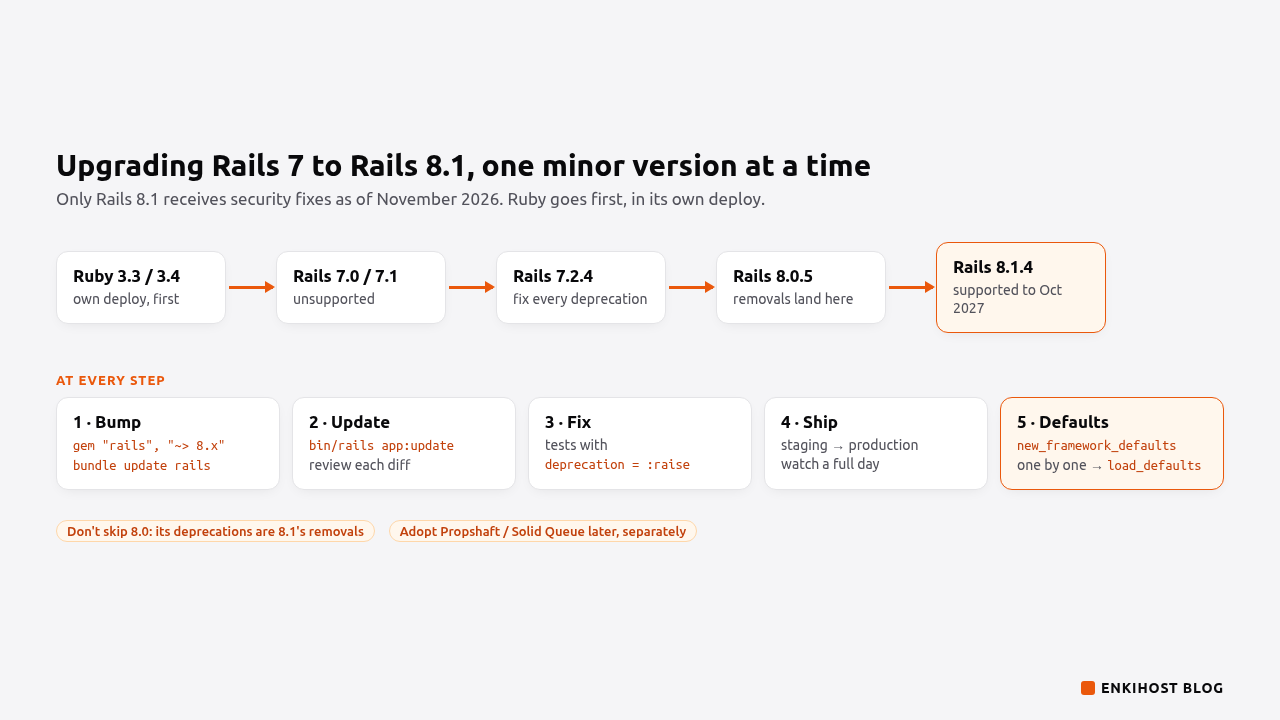
To upgrade Rails 7 to Rails 8, go one minor version at a time: get to the latest Rails 7.2 with no deprecation warnings, move to 8.0, then to 8.1, running bin/rails app:update and enabling the new framework defaults at each step. It’s urgent now: as of November 2026, Rails 8.1 is the only series still getting security fixes. This checklist gives you the order of steps, the changes that break real apps and a safe way to deploy them.
TL;DR
- Rails 7.2’s security support ended on 9 August 2026 and Rails 8.0’s on 7 November 2026. Land on 8.1.
- Upgrade Ruby first, in its own deploy, then go 7.2 → 8.0 → 8.1, fixing deprecations before each jump.
- Rails 8 doesn’t force Propshaft, Solid Queue or Kamal on existing apps. Upgrade the framework first; adopt new defaults later.
Why upgrade from Rails 7 to Rails 8 now?
Because Rails 7.x and 8.0 are out of security support, so a vulnerability found tomorrow won’t be patched for them. The Rails maintenance policy gives each minor release about two years of security fixes.
| Rails series | Security fixes until | Status in November 2026 |
|---|---|---|
| 8.1 | 10 Oct 2027 | Supported |
| 8.0 | 7 Nov 2026 | Unsupported |
| 7.2 | 9 Aug 2026 | Unsupported |
| 7.1 and older | — | Unsupported |
Prerequisites
- A test suite you trust, with request tests for the critical paths (login, checkout, main screens).
- A staging environment that matches production; the Rails staging environment guide shows how.
- An error tracker in production and a way to roll back a deploy.
Step 1: Upgrade Ruby first
Rails 8 requires Ruby 3.2+, but Ruby 3.2 reached end of life in March 2026, so target 3.4. Do it in its own deploy, so if something breaks you know it’s Ruby.
echo "3.4.12" > .ruby-version
bundle install && bin/rails test
# Gemfile
ruby file: ".ruby-version"
Step 2: Get to Rails 7.2 with zero deprecations
Every API Rails 8 removed was deprecated in 7.x first, so fixing 7.2’s warnings is most of the upgrade.
# Gemfile
gem "rails", "~> 7.2.4"
# config/environments/test.rb
config.active_support.deprecation = :raise
Run bundle update rails and bin/rails app:update, then fix every failing test. Also search production logs for DEPRECATION WARNING, which catches code paths your tests miss. The usual suspects:
| Deprecated in 7.x | Replace with |
|---|---|
enum status: [...] |
enum :status, [...] |
ActiveRecord::Base.connection |
with_connection { \|c\| ... } or lease_connection |
Rails.application.secrets |
Rails.application.credentials |
Run bundle outdated --only-explicit and upgrade any gem that pins railties below 8.
Step 3: Upgrade to Rails 8.0
Bump the Gemfile to gem "rails", "~> 8.0.5", then run:
bundle update rails
bin/rails app:update   # press d to see each diff; keep your own changes
8.0 removes what 7.2 deprecated, including keyword-style enum, ActiveSupport::ProxyObject and config options like warn_on_records_fetched_greater_than. Delete those lines from config/, or the app fails at boot.
Pro Tip: don’t skip 8.0. 8.1 removes things deprecated in 8.0, and without running 8.0 you never see those warnings.
Step 4: Upgrade to Rails 8.1
Once 8.0 runs cleanly on staging, bump to gem "rails", "~> 8.1.4" and repeat bundle update rails and bin/rails app:update. The 8.1 changes that bite existing apps:
| Change in 8.1 | What to do |
|---|---|
schema.rb columns sorted alphabetically |
Commit the one large, harmless diff on its own |
Built-in sidekiq adapter deprecated |
Upgrade to Sidekiq 8.x, which ships its own adapter |
:azure Active Storage service removed |
Move to S3-compatible storage first |
Benchmark.ms removed |
Use Process.clock_gettime(Process::CLOCK_MONOTONIC) |
On Azure storage, the Active Storage S3 guide covers the move.
Step 5: Enable the new framework defaults
Upgrading Rails doesn’t change behaviour until you change config.load_defaults. Uncomment the settings in config/initializers/new_framework_defaults_8_0.rb one at a time, deploying each batch. Then delete the file and repeat for 8.1:
# config/application.rb
config.load_defaults 8.1
Watch Regexp.timeout = 1 in particular: any regex that runs longer than a second now raises Regexp::TimeoutError.
Step 6: Deploy and verify
Ship each step as its own release through staging. Never combine the upgrade with a migration that renames or drops columns; the zero-downtime migrations playbook explains why.
bin/rails test && bin/rails zeitwerk:check
bin/rails about        # shows Rails 8.1.x and the Ruby version
Then watch a full traffic cycle (a day, including nightly jobs): error rate, p95 latency and memory per worker should match the week before.
Troubleshooting
Bundler could not find compatible versions for gem "railties": a gem pins Rails below 8. Update it, find a maintained fork or replace it.
NoMethodError: undefined method 'warn_on_records_fetched_greater_than=' at boot: a config option removed in 8.0. Delete the line.
Regexp::TimeoutError after enabling defaults: rewrite the regex, or give it more time with Regexp.new(pattern, timeout: 5).
Author Perspective
The Rails upgrades that went badly for me all tried to do everything at once: Ruby, two Rails versions, Propshaft and a new job backend in one branch. When production broke, anything could be the cause. The smooth ones were boring: Ruby alone, each Rails version alone, then the framework defaults a few lines at a time. And don’t skip that last step, or you’re running Rails 8.1 with Rails 7 behaviour forever.
FAQ
Can I upgrade directly from Rails 7.0 to Rails 8.1?
You can, but you shouldn’t. Each minor version removes APIs deprecated in the previous one, so skipping versions hides the warnings. Go 7.0 → 7.1 → 7.2 → 8.0 → 8.1, deploying each step.
Do I have to switch to Propshaft and Solid Queue in Rails 8?
No. Existing apps keep Sprockets, Sidekiq and Redis after upgrading; Rails 8 only changed the defaults for new apps. Adopt them later, each as a separate change.
How long does a Rails 7 to Rails 8 upgrade take?
For a well-tested app already on 7.2, a few days of work spread over a couple of weeks of staged deploys. Apps on 7.0 or with many unmaintained gems can take several weeks.