Rails Active Storage S3 Setup: AWS, Cloudflare R2, Hetzner and Direct Uploads

To set up Rails Active Storage with S3, add the aws-sdk-s3 gem, define an S3 service in config/storage.yml with your bucket, region and credentials, and set config.active_storage.service to that service in production.rb. That works for AWS S3 and for any S3-compatible store (Cloudflare R2, Hetzner Object Storage, Fly’s Tigris, MinIO) by adding an endpoint. This guide gives you the complete config for each provider, a least-privilege IAM policy, the CORS rules direct uploads need, a way to move existing local files into the bucket without downtime, and the exact errors you’ll hit along the way with their fixes.
TL;DR
- Never use the
localDisk service in production on a platform with an ephemeral filesystem: Heroku and Render delete those files on every deploy or restart.- Active Storage talks to every S3-compatible provider through the same
S3service: changeendpointandregion, not your code.- The IAM user needs only
s3:ListBucket,s3:PutObject,s3:GetObjectands3:DeleteObject(pluss3:PutObjectAclif you setpublic: true).- Direct uploads need a CORS rule on the bucket that allows
PUTwithContent-Type,Content-MD5andContent-Dispositionfrom your app’s origin.- To migrate from disk to S3, use the
Mirrorservice andActiveStorage::Blob#mirror_later, then switch the primary.
Table of Contents
- Prerequisites
- Step 1: Install the gem and create the bucket
- Step 2: Create a least-privilege IAM policy
- Step 3: Configure storage.yml for AWS, R2, Hetzner or Tigris
- Step 4: Store the credentials
- Step 5: Enable direct uploads and configure CORS
- Step 6: Serve files: redirect, proxy or public URLs?
- Step 7: Migrate existing local files to S3
- Verify it works
- How Heroku, Render, Fly.io, Upsun and Enkihost handle file uploads
- Troubleshooting Active Storage S3 errors
- Author Perspective: buckets are cheaper than disks you have to babysit
- Active Storage on Enkihost
- FAQ
- Sources
Prerequisites
You need a Rails app with Active Storage installed, a bucket at an S3-compatible provider, and access keys for it.
- Rails 7.1+ (examples use Rails 8.0 and Ruby 3.3). If Active Storage isn’t installed yet, run
bin/rails active_storage:installandbin/rails db:migrate. - An account at AWS, Cloudflare, Hetzner, Fly.io or any other S3-compatible provider.
- libvips installed wherever the app runs, if you generate image variants. The Dockerfile Rails 7.1+ generates already installs it; the production Dockerfile guide explains that line.
Step 1: Install the gem and create the bucket
Active Storage’s S3 service uses the official AWS SDK, so add it with require: false (Active Storage loads it on demand):
# Gemfile
gem "aws-sdk-s3", require: false
gem "image_processing", "~> 1.2"   # only if you use variants
bundle install
Create one bucket per environment, so a bin/rails console in staging can never delete production files:
| Environment | Bucket name example | Notes |
|---|---|---|
| production | myapp-production |
Block all public access unless you use public: true |
| staging | myapp-staging |
Same region and provider as production |
| development | Disk service (local) |
No bucket needed |
With the AWS CLI:
aws s3api create-bucket --bucket myapp-production --region eu-central-1 \
  --create-bucket-configuration LocationConstraint=eu-central-1
Pro Tip: pick the bucket region closest to where the app runs, not where your users are. Every upload and every proxied download crosses that link, and cross-region transfer is billed on AWS.
Step 2: Create a least-privilege IAM policy
Active Storage needs four S3 actions, and only on its own bucket. Create an IAM user (or an access key scoped to one bucket on R2 and Hetzner) with this policy:
{
  "Version": "2012-10-17",
  "Statement": [
    {
      "Effect": "Allow",
      "Action": ["s3:ListBucket"],
      "Resource": "arn:aws:s3:::myapp-production"
    },
    {
      "Effect": "Allow",
      "Action": ["s3:PutObject", "s3:GetObject", "s3:DeleteObject"],
      "Resource": "arn:aws:s3:::myapp-production/*"
    }
  ]
}
s3:ListBucket goes on the bucket ARN, and the object actions on bucket/*. Mixing those two up is the most common cause of AccessDenied on a brand-new setup. Add s3:PutObjectAcl only if you configure public: true in Step 3.
On Cloudflare R2, create an API token with Object Read & Write permission restricted to the bucket. On Hetzner Object Storage, S3 credentials are created per project in the Cloud Console.
Step 3: Configure storage.yml for AWS, R2, Hetzner or Tigris
Every provider uses service: S3. What changes is endpoint, region and, for some self-hosted stores, path-style addressing. Put the service you need in config/storage.yml:
# config/storage.yml
test:
  service: Disk
  root: <%= Rails.root.join("tmp/storage") %>

local:
  service: Disk
  root: <%= Rails.root.join("storage") %>

# AWS S3
amazon:
  service: S3
  access_key_id: <%= ENV.fetch("S3_ACCESS_KEY_ID", nil) %>
  secret_access_key: <%= ENV.fetch("S3_SECRET_ACCESS_KEY", nil) %>
  region: eu-central-1
  bucket: <%= ENV.fetch("S3_BUCKET", "myapp-#{Rails.env}") %>
  upload:
    cache_control: "private, max-age=<%= 1.day.to_i %>"

# Cloudflare R2 (region must be "auto")
cloudflare:
  service: S3
  endpoint: https://<%= ENV.fetch("R2_ACCOUNT_ID", "account-id") %>.r2.cloudflarestorage.com
  access_key_id: <%= ENV.fetch("S3_ACCESS_KEY_ID", nil) %>
  secret_access_key: <%= ENV.fetch("S3_SECRET_ACCESS_KEY", nil) %>
  region: auto
  bucket: <%= ENV.fetch("S3_BUCKET", "myapp-#{Rails.env}") %>

# Hetzner Object Storage (fsn1, nbg1 or hel1)
hetzner:
  service: S3
  endpoint: https://fsn1.your-objectstorage.com
  access_key_id: <%= ENV.fetch("S3_ACCESS_KEY_ID", nil) %>
  secret_access_key: <%= ENV.fetch("S3_SECRET_ACCESS_KEY", nil) %>
  region: fsn1
  bucket: <%= ENV.fetch("S3_BUCKET", "myapp-#{Rails.env}") %>

# Tigris on Fly.io (`fly storage create` sets these variables)
tigris:
  service: S3
  endpoint: <%= ENV.fetch("AWS_ENDPOINT_URL_S3", "https://t3.storage.dev") %>
  access_key_id: <%= ENV.fetch("AWS_ACCESS_KEY_ID", nil) %>
  secret_access_key: <%= ENV.fetch("AWS_SECRET_ACCESS_KEY", nil) %>
  region: auto
  bucket: <%= ENV.fetch("BUCKET_NAME", nil) %>

# MinIO or another self-hosted store
minio:
  service: S3
  endpoint: http://minio:9000
  force_path_style: true
  access_key_id: <%= ENV.fetch("S3_ACCESS_KEY_ID", nil) %>
  secret_access_key: <%= ENV.fetch("S3_SECRET_ACCESS_KEY", nil) %>
  region: us-east-1
  bucket: myapp-development
ENV.fetch(..., nil) keeps storage.yml loadable during assets:precompile in a Docker build, where the real keys aren’t present. Any key that isn’t an Active Storage option (endpoint, force_path_style, http_open_timeout, retry_limit) is passed straight to the AWS SDK client.
Then select the service per environment:
# config/environments/production.rb
config.active_storage.service = :cloudflare   # or :amazon, :hetzner, :tigris
Keep development.rb on :local, and test.rb on :test.
Which S3-compatible provider should I use?
Choose by egress pricing and location. Storage price differences are small at the sizes most Rails apps have, while egress (downloads) can dominate the bill on AWS.
| Provider | Endpoint setting | region |
Egress to the internet | Good fit |
|---|---|---|---|---|
| AWS S3 | none (derived from region) | real region, e.g. eu-central-1 |
Billed per GB | Apps already on AWS, IAM-heavy setups |
| Cloudflare R2 | https://<account>.r2.cloudflarestorage.com |
auto |
No egress fees | Public images, downloads, CDN-heavy apps |
| Hetzner Object Storage | https://<location>.your-objectstorage.com |
fsn1 / nbg1 / hel1 |
Included quota, then billed | EU apps, data residency in Germany/Finland |
| Tigris (Fly.io) | https://t3.storage.dev |
auto |
No egress fees | Apps deployed on Fly.io |
| MinIO (self-hosted) | your server, force_path_style: true |
any | Your bandwidth | Local development, air-gapped setups |
Check each provider’s pricing page before you commit, since these change.
Step 4: Store the credentials
Keep the keys out of storage.yml and out of git. Set them as environment variables on your platform, or in encrypted credentials.
# On the server or platform dashboard
S3_ACCESS_KEY_ID=AKIA...
S3_SECRET_ACCESS_KEY=...
S3_BUCKET=myapp-production
R2_ACCOUNT_ID=0123456789abcdef
If you prefer encrypted credentials, swap the ERB for Rails.application.credentials.dig(:s3, :access_key_id). Both approaches, and when to pick each, are covered in managing environment variables in Rails and the Rails credentials guide.
Step 5: Enable direct uploads and configure CORS
Direct uploads send the file from the browser straight to the bucket, so a 200 MB video never passes through Puma. Rails only creates the blob record and hands back a presigned URL.
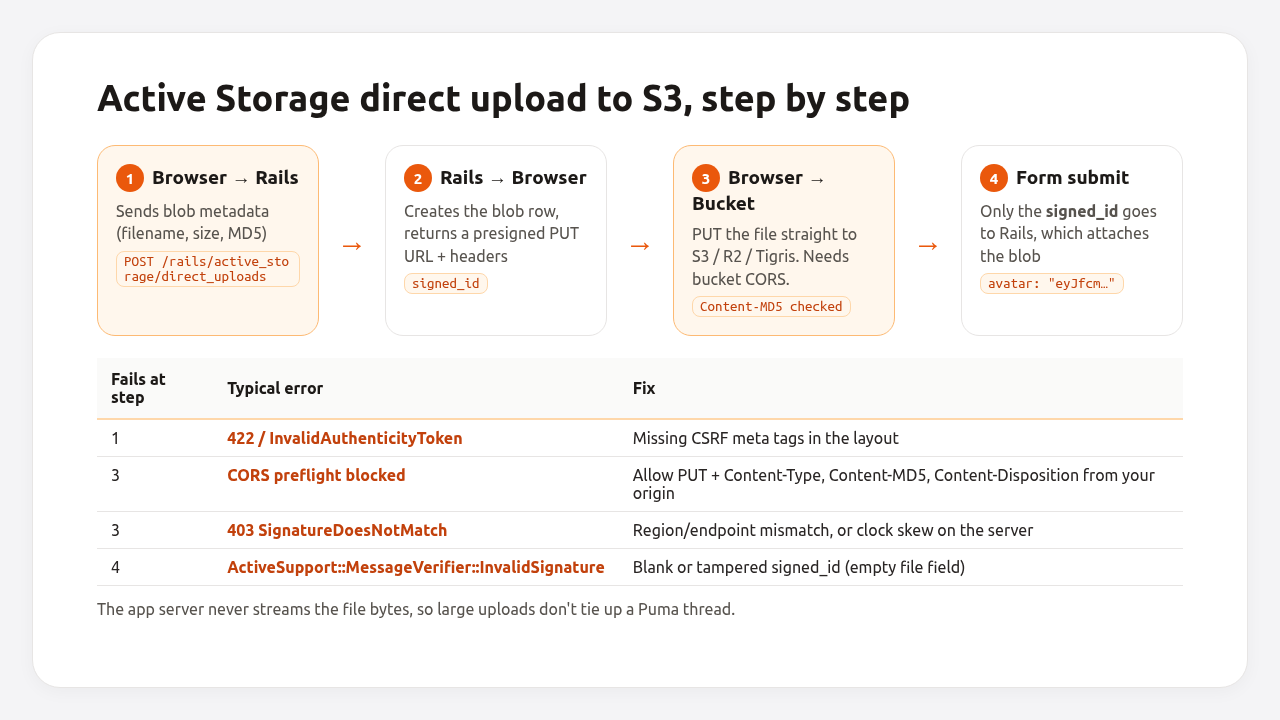
1. Load the JavaScript. With importmap (the Rails 8 default):
# config/importmap.rb
pin "@rails/activestorage", to: "activestorage.esm.js"
// app/javascript/application.js
import * as ActiveStorage from "@rails/activestorage"
ActiveStorage.start()
With jsbundling, run yarn add @rails/activestorage and use the same two lines.
2. Add direct_upload: true to the file field:
<%# app/views/users/_form.html.erb %>
<%= form_with model: @user do |form| %>
  <%= form.file_field :avatar, direct_upload: true, accept: "image/png,image/jpeg,image/webp" %>
  <%= form.submit %>
<% end %>
3. Allow the upload in the bucket’s CORS configuration. Without it, the browser’s preflight request fails and nothing reaches the bucket. Save this as cors.json:
{
  "CORSRules": [
    {
      "AllowedOrigins": ["https://www.example.com", "https://example.com"],
      "AllowedMethods": ["PUT"],
      "AllowedHeaders": ["Content-Type", "Content-MD5", "Content-Disposition"],
      "MaxAgeSeconds": 3600
    }
  ]
}
Apply it with the AWS CLI. The same command works against R2 and Hetzner with --endpoint-url:
# AWS
aws s3api put-bucket-cors --bucket myapp-production --cors-configuration file://cors.json

# Hetzner (or R2 with its endpoint)
aws s3api put-bucket-cors --bucket myapp-production --cors-configuration file://cors.json \
  --endpoint-url https://fsn1.your-objectstorage.com
On R2 you can also paste the rules (the array inside CORSRules) in the bucket’s Settings → CORS Policy in the Cloudflare dashboard. Add your staging domain to a separate rule on the staging bucket, not to production’s.
Pro Tip: direct uploads create blob records before the form is submitted. If users abandon the form, those blobs are never attached. Rails can clean them up for you: schedule ActiveStorage::Blob.unattached.where(created_at: ..2.days.ago).find_each(&:purge_later) as a daily job.
Step 6: Serve files: redirect, proxy or public URLs?
By default url_for(user.avatar) points at your app, which redirects to a presigned bucket URL that expires after 5 minutes. That’s secure but adds a round trip, and the expiring URL can’t be cached by a CDN.
| Mode | How to enable | URL lifetime | Use when |
|---|---|---|---|
| Redirect (default) | nothing | Presigned URL, 5 min (service_urls_expire_in) |
Private files, low traffic |
| Proxy | config.active_storage.resolve_model_to_route = :rails_storage_proxy |
Stable URL through your app | Put a CDN in front of the app, private-ish assets |
| Public | public: true in the service |
Permanent bucket URL | Avatars, product images, anything not secret |
# config/initializers/active_storage.rb (proxy mode for every attachment)
Rails.application.config.active_storage.resolve_model_to_route = :rails_storage_proxy
# config/storage.yml (public bucket for images)
cloudflare_public:
  service: S3
  public: true
  endpoint: https://<%= ENV.fetch("R2_ACCOUNT_ID", "account-id") %>.r2.cloudflarestorage.com
  access_key_id: <%= ENV.fetch("S3_ACCESS_KEY_ID", nil) %>
  secret_access_key: <%= ENV.fetch("S3_SECRET_ACCESS_KEY", nil) %>
  region: auto
  bucket: myapp-public
You can mix services per attachment, so private invoices and public avatars live in different buckets:
# app/models/user.rb
class User < ApplicationRecord
  has_one_attached :avatar, service: :cloudflare_public
  has_many_attached :invoices   # uses config.active_storage.service
end
Proxy mode streams every file through a Puma thread. Only use it with a CDN in front that caches the responses, otherwise large downloads tie up your app server. How proxy caching fits with the rest of your caching layers is covered in Rails caching strategies.
Step 7: Migrate existing local files to S3
Use the Mirror service: new uploads go to both disk and the bucket, and a job copies the old files over. Then you switch the primary to the bucket. No downtime, no missing images.
1. Mirror disk to the bucket:
# config/storage.yml
mirror:
  service: Mirror
  primary: local
  mirrors: [cloudflare]
# config/environments/production.rb
config.active_storage.service = :mirror
2. Deploy, then copy the existing blobs. Every blob stores the service_name it was uploaded with, and mirror_later only does something when that service is a Mirror. So first move the old local blobs onto the mirror service (reads still come from disk, its primary), then enqueue the copies. Each mirror_later enqueues an ActiveStorage::MirrorJob, so make sure a job worker is running:
bin/rails runner '
  ActiveStorage::Blob.where(service_name: "local").update_all(service_name: "mirror")
  ActiveStorage::Blob.where(service_name: "mirror").find_each(&:mirror_later)
'
3. Switch to the bucket once the mirror jobs have finished: set config.active_storage.service = :cloudflare and deploy. New uploads now go only to the bucket. Keep the mirror entry in storage.yml for now, because the existing blobs still reference it.
4. Point the existing blobs at the bucket:
bin/rails runner 'ActiveStorage::Blob.where(service_name: "mirror").update_all(service_name: "cloudflare")'
Now you can remove the mirror service. Keep the disk files for a week before deleting them, in case you need to re-run a copy. For a large number of files, compare the object count in the bucket with ActiveStorage::Blob.count before step 4.
Verify it works
Upload, read and delete a test blob from a production console. If any of the three fails, the error message tells you which permission or setting is wrong.
bin/rails runner '
  blob = ActiveStorage::Blob.create_and_upload!(io: StringIO.new("hello"), filename: "check.txt")
  puts "service: #{blob.service_name}"
  puts "exists:  #{blob.service.exist?(blob.key)}"
  puts "content: #{blob.download}"
  puts "url:     #{blob.url}"
  blob.purge
  puts "deleted: #{!blob.service.exist?(blob.key)}"
'
Expected output:
service: cloudflare
exists:  true
content: hello
url:     https://<account>.r2.cloudflarestorage.com/myapp-production/x8k2...?X-Amz-Algorithm=...
deleted: true
Then test a direct upload in the browser with DevTools open. In the Network tab you should see POST /rails/active_storage/direct_uploads (200), an OPTIONS preflight to the bucket (200 or 204), and a PUT to the bucket (200).
How Heroku, Render, Fly.io, Upsun and Enkihost handle file uploads
Platforms that run more than one instance, or that rebuild containers on deploy, can’t keep uploads on local disk. The table shows what each platform offers instead.
| Platform | Local filesystem | Built-in persistent storage | Recommended for Active Storage |
|---|---|---|---|
| Heroku | Ephemeral: files vanish on deploy and on the daily dyno restart | None | S3, often through the Bucketeer add-on |
| Render | Ephemeral by default | Persistent disk, but single instance only and it disables zero-downtime deploys | S3 or R2 for anything that scales |
| Fly.io | Ephemeral per Machine | Volumes (one per Machine) and Tigris object storage via fly storage create |
Tigris with the tigris service above |
| Upsun | Read-only after build | Mounts: storage mounts are shared between instances, instance mounts are not |
A storage mount with the Disk service, or S3 |
| Enkihost | Container filesystem | Persistent volumes (up to 3 on Ignite, 10 on Blaze) | A volume with the Disk service for one instance; S3/R2 when you scale out |
Heroku’s documentation is blunt about it: with two dynos, a file uploaded to local disk exists on only one of them, so half of the following requests can’t find it. Render documents the same trade-off from the other side: attaching a disk keeps files but costs you horizontal scaling and zero-downtime deploys. Moving to a bucket was a step in migrating a Rails app from Heroku to Enkihost too, because files left on a dyno are lost.
Troubleshooting Active Storage S3 errors
Aws::Sigv4::Errors::MissingCredentialsError
Aws::Sigv4::Errors::MissingCredentialsError: missing credentials, provide credentials with one of the following options: ...
The access key ERB rendered as empty. The environment variable isn’t set in the process that runs Rails (often the job worker, which has its own environment). Check with bin/rails runner 'p ENV["S3_ACCESS_KEY_ID"].present?' in the same container.
Aws::S3::Errors::PermanentRedirect
Aws::S3::Errors::PermanentRedirect: The bucket you are attempting to access must be addressed using the specified endpoint.
The region in storage.yml doesn’t match the bucket’s real region. Look it up with aws s3api get-bucket-location --bucket myapp-production and fix region.
Aws::S3::Errors::AccessDenied
The IAM policy is missing an action, or s3:ListBucket is attached to bucket/* instead of the bucket ARN. With public: true, the user also needs s3:PutObjectAcl.
Aws::S3::Errors::AccessControlListNotSupported
Aws::S3::Errors::AccessControlListNotSupported: The bucket does not allow ACLs
You set public: true, which uploads objects with a public-read ACL, but the bucket uses the AWS default “Bucket owner enforced” object ownership, which disables ACLs. Either remove public: true and use a bucket policy that allows public s3:GetObject, or enable ACLs in the bucket’s Object Ownership settings.
Direct upload fails with a CORS error
Access to XMLHttpRequest at 'https://myapp-production.s3.eu-central-1.amazonaws.com/...' from origin 'https://example.com' has been blocked by CORS policy: Response to preflight request doesn't pass access control check
The bucket has no CORS rule, or the rule doesn’t list your exact origin (scheme and www included) or the Content-MD5 header. Re-apply the cors.json from Step 5.
SignatureDoesNotMatch on direct uploads
The presigned URL was generated for one endpoint or region and the browser sent it to another, or the server’s clock is off by more than 15 minutes. Check region/endpoint and run timedatectl on self-managed servers.
Uploads to an S3-compatible store fail after a gem update
Recent aws-sdk-s3 versions send extra integrity checksums by default. If an S3-compatible provider rejects them after a bundle update, tell the SDK to send checksums only when required:
# config/storage.yml
hetzner:
  service: S3
  endpoint: https://fsn1.your-objectstorage.com
  region: fsn1
  bucket: <%= ENV.fetch("S3_BUCKET", nil) %>
  access_key_id: <%= ENV.fetch("S3_ACCESS_KEY_ID", nil) %>
  secret_access_key: <%= ENV.fetch("S3_SECRET_ACCESS_KEY", nil) %>
  request_checksum_calculation: when_required
  response_checksum_validation: when_required
ArgumentError: Missing host to link to!
You called url_for(attachment) or rails_blob_url outside a request, in a mailer or a job. Set the host once:
# config/environments/production.rb
config.action_mailer.default_url_options = { host: "example.com", protocol: "https" }
Rails.application.routes.default_url_options = { host: "example.com", protocol: "https" }
Vips::Error or LoadError: Could not open library 'vips.so.42'
The image variant processor can’t find libvips. Install libvips in the runtime image (apt-get install --no-install-recommends -y libvips on Debian), not only in the build stage.
Author Perspective: buckets are cheaper than disks you have to babysit
I resisted object storage for a long time on small apps because a folder on disk felt simpler. It isn’t, once you count the backups you have to remember, the deploy where a new container starts without the old files, and the day you want a second instance. These days every Rails app I start gets a bucket in production from day one, even if it only holds a few avatars, and the Disk service stays in development. R2 has become my default for anything users download, because egress pricing stops being something I think about. The one place I still use a volume is a single-instance internal tool where nobody will ever scale it out.
Active Storage on Enkihost
Enkihost runs Rails, Sinatra and Hanami apps with the environment variables your storage.yml reads, so pointing Active Storage at S3, R2 or Hetzner is a matter of setting S3_ACCESS_KEY_ID, S3_SECRET_ACCESS_KEY and S3_BUCKET in the app’s settings.
- Persistent volumes: up to 3 on Ignite and 10 on Blaze, for single-instance apps that keep files on the Disk service or for the disk side of a
Mirrormigration. - Zero-downtime deploys, so switching
config.active_storage.servicefrom:mirrorto the bucket in Step 7 doesn’t drop requests. - Managed PostgreSQL and Redis included on Ignite and Blaze, with
DATABASE_URLandREDIS_URLinjected. The blob table and theMirrorJobqueue need nothing extra. - Per-app resource isolation, and direct uploads keep large files off your app’s allocated CPU and memory entirely.
- Plans: Ignite at 9 EUR per month after a 14-day free trial (2 apps, 1 vCPU, 2 GB RAM), or Blaze at 29 EUR with five apps, 5 GB of RAM and CPU priority. If more than one app or instance needs the same files, keep uploads in a bucket.
See enkihost.com.
FAQ
Can I use Active Storage with Cloudflare R2?
Yes. Use the S3 service with endpoint set to https://ACCOUNT_ID.r2.cloudflarestorage.com and region set to auto. Active Storage, direct uploads and variants work the same as on AWS S3. R2 does not charge egress fees, which makes it a good fit for public images and downloads.
Do I need a separate bucket for each environment?
You should. Separate buckets for production and staging mean a staging console, a test script or a purge job can never delete production files. Use different access keys for each bucket too, so a leaked staging key can’t touch production data.
Why do my Active Storage URLs expire after five minutes?
In the default redirect mode, Active Storage redirects to a presigned bucket URL that is valid for five minutes, controlled by config.active_storage.service_urls_expire_in. Use proxy mode for stable URLs through your app, or a public service with public: true for permanent bucket URLs.
How do I make Active Storage files public?
Add public: true to the S3 service in storage.yml. Active Storage then uploads objects with a public-read ACL and returns permanent URLs. The IAM user needs s3:PutObjectAcl, and the bucket must allow ACLs. Use a separate public service only for attachments that are not sensitive.
Does Active Storage delete files from S3 when a record is destroyed?
Yes. has_one_attached and has_many_attached purge the attachment and delete the file from the bucket after the record is destroyed, using a background job by default. Set dependent: false on the association if you want to keep the files.
Sources
- Active Storage Overview — Rails Guides
- Using Active Storage on Heroku — Heroku Dev Center
- Persistent Disks — Render Docs
- Tigris Global Object Storage — Fly Docs
- Mounts — Upsun Docs
- aws-sdk-ruby with R2 — Cloudflare R2 Docs
- Configuring CORS — Amazon S3 User Guide
- Controlling ownership of objects and disabling ACLs — Amazon S3 User Guide
- Hetzner Object Storage overview — Hetzner Docs