How to Migrate a Rails App from Heroku to Enkihost, Step by Step
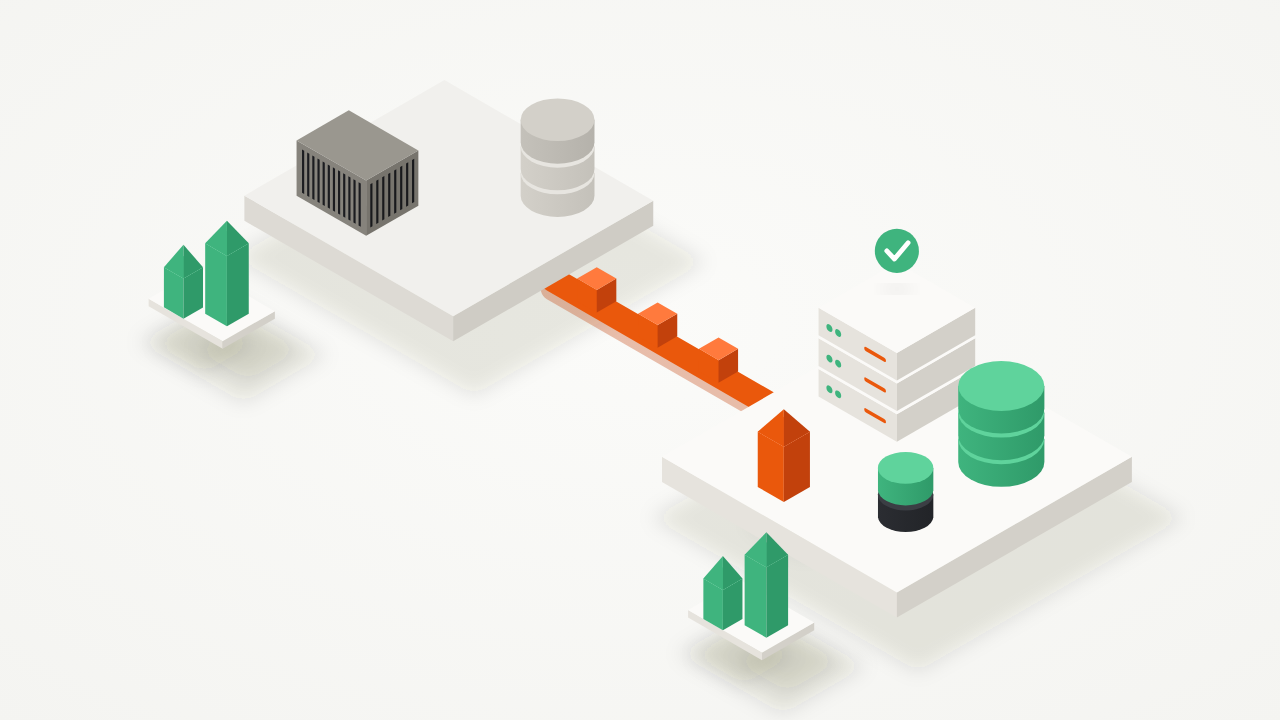
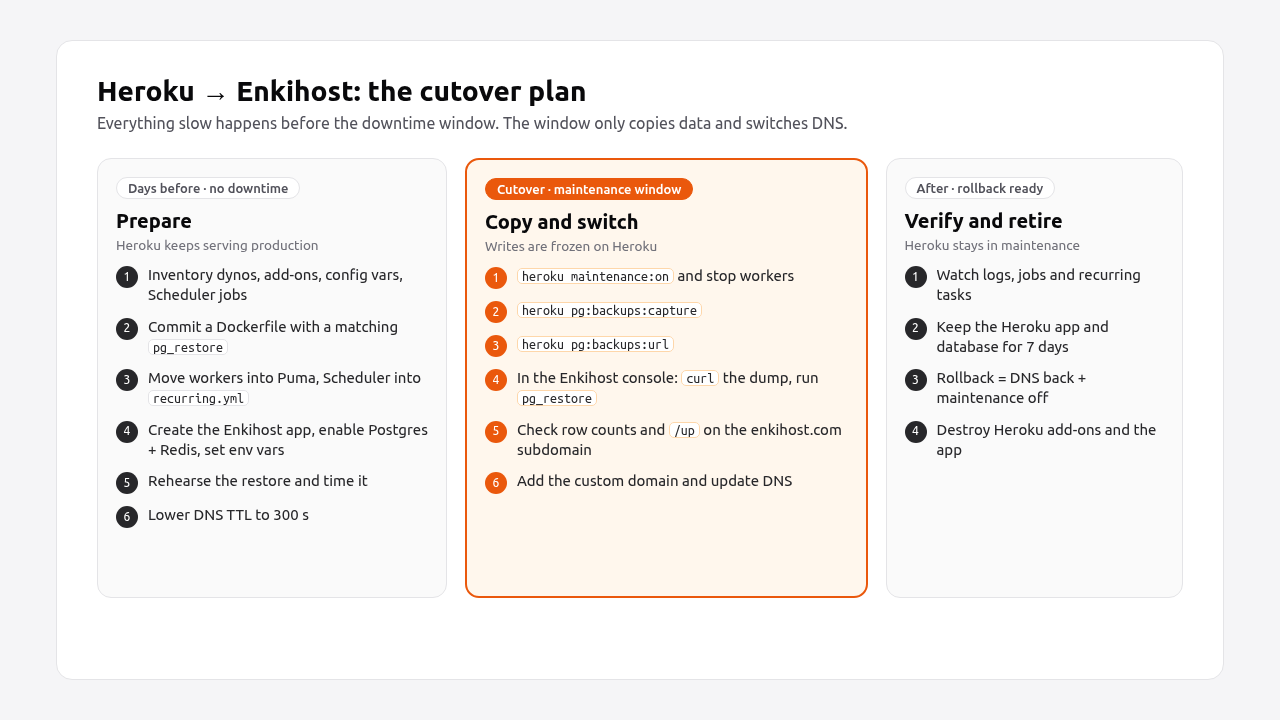
To migrate a Rails app from Heroku to Enkihost, you make the app build from a Dockerfile, fold the worker and Scheduler jobs into the web process, recreate the config vars, and copy the database with pg_restore from the Enkihost console during a short maintenance window. Then you switch DNS. Everything except the database copy happens beforehand, while Heroku keeps serving production. This guide walks through each step with the exact commands and config files, a rehearsal and rollback plan, and the errors you’re most likely to hit.
TL;DR
- Enkihost builds your app from the
Dockerfilein your GitHub repo and deploys on every push to the configured branch. Rails 7.1+ apps already have one; older apps can generate it with thedockerfile-railsgem.- Each Enkihost app runs one process. Heroku
workerdynos become Solid Queue running inside Puma (SOLID_QUEUE_IN_PUMA=true), and Heroku Scheduler jobs become entries inconfig/recurring.yml.- The Ignite plan (9 EUR/month after a 14-day free trial) includes PostgreSQL (512 MB RAM, 5 GB disk) and Redis (128 MB), injected as
DATABASE_URLandREDIS_URL, the same variable names Heroku uses.- The database moves with
heroku pg:backups:capture, thencurlandpg_restorein the Enkihost console. The container’spg_restoremust be at least as new as the Heroku PostgreSQL version.- Downtime is the time to copy the database plus DNS propagation. Rehearse the restore once to measure it, and keep the Heroku app for a week as your rollback.
Table of Contents
- What changes when you move a Rails app from Heroku to Enkihost?
- Prerequisites
- Step 1: Take an inventory of the Heroku app
- Step 2: Make the app build from a Dockerfile
- Step 3: Replace worker dynos and Heroku Scheduler
- Step 4: Create the Enkihost app and copy the config vars
- Step 5: Rehearse the database restore
- Step 6: Cut over
- Step 7: Verify it works
- Step 8: Decommission Heroku
- Troubleshooting
- How Render, Fly.io, Upsun and Enkihost handle a Heroku migration
- Author Perspective: rehearse once, migrate once
- Moving to Enkihost
- FAQ
- Sources
What changes when you move a Rails app from Heroku to Enkihost?
Most of a Heroku app carries over unchanged: Rails still reads DATABASE_URL and REDIS_URL, Puma still serves the web process, and you still deploy with git push. What changes is the build (a Dockerfile instead of buildpacks), the process model (one process per app instead of a Procfile with several dyno types), and how you run scheduled and one-off tasks.
| Heroku | Enkihost | What you do |
|---|---|---|
| Buildpacks | Your repo’s Dockerfile (one is generated if missing) |
Commit Rails’ production Dockerfile |
git push heroku main |
Push to the GitHub branch the app is connected to | Connect the repo in the dashboard |
web dyno |
The app’s single process, routed to port 3000 | Keep Puma on PORT 3000 |
worker dyno (Sidekiq, etc.) |
No separate process | Run Solid Queue inside Puma |
release: rails db:migrate |
No release phase | bin/docker-entrypoint runs db:prepare on boot |
| Heroku Scheduler | No cron | Solid Queue recurring tasks |
| Config vars | Environment variables in the dashboard | Copy them, minus Heroku-managed ones |
| Heroku Postgres / Heroku Key-Value Store | Included PostgreSQL / Redis, DATABASE_URL / REDIS_URL |
Enable both, restore the dump |
heroku run rails console |
Console in the dashboard | Same commands |
| Preboot | Zero-downtime deploys by default | Nothing |
Prerequisites
You need the Heroku CLI, the app’s code on GitHub, and an Enkihost account. The app should fit the plan you pick.
- Heroku CLI, logged in with access to the app (
heroku login). - The app in a GitHub repository. Enkihost deploys from GitHub, including private repos.
- An Enkihost account. Ignite (9 EUR/month after a 14-day free trial) runs two Rails or Sinatra apps with 1 vCPU and 2 GB of shared RAM, and includes PostgreSQL (512 MB RAM, 5 GB disk) and Redis (128 MB). Blaze (29 EUR/month) runs five apps with 2 dedicated vCPUs, 4 GB of RAM, five 2 GB databases, high availability and autoscaling.
- A database that fits the plan. Check
Data Sizeinheroku pg:info. More than about 4 GB on Ignite leaves no room to grow. - Rails 7.1 or newer is easiest, because it ships a production
Dockerfileandbin/docker-entrypoint. Older apps work too; see Step 2.
Step 1: Take an inventory of the Heroku app
List every process, add-on, config var and scheduled job before you change anything. These four commands show almost everything Heroku runs for you:
heroku ps -a myapp            # dyno types: web, worker, clock…
heroku addons -a myapp        # Postgres, Redis, Scheduler, logging, email…
heroku config -a myapp        # config vars
heroku pg:info -a myapp       # PG Version, Data Size, connections
Then open the Scheduler dashboard and write down each job and its frequency:
heroku addons:open scheduler -a myapp
Note three values from pg:info: the PG Version (you need a pg_restore at least that new in Step 2), the Data Size (it decides your plan and the length of the downtime), and whether the app uses extensions like pg_stat_statements or pgcrypto.
Pro Tip: Also read your Procfile. A release: line with more than db:migrate, or a clock: process, is something you’ll have to move explicitly.
Step 2: Make the app build from a Dockerfile
Enkihost uses the Dockerfile in your repo if there is one, and generates one otherwise. Commit your own, so the build is the same locally, in CI and in production. Rails 7.1+ generates it with rails new. For an older app, generate it with the dockerfile-rails gem:
bundle add dockerfile-rails --optimistic --group development
bin/rails generate dockerfile
Two things in that Dockerfile matter for this migration.
1. pg_restore must be at least as new as Heroku’s PostgreSQL. You’ll run pg_restore inside the app container, and an older client can’t read a newer dump. The Debian package in many Ruby images is older than Heroku’s current PostgreSQL versions. If heroku pg:info reports a newer version than pg_restore --version in your image, install the client from the PostgreSQL apt repository. In the base stage of the Rails Dockerfile, replace the apt-get install line:
# Dockerfile (base stage)
RUN apt-get update -qq && \
    apt-get install --no-install-recommends -y curl ca-certificates libjemalloc2 libvips postgresql-common && \
    /usr/share/postgresql-common/pgdg/apt.postgresql.org.sh -y && \
    apt-get install --no-install-recommends -y postgresql-client-17 && \
    rm -rf /var/lib/apt/lists /var/cache/apt/archives
Use the major version heroku pg:info shows instead of 17.
2. Migrations run on boot. Heroku ran them in the release phase. The Rails Dockerfile’s entrypoint runs db:prepare before the server starts, which creates the database on the first deploy and runs pending migrations on later ones:
#!/bin/bash -e
# bin/docker-entrypoint

# Enable jemalloc for reduced memory usage and latency.
if [ -z "${LD_PRELOAD+x}" ]; then
    LD_PRELOAD=$(find /usr/lib -name libjemalloc.so.2 -print -quit)
    export LD_PRELOAD
fi

# If running the rails server then create or migrate existing database
if [ "${@: -2:1}" == "./bin/rails" ] && [ "${@: -1:1}" == "server" ]; then
  ./bin/rails db:prepare
fi

exec "${@}"
Because the new container has to boot before Enkihost switches traffic to it, a failing migration aborts that deploy and the old container keeps serving. Write migrations so old and new code can run against the same schema.
Finally, check that Puma listens on port 3000, which is where Enkihost routes Rails traffic. The Rails default config/puma.rb already does:
# config/puma.rb
threads_count = ENV.fetch("RAILS_MAX_THREADS", 3)
threads threads_count, threads_count

port ENV.fetch("PORT", 3000)

plugin :tmp_restart
plugin :solid_queue if ENV["SOLID_QUEUE_IN_PUMA"]

pidfile ENV["PIDFILE"] if ENV["PIDFILE"]
Build the image locally once to catch errors early: docker build -t myapp .. Our production Dockerfile guide explains every line.
Step 3: Replace worker dynos and Heroku Scheduler
Each Enkihost app runs a single process, so background jobs run inside Puma with Solid Queue, and scheduled jobs become Solid Queue recurring tasks. Rails 8 apps already include Solid Queue. On Rails 7.1 or 7.2, add it:
bundle add solid_queue
bin/rails solid_queue:install
Point Active Job at it:
# config/environments/production.rb
config.active_job.queue_adapter = :solid_queue
Use one database for the app and the queue
Rails 8 puts Solid Queue in a separate queue database by default. On Enkihost, you get one DATABASE_URL, so use the single-database setup from the Solid Queue README:
- Remove
config.solid_queue.connects_tofromconfig/environments/production.rb. -
Create a migration and move the
create_tablestatements fromdb/queue_schema.rbinto itschangemethod, then deletedb/queue_schema.rb:bin/rails generate migration CreateSolidQueueTables - Run
bin/rails db:migratelocally and commit the migration anddb/schema.rb.
If your config/database.yml has queue, cache or cable entries under production, remove them, or point them at the primary database, so production uses only DATABASE_URL.
Run jobs inside Puma
Set SOLID_QUEUE_IN_PUMA=true as an environment variable in Step 4. The plugin :solid_queue line in config/puma.rb then starts the Solid Queue supervisor alongside the web server. Our background jobs in production guide covers when this is enough and how to tune it.
Coming from Sidekiq? Jobs written as ApplicationJob subclasses move to Solid Queue with only the adapter change above. Jobs that include Sidekiq::Job need converting to Active Job. If you’d rather keep Sidekiq, it has an embedded mode that runs inside the Puma process and uses the included Redis.
Move Scheduler jobs to recurring tasks
Each Heroku Scheduler entry becomes an entry in config/recurring.yml. If a scheduler job ran rake reports:daily, wrap the task’s code in a job:
# app/jobs/daily_report_job.rb
class DailyReportJob < ApplicationJob
  queue_as :default

  def perform
    Report.send_daily_summary
  end
end
# config/recurring.yml
production:
  daily_report:
    class: DailyReportJob
    schedule: every day at 6am
  purge_stale_invoices:
    command: "Invoice.purge_stale"
    schedule: every hour
Schedules are parsed by Fugit, so every day at 6am, every hour and cron syntax like 0 6 * * * all work. Heroku Scheduler runs in UTC; if a job must run at a local time, add the time zone to a cron schedule, for example 0 6 * * * Europe/Madrid.
Step 4: Create the Enkihost app and copy the config vars
Create the app in the Enkihost dashboard, connect the GitHub repository and branch, and enable PostgreSQL and Redis before the first deploy. Enkihost injects DATABASE_URL and REDIS_URL into the container when it deploys, so a database enabled after a deploy is only visible after the next one.
Export the Heroku config vars:
heroku config --shell -a myapp > heroku.env
Copy them into the app’s environment variables in the dashboard, with these changes:
| Variable | What to do |
|---|---|
DATABASE_URL, REDIS_URL, REDIS_TLS_URL |
Don’t copy. Enkihost sets DATABASE_URL and REDIS_URL. |
HEROKU_*, PAPERTRAIL_* and other add-on variables |
Don’t copy, unless you keep the add-on’s service outside Heroku |
RAILS_ENV, RACK_ENV |
Not needed. Enkihost sets both to production. |
RAILS_MASTER_KEY or SECRET_KEY_BASE |
Copy exactly, or the app can’t decrypt credentials and sessions break |
WEB_CONCURRENCY, RAILS_MAX_THREADS |
Re-check against the plan’s memory: 2 GB of shared RAM on Ignite |
| S3/Active Storage keys, API keys, SMTP | Copy unchanged |
SOLID_QUEUE_IN_PUMA |
Add, value true |
Delete heroku.env when you’re done. It contains every secret your app has.
Pro Tip: If you copied a Redis setup from Heroku that disables certificate checks, such as ssl_params: { verify_mode: OpenSSL::SSL::VERIFY_NONE }, it was there because Heroku Key-Value Store uses self-signed certificates. Read REDIS_URL as is and drop the workaround if the URL doesn’t use rediss://.
Now push to the connected branch. Enkihost builds the image and deploys it, and db:prepare creates an empty schema. Open the app on its enkihost.com subdomain and check that it boots and /up returns 200.
Step 5: Rehearse the database restore
Do the full restore once without maintenance mode, using a fresh backup, to check that it works and to measure how long it takes. That duration is your downtime.
On your machine, capture a backup and get a short-lived download URL:
heroku pg:backups:capture -a myapp
heroku pg:backups:url -a myapp
Open the console for your app in the Enkihost dashboard and run the restore there, where DATABASE_URL points at the Enkihost database:
pg_restore --version
curl -fSL -o /tmp/latest.dump "PASTE_THE_BACKUP_URL_HERE"
time pg_restore --verbose --clean --if-exists --no-acl --no-owner -d "$DATABASE_URL" /tmp/latest.dump
rm /tmp/latest.dump
Then compare row counts on both sides:
# Enkihost console
bin/rails runner 'puts [User.count, Order.count].inspect'

# your machine
heroku run -a myapp bin/rails runner "puts [User.count, Order.count].inspect"
Replace User and Order with your app’s busiest tables. Warnings about the heroku_ext schema or extensions are covered in Troubleshooting.
Pro Tip: Lower the TTL of your DNS records to 300 seconds after the rehearsal. By the time you cut over, a day later, resolvers will pick up the switch within minutes.
Step 6: Cut over
The cutover freezes writes on Heroku, copies the latest data and switches DNS. With a rehearsed restore, the window is the restore time plus a few minutes.
-
Turn on maintenance mode on Heroku so no new writes arrive:
heroku maintenance:on -a myapp -
Let the job queue drain, then stop workers. Jobs still sitting in Heroku Key-Value Store won’t move with the database. With Sidekiq, wait until the queues are empty:
heroku run -a myapp bin/rails runner "puts Sidekiq::Queue.all.sum(&:size)"
heroku ps:scale worker=0 -a myapp
That count doesn’t include Sidekiq’s scheduled and retry sets. Check them in the Sidekiq web UI and decide whether to run them early or let them go.
-
Capture the final backup and get its URL:
heroku pg:backups:capture -a myapp heroku pg:backups:url -a myapp -
Restore it in the Enkihost console, with the same
curlandpg_restorecommands as the rehearsal. -
Redeploy the Enkihost app, so
db:prepareruns any migrations that are newer than the Heroku schema and Solid Queue starts on the restored tables. An empty commit is enough:git commit --allow-empty -m "Redeploy after database restore" git push -
Check the app on its
enkihost.comsubdomain: sign in, load a page that reads recent data, and compare the row counts again. -
Add your custom domain in the Enkihost dashboard and update the DNS records to the target it shows. Enkihost issues the Let’s Encrypt certificate once DNS points at it.
Leave Heroku in maintenance mode. Visitors whose resolvers still have the old record see Heroku’s maintenance page instead of writing to the old database. The Rails maintenance mode guide shows how to customise that page.
Step 7: Verify it works
Check the custom domain, background jobs and recurring tasks before you call the migration done.
curl -sI https://www.example.com/up | head -1
# HTTP/2 200

dig +short www.example.com
# should return Enkihost's target, not Heroku's
Then in the app:
- Sign in, create a record, and check it appears in the Enkihost database from the console.
- Enqueue a job (send a password reset, for example) and confirm it runs. Solid Queue’s
SolidQueue::JobandSolidQueue::FailedExecutiontables show what happened. - Check that recurring tasks are registered:
bin/rails runner 'puts SolidQueue::RecurringTask.pluck(:key)'. - Watch the app’s logs for an hour for errors you didn’t see on Heroku.
Step 8: Decommission Heroku
Keep the Heroku app and its database for about a week. Until you delete them, rollback is two steps: point DNS back to Heroku and run heroku maintenance:off (any data written on Enkihost in the meantime would have to be copied back). Once you’re confident, remove the paid resources:
heroku addons:destroy heroku-postgresql -a myapp
heroku apps:destroy -a myapp
Download a final backup with heroku pg:backups:download -a myapp first if you want an archive.
Troubleshooting
pg_restore: error: unsupported version (1.16) in file header
The pg_restore in your container is older than the pg_dump Heroku used. Install a newer postgresql-client from the PostgreSQL apt repository as shown in Step 2, redeploy, and check pg_restore --version in the console again.
ERROR: unrecognized configuration parameter "transaction_timeout"
The dump was made by PostgreSQL 17 tools and the target server is older. The error is from the SET line at the top of the dump and doesn’t stop the restore; check the rest of the output for real errors. If the server is much older than Heroku’s, ask Enkihost support which version your database runs before the cutover.
ERROR: schema "heroku_ext" does not exist
Heroku installs extensions into a heroku_ext schema. Create it in the Enkihost database and run the restore again:
psql "$DATABASE_URL" -c 'CREATE SCHEMA IF NOT EXISTS heroku_ext;'
ActiveRecord::ConnectionNotEstablished or connection to server on socket "/var/run/postgresql/.s.PGSQL.5432" failed
The container has no DATABASE_URL, so Rails falls back to a local socket. Enable PostgreSQL for the app and redeploy, since the variable is injected at deploy time. Also check that config/database.yml doesn’t hardcode a host for production.
ActiveSupport::MessageEncryptor::InvalidMessage or Missing secret_key_base
RAILS_MASTER_KEY or SECRET_KEY_BASE is missing or doesn’t match the one on Heroku. Copy the exact value from heroku config:get RAILS_MASTER_KEY -a myapp.
Jobs are enqueued but never run
SOLID_QUEUE_IN_PUMA isn’t set, config/puma.rb doesn’t have the plugin :solid_queue line, or the Solid Queue tables aren’t in the primary database. Check with bin/rails runner 'puts SolidQueue::Process.count': zero means no supervisor is running.
How Render, Fly.io, Upsun and Enkihost handle a Heroku migration
All four platforms map the same Heroku concepts. They differ in how many processes an app can run and where scheduled jobs and migrations go.
| Heroku concept | Render | Fly.io | Upsun | Enkihost |
|---|---|---|---|---|
web dyno |
Web service | app process in fly.toml |
Application container | The app’s process |
worker dyno |
Background worker service (no free plan) | Extra process group in [processes] |
Worker in .upsun/config.yaml |
Solid Queue inside Puma |
| Release phase | Pre-deploy command | release_command |
Deploy hook | db:prepare in bin/docker-entrypoint |
| Scheduler | Cron job service | Scheduled Machines or a cron process | crons in the app config |
Solid Queue recurring tasks |
| Database copy | pg_restore to the external database URL |
pg_restore over a Fly proxy or from a Machine |
Import through the CLI | pg_restore from the app console |
| Config vars | Env vars or environment groups | fly secrets set |
Variables | Dashboard environment variables |
Render’s guide is the closest to a one-to-one mapping, because every Procfile entry becomes its own service, each billed separately. Fly.io keeps process groups inside one app, but you write and maintain fly.toml. Upsun moves everything into its YAML configuration. On Enkihost, the app runs as a single process. That means moving jobs and schedules into Rails itself, which is less to configure and pay for, but means a heavy job workload shares CPU and memory with your web requests.
For a broader comparison of these platforms on price and operations work, see Heroku alternatives for Rails.
Author Perspective: rehearse once, migrate once
Every migration that went badly for me went badly at the database step, never at the build step. A dump that wouldn’t restore because of a client version, an extension nobody remembered installing, a queue full of jobs that vanished with the old Redis. All of those show up in a rehearsal and none of them should show up for the first time with the maintenance page on. So I always do a full restore the day before, time it, and write the exact commands into a text file. On cutover day I copy and paste them. The other habit that has saved me: don’t delete the old app for a week. Rollback is only a rollback if the thing you’re rolling back to still exists.
Moving to Enkihost
The steps above stay short because Enkihost uses the same conventions a Heroku app already follows:
DATABASE_URLandREDIS_URL, injected from PostgreSQL and Redis included in the plan, sodatabase.ymland your Redis config don’t change.- Push-to-deploy from GitHub, with zero-downtime deploys: the new container must boot before the old one is removed.
- Ignite at 9 EUR per month after a 14-day free trial: two Rails or Sinatra apps, 1 vCPU, 2 GB of shared RAM, PostgreSQL (512 MB RAM, 5 GB disk) and Redis (128 MB). Enough for a production app plus a staging copy.
- Blaze at 29 EUR per month when you need more: five apps, 2 dedicated vCPUs, 4 GB of RAM, five 2 GB databases, high availability and autoscaling.
- Per-app resource isolation, so the memory you planned for is the memory you get.
Start the trial at enkihost.com.
FAQ
How long does it take to migrate a Rails app from Heroku to Enkihost?
The preparation (Dockerfile, Solid Queue, environment variables, a rehearsal restore) usually takes a few hours to a day for a typical app. The downtime itself is the time to restore the database plus DNS propagation, which the rehearsal lets you measure in advance.
Can I migrate from Heroku to Enkihost without downtime?
Not with a dump and restore, because writes have to stop while the data is copied. For most small and medium apps, a short maintenance window is simpler and safer than setting up logical replication between the two databases.
Do I have to switch from Sidekiq to Solid Queue?
No, but it’s the simplest option, because each Enkihost app runs one process and Solid Queue can run inside Puma. Sidekiq also has an embedded mode that runs inside the Puma process and uses the Redis included in the plan.
What happens to my Heroku Scheduler jobs?
They become entries in config/recurring.yml, run by Solid Queue inside your app. Each entry names a job class or a command and a schedule such as every day at 6am, so they live in version control instead of the Heroku dashboard.
Do I need to change config/database.yml?
Usually not for the primary database, because Rails reads DATABASE_URL just like on Heroku. You do need to remove separate production entries for the Solid Queue, Solid Cache or Solid Cable databases if they exist, so everything uses the single database Enkihost provides.
Sources
- Importing and Exporting Heroku Postgres Databases — Heroku Dev Center
- Heroku Postgres backups (pg:backups) — Heroku Dev Center
- Migrate from Heroku to Render — Render Docs
- Migrate from Heroku — Fly Docs
- Migration tutorials — Upsun Docs
- Solid Queue README — Rails
- dockerfile-rails generator — GitHub
- PostgreSQL apt repository — PostgreSQL Wiki
- Embedding Sidekiq — Sidekiq Wiki