Heroku Alternative for Rails: Enkihost vs Render vs Hetzner + Kamal in 2026
The best Heroku alternative for Rails depends on how much of the server you want to own. If you want git push deploys with nothing to operate, the realistic options in 2026 are a Ruby-focused host like Enkihost or a general platform like Render. If you want the lowest bill and can run Linux yourself, a rented server on Hetzner deployed with Kamal 2 is the do-it-yourself path. This guide compares all three on current list prices, zero-downtime deploys, PostgreSQL and Redis, and the operations work each one leaves to you. It also covers how Fly.io and Upsun fit in, and the steps to move an app off Heroku.
TL;DR
- On Heroku, a small production Rails app with zero-downtime deploys, PostgreSQL and Redis costs about $33/month. Preboot needs at least a Standard-1X dyno ($25), which has 512 MB of RAM.
- Render runs the same app for about $23/month on a Hobby workspace, or $48 once a team needs the $25 Pro workspace. Its free web services spin down after 15 minutes, and free databases expire after 30 days.
- Hetzner + Kamal 2 is cheapest on paper: €7.09/month for a 4 GB CX23 with backups. But Hetzner raised cloud prices on 15 June 2026, the cost-optimised CX line is listed as “currently not available”, and you run the OS, the database and the backups yourself.
- On Enkihost, the same app costs 9 EUR/month on Ignite (after a 14-day free trial): two Rails or Sinatra apps, 1 vCPU, 2 GB shared RAM, a managed PostgreSQL (512 MB RAM, 5 GB disk) and Redis (128 MB) included, with zero-downtime deploys. Blaze (29 EUR) adds dedicated vCPUs, high availability and autoscaling. The free Spark plan is for Jekyll sites only.
- Choose by who operates the server: a managed host if no one on the team wants that job, Kamal on a VM if someone does and has the time.
Table of Contents
- What is the best Heroku alternative for Rails in 2026?
- Why are Rails developers moving off Heroku?
- What does a small production Rails app cost on each platform?
- Enkihost vs Render: which is better for a Rails app?
- Enkihost vs Hetzner + Kamal: managed hosting or do it yourself?
- How Heroku, Render, Fly.io, Upsun and Enkihost compare
- How do you migrate a Rails app off Heroku?
- Which Heroku alternative should you choose?
- Author Perspective: the bill is the easy part
- Enkihost as a Heroku alternative for Rails
- FAQ
- Sources
What is the best Heroku alternative for Rails in 2026?
There isn’t one best Heroku alternative for Rails. There are three kinds, and the right one depends on how much operations work you want to take on. Managed hosts like Enkihost and Render keep the Heroku workflow. Container platforms like Fly.io give you more control at the cost of more configuration. Kamal on a rented VM gives you the lowest bill and all of the operations work.
| Enkihost | Render | Hetzner + Kamal 2 | |
|---|---|---|---|
| What it is | Managed Ruby hosting (Rails, Sinatra, Jekyll) | General-purpose managed platform | Rented VM + open-source deploy tool |
| Entry price | Ignite 9 EUR (14-day free trial); Blaze 29 EUR | $0 (spins down), $7 Starter instance | €5.49 CX23 + €0.50 IPv4 (limited availability) |
| Zero-downtime deploys | Yes | Yes on paid instances, not with a persistent disk | Yes, through kamal-proxy health checks |
| PostgreSQL / Redis | Included in the plan, inject DATABASE_URL / REDIS_URL |
Managed Postgres from $6, Key Value from $10 | Docker accessories you run yourself |
| Who patches the server | Platform | Platform | You |
| Best for | Ruby apps that want Heroku’s workflow at a small fixed price | Polyglot teams, preview environments, larger instances | Teams with Linux experience and several apps per server |
Pro Tip: Before you compare prices, write down which Heroku features you actually use: review apps, the release phase, scheduler, add-ons, preboot. Each one is easy to replace on some alternatives and missing on others.
Why are Rails developers moving off Heroku?
Most teams leave Heroku for its price per gigabyte of RAM, not for its developer experience. A 512 MB dyno is small for a Rails app with a few Puma workers, and the features a production app needs sit in the higher tiers.
The specific friction points, from Heroku’s own pricing page:
- Zero-downtime deploys need Standard dynos. Preboot is listed as a Standard-1X/2X feature. The $7 Basic dyno restarts your app on every deploy, so the cheapest setup without dropped requests is Standard-1X at $25/month, with 512 MB of RAM.
- Memory is tight. Standard-1X has 512 MB and Standard-2X has 1 GB for $50. A Rails 8 app with two Puma workers can easily need more than 512 MB, so in practice you end up on Standard-2X. Our Puma workers and threads guide shows how to size that.
- Eco dynos sleep. Eco ($5) sleeps after 30 minutes of inactivity and is limited to personal accounts. The free tier ended in November 2022.
- Database tiers jump. Postgres Essential plans ($5–20) run on shared RAM with 20–40 connections. The first Standard plan is $50.
None of this makes Heroku a bad product. It’s still the most polished git push experience. But a small app that needs to stay up during deploys pays $25–50 a month for compute alone, and that’s what pushes people to look elsewhere.
What does a small production Rails app cost on each platform?
For one small production Rails app (one always-on web process, zero-downtime deploys, PostgreSQL and Redis), list prices in October 2026 range from €7.09 on a self-managed Hetzner VM to $54.70 on Fly.io with a high-availability database. Enkihost Ignite is €9 with PostgreSQL and Redis included, Render about $23 and Heroku about $33.
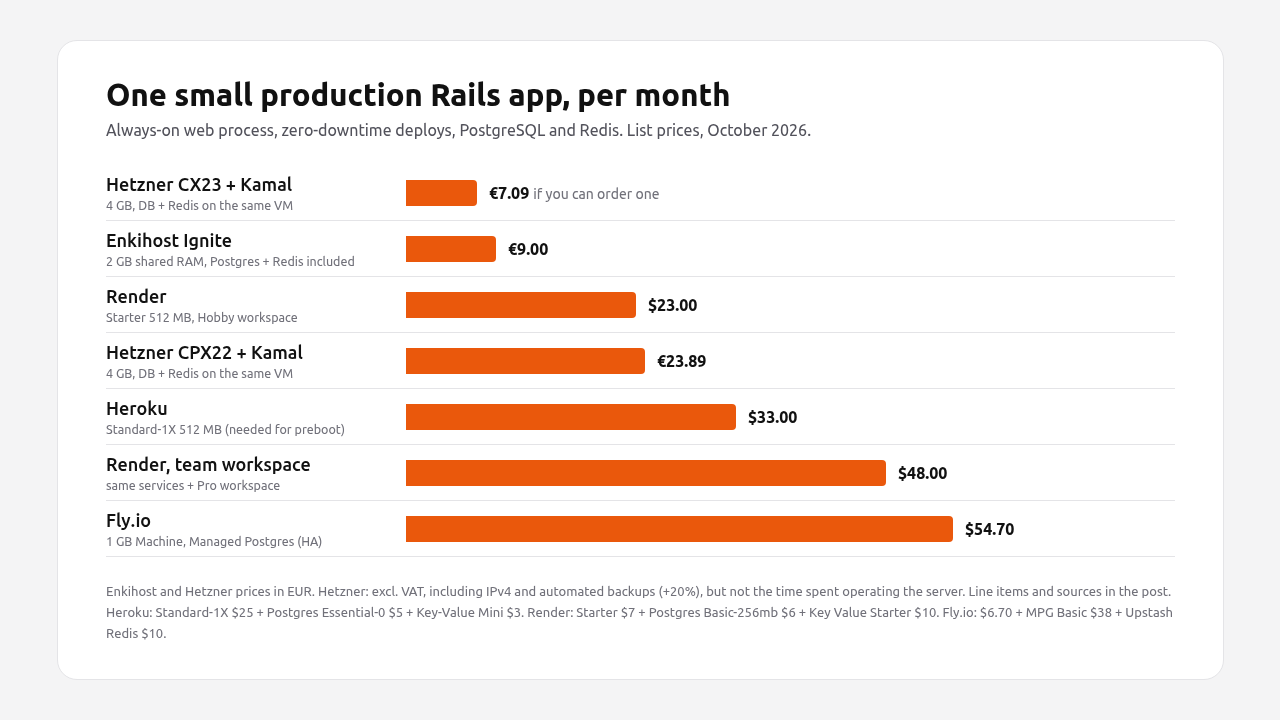
| Platform | Web | PostgreSQL | Redis | Other | Total / month |
|---|---|---|---|---|---|
| Heroku | Standard-1X, 512 MB: $25 | Essential-0, 1 GB: $5 | Key-Value Mini: $3 | — | $33.00 |
| Render (Hobby) | Starter, 512 MB: $7 | Basic-256mb, 1 GB: $6 | Key Value Starter: $10 | Hobby workspace: $0 | $23.00 |
| Render (team) | Starter, 512 MB: $7 | Basic-256mb: $6 | Key Value Starter: $10 | Pro workspace: $25 | $48.00 |
| Fly.io | shared-cpu-1x, 1 GB: $6.70 | Managed Postgres Basic (HA): $38 | Upstash fixed 250 MB: $10 | — | $54.70 |
| Hetzner CX23 + Kamal | 2 vCPU, 4 GB: €5.49 | Same VM | Same VM | IPv4 €0.50 + backups €1.10 | €7.09 |
| Hetzner CPX22 + Kamal | 2 vCPU, 4 GB: €19.49 | Same VM | Same VM | IPv4 €0.50 + backups €3.90 | €23.89 |
| Enkihost Ignite | 1 vCPU, 2 GB shared RAM, up to 2 apps: €9 | Included, 512 MB RAM / 5 GB disk | Included, 128 MB | — | €9.00 |
Hetzner prices are in EUR excluding VAT, for Germany and Finland. Automated backups are charged at 20% of the server price. Enkihost prices are from enkihost.com.
What the totals hide:
- Memory is not comparable. The Hetzner VM has 4 GB, but PostgreSQL, Redis, Docker and kamal-proxy share it with your app. Heroku and Render give 512 MB to the app alone, with the database elsewhere. Enkihost Ignite’s 2 GB is shared RAM for up to two apps, with PostgreSQL and Redis running as separate managed services.
- The database is not comparable. Fly.io’s $38 plan includes high availability. Heroku Essential-0 is capped at 1 GB and 20 connections. Enkihost Ignite’s database has 512 MB of RAM and 5 GB of disk, enough for a small app but not a large dataset. On Hetzner, the database is a container on the same machine as the app, so a dead VM takes both down.
- Your time is not on the invoice. The Hetzner rows assume someone patches the OS, watches disk space and tests restores. Our startup hosting costs breakdown shows how quickly that outweighs the price difference.
Enkihost vs Render: which is better for a Rails app?
Enkihost is the better fit if you only deploy Ruby apps and want a small, fixed monthly price. Render is the better fit if your team also ships Node, Python or Go services, needs preview environments, or will outgrow a few gigabytes of RAM per service.
| Enkihost | Render | |
|---|---|---|
| Languages | Ruby, Rails, Sinatra, Jekyll | Many runtimes plus Docker |
| Pricing model | Plans with database and Redis included: Ignite 9 EUR (2 apps), Blaze 29 EUR (5 apps) | Workspace plan ($0 Hobby, $25 Pro) + per-service instance ($7, $25, $85 …) |
| Free tier | 14-day free trial on Ignite; the free Spark plan is for one Jekyll site | Free web services spin down after 15 minutes idle and take about a minute to wake |
| Resources | Ignite: 1 vCPU, 2 GB shared RAM. Blaze: 2 dedicated vCPUs, 4 GB RAM. Per-app isolation | Fixed instance sizes from 512 MB to 96 GB |
| Zero-downtime deploys | Yes | Yes on paid instances; disabled if the service has a persistent disk |
| PostgreSQL | Included: 1× 512 MB RAM / 5 GB disk (Ignite), 5× 2 GB (Blaze); injects DATABASE_URL |
Managed, from $6 (256 MB RAM, 1 GB storage, then $0.30/GB) |
| Redis | Included: 1× 128 MB (Ignite), 5× (Blaze); injects REDIS_URL |
Key Value from $10 (256 MB) |
| Persistent volumes | Up to 3 (Ignite), 20 (Blaze) | $0.25/GB per month; a disk disables zero-downtime deploys |
| High availability | Blaze: high availability and autoscaling | Multiple instances per service |
| Free database | Not on the free plan (Jekyll only) | Expires 30 days after creation |
| Bandwidth / build minutes | No surcharges listed | Hobby: 5 GB, 500 min; Pro: 25 GB, 1,000 min; $0.15/GB overage |
Where Render wins
Render does more things. It has background workers, cron jobs and private services as separate service types. It has preview environments per pull request, Blueprints (render.yaml) for infrastructure as code, and instance sizes far beyond what a small app needs. If your Rails app is one of several services in different languages, Render keeps them in one place.
Where Enkihost wins
Enkihost does one thing: Ruby apps. Rails, Sinatra and Jekyll are the only supported runtimes, so the platform is built around how they deploy and run. Pricing is one plan with the database and Redis included, not a workspace fee plus instances plus a database plan plus a Key Value plan: the setup that costs $23 on Render is 9 EUR on Ignite. Zero-downtime deploys are included rather than a property of the instance tier. The bundled PostgreSQL and Redis inject the same DATABASE_URL and REDIS_URL variables Heroku uses, so a Rails app coming from Heroku needs no database.yml changes.
Pro Tip: If your app stores Active Storage uploads on local disk, move them to object storage before you migrate anywhere. On Render, a persistent disk turns off zero-downtime deploys, and on most platforms local disk doesn’t survive a redeploy.
Enkihost vs Hetzner + Kamal: managed hosting or do it yourself?
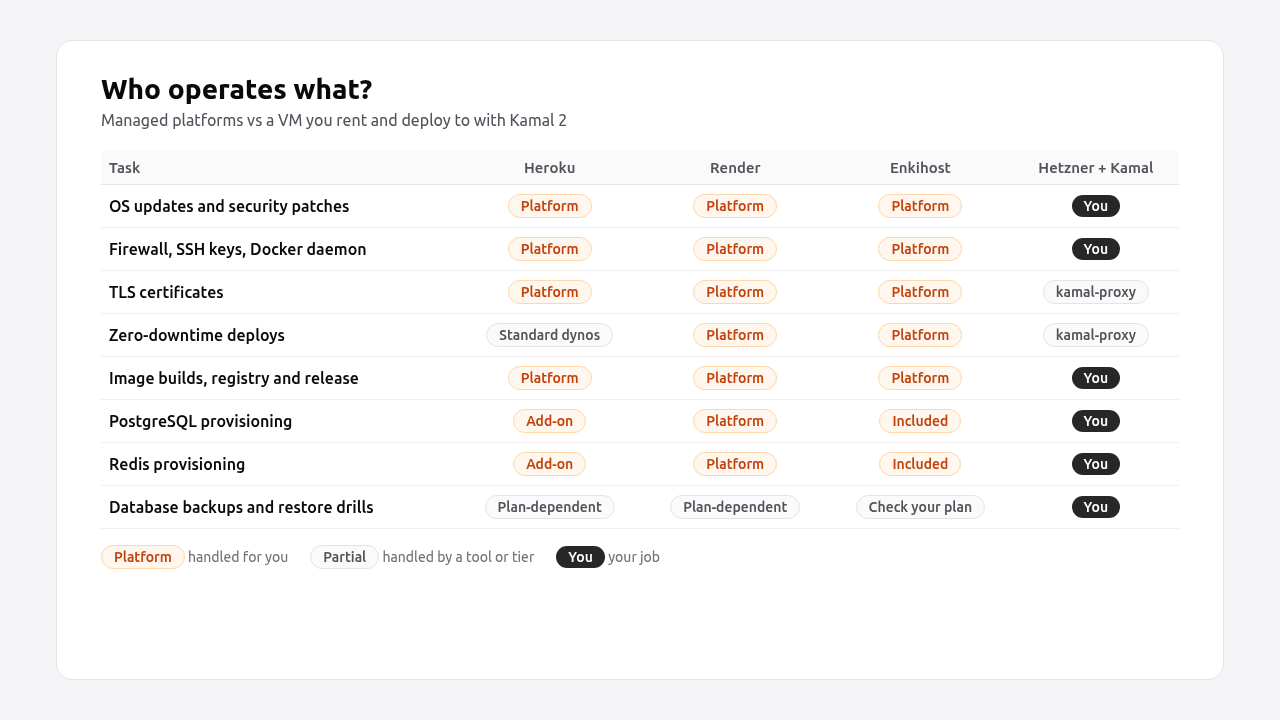
Hetzner + Kamal gives you the most raw RAM per euro. In exchange, you become the operations team: OS updates, firewall, Docker, PostgreSQL upgrades and backups are your job. Enkihost Ignite costs a little more than a CX23 (9 EUR vs €7.09 with backups) and much less than a CPX22, includes PostgreSQL and Redis, and removes that work. What you give up is control and headroom: 2 GB of shared RAM instead of a 4 GB VM of your own. The decision comes down to whether someone on the team wants that job and has the time to do it properly.
What does a Kamal 2 setup on Hetzner look like?
Rails 8 generates config/deploy.yml and a production Dockerfile for you. A single-server setup with PostgreSQL and Redis as Kamal accessories looks like this:
# config/deploy.yml
service: myapp
image: myuser/myapp

servers:
  web:
    - 203.0.113.10
  job:
    hosts:
      - 203.0.113.10
    cmd: bin/jobs

proxy:
  ssl: true
  host: myapp.example.com

registry:
  server: ghcr.io
  username: myuser
  password:
    - KAMAL_REGISTRY_PASSWORD

env:
  secret:
    - RAILS_MASTER_KEY
    - POSTGRES_PASSWORD
  clear:
    DB_HOST: myapp-db
    REDIS_URL: redis://myapp-redis:6379/0
    SOLID_QUEUE_IN_PUMA: false

builder:
  arch: amd64

accessories:
  db:
    image: postgres:17
    host: 203.0.113.10
    port: "127.0.0.1:5432:5432"
    env:
      clear:
        POSTGRES_USER: myapp
        POSTGRES_DB: myapp_production
      secret:
        - POSTGRES_PASSWORD
    directories:
      - data:/var/lib/postgresql/data
  redis:
    image: redis:7.4
    host: 203.0.113.10
    port: "127.0.0.1:6379:6379"
    directories:
      - data:/data
The secrets come from .kamal/secrets, which reads them from your shell or a password manager:
# .kamal/secrets
KAMAL_REGISTRY_PASSWORD=$KAMAL_REGISTRY_PASSWORD
RAILS_MASTER_KEY=$(cat config/master.key)
POSTGRES_PASSWORD=$POSTGRES_PASSWORD
The production database config points at the accessory container:
# config/database.yml (production section)
production:
  primary:
    adapter: postgresql
    host: <%= ENV["DB_HOST"] %>
    username: myapp
    password: <%= ENV["POSTGRES_PASSWORD"] %>
    database: myapp_production
Then provision and deploy:
kamal setup    # installs Docker, boots kamal-proxy and the accessories, deploys the app
kamal deploy   # every later release
kamal-proxy gives you HTTPS through Let’s Encrypt and zero-downtime deploys: it polls the new container’s /up endpoint and switches traffic once it responds. We cover the full flow, including Thruster and rollbacks, in minimal Rails deployments with Kamal 2.
What do you still have to operate yourself?
Kamal deploys containers. It doesn’t run your server for you. After kamal setup, these are still yours:
| Task | What it involves | Fails how, if skipped |
|---|---|---|
| OS updates | unattended-upgrades, kernel reboots |
Unpatched SSH or OpenSSL CVEs |
| Firewall and SSH | Allow only 22/80/443, key-only SSH | Exposed PostgreSQL or brute-force logins |
| Database backups | pg_dump on a schedule, copied off the VM |
A dead disk takes your data with it |
| Restore drills | Actually restoring a dump into a fresh database | Backups that turn out to be empty |
| PostgreSQL upgrades | Major version upgrades with pg_upgrade or dump/restore |
Running an end-of-life database |
| Disk space | Docker image pruning, log rotation | Full disk, failed deploys, crashed database |
| Monitoring | Uptime checks, disk/memory alerts | Learning about outages from customers |
Hetzner’s VM backups (20% of the server price) are snapshots of the whole disk, which helps if the VM is lost. They aren’t a replacement for consistent database dumps stored somewhere else. The trade-offs of running PostgreSQL yourself are covered in managed PostgreSQL vs self-hosted.
What does Hetzner cost in 2026?
Hetzner is still cheap per gigabyte, but less than it was. It raised cloud prices for new orders on 15 June 2026, and its cost-optimised plans are listed as unavailable.
| Plan | vCPU / RAM | Before 15 June 2026 | From 15 June 2026 | Change |
|---|---|---|---|---|
| CX23 | 2 / 4 GB | €3.99 | €5.49 | +38% |
| CX33 | 4 / 8 GB | €6.49 | €8.49 | +31% |
| CAX11 (Arm) | 2 / 4 GB | €4.49 | €5.99 | +33% |
| CPX22 | 2 / 4 GB | €7.99 | €19.49 | +144% |
| CPX32 | 4 / 8 GB | €13.99 | €35.49 | +154% |
Germany/Finland, EUR per month excluding VAT and IPv4, from Hetzner’s price adjustment notice. In October 2026, Hetzner’s cloud pages list the cost-optimised CX and CAX plans as “currently not available”.
The availability problem matters more than the prices: if you can’t order a CX23 today, the realistic 4 GB option is a CPX22 at €19.49, and the cost advantage over a managed host shrinks a lot.
Pro Tip: If you go the Kamal route, put several apps on one VM. Kamal and kamal-proxy route multiple apps by hostname, and one 8 GB server running three small apps is where self-hosting pays for its operations work.
How Heroku, Render, Fly.io, Upsun and Enkihost compare
All five run Rails apps from a Git push or a Docker image, but they differ in how they handle zero-downtime deploys, databases and pricing.
| Heroku | Render | Fly.io | Upsun | Enkihost | |
|---|---|---|---|---|---|
| Deploy model | Buildpacks, git push |
Native Ruby runtime or Docker | Docker image on Firecracker Machines | Git push, YAML config per project | Dockerfile from your GitHub repo (generated if missing), deploy on push |
| Zero-downtime deploys | Preboot, Standard dynos and up | Default on paid instances | bluegreen strategy with health checks |
Opt-in rolling strategy; default is stop-start | Default on every app |
| Cheapest always-on web | Basic $7 (512 MB, restarts on deploy) | Starter $7 (512 MB) | ~$3.69 (512 MB) | Resource-based, per project | Ignite 9 EUR (1 vCPU, 2 GB shared, two apps, PostgreSQL + Redis included) |
| Managed PostgreSQL | Essential from $5 | From $6 | Managed Postgres from $38 (HA) | Service container in the project | Included (512 MB RAM / 5 GB on Ignite) |
| Release phase / migrations | release: in Procfile |
Pre-deploy command | release_command in fly.toml |
Deploy hook | None; db:prepare in the Docker entrypoint |
| Ruby focus | General | General | General | General | Ruby only (Rails, Sinatra, Jekyll) |
Each fits a different team. Heroku is the safe, expensive default. Render is the closest one-to-one replacement for Heroku’s feature set. Fly.io suits teams that want multi-region and are comfortable with Docker and fly.toml. Upsun suits agencies and teams that want many environments per project.
Enkihost takes the narrow path: Ruby apps only, zero-downtime deploys on every app, and PostgreSQL and Redis included in the plan, injecting the same DATABASE_URL and REDIS_URL variables as Heroku. Ignite (9 EUR) covers two small apps; Blaze (29 EUR) adds dedicated vCPUs, high availability and autoscaling for five. What it doesn’t have: separate worker processes, cron, preview environments, or languages other than Ruby.
How do you migrate a Rails app off Heroku?
To migrate off Heroku, export your config vars, take a final database backup during a short maintenance window, restore it on the new host, deploy the same commit, and switch DNS. For a small app, the downtime is the time it takes to copy the database, usually minutes.
-
Lower the DNS TTL a day before, to 300 seconds, so the final switch propagates quickly.
-
Export config vars:
heroku config --shell -a myapp > heroku.envDrop
DATABASE_URLandREDIS_URLfrom the file, since the new host provides its own. Set the rest on the new platform. The Rails environment variables guide covers what belongs in env vars and what belongs in credentials. -
Deploy the app to the new host with an empty database first, so build problems show up before the cut-over.
-
Put Heroku in maintenance mode and take a final backup:
heroku maintenance:on -a myapp heroku pg:backups:capture -a myapp curl -o latest.dump "$(heroku pg:backups:url -a myapp)" -
Restore into the new database:
pg_restore --verbose --clean --no-acl --no-owner -d "$NEW_DATABASE_URL" latest.dump -
Replace the release phase. If your
Procfilehasrelease: bin/rails db:migrate, use the new host’s equivalent. On Kamal, the Rails 8bin/docker-entrypointrunsdb:preparebefore the server starts. -
Switch DNS to the new host and add the custom domain there so the certificate is issued.
-
Verify it works: load the site, sign in, run a background job, and check
/upreturns 200. Keep the Heroku app and its database for a week before deleting them.
Troubleshooting
pg_restore: error: could not execute query: ERROR: extension "pg_stat_statements" does not exist: the target database doesn’t allow that extension or your user can’t create it. Usually harmless; check the remaining output for real errors.ActiveRecord::ConnectionNotEstablishedafter the switch: the new host’sDATABASE_URLisn’t set for the web process, ordatabase.ymlhardcodes a host that overrides it.ActiveSupport::MessageEncryptor::InvalidMessageon boot:RAILS_MASTER_KEYis missing or doesn’t matchconfig/credentials.yml.enc.
Which Heroku alternative should you choose?
Pick by who will operate the infrastructure and what else runs alongside your Rails app.
| Situation | Choose |
|---|---|
| One or two small Ruby apps, no one wants to run servers, budget matters | Enkihost Ignite |
| Up to five Rails apps that need high availability and autoscaling | Enkihost Blaze |
| Rails plus services in other languages, preview environments per PR | Render |
| Multi-region, Docker-native team, latency-sensitive users worldwide | Fly.io |
| Many environments per project, agency workflow | Upsun |
| Several apps, someone on the team enjoys Linux, lowest cost per GB | Hetzner + Kamal 2 |
| Large team, enterprise compliance needs, budget isn’t the constraint | Stay on Heroku |
Author Perspective: the bill is the easy part
I’ve run Rails apps on Heroku, on Render, on bare Debian servers and with Kamal, and the monthly price was never the deciding factor. What decided it was the 2 a.m. question: when the disk fills up or PostgreSQL won’t start, whose phone rings? With Kamal on a VM, it’s mine, and that’s fine when I have several apps on the box and time to look after it. For a single app that I want to forget about, paying a managed host is cheaper than one lost evening a month. The 2026 Hetzner price change made this easier to see. Once the cheap plans are hard to get, the DIY path only wins when you actually use the whole server.
Enkihost as a Heroku alternative for Rails
Enkihost exists for the case this post keeps coming back to: a Ruby app that needs Heroku’s workflow and zero-downtime deploys, without a $25 dyno or a server to maintain.
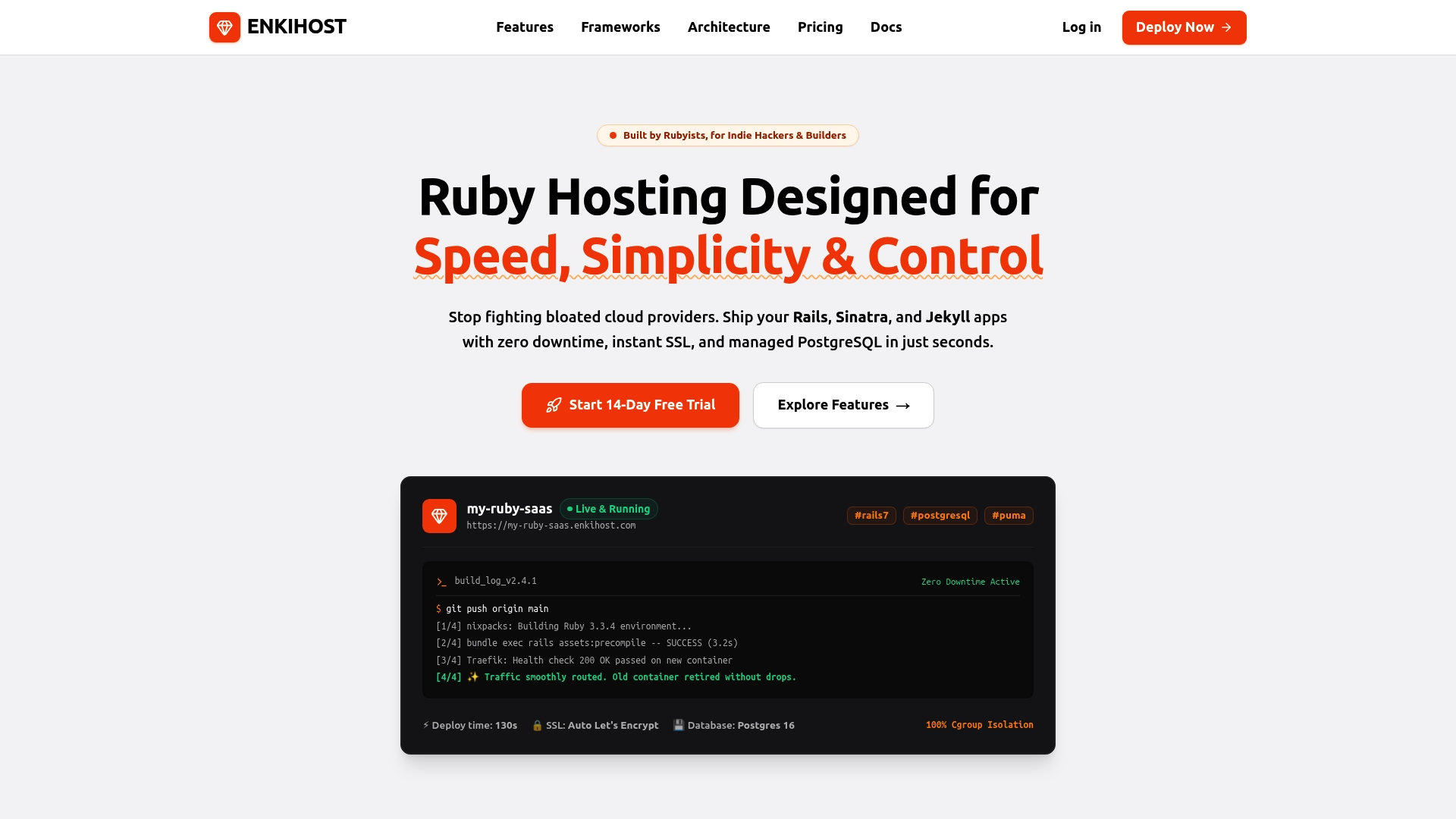
- Built for Ruby: hosting for Ruby, Rails, Sinatra and Jekyll apps, built by Rubyists.
- Ignite, 9 EUR/month after a 14-day free trial: two Rails or Sinatra apps, 1 vCPU, 2 GB shared RAM, a managed PostgreSQL (512 MB RAM, 5 GB disk), Redis (128 MB) and up to 3 persistent volumes.
- Blaze, 29 EUR/month: five apps, 2 dedicated vCPUs, 4 GB RAM, five 2 GB PostgreSQL databases, five Redis instances, high availability and autoscaling.
- Spark, free: one Jekyll site, for your docs or blog next to the app.
- Zero-downtime deploys as standard, not a property of a higher tier.
- Heroku-compatible config: the included PostgreSQL and Redis inject
DATABASE_URLandREDIS_URL, so a migrated app keeps its config. - Per-app resource isolation: shared hosting with allocated memory and CPU for each app, so a neighbour’s traffic doesn’t eat your capacity.
See enkihost.com.
FAQ
Is there still a free Heroku alternative for Rails?
Yes, with limits. Render’s free web services spin down after 15 minutes without traffic and its free PostgreSQL databases expire after 30 days. Enkihost’s free Spark plan is for Jekyll sites only, but its Ignite plan for Rails and Sinatra has a 14-day free trial and then costs 9 EUR a month with PostgreSQL and Redis included. For anything with real users, budget for a paid plan.
Is Render cheaper than Heroku for Rails?
Usually, yes. A small Rails app with zero-downtime deploys, PostgreSQL and Redis costs about 23 dollars a month on a Render Hobby workspace and about 33 dollars on Heroku, mostly because Heroku needs a 25-dollar Standard-1X dyno for preboot. Once a team needs Render’s 25-dollar Pro workspace, the gap closes.
Can I run PostgreSQL on the same Hetzner server as my Rails app with Kamal?
Yes. Kamal accessories run PostgreSQL and Redis as containers on the same server, which is the cheapest setup. The catch is that a single failed VM takes down both the app and the database, so you need off-server database backups and a tested restore procedure.
Does Kamal 2 give zero-downtime deploys on a single server?
Yes. kamal-proxy starts the new container, polls its health check endpoint (/up by default) and switches traffic once it responds, so requests keep being served during the deploy. Database migrations still need to be written so the old and new code can run against the same schema.
Do I need to change my Rails code to leave Heroku?
Usually not. Rails apps on Heroku already read DATABASE_URL and REDIS_URL from the environment, and hosts that inject the same variables need no code changes. You do need to replace Heroku-specific pieces such as the release phase, Heroku Scheduler and any add-ons that have no equivalent on the new platform.
Sources
- Heroku pricing — Heroku
- Heroku Postgres plans — Heroku Elements
- Render pricing — Render
- Deploying on Render (zero-downtime deploys) — Render Docs
- Deploy for free (free tier limits) — Render Docs
- Fly.io resource pricing — Fly Docs
- Deploy strategies — Fly Docs
- Upsun pricing — Upsun
- Build and deploy — Upsun Docs
- Price adjustment (June 2026) — Hetzner Docs
- Hetzner Cloud plans — Hetzner
- Proxy configuration — Kamal
- Accessories — Kamal