How to Add AI to a Rails App with RubyLLM: Chat, Streaming and Background Jobs

The fastest way to add AI to a Rails app in 2026 is RubyLLM: one gem, one API for OpenAI, Anthropic, Gemini, Bedrock, Mistral and local models, and Active Record models (acts_as_chat, acts_as_message) that save every conversation to your database. The hard part isn’t calling the model, it’s running it in production: a streamed answer can take 30 seconds or more, which is far too long to hold a Puma thread. This guide builds a streaming AI chat with RubyLLM 2.2 the production way, with the model call in a Solid Queue job and the tokens streamed to the browser over Turbo Streams, and covers tools, timeouts, retries and token costs.
TL;DR
- Install with
gem "ruby_llm", "~> 2.2",bin/rails generate ruby_llm:install,bin/rails db:migrateandbin/rails ruby_llm:load_models.bin/rails generate ruby_llm:chat_uiadds a working chat UI.- Never call the model inside a web request. The controller saves the user’s message with
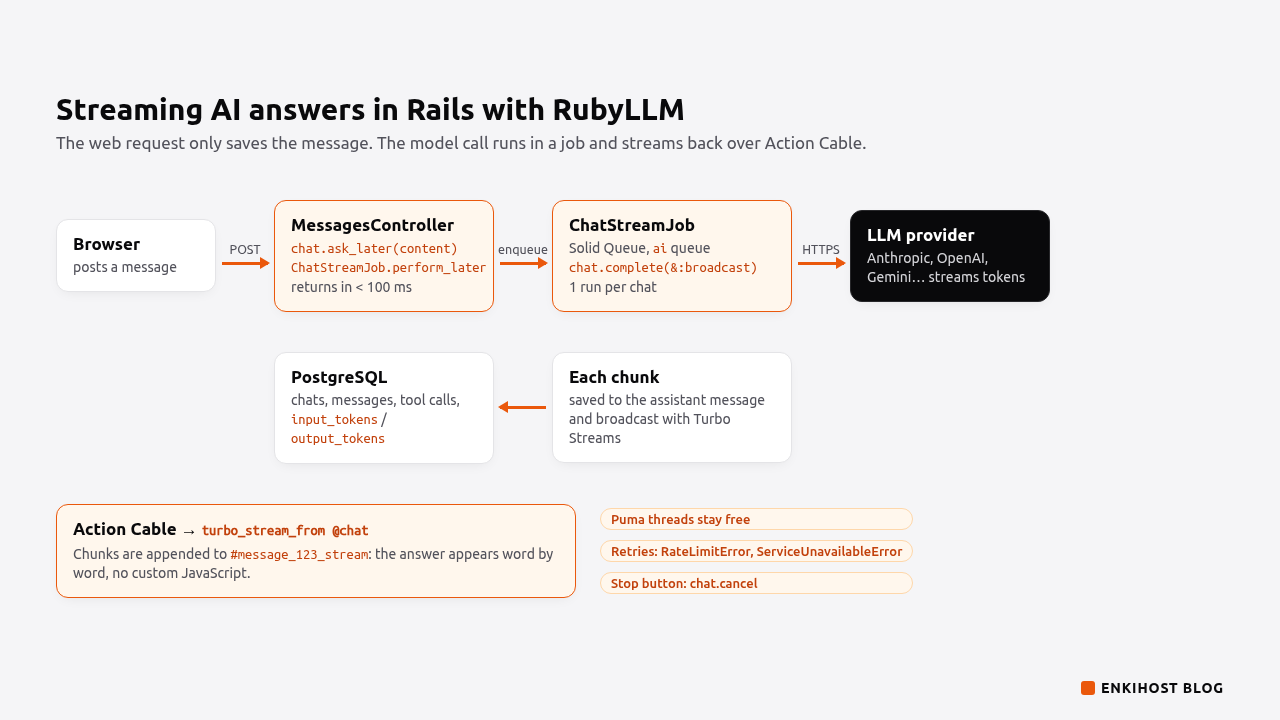
ask_laterand enqueues a job; the job runschat.complete(&:broadcast)and streams tokens to the page over Action Cable.- Turn on
config.broadcast_messages = trueand set acontext_budget, or one oversized tool result can break every later reply in a chat withContextLengthExceededError.- Retry
RubyLLM::RateLimitErrorandServiceUnavailableErrorin the job, discardBadRequestError, and limit concurrency per chat so two jobs never answer the same conversation at once.- Your app’s own CPU and memory barely matter; the cost is tokens. Store usage per message and put a budget on each user before you launch.
What is RubyLLM and why use it in Rails?
RubyLLM is a Ruby gem that gives every major model provider the same API, and its Rails integration saves chats, messages and tool calls as Active Record models. You write chat.ask "..." once and switch providers by changing a model name.
What it handles for you:
- One interface for chat, streaming, tools, structured output, embeddings, images and transcription across providers.
- Persistence:
acts_as_chatandacts_as_messagestore the conversation, including tool calls and token counts, in your database. - Turbo streaming: with broadcasting on, each streamed chunk is appended to the page with no JavaScript of your own.
- Background-safe runs: since 2.2, a chat is “claimed” by the job running it, messages sent during a run are queued with
ask_later, and a stop button can cancel a run from the web process.
Prerequisites
- Rails 7.2 or 8.x with Ruby 3.3+ (this guide uses Rails 8.1.4 and RubyLLM 2.2.2).
- An API key from at least one provider (Anthropic, OpenAI, Google, etc.).
- A background job backend: Solid Queue (Rails 8 default) or Sidekiq.
- Action Cable with a production adapter: Solid Cable (Rails 8 default) or Redis.
turbo-railsfor streaming to the browser.
On Rails 8.0, or on versions before 7.2.4 and 8.1.3, RubyLLM’s docs ask you to add gem "json", "< 3" to the Gemfile.
Step 1: Install RubyLLM
Add the gem, run the installer, migrate and load the model registry.
# Gemfile
gem "ruby_llm", "~> 2.2"
bundle install
bin/rails generate ruby_llm:install
bin/rails db:migrate
bin/rails ruby_llm:load_models
The installer creates:
ChatandMessagemodels withacts_as_chatandacts_as_message, and their migrations.- RubyLLM’s supporting tables: the model registry, tool calls, usage, queued messages and chat files.
config/initializers/ruby_llm.rb.app/agents/application_agent.rb, a base class for agents.
ruby_llm:load_models fills the model registry table with the models and prices RubyLLM knows about, so you can validate model names and estimate costs from your database.
For a full chat interface (controllers, views, message partials, Turbo Streams and the job), also run:
bin/rails generate ruby_llm:chat_ui
The rest of this guide shows what that UI needs, so you can build it yourself or understand what the generator wrote.
Step 2: Configure providers and defaults
Put the keys in credentials or environment variables, never in the repository, and set the defaults that matter in production.
bin/rails credentials:edit
# config/credentials.yml.enc (decrypted view)
anthropic_api_key: sk-ant-...
openai_api_key: sk-...
# config/initializers/ruby_llm.rb
RubyLLM.configure do |config|
  config.anthropic_api_key = Rails.application.credentials.anthropic_api_key || ENV["ANTHROPIC_API_KEY"]
  config.openai_api_key    = Rails.application.credentials.openai_api_key || ENV["OPENAI_API_KEY"]

  # Pin the model instead of relying on the gem's default, which changes between releases.
  config.default_model = "claude-sonnet-5-5"

  # Stream chunks to Turbo Streams subscribers (off by default since 2.2).
  config.broadcast_messages = true

  # Keep any single tool result under 25% of the context window,
  # and the whole request under 70%.
  config.context_budget = { per_result: 0.25, per_request: 0.7 }

  # Network behaviour
  config.request_timeout = 120 # seconds per HTTP request to the provider
  config.max_retries     = 3   # rate limits, timeouts and 5xx are retried before your job sees them
end
The Rails secrets and API keys guide covers rotating these keys and keeping them out of logs.
Pro Tip: pinning default_model matters more than it looks. RubyLLM 2.2 changed the default model, and an unpinned app silently switched models, prices and behaviour on a bundle update.
Step 3: Ask your first question
Try it in the console before building any UI:
# bin/rails console
chat = Chat.create!(model: "claude-sonnet-5-5")
chat.with_instructions "You are a concise assistant for a Rails hosting company."
reply = chat.ask "In one sentence, what does Puma do?"

reply.content          # => "Puma is a multi-threaded web server that..."
chat.messages.count    # => 3 (system, user, assistant)
reply.input_tokens     # tokens sent
reply.output_tokens    # tokens generated
ask returns a RubyLLM::Message, already saved as your Message record. Files go in with with:, for example chat.ask "Summarize this invoice", with: invoice.pdf_file, where pdf_file is an Active Storage attachment.
For a reusable assistant with fixed instructions and tools, define an agent:
# app/agents/support_agent.rb
class SupportAgent < ApplicationAgent
  model "claude-sonnet-5-5"
  instructions { "You help #{chat.user.name} with their account. Answer briefly. If you don't know, say so." }
  tools { [ LookupOrder.new(chat.user) ] }
end
# app/models/chat.rb
class Chat < ApplicationRecord
  acts_as_chat owner: :user
  belongs_to :user
end
SupportAgent.create!(user: current_user) starts a saved chat with those settings, and SupportAgent.find(id) resumes it.
Step 4: Stream answers from a background job
The controller only saves the message and enqueues a job; the job talks to the model and streams the answer.
Why not call the model in the controller?
Because a streamed answer takes seconds to minutes, and each one holds a Puma thread the whole time. With 3 threads per worker, three users chatting at once would block every other request. In a job, the web request finishes in milliseconds and the long-running work happens in the job worker.
# config/routes.rb
resources :chats, only: %i[ index create show ] do
  resources :messages, only: :create
end
# app/controllers/chats_controller.rb
class ChatsController < ApplicationController
  def index
    @chats = Current.user.chats.order(updated_at: :desc)
  end

  def create
    chat = SupportAgent.create!(user: Current.user)
    redirect_to chat
  end

  def show
    @chat = Current.user.chats.find(params[:id])
  end
end
# app/controllers/messages_controller.rb
class MessagesController < ApplicationController
  def create
    @chat = Current.user.chats.find(params[:chat_id])
    @chat.ask_later(params.expect(:content))
    ChatStreamJob.perform_later(@chat.id)

    respond_to do |format|
      format.turbo_stream { head :ok }
      format.html { redirect_to @chat }
    end
  end
end
# app/jobs/chat_stream_job.rb
class ChatStreamJob < ApplicationJob
  queue_as :ai

  # One run per chat at a time (Solid Queue). With Sidekiq, rely on RubyLLM's chat claim.
  limits_concurrency to: 1, key: ->(chat_id) { chat_id }, duration: 10.minutes

  retry_on RubyLLM::RateLimitError, RubyLLM::ServiceUnavailableError, RubyLLM::ConnectionError,
           wait: :polynomially_longer, attempts: 5
  discard_on RubyLLM::BadRequestError, RubyLLM::CancelledError

  def perform(chat_id)
    chat = SupportAgent.find(chat_id)
    chat.complete(&:broadcast)

    # A message arrived while another run held the chat: try again shortly.
    retry_job wait: 5.seconds if chat.running?
  end
end
ask_later stores the message even if a run is already answering the chat; the next complete picks it up. That’s why the job re-enqueues itself when running? is true instead of failing.
The view subscribes to the chat’s stream and renders the messages:
<%# app/views/chats/show.html.erb %>
<% turbo_refreshes_with method: :morph, scroll: :preserve %>
<%= turbo_stream_from @chat %>

<div id="messages">
  <%= render @chat.messages %>
</div>

<%= form_with url: chat_messages_path(@chat), data: { turbo_stream: true } do |form| %>
  <%= form.text_area :content, required: true, rows: 3, placeholder: "Ask something…" %>
  <%= form.submit "Send" %>
<% end %>
Broadcasting needs one partial per message role: messages/_user, messages/_assistant, messages/_tool and messages/_tool_calls. The assistant partial must contain the _stream target that chunks are appended to:
<%# app/views/messages/_assistant.html.erb %>
<div id="<%= dom_id(assistant) %>" class="message message--assistant">
  <div id="<%= dom_id(assistant) %>_stream"><%= simple_format(assistant.content) %></div>
</div>
<%# app/views/messages/_user.html.erb %>
<div id="<%= dom_id(user) %>" class="message message--user">
  <%= simple_format(user.content) %>
</div>
Run AI jobs on their own queue, so a burst of long chats doesn’t delay password reset emails:
# config/queue.yml
production:
  dispatchers:
    - polling_interval: 1
      batch_size: 500
  workers:
    - queues: [ default, mailers ]
      threads: 3
    - queues: [ ai ]
      threads: 5
      polling_interval: 0.5
Model calls spend almost all their time waiting on the network, so an ai worker with 5 threads uses little CPU. Each running job does hold one database connection when it saves chunks, so size the pool accordingly; the connection pool guide has the formula, and the background jobs guide covers running workers in production.
How do I add a stop button?
Call cancel on the chat from the web process. The job sees the request, stops streaming and raises RubyLLM::CancelledError, which the job above discards. Text already streamed stays as an assistant message marked cancelled?.
# app/controllers/chat_cancellations_controller.rb
class ChatCancellationsController < ApplicationController
  def create
    Current.user.chats.find(params[:chat_id]).cancel
    head :ok
  end
end
# config/routes.rb
resources :chats, only: %i[ index create show ] do
  resources :messages, only: :create
  resource :cancellation, only: :create, controller: "chat_cancellations"
end
Step 5: Give the model tools
A tool is a Ruby class the model can call to fetch your data or take an action. Scope every tool to the current user; the model decides what to call, but your code decides what it can reach.
# app/tools/lookup_order.rb
class LookupOrder < RubyLLM::Tool
  description "Looks up one of the current customer's orders by its number and returns its status."
  param :number, desc: "The order number, for example A-1042"

  def initialize(user)
    @user = user
  end

  def execute(number:)
    order = @user.orders.find_by(number: number.strip.upcase)
    return { error: "No order #{number} for this customer." } unless order

    { number: order.number, status: order.status, shipped_at: order.shipped_at&.to_date&.iso8601 }
  end
end
Return small, structured results. A tool that returns a full to_json of a record burns tokens and can hit the context_budget; RubyLLM 2.2 truncates results that exceed per_result instead of failing the chat, but the answer quality drops.
Pro Tip: never give the model a tool that runs SQL or shell commands built from its arguments. Treat tool arguments like any user input: they can be steered by prompt injection in documents or messages the model reads.
Step 6: Control cost, timeouts and abuse
For an AI feature, the bill comes from the provider, not from your server. Measure tokens from day one and limit them per user.
How much does an AI chat feature cost to run?
It depends on tokens: each reply costs (input tokens × input price) + (output tokens × output price), and input grows with the conversation because the whole history is sent each turn. Read current per-million-token prices from your provider’s pricing page or from RubyLLM’s model registry.
Track usage per user with the token counts RubyLLM saves on each message:
# app/models/user.rb
class User < ApplicationRecord
  has_many :chats, dependent: :destroy

  MONTHLY_TOKEN_BUDGET = 500_000

  def tokens_used_this_month
    Message.joins(:chat)
           .where(chats: { user_id: id }, created_at: Time.current.all_month)
           .sum("COALESCE(messages.input_tokens, 0) + COALESCE(messages.output_tokens, 0)")
  end

  def over_ai_budget?
    tokens_used_this_month >= MONTHLY_TOKEN_BUDGET
  end
end
# app/controllers/messages_controller.rb
class MessagesController < ApplicationController
  rate_limit to: 20, within: 1.minute, only: :create,
             by: -> { Current.user.id }, with: -> { head :too_many_requests }
  before_action -> { head :payment_required if Current.user.over_ai_budget? }, only: :create
  # ...create as above
end
The production checklist:
| Concern | Setting | Recommended starting value |
|---|---|---|
| Hung provider connection | config.request_timeout |
120 s (longer for reasoning models) |
| Transient errors | config.max_retries + retry_on in the job |
3 in RubyLLM, 5 attempts in the job |
| Two runs on one chat | limits_concurrency (Solid Queue) |
1 per chat |
| Runaway context | config.context_budget |
{ per_result: 0.25, per_request: 0.7 } |
| Abuse and cost spikes | rate_limit + token budget per user |
20 messages/min, monthly token cap |
| Web threads blocked | Model calls only in jobs | Never call ask in a controller |
| Secrets in logs | Filter parameters, no prompt logging with PII | config.filter_parameters += [:content] if prompts are sensitive |
The request timeout guide explains why a web request should never wait on a slow third-party API, which is exactly what an inline model call is.
Verify it works
bin/dev # or bin/rails server + bin/jobs in another terminal
- Visit
/chats, create a chat and send “Where is order A-1042?”. - The answer should appear word by word. In the server log,
MessagesController#createshould finish in well under 100 ms; in the jobs log,ChatStreamJobruns for the length of the answer. - Check the database:
Chat.last.messages.pluck(:role, :input_tokens, :output_tokens). - Send a second message while the first is still streaming: it’s answered after the first run, not lost.
- Click stop mid-answer: streaming stops and the partial answer stays, marked cancelled.
A quick test that never calls a provider:
# test/jobs/chat_stream_job_test.rb
require "test_helper"

class ChatStreamJobTest < ActiveJob::TestCase
  test "messages controller enqueues the job instead of calling the model" do
    chat = chats(:one)
    assert_enqueued_with(job: ChatStreamJob, args: [ chat.id ]) do
      chat.ask_later("Hello")
      ChatStreamJob.perform_later(chat.id)
    end
  end
end
For tests that exercise real answers, record provider responses with VCR or WebMock fixtures rather than hitting the API in CI.
Troubleshooting
RubyLLM::ConfigurationError: Missing configuration for Anthropic: anthropic_api_key. The key isn’t set in this environment. Check credentials for production and that RAILS_MASTER_KEY is available to the job worker, not only to the web process.
RubyLLM::ModelNotFoundError: Unknown model: .... The model registry doesn’t know the name. Run bin/rails ruby_llm:load_models after deploys that upgrade the gem, or fix the model id.
Answers appear only when complete, not word by word. config.broadcast_messages is false, the view is missing turbo_stream_from @chat, or the _assistant partial has no <id>_stream element. In production, also check that Action Cable uses Solid Cable or Redis, not the async adapter, which only works within one process.
RubyLLM::ContextLengthExceededError on every reply in one chat. An earlier tool result or file pushed the history past the model’s window. Set config.context_budget, and start a new chat for that user.
RubyLLM::RateLimitError under load. You’ve hit the provider’s requests or tokens per minute. Lower the ai queue’s threads, keep retry_on with backoff, and ask the provider for a higher tier.
Jobs time out at 30 or 60 seconds. Something outside RubyLLM is killing them: a Sidekiq job timeout middleware or a platform limit on worker processes. Model calls belong in a worker with no short request timeout.
RubyLLM vs calling provider SDKs directly
Use RubyLLM when you want persistence and Rails integration; use a provider’s own SDK when you need a feature on the day it ships.
| RubyLLM | Official provider SDK (anthropic, openai) |
Raw HTTP (Faraday) | |
|---|---|---|---|
| Providers | Many, one API | One | Any, all by hand |
| Saves chats to Active Record | Yes (acts_as_chat) |
No | No |
| Turbo streaming | Built in | You write it | You write it |
| Tools / function calling | Ruby classes, same for all providers | Provider-specific schemas | By hand |
| Newest provider features | After RubyLLM adds them | Immediately | Immediately |
| Switching providers | Change the model name | Rewrite calls | Rewrite calls |
| Best for | Product features in a Rails app | Provider-specific features, scripts | Unusual endpoints |
Pros of RubyLLM: less code, consistent errors, persisted transcripts and cost data, and the background-job features (claims, queued messages, cancellation) that are tedious to build yourself.
Cons: another abstraction to upgrade (2.0 and 2.2 both had breaking changes), and provider-specific options must be ones RubyLLM supports; since 2.2, options a provider can’t carry raise ArgumentError instead of being ignored.
How Heroku, Render, Fly.io and Railway handle AI workloads
All four can run a Rails app that calls a hosted model API; the differences are whether they sell inference themselves and how they run long-running workers.
| Platform | Hosted model inference | Where to run the long calls | Note |
|---|---|---|---|
| Heroku | Managed Inference and Agents add-on, exposing models through Heroku | Worker dynos | Router cuts web requests at 30 s, so inline streaming is especially risky |
| Render | No; call provider APIs | Background workers (separate paid service) | Web services and workers are billed separately |
| Fly.io | GPU Machines for self-hosted models | A separate process group in fly.toml |
Self-hosting a model is a different cost league than an API call |
| Railway | No; call provider APIs | A separate worker service from the same repo | Each service is billed for the CPU and RAM it uses |
| Enkihost | No; call provider APIs | Solid Queue in Puma, or Sidekiq with the included Redis | Allocated CPU and memory per app; the cost is the provider’s tokens |
For most Rails products, self-hosting a model isn’t worth it: a GPU instance costs more per month than millions of API tokens, and you take on model updates and capacity planning.
Author Perspective
The first AI feature I shipped in Rails called the model inside the controller, and it worked fine in development with one user. In production, a handful of people chatting at once was enough to queue every other request behind them, and the health check started failing. Moving the call into a job and streaming over Turbo fixed it in an afternoon, and RubyLLM 2.2 now handles most of what I had to write by hand back then: claiming the chat, queueing messages sent mid-answer, cancellation. The part I still set up first on every project is the token budget per user. Nobody notices a slow page for long, but everyone notices an API invoice that’s ten times what they expected.
Running AI features on Enkihost
An AI chat in Rails is a normal Rails app with long-running jobs, and Enkihost runs it with the pieces it needs already included.
- Managed PostgreSQL stores chats, messages, tool calls and token usage, with
DATABASE_URLinjected. - Managed Redis (
REDIS_URL) can back Action Cable and Sidekiq if you prefer them to Solid Cable and Solid Queue. - Allocated CPU and memory per app: model calls are mostly network waits, so streaming jobs fit in a 1 GB app; the app sizing guide shows how to check.
- Zero-downtime deploys: you can ship prompt and tool changes during the day. Turbo reconnects the page’s Action Cable subscription on its own, and queued jobs stay in the database until a worker picks them up.
- Per-app resource isolation, so a burst of AI jobs in one app doesn’t slow your other apps.
The Ignite plan (9 EUR/month after a 14-day free trial) includes PostgreSQL and Redis; see enkihost.com.
FAQ
Which AI models can I use with RubyLLM?
Models from OpenAI, Anthropic, Google Gemini, AWS Bedrock, Mistral, DeepSeek, OpenRouter and local servers such as Ollama, among others. Run bin/rails ruby_llm:load_models to load the current list into your database, and change providers by changing the model name.
Do I need Sidekiq to stream AI responses in Rails?
No. Solid Queue, the Rails 8 default, works well, and its limits_concurrency keeps one run per chat. What you do need is a job backend outside the web request and a production Action Cable adapter such as Solid Cable or Redis.
Can I use RubyLLM without saving chats to the database?
Yes. RubyLLM.chat.ask works without any Active Record models, which is fine for one-off tasks like summarizing a document in a job. The acts_as_chat models are for conversations users come back to.
How do I keep users from running up my AI bill?
Rate limit the endpoint that sends messages, store input and output tokens for every message, and block new messages when a user passes a monthly token budget. Also pin the model, because a more expensive default model changes your costs without a code change.
Is it safe to send user data to an LLM provider?
Only if your privacy policy and contracts allow it. Check the provider’s data retention and training terms, avoid sending data you don’t need, filter sensitive fields from logs, and treat everything the model returns, including tool arguments, as untrusted input.
Sources
- RubyLLM documentation
- RubyLLM Rails integration — RubyLLM docs
- Streaming with Hotwire/Turbo — RubyLLM docs
- Upgrade to 2.2 — RubyLLM docs
- crmne/ruby_llm on GitHub
- Active Job Basics — Rails Guides
- Heroku Managed Inference and Agents — Heroku Dev Center
- Background workers — Render Docs
- GPU Machines — Fly Docs
- Deploy a Rails app — Railway Guides