Rails Asset Pipeline in Production: Propshaft, Importmap, Bundlers and CDNs Compared

The Rails asset pipeline in production is three decisions: how assets are built (Propshaft or Sprockets, with importmap or a JavaScript bundler), how they’re fingerprinted and cached (digested filenames with a one-year immutable cache header), and where they’re served from (Thruster inside the container, a CDN in front of the app, or a bucket behind a CDN). Rails 8’s defaults, Propshaft, importmap and Thruster, are enough for most apps. A CDN starts paying off with global users or heavy traffic. This guide compares every option, shows the trade-offs and costs with sources, and recommends a setup by type of app. For build errors during assets:precompile, see the companion How-To linked below.
TL;DR
- Rails 8 defaults to Propshaft, a lean pipeline that digests and copies files. Transpiling and bundling are delegated to importmap, jsbundling (esbuild, Bun, Rollup, Webpack), cssbundling or tailwindcss-rails.
- Importmap ships ES modules without a build step and works well over HTTP/2. Choose a bundler when you need npm packages that require compilation, JSX or TypeScript.
- Every digested asset should be served with
Cache-Control: public, max-age=31536000, immutable. Filenames change when content changes, so long caching is safe.- Thruster serves and compresses assets directly from the Rails 8 container. Add a CDN (
config.asset_host) for global audiences and to take asset traffic off your app. Cloudflare R2 charges no egress fees, while S3 charges $0.09/GB after the first 100 GB.- Keep old digests available across deploys with Kamal’s
asset_path, a CDN cache or a bucket that only grows, or users mid-session will hit 404s.
Table of Contents
- What is the Rails asset pipeline in production?
- Propshaft vs Sprockets
- Importmap vs jsbundling vs Vite
- How should Rails serve assets in production?
- Caching, compression and fingerprinting
- How much does serving assets cost?
- How Heroku, Render, Fly.io, Upsun and Enkihost serve Rails assets
- Which asset setup should you choose?
- Author Perspective: the fastest build is no build
- Serving Rails assets on Enkihost
- FAQ
- Sources
What is the Rails asset pipeline in production?
In production, the asset pipeline takes your stylesheets, JavaScript, images and fonts, builds them once during deployment, gives each file a content-based fingerprint, and serves the result with long-lived cache headers. Nothing is compiled at request time.
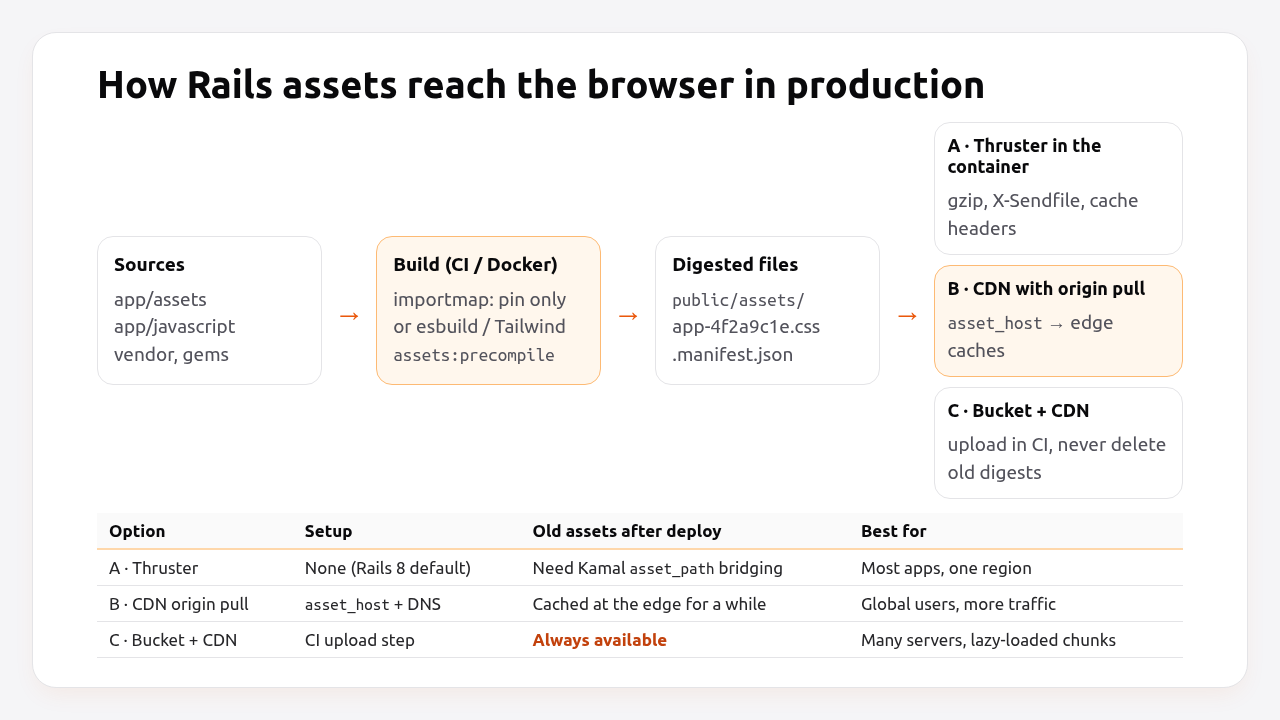
Three layers make up the pipeline:
| Layer | Rails 8 default | Alternatives | Job |
|---|---|---|---|
| Asset library | Propshaft | Sprockets | Digest, copy, resolve asset_path |
| JavaScript | importmap-rails | jsbundling-rails (esbuild, Bun, Rollup, Webpack), Vite Ruby | Deliver JS modules or bundles |
| CSS | Plain CSS or tailwindcss-rails | cssbundling-rails (Sass, PostCSS, Bootstrap), dartsass-rails | Compile CSS if needed |
| Serving | Thruster in the container | Nginx, CDN with asset_host, bucket + CDN |
Deliver files fast, with caching and compression |
All of this comes together in one build command, bin/rails assets:precompile. Its errors and fixes are covered in the Rails assets precompile guide.
Propshaft vs Sprockets
Use Propshaft for new apps and for apps whose CSS and JavaScript are already handled by importmap or a bundler. Stay on Sprockets if you rely on its processors, such as Sass through sassc-rails, //= require concatenation or ERB inside assets, and don’t have time to migrate.
| Propshaft | Sprockets | |
|---|---|---|
| Default since | Rails 8.0 | Rails 3.1 – 7.x |
| Compiles Sass, CoffeeScript, ERB | No (delegates to other tools) | Yes |
Concatenation (//= require) |
No | Yes |
| Manifest of what to precompile | Not needed: everything in load paths | app/assets/config/manifest.js |
| Precompile speed | Fast (digest and copy) | Slower on large apps |
| Live compilation in production | Never | Possible with config.assets.compile = true (don’t) |
| Complexity | Small codebase, few options | Large, many processors and gems |
Pros of Propshaft: fast builds, very little configuration, no hidden compile step in production, and predictable output.
Cons of Propshaft: no built-in Sass or concatenation, so apps that depended on Sprockets processors need another tool (dartsass-rails, cssbundling-rails) after migrating. Some older gems still ship assets that assume Sprockets.
Importmap vs jsbundling vs Vite
Importmap delivers your JavaScript as individual ES modules that the browser loads directly, without a bundler or Node. Bundlers combine modules into fewer, optimised files and support JSX, TypeScript and the npm ecosystem.
| importmap-rails | jsbundling-rails (esbuild/Bun) | Vite Ruby | |
|---|---|---|---|
| Build step | None (pins only) | Yes, at precompile | Yes, plus dev server |
| Node.js required | No | Yes (or Bun) | Yes |
| JSX / TypeScript | No | Yes | Yes |
| npm packages needing compilation | No | Yes | Yes |
| Number of HTTP requests | Many small modules (fine over HTTP/2+) | Few bundles | Few bundles, code splitting |
| Tree shaking | No | Yes | Yes |
| Best for | Hotwire apps (Turbo, Stimulus) | React/Vue islands, larger JS | SPA-like front ends, HMR in dev |
Importmap’s many-requests trade-off is mostly a non-issue today: HTTP/2 and HTTP/3 multiplex requests over one connection, and every module is fingerprinted and cached for a year. 37signals has written about running HEY with importmap and no JavaScript build step at all. The case for a bundler is the code you depend on, not the number of files.
How should Rails serve assets in production?
Serve assets from Thruster in the container by default, put a CDN in front once you have users far from your servers or a lot of asset traffic, and use a bucket behind a CDN when you run many servers or lazy-load JavaScript chunks that must survive deploys.
| A · Thruster in the container | B · CDN with origin pull | C · Bucket + CDN | |
|---|---|---|---|
| Setup | None (Rails 8 Dockerfile) | config.asset_host + CDN config |
CI uploads public/assets to a bucket |
| Latency for distant users | Server’s region only | Edge, close to users | Edge, close to users |
| Load on app servers | Serves every asset request (cheaply) | Only cache misses | None |
| Old assets after a deploy | Need asset bridging (Kamal asset_path) |
Cached at edge for a while, not guaranteed | Always available (bucket only grows) |
| Extra cost | None | CDN plan, often free tier | Storage + CDN |
| Moving parts | Fewest | DNS, CDN rules | CI step, bucket permissions, CDN |
Pros of Thruster: zero configuration, gzip compression, efficient file serving, and caching headers. Cons: no geographic distribution, and all asset traffic shares your app’s bandwidth.
Pros of a CDN: lower latency worldwide, less traffic on your servers, often DDoS protection. Cons: another service and DNS to manage, and cache invalidation of non-digested files must be handled.
Configuring a CDN in front of Rails takes one setting:
# config/environments/production.rb
config.asset_host = ENV.fetch("ASSET_HOST", nil)   # e.g. "https://cdn.example.com"
Point the CDN’s origin at your app’s hostname. It requests /assets/... from Rails or Thruster on a cache miss and keeps the file at the edge for as long as the cache header allows. Because fingerprints change with content, you never need to purge /assets/*.
Pro Tip: Don’t proxy HTML through the CDN with long cache times unless you mean to. Cache rules for /assets/* should be “respect origin headers, cache for a year”. For HTML, follow your app’s Cache-Control, which is usually private or no-cache.
Caching, compression and fingerprinting
Every digested asset should be cached for a year, compressed, and fingerprinted. Rails 8 sets the first, Thruster handles the second, and the pipeline does the third.
# config/environments/production.rb (Rails 8 default)
config.public_file_server.headers = { "cache-control" => "public, max-age=#{1.year.to_i}" }
Add immutable so browsers don’t revalidate fingerprinted files even on reload:
config.public_file_server.headers = { "cache-control" => "public, max-age=#{1.year.to_i}, immutable" }
| Concern | How it’s handled | Check with |
|---|---|---|
| Fingerprinting | Propshaft/Sprockets rename app.css → app-4f2a9c1e.css |
Page source shows digested names |
| Long cache | public_file_server.headers |
curl -sI .../assets/app-….css \| grep cache-control |
| Compression | Thruster gzips responses; CDNs add Brotli | curl -sI -H "Accept-Encoding: br, gzip" … |
| Old versions after deploy | Asset bridging or a bucket that keeps old digests | Request a previous digest after deploying |
| HTTP/2 multiplexing | TLS proxy or CDN | curl -sI --http2 … |
The deploy-overlap problem is subtle and worth repeating: right after a deploy, a browser holding the previous HTML asks for the previous digests. If the new container only contains new files, those requests return 404. With Kamal, asset_path: /rails/public/assets in config/deploy.yml combines old and new assets during the switch. With a bucket, upload without deleting.
How much does serving assets cost?
Serving assets is cheap until bandwidth adds up. The main cost is egress, the bytes leaving your provider, and it varies from free to $0.09/GB depending on where assets are stored and served.
| Option | Storage | Egress / bandwidth | Notes |
|---|---|---|---|
| From the app (Thruster) | Included in the container | Your platform’s bandwidth pricing | Render charges bandwidth beyond the plan allowance |
| AWS S3 direct | ~$0.023/GB-month (Standard) | First 100 GB/month free, then $0.09/GB | Usually fronted by CloudFront |
| Cloudflare R2 | $0.015/GB-month | $0 egress | Pay per operation; free tier includes 10 GB storage |
| CDN in front of the app | — | Often free or flat-rate plans for typical sites | Cuts origin bandwidth to cache misses |
Prices from AWS S3 and Cloudflare R2 pricing pages, October 2026.
A worked example: 500 GB of asset traffic per month costs about $36 served straight from S3 (400 GB × $0.09 after the free 100 GB), and close to $0 from R2 or from a CDN with a free tier and a good hit rate. For most Rails apps, assets are a few megabytes per release, so storage is negligible and egress decides the bill.
That makes the “bucket + CDN” setup cheap as well as robust. Our startup hosting costs breakdown covers where bandwidth fits into the rest of the bill.
How Heroku, Render, Fly.io, Upsun and Enkihost serve Rails assets
Every platform can serve Rails assets from the app. They differ in how assets are built, whether a CDN is included, and what happens to old assets on deploy.
| Platform | How assets are built | Served by | Built-in CDN | Old assets kept |
|---|---|---|---|---|
| Heroku | Ruby buildpack runs assets:precompile |
The dyno (Rails/Thruster) | No (use a CDN add-on or external CDN) | Yes, buildpack caches public/assets and runs assets:clean |
| Render | Your build command | The service | Static sites only; use an external CDN for apps | Per build |
| Fly.io | Your Dockerfile | The Machine (Thruster) | No (external CDN) | Per image; bridge or use a bucket |
| Upsun | Build hook | The app container, or web.locations for static files |
Fastly on some plans | Per build |
| Kamal 2 | Your Dockerfile | Thruster in the container | No | With asset_path bridging |
| Enkihost | Your Dockerfile, or the generated one | The container (Rails/Thruster) | No (external CDN) | Per image |
Upsun lets you serve public/assets directly from its web server with web.locations, which takes static files away from Puma entirely:
# .upsun/config.yaml (app excerpt)
web:
  locations:
    "/assets":
      root: "public/assets"
      expires: 1y
      passthru: false
      allow: true
Enkihost runs Rails apps with zero-downtime deploys and per-app resource isolation, so serving assets with Thruster works as in the Rails 8 defaults, and a CDN with asset_host can be added in front the same way as on any platform above.
Which asset setup should you choose?
| App | Pipeline | JavaScript | Serving |
|---|---|---|---|
| New Hotwire app | Propshaft | importmap | Thruster; add a CDN when traffic grows |
| Hotwire app with Tailwind | Propshaft + tailwindcss-rails | importmap | Thruster or CDN |
| App with React/Vue components | Propshaft | jsbundling (esbuild or Bun) | CDN, with asset bridging or a bucket |
| SPA-like front end in Rails | Propshaft or Vite Ruby | Vite | Bucket + CDN |
| Legacy app on Sprockets with Sass | Sprockets (migrate later) | Existing setup | CDN; keep config.assets.compile = false |
| Global audience | Any | Any | CDN or bucket + CDN, required |
The Rails performance optimization guide and Rails caching strategies cover the server side of page speed. Assets are the client side.
Author Perspective: the fastest build is no build
Over the past few years I’ve moved most of my Rails apps from Webpacker and jsbundling back to importmap and Propshaft, and I don’t miss the bundler. Deploys got faster, the Docker image lost Node, and “the build broke” stopped being a category of problem. When an app genuinely needs React or TypeScript, esbuild through jsbundling is fast and simple. What I’d push every team to do, whatever pipeline they choose, is check two things after the next deploy: that assets come back with immutable cache headers, and that a digest from the previous release still returns 200. Those two checks catch most asset problems I see in production.
Serving Rails assets on Enkihost
The Rails 8 asset defaults are designed to run without extra infrastructure, and that’s how they run on Enkihost:
- Zero-downtime deploys, so precompiled, fingerprinted assets roll out with the release, and a CDN or bucket can keep previous digests available for users mid-session.
- Per-app resource isolation with allocated memory and CPU, so Thruster serving assets doesn’t compete with other apps for resources.
- PostgreSQL and Redis add-ons that inject
DATABASE_URLandREDIS_URL, covering the rest of a Rails 8 stack without extra services. - Plans for Rails and Sinatra: Ignite at 9 EUR per month after a 14-day free trial, with PostgreSQL and Redis included, or Blaze at 29 EUR with high availability and autoscaling. The free Spark plan is for Jekyll sites.
See enkihost.com.
FAQ
What is Propshaft in Rails?
Propshaft is the default asset pipeline in Rails 8. It fingerprints and copies files from the asset load paths into public/assets and resolves asset paths in views, but it does not compile Sass or bundle JavaScript itself. Those jobs are handled by importmap, jsbundling, cssbundling or tailwindcss-rails.
Should I use importmap or esbuild with Rails?
Use importmap for Hotwire apps that mostly use Turbo, Stimulus and a few small libraries, since it needs no build step and no Node.js. Use esbuild through jsbundling-rails when you need JSX, TypeScript or npm packages that must be compiled, or when you want tree shaking for a large JavaScript codebase.
Do I need a CDN for Rails assets?
Not at first. Thruster serves fingerprinted assets with long cache headers efficiently from the app container. A CDN becomes worthwhile when users are spread across regions, when asset traffic is a significant part of your bandwidth, or when you run several servers and want old assets to survive deploys.
How do I serve Rails assets from a CDN?
Set config.asset_host to the CDN’s URL, point the CDN’s origin at your app, and cache paths under /assets according to the origin’s cache headers. Rails then writes asset URLs with the CDN hostname, and fingerprinted filenames mean you never need to purge the CDN cache after a deploy.
Why do I get 404s for assets right after a deploy?
Browsers that loaded HTML from the previous release still request the previous release’s fingerprinted files, which the new container no longer contains. Keep old assets available, using Kamal’s asset_path bridging, a CDN cache or a bucket where old digests are never deleted.
Sources
- The Asset Pipeline — Rails Guides
- rails/propshaft — GitHub
- rails/importmap-rails — GitHub
- rails/jsbundling-rails — GitHub
- basecamp/thruster — GitHub
- Kamal configuration: asset_path — Kamal docs
- Rails Asset Pipeline on Heroku — Heroku Dev Center
- Web: locations — Upsun Docs
- Amazon S3 pricing — AWS
- Cloudflare R2 pricing — Cloudflare
- Cache-Control: immutable — MDN