Rails Solid Queue Recurring Tasks: Replacing Cron in Production
Solid Queue recurring tasks replace cron in a Rails app: you list jobs and schedules in config/recurring.yml, and Solid Queue’s scheduler process enqueues each job at the right time, recording every run in the database so that two schedulers never enqueue the same run twice. No crontab on a server, no separate scheduler add-on, and the jobs run with the same retries, logging and monitoring as the rest of your Active Job workload. This guide covers the recurring.yml syntax, where the scheduler runs (including inside Puma), time zones, what happens to runs missed during a deploy, how duplicates are prevented, and how to know when a scheduled job silently stopped running.
TL;DR
- Define recurring jobs in
config/recurring.ymlwith aclass(or acommand) and aschedulein cron or natural-language syntax, such asevery day at 3am.- The Solid Queue scheduler process enqueues them. It runs under
bin/jobs, or inside Puma withplugin :solid_queue, so a Rails 8 app needs no cron daemon at all.- Running more than one scheduler is safe: each run is recorded in
solid_queue_recurring_executionswith a unique index on task and time, so a run is enqueued once.- Runs missed while no scheduler is running are not caught up. Write jobs that process “everything since the last successful run”, not “the last 24 hours”.
- Schedules without a time zone use
config.time_zone(in current Solid Queue versions). Write the zone explicitly for anything that must happen at a local time.
Table of Contents
- How do Solid Queue recurring tasks replace cron?
- Prerequisites
- Step 1: Define tasks in config/recurring.yml
- Step 2: Write jobs that are safe to schedule
- Step 3: Run the scheduler in production
- Step 4: Get time zones right
- What happens to runs missed during a deploy?
- Step 5: Monitor recurring tasks
- Verify it works
- Troubleshooting
- How Heroku, Render, Fly.io and Upsun schedule jobs
- Author Perspective
- Recurring tasks on Enkihost
- FAQ
- Sources
How do Solid Queue recurring tasks replace cron?
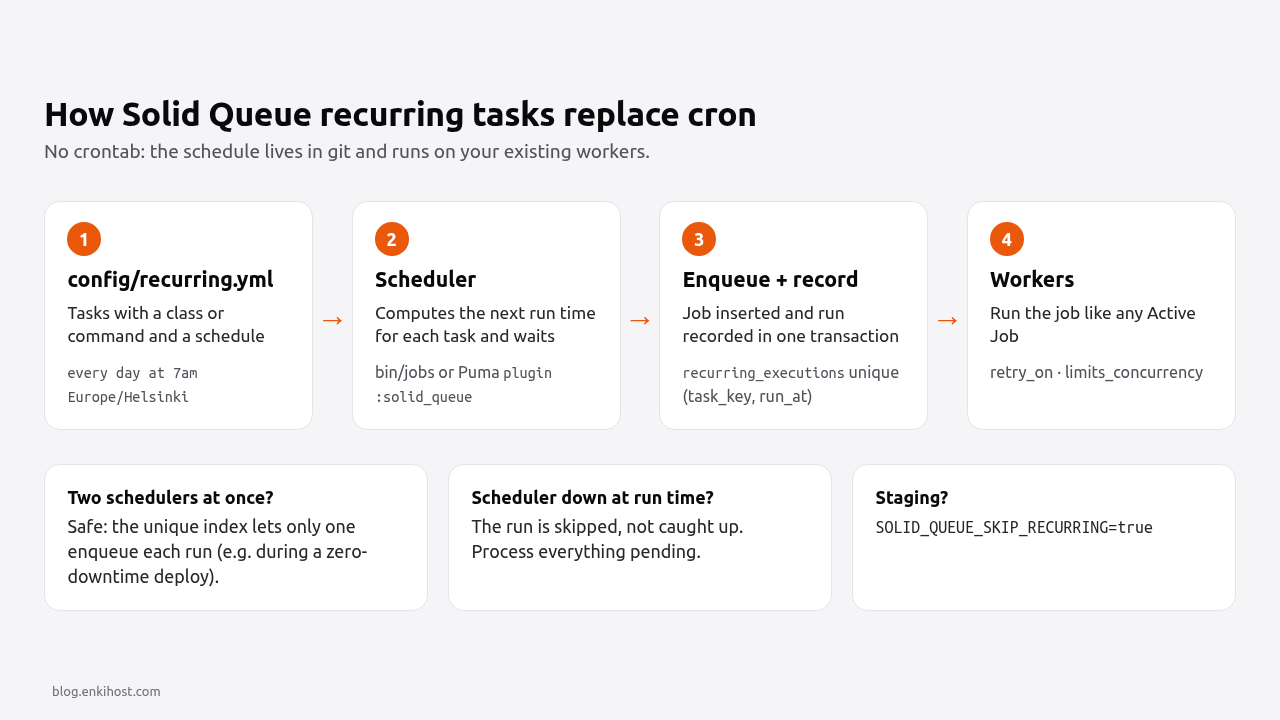
The scheduler reads config/recurring.yml, computes each task’s next run time, and at that moment enqueues the job, recording the run in the database in the same transaction. Workers then pick it up like any other job.
System cron + rails runner |
Solid Queue recurring tasks | |
|---|---|---|
| Where schedules live | A crontab on one server | config/recurring.yml, in git |
| What runs the job | A new process that boots Rails every time | An Active Job, on your existing workers |
| Boot cost per run | Full Rails boot (seconds, plus memory) | None: the app is already loaded |
| Retries on failure | None unless you write them | retry_on / discard_on, failed jobs kept for inspection |
| More than one server | Each server runs it (duplicates) unless you pick one | Safe: one run per task per time, enforced by a unique index |
| Visibility | Mail to root, or a log file | Mission Control – Jobs, job records, instrumentation |
| Missed while down | Lost (unless you use anacron) | Lost: no catch-up |
| Needs | Shell access and a cron daemon | Solid Queue and a database |
That fourth row is why recurring tasks fit containers and PaaS platforms so well: there’s no long-lived server with a crontab, and every container is the same image.
Prerequisites
- Rails 7.1 or later with Solid Queue 1.x as the Active Job adapter. Rails 8 apps have it by default (
config.active_job.queue_adapter = :solid_queueinproduction.rb). - The Solid Queue tables migrated (
db/queue_schema.rb, usually in a separatequeuedatabase). - On Rails 7.1 or 7.2:
bundle add solid_queue && bin/rails solid_queue:install, which also generatesconfig/queue.yml,config/recurring.ymlandbin/jobs.
Step 1: Define tasks in config/recurring.yml
Each task has a key, a class (an Active Job class) or a command (Ruby evaluated inside a job), and a schedule. Group them by environment.
# config/recurring.yml
production:
  # Generated by the installer: deletes finished job records in batches.
  clear_solid_queue_finished_jobs:
    command: "SolidQueue::Job.clear_finished_in_batches(sleep_between_batches: 0.3)"
    schedule: every hour at minute 12

  send_daily_digest:
    class: DailyDigestJob
    queue: mailers
    schedule: every day at 7am Europe/Helsinki
    description: "Email yesterday's activity to subscribed users"

  sync_exchange_rates:
    class: SyncExchangeRatesJob
    args: [ "EUR", { force: false } ]
    priority: 10
    schedule: "*/15 * * * *"

  expire_trials:
    class: ExpireTrialsJob
    schedule: every day at 00:05

  weekly_report:
    class: WeeklyReportJob
    schedule: "0 6 * * 1 Europe/Helsinki"   # Mondays at 06:00 local time

staging:
  clear_solid_queue_finished_jobs:
    command: "SolidQueue::Job.clear_finished_in_batches(sleep_between_batches: 0.3)"
    schedule: every hour at minute 12
The options:
| Key | Required | What it does |
|---|---|---|
class |
One of class/command |
Active Job class to enqueue |
command |
One of class/command |
Ruby code evaluated inside SolidQueue::RecurringJob, on the solid_queue_recurring queue |
schedule |
Yes | Cron or natural language, parsed by Fugit; may end with a time zone |
args |
No | One argument, a hash, or an array whose last element can be keyword arguments |
queue |
No | Overrides the job class’s queue |
priority |
No | Numeric priority for this enqueue |
description |
No | Shown in Mission Control |
The args above enqueue SyncExchangeRatesJob.perform_later("EUR", force: false).
Schedules are parsed by Fugit, so both forms work:
| Natural language | Cron equivalent |
|---|---|
every 5 minutes |
*/5 * * * * |
every hour at minute 12 |
12 * * * * |
every day at 3am |
0 3 * * * |
every monday at 6:30 |
30 6 * * 1 |
every day at 9am Europe/Helsinki |
0 9 * * * Europe/Helsinki |
Each task must resolve to one cron. every day at 9am and 3pm works (it becomes 0 9,15 * * *), but every day at 9am and 3:30pm fails validation, because different minutes need two crons; use two tasks.
Pro Tip: prefer class over command for anything beyond a one-liner. A job class can be tested, has its own retries and shows a meaningful name in Mission Control; a command string is eval‘d and only fails at run time.
Step 2: Write jobs that are safe to schedule
A recurring job should be idempotent, bounded in time, and should process “what’s pending” rather than “a fixed window”. Those three properties make missed runs, retries and overlaps harmless.
# app/jobs/daily_digest_job.rb
class DailyDigestJob < ApplicationJob
  queue_as :mailers

  # Never run two digests at once, even if a run is slow or retried.
  limits_concurrency to: 1, key: "daily_digest", duration: 2.hours

  retry_on Net::OpenTimeout, Net::ReadTimeout, wait: :polynomially_longer, attempts: 5

  def perform
    User.subscribed_to_digest
        .where("digest_sent_on IS NULL OR digest_sent_on < ?", Date.current)
        .find_each(batch_size: 500) do |user|
      DigestMailer.with(user: user).daily.deliver_now
      user.update_column(:digest_sent_on, Date.current)
    end
  end
end
Three details make this job safe:
- The
digest_sent_onmarker makes it idempotent: a retry or a second run the same day skips users who already got the email. - “Not sent today” instead of “created in the last 24 hours” means a missed run is picked up by the next one instead of silently skipping a day.
limits_concurrencystops a slow run from overlapping with the next one.durationmust be longer than the worst-case run time.
For jobs that process records since the last run, store the high-water mark yourself:
# app/jobs/sync_orders_job.rb
class SyncOrdersJob < ApplicationJob
  limits_concurrency to: 1, key: "sync_orders", duration: 30.minutes

  def perform
    state = JobCheckpoint.find_or_create_by!(name: "sync_orders")
    since = state.last_success_at || 1.day.ago
    now = Time.current

    ExternalShop.orders_updated_between(since, now).each { |order| Order.upsert_from_api(order) }

    state.update!(last_success_at: now)
  end
end
# db/migrate/20261108090000_create_job_checkpoints.rb
class CreateJobCheckpoints < ActiveRecord::Migration[8.0]
  def change
    create_table :job_checkpoints do |t|
      t.string :name, null: false, index: { unique: true }
      t.datetime :last_success_at
      t.timestamps
    end
  end
end
The background jobs guide covers retries and idempotency in more depth.
Step 3: Run the scheduler in production
The scheduler is one of the processes Solid Queue’s supervisor starts, next to workers and dispatchers. Start the supervisor with bin/jobs, or let Puma start it for you.
Inside Puma (one process for web and jobs, the Rails 8 default for single-server setups):
# config/puma.rb
plugin :solid_queue if ENV["SOLID_QUEUE_IN_PUMA"]
Set SOLID_QUEUE_IN_PUMA=true and Puma forks the Solid Queue supervisor, which runs the scheduler, a dispatcher and the workers from config/queue.yml.
As a separate process (Kamal role, Procfile, systemd):
# config/deploy.yml (Kamal)
servers:
  web:
    - 203.0.113.10
  job:
    hosts:
      - 203.0.113.10
    cmd: bin/jobs
# Procfile
web: bundle exec puma -C config/puma.rb
jobs: bin/jobs
Environment variables control whether a process schedules anything:
| Variable / flag | Effect | Use it for |
|---|---|---|
SOLID_QUEUE_SKIP_RECURRING=true / --skip-recurring |
No scheduler in this process | Staging, review apps, extra worker processes |
SOLID_QUEUE_ONLY_RECURRING=true / --only-recurring |
Only the scheduler, no workers | A dedicated, lightweight scheduler process |
SOLID_QUEUE_RECURRING_SCHEDULE=config/schedule.yml |
Different schedule file | Rarely needed |
SOLID_QUEUE_SKIP_RECURRING is the one to remember for staging: a copy of production that also sends the daily digest to real users is a classic incident. The staging environment guide has the rest of that checklist.
Is it safe to run more than one scheduler?
Yes, as long as they all use the same schedule. When the scheduler enqueues a run, it inserts a row into solid_queue_recurring_executions in the same transaction. That table has a unique index on task_key and run_at, so if two schedulers fire at the same moment, the second insert fails and that scheduler skips the run. This holds while finished jobs are preserved (preserve_finished_jobs, true by default).
That matters during deploys: with zero-downtime deploys, the old and new release both run a scheduler for a few seconds, and the unique index is what keeps a 3:00 job from running twice.
Step 4: Get time zones right
Write the time zone into every schedule that must happen at a local time. Without one, current Solid Queue versions interpret the schedule in config.time_zone (UTC unless you’ve changed it); older versions used the server’s local time.
# config/application.rb
config.time_zone = "Europe/Helsinki"

# Optional: the zone recurring schedules default to. nil = the server's local time.
# config.solid_queue.time_zone = "UTC"
Two rules avoid most surprises:
- Business times get an explicit zone:
every day at 7am Europe/Helsinki. Daylight saving changes are handled by Fugit; the job runs at 07:00 local time all year. - Maintenance jobs avoid the DST hours: on the day clocks change, local times between roughly 01:00 and 04:00 (depending on the zone) either happen twice or not at all. Schedule cleanup jobs at
every day at 4:30amor in UTC.
Check which version you run with bundle exec gem list solid_queue, and read its README’s “Recurring tasks” section if it’s older than the one this guide was written against (1.7).
What happens to runs missed during a deploy?
They’re skipped. When the scheduler starts, it schedules each task’s next run; it doesn’t enqueue runs that fell due while no scheduler was running. Cron behaves the same way.
| Situation | Result |
|---|---|
| Zero-downtime deploy (old and new release overlap) | No gap: one of the schedulers enqueues the run, the unique index stops the other |
| Restart with a few seconds of downtime exactly at 03:00 | The 03:00 run is skipped |
| App stopped for an hour | Every run in that hour is skipped |
| A run is enqueued but the job fails | The job retries per its retry_on rules; it isn’t skipped |
That’s why Step 2’s jobs process “everything not done yet”. A skipped daily digest is then sent by the next run instead of being lost. To run a task immediately (after an outage, or to test it), enqueue it from a console:
# bin/rails console
SolidQueue::RecurringTask.find_by!(key: "send_daily_digest").enqueue(at: Time.current)
Step 5: Monitor recurring tasks
Monitor the outcome, not just the schedule. A recurring task that never runs produces no error; you have to notice the absence.
Mission Control – Jobs shows recurring tasks, their schedules, last runs and failed executions:
# Gemfile
gem "mission_control-jobs"
# config/routes.rb
Rails.application.routes.draw do
  authenticate :user, ->(user) { user.admin? } do
    mount MissionControl::Jobs::Engine, at: "/jobs"
  end
end
Adapt the authenticate block to your authentication; never mount it publicly.
Instrumentation reports every enqueue, including skipped duplicates and errors:
# config/initializers/solid_queue_instrumentation.rb
ActiveSupport::Notifications.subscribe("enqueue_recurring_task.solid_queue") do |event|
  payload = event.payload
  if payload[:enqueue_error]
    Rails.logger.error("recurring task #{payload[:task]} failed to enqueue: #{payload[:enqueue_error]}")
  elsif !payload[:skipped]
    Rails.logger.info("recurring task #{payload[:task]} enqueued for #{payload[:at]} job_id=#{payload[:active_job_id]}")
  end
end
A dead man’s switch catches the failure nothing else does: a job that should have run and didn’t. Ping a heartbeat monitor (Healthchecks.io, Better Stack, Cronitor) at the end of each successful run, and let the monitor alert you when the ping doesn’t arrive:
# app/jobs/concerns/heartbeat.rb
module Heartbeat
  extend ActiveSupport::Concern

  included do
    after_perform do |job|
      url = ENV["HEARTBEAT_URL_#{job.class.name.underscore.upcase}"]
      Net::HTTP.get(URI(url)) if url.present?
    rescue StandardError => e
      Rails.logger.warn("heartbeat failed for #{job.class.name}: #{e.message}")
    end
  end
end
class DailyDigestJob < ApplicationJob
  include Heartbeat
  # ...
end
Set HEARTBEAT_URL_DAILY_DIGEST_JOB to the monitor’s ping URL, with a grace period longer than the job usually takes. The Rails log management guide shows how to alert on the log lines above, too.
Verify it works
Validate the configuration before deploying. bin/jobs check loads config/queue.yml and config/recurring.yml for the current environment without starting anything:
RAILS_ENV=production bin/jobs check
# Solid Queue configuration is valid.
Add it to CI so a typo in recurring.yml fails the build, not the deploy. Then, in production:
# bin/rails console
SolidQueue::RecurringTask.all.each do |task|
  puts "#{task.key.ljust(32)} next: #{task.next_time}  last: #{task.last_enqueued_time.inspect}"
end
# Runs recorded for one task (newest first)
SolidQueue::RecurringExecution.where(task_key: "send_daily_digest").order(run_at: :desc).limit(5).pluck(:run_at, :job_id)
And confirm a scheduler process is alive:
SolidQueue::Process.where(kind: "Scheduler").pluck(:hostname, :pid, :last_heartbeat_at)
An empty result means no process is running the schedule: check SOLID_QUEUE_IN_PUMA, SOLID_QUEUE_SKIP_RECURRING and the process manager.
Troubleshooting
Invalid recurring tasks: followed by - sync_orders: Class name doesn't correspond to an existing class. The class in recurring.yml is misspelled, or the job file isn’t where Zeitwerk expects it (app/jobs/sync_orders_job.rb for SyncOrdersJob).
- daily_report: Schedule is not a supported recurring schedule. Fugit couldn’t parse it as a single cron. Test the string in a console with Fugit.parse("every day at 7am", multi: :fail), which is how Solid Queue parses it; it should return a Fugit::Cron.
Schedule generates multiple cron schedules. A phrase like every day at 9am and 3:30pm needs two crons because the minutes differ. Split it into two tasks, or use one cron when the minutes match (40 0,15 * * *).
- cleanup: either command or class must be present. The task has neither key, often from a YAML indentation mistake that turned the task’s options into siblings.
Jobs run an hour off after a daylight saving change. The schedule has no time zone and the default is UTC (or the server’s time). Add the zone to the schedule.
Recurring jobs run in staging and send real emails. Staging uses the production key in recurring.yml because RAILS_ENV=production. Set SOLID_QUEUE_SKIP_RECURRING=true there, or give staging its own RAILS_ENV and section.
A task you deleted from recurring.yml still appears in Mission Control. A starting scheduler removes static tasks that are no longer configured, but if you removed all tasks, no scheduler starts to clean up. Remove them with SolidQueue::RecurringTask.static.delete_all.
How Heroku, Render, Fly.io and Upsun schedule jobs
Each platform has its own scheduler, separate from the app’s job system. Solid Queue recurring tasks work on all of them, as long as a Solid Queue process is running.
| Platform | Built-in option | How it runs | Schedule options | Notes |
|---|---|---|---|---|
| Heroku | Heroku Scheduler add-on | A one-off dyno per run | Every 10 minutes, hourly, or daily (UTC) | “Expected but not guaranteed”: runs can rarely be skipped or happen twice; Heroku suggests a clock process for critical jobs |
| Render | Cron Job service | A separate service, own build | Cron expression, in UTC | At most one active run per cron job; runs stop after 12 hours |
| Fly.io | Supercronic in a process group, Cron Manager, or scheduled Machines | Inside your container, or temporary Machines | Cron (Supercronic), or hourly/daily/weekly/monthly (scheduled Machines) | Scheduled Machines suit infrequent jobs, not precise timing |
| Upsun | crons in the app configuration |
In the app container | Cron spec |
Configured per app alongside the web process |
| Enkihost | No cron | Solid Queue recurring tasks inside Puma | Anything Fugit accepts | One process per app; see below |
The platform schedulers all start a command; Solid Queue enqueues a job. For a Rails app already on Solid Queue, recurring tasks avoid a second scheduling system, a second place to look for failures, and the Rails boot on every run.
Author Perspective
For a Rails 8 app, I’d make Solid Queue recurring tasks the default and reach for a platform scheduler only when something outside the app has to run. Keeping schedules in recurring.yml means they’re reviewed in pull requests, deployed with the code and visible in the same dashboard as every other job, which is a real improvement over a crontab nobody remembers editing. The part I’d insist on is the job design, not the scheduler: write each recurring job as “process everything that’s pending” with an idempotency marker, and add a heartbeat for the ones that matter. Then a missed run, a retry or a duplicate is a non-event, and you find out about a stopped schedule from a monitor instead of from a customer.
Recurring tasks on Enkihost
Enkihost runs one process per app and has no cron, so Solid Queue recurring tasks inside Puma are the way to schedule work there, and they need no extra service.
- Set
SOLID_QUEUE_IN_PUMA=trueand keepplugin :solid_queueinconfig/puma.rb. The scheduler, dispatcher and workers run inside the app’s container. - Managed PostgreSQL holds the Solid Queue tables, including
solid_queue_recurring_executions, and is injected asDATABASE_URL. - Zero-downtime deploys overlap the old and new release briefly; the unique index on recurring executions keeps a scheduled job from being enqueued twice during that overlap.
- Per-app resource isolation: jobs share the app’s CPU and memory with web requests, so schedule heavy jobs away from peak traffic and keep
limits_concurrencyon them.
If you’re moving from Heroku Scheduler, the Heroku to Enkihost migration guide shows how each Scheduler entry maps to a recurring.yml task. See enkihost.com for details.
FAQ
Does Solid Queue run missed recurring jobs after a restart?
No. When the scheduler starts, it schedules each task’s next run and does not enqueue runs that fell due while it was stopped. Write recurring jobs to process everything pending since the last successful run, so the next run picks up the work a missed run would have done.
Can I run Solid Queue recurring tasks on multiple servers?
Yes. Every run is recorded in solid_queue_recurring_executions in the same transaction as the enqueue, with a unique index on task key and run time, so only one scheduler enqueues each run. All schedulers must use the same recurring.yml, and finished jobs must be preserved, which is the default.
What time zone do Solid Queue recurring schedules use?
A time zone written in the schedule, such as every day at 7am Europe/Helsinki, always wins. Without one, current Solid Queue versions use the application’s config.time_zone, which can be changed with config.solid_queue.time_zone; older versions used the server’s local time.
How do I disable recurring tasks in staging?
Set the environment variable SOLID_QUEUE_SKIP_RECURRING=true, or start the jobs process with bin/jobs –skip-recurring. Staging usually runs with RAILS_ENV=production and would otherwise run every production schedule, including emails to real users.
Can I add recurring tasks at runtime without editing recurring.yml?
Yes. Enable dynamic_tasks_enabled in the scheduler section of config/queue.yml and call SolidQueue.schedule_recurring_task with a key and the same options as recurring.yml. Remove them with SolidQueue.unschedule_recurring_task. Tasks defined in recurring.yml can’t be removed this way.
Sources
- Solid Queue README: recurring tasks — GitHub
- Fugit: cron and natural-language schedules — GitHub
- Active Job Basics — Rails Guides
- Mission Control – Jobs — GitHub
- Heroku Scheduler — Heroku Dev Center
- Scheduled jobs and custom clock processes — Heroku Dev Center
- Cron Jobs — Render Docs
- Task scheduling guide — Fly Docs
- Crontab with Supercronic — Fly Docs
- Upsun Docs