ActionController::InvalidAuthenticityToken in Rails: Every Cause and How to Fix It

ActionController::InvalidAuthenticityToken means Rails’ CSRF protection rejected a POST, PATCH, PUT or DELETE request because the token sent with it didn’t match the one in the user’s session, or the request’s Origin header didn’t match the app’s URL. The fix is almost never to turn protection off. It’s to find which side of the comparison broke: the session cookie never arrived, the token in the page was stale, the token wasn’t sent at all, or a proxy hid the real scheme or host. This guide shows how to tell which one you have from the logs in a couple of minutes, and gives the exact fix for each cause.
TL;DR
- The error means “the token in the request doesn’t match the session” or “the Origin header doesn’t match
request.base_url”. The log line before the exception tells you which.- JavaScript requests need
<%= csrf_meta_tags %>in the layout and anX-CSRF-Tokenheader on every non-GETfetch.- If it happens only in production, suspect cookies (domain,
SameSite, size, differentsecret_key_baseper server) or the proxy (X-Forwarded-Proto,Host).- Never cache HTML that contains a form for more than one user: the token inside belongs to one session.
- Use
skip_forgery_protectiononly for endpoints that authenticate another way, such as signed webhooks and token-based APIs.
Table of Contents
- What does InvalidAuthenticityToken mean?
- Step 1: Read the log to find which check failed
- Step 2: Add a diagnostic rescue_from
- Step 3: Fix the cause
- Step 4: Handle expired sessions gracefully
- Verify it works
- How Heroku, Render, Fly.io, Upsun and Enkihost affect CSRF
- Troubleshooting checklist
- Author Perspective: the token is rarely the problem
- Stable sessions on Enkihost
- FAQ
- Sources
What does InvalidAuthenticityToken mean?
Rails raised it because a state-changing request failed the CSRF check. Every controller that inherits from ActionController::Base runs protect_from_forgery with: :exception by default (Rails 5.2+), which compares two things.
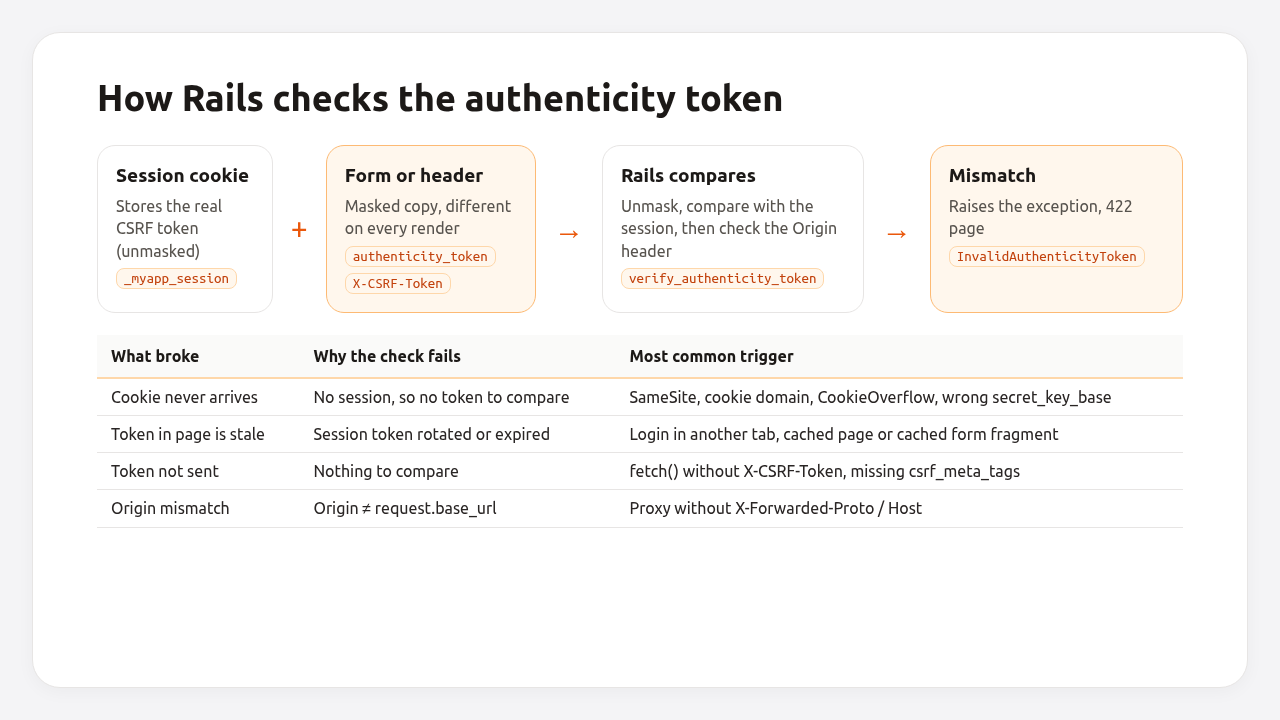
- The real token, stored in the session (
session[:_csrf_token]), which lives in the session cookie by default. - A masked copy sent with the request, either as the
authenticity_tokenform field thatform_withadds, or as theX-CSRF-Tokenheader that Turbo and Rails Request.JS send. The copy is masked differently on every render, so two tokens in two tabs look different but are both valid.
With per_form_csrf_tokens (on by default since Rails 5.0), form tokens are also bound to the form’s action and method. And with forgery_protection_origin_check (also on by default), Rails checks that the Origin header matches request.base_url.
GET, HEAD and OPTIONS requests are never checked, which is why the error always shows up on form submissions, logins, logouts (DELETE) and AJAX calls.
Step 1: Read the log to find which check failed
Rails logs a line just before raising the exception. It’s the fastest way to know which half of the comparison failed.
Can't verify CSRF token authenticity.
Completed 422 Unprocessable Content in 3ms

ActionController::InvalidAuthenticityToken (Can't verify CSRF token authenticity.):
That’s a token mismatch: the token was missing, stale, or there was no session to compare it with.
HTTP Origin header (https://example.com) didn't match request.base_url (http://example.com)
Completed 422 Unprocessable Content in 2ms

ActionController::InvalidAuthenticityToken (HTTP Origin header (https://example.com) didn't match request.base_url (http://example.com)):
That’s an origin mismatch. The token was fine, but Rails thinks the app lives at a different URL than the browser does. Go straight to the proxy fix.
| Log message | What failed | Jump to |
|---|---|---|
Can't verify CSRF token authenticity. |
Token missing, stale, or no session | Causes 1–5, 7 |
HTTP Origin header (…) didn't match request.base_url (…) |
Scheme or host seen by Rails is wrong | Cause 6 |
| Only on webhook or API routes | Request was never meant to carry a token | Cause 8 |
Step 2: Add a diagnostic rescue_from
If the log doesn’t make the cause obvious, log the inputs of the check. This tells you in one failed request whether the session, the token or the origin is the problem.
# app/controllers/application_controller.rb
class ApplicationController < ActionController::Base
  rescue_from ActionController::InvalidAuthenticityToken, with: :log_csrf_failure

  private

  def log_csrf_failure(exception)
    Rails.logger.warn({
      event: "csrf_failure",
      message: exception.message,
      path: request.path,
      session_token_present: session[:_csrf_token].present?,
      param_token_present: params[:authenticity_token].present?,
      header_token_present: request.x_csrf_token.present?,
      origin: request.origin,
      base_url: request.base_url,
      cookie_names: request.cookies.keys,
      user_agent: request.user_agent
    }.to_json)

    raise exception
  end
end
Read the result like this:
session_token_present |
Token sent? | Likely cause |
|---|---|---|
false |
yes | The session cookie didn’t arrive: causes 3, 4 and 5 |
true |
no | The client didn’t send the token: causes 1 and 2 |
true |
yes | The token is stale: cause 7 |
any, with origin ≠ base_url |
— | Proxy or domain: cause 6 |
cookie_names is useful too. If your session cookie (_myapp_session) isn’t in the list, the browser didn’t send it, and no token in the world will pass. Remove the rescue_from (or keep it with the raise) once you’ve found the cause; it’s for logging, not for hiding the error.
Step 3: Fix the cause
Cause 1: csrf_meta_tags missing from the layout
Turbo, Rails UJS and Request.JS read the token from two <meta> tags in the <head>. If a layout, often a separate one for admin pages or marketing pages, lacks them, every JavaScript form submission fails.
<%# app/views/layouts/application.html.erb %>
<head>
  <title>MyApp</title>
  <%= csrf_meta_tags %>
  <%= csp_meta_tag %>
  <%= stylesheet_link_tag "application" %>
  <%= javascript_importmap_tags %>
</head>
Check every file in app/views/layouts/, not only application.html.erb.
Cause 2: fetch() requests without the X-CSRF-Token header
Your own fetch or Axios calls don’t get the token automatically. Read it from the meta tag and send it as a header on every non-GET request:
// app/javascript/lib/request.js
export async function postJSON(url, data) {
  const token = document.querySelector('meta[name="csrf-token"]')?.content

  const response = await fetch(url, {
    method: "POST",
    credentials: "same-origin",
    headers: {
      "Content-Type": "application/json",
      "Accept": "application/json",
      "X-CSRF-Token": token
    },
    body: JSON.stringify(data)
  })

  if (!response.ok) throw new Error(`Request failed: ${response.status}`)
  return response.json()
}
Or use Rails Request.JS, which adds the header for you:
bin/importmap pin @rails/request.js
// app/javascript/controllers/favorite_controller.js
import { Controller } from "@hotwired/stimulus"
import { post } from "@rails/request.js"

export default class extends Controller {
  async toggle() {
    await post(this.element.dataset.url, { responseKind: "turbo-stream" })
  }
}
Cause 3: the session cookie is too big or never set
If the session cookie exceeds 4 KB, Rails raises ActionDispatch::Cookies::CookieOverflow on the request that tried to write it, and the browser keeps the old session (or none). Users then fail the CSRF check on the next form.
ActionDispatch::Cookies::CookieOverflow (_myapp_session cookie overflowed with size 4211 bytes)
Store IDs in the session, never objects or long lists:
# Bad: whole records or arrays in the cookie session
session[:cart] = @cart.line_items.map(&:attributes)

# Good: one ID, load the rest from the database
session[:cart_id] = @cart.id
If you genuinely need a big session, move it server-side with a Redis or database session store, which the Rails Redis caching guide covers alongside cache configuration.
Cause 4: cookie domain or SameSite blocks the session
The session cookie must be sent on the form’s POST. Two settings decide that: its domain and its SameSite attribute.
Domain. domain: :all makes Rails set the cookie on the registrable domain (for example .example.com) so it’s shared with subdomains. On a platform’s default domain such as myapp.herokuapp.com, that becomes .herokuapp.com, which is on the Public Suffix List, and browsers refuse to store it. Users get a new, empty session on every request.
# config/initializers/session_store.rb
Rails.application.config.session_store :cookie_store,
  key: "_myapp_session",
  # Share with subdomains only on your own domain, never on a platform domain.
  domain: (Rails.env.production? && ENV["APP_DOMAIN"].present? ? ".#{ENV["APP_DOMAIN"]}" : nil),
  same_site: :lax,
  secure: Rails.env.production?
SameSite. The default SameSite=Lax doesn’t send the cookie on cross-site POSTs. That’s the point of it, but it also breaks legitimate flows where another site posts back to you: a payment provider’s return URL, a SAML identity provider, “Sign in with Apple” using form_post. Those requests arrive without a session, so they can never pass the CSRF check. Don’t switch the whole app to SameSite=None; handle those specific endpoints like webhooks (cause 8) and verify them with the provider’s signature or state parameter instead.
If your app runs inside an <iframe> on another site, the session cookie is a third-party cookie, and modern browsers block or partition it. That needs SameSite=None; Secure at minimum, and often a different design (opening a top-level window for login).
Cause 5: each server has a different secret_key_base
The cookie session is encrypted with secret_key_base. If two instances behind a load balancer have different values, a cookie written by one can’t be read by the other, so the session is empty half the time. The symptom is intermittent: the same form works, then fails, depending on which instance answered.
Make sure every web and job process gets the same value, from SECRET_KEY_BASE or from config/credentials/production.yml.enc with the same RAILS_MASTER_KEY:
# Run on each instance; the output must be identical
bin/rails runner 'puts Digest::SHA256.hexdigest(Rails.application.secret_key_base)[0, 12]'
Rotating secret_key_base logs everyone out and invalidates every open form. Do it on purpose, with the rotation steps in the Rails credentials guide, not by accident during a deploy.
Cause 6: the proxy hides the real scheme or host
HTTP Origin header (https://example.com) didn't match request.base_url (http://example.com) means TLS ends at a proxy and Rails believes the request arrived over plain HTTP. If the hosts differ instead (https://example.com vs https://app-internal:3000), the proxy isn’t forwarding the original Host header.
Fix the scheme with assume_ssl or X-Forwarded-Proto:
# config/environments/production.rb
config.assume_ssl = true   # only if the proxy itself redirects HTTP to HTTPS
config.force_ssl = true
Fix the host in the proxy. For Nginx:
# /etc/nginx/sites-available/myapp
location / {
  proxy_pass http://127.0.0.1:3000;
  proxy_set_header Host $host;
  proxy_set_header X-Forwarded-Proto $scheme;
  proxy_set_header X-Forwarded-For $proxy_add_x_forwarded_for;
}
Which setting each platform needs is in how to force HTTPS in Rails, which covers this exact error message.
Cause 7: the token in the page is stale
The session’s token changed after the page was rendered. Three common ways:
- Login or logout in another tab. Rails’ authentication generator and Devise reset the session (or the CSRF token) on sign-in to prevent session fixation, so every other open tab now holds a dead token.
- A cached page or fragment. HTML served from a CDN, a
publicHTTP cache, or acacheblock in a view contains the token of whoever rendered it first. Everyone else fails. - Turbo’s page cache and the browser’s back button. Restoring a snapshot shows a form rendered for the previous session.
Never cache a form for multiple users. Cache the parts around it instead:
<%# app/views/products/show.html.erb %>
<% cache @product do %>
  <%= render "product_details", product: @product %>
<% end %>

<%# Not cached: the form carries this session's token %>
<%= render "add_to_cart_form", product: @product %>
If a whole page is cached at the edge, make sure it doesn’t contain forms, or load them with a Turbo Frame from an uncached URL:
<%= turbo_frame_tag "newsletter_form", src: new_newsletter_subscription_path, loading: :lazy %>
For Turbo’s own snapshot cache, opt pages with sensitive forms out:
<%# app/views/layouts/application.html.erb, inside <head> %>
<%= yield :head %>

<%# app/views/sessions/new.html.erb %>
<% content_for :head do %>
  <meta name="turbo-cache-control" content="no-cache">
<% end %>
Which caching layer is safe for what content is covered in Rails caching strategies.
Cause 8: webhooks and API clients don’t send tokens
A Stripe webhook or a mobile app calling a JSON endpoint has no browser session and no token, so a controller inheriting from ActionController::Base rejects it. These requests authenticate another way, so skip CSRF for them only:
# app/controllers/webhooks/stripe_controller.rb
class Webhooks::StripeController < ApplicationController
  skip_forgery_protection

  def create
    event = Stripe::Webhook.construct_event(
      request.body.read,
      request.headers["Stripe-Signature"],
      ENV.fetch("STRIPE_WEBHOOK_SECRET")
    )
    # handle event...
    head :ok
  rescue JSON::ParserError, Stripe::SignatureVerificationError
    head :bad_request
  end
end
For a token-authenticated JSON API, inherit from ActionController::API, which doesn’t include forgery protection at all. If the API shares controllers with the browser app, use protect_from_forgery with: :null_session there, so requests without a token run with an empty session instead of raising.
Never use skip_forgery_protection on an endpoint that relies on the session cookie for authentication. That’s exactly the hole CSRF protection exists to close.
Step 4: Handle expired sessions gracefully
Some failures are legitimate: a form left open overnight after the session expired. Instead of the bare 422 page, send the user back with a message. Do this only for HTML requests, and only after you’ve ruled out the causes above:
# app/controllers/application_controller.rb
class ApplicationController < ActionController::Base
  rescue_from ActionController::InvalidAuthenticityToken do
    respond_to do |format|
      format.html do
        redirect_back fallback_location: root_path,
          alert: "Your session expired. Please try again."
      end
      format.any { head 422 }
    end
  end
end
The request is still rejected; the user just gets a fresh form with a fresh token. Keep logging these events, since a sudden spike is either a broken deploy or an attack.
Verify it works
Check the happy path, the rejection, and the production setup from outside.
# 1. A POST without a token is rejected (expect 422)
curl -s -o /dev/null -w "%{http_code}\n" -X POST https://example.com/session \
  -d "email=a@example.com&password=x"

# 2. The session cookie is set, Secure, SameSite=Lax, with the expected domain
curl -sI https://example.com/session/new | grep -i set-cookie

# 3. The page includes the meta tags
curl -s https://example.com/session/new | grep -o '<meta name="csrf-[a-z]*"'
Then add a system test with forgery protection on, because the test environment disables it by default (config.action_controller.allow_forgery_protection = false in test.rb), which is why these bugs never show up in CI:
# test/system/csrf_test.rb
require "application_system_test_case"

class CsrfTest < ApplicationSystemTestCase
  setup do
    @original = ActionController::Base.allow_forgery_protection
    ActionController::Base.allow_forgery_protection = true
  end

  teardown do
    ActionController::Base.allow_forgery_protection = @original
  end

  test "signing in works with CSRF protection enabled" do
    user = users(:one)
    visit new_session_path
    fill_in "email_address", with: user.email_address
    fill_in "password", with: "password"
    click_on "Sign in"
    assert_current_path root_path
  end
end
How Heroku, Render, Fly.io, Upsun and Enkihost affect CSRF
CSRF protection is your app’s job on every platform, but two platform details cause most production-only failures: whether the proxy forwards the scheme and host, and whether the default domain accepts shared cookies.
| Platform | Forwards X-Forwarded-Proto |
Default domain on the Public Suffix List | Watch out for |
|---|---|---|---|
| Heroku | Yes | Yes (herokuapp.com) |
domain: :all on *.herokuapp.com drops the session cookie |
| Render | Yes | Yes (onrender.com) |
Same domain: :all trap on *.onrender.com |
| Fly.io | Yes | Yes (fly.dev) |
Same trap; also different secrets per app if you split web and workers |
| Upsun | Yes | Yes (*.platformsh.site, *.upsun.app) |
Preview environments get new hostnames, so hard-coded cookie domains break there |
| Enkihost | Yes (Traefik) | Use your custom domain for shared cookies | Set SECRET_KEY_BASE once per app so every instance reads the same cookies |
The Public Suffix List is what browsers use to decide which domains can hold cookies. Every platform puts its shared default domain there on purpose, so one customer’s app can’t set cookies for another’s. It also means cross-subdomain cookies only work on your own domain.
Troubleshooting checklist
Run through this in order. Each line is a cause from Step 3.
| Check | Command or place | Cause |
|---|---|---|
| Meta tags in every layout | grep -L csrf_meta_tags app/views/layouts/*.erb |
1 |
Custom fetch calls send X-CSRF-Token |
grep -rn "fetch(" app/javascript |
2 |
No CookieOverflow in logs |
search logs for CookieOverflow |
3 |
Session cookie has the right domain |
Set-Cookie header in Verify step 2 |
4 |
Same secret_key_base on every instance |
digest command in cause 5 | 5 |
| Origin matches base URL | log line HTTP Origin header… |
6 |
No forms inside cache blocks or CDN-cached pages |
grep -rn "cache" app/views |
7 |
| Webhooks and APIs skip CSRF and verify signatures | controllers under webhooks/, api/ |
8 |
Author Perspective: the token is rarely the problem
Every time I’ve chased this error in production, the token itself was fine. It was a cookie that never made it back: once a domain: :all left over from a multi-subdomain setup that broke the app on its platform URL, once a cart stored in the session that crossed 4 KB for customers with big orders, and once a fragment-cached signup form that worked for me and failed for everyone else. That’s why I now start with the diagnostic rescue_from instead of guessing. Thirty seconds of logging which inputs were present saves an afternoon of trying skip_forgery_protection in random controllers, which is the one “fix” I’d never ship.
Stable sessions on Enkihost
Most production-only CSRF failures come from the environment around the app: proxies, cookie domains, secrets that differ between instances. Enkihost keeps that part predictable.
- One set of environment variables per app, so every instance gets the same
SECRET_KEY_BASEorRAILS_MASTER_KEYand reads the same session cookies. - Custom domains on Ignite and Blaze, so you can share sessions across your own subdomains instead of a platform domain.
- Zero-downtime deploys, where old and new instances overlap briefly, which is exactly when consistent secrets matter.
- Managed Redis included on Ignite and Blaze (with
REDIS_URLinjected) if you move sessions server-side to escape the 4 KB cookie limit. - Plans: Ignite at 9 EUR per month after a 14-day free trial, or Blaze at 29 EUR with five apps, 5 GB of RAM and CPU priority.
See enkihost.com.
FAQ
Is it safe to disable protect_from_forgery to fix InvalidAuthenticityToken?
No, not for controllers that use the session cookie for authentication. Disabling it lets any website submit forms on behalf of your logged-in users. Skip forgery protection only for endpoints that authenticate another way, such as signed webhooks or token-based APIs, and fix the real cause everywhere else.
Why does InvalidAuthenticityToken only happen in production?
Because the test environment disables forgery protection by default, and development usually runs on one process over plain HTTP. Production adds a TLS proxy, multiple instances, real cookie domains and caching, which are the usual causes: a wrong Origin or scheme, different secret_key_base values, a cookie domain the browser rejects, or cached forms.
Why do users get InvalidAuthenticityToken after logging in?
Signing in resets the session or rotates the CSRF token to prevent session fixation. Any other tab, or any page restored from the browser or Turbo cache, still holds the old token and fails on its next submission. Reloading the page fixes it. Rescue the error for HTML requests and redirect back with a message so users understand what happened.
How do I send the CSRF token with fetch in Rails?
Render csrf_meta_tags in the layout, read the content of the meta tag named csrf-token in JavaScript, and send it in the X-CSRF-Token header on every POST, PATCH, PUT and DELETE request. Rails Request.JS does this automatically, and Turbo does it for its own form submissions.
Does Rails check the CSRF token on GET requests?
No. Rails only verifies the token on non-GET requests, and GET requests to JavaScript responses are checked separately for cross-origin script inclusion. That is why GET routes must never change data: they are not protected by the authenticity token.
Sources
- ActionController::RequestForgeryProtection — Rails API
- Securing Rails Applications: CSRF — Rails Guides
- Configuring Rails Applications: forgery protection options — Rails Guides
- Rails Request.JS — GitHub
- Turbo Drive: opting out of caching — Turbo Handbook
- Public Suffix List
- SameSite cookies — MDN
- HTTP routing and request headers — Heroku Dev Center
- Fly Proxy request headers — Fly Docs
- Stripe webhook signature verification — Stripe Docs