Zero Downtime Deploys with Rails: How Health Checks Actually Work

A zero downtime deploy in Rails is two handoffs, not one. The new release has to prove it can serve requests before the proxy sends it traffic, and the old release has to finish every request it already accepted before it exits. The health check controls the first handoff; Puma’s graceful shutdown and the proxy’s drain timeout control the second. This post walks through the exact sequence, what /up should and shouldn’t check, how readiness differs from liveness, and the timeouts that decide whether a deploy drops requests.
TL;DR
- A zero downtime deploy starts the new release, waits until its health check passes, switches the proxy to it, and only then stops the old release.
- The deploy gate is a readiness check: “can this process serve a request right now?” Keep it shallow. Rails 7.1+ already ships one at
/up.- Requests are dropped on the way out, not in: the old Puma must receive
SIGTERM, stop accepting, and finish in-flight requests before it is killed.- Every timeout in the chain must be longer than the one inside it: proxy drain ≥ Puma shutdown ≥ your slowest request.
- Health checks don’t protect you from incompatible migrations or missing assets; those need their own two-step deploys.
Table of Contents
- What happens during a zero downtime deploy?
- Readiness vs liveness: which check gates a deploy?
- What should the Rails health check endpoint return?
- How does the old release finish its requests?
- A complete zero downtime setup with Kamal 2
- What breaks zero downtime even with health checks?
- Verify it works: deploy under load
- Troubleshooting
- How Heroku, Render, Fly.io and Upsun handle the cutover
- Author Perspective
- Zero downtime deploys on Enkihost
- FAQ
- Sources
What happens during a zero downtime deploy?
A zero downtime deploy runs the old and new release side by side for a few seconds and moves traffic only when the new one is ready. Every platform that offers it, from Kamal to Render to Enkihost, follows roughly the same five steps.
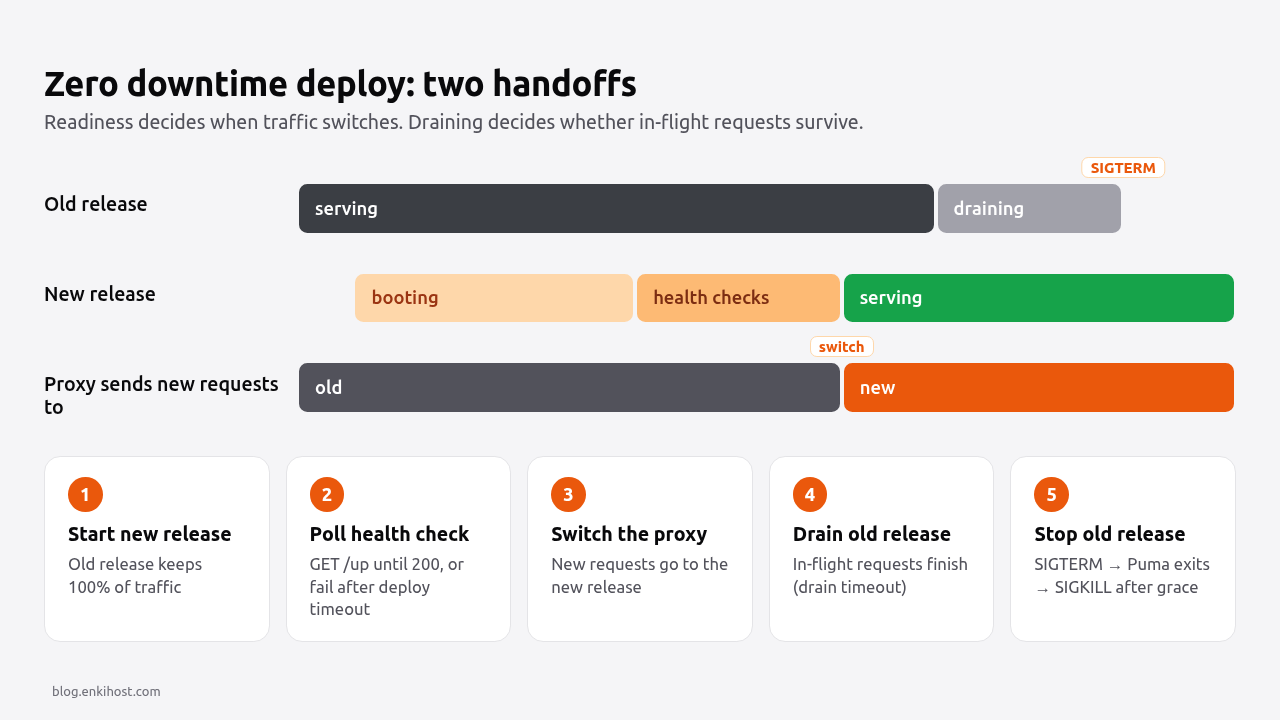
- Start the new release next to the old one. The old release keeps serving all traffic.
- Poll the new release’s health check until it returns
200, or give up after a deploy timeout. If it never passes, the deploy fails and the old release stays live. This is the safety net. - Switch the proxy. New requests go to the new release. Requests already in progress on the old release keep running.
- Drain the old release. The proxy (or the platform) waits for the old release’s open requests to finish, up to a drain timeout.
- Stop the old release with
SIGTERM, thenSIGKILLif it hasn’t exited after a grace period.
Steps 1–3 are about readiness: nobody sees a release that can’t answer. Steps 4–5 are about draining: nobody’s request is cut off halfway. Most “we have health checks but deploys still throw 502s” incidents are in steps 4 and 5.
Pro Tip: the health check never sees real traffic. A release can pass /up and still fail every real request (a bad credential, a broken view). Watch the error rate for a few minutes after each switch; a health check isn’t a smoke test.
Readiness vs liveness: which check gates a deploy?
Readiness gates the deploy; liveness restarts stuck processes. They answer different questions, and mixing them up either lets broken releases through or restarts healthy ones.
| Check | Question it answers | Who acts on it | What happens on failure | What it should test |
|---|---|---|---|---|
| Startup | Has the process finished booting? | Orchestrator (Kubernetes startupProbe) |
Keep waiting, then restart | Same as liveness, with a longer budget |
| Readiness | Can it serve a request right now? | Proxy / load balancer, deploy tool | Take it out of rotation; during a deploy, don’t switch | App booted, router answers |
| Liveness | Is the process hopelessly stuck? | Orchestrator / supervisor | Kill and restart the process | Process responds at all |
| Dependency (deep) | Are Postgres, Redis, the queue reachable? | Humans, via monitoring and alerts | Page someone | Database query, Redis PING, queue latency |
The deploy gate should answer “did this release boot correctly?” If Postgres goes away for a minute, failing every release’s readiness check doesn’t help anyone: the old release can’t reach the database either, and a deploy blocked on a database outage just delays the fix. That’s why the deploy check is shallow and the dependency check feeds monitoring. The Rails health check endpoint guide builds the deep /health/ready endpoint for monitoring; this post is about the shallow one the deploy waits on.
What should the Rails health check endpoint return?
It should return 200 as soon as the app has booted and can route a request, and nothing more. Rails 7.1 and later generate exactly this as rails_health_check, mounted at /up:
# config/routes.rb
Rails.application.routes.draw do
  get "up" => "rails/health#show", as: :rails_health_check

  # ...your routes
end
Rails::HealthController#show returns 200 with a small green HTML page if the app booted, and 500 if an exception was raised while booting. It doesn’t touch the database, which is what you want for a deploy gate.
Two production settings commonly break it, because the deploy tool calls /up over plain HTTP on an internal IP:
# config/environments/production.rb
Rails.application.configure do
  config.assume_ssl = true
  config.force_ssl = true

  # Don't redirect the health check to https; the proxy calls it over http.
  config.ssl_options = { redirect: { exclude: ->(request) { request.path == "/up" } } }

  # Allow your domains, but let the health check through from any Host header
  # (the deploy tool calls it by container IP).
  config.hosts = ["example.com", /.*\.example\.com/]
  config.host_authorization = { exclude: ->(request) { request.path == "/up" } }

  # Keep health check polling out of the logs (Rails 8.0+).
  config.silence_healthcheck_path = "/up"
end
Without the ssl_options exclude, /up answers 301, and most deploy tools treat anything other than 2xx as unhealthy. Without the host_authorization exclude, it answers 403 Blocked hosts. The force HTTPS guide covers the rest of the SSL settings.
Should /up warm the app before it reports healthy?
Only if your first request is slow enough to time out. Puma loads the app before binding when you use preload_app! (or eager_load = true, the production default), so by the time /up answers, the code is loaded. Caches are cold, and the first database connection is opened lazily, but that costs milliseconds, not seconds. If you have something heavier, such as loading a large lookup table into memory, do it in an initializer so it completes before Puma binds the port, rather than adding it to the health check.
How does the old release finish its requests?
When Puma receives SIGTERM, it stops accepting new connections, finishes the requests it is already processing, and exits. The deploy is only zero downtime if the platform waits for that to finish before sending SIGKILL.
The settings that matter live in config/puma.rb:
# config/puma.rb
max_threads = ENV.fetch("RAILS_MAX_THREADS", 3).to_i
threads max_threads, max_threads

port ENV.fetch("PORT", 3000)

workers ENV.fetch("WEB_CONCURRENCY", 2).to_i
preload_app!

# On SIGTERM, also process connections already waiting in the socket backlog
# instead of dropping them.
drain_on_shutdown

# Give workers this long to finish in-flight requests on shutdown before
# they are force-killed. Must be shorter than the platform's grace period.
worker_shutdown_timeout 25

# Leave persistent_timeout at Puma's default (65 s in current Puma). It must stay
# longer than the proxy's idle keep-alive timeout, or the proxy reuses a
# connection Puma already closed and the client gets a 502.

plugin :tmp_restart
pidfile ENV["PIDFILE"] if ENV["PIDFILE"]
Three timeouts have to nest, from the outside in:
| Layer | Setting | Typical default | Must be |
|---|---|---|---|
| Proxy / deploy tool | Kamal drain_timeout, Render maxShutdownDelaySeconds, Fly kill_timeout |
30 s (Kamal, Render), 5 s (Fly) | Longest |
| Container runtime | docker stop --time / stop_grace_period |
10 s | ≥ Puma shutdown |
| Puma | worker_shutdown_timeout |
30 s | ≥ your slowest request |
| Your app | Slowest legitimate request | — | Shortest; enforce it with a request timeout |
If Docker’s 10-second default is shorter than Puma’s shutdown window, Docker sends SIGKILL while requests are still running, and those clients see a reset connection. Keep the slowest request short with a timeout at the app level; the Rails request timeout guide shows how, and the Puma workers and threads guide explains the worker and thread settings above.
Pro Tip: in Docker, use exec form for the command (CMD ["./bin/thrust", "./bin/rails", "server"]), not shell form. With shell form, /bin/sh is PID 1, it doesn’t forward SIGTERM, and Puma never hears about the shutdown until SIGKILL arrives.
What about long-lived connections?
WebSockets (Action Cable) and server-sent events don’t drain: they stay open until someone closes them. On shutdown, the old release closes them and clients reconnect, which Action Cable’s JavaScript client does automatically, to the new release. Design for the reconnect (re-subscribe, re-fetch missed state) rather than trying to keep sockets open across a deploy.
A complete zero downtime setup with Kamal 2
Kamal 2 is a good reference because every step of the cutover is a visible setting. kamal-proxy runs on the host, starts the new container, polls its health check, switches traffic and drains the old one.
# config/deploy.yml
service: myapp
image: myorg/myapp

servers:
  web:
    - 203.0.113.10

proxy:
  ssl: true
  host: example.com
  app_port: 80            # Thruster listens on 80 in the Rails 8 Dockerfile
  healthcheck:
    path: /up
    interval: 1           # seconds between polls
    timeout: 3            # per-request timeout

# How long the new container has to pass the health check.
deploy_timeout: 30

# How long the old container may keep finishing requests after the switch.
drain_timeout: 30

registry:
  username: myorg
  password:
    - KAMAL_REGISTRY_PASSWORD

env:
  secret:
    - RAILS_MASTER_KEY
  clear:
    WEB_CONCURRENCY: 2
    RAILS_MAX_THREADS: 3

builder:
  arch: amd64
# Dockerfile (last lines of the Rails 8 default)
USER 1000:1000
ENTRYPOINT ["/rails/bin/docker-entrypoint"]
EXPOSE 80
CMD ["./bin/thrust", "./bin/rails", "server"]
Kamal’s drain_timeout (30 s) is longer than Puma’s worker_shutdown_timeout (25 s above), so Puma finishes first. The Kamal 2 deployment post covers the rest of deploy.yml.
What breaks zero downtime even with health checks?
Health checks only prove that the new release boots. Several kinds of change break requests during the overlap window, when old and new code run at the same time.
| Problem | What users see | Fix |
|---|---|---|
| Migration removes or renames a column the old release still reads | PG::UndefinedColumn 500s on the old release until it stops |
Expand/contract: add first, deploy, remove later (zero downtime migrations) |
| Old pages request old fingerprinted assets that the new release deleted | Unstyled pages, broken JS until reload | Keep the previous release’s assets (Kamal asset_path, or a CDN) |
secret_key_base changed |
Everyone is logged out, CSRF errors | Never rotate it in a normal deploy |
| Sidekiq/Solid Queue killed mid-job | Jobs retried, possibly run twice | Idempotent jobs; give workers a shutdown timeout |
| Requests longer than the drain timeout | Connection reset on the slowest endpoints | App-level timeouts, move long work to jobs |
| Boot takes longer than the deploy timeout | Deploy fails, old release keeps serving | Raise the timeout or find the slow initializer |
Note the last row: a failed deploy is the health check working. The old release kept serving; nothing was dropped.
Verify it works: deploy under load
Run a steady stream of requests during a deploy and count anything that isn’t a success. If the count is zero, the cutover is clean.
#!/usr/bin/env bash
# bin/deploy-probe: run in a second terminal while you deploy.
URL="${1:-https://example.com/up}"
ok=0; fail=0
end=$((SECONDS + 120))
while [ $SECONDS -lt $end ]; do
  code=$(curl -s -o /dev/null -w '%{http_code}' --max-time 5 "$URL")
  if [ "$code" = "200" ]; then ok=$((ok+1)); else fail=$((fail+1)); echo "$(date +%T) $code"; fi
  sleep 0.1
done
echo "ok=$ok fail=$fail"
chmod +x bin/deploy-probe
bin/deploy-probe https://example.com/up   # terminal 1
kamal deploy                              # terminal 2
Probing /up tests the switch. To test draining, also probe a slow real page; a request that takes 2–3 seconds is more likely to be in flight at the moment the old release stops. Expect fail=0 for both.
Troubleshooting
target failed to become healthy within configured timeout (30s) (Kamal). The new container never returned 200 on the health path. Run kamal app logs and look for one of the next two errors, or a boot exception. If the app is just slow to boot, raise deploy_timeout.
[ActionDispatch::HostAuthorization::DefaultResponseApp] Blocked hosts: 172.18.0.5:80. The deploy tool calls /up by container IP, which isn’t in config.hosts. Add the host_authorization exclude shown above.
Health check returns 301 instead of 200. force_ssl is redirecting the internal HTTP probe. Add the ssl_options redirect exclude.
502 Bad Gateway for a second or two right after the switch. The old release was killed before it finished. Check that the Docker command uses exec form, that Puma gets SIGTERM (you’ll see - Gracefully stopping, waiting for requests to finish in the logs), and that the timeouts nest as in the table above.
Errno::EADDRINUSE: Address already in use - bind(2) for "0.0.0.0" port 3000. Old and new release are trying to bind the same port on the same host. Platforms avoid this by running each release in its own container or network namespace; on a bare server, use a proxy and a different port per release.
How Heroku, Render, Fly.io and Upsun handle the cutover
All four can deploy without downtime, but they decide “ready” differently: some poll an HTTP path, some wait a fixed time, some only check that the process started.
| Platform | When traffic switches | Old release shutdown |
|---|---|---|
| Heroku (Preboot enabled) | About 3 minutes after the new dynos start, on time, not on health | SIGTERM, then SIGKILL 30 s later |
| Render | When all new instances pass healthCheckPath |
SIGTERM, then SIGKILL after maxShutdownDelaySeconds (default 30 s) |
| Fly.io | Rolling, per Machine, once [[http_service.checks]] pass |
kill_signal (default SIGINT), then SIGKILL after kill_timeout (default 5 s) |
| Upsun | Default stop-start strategy holds idempotent requests (GET, PUT, DELETE, not POST) during the deploy; the rolling strategy serves traffic from a temporary clone; post_start can delay routing until the app answers |
WebSocket and SSE connections dropped under any strategy |
| Enkihost | Once the new container is running (within 30 s) | Old container removed after the switch |
Two things to change on day one: on Fly.io, set kill_signal = "SIGTERM" and raise kill_timeout, because the 5-second default is shorter than Puma’s shutdown window. On Heroku, preboot is opt-in (heroku features:enable preboot); without it, every deploy restarts dynos in place with a brief gap.
Author Perspective
My view is that “zero downtime” is a claim you should test, not a feature you switch on. The health check part is the easy half and every platform gets it roughly right; the draining half is where configuration quietly decides the outcome, and it’s invisible until you deploy under load. A shell-form CMD that swallows SIGTERM, or a container stop timeout shorter than Puma’s shutdown window, looks perfectly fine in a quiet staging deploy. That’s why I treat the timeouts table above as a checklist for every new app and run the probe script against a slow page before I trust a deploy pipeline. It takes ten minutes, and it’s the only way I know to actually confirm the claim rather than assume it.
Zero downtime deploys on Enkihost
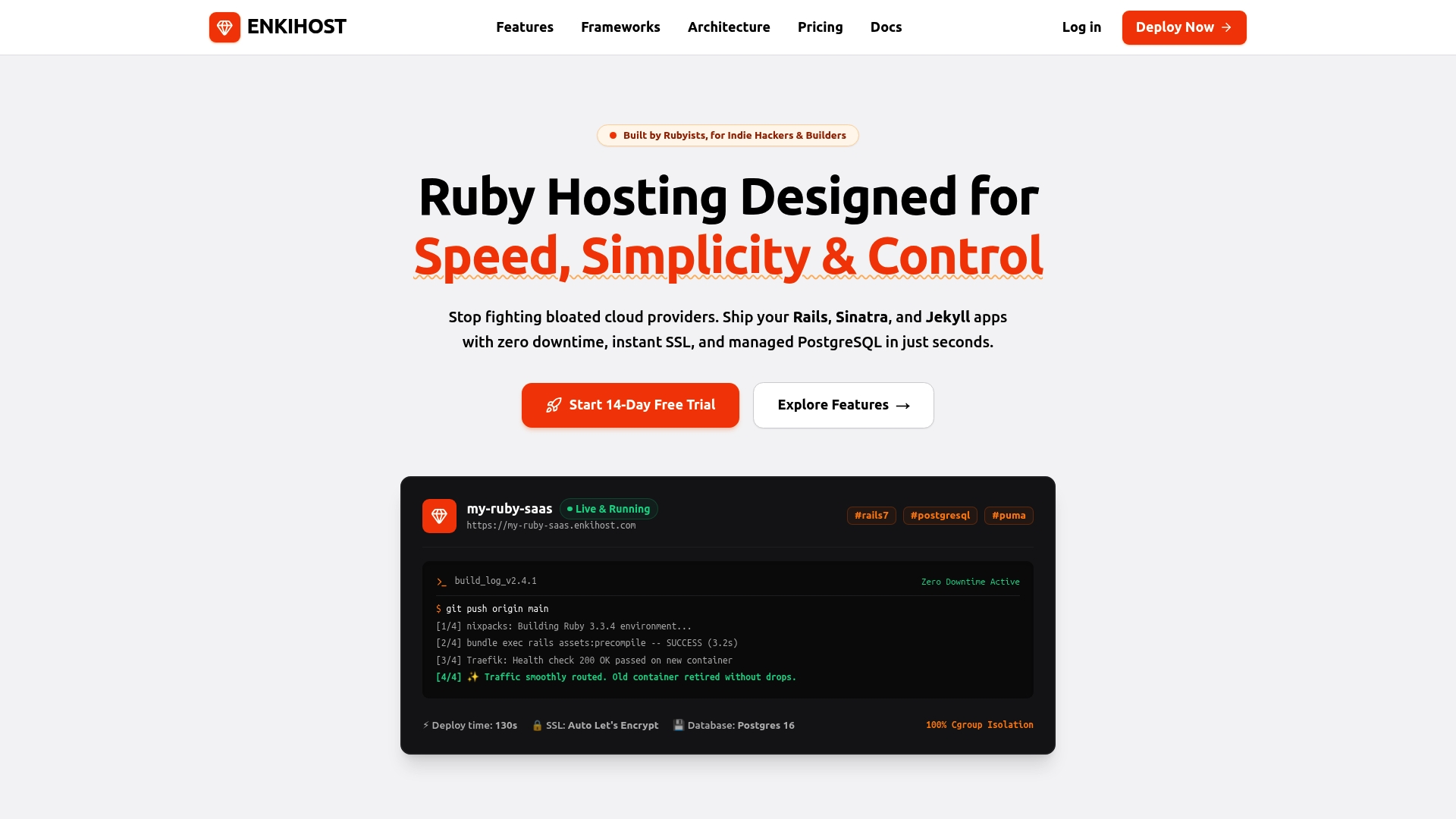
On Enkihost, zero-downtime deploys are the standard deploy path, not something you configure. Each release starts in a new container next to the running one; the old container keeps serving until the new one is running, and if the new one doesn’t come up within 30 seconds, the deploy is aborted and the old release stays live.
What that means for the setup in this post:
- Keep
/upshallow and reachable over HTTP, with thessl_optionsandhost_authorizationexcludes. It costs nothing and it’s what any proxy or uptime monitor will call. - Keep the Puma settings: exec-form command,
drain_on_shutdownand aworker_shutdown_timeoutshorter than your slowest acceptable request. They decide whether the old container finishes cleanly. - Point an external uptime monitor at your deep check, because the deploy gate is the container’s state, not your dependencies.
- Managed PostgreSQL and Redis are injected as
DATABASE_URLandREDIS_URL, so old and new releases talk to the same database during the overlap, which is exactly why the expand/contract migration rule applies. - Per-app resource isolation means booting the new release doesn’t compete with another customer’s app for memory during the overlap.
Deploys run from git push. See enkihost.com for details.
FAQ
Does Rails have a built-in health check endpoint?
Yes. Since Rails 7.1, new apps include get “up” => “rails/health#show” in config/routes.rb. It returns 200 if the app booted without exceptions and 500 otherwise, and it does not check the database or other dependencies.
Should the deploy health check query the database?
No. The deploy gate should only confirm that the new release booted and can route a request. If it queries the database, a short database outage blocks every deploy, including the one that might fix it. Check the database in a separate endpoint that feeds monitoring.
Why do I still get 502 errors during a deploy if the health check passes?
The health check only protects the switch to the new release. 502s right after the switch usually mean the old release was killed before it finished its requests: Puma didn’t receive SIGTERM, or the container’s stop timeout was shorter than Puma’s shutdown timeout.
How long should worker_shutdown_timeout be in Puma?
Longer than your slowest legitimate request and shorter than the platform’s grace period before SIGKILL. With a 30-second platform grace period and requests capped at 15 seconds, 25 seconds is a reasonable value.
Do WebSocket connections survive a zero downtime deploy?
No. WebSocket and server-sent event connections are closed when the old release stops, and clients reconnect to the new one. Action Cable’s JavaScript client reconnects automatically, so design channels to re-subscribe and re-fetch any state they missed.
Sources
- Rails::HealthController — Rails API
- Configuring Rails Applications — Rails Guides
- Puma DSL: drain_on_shutdown, worker_shutdown_timeout — Puma docs
- Puma signal handling — Puma docs
- Kamal configuration: deploy_timeout, drain_timeout — Kamal docs
- Kamal proxy configuration: healthcheck — Kamal docs
- Preboot — Heroku Dev Center
- Dynos and the dyno lifecycle: graceful shutdown with SIGTERM — Heroku Dev Center
- Deploys: zero-downtime deploys — Render Docs
- Health Checks — Render Docs
- App configuration (fly.toml): kill_signal, kill_timeout, checks — Fly Docs
- Build and deploy: deployment strategies and post_start — Upsun Docs
- Configure probes (liveness, readiness, startup) — Kubernetes docs
- docker container stop — Docker Docs