Rails Action Mailer SMTP in Production: Settings, SPF, DKIM, DMARC and Gmail's Sender Rules

Setting up Rails Action Mailer with SMTP in production takes two pieces of work: about fifteen lines of smtp_settings in Rails, and three DNS records (SPF, DKIM and DMARC) so Gmail, Outlook and Yahoo accept what you send. The Rails half fits in five minutes. The DNS half decides whether your password resets reach the inbox, land in spam or get rejected with 550 5.7.26, and since Gmail moved from warnings to rejections in late 2025, it’s no longer optional. This guide covers both, plus one-click unsubscribe headers, deliver_later, timeouts, the SMTP errors you’ll actually see, and when an HTTPS email API is a better choice than SMTP.
TL;DR
- Configure
config.action_mailer.smtp_settingsinproduction.rbwithport: 587,authentication: :plain,enable_starttls: true, and credentials fromRails.application.credentialsor environment variables. Setdefault_url_optionsso links in emails work.- Always send with
deliver_later, with timeouts set. A slow SMTP server should delay a job, not a web request.- Publish SPF, DKIM (2048-bit if possible) and DMARC records for the sending domain, and make sure the
From:domain aligns with one of them. Gmail and Yahoo require this from bulk senders and reject non-compliant mail.- Marketing and subscription emails need
List-UnsubscribeandList-Unsubscribe-Post: List-Unsubscribe=One-Clickheaders, unsubscribes honoured within two days, and a spam rate below 0.3% (aim for 0.1%).- Many hosts block outbound SMTP ports (Render’s free tier blocks 25, 465 and 587). An HTTPS email API sidesteps that entirely.
How does Action Mailer send email over SMTP?
Action Mailer renders the email, then hands it to a delivery method; with :smtp, Ruby’s Net::SMTP connects to your provider’s SMTP server, upgrades the connection to TLS, logs in and submits the message. The provider then delivers it to the recipient’s mail server, which checks SPF, DKIM and DMARC before deciding between inbox, spam and rejection.
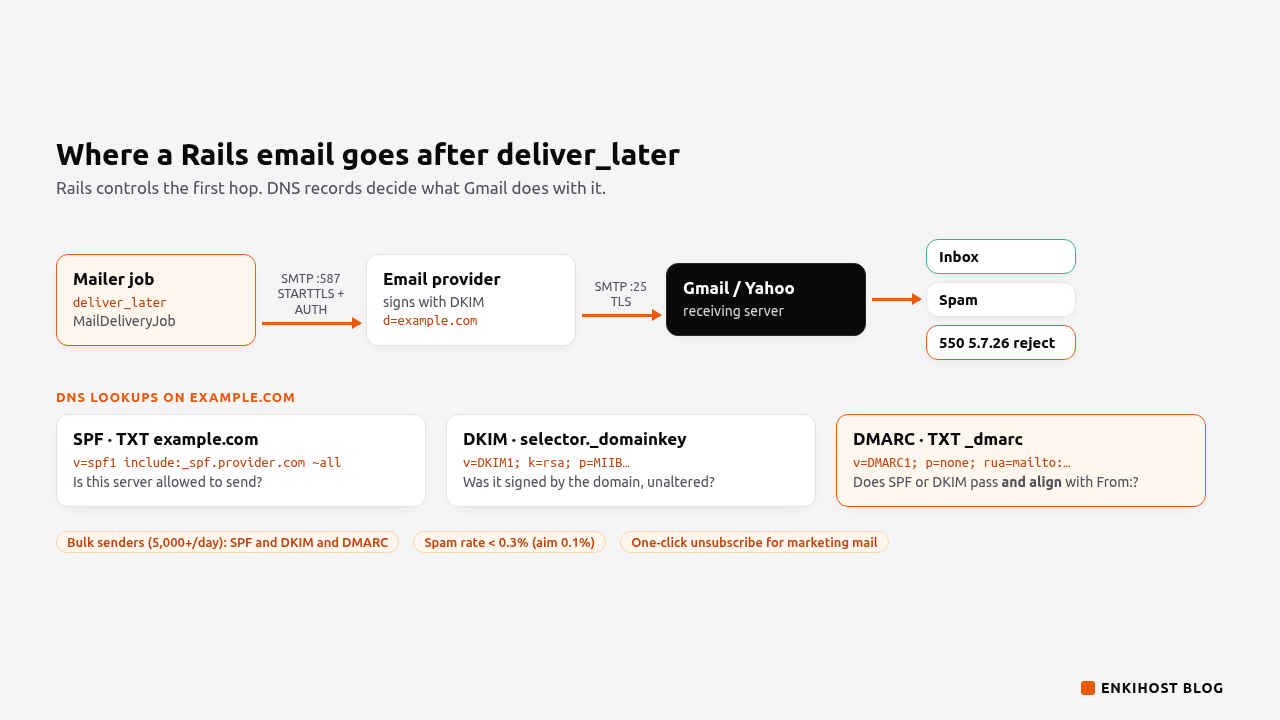
Your app only controls the first hop. Everything after it depends on the provider’s reputation and on DNS records you publish, which is why “it works locally” says little about production deliverability.
| SMTP port | Encryption | Rails setting | Use it? |
|---|---|---|---|
| 25 | Optional STARTTLS | — | No: server-to-server relay, blocked by most hosts |
| 587 | STARTTLS (upgrade after connecting) | port: 587, enable_starttls: true |
Yes, the standard submission port |
| 465 | Implicit TLS from the first byte | port: 465, tls: true |
Yes, if your provider prefers it |
| 2525 | STARTTLS | port: 2525, enable_starttls: true |
Fallback some providers offer when 587 is blocked |
Prerequisites
- A Rails 7.2 or 8.x app (examples use Rails 8.1) with at least one mailer.
- An SMTP account from an email provider, with a host, port, username and password (often an API key used as the password).
- Access to the DNS of the domain you send from.
- A background job backend: Solid Queue (Rails 8 default) or Sidekiq.
Step 1: Configure smtp_settings
Put the SMTP settings in config/environments/production.rb, read the secrets from credentials, and set the URL options mailers need for links.
bin/rails credentials:edit --environment production
# config/credentials/production.yml.enc (decrypted view)
smtp:
  address: smtp.your-provider.com
  user_name: apikey-or-username
  password: your-smtp-password
# config/environments/production.rb
Rails.application.configure do
  # ...other settings

  config.action_mailer.delivery_method = :smtp
  config.action_mailer.perform_deliveries = true
  config.action_mailer.raise_delivery_errors = true # let the job fail and retry

  smtp = Rails.application.credentials.smtp || {}
  config.action_mailer.smtp_settings = {
    address:         smtp[:address]   || ENV.fetch("SMTP_ADDRESS"),
    port:            Integer(ENV.fetch("SMTP_PORT", 587)),
    domain:          ENV.fetch("SMTP_HELO_DOMAIN", "example.com"), # your domain, used in HELO/EHLO
    user_name:       smtp[:user_name] || ENV.fetch("SMTP_USERNAME"),
    password:        smtp[:password]  || ENV.fetch("SMTP_PASSWORD"),
    authentication:  :plain,
    enable_starttls: true,   # require STARTTLS on 587; fails instead of sending in clear text
    open_timeout:    5,      # seconds to connect
    read_timeout:    10      # seconds to wait for each server response
  }

  config.action_mailer.default_url_options = { host: "app.example.com", protocol: "https" }
  config.action_mailer.asset_host = "https://app.example.com" # for image_tag in email views
end
Set a default sender once, on a domain you control and have authenticated:
# app/mailers/application_mailer.rb
class ApplicationMailer < ActionMailer::Base
  default from: email_address_with_name("hello@example.com", "Example App"),
          reply_to: "support@example.com"
  layout "mailer"
end
email_address_with_name quotes the display name properly, which matters when it contains commas or accents. Gmail’s rules also require exactly one address in the From: header.
Pro Tip: enable_starttls: true (Rails 7.1+) is stricter than the older enable_starttls_auto. With _auto, a server that doesn’t offer STARTTLS gets your password and email in clear text; with enable_starttls, the connection fails instead. Use it on port 587.
The environment variables guide and the credentials guide cover where each kind of secret should live.
Step 2: Send with deliver_later
Send every email from a background job. An SMTP handshake takes from a few hundred milliseconds to several seconds, and a provider outage would otherwise turn into slow or failing web requests.
# app/controllers/registrations_controller.rb
def create
  @user = User.new(registration_params)
  if @user.save
    WelcomeMailer.with(user: @user).welcome.deliver_later
    redirect_to root_path, notice: "Welcome!"
  else
    render :new, status: :unprocessable_content
  end
end
# app/mailers/welcome_mailer.rb
class WelcomeMailer < ApplicationMailer
  def welcome
    @user = params[:user]
    mail to: email_address_with_name(@user.email_address, @user.name),
         subject: "Welcome to Example App"
  end
end
Retry transient SMTP failures, and stop retrying permanent ones:
# config/initializers/action_mailer_retries.rb
Rails.application.config.after_initialize do
  ActionMailer::MailDeliveryJob.retry_on Net::OpenTimeout, Net::ReadTimeout, Errno::ECONNRESET,
                                         Net::SMTPServerBusy, wait: :polynomially_longer, attempts: 6
  ActionMailer::MailDeliveryJob.discard_on Net::SMTPSyntaxError, Net::SMTPFatalError
end
Net::SMTPServerBusy covers 4xx replies, which mean “try later”, including Gmail’s rate-limit deferrals; Net::SMTPFatalError covers 5xx replies, which won’t succeed on a retry. Put mail on its own queue if you send in bursts, so a newsletter doesn’t delay password resets:
# config/environments/production.rb
config.action_mailer.deliver_later_queue_name = :mailers
The background jobs guide covers running the workers that process this queue.
Step 3: Publish SPF, DKIM and DMARC
These three DNS records prove that your provider is allowed to send for your domain. Without them, Gmail rejects or spam-folders your mail, whatever your Rails code does.
What DNS records do I need to send email from Rails?
You need an SPF TXT record listing your provider, a DKIM record (TXT or CNAME) with the provider’s public key, and a DMARC TXT record at _dmarc. Your provider’s dashboard gives you the exact SPF include and DKIM values.
| Record | Name | Example value | What it proves |
|---|---|---|---|
| SPF | example.com (TXT) |
v=spf1 include:_spf.your-provider.com ~all |
This server may send for the domain in the envelope sender |
| DKIM | selector1._domainkey.example.com (TXT or CNAME) |
v=DKIM1; k=rsa; p=MIIBIjANBg… |
The message wasn’t altered and was signed by the domain |
| DMARC | _dmarc.example.com (TXT) |
v=DMARC1; p=none; rua=mailto:dmarc@example.com; adkim=r; aspf=r |
What receivers should do when SPF/DKIM fail or don’t align, and where to send reports |
Rules that trip people up:
- One SPF record per domain. Two
v=spf1TXT records make SPF fail with apermerror. Merge them:v=spf1 include:_spf.google.com include:_spf.your-provider.com ~all. - SPF has a 10-DNS-lookup limit. Each
include:costs lookups. Too many and SPF fails for everyone. - Alignment is what DMARC checks. The
From:domain (example.com) must match the DKIM signing domain or the SPF envelope domain. A provider that signs with its own domain (d=provider.net) passes DKIM but fails DMARC alignment. Set up your own DKIM records in the provider’s dashboard. - Start DMARC at
p=none, read the reports for a couple of weeks, then move top=quarantineand laterp=rejectonce every legitimate source passes.
If you send from your own server instead of a provider, you also need a matching PTR (reverse DNS) record for the server’s IP; the Postfix and OpenDKIM guide covers that path in detail.
Check what’s published with dig:
dig +short TXT example.com | grep spf1
dig +short TXT selector1._domainkey.example.com
dig +short TXT _dmarc.example.com
Step 4: Meet Gmail and Yahoo’s sender requirements
Gmail and Yahoo require every sender to authenticate and keep complaints low, and require bulk senders (over 5,000 messages a day to Gmail addresses) to add DMARC, alignment and one-click unsubscribe. Since November 2025, Gmail rejects or defers non-compliant mail instead of only warning.
| Requirement | All senders | Bulk senders (5,000+/day) |
|---|---|---|
| SPF or DKIM | Yes (SPF or DKIM) | SPF and DKIM |
| DMARC record | Recommended | Required (p=none is acceptable) |
From: aligned with SPF or DKIM domain |
Recommended | Required |
| Valid forward and reverse DNS for sending IPs | Required | Required |
| TLS in transit | Required | Required |
| Spam rate in Postmaster Tools | Below 0.3% | Below 0.3%, aim for under 0.1% |
| One-click unsubscribe (RFC 8058) | — | Required for marketing and subscription mail |
| Visible unsubscribe link in the body | — | Required for marketing and subscription mail |
Transactional emails (password resets, receipts) don’t need unsubscribe headers. Newsletters, digests and product updates do. Add them in the mailer:
# app/mailers/digest_mailer.rb
class DigestMailer < ApplicationMailer
  def weekly
    @user = params[:user]
    token = @user.generate_token_for(:unsubscribe)
    @unsubscribe_url = unsubscribe_url(token: token)

    headers["List-Unsubscribe"]      = "<#{@unsubscribe_url}>, <mailto:unsubscribe@example.com?subject=unsubscribe>"
    headers["List-Unsubscribe-Post"] = "List-Unsubscribe=One-Click"

    mail to: @user.email_address, subject: "Your weekly summary"
  end
end
# app/models/user.rb
class User < ApplicationRecord
  generates_token_for :unsubscribe # no expiry: links in old emails must keep working
end
# config/routes.rb
get  "unsubscribe/:token", to: "unsubscribes#show", as: :unsubscribe
post "unsubscribe/:token", to: "unsubscribes#create"
# app/controllers/unsubscribes_controller.rb
class UnsubscribesController < ApplicationController
  allow_unauthenticated_access # if you use the Rails 8 authentication generator
  skip_forgery_protection only: :create # Gmail POSTs here without a CSRF token
  before_action :set_user

  def show; end # page with a confirm button, for people who click the link in the body

  def create
    @user.update!(digest_opt_in: false)

    if params["List-Unsubscribe"] == "One-Click"
      head :ok # the mail client's one-click POST
    else
      redirect_to unsubscribe_path(params[:token]), notice: "You're unsubscribed."
    end
  end

  private
    def set_user
      @user = User.find_by_token_for(:unsubscribe, params[:token])
      head :not_found unless @user
    end
end
The POST is the “one-click” part: Gmail and Yahoo send List-Unsubscribe=One-Click to that URL when the user clicks unsubscribe in the mail client, and you must honour it within two days. The GET page is for the visible link in the email body. Skipping CSRF protection is safe here because the token in the URL already identifies and authorizes the request; the InvalidAuthenticityToken guide explains when skipping it is and isn’t safe.
Register your domain in Google Postmaster Tools to watch your spam rate and authentication results.
Step 5: Preview and test emails locally
Use mailer previews to see emails in the browser, and the :test delivery method in tests, so nothing reaches a real inbox before you mean it to.
# test/mailers/previews/welcome_mailer_preview.rb
class WelcomeMailerPreview < ActionMailer::Preview
  def welcome
    WelcomeMailer.with(user: User.first).welcome
  end
end
Open http://localhost:3000/rails/mailers to see every preview. In development, letter_opener opens each sent email in a browser tab:
# Gemfile
group :development do
  gem "letter_opener"
end
# config/environments/development.rb
config.action_mailer.delivery_method = :letter_opener
config.action_mailer.perform_deliveries = true
config.action_mailer.default_url_options = { host: "localhost", port: 3000 }
# test/mailers/digest_mailer_test.rb
require "test_helper"

class DigestMailerTest < ActionMailer::TestCase
  test "weekly digest has one-click unsubscribe headers" do
    email = DigestMailer.with(user: users(:one)).weekly
    assert_equal "List-Unsubscribe=One-Click", email["List-Unsubscribe-Post"].value
    assert_match %r{<https://app.example.com/unsubscribe/}, email["List-Unsubscribe"].value
  end
end
Add the production host to config/environments/test.rb (config.action_mailer.default_url_options = { host: "app.example.com", protocol: "https" }) for that assertion to match.
Verify it works
Send one real email from production and read the headers the receiving server added.
# On the production app (kamal app exec, heroku run, or your platform's console)
bin/rails runner 'ActionMailer::Base.mail(from: "hello@example.com", to: "you@gmail.com", subject: "SMTP test", body: "It works").deliver_now'
In Gmail, open the message, choose Show original, and check:
SPF: PASSwith your domain or the provider’s bounce domain.DKIM: PASSwith your domain (d=example.com).DMARC: PASS.- The
Received:line mentionsTLS.
Also send to mail-tester.com for a scored report. Anything below 9/10 tells you what’s missing.
Troubleshooting
Net::OpenTimeout: execution expired. The app can’t reach the SMTP server at all. The most common cause is the host blocking outbound SMTP ports (Render’s free tier blocks 25, 465 and 587; many clouds block 25). Try port 2525 if your provider offers it, or switch to the provider’s HTTPS API.
Net::SMTPAuthenticationError: 535 5.7.8 Username and Password not accepted. Wrong credentials, or the account requires an API key or app password instead of the login password. Check for a stray newline in the environment variable.
OpenSSL::SSL::SSLError: SSL_connect returned=1 errno=0 ... wrong version number. The port and TLS mode don’t match: implicit TLS (tls: true) on port 587, or STARTTLS on 465. Use port: 587, enable_starttls: true or port: 465, tls: true.
550-5.7.26 Unauthenticated email from example.com is not accepted due to domain's DMARC policy (Gmail). DMARC failed: neither SPF nor DKIM passed and aligned with the From: domain. Set up the provider’s custom DKIM for your domain.
421-4.7.28 ... unusual rate of unsolicited mail or 550-5.7.1 ... likely unsolicited mail (Gmail). Reputation or volume problem. Slow down, check your spam rate in Postmaster Tools, and make sure recipients actually opted in.
ActionView::Template::Error: Missing host to link to!. config.action_mailer.default_url_options isn’t set for this environment.
Emails sent but never arrive, no error. perform_deliveries is false, delivery_method is still :test, or the job queue isn’t being processed. Check that the job worker is running and that MailDeliveryJob appears in its log.
SMTP vs an HTTPS email API
SMTP is universal and works with any provider; an HTTPS API is faster, firewall-proof and returns structured errors. For a Rails app, both plug into Action Mailer, so the choice is about your host and your error handling, not your mailer code.
SMTP (:smtp) |
HTTPS API delivery method | |
|---|---|---|
| Ports needed | 587, 465 or 2525 outbound | 443 only |
| Blocked by hosts | Sometimes (Render free tier, many clouds on 25) | Practically never |
| Round trips per email | Several (connect, STARTTLS, AUTH, MAIL, RCPT, DATA) | One HTTPS request |
| Errors | SMTP reply codes inside Net::SMTP* exceptions |
HTTP status + JSON message |
| Switching providers | Change host and credentials | Change gem and settings |
| Mailer code changes | None | None (still Action Mailer) |
Pros of SMTP: standard, no extra gem, easy to switch providers. Cons: port blocks, slower under load, cryptic errors.
Pros of an API: works everywhere HTTPS does, faster, clearer errors. Cons: one more gem, provider-specific settings.
How Heroku, Render, Fly.io and Railway handle outgoing email
None of the four delivers your transactional email for you in production; you bring a provider, and some platforms restrict SMTP.
| Platform | Built-in email | SMTP from the app | What they recommend |
|---|---|---|---|
| Heroku | No | Allowed | Email add-ons from Elements that inject SMTP config vars |
| Render | No | Blocked on free web services (25, 465, 587); port 25 blocked for all services | A provider’s HTTP API, or a paid instance |
| Fly.io | No | Allowed, but shared IPs have no reverse DNS | Relay through a transactional email service |
| Railway | None | Only on Pro and above; blocked on Free, Trial and Hobby | An HTTPS email API (Resend, SendGrid, Mailgun, Postmark) |
| Enkihost | No; included services are PostgreSQL and Redis | Not documented | Enkimail over HTTPS, an Action Mailer delivery method |
Author Perspective
Every email problem I’ve debugged in a Rails app has been one of two things: a port that the host silently blocked, or DNS that wasn’t aligned. The Rails side is almost never the issue. So my order of work is always DNS first (custom DKIM on the provider, SPF merged into one record, DMARC at p=none with reports going somewhere I read), then one real email to my own Gmail account with “Show original” open, and only then the Rails config. The other habit that saves me is deliver_later with raise_delivery_errors = true. Failures go to the job’s retry queue and show up in the error tracker, instead of disappearing inside a web request that already returned 200.
Sending Rails email from Enkihost with Enkimail
Enkihost doesn’t include an SMTP server, and the simplest way to send from a Rails app there is Enkimail, an email platform for transactional email and campaigns that plugs into Action Mailer and sends over HTTPS.
# Gemfile
gem "enkimail"
# config/environments/production.rb
config.action_mailer.delivery_method = :enkimail
config.action_mailer.enkimail_settings = { api_key: ENV.fetch("ENKIMAIL_API_KEY") }
config.action_mailer.default_url_options = { host: "app.example.com", protocol: "https" }
- No SMTP ports: the gem sends over HTTPS to the Enkimail API, so the port-blocking errors above can’t happen.
- Same mailers:
deliver_later, previews, tests and the unsubscribe headers in this guide work unchanged. - Domain verification in the Enkimail dashboard gives you the SPF and DKIM records to publish; the
fromaddress must be a verified sender. - On Enkihost, the API key is one environment variable, and
deliver_laterruns on Solid Queue or on Sidekiq with the included Redis (Ignite and Blaze plans).
The Sinatra and Enkimail guide shows the same delivery method outside Rails. See enkihost.com for hosting plans.
FAQ
Which port should Rails use for SMTP, 587 or 465?
Use 587 with STARTTLS (enable_starttls: true) unless your provider says otherwise. Port 465 uses implicit TLS and needs tls: true instead. Port 25 is for server-to-server relay and is blocked by most hosting platforms.
Can I send production email from Rails with a Gmail account?
Only for very low volume. Gmail’s SMTP needs an app password, limits how many messages and recipients you can send per day, and sends from a gmail.com or Workspace address. For a production app, use a transactional email provider with your own domain.
Do transactional emails need an unsubscribe link?
No. Password resets, receipts and security alerts don’t need List-Unsubscribe headers under Gmail and Yahoo’s rules. Newsletters, digests, product updates and other marketing or subscription emails do, including one-click unsubscribe.
Why do my Rails emails go to spam even with SPF and DKIM?
Usually because DKIM is signed with the provider’s domain, not yours, so DMARC alignment fails, or because the content and sending pattern look unsolicited. Set up custom DKIM for your domain, add DMARC, and check your spam rate in Google Postmaster Tools.
Should Action Mailer raise delivery errors in production?
Yes, when you send with deliver_later. With raise_delivery_errors set to true, a failed send raises inside the job, which retries it and reports it to your error tracker. With it off, failures are silently lost.
Sources
- Action Mailer Basics — Rails Guides
- Email sender guidelines — Google Workspace Admin Help
- Sender best practices — Yahoo Sender Hub
- RFC 8058: Signaling One-Click Functionality for List Email Headers
- DMARC overview — dmarc.org
- Google Postmaster Tools
- Sending email (SMTP) — Heroku Dev Center
- Free instance limitations — Render Docs
- Outbound networking — Railway Docs
- enkimail gem — GitHub