Rails 8 Authentication Generator: Add Login Without Devise, Step by Step

The Rails 8 authentication generator gives you login, logout and password resets in one command, with about 200 lines of plain Rails code you own instead of a gem you configure. bin/rails generate authentication creates a User model with has_secure_password, database-backed sessions, a signed session cookie and a password reset mailer. It doesn’t create sign-up, and a few production details are left to you. This guide runs the generator on a Rails 8.1 app, explains each generated file, then adds sign-up, rate limits, session cleanup, “log out everywhere” and tests, so you end up with authentication that’s ready for real users.
TL;DR
bin/rails generate authenticationaddsUser,SessionandCurrentmodels, aSessionsController, aPasswordsController, aPasswordsMailer, anAuthenticationconcern and two migrations. Runbin/rails db:migrateand you have login, logout and password reset.- It doesn’t add sign-up, email confirmation, account lockout or “remember me” options. Sign-up is a 30-line controller you write yourself, shown below.
- Sessions are rows in a
sessionstable, referenced by a signed, HTTP-only cookie. Deleting a row logs that device out, which makes “log out everywhere” a one-liner.- Login is rate limited to 10 attempts per 3 minutes with
rate_limit, which stores its counters inRails.cache. In production, that cache must be shared by all processes (Solid Cache or Redis), or the limit doesn’t hold.- Choose the generator for email-and-password apps you want to understand fully; choose Devise or Rodauth when you need OAuth, 2FA, lockout and confirmation out of the box.
What does the Rails 8 authentication generator create?
It creates a complete email-and-password login system from plain Rails parts: has_secure_password, a sessions table, a signed cookie and a mailer. Nothing is hidden in a gem; every line ends up in your app/ folder.
| File | What it does |
|---|---|
app/models/user.rb |
has_secure_password, has_many :sessions, normalizes email_address |
app/models/session.rb |
One row per logged-in browser, with ip_address and user_agent |
app/models/current.rb |
Current.session and Current.user for the current request |
app/controllers/concerns/authentication.rb |
require_authentication before every action, allow_unauthenticated_access, cookie handling |
app/controllers/sessions_controller.rb |
Login form, login (rate limited), logout |
app/controllers/passwords_controller.rb |
“Forgot password” form, reset email, new password form |
app/mailers/passwords_mailer.rb + views |
The reset email, in HTML and text |
app/views/sessions/, app/views/passwords/ |
Login and reset forms |
app/channels/application_cable/connection.rb |
Identifies Action Cable connections by the same session cookie |
db/migrate/*_create_users.rb, *_create_sessions.rb |
users (unique email_address, password_digest) and sessions |
config/routes.rb |
resource :session and resources :passwords, param: :token |
Gemfile |
Uncomments or adds bcrypt |
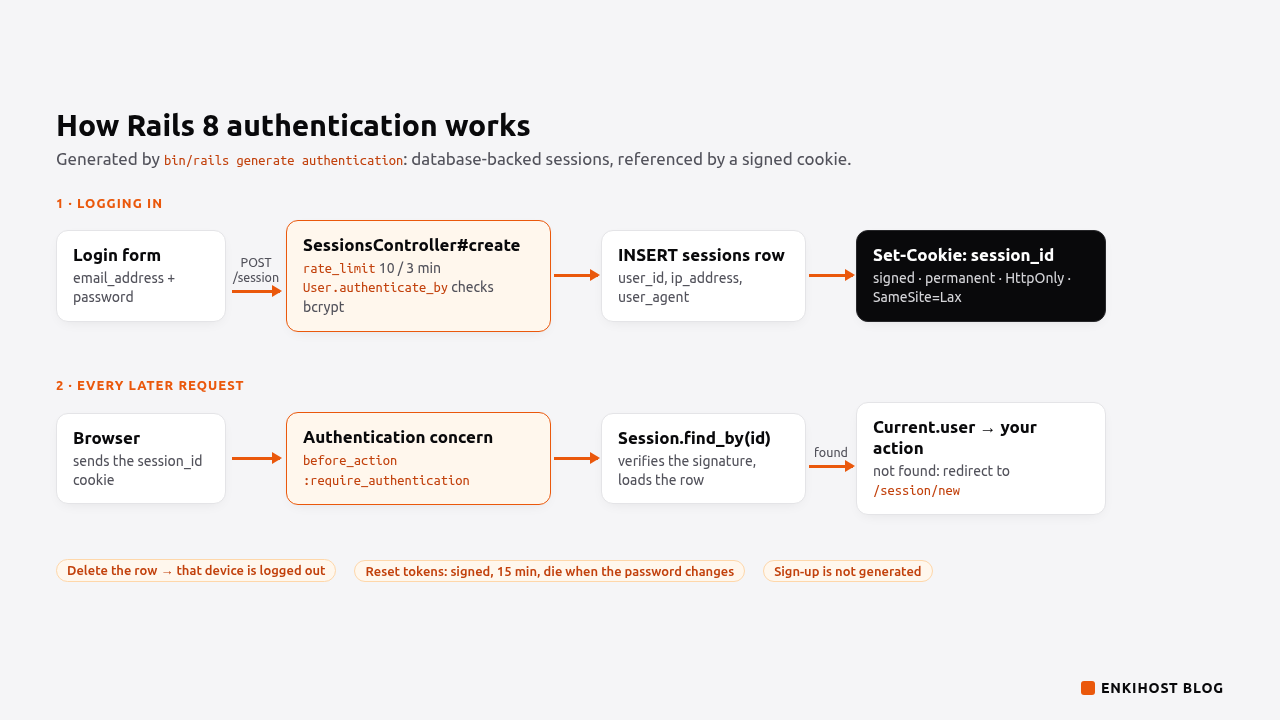
The flow is short enough to hold in your head:
Prerequisites
- Rails 8.0 or 8.1 (this guide uses 8.1.4) and Ruby 3.3 or later. Rails 8.0’s security support ended on 7 November 2026, so new work should be on 8.1.
- An app without a
Usermodel, or one where you’re ready to merge the generated model into yours. - A database (PostgreSQL, SQLite or MySQL). Nothing here is database-specific.
- Action Mailer configured if you want password reset emails to leave development. Locally, the email shows up in the server log.
Step 1: Run the generator
Run one command, then migrate.
bin/rails generate authentication
bin/rails db:migrate
The generator runs bundle install for bcrypt, injects include Authentication into ApplicationController and adds the routes. From now on, every controller action requires login unless you say otherwise. That’s the safe default: you opt pages out, not in.
Open the public pages up explicitly:
# app/controllers/pages_controller.rb
class PagesController < ApplicationController
  allow_unauthenticated_access only: %i[ home pricing ]

  def home; end
  def pricing; end
end
Create a first user from the console to try it:
bin/rails runner 'User.create!(email_address: "you@example.com", password: "a-long-test-password")'
bin/rails server
Visit http://localhost:3000/session/new and log in.
Pro Tip: if your app already has a User model, commit first and run the generator on a clean tree. It will skip or conflict on user.rb, and git diff is the easiest way to merge has_secure_password, has_many :sessions and the email_address column into what you have.
Step 2: Understand the generated code
You own this code, so it’s worth ten minutes to read it once. These are the parts that matter in production.
How does Rails 8 authentication store the session?
It stores a row in the sessions table and puts that row’s id in a signed, permanent, HTTP-only cookie with SameSite=Lax. On each request, the concern reads the cookie, finds the row and sets Current.session.
# app/controllers/concerns/authentication.rb (generated, abridged)
def resume_session
  Current.session ||= find_session_by_cookie
end

def find_session_by_cookie
  Session.find_by(id: cookies.signed[:session_id]) if cookies.signed[:session_id]
end

def start_new_session_for(user)
  user.sessions.create!(user_agent: request.user_agent, ip_address: request.remote_ip).tap do |session|
    Current.session = session
    cookies.signed.permanent[:session_id] = { value: session.id, httponly: true, same_site: :lax }
  end
end

def terminate_session
  Current.session.destroy
  cookies.delete(:session_id)
end
Two consequences:
- The cookie is useless without the row. Deleting a
Sessionrecord logs that browser out immediately, on its next request. Devise’s default cookie sessions can’t do that without extra work. - The cookie is signed with
secret_key_base. Rotatingsecret_key_baselogs everyone out. Keep it in credentials or an environment variable that survives deploys; the Rails credentials guide covers how.
How does login work?
User.authenticate_by looks the user up by email and compares the password with the bcrypt digest. It takes the same time whether or not the email exists, so response timing doesn’t leak which emails are registered.
# app/controllers/sessions_controller.rb (generated)
class SessionsController < ApplicationController
  allow_unauthenticated_access only: %i[ new create ]
  rate_limit to: 10, within: 3.minutes, only: :create, with: -> { redirect_to new_session_url, alert: "Try again later." }

  def new
  end

  def create
    if user = User.authenticate_by(params.permit(:email_address, :password))
      start_new_session_for user
      redirect_to after_authentication_url
    else
      redirect_to new_session_path, alert: "Try another email address or password."
    end
  end

  def destroy
    terminate_session
    redirect_to new_session_path, status: :see_other
  end
end
How do password resets work without a token column?
has_secure_password generates a signed, expiring reset token from the user’s id and part of the current password digest. There’s no reset_password_token column: the token expires after 15 minutes, and it stops working as soon as the password changes, because the digest it was signed against no longer matches.
# app/controllers/passwords_controller.rb (generated, abridged)
def create
  if user = User.find_by(email_address: params[:email_address])
    PasswordsMailer.reset(user).deliver_later
  end

  redirect_to new_session_path, notice: "Password reset instructions sent (if user with that email address exists)."
end

private
  def set_user_by_token
    @user = User.find_by_password_reset_token!(params[:token])
  rescue ActiveSupport::MessageVerifier::InvalidSignature
    redirect_to new_password_path, alert: "Password reset link is invalid or has expired."
  end
The notice is the same whether or not the email exists, so the form can’t be used to discover accounts.
Step 3: Add sign-up
The generator leaves registration out on purpose, because sign-up rules differ more between apps than login does. A minimal, safe version is one controller, one view and two routes.
Add validations to the model first:
# app/models/user.rb
class User < ApplicationRecord
  has_secure_password
  has_many :sessions, dependent: :destroy

  normalizes :email_address, with: ->(e) { e.strip.downcase }

  validates :email_address, presence: true, uniqueness: true,
                            format: { with: URI::MailTo::EMAIL_REGEXP }
  validates :password, length: { minimum: 12 }, allow_nil: true
end
allow_nil: true keeps the length check from firing when you update a user without touching the password. has_secure_password already rejects passwords over 72 bytes, bcrypt’s limit.
# app/controllers/registrations_controller.rb
class RegistrationsController < ApplicationController
  allow_unauthenticated_access only: %i[ new create ]
  rate_limit to: 5, within: 1.hour, only: :create,
             with: -> { redirect_to new_registration_url, alert: "Too many sign-ups from your network. Try again later." }

  def new
    @user = User.new
  end

  def create
    @user = User.new(registration_params)

    if @user.save
      start_new_session_for @user
      redirect_to after_authentication_url, notice: "Welcome!"
    else
      render :new, status: :unprocessable_content
    end
  end

  private
    def registration_params
      params.expect(user: %i[ email_address password password_confirmation ])
    end
end
<%# app/views/registrations/new.html.erb %>
<h1>Create your account</h1>

<%= form_with model: @user, url: registration_path do |form| %>
  <% if @user.errors.any? %>
    <ul>
      <% @user.errors.full_messages.each do |message| %>
        <li><%= message %></li>
      <% end %>
    </ul>
  <% end %>

  <%= form.email_field :email_address, required: true, autofocus: true, autocomplete: "username", placeholder: "Email address" %>
  <%= form.password_field :password, required: true, autocomplete: "new-password", placeholder: "Password (12+ characters)", minlength: 12, maxlength: 72 %>
  <%= form.password_field :password_confirmation, required: true, autocomplete: "new-password", placeholder: "Repeat password", maxlength: 72 %>
  <%= form.submit "Sign up" %>
<% end %>

<%= link_to "Already have an account? Log in", new_session_path %>
# config/routes.rb
Rails.application.routes.draw do
  resource :session
  resources :passwords, param: :token
  resource :registration, only: %i[ new create ]
  # ...your other routes
end
params.expect (Rails 8) returns a 400 instead of raising a 500 when someone posts a malformed user parameter.
Pro Tip: uniqueness: true alone races under concurrent sign-ups. The generated migration already adds a unique index on email_address, which is what actually guarantees uniqueness; the validation just gives a friendly error message.
Step 4: Harden it for production
The generated code is secure by default, but four production settings decide whether it stays that way.
Is the login rate limit shared between Puma workers?
Only if Rails.cache is shared. rate_limit counts attempts in the Rails cache store. With :memory_store, each Puma worker and each server keeps its own count, so an attacker gets 10 attempts per worker. In production, use Solid Cache (the Rails 8 default) or Redis:
# config/environments/production.rb
config.cache_store = :solid_cache_store
# or, with Redis:
# config.cache_store = :redis_cache_store, { url: ENV.fetch("REDIS_URL") }
The Rails rate limiting guide covers rate_limit in depth, including adding Rack::Attack in front for limits per IP across all routes.
Add the same protection to password reset requests, so nobody can flood a user’s inbox:
# app/controllers/passwords_controller.rb
class PasswordsController < ApplicationController
  allow_unauthenticated_access
  before_action :set_user_by_token, only: %i[ edit update ]
  rate_limit to: 5, within: 15.minutes, only: :create,
             with: -> { redirect_to new_password_url, alert: "Try again later." }
  # ...generated actions
end
If your generated controller already has a rate_limit line, keep it and adjust the numbers instead of adding a second one.
Does a password reset log out other devices?
Make sure it does. After a reset, sessions created with the old password should end, because a reset is often what a user does after a suspected break-in:
# app/controllers/passwords_controller.rb
def update
  if @user.update(params.permit(:password, :password_confirmation))
    @user.sessions.destroy_all
    redirect_to new_session_path, notice: "Password has been reset."
  else
    redirect_to edit_password_path(params[:token]), alert: "Passwords did not match."
  end
end
Other production settings
| Setting | Where | Why |
|---|---|---|
config.force_ssl = true (and assume_ssl behind a proxy) |
config/environments/production.rb |
Session cookies are only marked secure over HTTPS. See how to force HTTPS in Rails |
config.action_mailer.default_url_options = { host: "app.example.com", protocol: "https" } |
config/environments/production.rb |
Reset emails need absolute URLs, or rendering fails with Missing host to link to! |
config.filter_parameters includes :passw |
config/initializers/filter_parameter_logging.rb |
Present by default; keeps passwords and reset tokens out of logs |
| A working Active Job backend | config/queue_adapter |
Reset emails use deliver_later |
The secure Rails deployment checklist has the rest of the production list.
Step 5: Add “log out everywhere” and session cleanup
Because sessions are rows, you can list them, end them and clean them up with ordinary Active Record.
# config/routes.rb
namespace :account do
  resources :sessions, only: %i[ index destroy ]
end
# app/controllers/account/sessions_controller.rb
class Account::SessionsController < ApplicationController
  def index
    @sessions = Current.user.sessions.order(updated_at: :desc)
  end

  # DELETE /account/sessions/:id   -> end one device
  # DELETE /account/sessions/all   -> end every device except this one
  def destroy
    if params[:id] == "all"
      Current.user.sessions.where.not(id: Current.session.id).destroy_all
    else
      Current.user.sessions.find(params[:id]).destroy
    end
    redirect_to account_sessions_path, notice: "Signed out.", status: :see_other
  end
end
In the view, button_to "Log out everywhere else", account_session_path("all"), method: :delete ends every other session, and each row in the list can show session.user_agent, session.ip_address and session.updated_at.
The sessions table grows with every login and never shrinks on its own. The cookie is permanent, so decide how long an idle session may live and delete older ones on a schedule:
# app/jobs/expire_sessions_job.rb
class ExpireSessionsJob < ApplicationJob
  queue_as :default

  def perform(max_age: 30.days)
    Session.where(updated_at: ...max_age.ago).in_batches.delete_all
  end
end
# app/controllers/concerns/authentication.rb: refresh updated_at at most once a day
def resume_session
  Current.session ||= find_session_by_cookie&.tap do |session|
    session.touch if session.updated_at < 1.day.ago
  end
end
# config/recurring.yml
production:
  expire_sessions:
    class: ExpireSessionsJob
    schedule: every day at 3am
Touching the row at most once a day keeps the expiry “30 days of inactivity” without writing to the database on every request. The Solid Queue recurring tasks guide covers the scheduler setup.
Step 6: Test it
Recent Rails versions generate a SessionTestHelper with sign_in_as for integration tests. If your app doesn’t have one, add it:
# test/test_helpers/session_test_helper.rb
module SessionTestHelper
  def sign_in_as(user)
    Current.session = user.sessions.create!
    ActionDispatch::TestRequest.create.cookie_jar.tap do |cookie_jar|
      cookie_jar.signed[:session_id] = Current.session.id
      cookies["session_id"] = cookie_jar[:session_id]
    end
  end

  def sign_out
    Current.session&.destroy!
    cookies.delete("session_id")
  end
end

ActiveSupport.on_load(:action_dispatch_integration_test) do
  include SessionTestHelper
end
# test/test_helper.rb
require_relative "test_helpers/session_test_helper"
# test/integration/authentication_test.rb
require "test_helper"

class AuthenticationTest < ActionDispatch::IntegrationTest
  setup { @user = User.create!(email_address: "ada@example.com", password: "correct-horse-battery") }

  test "redirects anonymous users to login" do
    get root_path
    assert_redirected_to new_session_path
  end

  test "logs in with the right password" do
    post session_path, params: { email_address: "ADA@example.com ", password: "correct-horse-battery" }
    assert_redirected_to root_path
    assert cookies[:session_id].present?
  end

  test "rejects the wrong password" do
    post session_path, params: { email_address: "ada@example.com", password: "nope" }
    assert_redirected_to new_session_path
  end

  test "signs up a new user" do
    assert_difference "User.count", 1 do
      post registration_path, params: { user: { email_address: "new@example.com", password: "a-long-password", password_confirmation: "a-long-password" } }
    end
  end

  test "password reset ends other sessions" do
    sign_in_as @user
    token = @user.password_reset_token
    patch password_path(token), params: { password: "brand-new-password", password_confirmation: "brand-new-password" }
    assert_equal 0, @user.sessions.count
  end
end
The second test checks that normalizes strips and downcases the email, a detail that otherwise breaks login for users who type their address with a capital letter.
Verify it works
bin/rails test test/integration/authentication_test.rb
bin/rails server
Then, in the browser:
- Visit a protected page while logged out: you should land on
/session/new. - Sign up at
/registration/new, log out, log back in. - Request a reset at
/passwords/new; the email with the reset link appears in the server log in development. - Open DevTools → Application → Cookies:
session_idisHttpOnlyand, in production over HTTPS,Secure. - In the console,
User.last.sessions.destroy_all, then reload: you’re logged out. - Submit the login form with a wrong password 11 times within 3 minutes: the 11th attempt shows “Try again later.”
Troubleshooting
ActionView::Template::Error: Missing host to link to! Please provide the :host parameter, set default_url_options[:host], or set :only_path to true when sending a reset email. Set config.action_mailer.default_url_options for the environment.
Redirect loop to /session/new. A controller that renders the login page, or a layout partial, calls require_authentication again. Add allow_unauthenticated_access to that controller, and check that error pages (ErrorsController) also allow it.
ActiveSupport::MessageVerifier::InvalidSignature in production but not locally. The reset link expired (15 minutes), was already used, or secret_key_base differs between the server that sent the email and the one handling the click. All app servers must share the same secret_key_base.
Rate limit never triggers in production. Rails.cache is a :memory_store or :null_store, so each process counts separately or not at all. Switch to Solid Cache or Redis.
ActiveRecord::RecordNotUnique: PG::UniqueViolation ... index_users_on_email_address. Two sign-ups with the same email raced past the validation. Rescue it in RegistrationsController#create and re-render the form with an error.
Action Cable connections rejected after adding authentication. The generated ApplicationCable::Connection finds the user through cookies.signed[:session_id]. Cable requests must go to the same domain as the app so the cookie is sent.
Rails 8 authentication generator vs Devise vs Rodauth
The generator is the smallest option and the easiest to read; Devise and Rodauth are larger and do more for you.
| Rails 8 generator | Devise | Rodauth (rodauth-rails) |
|
|---|---|---|---|
| What it is | Generated code you own | Engine + Warden, configured by modules | Rack-based framework, configured in Ruby |
| Login, logout, password reset | Yes | Yes | Yes |
| Sign-up | No (≈30 lines, above) | Yes (:registerable) |
Yes |
| Email confirmation | No | Yes (:confirmable) |
Yes |
| Account lockout | No (rate limit only) | Yes (:lockable) |
Yes |
| 2FA / TOTP / WebAuthn passkeys | No | Through extra gems | Built in |
| OAuth / “Sign in with Google” | No (add OmniAuth) | OmniAuth integration | Through rodauth-omniauth |
| Database-backed sessions you can revoke | Yes | No by default | Optional (active sessions feature) |
| Code you need to read to understand it | ≈200 lines | Several thousand | Several thousand |
| Best for | Email/password apps, internal tools, MVPs | Apps that need the standard features quickly | Security-heavy apps, passkeys, MFA |
Pros and cons of the generator
Pros: no dependency beyond bcrypt, no DSL to learn, revocable sessions, and upgrades never change your login behaviour behind your back.
Cons: every feature beyond the basics is yours to build and test, there’s no ecosystem of extensions, and security fixes in later Rails versions don’t reach code that was already generated. Read the Rails release notes for changes to the generator templates.
If you need Google login next to it, the Google authentication guide shows the OAuth side, which plugs into start_new_session_for the same way.
How Heroku, Render, Fly.io and Railway affect authentication
None of the platforms handle app login for you. What they change is where the rate limit counters live and whether HTTPS reaches your app correctly.
| Platform | Shared cache for rate_limit |
HTTPS to the app | Watch out for |
|---|---|---|---|
| Heroku | Heroku Key-Value Store (Redis) add-on, or Solid Cache in Postgres | Router terminates TLS, sets X-Forwarded-Proto |
Each dyno has its own memory, so :memory_store limits are per dyno |
| Render | Render Key Value, or Solid Cache | TLS at Render’s edge | Multiple instances need a shared cache |
| Fly.io | Upstash Redis or Solid Cache on Postgres/SQLite | fly-proxy terminates TLS |
Machines in several regions each count separately with a local cache |
| Railway | Redis template, or Solid Cache | TLS at the edge; X-Forwarded-Proto is always https |
Add config.assume_ssl = true so cookies get the secure flag |
| Enkihost | Managed Redis (REDIS_URL) or Solid Cache in the included PostgreSQL |
Custom domains with TLS | Same rule: use a shared cache store, not :memory_store |
Author Perspective
For the last few email-and-password apps I’ve started, I’ve reached for the generator first and haven’t missed Devise. What sold me wasn’t the smaller dependency list; it was being able to answer “what happens when a user logs in?” by reading three short files. The two things I add every time are the ones in Steps 4 and 5: ending sessions on password reset and expiring old sessions on a schedule. The day a client asked for passkeys and SSO, though, I moved that project to Rodauth rather than growing the generated code into a framework of my own. The generator is a very good starting point and a poor place to reimplement 2FA.
Authentication on Enkihost
The generated authentication runs on Enkihost without any platform-specific code, and the pieces it depends on come with the Ignite and Blaze plans.
- Managed PostgreSQL holds the
usersandsessionstables, withDATABASE_URLinjected for you. - Managed Redis (
REDIS_URL) givesrate_limita cache that all your Puma workers share, or you can keep Solid Cache in PostgreSQL. - Custom domains with HTTPS, so the session cookie is
Securein production. The custom domain guide shows the DNS setup. - Zero-downtime deploys mean users aren’t logged out or shown errors while you ship authentication changes, as long as
secret_key_basestays the same between releases. - Per-app resource isolation: bcrypt is deliberately slow, and a login spike on one app doesn’t take CPU from your other apps.
The Ignite plan has a 14-day free trial; see enkihost.com for the plans.
FAQ
Does the Rails 8 authentication generator include sign-up?
No. It generates login, logout and password reset only. Add sign-up with a RegistrationsController that creates the user and calls start_new_session_for, plus email validations on the User model and a rate limit on the create action.
Can I use the Rails 8 authentication generator with an API-only app?
Yes. In an API-only app the generator skips the views, but the models, the Authentication concern and the controllers are still created. For token-based APIs, most teams replace the cookie lookup with a bearer token stored on the Session record.
How long does a Rails 8 login session last?
Until the user logs out or the Session row is deleted. The session_id cookie is permanent, so the generated code never expires sessions by itself. Add a scheduled job that deletes sessions not used for, for example, 30 days.
Is the Rails 8 authentication generator secure enough for production?
Yes for email-and-password login: it uses bcrypt, timing-safe lookup, signed HTTP-only cookies, expiring reset tokens and a login rate limit. Make sure the rate limit uses a shared cache, force HTTPS and end other sessions on password reset.
Can I migrate from Devise to the Rails 8 authentication generator?
Yes, and existing passwords keep working because both store bcrypt digests. Copy Devise’s encrypted_password column into password_digest, rename email to email_address or adjust the generated code, then run both systems side by side until all users have new sessions.
Sources
- Securing Rails Applications: Authentication — Rails Guides
- Authentication generator source — rails/rails on GitHub
- Add an authentication generator — rails/rails pull request #52328
has_secure_passwordandauthenticate_by— Rails API- Rails 8.1 release notes — Rails Guides
- Rails maintenance policy and supported versions — rubyonrails.org
- Devise — heartcombo/devise on GitHub
- Getting Started on Heroku with Rails 8 — Heroku Dev Center
- Deploy a Rails 8 app — Render Docs
- Rails on Fly.io — Fly Docs
- Railway documentation